
Learning how to reduce bandwidth usage on a VPS starts with one habit: measure before you change anything. Most people who hit their transfer quota go looking for a way to "limit bandwidth." What they need is to find the process, URL or bot that's sending the data and get rid of the waste. Below is the order I follow on client servers. You'll need root SSH access (see how to connect to your VPS) and a backup of every config file before you edit it, for example cp nginx.conf nginx.conf.bak.
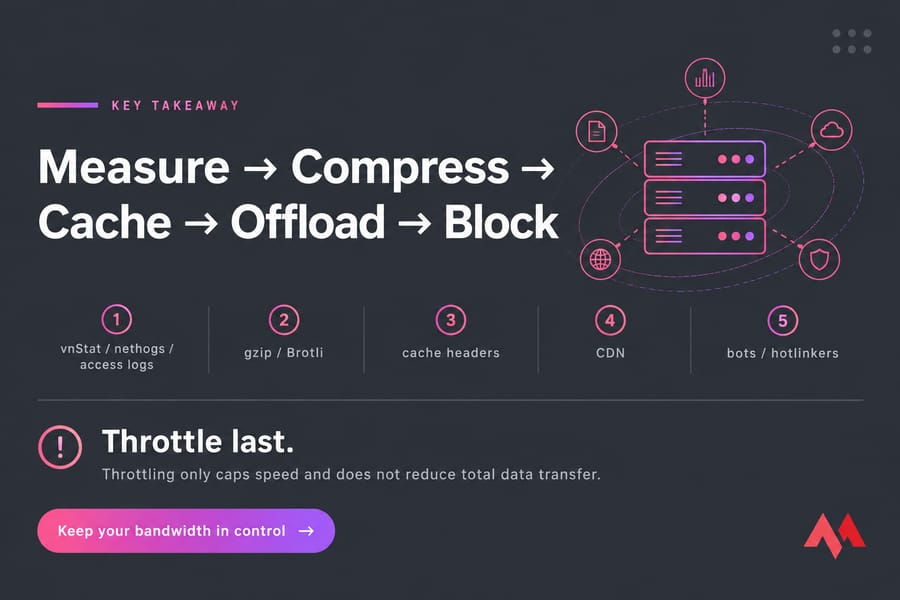
The short version: find the source with vnStat, nethogs and your access logs. Then enable gzip or Brotli, set long cache headers, put static files behind a CDN, switch images to WebP or AVIF, block abusive bots and hotlinkers, and turn backups into incremental jobs. Throttling caps speed. It doesn't lower the total you transfer.
Bandwidth vs Data Transfer: What Your VPS Actually Meters
These two terms get mixed up all the time, and the mix-up causes bad fixes.
| Term | What it means |
|---|---|
| Bandwidth | Port speed: how fast data can move, e.g. 1 Gbps |
| Data transfer | Volume: how much data moves in a billing cycle, e.g. 2 TB/month |
Providers commonly meter outbound (egress) traffic only, but check your own plan's terms. If you go over, you'll usually get one of three outcomes: throttling, overage fees or suspension. Dedicated and colocation servers sometimes use 95th-percentile billing instead. If you're still choosing a plan, read what to consider when choosing VPS hosting.
Why VPS Bandwidth Usage Spikes: 7 Common Causes
- Heavy pages. The HTTP Archive Web Almanac 2025 puts the median mobile home page at 2.6 MB, up 8.4% from 2024. Fix → compression, caching, images.
- Bots and AI crawlers. Imperva's 2026 Bad Bot Report found that bots made up more than 53% of all web traffic in 2025, up from 51% the year before. Wikimedia reported that multimedia download bandwidth grew 50% since January 2024, mostly because of scrapers. More on web crawlers. Fix → bot blocking.
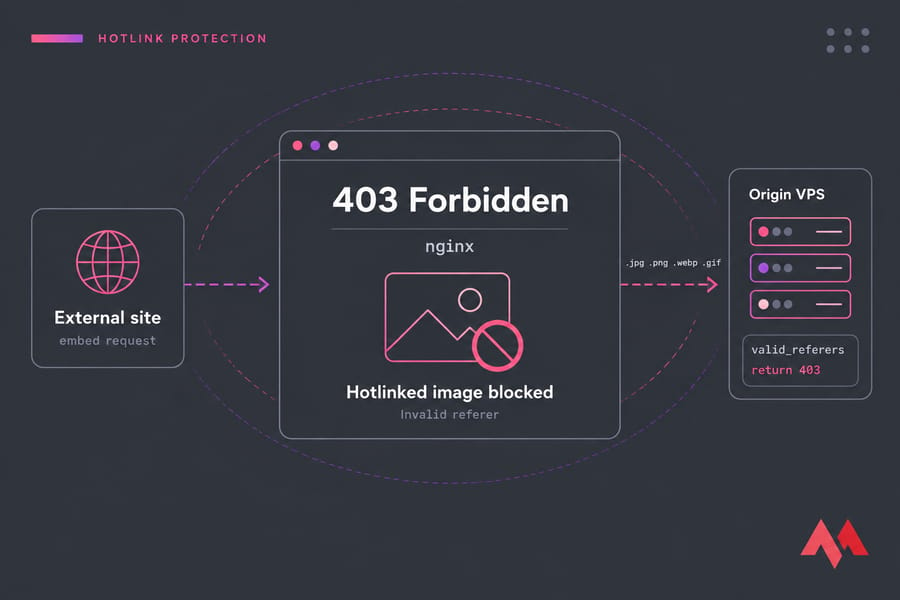
- Hotlinking. Other sites embed your images and you pay for the transfer.
- Large public downloads and video.
- Off-site backup jobs.
- Updates and container image pulls.
- Malware. Spam relays or DDoS bots such as the XorDDoS trojan. Fix → self-generated traffic.
How to Monitor Bandwidth Usage on a Linux VPS
If you're on a control panel, you can check bandwidth usage in cPanel. On an unmanaged server, start with vnStat. It reads kernel interface counters instead of sniffing packets, so it barely costs anything to run.
sudo apt install vnstat nethogs iftop    # Ubuntu/Debian
sudo dnf install vnstat nethogs iftop    # AlmaLinux (EPEL)
vnstat -d    # daily
vnstat -m    # monthly
vnstat -l    # live
vnstat -t    # top days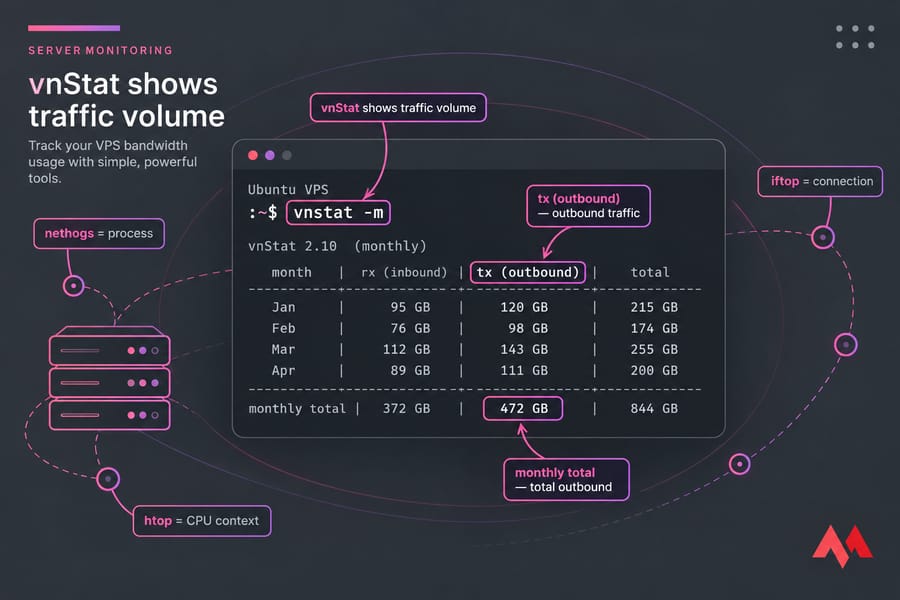
vnStat tells you how much traffic you're moving. nethogs tells you which process is sending it, and iftop breaks it down per connection. If a process you don't recognize sits at the top of nethogs, treat it as a red flag. For CPU context, htop helps too.
Next, find your top bandwidth URLs and user agents in the access log:
awk '{a[$7]+=$10} END{for(i in a) print a[i],i}' /var/log/nginx/access.log | sort -rn | head -20
awk -F'"' '{print $6}' /var/log/nginx/access.log | sort | uniq -c | sort -rn | head -10
Run GoAccess on the same log if you'd rather read a visual report. On a Windows VPS, open Resource Monitor → Network, or run Get-NetAdapterStatistics in PowerShell. For long-term graphs, set up Prometheus and Grafana or pick from these VPS monitoring tools.
Enable HTTP Compression (gzip vs Brotli)
Once you know which URLs are heavy, compression is the quickest thing to fix. If Nginx isn't set up yet, follow installing Nginx on Ubuntu first.
gzip on;
gzip_comp_level 5;
gzip_min_length 256;
gzip_vary on;
gzip_types text/css application/javascript application/json image/svg+xml text/plain;
On Apache, use mod_deflate with AddOutputFilterByType DEFLATE, or mod_brotli with BROTLI_COMPRESS (these .htaccess tips help). Brotli on Nginx needs the ngx_brotli module, and whether it's packaged depends on your distro. Don't compress JPEG, PNG or MP4 files, because they're already compressed. Check that it's working with curl -H "Accept-Encoding: br,gzip" -I https://yoursite.com.
| Metric | gzip | Brotli |
|---|---|---|
| Size saved (DebugBear test) | 65% | 70% |
| CPU cost | Low | High at top levels |
| Support | Universal | All modern browsers over HTTPS |
Warning: run nginx -t before every reload. High Brotli levels can max out a 1-vCPU plan, so pre-compress static files at build time and keep on-the-fly compression at a moderate level.
Set Browser Caching Headers to Cut Repeat Transfers
location ~* \.(css|js|webp|avif|woff2)$ {
    expires 365d;
    add_header Cache-Control "public, immutable";
}
Apache's equivalent is mod_expires with ExpiresByType. Long cache lifetimes only work if you use cache-busting filenames (app.3f9a.js). Otherwise visitors keep stale files after you deploy. ETag and Last-Modified headers let the server return 304 Not Modified responses, which have no body at all.
Server-side caches like FastCGI cache, a Redis object cache (install Redis on Ubuntu, or compare Redis vs Memcached) or a WordPress plugin mostly save CPU, not egress. They're still worth running, just for a different reason. If you change cache rules, clear the WordPress cache.
Offload Static Files with a CDN to Reduce Server Bandwidth
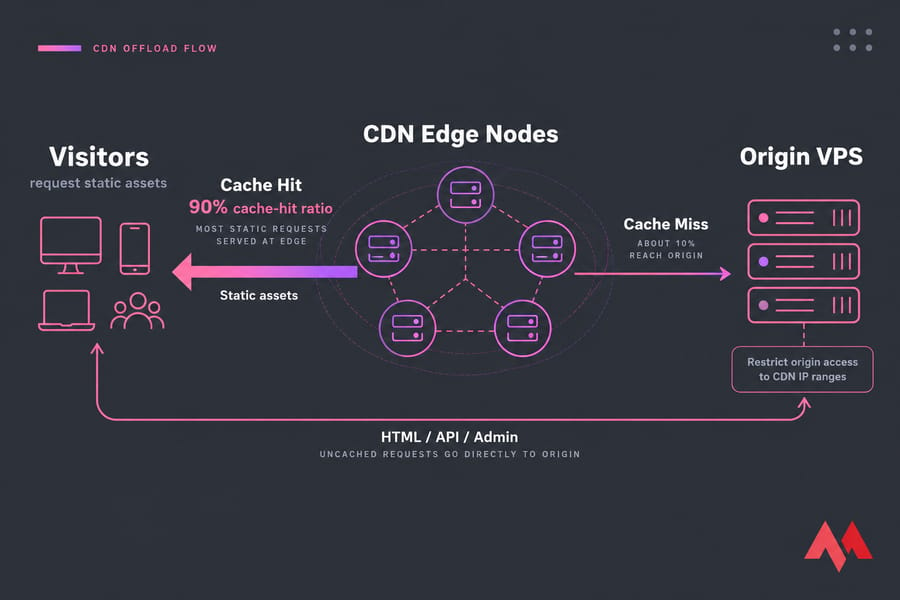
A CDN edge serves repeat requests for cached files, so those requests never hit your origin. (New to this? Here's what a CDN is and the benefits of using a CDN.) The number to watch is cache-hit ratio: a 90% hit ratio on static assets means only about a tenth of those requests reach your server. Uncached HTML, API calls and admin areas still come from the origin. Restrict origin access to the CDN's IP ranges too, or scrapers will go around the CDN and hit your server directly.
Outgrowing your transfer quota? If you've done all of this and traffic is still climbing, that's growth, not waste. See Unlimited Bandwidth VPS plans.
Optimize Images, Video and Downloads
According to Google, lossless WebP files are 26% smaller than PNGs, and lossy WebP files are 25–34% smaller than comparable JPEGs. AVIF usually gets files smaller again. To batch-convert a folder:
for f in *.jpg; do cwebp -q 80 "$f" -o "${f%.jpg}.webp"; doneAdd loading="lazy" and srcset so phones don't download desktop-sized images, and minify your CSS, JS and HTML. These changes also help your Core Web Vitals. For hands-on tools, see how to compress JPEG and PNG images. Video doesn't belong on your web server. Read about video streaming on a VPS and move it to a Streaming VPS. Large downloads can go on a separate storage VPS.
Block Bad Bots, AI Crawlers and Hotlinking
map $http_user_agent $bad_bot {
    default 0;
    ~*(MJ12bot|SemrushBot|AhrefsBot|Bytespider|GPTBot) 1;
}
limit_req_zone $binary_remote_addr zone=perip:10m rate=10r/s;

server {
    if ($bad_bot) { return 403; }
    limit_req zone=perip burst=20 nodelay;
    location ~* \.(jpg|png|webp|gif)$ {
        valid_referers none blocked server_names *.google.com;
        if ($invalid_referer) { return 403; }
    }
}
The valid_referers directive lists the sites allowed to embed your files. On Apache, you get the same result with RewriteCond %{HTTP_REFERER} rules that return [F]. robots.txt is only a request, and malicious bots ignore it. To ban repeat offenders, use fail2ban or configure the CSF firewall, and consider a web application firewall.
Warning: never block Googlebot or Bingbot, and verify their IPs with a reverse DNS lookup. If you're dealing with volumetric floods, which are actual DDoS attacks, server rules won't help. A DDoS-protected VPS filters that traffic before it reaches you.
Reduce Self-Generated Outbound Traffic
I've seen servers burn half their quota on nightly full backups. Switch to incremental backups with the rsync command, and exclude caches and logs:
rsync -az --partial --exclude='cache/' /var/www/ backup@10.0.0.5:/backups/www/If you send backups to a server in the same data center, internal traffic is often free, but confirm that with support first. More options are in how to back up your VPS. Schedule unattended-upgrades sensibly, delete unused Docker images so you're not pulling the same layers again, and use logrotate instead of shipping raw logs off the server. Watch for signs of compromise, such as unknown processes in nethogs or floods of outbound mail (ss -tnp | grep :25). If you see either, secure your Linux VPS right away.
Limiting vs Reducing: When to Throttle VPS Bandwidth
Tools like Wondershaper and tc cap throughput on a network interface, and Nginx's limit_rate 500k; caps the speed of each download. That protects other services on the box, but the total GB you transfer stays the same.
| Aspect | Reduce | Throttle |
|---|---|---|
| Monthly GB | Drops | Unchanged |
| Speed | Usually faster | Slower by design |
| Best for | Websites, apps | Seedboxes, mirrors, game servers |
For testing your network, see the MikroTik bandwidth test and this network optimization guide.
When to Upgrade to an Unlimited Bandwidth VPS
Here's my rule: if you've applied every fix above and you're still over 80% of your quota for two months or more with legitimate traffic, it's time to upgrade. Streaming, file hosting and VPN workloads usually hit this point sooner. An unlimited bandwidth VPS fits these workloads, but read the fair-use policy first. You can also resize your server or compare VPS plans. For wider tuning, see how to improve VPS performance.

An experienced tech and developer blog writer, specializing in VPS hosting and server technologies. Fueled by a passion for innovation, I break down complex technical concepts into digestible content, simplifying tech for everyone.