
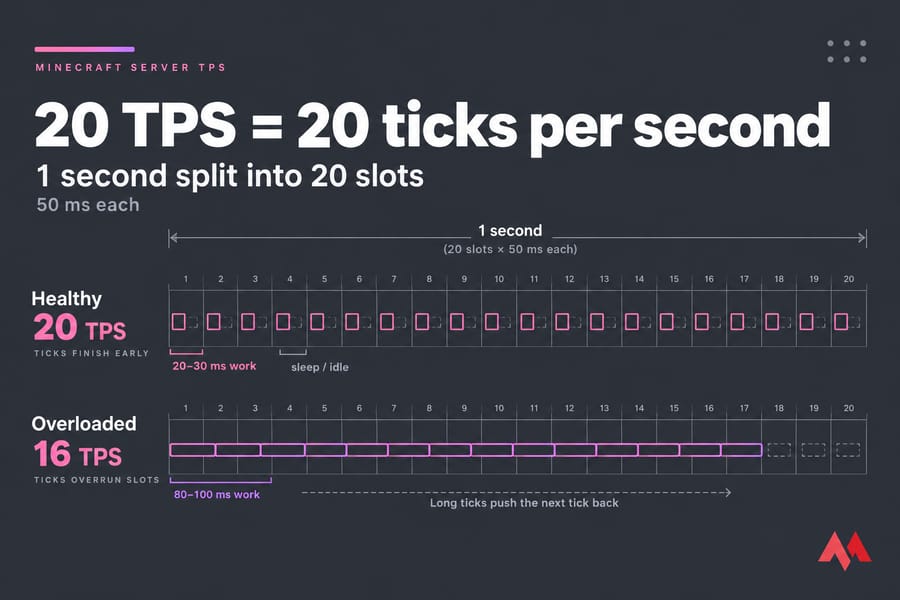
Minecraft server TPS (ticks per second) is the number of game updates your server finishes each second. A healthy server runs at 20 TPS, which gives each tick 50 milliseconds. To diagnose performance problems, watch MSPT (milliseconds per tick) alongside TPS and profile the server with spark while the lag is happening. The profile shows whether entities, chunks, redstone, plugins or hardware are eating the tick budget.
Check which server software you run (Paper, Spigot, Purpur, Fabric or Vanilla), since the commands differ, and make sure you have operator or console access. If you're still setting up, start with how to make a Minecraft server.
What is Minecraft server TPS?
A tick is one pass through the server's game loop. In it, the server processes player packets, moves entities, runs mob AI and pathfinding, spawns mobs, handles redstone and sends the results to every player. Minecraft runs at a fixed 20 ticks per second, so one tick happens every 50 ms.
If a tick finishes early, the server sleeps until the next one is due. If it runs long, the next tick gets pushed back, and because nearly all of this work runs on one main thread, the delay piles up. Once the server is about 2,000 ms behind, the console prints the familiar "Can't keep up!" warning and skips ticks to catch up.
TPS vs MSPT vs ping vs FPS
Players call everything "lag," but these four metrics point to different problems in different places:
| Metric | What it measures | Typical symptom | Fix direction |
|---|---|---|---|
| TPS | Ticks the server completes per second (20 maximum) | Every player sees delayed block breaks, slow mobs, crops not growing | Server load, config, hardware |
| MSPT | Time each tick takes | Rising MSPT shows up before TPS drops | Profile and find what fills the tick |
| Ping | Network round trip between player and server | Rubber-banding for some players while others are fine | Routing, server location, player connection |
| FPS | Frames the player's own PC renders | Choppy screen for one player, server stays smooth | Client settings, GPU, mods |
MSPT is the more useful number. TPS is an average capped at 20, so it sits at 20 until the problem is serious. A server at 20 TPS and 47 MSPT looks healthy, but it has almost no headroom and will drop as soon as a few more players log in. If high ping is the real issue, read Minecraft server ping vs TPS.
What is a good TPS and MSPT on a Minecraft server?
20 TPS is the maximum, and you only stay there while MSPT averages 50 or less. These bands are a rule of thumb, not official cutoffs:
| MSPT | TPS impact | What to do |
|---|---|---|
| Under 25 ms | Solid 20 TPS, plenty of headroom | Nothing |
| 25 to 40 ms | 20 TPS | Keep an eye on it during peak hours |
| 40 to 50 ms | 20 TPS, but fragile | Profile now, before it gets worse |
| Over 50 ms | TPS drops, players feel it | Diagnose right away |
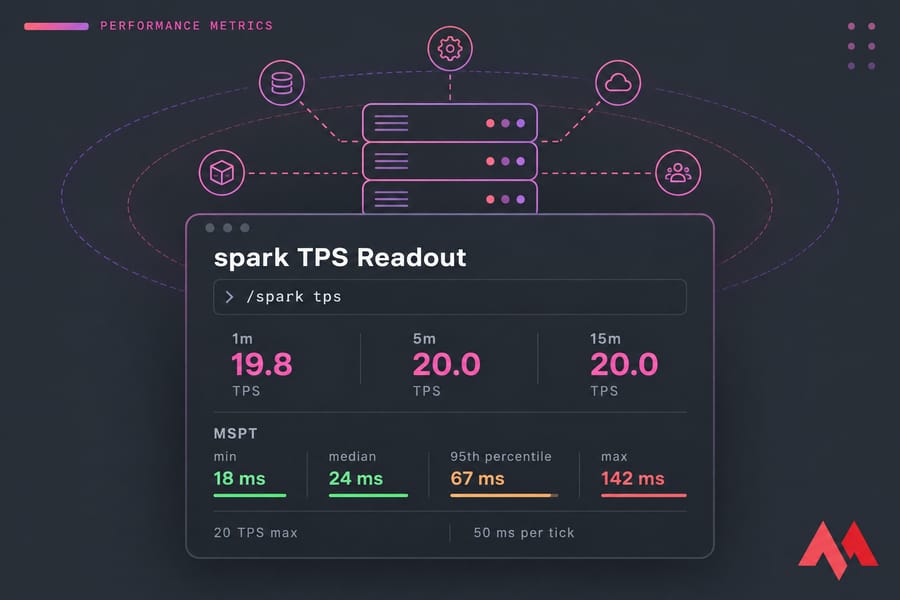
Watch the spread too. spark reports minimum, median, 95th percentile and maximum MSPT. A good median with a 400 ms maximum means periodic spikes, which you diagnose differently from steady slowness.
How to check TPS and MSPT on Paper, Spigot and Purpur
Spigot, Paper and Purpur all have /tps, which shows averages over 1, 5 and 15 minutes, and Paper and its forks add /mspt. Paper 1.21 and newer ships with spark built in, and it gives the fullest readout:
/spark tps
/spark health --upload
/spark tps shows TPS over several time windows and MSPT as a color-coded distribution. /spark health --upload adds CPU, memory and disk figures plus a shareable link. On Fabric or Forge, install spark yourself from spark.lucko.me. Vanilla has very little built in, which is one reason to compare Paper vs Spigot vs Bukkit before your server grows.
Common causes of low TPS on a Minecraft server
| Cause | Typical signs | Likely fix |
|---|---|---|
| Entities (mobs, villagers, dropped items, armor stands) | Lag near farms or a villager trading hall | Cap farms, clear item overflow, lock villagers in place |
| Hoppers and block entities | Lag around big hopper sorter arrays | Use fewer hoppers, redesign the sorters |
| Redstone clocks | Steady load in one area even when nobody is there | Switch off clocks that run all the time |
| Chunk generation | Spikes while players fly elytra into new terrain | Pre-generate the world, set a world border |
| View and simulation distance | MSPT rises with player count | Lower simulation-distance first |
| Plugins | Spikes at fixed intervals from scheduled tasks | Update, reconfigure or remove the plugin |
| Hardware | High MSPT even after you clean up | Faster single-core CPU, more RAM or NVMe storage |
Don't trust CPU graphs on their own. A maxed-out main thread on an 8-core machine shows up as about 12% total CPU usage, even while the server is falling behind.
How to diagnose Minecraft server lag with spark profiler
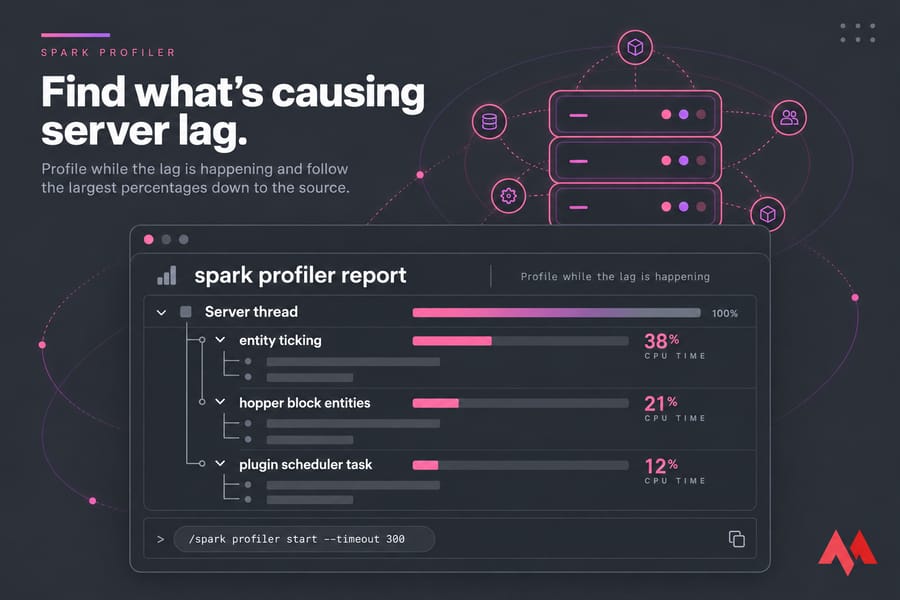
Paper's documentation calls spark the preferred way to profile Paper. Timings has gone unmaintained for years, Paper deprecated it, and 1.21 turns it off by default. Profile while the lag is happening, because a report taken after it stops will look clean.
/spark profiler start --timeout 300For short freezes on an otherwise smooth server, record only the slow ticks:
/spark profiler start --only-ticks-over 100 --timeout 300When the timeout ends, spark gives you a URL to an interactive report. Expand the server thread and follow the largest percentages down. Usually you'll end up at entity ticking, chunk loading, a block entity type or one plugin's package name. That report is also what to bring to the PaperMC Discord if you ask for help.
Step-by-step Minecraft server TPS troubleshooting workflow
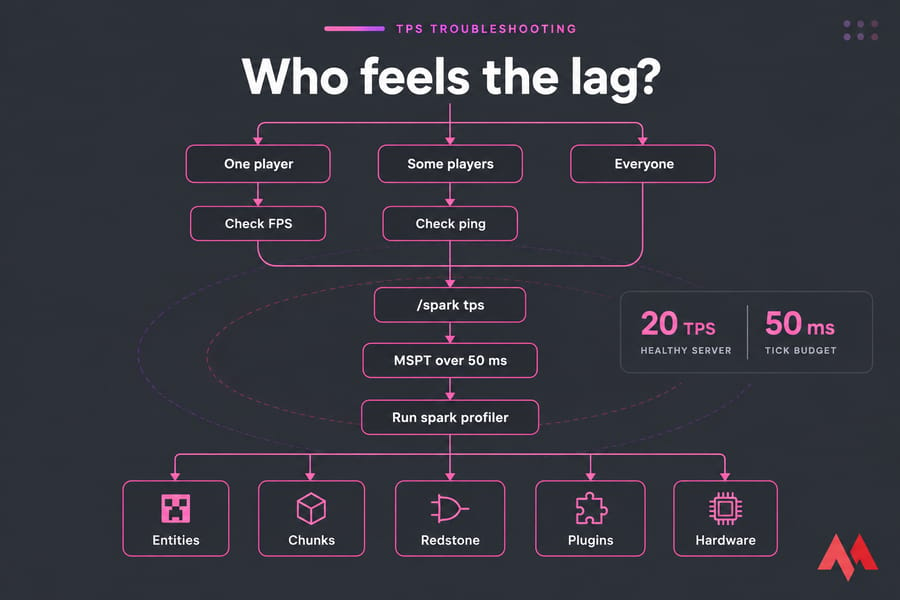
- Work out what kind of lag it is. One choppy player means checking their FPS, some players rubber-banding means checking ping, and everyone affected means server TPS.
- Run
/spark tpsduring peak load, not at 4 a.m. - Check what changed recently: a new plugin, a new farm, a version update or players exploring new terrain.
- Run the spark profiler while the lag is happening.
- Visit the suspect areas (farms, trading halls, the edges of explored terrain) and watch MSPT live.
- Change one thing, then retest. If MSPT didn't move, undo the change.
- Pick the fix: config changes, gameplay limits or new hardware.
Quick fixes to improve Minecraft server performance
- Clear item buildup at farm outputs and cap mob farms.
- Lock trading hall villagers in single-block cells so they stop pathfinding.
- Switch off redstone clocks nobody needs and shorten hopper chains.
- Lower simulation distance before view distance, since simulation distance controls how far out the world keeps ticking.
- Pre-generate terrain so exploring doesn't trigger chunk generation mid-game.
- Update Paper and your plugins, and check what each plugin schedules to run.
Once the world is under control, look at JVM tuning in best JVM arguments for Minecraft. Before you change the world, keep a recent restore point by setting up a way to back up a Minecraft server automatically.
When better hosting or hardware improves TPS
If MSPT stays high after cleanup and spark shows normal game work filling the main thread, the hardware is the bottleneck:
| Symptom | Bottleneck | Best fix |
|---|---|---|
| Main thread maxed out, high MSPT, free memory left over | Single-core CPU speed | A faster CPU per core (see best server CPU for Minecraft) |
| Frequent long garbage collection pauses, swapping, a heap that's too small | RAM | Check how much RAM Minecraft needs, then add more RAM to a Minecraft server |
| Spikes during world saves and chunk loading | Disk I/O | NVMe storage |
Extra RAM won't help a maxed-out main thread, because spare memory doesn't make a tick run faster. A better host won't fix a bad plugin either, so read your spark report before you spend money. If it points to the hardware, look at MonoVM's Minecraft server hosting plans or a Minecraft VPS hosting plan for Paper, plugin-heavy and modded servers. To compare providers, read best Minecraft server hosting. After you move, secure the Minecraft server from attacks, since a DDoS can look a lot like high ping.

An experienced tech and developer blog writer, specializing in VPS hosting and server technologies. Fueled by a passion for innovation, I break down complex technical concepts into digestible content, simplifying tech for everyone.