To size a Minecraft server from player count, start with a base allocation for your server software, then add capacity for peak concurrent players, plugins or mods, chunk generation and backups. On Java servers, single-core CPU speed matters about as much as RAM, so size them together. If you haven't installed yet, how to make a Minecraft server covers setup.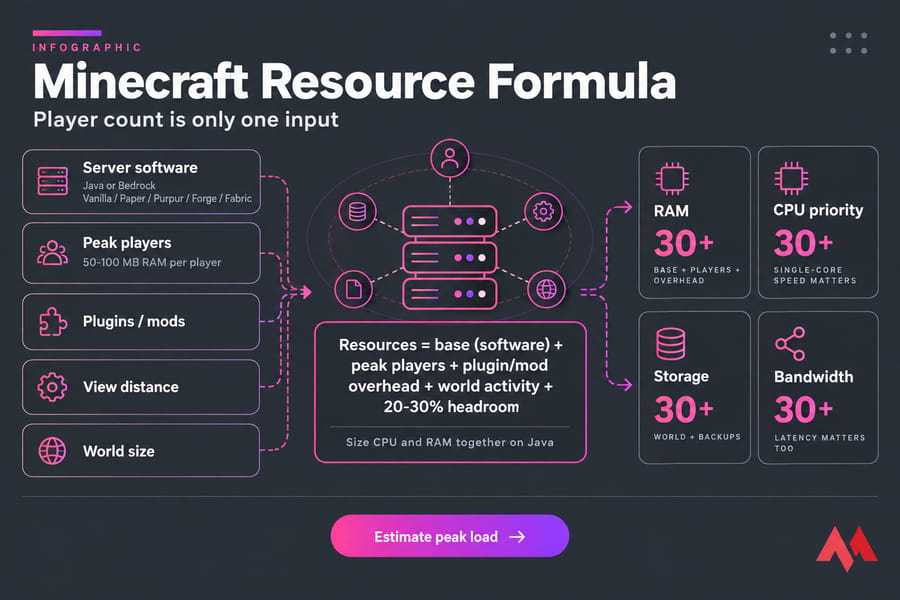
Minecraft server requirements: what changes resource usage
Player count is only one input. The Minecraft Wiki puts it at "about 50-100 MB of RAM" per player, but adds that a player flying with an elytra or riding a rail line "will effectively lead to significantly more RAM being used by the server". That memory goes to chunks, and moving players keep loading new ones.
Answer these first:
- Java or Bedrock? Vanilla, Paper/Purpur, or a Forge/Fabric modpack?
- What's your peak concurrent player count? 40 whitelisted members with 8 online at once is an 8-player server.
- How many plugins, or how big is the modpack?
- What are your view distance and simulation distance? Both raise RAM and CPU load.
- Will players explore new terrain, or will you pregenerate the world?
- How many backups will you keep, and where?
Minecraft server resource calculator formula
Use this as a rough worksheet:
Resources = base (software) + peak players + plugin/mod overhead + world activity + 20 to 30% headroom
- Set the base. Vanilla and Paper idle at a few GB once the JVM and spawn chunks load. Modpacks start higher before anyone joins.
- Add for peak players using the ranges below, since there's no fixed amount per player.
- Add overhead for plugins, mods and extra worlds (Nether, End, resource worlds).
- Add 20 to 30% headroom for exploration spikes, updates and events.
The result is your Java heap, set with -Xms and -Xmx. The VPS needs extra RAM on top for the OS. More memory won't fix a CPU-bound server, though; the CPU section explains how to tell the difference.
How much RAM for a Minecraft server by player count
These are safe starting estimates for Java heap size.
| Peak players | Vanilla | Paper/Purpur | Light modded (Fabric/Forge) | Heavy modded |
|---|---|---|---|---|
| 1 to 5 | 3 to 4 GB | 2 to 4 GB | 4 to 6 GB | 8 GB |
| 6 to 10 | 4 to 6 GB | 4 to 6 GB | 6 to 8 GB | 8 to 10 GB |
| 11 to 20 | 6 to 8 GB | 5 to 8 GB | 8 to 10 GB | 10 to 12 GB |
| 21 to 50 | 8 to 10 GB | 6 to 10 GB | 10 to 12 GB | 12 to 16 GB |
| 50+ | Not advised | 10 to 16 GB | 12 GB+ | 16 GB+, consider splitting servers |
Modded servers break the normal estimates. WinterNode says a pack like All the Mods 10 "realistically needs 12GB or more", and a heavy pack can need more with only a few players online. See how much RAM a Minecraft server needs for a longer breakdown, or how to add more RAM to a Minecraft server if you're already at your limit.
Minecraft server CPU requirements by player count
Each world's game logic runs in one main tick loop, so one fast core matters more than many cores. Extra cores still help with chunk loading, garbage collection, plugins and a second world. When comparing plans, check clock speed and CPU generation (a recent Ryzen against an older Xeon, say) before core count. The guide to the best server CPU for Minecraft compares specific chips.
Chunk generation, redstone, mob farms, busy spawn hubs and modded automation all push the CPU. A server should run at 20 TPS, which leaves 50 ms per tick. Once MSPT (milliseconds per tick) passes 50, TPS drops and the whole world lags.
| Symptom | Likely cause | Check |
|---|---|---|
| TPS under 20, mobs and blocks lag for everyone | CPU-bound | MSPT, profiler (spark) |
| Freezes every few minutes, heap near max | RAM or GC pressure | Heap usage, GC logs |
| Lag only while players explore | Chunk generation | Pregenerate, lower view distance |
| Rubberbanding for one player only | Network latency | Ping |
Minecraft server storage requirements and backup sizing
World files grow whenever players explore new chunks, and plugins and mods add logs, web maps and caches. Backups take more space than the world itself. Plan for the active world, plus 2 to 5 times that for backups (depending on how many copies you keep), plus room for updates and logs. Use NVMe or SSD rather than HDD so chunk loads and saves don't hold up ticks.
Keep at least one copy off the server; here's how to back up a Minecraft server automatically.
Minecraft server bandwidth usage and network latency
Per-player bandwidth depends on movement, chunk sends, voice chat mods, maps and crossplay layers. On small private servers it's rarely the limit. Latency causes more trouble. Ping is the delay between one player and the server, while TPS measures the whole world's simulation speed, so high ping hurts one person and low TPS hurts everyone. Minecraft server ping vs TPS covers how to diagnose each.
Pick a data center close to most of your players from the available VPS locations. Public servers also need DDoS protection, so learn how to secure a Minecraft server from attacks before you advertise the IP.
Vanilla vs Paper vs Spigot vs Purpur vs Forge sizing
| Software | Resource profile | Best for |
|---|---|---|
| Vanilla | Least optimized | A few friends, no plugins |
| Spigot | Better than Vanilla | Older plugin setups |
| Paper/Purpur | Most efficient for plugin servers | Most SMPs and public servers |
| Fabric/Forge/NeoForge | Hard to predict, depends on the pack | Modpacks |
| Bedrock Dedicated Server | Separate software, sized differently | Bedrock-only players |
Check the Java version before you migrate. PaperMC's docs say "Paper requires at least Java 25 to run" for current builds, starting with version 26.1. If you're unsure which route to take, compare plugins vs mods in Minecraft, then install plugins on a Minecraft server or install mods on a Minecraft server.
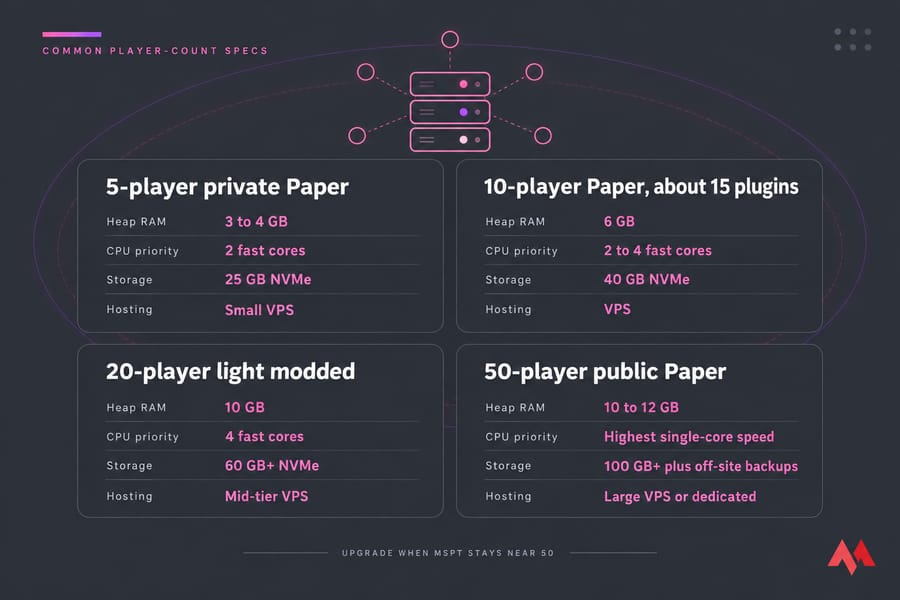
Minecraft server specs examples for common player counts
| Scenario | Heap RAM | CPU priority | Storage | Hosting |
|---|---|---|---|---|
| 5-player private Paper | 3 to 4 GB | 2 fast cores | 25 GB NVMe | Small VPS |
| 10-player Paper, about 15 plugins | 6 GB | 2 to 4 fast cores | 40 GB NVMe | VPS |
| 20-player light modded | 10 GB | 4 fast cores | 60 GB+ NVMe | Mid-tier VPS |
| 50-player public Paper | 10 to 12 GB | Highest single-core speed | 100 GB+ plus off-site backups | Large VPS or dedicated |
Upgrade when MSPT stays near 50 at peak or the heap stays full after garbage collection. For pricing at each tier, see how much a Minecraft server costs.
Common Minecraft server sizing mistakes
- Giving Java all the system RAM. That starves the OS, and a very large heap can lengthen GC pauses. Leave 1 to 2 GB free.
- Pasting old flag sets into modern Java. Start with just
-Xmsand-Xmx, and add Aikar's flags only if GC problems show up. The best JVM arguments for Minecraft guide covers both approaches. - Running the wrong Java version for your server build.
- Buying a plan with lots of RAM but weak, oversold CPU cores.
- Leaving no room for backups, maps, logs and world growth.
When to upgrade from Minecraft VPS hosting to dedicated server
A VPS is enough while TPS holds at 20 at peak and your calculated heap fits the plan with headroom to spare. In that case, Minecraft VPS hosting gives you full root access, NVMe storage and plan upgrades as the world grows. Move up a VPS tier when MSPT climbs during events or backups start filling the disk. A Minecraft dedicated server makes sense once you run several instances behind a proxy, host a heavy modpack for 20 or more players, or see the CPU near its limit even after tuning.

An experienced tech and developer blog writer, specializing in VPS hosting and server technologies. Fueled by a passion for innovation, I break down complex technical concepts into digestible content, simplifying tech for everyone.