
In 2025, Core Web Vitals Optimization has become the foundation of good site performance, emphasizing the importance of UX alongside good rankings on Google. These are top performance metrics by Google—Largest Contentful Paint (LCP), Cumulative Layout Shift (CLS), and Interaction to Next Paint (INP) between the site and evaluation rankings in the SERPs. To achieve these optimal vitals, utilizing high-performance hosting solutions such as a VPS server ensures your server-side response times are kept to an absolute minimum.
With the release of the Google Page Experience update, Core Web Vitals is catching more of a cultural meaning rather than technical ones—Speed of love of the user: how they behave on Mobile and Desktop, and ultimately how long it takes them to navigate between screens. In short, these metrics will be amongst the richest knowledge wells any devs or site owners keep in their tool bag to aid them in keeping one lead ahead in the ever-greedy-for-flexibility performance-based marketing culture.
📈 Core Web Vitals Metrics in 2025
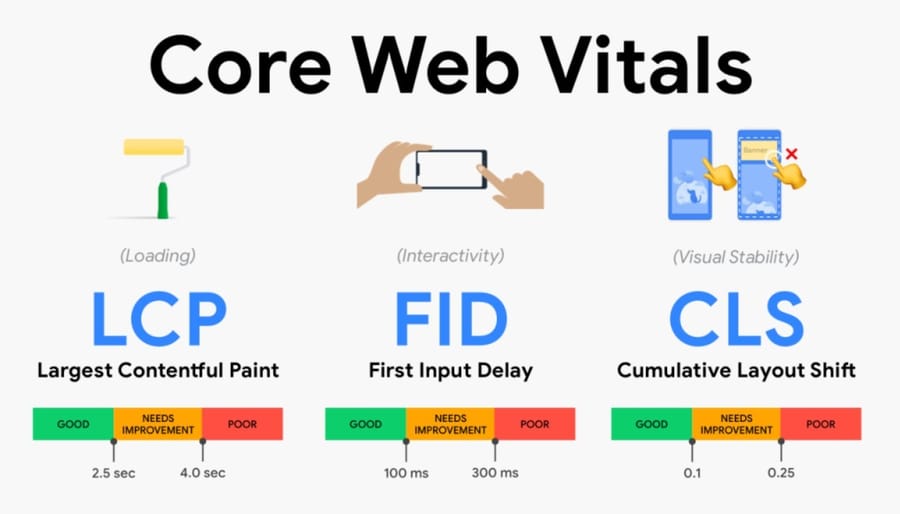
In 2025, Core Web Vitals will continue to serve as foundational performance indicators, directly tied to user satisfaction and search visibility. Each metric reflects a specific aspect of page experience, and Google has set clear thresholds to help site owners measure and improve them using reliable tools.
- Largest Contentful Paint (LCP): Measures loading performance — specifically, how quickly the largest visual element (like a banner image or main content block) becomes visible.
- Cumulative Layout Shift (CLS): Evaluates visual stability by tracking unexpected layout shifts during page load.
- Interaction to Next Paint (INP): Assesses responsiveness by measuring the delay between user interaction and visual response.
- Recommended Tools for Tracking:
-
- Google PageSpeed Insights: Combines lab and field data with actionable insights
- Chrome UX Report (CrUX): Real-world metrics collected from Chrome users
- WebPageTest: Advanced testing with detailed breakdowns, filmstrips, and custom scripting
Related Article: Best SEO Checker Websites
⚖️ Lab Data vs Field Data: What's the Difference?
When considering Core Web Vitals Optimization, it's essential to understand the difference between lab data and field data (also known as Real User Metrics or RUM). Each serves a distinct purpose: lab data helps during development and debugging, while field data reflects actual user experience and is used by Google to assess ranking performance.
|
Feature |
Lab Data |
Field Data (RUM) |
|
Definition |
Simulated performance in a controlled environment |
Metrics gathered from real user devices |
|
Purpose |
Debugging, development, and spotting technical issues |
SEO evaluation, UX monitoring, real-world impact |
|
Consistency |
High (same device/network every time) |
Variable (depends on user device, connection) |
|
When to Use |
During site builds, staging, or optimization |
When auditing live site performance |
|
Example Tools |
Lighthouse (DevTools), WebPageTest |
PageSpeed Insights (field section), CrUX |
⚠️ Common Causes of Poor Scores
Many websites struggle with poor Core Web Vitals scores due to common performance bottlenecks that can often be fixed with proper diagnosis and prioritization. Understanding the root causes behind low LCP, CLS, and INP scores is the first step toward meaningful optimization, especially across different devices like mobile and desktop.
- LCP (Largest Contentful Paint) Issues
- Slow server response times (high TTFB)
- Render-blocking JavaScript and CSS
- Large, unoptimized images or videos
- Inefficient caching strategies
- CLS (Cumulative Layout Shift) Issues
- Missing width/height attributes on images and iframes
- Ads or banners that load dynamically and shift content
- Custom fonts are causing layout shifts during rendering
- Inserting DOM elements above existing content
- INP (Interaction to Next Paint) Issues
- Heavy or long-running JavaScript tasks
- Poorly optimized event handlers (e.g., onclick, touchstart)
- Third-party scripts are delaying responsiveness
- Lack of proper interaction readiness or JS splitting
- Device Variations: Mobile vs Desktop
- Mobile devices often have slower CPUs and connections
- Touch interactions affect INP more significantly on mobile
- Poor responsive design or layout bugs may appear only on one device type
⚙️ How to Optimize Metrics of Core Web Vitals
core web vitals metric is essential for improving both user experience, site speed, and SEO. Since LCP, CLS, and INP each measure different aspects of performance, they require targeted strategies using modern web technologies and proven techniques. Implementing these strategies also pairs perfectly with high-speed server infrastructure such as NVMe VPS, ensuring optimal performance for dynamic sites.
Improve core web vitals
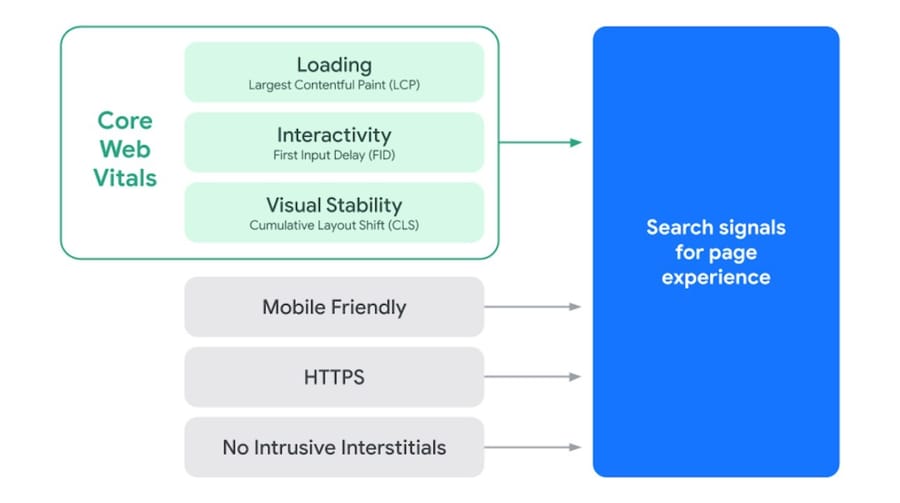
Largest Contentful Paint (LCP) focuses on how quickly the largest visible element (usually a hero image, heading, or video) renders in the viewport. Improving LCP often involves reducing server response time, optimizing images, and eliminating render-blocking resources. A fast-loading experience ensures users engage with your content sooner, especially on slower connections or mobile devices.
For high-traffic websites that demand the lowest possible latency and fast data retrieval, choosing an SSD VPS plan can significantly reduce TTFB and avoid server-side bottlenecks that delay LCP.
- Convert images to WebP or AVIF formats and apply lossless/lossy compression
- Enable lazy loading for offscreen images and defer non-critical elements
- Use server-side caching and choose fast hosting to reduce Time to First Byte (TTFB)
- Implement a Content Delivery Network (CDN) for global asset delivery
- Minimize or defer render-blocking CSS and JavaScript
🛠️ CLS Optimization
Cumulative Layout Shift (CLS) measures how much content unexpectedly shifts during page load—a common frustration for users. These shifts often result from improperly sized media elements, late-loading ads, or font rendering delays. Fixing layout instability improves visual consistency and trust in your brand experience.
- Always set explicit width and height attributes for images, videos, and iframes
- Avoid inserting dynamic content above the fold after initial load
- Use font-display: swap to ensure text remains visible during font loading
- Preload custom fonts to reduce the layout shift caused by delayed font rendering
⚡ INP Optimization (2025 Focus)
Interaction to Next Paint (INP) is now the critical Core Web Vitals for responsiveness, replacing First Input Delay (FID). It measures the total latency of the longest interaction on a page, from user input to visual response. Poor INP often results from bloated JavaScript, slow event handlers, or third-party scripts delaying updates. Fixing this improves how responsive your site feels during actual use, especially on mobile.
- Minimize long JavaScript tasks by splitting bundles and using async loading
- Improve interaction readiness with efficient code and early hydration techniques
- Delay or defer non-critical third-party scripts that interfere with interactivity
- Use tools like Lighthouse, Chrome DevTools, and the INP Debugger to identify bottlenecks
🚀 Top Tools for Core Web Vitals Optimization
Choosing the right tools is crucial for effectively diagnosing and improving your Core Web Vitals. From browser-based audits to INP-specific analysis platforms, each tool plays a unique role in optimizing site performance based on your goals and tech stack.
- Lighthouse (Chrome DevTools): Run in-browser performance audits with actionable insights for LCP, CLS, and INP. Ideal for lab testing during development and debugging.
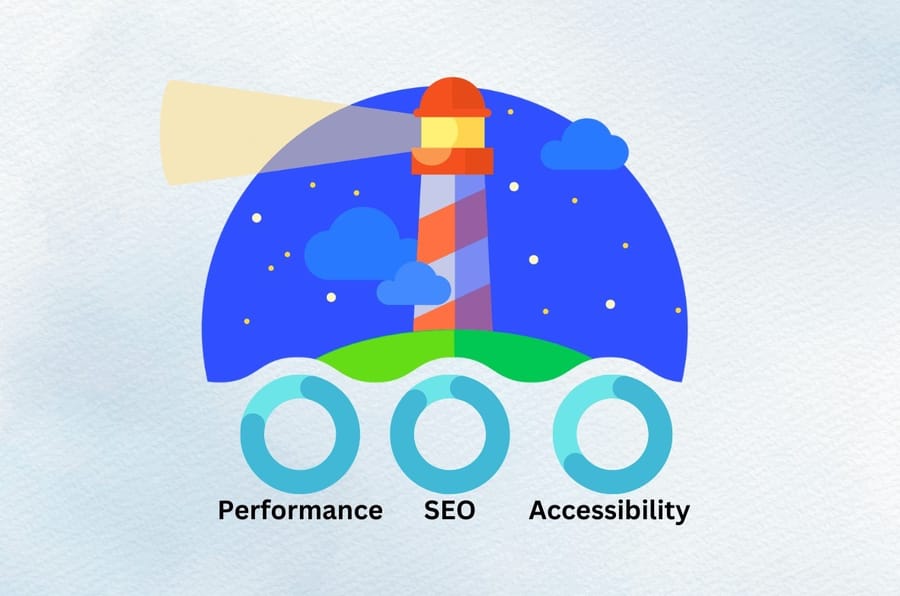
- PageSpeed Insights: Provides both lab data and field (real-user) metrics, directly pulled from the Chrome UX Report (CrUX). Great for SEO audits and tracking live user experience.
- WebPageTest: Offers deep diagnostics like filmstrip views, TTFB breakdowns, and multi-location testing. Best for advanced technical performance analysis.
- NitroPack / WP Rocket: WordPress-friendly optimization plugins with built-in features like caching, lazy loading, compression, and CDN. Ideal for non-technical users looking for quick results.
- Cloudflare APO (Automatic Platform Optimization): Speeds up Time to First Byte (TTFB) and improves overall site speed by caching HTML at the edge. Especially useful for global WordPress sites.
- PerfSee or Treo: Specialized in INP-focused performance profiling, offering insights into interaction delays and JavaScript execution. Best suited for developers optimizing responsiveness.
🖥️ WordPress vs Custom Sites: Optimization Tactics
Optimizing Core Web Vitals on WordPress sites is easier due to the availability of many powerful plugins. One-click solutions are offered through NerPack, WP Rocket, and Autoptimise for caching, lazy loading, image compression, and script minification. These plugins cut the time of optimization and require very little knowledge of coding, and are, therefore, an option for bloggers, business owners, and marketers.
Custom-coded websites require a more manual approach toward optimization that is done at the code level. Developers need to implement manual lazy loading, async/defer for JavaScript, proper and exact use of preconnect and preload, along with efficient resource loading strategies that fit their architecture. Of course, it requires more work but higher precision in performance management. If you want to dive deeper into performance management, check out our guide on how to improve the performance of VPS.
Related Article: What is WordPress?
📋 Checklist: Core Web Vitals Audit & Fix Flow
Conducting a thorough Core Web Vitals audit requires a systematic approach, from choosing the right tools to applying targeted fixes and timing your rechecks. The table below provides a complete workflow to help you optimize performance across devices and keep your site aligned with Google's 2025 standards.
|
Step |
Details |
|
Tools to Run |
PageSpeed Insights, Lighthouse, WebPageTest, CrUX, INP Debugger |
|
Metrics to Check |
LCP (< 2.5s), CLS (< 0.1), INP (< 200ms) |
|
Fixes to Apply |
Image compression, lazy loading, async JS, preload fonts, reduce long tasks |
|
Mobile/Desktop Priority |
Start with mobile (Google's default), then audit desktop for layout/UX issues |
|
When to Re-Audit |
After major site changes, plugin updates, or monthly for active websites |
⚠️ Common Mistakes to Avoid
- Ignoring mobile performance: Always optimize your LCP and INP on mobile viewports first, as Google uses a mobile-first index.
- Overloading third-party scripts: Too many unoptimized trackers and ad scripts will severely degrade INP.
- Missing image dimensions: Failing to declare dimensions causes layout shifts, which ruin your CLS scores.
💡 Expert Tips for Optimization
- Compress your media files dynamically using advanced formats such as WebP or AVIF.
- Implement resource hints (preconnect and dns-prefetch) to speed up external domain lookups.
- Review your long tasks regularly in Chrome DevTools to keep INP well below the 200ms threshold.
📊 Performance Metric Comparison Table
| Metric | Measures | Target Threshold | Common Fix |
| LCP | Loading Performance | < 2.5 seconds | CDN, Caching, Image Optimization |
| CLS | Visual Stability | < 0.1 | Set explicit width/height on media |
| INP | Interactivity/Responsiveness | < 200 milliseconds | Code splitting, defer JS execution |
🎯 Conclusions
Since 2025, Core Web Vitals have become mandatory for SEO performance and in-the-world user satisfaction, with an updated Google response metric from FID to INP. Developers, technical SEOs, or site owners acting upon areas of delay in their LCP, CLS, and INP would increase site visibility and engagement by a thousand percent. Never put off a dive in ranks; now is the time to perform a CWV audit, find problems, and apply the proper tools to remain on the competitive side. Feel free to call in case you want to discuss personal ways to optimization or professional help.
🔗 Quick Links to Our Solutions:
- Explore reliable hosting solutions for faster server response times: VPS Server
- Upgrade to high-speed dynamic environments: SSD VPS
- Check out our optimized, scalable cloud configurations: Cloud VPS