
For most people, the best JVM arguments for Minecraft are just two: -Xms and -Xmx. If you're on a modern runtime (Java 17, 21 or 25), set your memory and leave the rest alone at first. Only if your server shows garbage-collection lag spikes should you switch to Aikar's flags, which PaperMC still documents and still treats as the Minecraft-specific fallback.
Best JVM arguments for Minecraft: the short answer
That probably isn't what you expected. A lot of guides still open with a 30-flag wall of text copied from a 2019 video. I've watched people paste those into a fresh Java 21 server, get a crash loop, and blame Paper for it.
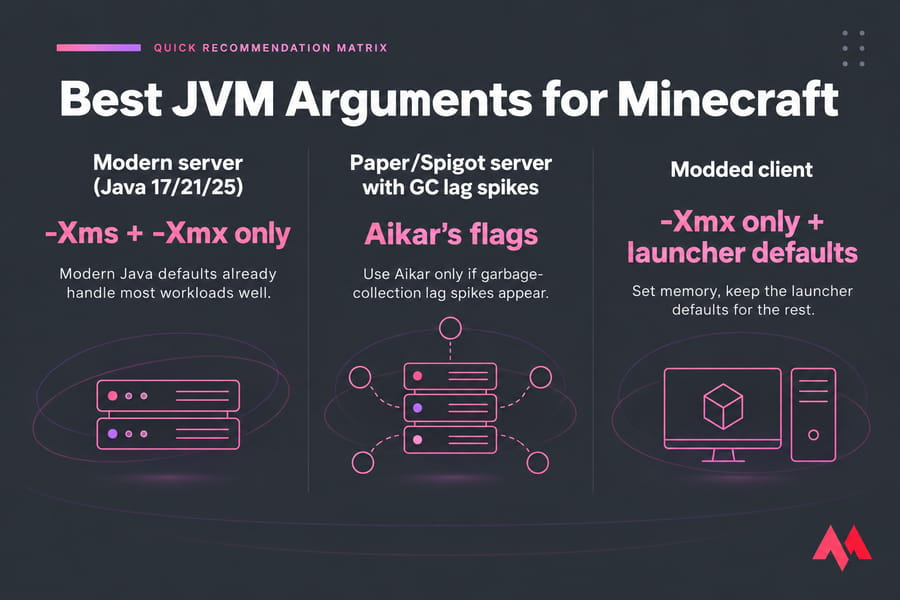
Recommended default for Java 17, 21 and 25
Here's a minimal, safe server command:
java -Xms4G -Xmx4G -jar server.jar noguiAnd if GC pauses show up, use the Aikar version (covered line by line below):
java -Xms6G -Xmx6G -XX:+UseG1GC -XX:+ParallelRefProcEnabled -XX:MaxGCPauseMillis=200 -XX:+UnlockExperimentalVMOptions -XX:+DisableExplicitGC -XX:+AlwaysPreTouch -XX:G1NewSizePercent=30 -XX:G1MaxNewSizePercent=40 -XX:G1HeapRegionSize=8M -XX:G1ReservePercent=20 -XX:G1HeapWastePercent=5 -XX:G1MixedGCCountTarget=4 -XX:InitiatingHeapOccupancyPercent=15 -XX:G1MixedGCLiveThresholdPercent=90 -XX:G1RSetUpdatingPauseTimePercent=5 -XX:SurvivorRatio=32 -XX:+PerfDisableSharedMem -XX:MaxTenuringThreshold=1 -Dusing.aikars.flags=https://mcflags.emc.gs -Daikars.new.flags=true -jar paper.jar --noguiCheck your Java version first
Before you touch any flags, make sure the Java version matches the game version. If it doesn't, you'll get startup errors no matter which flags you use. Here's the current split:
| Minecraft version | Minimum Java | Recommended approach |
|---|---|---|
| 1.18 – 1.20.4 | Java 17 | Xms/Xmx only, Aikar if GC lag appears |
| 1.20.5 – 1.21.11 | Java 21 | Xms/Xmx only, Aikar if GC lag appears |
| 26.1 and newer | Java 25 | Xms/Xmx only, test any extras carefully |
Not sure what you've got installed? Here's how to check your Java version in under a minute. Older Minecraft versions usually run fine on newer Java. The reverse never works.
Server vs client vs modded setup
These are three separate problems. A server cares about stable tick times (TPS). A local client cares about frame pacing and stutter. A modded server cares about both, plus huge memory footprints. So pick the section below that matches what you're actually running.
Do you still need custom Minecraft JVM flags in 2026?
Usually, no. PaperMC's own start script generator tells you to run modern JVMs (17, 21 or higher) with no flags first, because the default GC settings already handle most workloads well. Aikar's flags are what it suggests if you hit GC problems or you're on older Java or Minecraft versions.
Why the change? Since Java 9, G1 has been the default garbage collector on any machine with at least 2 CPUs and about 2GB of RAM, which covers basically every server. Its ergonomics also got a lot better with each LTS release. A big chunk of what Aikar tuned by hand back in the Java 8 days, the JVM now handles on its own.
Why old YouTube flag lists can hurt performance
Old tutorials stick around because they rank and get re-shared. The trouble is that they often include:
- Collectors that have been removed from Java entirely (CMS was dropped in Java 14)
- Options like
-XX:+AggressiveOptsthat no longer exist and can stop the JVM from starting - Huge heap values that make GC pauses longer, not shorter
- Client "FPS boost" flags that do nothing measurable
The biggest misconception: more flags does not mean more speed
| Myth | Reality |
|---|---|
| More flags = better performance | Flags only change how memory and GC behave. They can't make a slow CPU tick faster. |
| Aikar's flags are mandatory | They're a proven fallback. On Java 17+ you should try running without them first. |
| 16GB fixes lag | Too much heap can make each GC pause longer. |
| JVM flags boost FPS | At most they reduce stutter on heavy modpacks. Your GPU and render mods decide FPS. |
If your server version is badly out of date, that's a bigger problem than any flag. Fix it first with this guide on how to update a Minecraft server.
Best Minecraft server JVM arguments for Paper, Spigot, and Bukkit
Most people looking up "Minecraft server java flags" are running Paper. That makes sense. It's faster than Spigot, it runs Bukkit and Spigot plugins, and it's the platform Aikar's flags were written for. If you're still deciding, read Paper vs Spigot vs Bukkit. Short version: Paper is the right pick for nearly every plugin server.
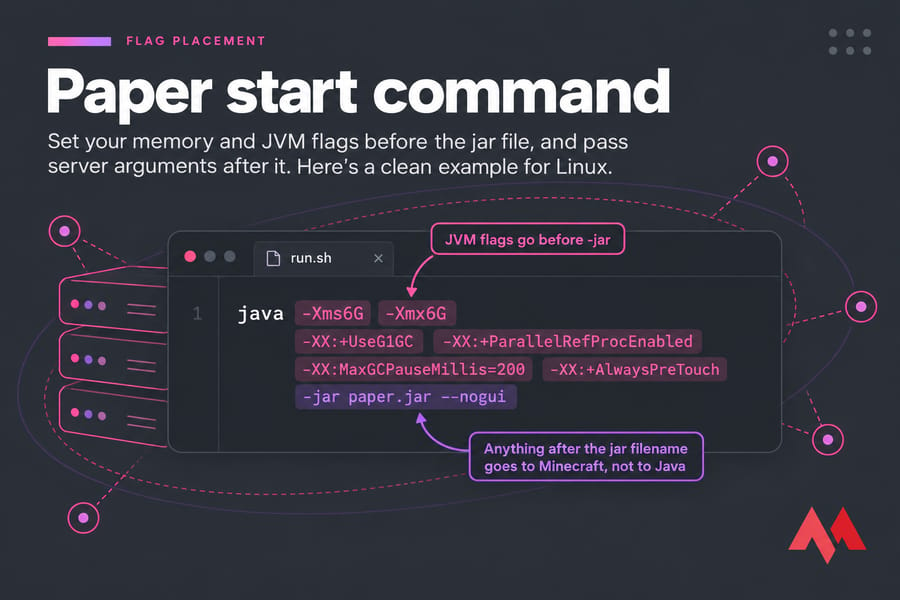
Minimal modern start command
java -Xms6G -Xmx6G -jar paper.jar --noguiTwo rules:
- JVM flags go before
-jar. Anything after the jar filename goes to Minecraft, not to Java. nogui/--noguiturns off the Swing console window. That saves some memory on a headless box.
Aikar flags copy-paste example
Run the minimal command for a few days and watch it. If you see regular lag spikes that line up with GC (spark's /spark gc report shows them clearly), switch to the full Aikar command from the top of this page. Only change the -Xms/-Xmx values and the jar name. Leave everything else exactly as it is.
When to use run.sh, run.bat, or panel startup fields
On Linux, save the command in run.sh, run chmod +x run.sh, and start it inside screen or tmux. On Windows, use run.bat and put pause on the last line so you can read any crash message. On a hosting panel, look for a "Startup" or "JVM arguments" field. Some panels only let you change memory. That's normal.
New to all this? Start with how to make a Minecraft server, then come back here.
Need more than JVM tweaks? If your flags and RAM are already sorted and your home PC is still the bottleneck, Minecraft VPS hosting gives you dedicated resources, root access to edit startup scripts, and room to grow. See the Minecraft VPS plans.
Best JVM arguments for modded Minecraft, Forge, Fabric, and NeoForge
Modded is where people tinker the most, and where bad flags do the most damage. Server tuning and client tuning are different jobs, so treat them separately.
Recommended flags for a modded local client
In CurseForge, Prism Launcher or the official launcher, you mostly just set memory:
-Xms4G -Xmx6GUse 4–6GB for light packs and 6–10GB for big kitchen-sink packs. Leaving -Xms lower than -Xmx on a client is fine, since your desktop needs that RAM too. If a pack stutters a lot, adding -XX:+UseG1GC -XX:MaxGCPauseMillis=50 can help a little. But a render mod like Sodium will do far more for FPS than any JVM flag.
Recommended flags for a modded dedicated server
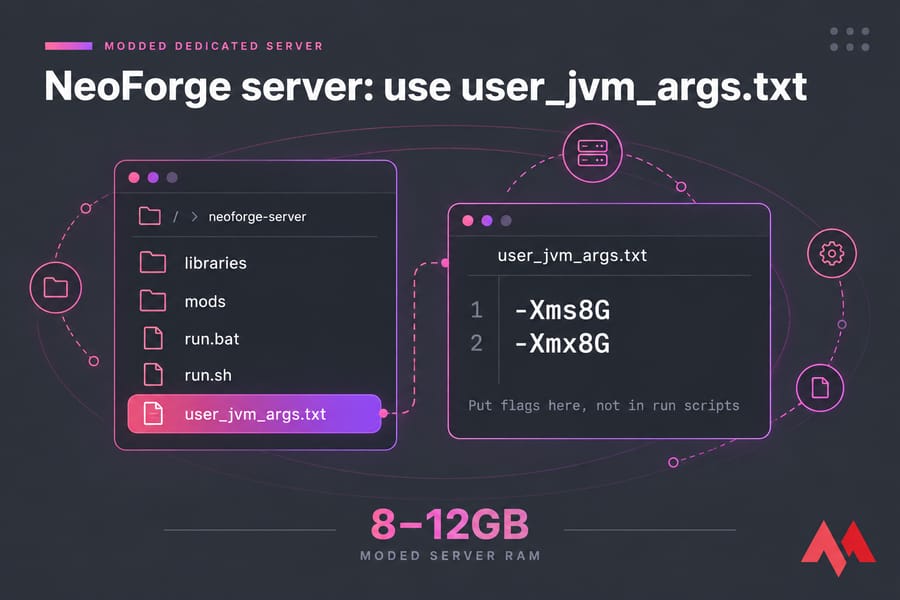
Same idea as Paper. Start with Xms/Xmx set equal, then add Aikar's flags if GC spikes show up in testing. Modded servers often need 8–12GB. A big pack with 300+ mods can go higher, but going past about 16GB rarely helps.
user_jvm_args.txt and launcher-specific notes
Since 1.17, Forge and NeoForge server installers generate run.sh, run.bat and a file called user_jvm_args.txt. Put your flags in user_jvm_args.txt, one or more per line. Don't edit the run scripts, because they get overwritten when you update. Fabric is simpler: you launch fabric-server-launch.jar with your flags before -jar.
| Modded local client | Modded dedicated server | |
|---|---|---|
| Where flags go | Launcher JVM arguments field | user_jvm_args.txt or start script |
| Typical -Xmx | 4–10GB | 6–12GB |
| Xms = Xmx? | Optional | Yes |
| Main goal | Fewer stutters | Stable TPS |
For the full setup, see how to make a modded Minecraft server and how to install mods on a Minecraft server. If you're not sure whether you need mods or plugins in the first place, Minecraft plugins vs mods explains the difference.
Minecraft RAM allocation: -Xms vs -Xmx explained
-Xms is the starting heap size. -Xmx is the maximum heap size. On a dedicated server, set them to the same value so Java doesn't spend time resizing the heap while the server runs. On a client, a lower -Xms is fine.
| Use case | Safe -Xmx range | Suggested -Xms | Notes |
|---|---|---|---|
| Vanilla client | 2–4GB | 1–2GB | More rarely helps |
| Modded client | 4–10GB | Half of Xmx | Scale with pack size |
| Small vanilla server (1–5 players) | 3–4GB | Same as Xmx | CPU matters more |
| Paper server (10–30 players) | 6–10GB | Same as Xmx | Aikar sweet spot |
| Light modded server | 6–8GB | Same as Xmx | Pre-generate chunks |
| Heavy modded server | 10–16GB | Same as Xmx | Rarely needs more |
Leave headroom for the operating system
Java uses more memory than just the heap. Paper's docs say that if your host gives you 8000MB, you shouldn't set -Xmx to 8000M. Drop it by roughly 1000–1500MB so the OS and the JVM's own overhead have room, and so the OOM killer doesn't shut down your server.
Want more detail? Read how much RAM Minecraft needs and how to allocate more RAM to Minecraft.
Why allocating too much RAM can backfire
A bigger heap means more memory to scan on some collections, and that can mean longer pauses. Paper puts it plainly: past a certain point, more memory just gives diminishing returns. In my experience, 6–10GB covers almost every Paper server I've run. When someone gives a 5-player server 24GB, they're usually treating the wrong problem.
Aikar flags for Minecraft explained line by line
Aikar's flags are documented directly on PaperMC's site. The instruction there is to use them as-is and only change Xms and Xmx. You don't need to understand every line, but these are the ones that matter:
| Flag | What it does | Touch it? |
|---|---|---|
-XX:+UseG1GC |
Uses the G1 collector (already the default on Java 9+) | Leave it |
-XX:MaxGCPauseMillis=200 |
Tells G1 to aim for pauses under 200ms | No |
-XX:+AlwaysPreTouch |
Commits all heap memory at startup, so there are no page-fault hiccups later | Keep (slower boot is normal) |
-XX:+DisableExplicitGC |
Ignores plugins that call System.gc() |
Keep |
-XX:G1NewSizePercent=30 / G1MaxNewSizePercent=40 |
Makes the young generation much bigger, which suits Minecraft's short-lived objects | Only above 12GB |
-XX:G1ReservePercent=20 |
Keeps spare heap to avoid "to-space exhausted" failures | Only above 12GB |
-XX:InitiatingHeapOccupancyPercent=15 |
Starts background marking early | Only above 12GB |
-XX:MaxTenuringThreshold=1 |
Promotes surviving objects quickly instead of copying them over and over | No |
The 12GB+ variant
If -Xmx is above 12GB, Paper recommends changing five values: G1NewSizePercent=40, G1MaxNewSizePercent=50, G1HeapRegionSize=16M, G1ReservePercent=15, InitiatingHeapOccupancyPercent=20. At 12GB or below, leave them alone.
Which advanced flags most users should not touch
Leave the mixed-GC tunables (G1HeapWastePercent, G1MixedGCCountTarget, G1MixedGCLiveThresholdPercent) and SurvivorRatio as they are. Changing them without measuring is guesswork. If you do want to experiment, check Linux memory usage and Linux CPU usage before and after, so you have real numbers to compare.
Minecraft JVM arguments to avoid
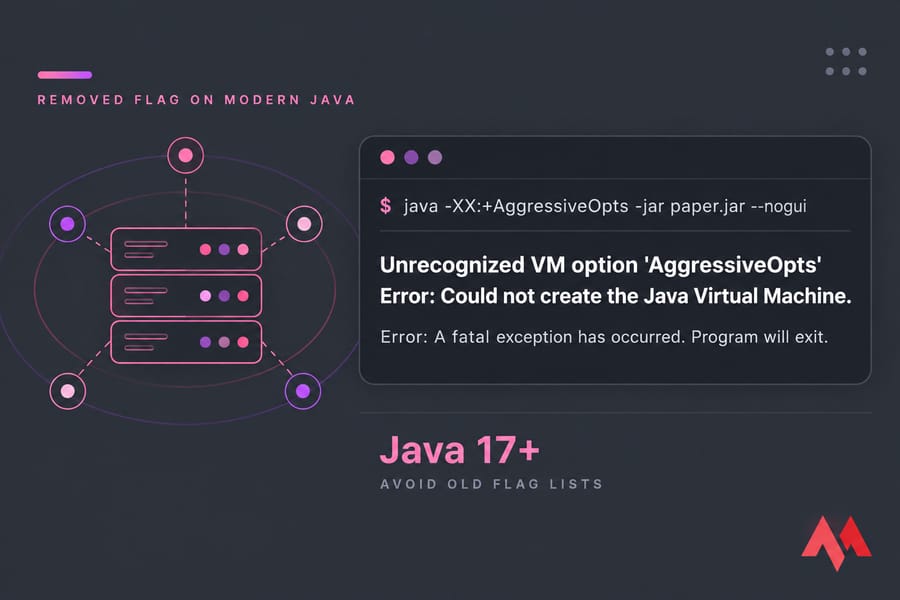
Warning: An "Unrecognized VM option" startup error almost always means one of two things. Either a flag was removed in your Java version, or you're running the wrong Java for your Minecraft version.
| Flag or habit | Problem |
|---|---|
-XX:+UseConcMarkSweepGC |
CMS was removed in Java 14 |
-XX:+AggressiveOpts |
Removed. Newer JVMs won't start with it |
-XX:PermSize / MaxPermSize |
PermGen was removed in Java 8 |
-Xmn combined with Aikar's flags |
Overrides G1's adaptive young-gen sizing |
| Java 25-only flags on Java 21 | The JVM won't launch |
| Mixing two "optimized" flag packs | Contradictory settings, unpredictable GC |
Some flags don't break anything but don't help either. -XX:+UseG1GC on its own falls into that group on modern Java. Version-specific options are trickier. Newer flag generators offer flags that only exist on Java 21 or 25, and if you paste those into an older runtime, the server won't start. Copy-paste mistakes cause trouble too: curly "smart quotes" from blogs, line breaks inside a .bat file, or flags placed after -jar.
Still stuck after fixing the flags? Work through troubleshooting a Linux VPS.
How to set JVM arguments in Minecraft on Windows and Linux
Official Minecraft Launcher
- Open the Installations tab.
- Hover over your profile, click the three dots, then Edit.
- Click More Options.
- In JVM Arguments, change only the
-Xmx2Gvalue (for example, to-Xmx4G). Leave the rest as it is.
CurseForge and Prism Launcher
In CurseForge, go to Settings → Minecraft → Java Settings. Use the memory slider, and add any extras in "Additional Arguments." In Prism Launcher, you can set global memory and JVM arguments under Settings → Java, or override them per instance under Edit → Settings → Java. Per-instance is the better option if you run several packs.
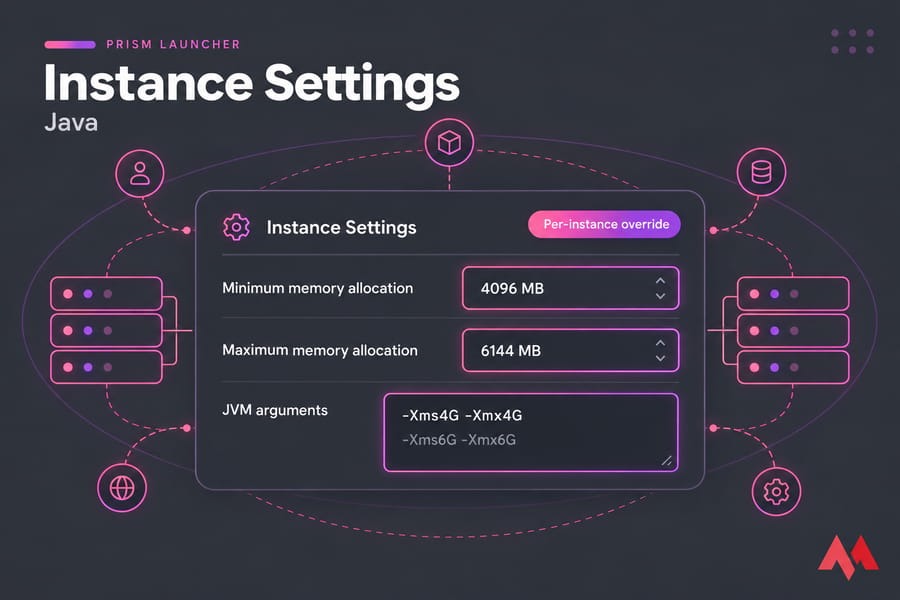
Linux and Windows server startup scripts
# run.sh (Linux)
#!/bin/sh
java -Xms6G -Xmx6G -jar paper.jar --nogui
:: run.bat (Windows)
java -Xms6G -Xmx6G -jar paper.jar --nogui
pauseFor Forge and NeoForge, edit user_jvm_args.txt and leave the generated scripts alone. On a remote box, you'll need to connect to your VPS, or SSH into Linux, before you can edit anything. If friends can't reach a home-hosted server, port forwarding your Minecraft server is usually the fix.
Quick summary: flags always go before -jar.
JVM flags not fixing lag? Check TPS, CPU, mods, and hosting
JVM flags fix one kind of lag: GC pauses. A lot of other things look the same from a player's point of view.
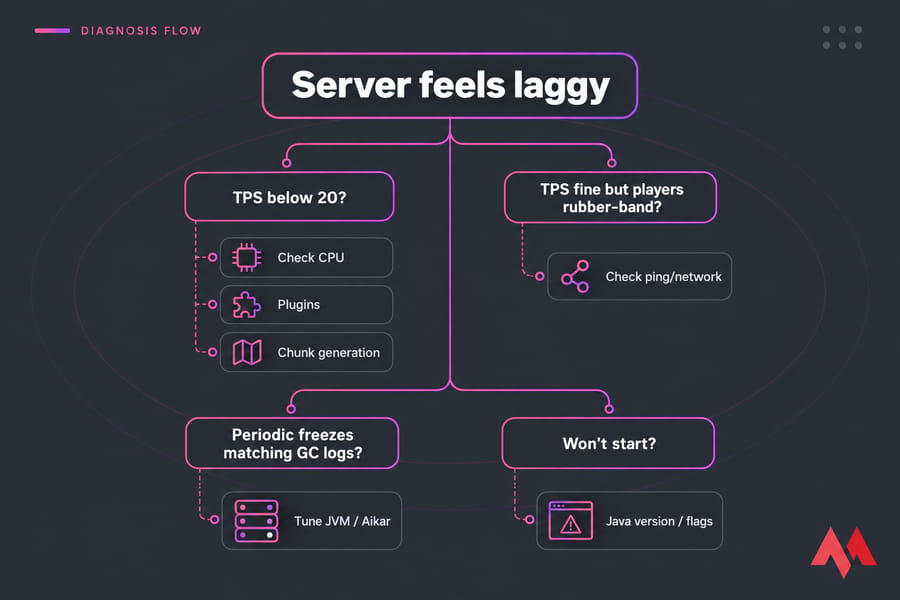
- Low TPS, high ping? These are different problems. Minecraft server ping vs TPS explains how to tell them apart.
- One CPU core maxed out? The main game loop is mostly single-threaded, so clock speed matters more than core count. See the best server CPU for Minecraft.
- Farms, entity piles, or a heavy plugin? Run a spark profile. One badly written plugin can use up half your tick time.
- Chunk generation spikes? Pre-generate your world with Chunky.
- Slow disk? Saving and loading worlds on HDDs causes stalls. NVMe SSDs fix that.
Once things are stable, lock the server down. Secure a Minecraft server against attacks, and set it up to back up a Minecraft server automatically.
When to upgrade your Minecraft hosting plan
Your flags are clean, RAM is sized right, plugins are profiled, and the CPU still sits at 100%? Then the hardware is the limit. Compare options in our roundup of the best Minecraft server hosting. Or go straight to MonoVM's Minecraft server hosting, which gives you full control over Java, startup scripts, and backups. Use the flags above, put them on hardware that can keep up, and launch your Minecraft server.

An experienced tech and developer blog writer, specializing in VPS hosting and server technologies. Fueled by a passion for innovation, I break down complex technical concepts into digestible content, simplifying tech for everyone.