![How to Secure a Minecraft Server from Attacks [2026] 🎮](/wp-content/uploads/2026/10/secure-minecraft-server-from-attacks712-main.webp)
If you want to secure a Minecraft VPS from attacks, you have to harden two layers: the VPS and the game stack running on it. On the VPS side, that means updating the OS, locking down SSH, opening only the ports you need and keeping RCON off the public internet. On the game side, keep backend servers hidden behind your proxy, hide the origin IP, automate off-server backups, and add upstream DDoS protection once your server goes public. Skip any one layer and the others won't save you.
I've watched plenty of Paper servers fall over within hours of being posted on a server list. The owners almost always had a plugin installed that was "supposed to stop attacks." In most cases the real problem was much simpler: an exposed backend, a raw IP posted on Discord, or RCON open with a weak password.
Before you start, you'll need:
- A Linux VPS with root or sudo access (the examples use Ubuntu)
- A Minecraft Java Edition server (Paper, Spigot, Vanilla or Forge)
- SSH access and permission to restart services
- To know whether you run a single server or a Velocity/BungeeCord network
- A domain name (optional, but strongly recommended)
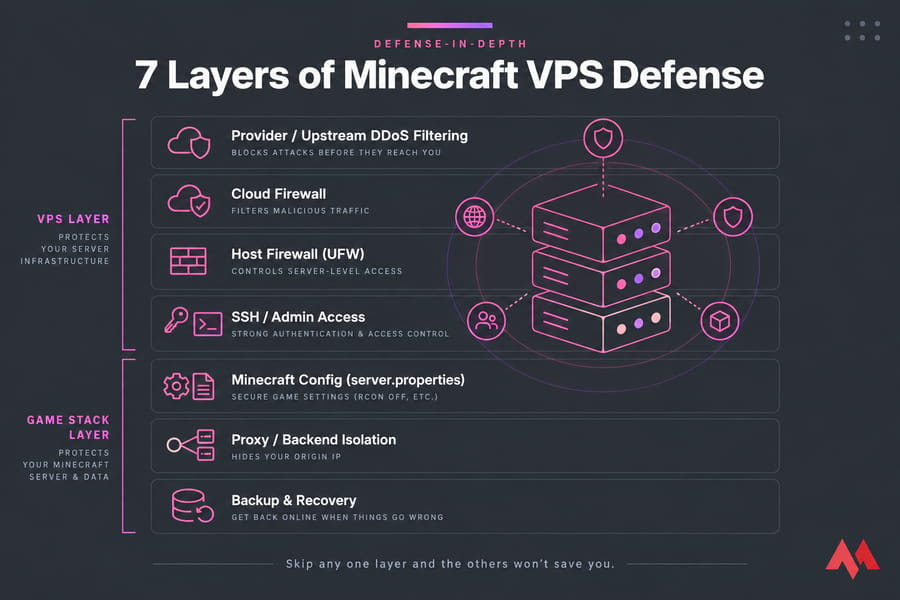
Minecraft server security starts with understanding the attack surface
Minecraft servers don't get attacked like web servers. A website mostly handles short HTTP requests. A Minecraft server keeps a long-lived TCP connection open for every player, on a public port (25565 by default), and does real work for each handshake, login and ping. That means an attacker doesn't always need huge bandwidth. Sometimes it's enough to make your server do thousands of expensive login attempts.
Here are the four attack types you'll actually run into:
| Attack type | What it targets | Typical symptom | First defense |
|---|---|---|---|
| Volumetric DDoS | Your VPS uplink bandwidth | Whole VPS unreachable, SSH included | Upstream filtering / DDoS-protected VPS |
| Connection, login and ping floods (bot joins) | Minecraft protocol handling | TPS drops, login queue stalls, console spam | Protective proxy, rate limits, anti-bot tooling |
| Brute-force and admin access | SSH, RCON, control panels | Failed-login floods in auth logs | SSH keys, fail2ban, closed admin ports |
| Plugin, mod and config exploits | Your server software | Unexpected OPs, crashes, griefing | Patching, permission limits, trusted sources |
A private server for five friends has a small attack surface. A public SMP listed on three server sites has a big one. Keep that in mind as you go, because not every step below matters equally for every setup. If you want the background, MonoVM has a plain-English explainer on what a DDoS attack is.
Start with the VPS itself, before you touch any Minecraft settings.
Secure the Linux VPS before you harden the Minecraft server
If someone gets shell access, every Minecraft setting you've tuned stops mattering. So lock down the operating system first.
Update the OS and Java runtime
Run sudo apt update && sudo apt upgrade weekly at minimum, and turn on unattended-upgrades for security patches. Keep your Java runtime current too. PaperMC's own security guide tells you to keep your OS and software updated and to follow your distro's hardening advice.
Run Minecraft as a non-root user
This is the step most people skip, and in my experience it's the one they regret most. If a plugin gets exploited while the server runs as root, the attacker owns the whole box. Create a dedicated user and run the server through a systemd unit:
sudo adduser --system --group --home /opt/minecraft minecraft
# in /etc/systemd/system/minecraft.service
[Service]
User=minecraft
WorkingDirectory=/opt/minecraft
ExecStart=/usr/bin/java -Xms4G -Xmx4G -jar paper.jar --nogui
Verify: ps -o user= -p $(pgrep -f paper.jar) should print minecraft, not root. Don't give this account sudo.
Lock down SSH with keys and fail2ban
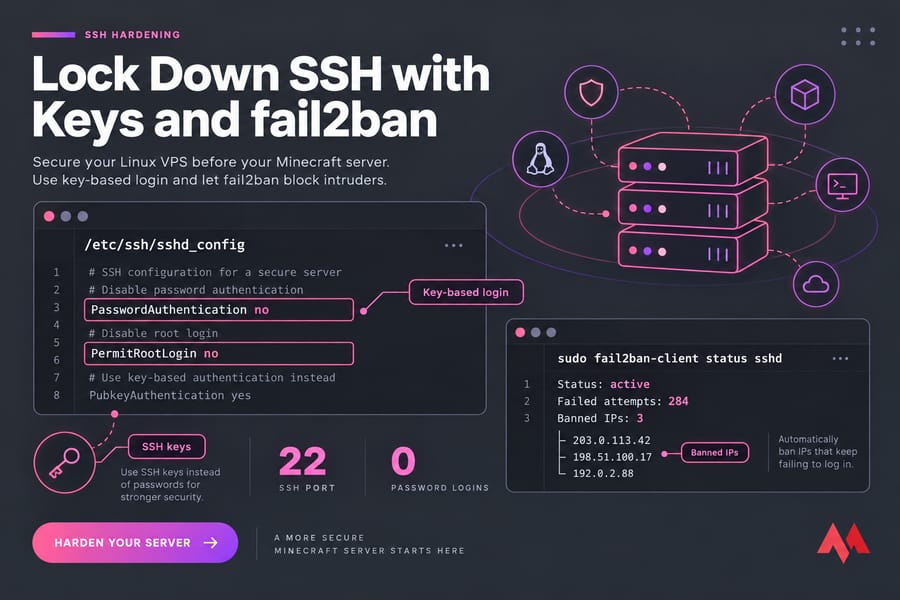
Switch to key-based login, then set PasswordAuthentication no and PermitRootLogin no in /etc/ssh/sshd_config. Install fail2ban so it bans IPs that keep failing to log in. Moving SSH off port 22 is fine for cutting log noise, but it doesn't stop a determined attacker. Keys do the real work. For the full walkthrough, see how to secure SSH on your VPS.
Remove services you don't need
Run systemctl list-units --type=service --state=running. Anything you don't recognize or use (an old FTP daemon, a test database, a web panel left over from setup) should be stopped and disabled. Every service you remove is one less thing an attacker can reach. MonoVM's guide to secure your Linux VPS covers the rest of the OS baseline.
Minecraft server firewall rules and open ports you actually need
Use a default-deny policy. Allow only what players and you actually need, and block everything else.
| Service | Default port | Public? | Recommendation |
|---|---|---|---|
| Minecraft Java | 25565/TCP | Yes | Open (or open only on the proxy) |
| Bedrock / Geyser | 19132/UDP | Only if used | Open only if you support Bedrock players |
| RCON | 25575/TCP | No | Disable, or bind to localhost |
| Query | 25565/UDP | Rarely | Leave enable-query=false unless a list site needs it |
| SSH | 22/TCP | Restricted | Key-only; allowlist your IP if it's static |
| Backend Paper servers | 25566+ | Never | Allow from the proxy IP only |
| Game panels (Pterodactyl, etc.) | Varies | Restricted | Put behind a VPN or IP allowlist |
A minimal UFW setup for a single public server looks like this:
sudo ufw default deny incoming
sudo ufw default allow outgoing
sudo ufw allow 22/tcp
sudo ufw allow 25565/tcp
sudo ufw enable
On cloud platforms there's a second firewall layer. Oracle Cloud, for example, uses Network Security Groups or security lists as virtual firewalls in front of your instance. You need ingress rules in both places, and I've seen people spend an hour debugging UFW when the real block was in the cloud console.
Verify: run sudo ss -tulpn to see what's listening, then scan from a different machine with nmap -Pn your-ip. If 25575 shows up as open from outside, fix it now. Here's how to check open ports in Linux in more detail.
Secure server.properties and Paper settings for a public Minecraft server
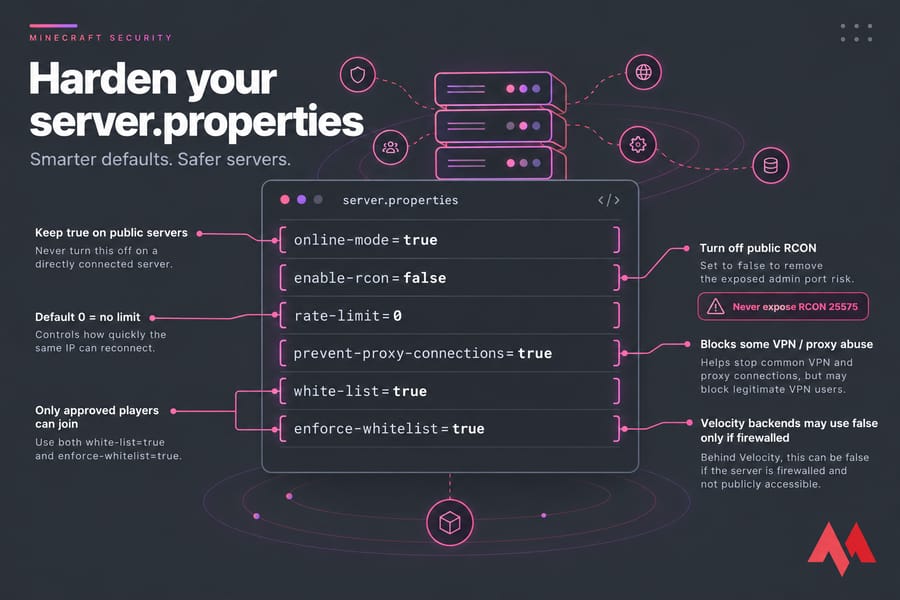
Once the network perimeter is tight, move on to the game config. These settings live in server.properties, and PaperMC documents each of them.
| Setting | Why | Caution |
|---|---|---|
online-mode=true |
Mojang authenticates every player, so nobody can join under someone else's name | Backends behind Velocity use false, but only if they're firewalled |
enable-rcon=false |
Removes a password-protected admin port | If you need it, bind it privately (see below) |
rate-limit |
Kicks clients that send too many packets | Default 0 means no limit. Test a value before rolling it out |
prevent-proxy-connections=true |
Blocks players whose ISP region doesn't match Mojang's records, which catches some VPN and proxy abuse | Can lock out legitimate VPN users |
white-list=true + enforce-whitelist=true |
Only approved players can join | Doesn't stop network-layer attacks |
Never turn off online-mode on a server players connect to directly. That's how people end up with someone joining as the owner and giving themselves OP.
Why exposed RCON is so risky
Warning: RCON sends its password over an unencrypted connection, and anyone who gets in has full console access. Don't expose port 25575 to the internet.
If a tool really needs RCON, set rcon.port to something firewalled, use a long random password (openssl rand -base64 32), and connect through an SSH tunnel (ssh -L 25575:127.0.0.1:25575 user@vps) instead of opening the port.
Choosing a server fork matters too. Paper patches several exploits that Vanilla and Spigot don't, which is one reason it's the usual pick in Paper vs Spigot vs Bukkit comparisons. If you're still setting things up, first see how to set up a Minecraft server, then come back here.
Velocity backend security for Paper, Bungee and multi-server networks
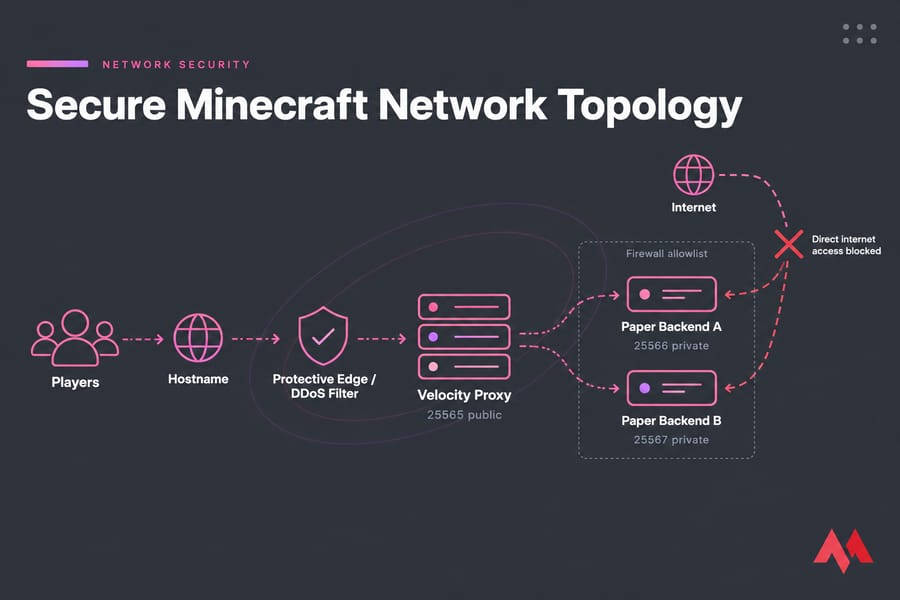
This section matters more than anything in server.properties. When you put Paper behind Velocity or BungeeCord/Waterfall, the backends run in offline mode. The proxy handles authentication and passes player identity along. PaperMC spells out the problem plainly: in offline mode, someone could in theory impersonate any player. If an attacker can connect to a backend directly, they can join as your admin account.
Same host: bind the backend to localhost
If the proxy and backends share one VPS, set server-ip=127.0.0.1 in each backend's server.properties. The backend then can't be reached from the internet at all. It's the simplest form of isolation, and it's very hard to get wrong.
Separate nodes: firewall allowlists or private tunnels
When the backends run on different machines, allow the backend port from the proxy's IP only:
sudo ufw allow from 203.0.113.10 to any port 25566 proto tcpEven better, connect the nodes over WireGuard and bind the backends to the tunnel interface. PaperMC lists encrypted tunnels as a valid option, and they also protect the traffic between nodes.
Modern forwarding and the forwarding secret
In velocity.toml, set player-info-forwarding-mode = "modern". Then in each backend's config/paper-global.yml, set proxies.velocity.enabled: true, online-mode: true, and paste in the same secret from Velocity's forwarding.secret file. Treat that secret like a password: don't commit it to Git, and rotate it if it leaks.
Important: PaperMC states outright that Velocity modern forwarding is not a replacement for a firewall. Use both.
Protect your Minecraft server from DDoS: what actually works on a VPS
A local firewall like UFW or nftables runs on your VPS. That means by the time it drops a packet, the traffic has already used up your uplink bandwidth. If someone sends 20 Gbps at a 1 Gbps port, your firewall rules don't matter. The VPS goes offline either way.
Real DDoS mitigation filters traffic before it reaches your server. You've got three realistic ways to get that:
- A DDoS-protected VPS: your provider filters attack traffic at its network edge.
- A Minecraft-aware protective proxy: services like Cloudflare Spectrum, a reverse layer-4 proxy that sits in front of your Minecraft server and extends Cloudflare's DDoS mitigation to it.
- A hidden origin IP: players connect to
play.yourserver.com, which points at the protective edge, never at the real VPS IP.
| Setup | Best for | Stops | Doesn't stop | Cost/complexity |
|---|---|---|---|---|
| Standard VPS + firewall | Private friend servers | Port scans, brute-force | Any real volumetric flood | Low |
| DDoS-protected VPS | Public SMPs | Most L3/L4 floods | Bot joins that look like real logins | Low–medium |
| Protective Minecraft proxy | Servers with a hidden origin | Floods aimed at the edge, origin exposure | Attacks on a leaked origin IP | Medium |
| Combined (protected VPS + proxy + anti-bot) | Networks and monetized servers | The widest range of attacks | Admin mistakes | Higher |
Note the "doesn't stop" column. Bot join floods use valid-looking connections, so network filtering lets them through. That's where anti-bot plugins on the proxy actually help. Plugins can't do anything about volumetric floods, though, because that traffic never reaches Java.
If your origin IP has leaked (old DNS records, a plugin that shows it, a screenshot), filtering won't help much. Ask your provider for a new IP, update DNS to point through the protective edge only, and never post the new raw IP anywhere.
Need a Minecraft VPS that's easier to defend? If your server is public or growing, or already getting connection floods, a standard VPS probably won't hold up. MonoVM's Minecraft VPS hosting gives you NVMe storage and full root access, and if you need network filtering in front of it, a DDoS-protected VPS handles the upstream part.
Minecraft server security best practices for admins and plugins
Most griefing disasters I've cleaned up started with an admin account, not an attack. Keep these habits:
- Keep the OP list tiny. Ideally just you. Give staff granular permissions through LuckPerms instead of blanket OP.
- Vet every plugin. Download only from Hangar, Modrinth, SpigotMC or the developer's official GitHub. Don't install leaked premium plugins, which are a common way backdoors get in. Here's how to install Minecraft plugins safely.
- Patch on a schedule. Check Paper, Velocity, plugins and the OS for updates weekly, and take a backup before every update.
- Turn on MFA everywhere. That includes your hosting dashboard, billing account, game panel, Discord and your Mojang/Microsoft account.
- Use SSH for remote admin, plus
tmuxorscreento attach to the console, instead of a public RCON port. - Rotate secrets whenever a staff member leaves: SSH keys, panel passwords and the forwarding secret.
Minecraft backup security and recovery planning
Prevention reduces how often you get hit. Recovery speed decides how much damage a hit actually does.
Key takeaway: If your only backup is on the same VPS, you don't have a recovery plan. One compromised disk or one bad rm -rf wipes out both copies.A sensible baseline is automated world backups every 6 hours, 7 daily copies, 4 weekly copies, and an encrypted copy pushed off the server with restic or rclone. A cheap storage VPS works well as a target. MonoVM has step-by-step guides to back up a Minecraft server automatically and to back up your VPS properly. Test a restore once a month. A backup you've never restored is just a guess.
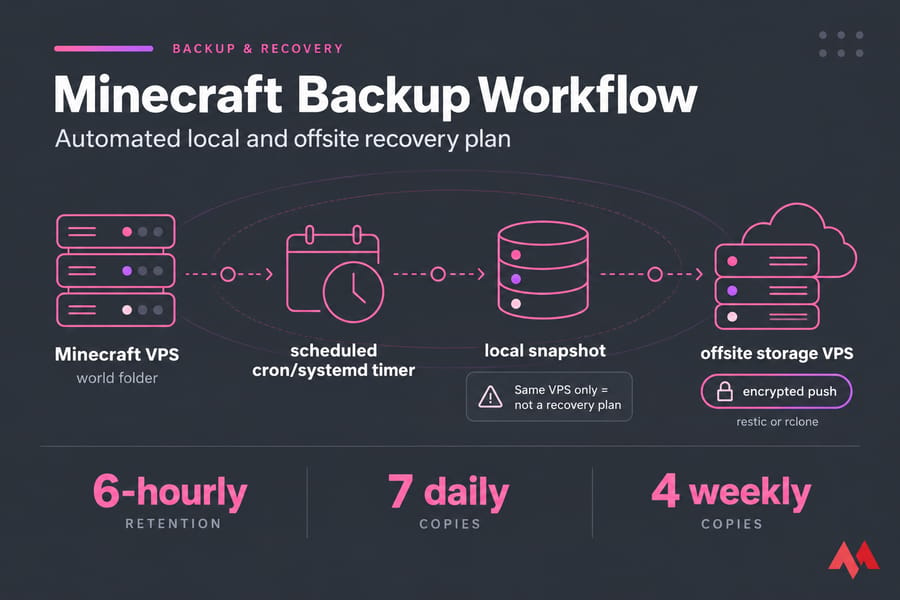
For monitoring, watch CPU, RAM, TPS (with spark), connection counts (ss -s) and /var/log/auth.log. If connections suddenly spike while TPS holds steady, that's usually a flood. If TPS drops with normal connection counts, look at plugins or lag machines.
After an incident:
- Isolate: whitelist the server or take it offline.
- Save the logs before you change anything.
- Rotate SSH keys, panel passwords, the RCON password and the forwarding secret.
- Remove any OPs you didn't add and audit the plugins folder.
- Restore the world from a clean backup if needed.
- Rotate the IP if the origin leaked, then verify everything before reopening.
Common Minecraft VPS security mistakes that still cause downtime
| Mistake | Why it's dangerous | Better approach |
|---|---|---|
| Publishing the raw origin IP | Attackers skip your protection entirely | Share a hostname pointed at a protected edge |
| Running Minecraft as root | A single plugin exploit gives full system control | Dedicated unprivileged user + systemd |
| Public RCON | Brute-forceable console access | Disable it or tunnel over SSH |
| Open backends in a proxy network | Anyone can impersonate any player | localhost binding or a firewall allowlist |
| Relying on plugins for DDoS | Floods saturate the link before Java sees them | Upstream filtering |
| Configuring only one firewall layer | Gaps between the cloud firewall and UFW go unnoticed | Audit both, then scan from outside |
Best Minecraft hosting setup if you expect attacks or public growth
| Server size | Risk level | Recommended stack |
|---|---|---|
| Private friend server (under 10 players) | Low | Standard VPS, UFW, whitelist, SSH keys, offsite backups |
| Public SMP or modded community | Medium–high | DDoS-protected VPS, hostname only, anti-bot, LuckPerms |
| Network or monetized server | High | Velocity on a protected edge, isolated Paper backends over WireGuard, monitoring, IP rotation plan |
Once your server is public, choosing a location close to your players matters for both latency and uptime. MonoVM's Minecraft VPS plans and DDoS-protected VPS options cover the two higher tiers. If you'd rather not manage the OS yourself, managed Minecraft server hosting is the simpler option.
Quick recap: patch the OS, firewall everything except the game port, hide the origin IP, lock down admin access, and automate offsite backups. Get those five right and you're ahead of most public servers.

An experienced tech and developer blog writer, specializing in VPS hosting and server technologies. Fueled by a passion for innovation, I break down complex technical concepts into digestible content, simplifying tech for everyone.