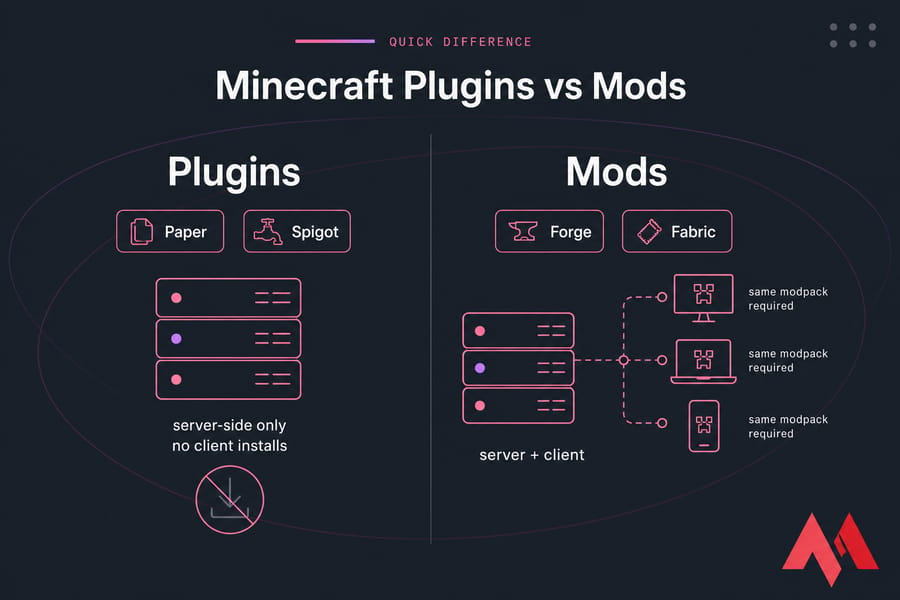
Minecraft plugins and mods both change gameplay, but they work differently. Plugins usually run on server software like Paper or Spigot and don't require players to install anything extra. Mods often change deeper game mechanics, run on Forge or Fabric, and usually require both the server and players to install the same mod setup.
Minecraft plugins vs mods: the quick difference
That's the short version. Everything else is about consequences — for your players, your hardware, and your weekend.
- Plugins = server-side add-ons. Permissions, economies, anti-grief, minigames.
- Mods = deeper rewrites. New mobs, dimensions, tech trees, full modpacks.
- Both are Java Edition territory. Bedrock uses add-ons, which is a separate conversation.
The fastest way to tell which one you need? Ask whether your friends will tolerate a 15-minute install before they can join. If the answer is no, you want plugins. If they're excited about it, mods are on the table.
What are Minecraft plugins?
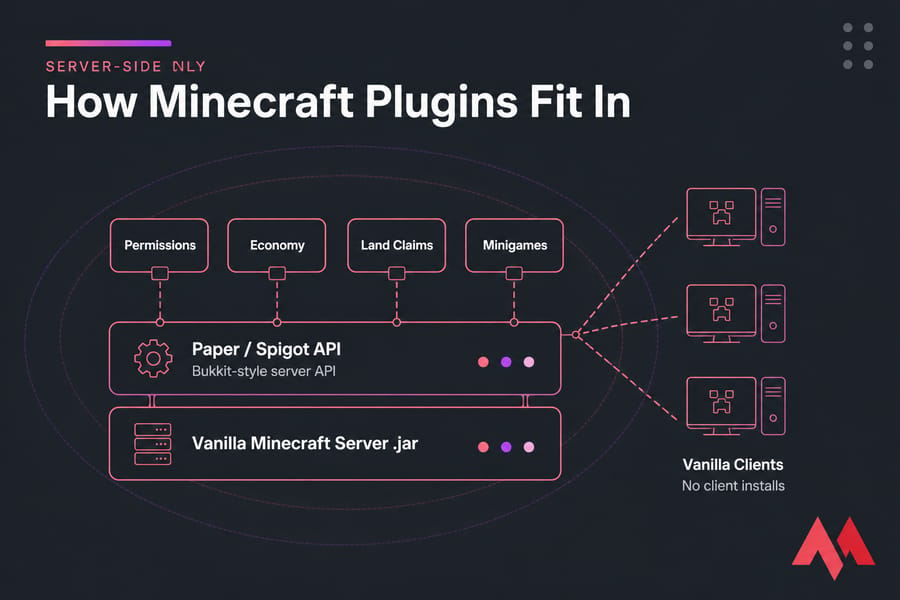
A plugin is a Java add-on that hooks into your server software's API. It doesn't rewrite Minecraft — it sits on top of the server and changes how the server behaves. Bukkit created that API years ago; Spigot, Paper, and Purpur all descend from it.
Here's what makes plugins so popular with server owners: you drop a .jar file into the /plugins folder, restart, and it works. No client installs. No version-matched downloads for your players.
Typical plugin jobs:
- Permissions and rank systems (who can use
/tp, who can't) - Economy plugins with shops, currency, and auction houses
- Anti-grief and land claims — the single biggest reason public servers survive
- Moderation and anti-cheat tooling
- Minigames: bed wars, skyblock, parkour arenas
- Quality-of-life stuff like homes, warps, and chat formatting
To be fair, plugins aren't automatically featherweight. I've seen a badly configured world-generation plugin chew through more CPU than a modest modpack. But as a category, they're gentler on resources than a 200-mod pack.
What are Minecraft mods?
Mods go deeper. Instead of using a stable API, they patch and extend the game code itself through a mod loader — Forge, NeoForge, Fabric, or Quilt. That gives them near-unlimited reach.
Mods can add new biomes, new mobs, entire dimensions, magic systems, automated factory chains, or replace progression from scratch. If you've ever seen someone build a nuclear reactor in Minecraft, that's mods. Browse a few on best Minecraft mods and you'll see the range fast.
The catch — and it's a big one — is the client side. Because mods change game content, players usually need the exact same mods at the exact same versions as the server. Get one version off and they'll bounce at the connection screen with a mismatch error. Modpacks from CurseForge or Modrinth exist mostly to solve this problem: one curated bundle, one version, everyone installs the same thing.
Some mods are genuinely server-side only (performance patches, chunk optimizers). Most content mods aren't. Plan for the install requirement, don't hope around it.
If that's the direction you're going, our walkthrough on how to make a modded Minecraft server covers the loader setup properly.
Minecraft plugin vs mod: key differences at a glance
| Feature | Plugins | Mods |
|---|---|---|
| Where it runs | Server only | Server + client (usually) |
| Player installation | None needed | Matching mods or modpack required |
| Server software | Paper, Spigot, Bukkit, Purpur | Forge, NeoForge, Fabric, Quilt |
| Gameplay depth | Rules, systems, admin features | New content, mechanics, full overhauls |
| Setup difficulty | Drop-in jar, low friction | Loader install, dependency chains |
| Resource usage | Typically lighter | Typically heavier, especially modpacks |
| Update complexity | Moderate — most plugins track new versions quickly | High — packs often lag behind Minecraft releases |
| Ideal for | Public servers, SMPs, minigames | RPG, tech, magic, curated adventures |
Plugins optimize for accessibility and control. Mods optimize for transformation. Neither is "better" — they answer different questions.
Plugins vs mods for a Minecraft server
Let's make this concrete. Pick the row that matches your goal.
| Your goal | Recommended | Why |
|---|---|---|
| Small vanilla-plus server for friends | Plugins (Paper) | Everyone joins in seconds, no downloads |
| Public SMP with strangers | Plugins | You need land claims, permissions, and moderation tools |
| Minigame network | Plugins | The entire minigame ecosystem is plugin-based |
| Tech/magic progression server | Mods | No plugin can replicate a full tech tree |
| Curated modpack with a small group | Mods | Shared install is fine when the group is committed |
| Testing on a tight budget | Plugins | Lower RAM floor — see free Minecraft server options |
Onboarding friction is the deciding factor more often than people expect. A modded server with three active players isn't a community. A plugin server that anyone can join at 2 AM on a whim usually is.
Paper vs Spigot vs Forge vs Fabric: compatibility explained
Your server jar decides everything. Choose it before you choose content.
| Server software | Plugins | Mods | Best for |
|---|---|---|---|
| Bukkit | Yes | No | Legacy setups |
| Spigot | Yes | No | Broad plugin compatibility |
| Paper | Yes | No | Most plugin servers — best performance of the three |
| Purpur | Yes | No | Paper fork with extra config knobs |
| Forge | No | Yes | Large legacy modpacks |
| NeoForge | No | Yes | Modern Forge-lineage packs |
| Fabric | No | Yes | Lightweight mods, fast version updates |
Paper plugins don't natively run on Forge or Fabric. And Forge mods won't load on Paper. That's not a bug you can configure around — they're separate ecosystems.
Version matching bites people constantly. A plugin built for 1.20.1 may refuse to load on 1.21, and modpacks are worse. Read update a Minecraft server before you jump on a new release, and having full file access on a VPS makes swapping between Paper, Forge, and Fabric far less painful.
Are plugins easier than mods?
For beginners, yes — mostly. Plugin installs are one file and a restart. Mod setups involve a loader, dependency mods, and a matching client-side install for every player. When something breaks on a 150-mod pack, finding the culprit is a genuinely tedious process of elimination.
But don't romanticize plugins. A 40-plugin server with overlapping permission nodes and three conflicting economy systems will humble you too.
Resource planning differs as well. Modpacks want more heap and stronger single-core performance — check how much RAM Minecraft needs and best server CPU for Minecraft before committing. If your world is already stuttering, you may just need to add more RAM to your Minecraft server.
Can you use plugins and mods together?
Sometimes. Hybrid server software exists that bridges Forge or Fabric with the Bukkit API, letting mods and plugins coexist on one jar. It works — when it works.
What you're signing up for: slower version support, weird edge-case bugs, plugins that misbehave around modded items, and a much smaller pool of people who can help you debug it. Hybrid setups earn their keep on large modded networks that genuinely need permissions and economy tooling on top of modded content.
My honest advice for a first server? Skip hybrid. Pick one ecosystem and get good at it.
Common mistakes to avoid
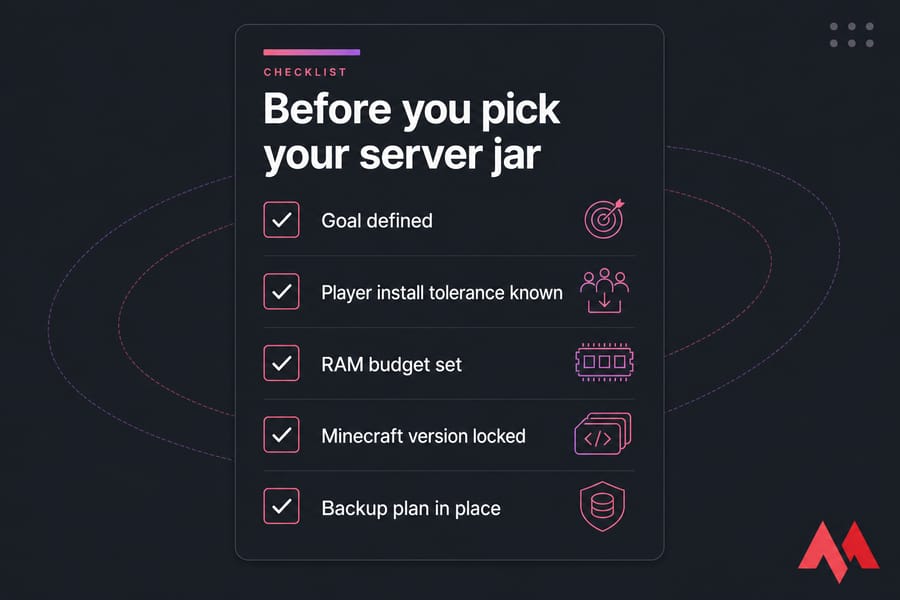
- Choosing mods when plugins would do. Wanting shops and ranks isn't a reason to install Forge.
- Forgetting the client requirement. Tell players about the modpack before launch day, not after.
- Underestimating RAM and CPU. Modded servers hit resource walls quickly. Budget accordingly — how much a Minecraft server costs depends heavily on this choice.
- Mixing versions. Server, loader, mods, and clients all need to line up.
- Grabbing the wrong server jar. Downloading Paper then hunting for mod support is a wasted afternoon.
- No backups. One bad plugin update can corrupt a world. Snapshot before every change.
Should you choose plugins or mods?
Default answer for beginners: plugins on Paper. Easiest setup, zero player friction, best performance per gigabyte of RAM, and the largest support community. Start with our guide on how to make a Minecraft server and add plugins one at a time.
Go modded when the content is the point — when your server exists because you want tech trees, custom dimensions, or a specific modpack experience. Just size the hardware for it first.
Set up the right Minecraft server
Plugin server: faster launch, broader access, lighter resources. Modded server: deeper gameplay, heavier requirements, more maintenance. Either way, you want hosting with full server file access, scalable RAM and CPU, and low latency to your player base — not a locked-down panel that won't let you swap jars.
MonoVM runs across 25+ global locations with flexible resources, full server control, and 24/7 support. Compare plans on Minecraft server hosting, review the options in our best Minecraft server hosting roundup, or go straight to Minecraft VPS hosting and get your server online today.

An experienced tech and developer blog writer, specializing in VPS hosting and server technologies. Fueled by a passion for innovation, I break down complex technical concepts into digestible content, simplifying tech for everyone.