
To optimize a Minecraft server, measure the lag first with spark or /tps, then fix what the measurement points to. On most unmodded servers that means running Paper, lowering view-distance and simulation-distance, pre-generating chunks, cutting heavy plugins and entity buildup, and giving Java a sensible amount of RAM on a fast CPU with NVMe storage. Change one thing at a time and retest after each.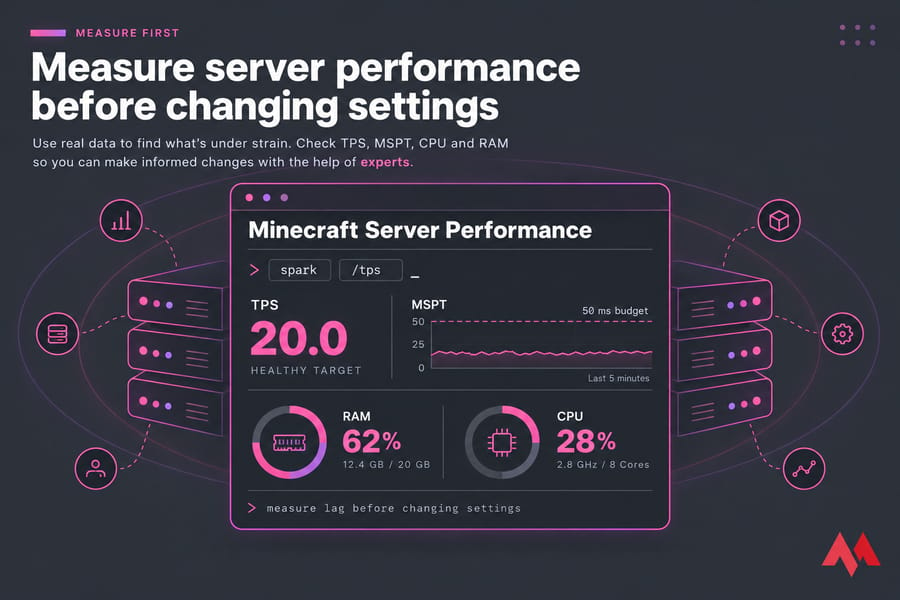
Before you start, have these ready:
- Panel or SSH access, and permission to edit
server.properties - Your server type: Vanilla, Paper, Spigot, Fabric, Forge or NeoForge
- A fresh backup (see how to back up a Minecraft server automatically)
- The right Java version. Java Edition servers on 1.20.5 and newer need Java 21.
Minecraft server optimization starts with the right lag diagnosis
Server lag vs client FPS lag vs network ping
Players use "lag" for three problems. Server lag means the server can't finish its ticks on time, so the world slows down for everyone. FPS lag is on one player's computer, and no server change will help it. Ping lag is network latency between a player and the server. If you aren't sure which one you're seeing, read Minecraft server ping vs TPS.
Signs your server has a TPS problem
A healthy server runs 20 ticks per second. When TPS drops, every player notices at once:
| Symptom | Likely cause | First action |
|---|---|---|
| Rubberbanding, delayed block breaking for everyone | Low TPS (server lag) | Run /tps and a spark profile |
| Mobs freeze, crops and furnaces slow down | Overloaded ticking (entities, redstone, farms) | Check entity counts, lower simulation-distance |
| Chunks load slowly at the edge of the map | Chunk generation or slow disk | Pre-generate the world |
| Only one player stutters, TPS stays at 20 | Client FPS | Player lowers render distance or drops shaders |
| One player teleports back, others are fine | Network ping | Check their route or pick a closer server location |
The metrics to watch: TPS, MSPT, RAM, CPU, disk
TPS tells you whether you're lagging; MSPT (milliseconds per tick) tells you how close you are. Each tick gets a 50 ms budget, so a server averaging 45 MSPT still shows 20 TPS but has no room left when someone flies into new terrain. Also watch main-thread CPU, RAM and garbage collection pauses, and disk activity during saves. Find out which one is under strain before changing settings.
Choose the best Minecraft server software for performance
Why Paper is usually faster than Vanilla or Spigot
For an unmodded Java server, Paper is the default I'd recommend. It's a Spigot fork with a large set of performance patches, extra config options for entities and chunks, and spark bundled from 1.21 onward. Spigot works but has fewer optimizations, and Vanilla offers little beyond server.properties. Most Bukkit and Spigot plugins run on Paper unchanged, so switching usually means swapping the jar. The Paper vs Spigot vs Bukkit comparison covers history and compatibility.
| Server type | Best for | Performance | Plugin/mod support | Difficulty |
|---|---|---|---|---|
| Vanilla | Pure gameplay, technical players who want exact mechanics | Baseline | None | Easy |
| Spigot | Older plugin stacks | Better than Vanilla | Bukkit/Spigot plugins | Easy |
| Paper | Most survival, SMP and minigame servers | Best for unmodded | Bukkit/Spigot/Paper plugins | Easy |
| Fabric | Light modded and performance-mod setups | Depends on mods | Fabric mods | Medium |
| Forge/NeoForge | Large modpacks | Heaviest, depends on pack | Forge/NeoForge mods | Medium to hard |
When Fabric, Forge, or NeoForge changes the optimization approach
Paper can't load mods. On Fabric, server-side performance mods do much of what Paper does for plugin servers. On Forge or NeoForge, the modpack usually sets your ceiling, and one badly behaved mod can cost more tick time than every other setting combined. Profile carefully and pick the pack with your hardware in mind.
When not to switch software
Stay put if your server depends on exact Vanilla mechanics, since Paper fixes some exploits and changes some redstone and duplication behavior technical players rely on. Spigot-only plugins and modded worlds don't move to Paper either. If you're starting fresh, see how to make a Minecraft server.
Optimize server.properties settings for lower lag
Best view-distance for smoother gameplay
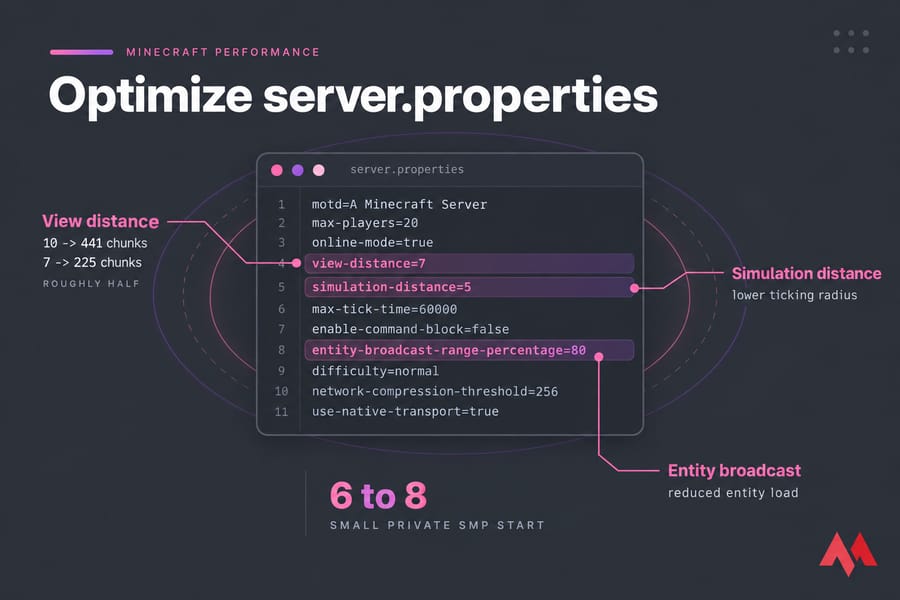
view-distance is the radius of chunks the server sends each player, and it defaults to 10 on Paper and Vanilla. The loaded area is a square, so cost grows fast: a radius of 10 covers 441 chunks per player, while 7 covers 225, roughly half. Players see fog closer in. For a small private SMP, start at 6 to 8.
How simulation-distance affects ticking and farms
simulation-distance controls how far from a player the world actually ticks: mobs move, crops grow, redstone fires and fluids flow. It also defaults to 10. Ticking costs far more than sending terrain, so lowering it often helps more than people expect. The catch is that farms outside the simulated area stop while players are away, so warn your builders first.
| Server example | Players | View distance | Simulation distance | Notes |
|---|---|---|---|---|
| Small private SMP | 2 to 10 | 8 | 6 | Close to the default experience |
| Medium public survival | 10 to 40 | 7 | 5 | Tell farm builders about the change |
| Plugin-heavy survival server | 40+ | 6 | 4 | Lower further only if profiling shows ticking load |
| Light modded Fabric server | 5 to 20 | 7 | 5 | Modded chunks cost more, test with your pack |
Treat these as starting points to test against your own profile.
Other settings that impact server strain
entity-broadcast-range-percentage sets how close entities must be before the server sends them to clients. Around 80 trims network and client load near busy farms. Paper's world config files add options for entity limits, despawn ranges and hopper behavior. Change them one at a time and write each change down; after a dozen stacked edits, you can't trace a regression.
Use spark profiler and Paper tools to find the real bottleneck
How to profile a Paper server with spark
Paper bundles spark from 1.21, and the PaperMC docs call it the preferred profiler. Timings still ships, but the same docs say it has been unmaintained for years and is hard for beginners to read. On older Paper, Spigot, Fabric or Forge, install spark as a plugin or mod.
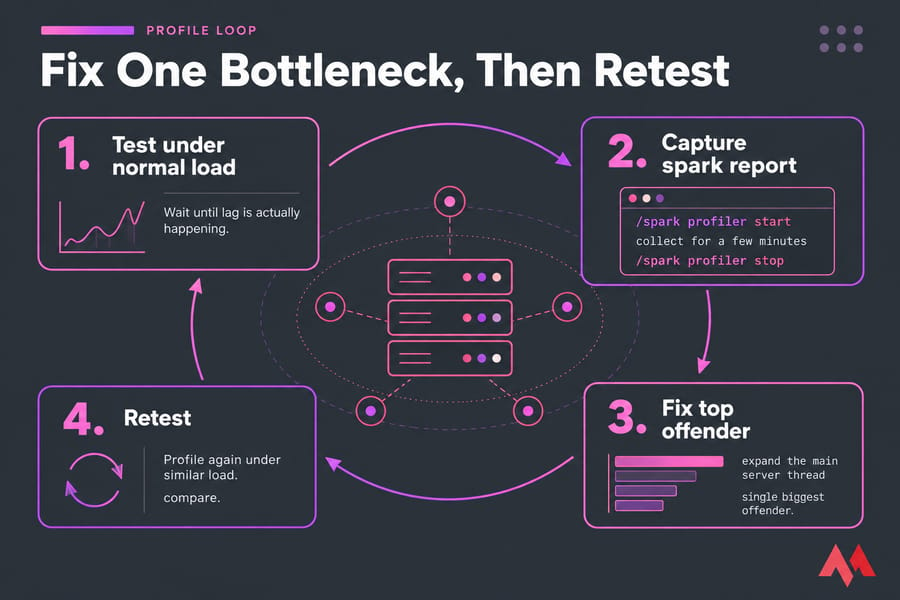
- Wait until the server is under normal load and the lag is actually happening.
- Run
/spark profiler start, let it collect for a few minutes, then run/spark profiler stop. - Open the link and expand the main server thread to see what takes the most tick time.
- Fix the single biggest offender.
- Profile again under similar load and compare.
When to use /tps, /mspt, and Paper diagnostics
/tps shows average TPS over the last 1, 5 and 15 minutes. Paper's /mspt shows tick times, which warn you before TPS falls. /spark tps and /spark health add CPU, memory and GC stats. Use these day to day and run a full profile when something looks off.
What a bad profiling report usually points to
Most reports land in one of four places: a plugin's event listener or scheduled task eating the tick, entity ticking (mobs, villagers, item drops), chunk generation spikes from exploring, or long GC pauses from memory sizing. If your host's graphs disagree with spark, check those too. Checking VPS resource usage and general VPS performance tuning cover the system side.
Pre-generate chunks to reduce world generation lag
Why unexplored terrain hurts performance
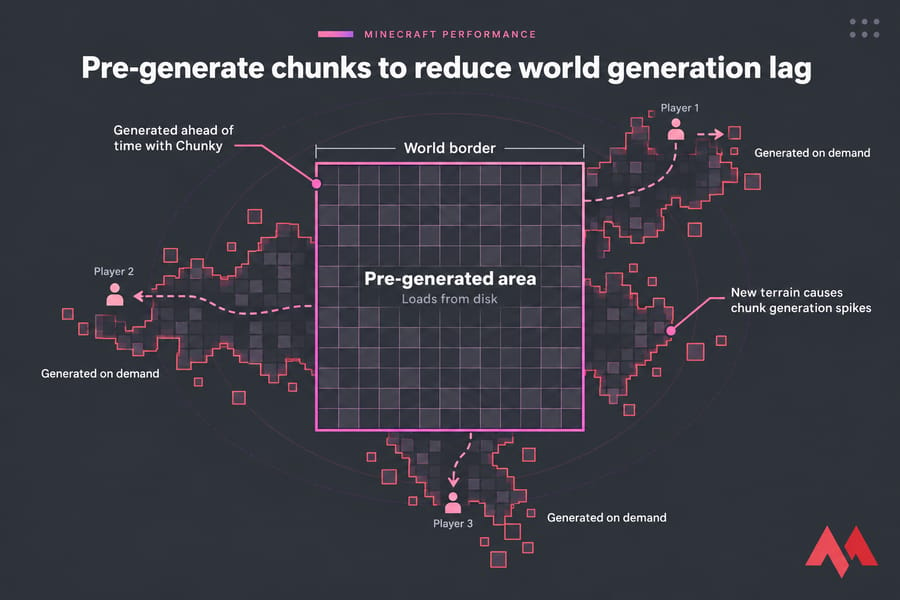
Generating a chunk is one of the most expensive jobs the server does, since terrain, caves, structures and lighting all get calculated first. Three players on elytra heading different ways keep the server generating nonstop, and TPS drops for everyone.
When to use Chunky or similar pregeneration tools
Chunky is the common choice and runs as a plugin on Paper and a mod on Fabric and Forge. Set a center and radius (for example /chunky radius 5000), run /chunky start, and the area gets generated ahead of time so it later loads from disk. It keeps the CPU busy for hours, so run it off-peak and back up first.
How large your pre-generated area should be
A small SMP might need a radius of 3,000 to 5,000 blocks; a public server with lots of exploring will want more. Put a world border at the edge, or players will generate new terrain past it and the lag comes back. Bigger areas take more disk space, which matters on small plans and when you transfer a Minecraft world to a new server.
Reduce plugin, mod, and entity lag on a Minecraft server
Heavy plugins and scheduled tasks to audit
What plugins do matters more than how many you run. Look in spark for synchronous database calls, large block scans or frequent full-world checks. Before you install plugins on a Minecraft server, ask whether the feature is worth the tick time. Mods add blocks, entities and world generation, which is why installing mods on a Minecraft server usually raises hardware needs more than plugins do.
How mobs, villagers, hoppers, and redstone create lag
| Source | Why it lags | Fix |
|---|---|---|
| Villager trading halls | Villager pathfinding and AI are expensive per entity | Cap hall size, confine villagers to 1x1 cells |
| Mob farms | Hundreds of mobs ticking and colliding | Kill mobs quickly, limit farms per player |
| Item drops | Every dropped item is an entity | Collect drops, lower despawn times in Paper config |
| Hopper chains | Hoppers check for items constantly | Use water streams, shorten chains |
| Redstone clocks | Always-on clocks run whether anyone needs them or not | Add on/off switches, ban unattended clocks |
| Large animal pens | Animals breed and accumulate | Set per-chunk limits or ask players to cull |
Safe ways to cut entity load without ruining gameplay
Use spark or Paper's entity counts to find the busiest chunks, then talk to whoever built there. The cause is usually one oversized farm. Publish simple build rules, like farm size caps and switchable clocks, so players know them up front.
Skip lag-clearing plugins that wipe entities on a timer. They delete players' items, the lag returns between clears, and you never learn which farm caused it. If you're still choosing an ecosystem, Minecraft plugins vs mods explains the differences.
Tune Java RAM allocation and JVM flags carefully
How much RAM to allocate without overdoing it
RAM is the first fix most people try, and often the wrong one. Too much memory lets garbage pile up, so each collection has more to clear and stutters can get longer. A small Paper SMP runs comfortably on a few gigabytes; large Forge modpacks need much more. Leave headroom for the OS on a VPS. See how much RAM Minecraft needs, and once you've confirmed memory is the limit, how to add more RAM to a Minecraft server.
Java 21 requirements for newer Minecraft versions
Java servers on 1.20.5 and newer won't start on anything older than Java 21. Use a current OpenJDK 21 build, and if you're unsure what's installed, here's how to check your Java version.
When JVM flags help and when they do not
Setting -Xms and -Xmx to the same value and using G1GC covers most of the benefit. Aikar's flags are a widely used, well-tested G1GC baseline for Paper, and plenty of hosts ship them by default. They won't fix a villager hall, though, and their tuning predates Java 21, so measure before and after. A typical start command:
java -Xms6G -Xmx6G -XX:+UseG1GC -XX:+ParallelRefProcEnabled -XX:MaxGCPauseMillis=200 -XX:+UnlockExperimentalVMOptions -XX:+DisableExplicitGC -XX:+AlwaysPreTouch -jar paper.jar --noguiThe full set and the reasoning behind each option are in the best JVM arguments for Minecraft guide.
Improve Minecraft server hosting performance with better hardware
Why single-core CPU speed matters more than raw cores
Each world's main tick runs mostly on one thread, so a CPU with high clock speed and strong per-core performance beats one with many slow cores. Extra cores help with chunk loading, networking and the OS, but the main thread sets your TPS ceiling. The best server CPU for Minecraft guide compares chips.
NVMe storage, backups, and restart routines
Chunk loading, autosaves and backups all hit the disk, and NVMe cuts those stalls compared with SATA SSDs or spinning disks, especially on large pre-generated worlds. Shockbyte recommends restarting every 12 to 24 hours to clear old chunk and entity data from memory. Schedule restarts and backups for your quietest hour.
When to move to a VPS or dedicated Minecraft server
| Symptom | Likely bottleneck | Try first | Upgrade trigger |
|---|---|---|---|
| Low TPS with modest player count | CPU (weak or oversold cores) | Paper, lower distances, profile | MSPT stays high after config cleanup |
| Chunk loading stalls | Disk I/O | Pre-generate, check autosave | Host doesn't offer NVMe |
| Long GC pauses | RAM sizing | Right-size heap, review mods | Plan can't fit the pack plus OS headroom |
| Outages during attacks | Network | Whitelist, firewall | Public server without DDoS protection |
Free and shared hosts often put many servers on one CPU, which caps what tuning can do. A VPS gives you dedicated resources and root access; a dedicated server suits large networks or heavy modpacks. If your config is clean and the main thread is still maxed out, MonoVM's Minecraft VPS hosting gives you more CPU and NVMe storage. New hardware won't rescue a bad config, so finish the earlier steps first. For a wider look at providers, read best Minecraft server hosting.
Common Minecraft server optimization mistakes to avoid
- Giving Java most of the machine's RAM, which means longer GC pauses and a starved OS.
- Copying an old guide's config. Option names and defaults have changed across Paper versions, and some old values break current mechanics.
- Dropping
simulation-distanceto 2 or 3 for TPS, then losing players whose farms stopped. - Editing configs without a backup. Keep a copy of every config before you change it, and see how to back up a server or VPS for the full-machine view.
- Updating Minecraft without checking the Java version it needs.
- Changing five things at once, so you can't tell which one helped and which one hurt.
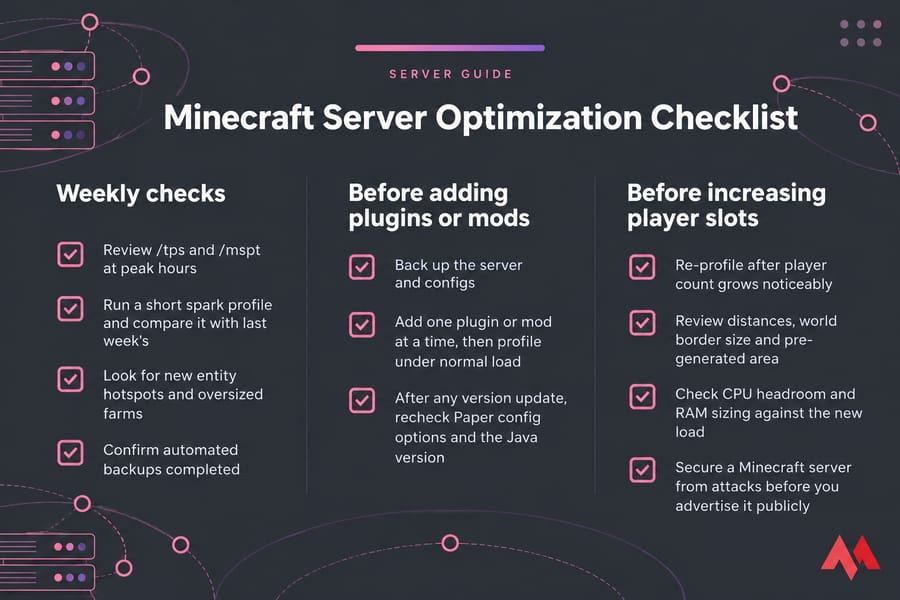
Minecraft server optimization checklist for ongoing maintenance
Weekly checks
- Review
/tpsand/msptat peak hours - Run a short spark profile and compare it with last week's
- Look for new entity hotspots and oversized farms
- Confirm automated backups completed
Before adding plugins or mods
- Back up the server and configs
- Add one plugin or mod at a time, then profile under normal load
- After any version update, recheck Paper config options and the Java version (see how to update a Minecraft server)
Before increasing player slots
- Re-profile after player count grows noticeably
- Review distances, world border size and pre-generated area
- Check CPU headroom and RAM sizing against the new load
- Secure a Minecraft server from attacks before you advertise it publicly
If you've worked through the checklist and the server is still at its limit, the next step is a host with fast per-core CPUs and NVMe storage. Get Minecraft server hosting from MonoVM and move your tuned configs over.

An experienced tech and developer blog writer, specializing in VPS hosting and server technologies. Fueled by a passion for innovation, I break down complex technical concepts into digestible content, simplifying tech for everyone.