IPv6 Neighbor Discovery Protocol (NDP) is the ICMPv6-based system a VPS uses to find its router, resolve neighbor MAC addresses, check that its addresses are unique, and track whether neighbors are still reachable. It replaces IPv4's ARP and drives Router Advertisements, SLAAC, and proxy NDP. When IPv6 on a VPS "half works," the fault is usually in NDP.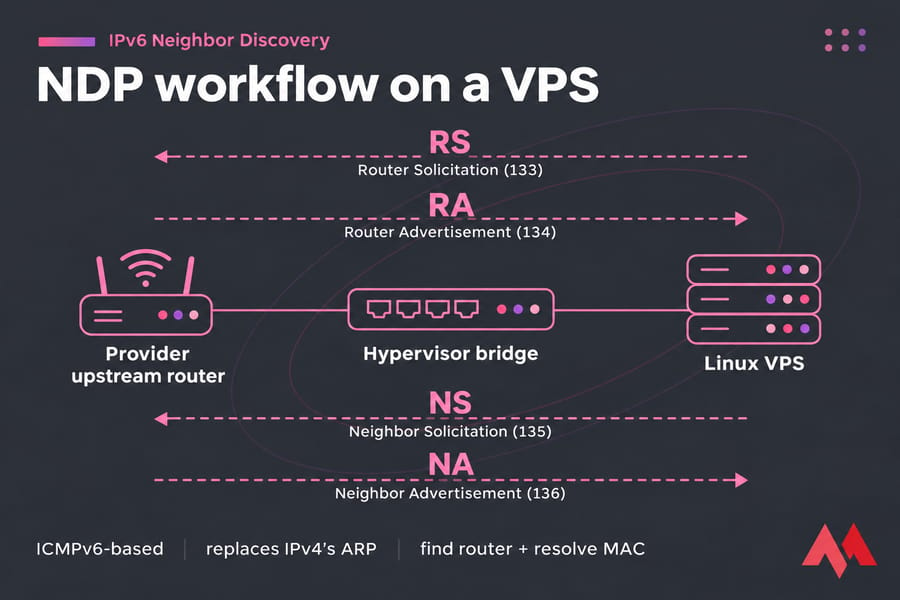
What IPv6 Neighbor Discovery is and how it works
NDP is defined in RFC 4861 and runs entirely on ICMPv6. In IPv4, ARP, ICMP Router Discovery and Redirect handled these jobs separately; NDP covers all of them. (New to the basics? Read what IPv6 is.)
NDP uses five ICMPv6 message types:
- RS (Router Solicitation, type 133): a host asks for a router.
- RA (Router Advertisement, type 134): the router announces itself, its prefixes and its config flags. It can also carry DNS servers through the RDNSS and DNSSL options from RFC 6106.
- NS (Neighbor Solicitation, type 135): asks "who has this IPv6 address?" It goes to a solicited-node multicast group instead of a broadcast.
- NA (Neighbor Advertisement, type 136): the reply with the link-layer (MAC) address.
- Redirect (type 137): a router points a host to a better next hop.
Results go into the neighbor cache, with states like REACHABLE, STALE, INCOMPLETE and FAILED. Before using a new address, a host runs Duplicate Address Detection (DAD, RFC 4862): it sends an NS for its own address and drops the address if anyone answers.
Why IPv6 Neighbor Discovery matters on VPS servers
On a VPS, the router belongs to the provider. Your server can show a global address in ip -6 addr while the upstream router has no idea where to send its traffic, which is why an AAAA record pointing at a correct address can still time out.
Providers set up IPv6 differently. DigitalOcean, for example, gives each IPv6-enabled Droplet a /124 subnet with 16 usable addresses and auto-configures one of them.
| Provider behavior | What you'll see | What to configure |
|---|---|---|
| Single IPv6 via RA or static config | One global address, default route via fe80:: gateway |
Usually nothing; confirm the route |
| Prefix is on-link (/64 shared with the router) | Router sends NS for each address you use | Add extra addresses to the interface |
| Prefix routed to your primary address | No NS per address | Assign addresses anywhere |
| On-link prefix used by containers behind the VPS | Upstream NS unanswered | Proxy NDP or an NDP proxy daemon |
For prefix sizing, see IPv6 subnets and /64 prefixes. If you run IPv4 and IPv6 together, see dual-stack IPv4 and IPv6 networking.
NDP vs ARP, SLAAC, and DHCPv6
NDP is the message layer. SLAAC is a set of rules (RFC 4862) that uses RA messages to build addresses, and DHCPv6 is a separate server-based protocol. See IPv4 vs IPv6 and SLAAC vs DHCPv6 for more.
| Item | Role | Uses ICMPv6? | Assigns addresses? | VPS use case |
|---|---|---|---|---|
| ARP | IPv4 address resolution | No | No | IPv4 side of a dual-stack VPS |
| NDP | Router discovery, resolution, reachability, DAD | Yes | No | Every IPv6 VPS |
| SLAAC | Builds addresses from RA prefixes | Yes, via RA | Yes, host-generated | Providers that hand out addresses by RA |
| DHCPv6 | Server-assigned addresses and options | No (UDP) | Yes | Rare on VPS; still needs RA for the default route |
DHCPv6 can't give you a default route, so even a DHCPv6 network relies on RA for that. Many servers pair a static address with a fe80::1 gateway, learned from RA or set by hand, and RDNSS lets RA deliver DNS servers without DHCPv6.
How to check IPv6 Neighbor Discovery on a Linux VPS
Replace eth0 with your interface (ens3 and enp1s0 are common).
- Confirm you have a global address and a link-local (
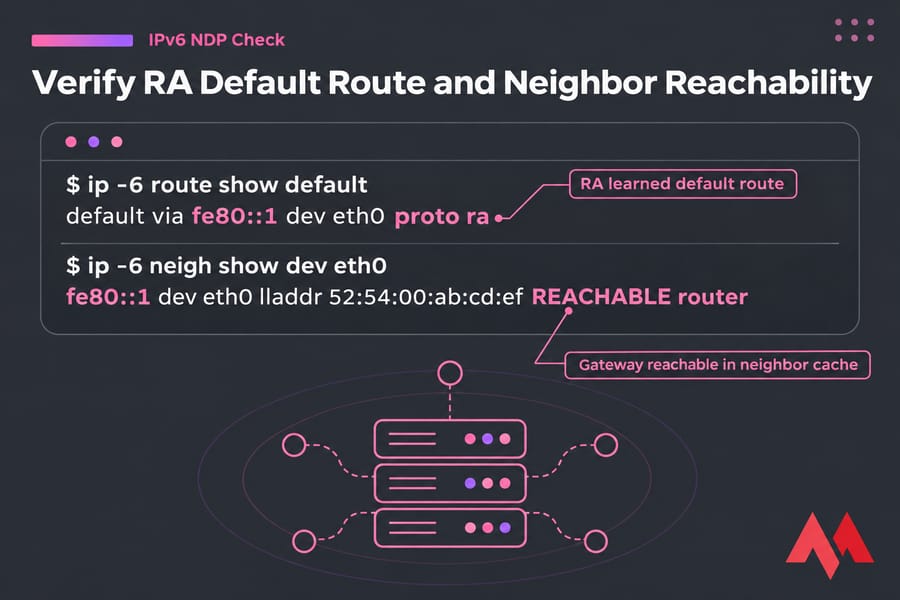
fe80::) address, and that neither is markedtentativeordadfailed:ip -6 addr show dev eth0 - Check for a default route. "proto ra" means it came from a Router Advertisement:
ip -6 route show default - Inspect the neighbor cache. The gateway should show REACHABLE or STALE with a MAC address. FAILED means trouble:
ip -6 neigh show dev eth0 - Watch NDP traffic live, restarting the interface to catch RS and RA:
tcpdump -ni eth0 'icmp6 and ip6[40] >= 133 and ip6[40] <= 137' - Test outbound reachability:
ping -6 -c 4 2001:4860:4860::8888
Ubuntu uses netplan with systemd-networkd, while Debian often uses ifupdown. For distro-specific steps, see configure IPv6 on Ubuntu.
Proxy NDP on a VPS
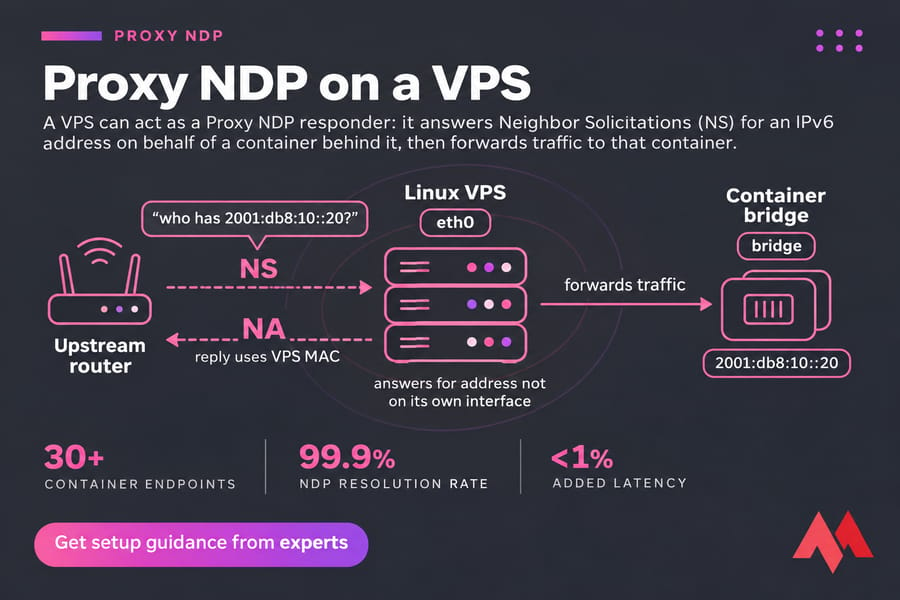
Proxy NDP makes your VPS answer Neighbor Solicitations for addresses that aren't on its own interface, such as container addresses behind it. You only need it when the upstream router treats your prefix as on-link. If your provider routes the prefix to your primary address, skip it.
Temporary setup with iproute2:
sysctl -w net.ipv6.conf.eth0.proxy_ndp=1
sysctl -w net.ipv6.conf.all.forwarding=1
sysctl -w net.ipv6.conf.eth0.accept_ra=2
ip -6 neigh add proxy 2001:db8:10::20 dev eth0
ip -6 neigh show proxy
The last command should list the proxied address. Don't skip the accept_ra=2 line: once forwarding is on, Linux ignores Router Advertisements, and your RA-learned default route disappears when it expires.
To make it persistent with systemd-networkd, add these lines to the interface's .network file:
[Network]
IPv6ProxyNDP=yes
IPv6ProxyNDPAddress=2001:db8:10::20
systemd-networkd then sets the per-interface proxy_ndp switch and adds each address to the kernel's proxy table. The kernel only proxies addresses you list, so for large ranges you'll want a daemon such as ndppd. To test, run ping -6 from an outside host while tcpdump on the VPS shows the NS coming in and your NA going out.
Common IPv6 NDP problems and fixes
| Symptom | Likely cause | Check | Fix |
|---|---|---|---|
| Address assigned, unreachable from outside | Upstream NS unanswered, or wrong prefix length | tcpdump for NS |
Correct the prefix; add proxy NDP if needed |
| No default route after boot | RA ignored (forwarding on, accept_ra 0 or 1) |
ip -6 route |
accept_ra=2 or a static fe80::1 gateway |
Address marked dadfailed |
Duplicate address on the link | ip -6 addr |
Pick another address; ask the provider |
| Gateway FAILED or INCOMPLETE | Firewall dropping ICMPv6 types 133 to 137 | ip -6 neigh |
Allow NDP in ip6tables/nftables |
| Ping works, names don't resolve | No IPv6 DNS | resolvectl status |
Set DNS explicitly |
Check in this order: address, route, RA, neighbor cache, firewall, DNS. For more cases, see fix IPv6 connection problems. NAT64 and DNS64 setups add failure points of their own.
IPv6 NDP security on VPS environments
RFC 4861 notes that unsecured NDP is open to spoofed RAs and forged NAs, which let an attacker on the same link redirect traffic. Providers usually filter this at the switch, but you can't verify that from inside the guest. RFC 6583 describes another risk: scanning a large on-link prefix can fill a router's neighbor cache.
- Allow the ICMPv6 types NDP uses. Blocking all ICMPv6 breaks IPv6.
- Set
accept_ra=0on interfaces that should never learn routes. - Confirm your cloud firewall has IPv6 rules as well as IPv4 ones.
- Watch
ip monitor neighfor unexpected gateway MAC changes.
For the broader hardening list, see IPv6 security best practices.
Need an IPv6-ready VPS?
MonoVM's IPv6 VPS hosting and Linux VPS hosting let you run dual-stack apps, test routing, or host services on multiple IPv6 addresses. Both give you root access, so you can set up everything in this guide yourself.

An experienced tech and developer blog writer, specializing in VPS hosting and server technologies. Fueled by a passion for innovation, I break down complex technical concepts into digestible content, simplifying tech for everyone.