
Installing plugins on a Minecraft server is mostly a five-minute job — if you're running the right server software. That's the part nobody tells you before you spend an hour wondering why your .jar file did nothing.
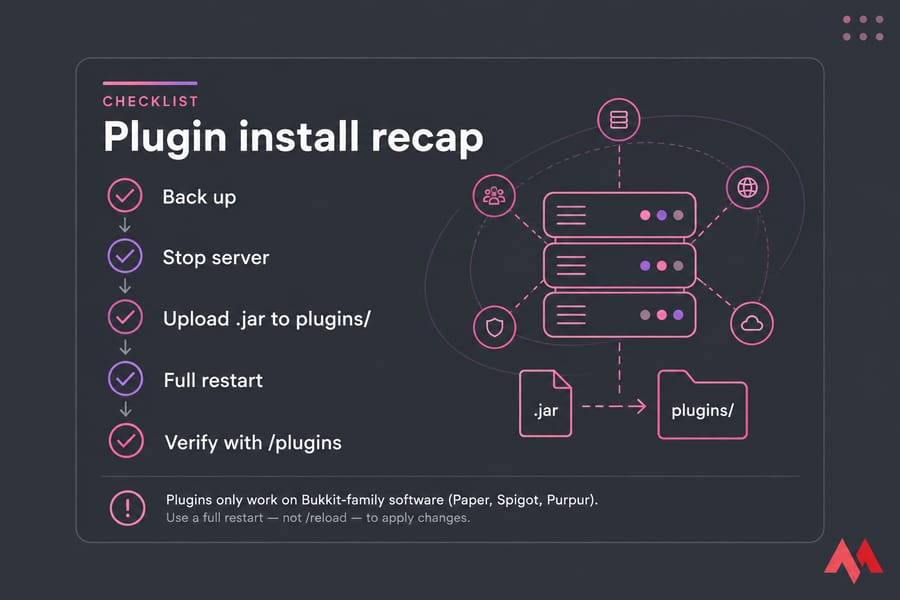
Short version: plugins only load on Bukkit-family software — Paper, Spigot, Purpur, or old Bukkit. Stop the server, drop the plugin .jar into the plugins folder, start the server again, then run /plugins to confirm it loaded. Use a full restart, never /reload.
Now let's go through it properly, including the compatibility checks and the errors that trip up almost everyone on their first try. If you haven't built the base server yet, start with how to make a Minecraft server and come back here.
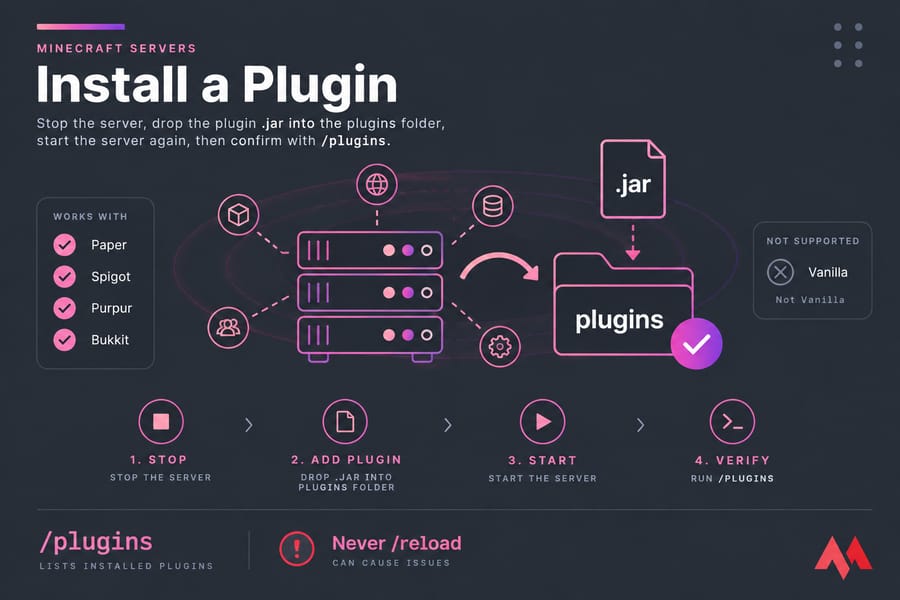
What Minecraft server software supports plugins?
Plugins are written against the Bukkit API. If your server jar doesn't implement that API, it has no idea what a plugin is — it'll ignore the file completely, no error, no warning, nothing.
Do plugins work on vanilla Minecraft servers?
No. The official Mojang server.jar can't load plugins, and it won't even create a plugins folder. If you're on vanilla, swap the jar for Paper before you do anything else. Your world files carry over — Paper reads the same world data, so you're not starting from scratch.
Why Paper is the default choice
Paper is a drop-in replacement for CraftBukkit and Spigot, and it's where the ecosystem's momentum lives. Better performance out of the box, active development, and Hangar (Paper's own plugin repository) sitting right next to it. Worth knowing: current Paper builds require Java 25, while the older 1.20.5–1.21.x lines run on Java 21. Check your host's Java version selector before you upgrade anything.
Paper vs Spigot vs Purpur
| Software | Plugin support | Performance | Best for |
|---|---|---|---|
| Vanilla | None | Baseline | Pure survival with friends |
| Spigot | Bukkit + Spigot plugins | Better than vanilla | Legacy setups, older guides |
| Paper | Bukkit, Spigot, and Paper plugins | Strong | Almost every plugin server |
| Purpur | Same as Paper (it's a Paper fork) | Paper-level, plus extra toggles | Admins who want deep config control |
Purpur is a fork of Paper, which is a fork of Spigot, which came from CraftBukkit. So plugin compatibility flows downhill — a Spigot plugin runs on Paper and Purpur, but a Paper-specific plugin won't necessarily run on Spigot. Pick Paper unless you have a concrete reason not to.
Minecraft plugins vs mods: know the difference first
This is where half the failed installs come from. People download a mod, drop it in plugins/, and wonder why the server rejects it.
| Type | Runs on | Client install needed? | Example |
|---|---|---|---|
| Plugin | Paper, Spigot, Purpur, Bukkit | No — server-side only | EssentialsX, LuckPerms |
| Mod | Forge, Fabric, NeoForge | Usually yes, matching version | Create, JEI |
| Hybrid | Mohist, Arclight | Yes, for the mod half | Modded server with EssentialsX |
Plugins change server behaviour — commands, permissions, land claims, economy. Players join with a normal unmodified client. Mods change the game itself, which means everyone needs the same files installed.
Can you use plugins on Forge or Fabric?
Not directly. Forge, Fabric, and NeoForge are mod loaders; they don't implement the Bukkit API. Hybrids like Mohist and Arclight bolt both systems together and they do work — but they lag behind on updates and break in creative ways. I wouldn't hand one to a first-time server owner. For a deeper breakdown, read our guide on Minecraft plugins vs mods.
Plugin compatibility checklist before you upload anything
Run through this before you touch a file. It takes two minutes and prevents most crashes.
- Minecraft version match. Mojang moved to year-based version numbers in 2026 (26.1, 26.2), so instead of hunting for "1.21 support" you're now matching your game drop. A plugin built for a newer API often refuses to load on an older server jar.
- Platform match. The download page should say Paper, Spigot, or Bukkit. If it says Fabric or Forge only, stop.
- Java version. Your server jar dictates this, not the plugin — but a plugin compiled for a newer Java than your runtime throws an
UnsupportedClassVersionError. - Dependencies. Some plugins need helper libraries installed first. Vault is the classic one for economy and permissions bridging; ProtocolLib handles packet-level features; PlaceholderAPI feeds text variables to other plugins.
- Backup. Take one. Every time. Here's how to back up a Minecraft server automatically so you stop relying on memory.
If your server itself is out of date, sort that first — our walkthrough on how to update a Minecraft server covers the safe order of operations.
How to install plugins on a Paper, Spigot, or Purpur server
Same five steps whether you're running the server on your own PC, a VPS over SFTP, or a hosting panel.
Step 1: Stop the server completely
Use the stop command in console or the Stop button in your panel. Wait for a clean shutdown — that flushes world data to disk. Killing the process mid-save is how worlds get corrupted.
Step 2: Download the correct .jar
Grab it from Hangar, Modrinth, or SpigotMC. Make sure the file ends in .jar. Some projects ship a .zip — extract it and find the jar inside, usually labelled bukkit or paper.
Step 3: Upload it to the plugins folder
The plugins/ folder sits in your server's root directory, next to server.properties and your world folders. Drop the jar straight in. Not in a subfolder, not renamed to something cute — just the jar, sitting in plugins/.
If the folder doesn't exist, that's your answer: you're not running plugin-capable software. Paper creates it on first boot.
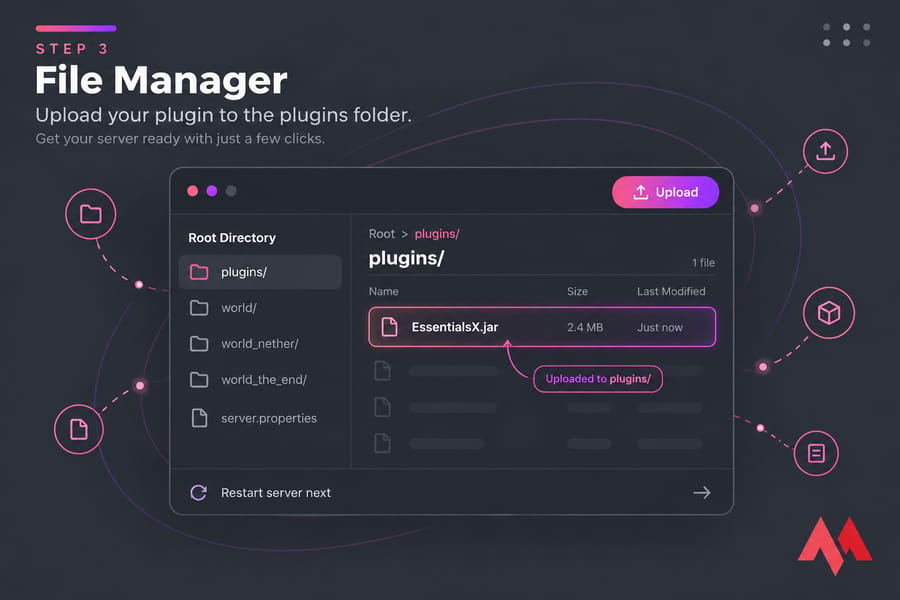
Step 4: Start the server with a full restart
Boot it back up normally. Watch the console as it loads — plugin enable messages appear during startup, and so do the errors. Don't walk away from this part.
Step 5: Confirm the plugin loaded
Type /plugins in-game or plugins in console. Green name means it's running. Red means it's installed but disabled or crashed. Missing entirely means the server never saw the file.
On first successful load, the plugin generates its own folder inside plugins/ — that's your proof it actually ran, and it's where the config lives.
Correct server software + matching plugin version + full restart = successful install. Miss any one of those three and it fails.
How to add plugins with a hosting control panel
Panel workflows look different but land in the same place.
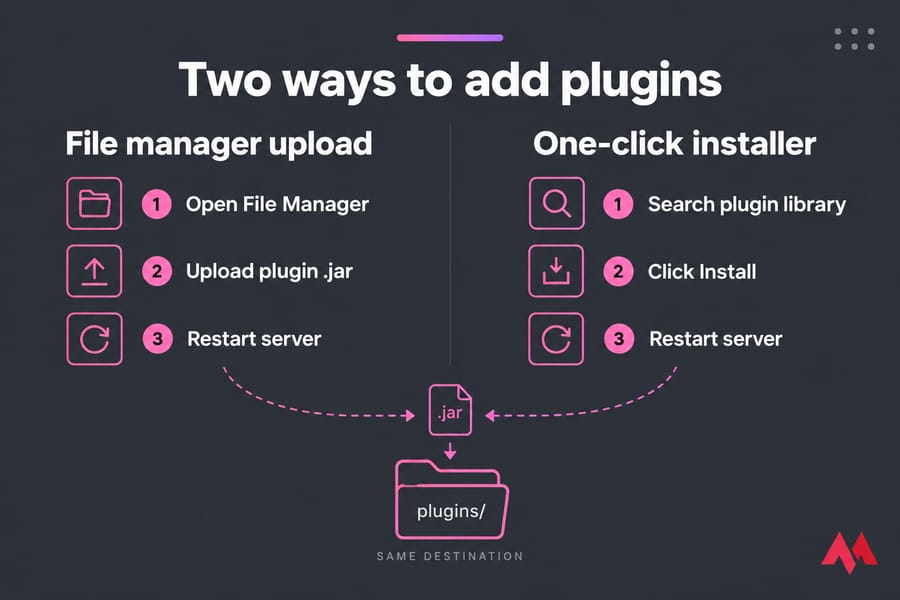
File manager route: open File Manager, navigate to plugins, click Upload, drag the jar in, then restart from the console tab. Large files sometimes time out in browser uploads — that's when SFTP earns its keep.
One-click installer route: some hosts bundle a plugin browser that pulls from an integrated library. Search, click install, restart. Convenient, but the catalogue is usually a subset of what's out there, and versions can lag behind the source.
Both methods drop the same jar into the same folder. Managed panels are convenient, but full VPS access is better when you want direct control over plugin files and configs. If you're comparing options, our roundup of the best Minecraft server hosting breaks down what actually matters.
Configuring, updating, and removing plugins
After the first successful start, look inside plugins/PluginName/. You'll find config.yml plus any language or data files. Edit it, save, restart.
YAML is picky about indentation — spaces only, never tabs. One stray tab and the plugin refuses to load with a parse error. Edit through your panel's built-in editor or something like nano over SSH.
Restart, don't /reload
The /reload command tries to unload and re-register plugin classes while the JVM is running. Java doesn't handle that cleanly — you get orphaned listeners, memory leaks, duplicated tasks, and bugs that surface an hour later with no obvious cause. Plugin developers have been warning people off it for years. A plugin's own reload command (like /lp reload) is fine; the global /reload isn't.
Updating and removing
To update: back up, stop the server, delete the old jar, upload the new one, start. Never leave two versions of the same plugin in the folder — the server may load both and things get weird. Skim the changelog for config-breaking changes before you commit.
To remove: stop the server, delete the jar. Keep the config folder if you might reinstall later; delete it for a clean slate. If a bad update wrecks something, restore your backup rather than trying to patch around it.
Plugin not loading? Common errors and fixes
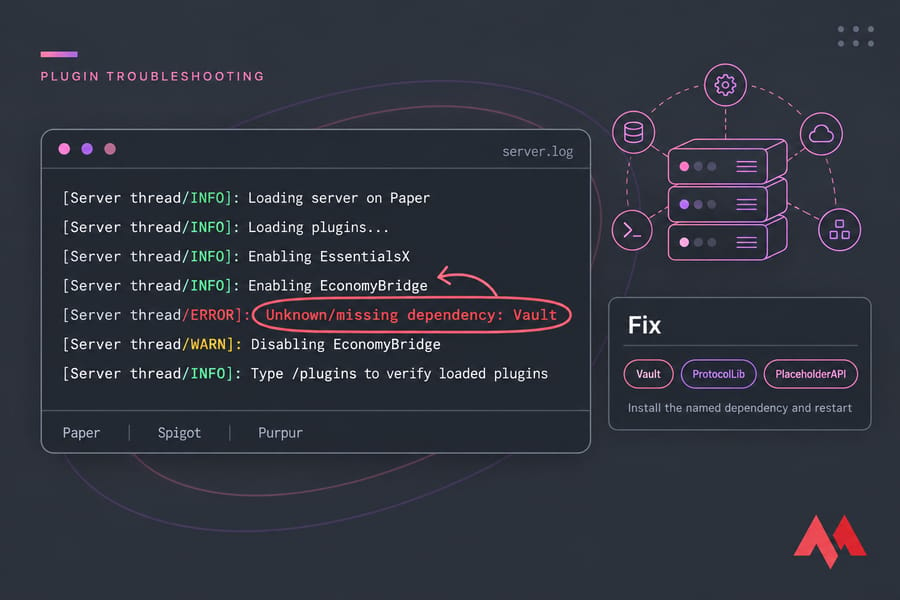
Your startup log names the problem almost every time. Read it before you guess.
| Symptom | Likely cause | Fix |
|---|---|---|
Plugin missing from /plugins |
Wrong folder, wrong file type, or vanilla server | Confirm the jar sits directly in plugins/ and you're on Paper/Spigot/Purpur |
| Plugin listed in red | Loaded but disabled after an error | Search the log for the plugin name and read the stack trace above it |
Unknown/missing dependency |
Required library not installed | Install the named dependency (Vault, ProtocolLib, PlaceholderAPI) and restart |
Unsupported API version |
Plugin built for a newer Minecraft version | Download the build matching your server version, or update the server |
UnsupportedClassVersionError |
Java runtime too old | Move to the Java version your server jar requires |
| Server won't start at all | Plugin crashes during enable, or RAM exhaustion | Remove the last jar you added, restart, then reinstall properly |
| Server starts but lags hard | Too many plugins for the allocated memory | See add more RAM to your Minecraft server |
One underrated cause: a truncated upload. If the jar transferred over a flaky connection, the file is corrupt and the server throws an invalid-jar error. Re-upload and compare file sizes.
Safe places to download Minecraft plugins
Three sources cover practically everything you'll need:
- Hangar — Paper's own repository and their recommended starting point.
- Modrinth — modern interface, clear version and platform filters, hosts plugins alongside mods.
- SpigotMC — the long-running community resource hub, still where many established plugins publish.
BukkitDev and official GitHub releases are fine too. What you want to avoid are reupload sites and YouTube description links — that's where malicious jars live, and a plugin runs with full server permissions. Before downloading, check the update date, the supported versions list, and the dependency notes.
Good first plugins: EssentialsX (core commands and homes), LuckPerms (permissions), WorldEdit (building), WorldGuard (region protection), ViaVersion (lets older clients connect). Install them one at a time and restart between each. Tedious, but when something breaks you'll know exactly what caused it.
Next steps: performance, backups, and hosting
A handful of plugins costs you almost nothing. Fifteen of them, with a big world and twenty players online, is a different story — each one adds memory pressure and tick time. CPU single-thread performance matters more than core count here, which our breakdown of the best server CPU for Minecraft explains, and capacity planning starts with how much RAM Minecraft needs.
Two habits to build now: back up before every plugin change, and test new plugins on a copy of the world before touching the live server. Self-hosting from home? You'll also want to port forward a Minecraft server properly.
Ready for a server that keeps up with your plugin list? Run Paper, Spigot, or Purpur on a MonoVM Minecraft VPS with direct file access and resources you can scale, or start from a clean Linux VPS and build it your way.

An experienced tech and developer blog writer, specializing in VPS hosting and server technologies. Fueled by a passion for innovation, I break down complex technical concepts into digestible content, simplifying tech for everyone.