KVM and Docker solve different problems, so "kvm vs docker" is rarely an either-or choice. KVM runs full virtual machines, each with its own guest operating system and kernel. Docker runs lightweight containers that share the host's Linux kernel. Choose KVM for stronger isolation and mixed-OS workloads, Docker for fast deployment and density, or combine them by running Docker inside a KVM VPS, which is what most production setups do.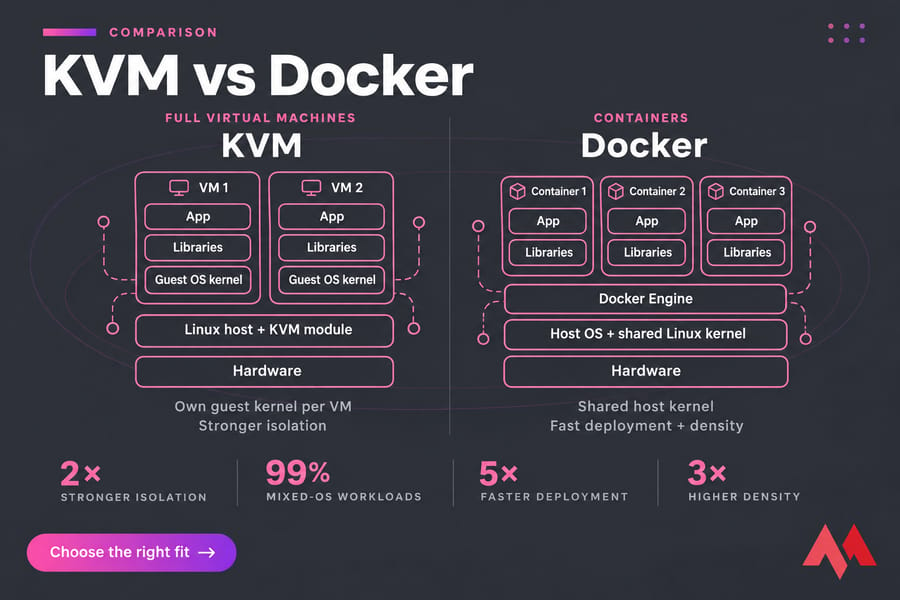
KVM vs Docker at a glance
KVM virtualizes hardware; Docker virtualizes at the operating system level. The VM vs container question comes down to which layer you need.
| Feature | KVM (virtual machine) | Docker (container) |
|---|---|---|
| Kernel | Own guest kernel per VM | Shared host kernel |
| OS choice | Linux, Windows, BSD, custom kernels | Linux userspaces only |
| Startup | Boots a full OS | Starts a process, usually in seconds |
| Overhead | Full OS per VM | App plus its libraries |
| Isolation | Hypervisor boundary | Namespaces and cgroups |
| Best for | Tenant isolation, mixed OS, legacy apps | Microservices, CI/CD, repeatable deploys |
For background, see MonoVM's guides on KVM virtualization and VM vs containers.
What KVM is and how it works
KVM (Kernel-based Virtual Machine) is a Linux kernel module that turns the kernel into a hypervisor. It has been in mainline Linux since version 2.6.20 in 2007. Using Intel VT-x or AMD-V, it runs each VM as a normal Linux process.
QEMU emulates each VM's devices, and libvirt manages them through tools like virsh. Inside each VM you install a complete guest OS, so Windows Server and Ubuntu can share one host. A KVM VPS hosting plan is one of these VMs, with full root access and your own kernel.
What Docker is and how containers work
A Docker container is an isolated process on the host. Namespaces give it its own view of processes, network, and filesystem; cgroups cap its CPU and memory. Containers start from images built as read-only layers (base distro, runtime, your code), and since no OS boots, a container starts about as fast as the app inside it.
Because every container uses the host kernel, you can't run a Windows app or load a custom kernel module per container. Keep a Docker cheat sheet nearby for daily commands.
Docker Engine vs Docker Desktop
Docker Engine is the daemon and CLI you install on a server. Docker Desktop is a workstation app, and Docker's documentation states that on Linux it runs a VM that requires KVM support. So Docker Desktop on a Linux laptop is already Docker inside KVM. On a VPS, use plain Docker Engine.
KVM vs Docker performance and resource usage
| Metric | KVM | Docker |
|---|---|---|
| Startup time | Boots a guest OS | Starts a process (clear Docker win) |
| Memory and disk | Guest OS per VM | Shared kernel and image layers |
| CPU-bound work | Near-native | Native (gap often small) |
| Density | A handful of VMs per host | Many containers per host |
For a CPU-heavy job like video encoding, KVM executes guest code directly on the CPU, so the gap can be modest. It grows with many small services: ten Node.js microservices as ten VMs means ten kernels and ten copies of system packages, while ten containers share one. Benchmark your own workload before choosing on speed.
KVM vs Docker security and isolation
Each VM has its own kernel, and an attacker must break through the hypervisor to reach the host or a neighbor. Containers share the host kernel, so a kernel exploit from one container can affect everything on that host.
Rootless mode, seccomp profiles, and dropped capabilities shrink the container attack surface a lot, but there's still one kernel. That shared kernel is a concern for multi-tenant SaaS, untrusted code such as user-submitted builds, and regulated workloads where auditors ask how tenants are separated. In those cases I'd give each tenant its own VM and run containers inside it. MonoVM's virtual machine security best practices cover hardening that VM layer.
When to use Docker vs a VM
| Workload | Recommended | Why |
|---|---|---|
| Windows or mixed Windows/Linux apps | KVM | Containers can't change the kernel |
| Custom kernel or kernel modules | KVM | You control the guest kernel |
| Legacy monolith on an old distro | KVM | Freeze the whole OS as-is |
| Node.js or Python microservices | Docker | One image per service, cheap to scale |
| CI/CD runners and staging | Docker | Same image from dev to production |
| WordPress or self-hosted apps on a VPS | Docker on KVM | Easy updates inside a private VM |
| Multi-tenant SaaS | Docker on KVM | Per-tenant VMs, containers inside |
If you're splitting an app into services, read how to deploy microservices.
Docker inside KVM: the hybrid approach
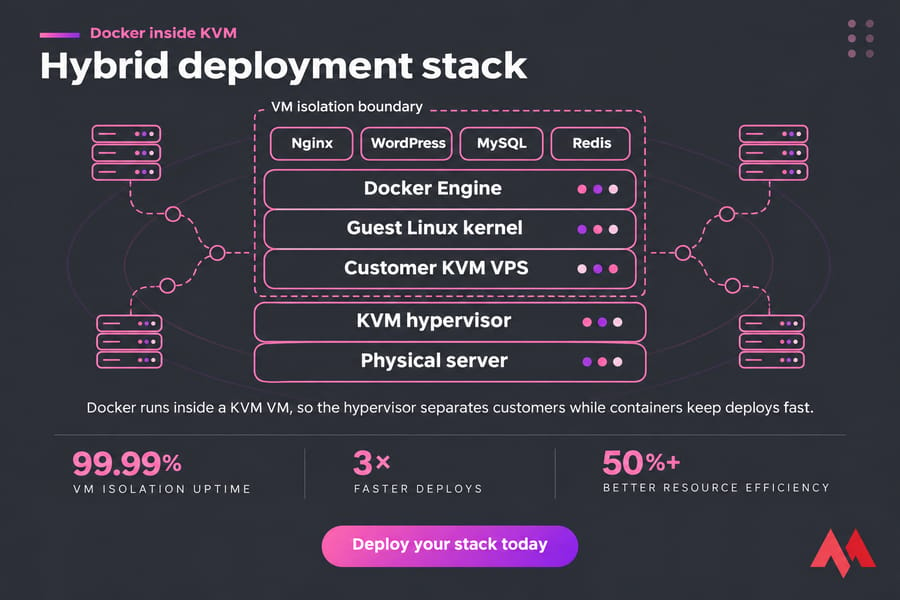
Docker runs fine inside a KVM VM, and that's the standard pattern in cloud hosting: cloud instances are VMs, and teams run containers on top. The hypervisor separates you from other customers, and containers keep your own deploys fast. A typical setup:
- Order a KVM VPS with enough RAM for the host OS plus your containers.
- Install Docker on Linux using Docker Engine.
- Run your apps with Docker Compose behind a reverse proxy container.
- Firewall the VM, since Docker edits iptables and published ports can bypass ufw rules.
This setup works well for agencies, startups running staging and production, and self-hosters. Learn how to set up a KVM VPS for web hosting, or start from Docker VPS hosting if you want Docker ready to go.
KVM vs Docker decision matrix
| Priority | Better choice |
|---|---|
| Isolation between tenants | KVM |
| OS and kernel flexibility | KVM |
| Startup speed and density | Docker |
| Portability and developer velocity | Docker |
| Single simple app, small team | KVM alone |
| Production VPS running several apps | Docker inside KVM |
Common mistakes when comparing Docker and KVM
- Treating a container like a small VM. It's a process with no guest OS of its own.
- Assuming Docker replaces every VM. On a VPS, the host kernel your containers use lives in a VM.
- Forgetting storage and networking. Container data disappears without volumes, and published ports can slip past your firewall.
- Adding Docker because it's popular. If nobody on the team knows it, one WordPress install on a plain VM is easier to run.
For the layer below both, see bare metal vs virtual machine.
Final verdict: should you choose KVM, Docker, or both?
Pick KVM when you need your own kernel, a non-Linux OS, or a hard boundary between tenants. Pick Docker when you ship many services, rebuild often, and want the same image in staging and production. For most people deploying apps on a VPS, the answer to KVM vs Docker is to run Docker Engine on a KVM VPS: the hypervisor isolates your server, and containers keep deployments fast and repeatable. Compare KVM VPS plans with Docker VPS plans to find the right base for your stack.

An experienced tech and developer blog writer, specializing in VPS hosting and server technologies. Fueled by a passion for innovation, I break down complex technical concepts into digestible content, simplifying tech for everyone.