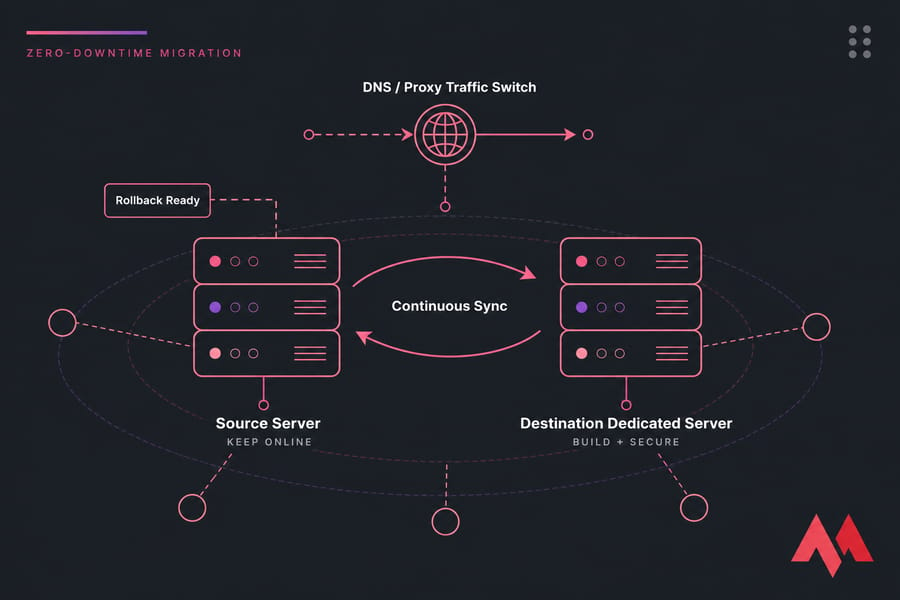
To migrate to a dedicated server without downtime, you keep the source server online, build and secure the destination server in parallel, run an initial file sync, replicate the changing database data, test privately through a hosts-file override, run a final delta sync, switch traffic via DNS or a proxy, then monitor both boxes and keep the source ready for rollback.
The Short Answer
That's the whole thing in one breath. But here's the honest qualification most guides skip: true zero downtime needs overlapping servers and a working method for synchronizing live writes. If replication isn't on the table, you'll need a short read-only window during the final sync — otherwise you lose data. A plain backup-and-restore dedicated server migration always costs you an interruption. Always.
How Zero-Downtime Server Migration Actually Works
The architecture matters more than the commands. Get this wrong and no amount of clever rsync flags will save you.
What "zero downtime" really means
There's a difference between "no visible interruption" and "literally zero failed requests." The second one requires a load balancer, health checks, and an application designed for it. Most sites don't have that. What you can realistically achieve is a migration where users notice nothing — maybe a handful of requests hit a slightly stale server, but nobody sees an error page and no order is lost.
The core pattern is simple. Both servers run at the same time. You bulk-copy everything, then keep copying only what changed, then move traffic. Files handle this well. Databases don't, because a database is a moving target with transactional guarantees you can't fake with a file copy.
Static sites vs. stateful applications
A static site — HTML, CSS, images, maybe a build pipeline — is trivial. Sync the files, test, flip DNS. You're done in an afternoon.
A WordPress or PHP CMS sits in the middle. Files change occasionally (uploads, plugin updates), the database changes constantly (comments, sessions, options autoload junk). A short read-only period usually solves it.
An e-commerce store or SaaS app is the hard case. Orders land every minute. Background workers process jobs. Redis holds sessions. Here you need real replication, or you will lose transactions. If you're not sure which category you're in, look at your database write rate during peak hours. That number decides your method.
Four cutover methods compared
| Method | Best for | Handles live writes? | User-visible interruption | Rollback speed | Main risk |
|---|---|---|---|---|---|
| Backup and restore | Small static sites, dev environments | No | Minutes to hours | Fast | Data loss between dump and cutover |
| Rsync + read-only freeze | CMS, brochure sites, low-write apps | Partially (writes paused) | Seconds to a few minutes | Fast | Freeze window runs longer than planned |
| Native database replication | E-commerce, SaaS, write-heavy apps | Yes | None if lag is zero | Moderate | Split writes to two primaries |
| Reverse proxy from source | Sites with slow DNS caches or long TTLs | Yes | None | Very fast | Added latency hop, proxy misconfiguration |
| Load balancer / blue-green | Multi-server production estates | Yes | None | Instant | Requires shared session and data layer |
| Floating IP | Same-provider, same-network moves | Yes | Seconds | Instant | Only works if infrastructure supports it |
Also worth confirming before you spend a weekend on this: is a dedicated box actually the right destination? If you haven't compared VPS vs. dedicated server tradeoffs yet, do that first. And if the term itself is fuzzy, what is a dedicated server covers the fundamentals.
Dedicated Server Migration Prerequisites
Do not start until every one of these is true. I mean it — I've watched a migration stall at 2 a.m. because nobody had registrar access.
- Root or sudo on both source and destination servers.
- SSH key authentication working between them (test it before migration day).
- Access to your authoritative DNS records — and the registrar login, in case nameservers need touching.
- A complete, restored-and-verified backup stored off the source server. Untested backups don't count. Here's how to create and verify a server backup.
- Database admin credentials and, if you're replicating, the ability to enable binary logging.
- TLS certificates in hand or the ability to reissue them.
- Both servers billable simultaneously for at least a week.
- A named rollback owner who can make the call without a committee meeting.
- A change freeze — no plugin updates, no deploys, no schema changes during the window.
Provision the destination early. You want days of overlap, not hours. Pick a location close to your primary users while you're at it — dedicated server hosting plans are available across a wide range of regions, so there's no reason to land your box on the wrong continent.
One more decision: can your team actually do this? If replication, cutover, and rollback are outside your comfort zone, a managed dedicated server is a legitimate risk-management choice, not an admission of defeat. The managed or unmanaged server breakdown helps you decide.
Build a Pre-Migration Server Audit
This is the step everyone rushes. Don't. Every migration horror story I've heard traces back to an undocumented dependency.
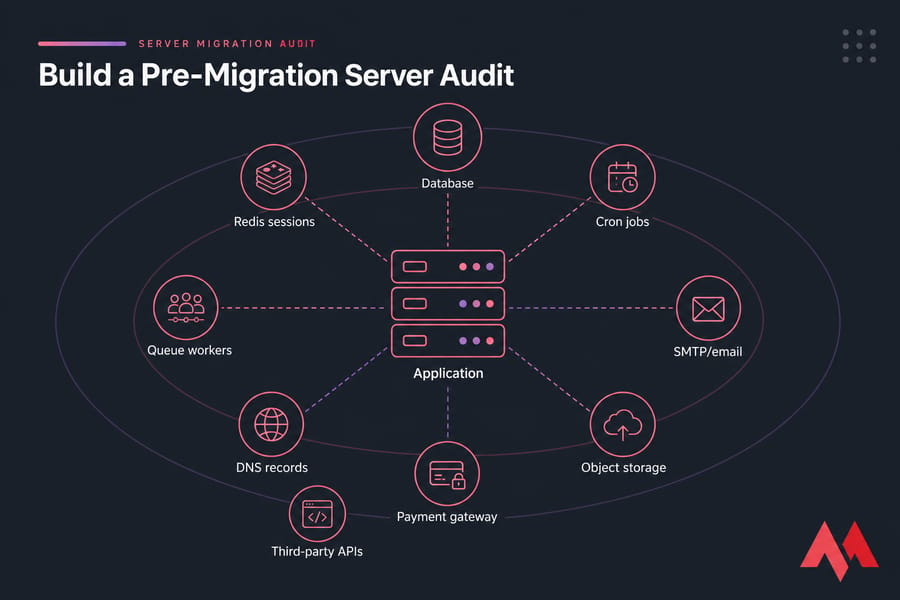
Record everything in a table with source value, destination value, owner, and status. Boring? Yes. It's also the difference between a clean cutover and a Tuesday afternoon of frantic debugging.
What to inventory
- Web layer: every domain, subdomain, virtual host, redirect rule, and certificate. Note Nginx or Apache version and any custom modules.
- Runtime: PHP version and every loaded extension (
php -m), Node/Python versions, composer or npm lockfiles. - Data: database engine and exact version, database names, users, grants, character sets, and total size.
- Resources: disk usage and inode usage (
df -h,df -i,du -sh), memory (free -m), peak CPU, IOPS, and monthly bandwidth. Our check disk space in Linux guide covers the storage side properly. - DNS: A, AAAA, CNAME, MX, TXT, SPF, DKIM, DMARC — and your current TTL values. Write them down now.
- Scheduled work: user crontabs, system cron, systemd timers, queue consumers, background workers.
- The forgotten stuff: Redis session store, upload directories, API keys, webhook endpoints, payment gateway callbacks, and any third-party service that allowlists your current IP.
That last bullet deserves emphasis. Payment processors, SMS gateways, and partner APIs often lock to a source IP. Your new dedicated server has a new IP. Submit those allowlist changes days ahead — some vendors take 48 hours.
Baseline your metrics
Before you touch anything, capture the source server's median response time, error rate, and transaction success rate. These become your pass/fail gates later. Without a baseline you're guessing whether the new box is actually better.
Then define rollback thresholds in writing. Something like: 5xx rate above 2% for five minutes, or checkout failure on the test transaction, or replication lag that won't drop to zero.
Prepare the New Dedicated Server
Build the destination to match the source. Match versions exactly. I know it's tempting to jump from PHP 8.1 to 8.3 while you're in there — resist. Migration and upgrade are two separate projects, and combining them means you won't know which one broke things.
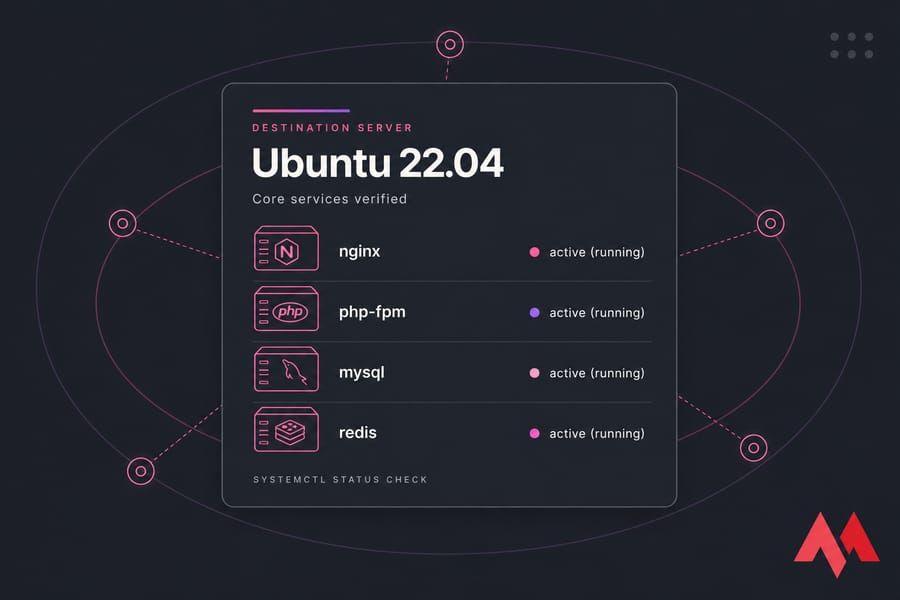
Work through this in order:
- Install the same OS family and release as the source (Ubuntu 22.04 in our running example).
- Set hostname, timezone, and NTP sync.
- Create service users, deploy SSH keys, disable password auth, configure sudo.
- Configure the firewall — open 80, 443, and your SSH port only. Nothing else.
- Install Nginx (or Apache), PHP-FPM with matching extensions, MySQL/MariaDB, Redis, and your monitoring agent.
- Recreate virtual hosts, document roots, ownership, and permissions.
- Stage TLS certificates without touching public DNS — use DNS-01 validation with Certbot, or copy the existing certificate and private key over an encrypted channel.
- Disable all cron jobs, queue workers, and outbound email on the destination. Two servers running the same nightly billing job is a genuinely bad day.
The full walkthrough lives in set up the new dedicated server, and you should run through the secure the dedicated server checklist before anything public points at it.
Size the box from your measured peak, not from your old plan's advertised limits. If the source never exceeded 6 GB of RAM but you were paying for 32, don't blindly buy 32 again.
Transfer Files With Rsync
Rsync is the right tool here because it copies deltas. First pass moves everything, subsequent passes move only what changed since. On 100 GB of files, that turns a four-hour transfer into a 90-second final sync.
Always dry-run first:
rsync -aHAXvzn --numeric-ids --info=progress2 \
  --exclude='cache/' \
  --exclude='tmp/' \
  --exclude='*.log' \
  /path/to/application/ \
  SSH_USER@NEW_SERVER_IP:/path/to/application/
Replace /path/to/application, SSH_USER, and NEW_SERVER_IP with your values. The -n makes it a dry run — it lists what would transfer without moving a byte. Read that output. If it wants to touch something unexpected, find out why before you drop the -n.
Flag breakdown: -a preserves permissions, timestamps, symlinks, and recurses. -H keeps hard links. -A and -X carry ACLs and extended attributes (important on SELinux systems). --numeric-ids preserves numeric UID/GID instead of remapping by name — critical when user IDs differ between servers. -z compresses in transit, which helps on slow links and hurts on fast ones with already-compressed data.
Trailing slashes matter more than people expect. /app/ copies the contents of app into the destination path. /app copies the directory itself, creating /dest/app/. Get this backwards and you'll have a nested mess.
Warning: Never put
--deletein a production command until you've reviewed a dry run of that exact command. It removes destination files that no longer exist on the source. Useful for the final pass, catastrophic if your paths are off by one directory.
Run the initial sync, then run it again a few hours later. Then again. Each pass gets faster. Verify with file counts (find /path -type f | wc -l on both sides), total size, and spot-check checksums with sha256sum on a few large files. For deeper flag coverage, see the rsync command guide.
What rsync should not touch: active sockets, PID files, and — this one's important — your database data directory. Which brings us to the hard part.
Migrate the Database Without Downtime
Files and databases have completely different consistency requirements. Rsync gives you eventual file consistency. A database needs transactional consistency, and copying /var/lib/mysql from a running server gives you neither — you get a torn, half-written mess that may or may not start.
Pick your method
| Workload | Recommended approach | Expected write pause |
|---|---|---|
| Static or read-only site | Single dump and restore | None |
| Small CMS, low write rate | Initial dump, then read-only mode for the final import | 30 seconds to 5 minutes |
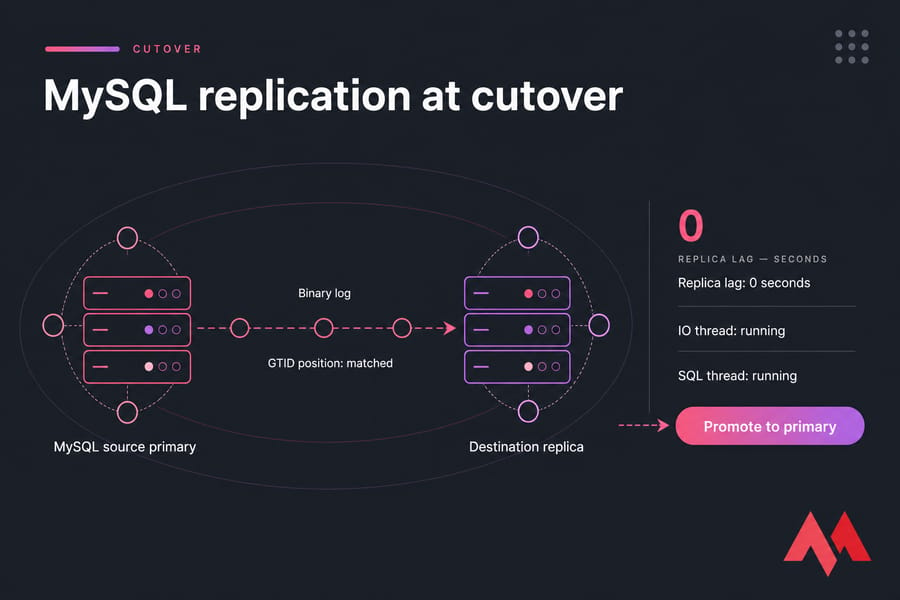
| E-commerce, SaaS, continuous writes | Native replication, promote at cutover | Seconds or none |
MySQL and MariaDB
Match versions first. Replicating from MySQL 8.0 to 5.7 doesn't work; the other direction usually does but adds risk. On the source, enable binary logging and create a replication user with the narrowest possible grants. Take a consistent dump with mysqldump --single-transaction --master-data=2 (InnoDB only) or use a snapshot tool, restore it on the destination, then point the replica at the source using GTID-based replication.
Watch SHOW REPLICA STATUS. You want Seconds_Behind_Source at zero and both IO and SQL threads running. Don't promote until lag is genuinely zero — not "close to zero."
PostgreSQL
Physical streaming replication with pg_basebackup is the straightforward path, but it requires identical major versions and copies the entire cluster. Logical replication handles cross-version moves and lets you migrate individual databases, at the cost of not replicating DDL. Monitor replay lag through pg_stat_replication.
Either way, the database replication guide goes deeper than I can here.
Redis, queues, and workers
Sessions in Redis? You've got three options: replicate Redis alongside the database, drain traffic gracefully, or just accept that users get logged out. For a forum, option three is fine. For a checkout flow mid-transaction, it absolutely isn't.
Queue consumers must run in exactly one place. Before cutover, stop the source workers, let the queue drain, then start the destination workers. Never both. Duplicate job execution means duplicate emails, duplicate charges, duplicate everything.
Validate before you trust it
Compare row counts on your largest tables. Spot-check the ten most recent orders. Run an actual write transaction against the destination and confirm it lands. Then check that it doesn't somehow replicate backwards.
If your application handles orders, subscriptions, or continuously written user data and you've never promoted a replica in production before — this is the moment to consider a managed dedicated server instead of learning on live data.
Test Before Changing DNS
Never test only the homepage. The homepage is the one page guaranteed to work.
Map your domain to the destination IP locally with a hosts-file override — use a hosts-file override explains the file location on Windows, macOS, and Linux. Test both the apex domain and www. For command-line testing without editing files, curl --resolve example.com:443:NEW_SERVER_IP https://example.com/ does the same job.
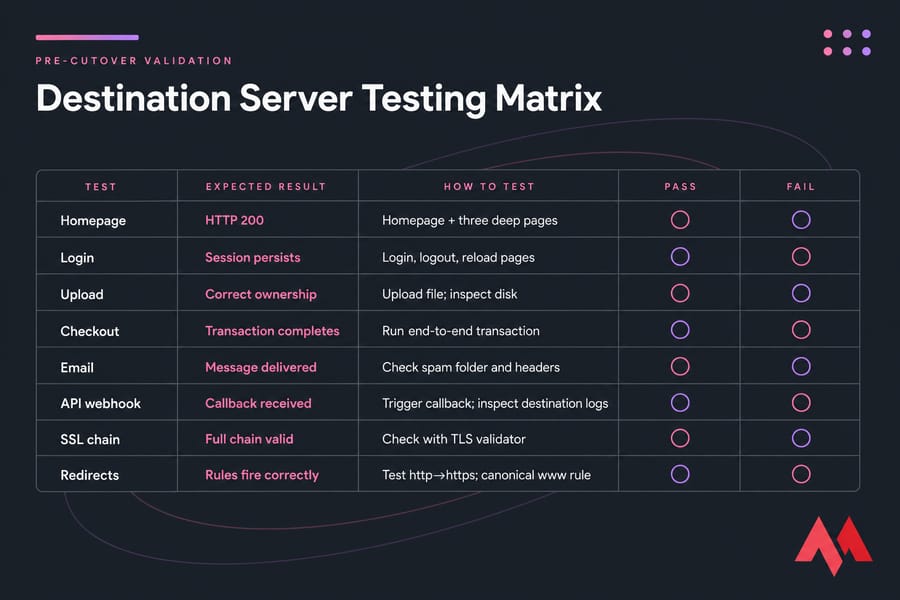
Work through every one of these with a named owner and a recorded result:
- Homepage and three deep pages return HTTP 200.
- All redirect rules fire correctly (http→https, non-www→www or whichever way you go).
- Full TLS chain validates — not just the leaf certificate.
- Login, logout, and session persistence across page loads.
- File upload writes to disk with correct ownership.
- Search and contact forms submit.
- A real checkout or write transaction completes end to end.
- Outbound email actually delivers (check spam folder and headers).
- API callbacks and webhooks reach the destination.
- Scheduled jobs run correctly when manually triggered — but stay disabled otherwise.
Then read the logs. Nginx error log, PHP-FPM log, application log, MySQL error log, journalctl -xe. A page can return 200 while quietly throwing warnings that become real failures under load.
Finally, compare response times against your source baseline. If the new dedicated server is slower, something's misconfigured — probably opcache, a missing index, or a query cache setting.
Perform the DNS Cutover
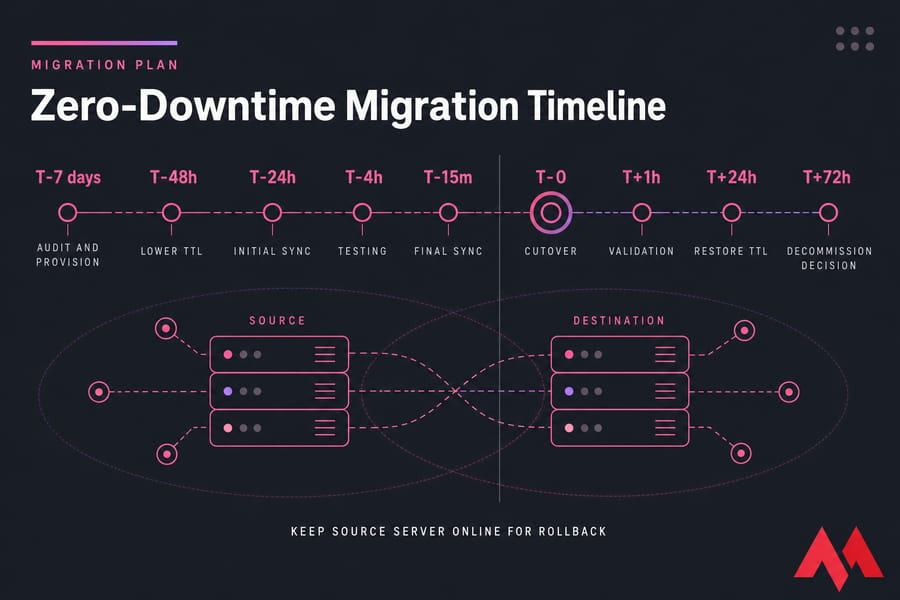
Lower your TTL 24 to 48 hours before migration day. Here's the nuance: the reduction only takes effect after the previous TTL expires from resolver caches. If your A record has been sitting at 86400 seconds, you need to wait a full day after dropping it to 300 before that short TTL is actually in play. Plan backwards from there.
The cutover sequence
- Run the final rsync delta pass. Should take seconds if you've been syncing regularly.
- Confirm replica lag is zero.
- If you have no replication, enable read-only or maintenance mode on the source now — and start a timer.
- Promote the destination database to primary. Stop replication cleanly; don't just kill it.
- Stop cron and workers on the source. Start them on the destination.
- Update the A record. Update the AAAA record too — forgetting IPv6 is a classic, and it means a slice of your users silently keeps hitting the old box.
- Verify with
dig +short example.com @your-authoritative-nsthat the authoritative answer changed. - Disable read-only mode if you enabled it.
Changing an A record doesn't instantly move everyone. Resolvers honour cached records, some ignore TTLs entirely, and corporate DNS can be stubborn. DNS propagation and TTL behaviour is worth understanding before you're standing in the middle of it.
Because of that lag, the source server must stay healthy and reachable — but it must not accept new writes into a separate database. The cleanest fix is to configure a reverse proxy on the source that forwards everything to the destination. Cached-DNS visitors get the new site, one hop later, with a single authoritative data layer. This is my preferred approach for anything transactional.
Monitor After Cutover
The DNS change starts the observation window. It doesn't end the migration.
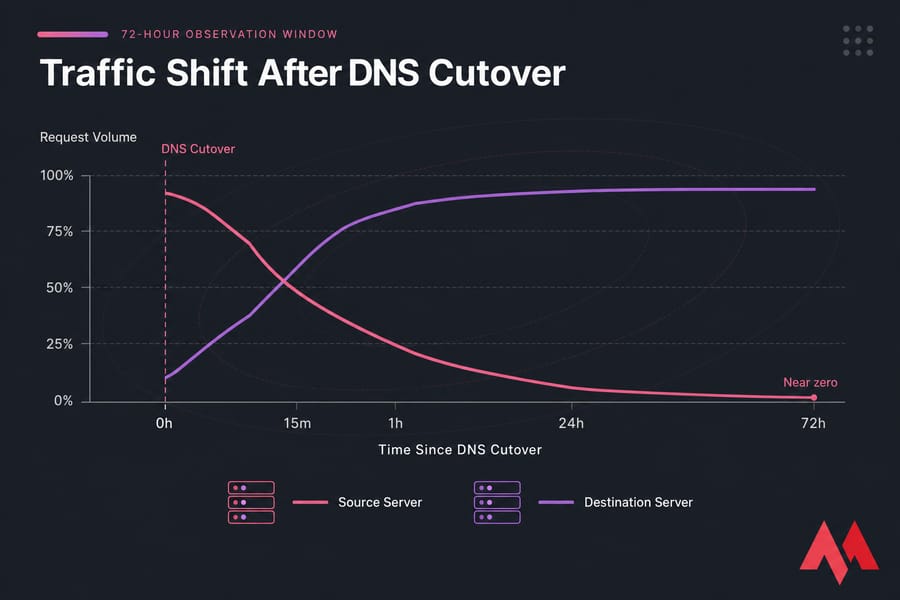
- First 15 minutes: HTTP status codes, error logs, one real transaction, database connection count.
- First hour: latency versus baseline, slow query log, queue depth, worker health, memory pressure.
- First 24 hours: cron jobs fired on schedule, backups ran, email delivered, disk and inode usage trending sanely.
- 72 hours: source server traffic near zero, certificate renewal tested, monitoring alerts wired up.
Keep an eye on both servers' access logs until source requests approach zero. Restore your normal TTL only after you're confident. Set up proper alerting while you're at it — the VPS monitoring tools roundup applies equally to dedicated hardware.
Warning: Don't delete the old server until logs show negligible traffic, new backups have been taken from the destination, and at least one of those backups has been restored successfully somewhere.
Rolling Back a Failed Migration
Rollback is a planned safety mechanism, not a failure. Define the triggers before cutover so nobody has to debate them at midnight.
| Trigger | Threshold | Immediate action | Data reconciliation |
|---|---|---|---|
| 5xx error rate | Above 2% for 5 minutes | Revert DNS or proxy back to source | Export writes made post-cutover |
| Checkout or login failure | Any confirmed failure | Revert immediately | Manually replay affected transactions |
| Latency regression | Above 2× baseline sustained | Hold, investigate 15 min, then decide | Usually none needed |
| Replication or data integrity failure | Any mismatch in row counts | Stop writes, revert | Full diff and manual merge |
The genuinely hard part isn't routing traffic back — that's a DNS edit or a proxy config reload. It's the writes that already landed on the destination. Say fourteen orders came in during the twenty minutes before you rolled back. Those rows exist on the new database and not the old one. You now have to export them, reconcile IDs, and import them without colliding with auto-increment sequences.
Which is exactly why you keep one system authoritative for writes at all times, and why you never flip traffic back and forth between two unsynchronized databases. Pick a direction, commit, reconcile once. Preserve all logs and write the incident timeline while it's fresh. Your backups — see how to backup a website safely — are the last line here.
Common Migration Mistakes
| Mistake | Consequence | Prevention |
|---|---|---|
| Copying a live database directory | Corrupt or unstartable database | Use dumps, snapshots, or native replication |
| Changing DNS before testing | Public exposure of a broken site | Hosts-file testing with a full test matrix |
| Cron and workers running on both servers | Duplicate emails, charges, and jobs | Disable on destination until cutover, then disable on source |
| Forgetting the AAAA record | IPv6 users keep hitting the old server | Update and verify both A and AAAA |
| Mismatched PHP or database versions | Fatal errors under specific code paths | Match versions exactly; upgrade separately |
| Wrong file ownership or SELinux context | 403s, failed uploads, blocked sockets | Use --numeric-ids, restore contexts, verify |
| Missing PTR record and mail config | Outbound email lands in spam | Set rDNS, verify SPF, DKIM, DMARC |
| Forgotten third-party IP allowlists | Payment gateway or API rejects your server | Submit new IPs days in advance |
| Terminating the source too early | No rollback path, cached users see nothing | Retain for 72 hours minimum |
Run the dedicated server security checklist once the dust settles — hardening a box that's already serving production traffic is a different exercise than hardening an empty one.
Start Your Migration With a Rollback-Ready Plan
Keep the source online. Provision the destination early. Synchronize changing data properly. Test every critical transaction. Switch traffic only after the new environment passes validation.
That's the whole discipline. Buy a dedicated server sized to your measured workload, or explore managed server options if your application needs a second pair of experienced hands during cutover.

An experienced tech and developer blog writer, specializing in VPS hosting and server technologies. Fueled by a passion for innovation, I break down complex technical concepts into digestible content, simplifying tech for everyone.