
You usually can't connect to an IPv6 VPS because one of five things is wrong: your local network has no IPv6, the VPS firewall blocks IPv6 traffic, SSH or your app isn't listening on IPv6, the AAAA record points to the wrong address, or the server has no working IPv6 route. Check them in roughly that order.
Before you start, open your provider's web console (it works when SSH doesn't). You'll also need root or sudo, the VPS's IPv6 address, and a terminal on your own machine. New to the protocol? Read what IPv6 is and the main IPv4 vs IPv6 differences first.
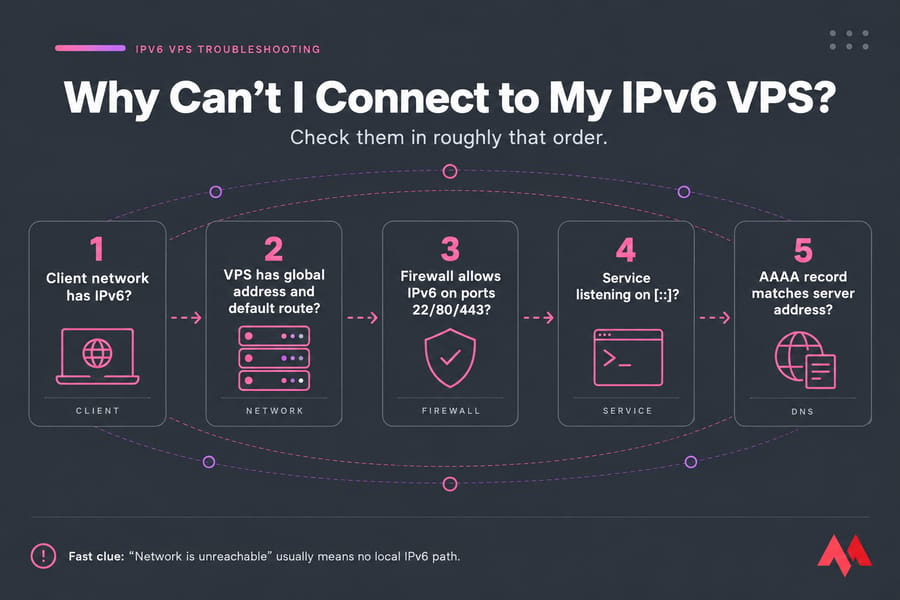
? 5 AAAA record matches server address? Each node color coded: client, network, firewall, service, DNS]
IPv6 VPS troubleshooting starts with the error message
The exact text your client prints tells you which layer failed. If "Network is unreachable" appears instantly, your computer never had a path to send the packet.
| Error | What it means | First check |
|---|---|---|
| Connection timed out | Packets left your machine, nothing came back | Cloud and OS firewall, wrong IP, VPS powered off |
| Connection refused | The host answered, but nothing listens on that port | Is sshd or the app running and bound to IPv6? |
| Network is unreachable | Your own machine has no IPv6 route | Local ISP, router, or VPN |
| Could not resolve hostname | DNS returned no usable address | AAAA record |
| Remote host identification has changed | The server key changed, usually after a reinstall | ssh-keygen -R 2001:db8::10 |
Test IPv6 connectivity from your local network first
People skip this check, and it's often the whole answer. From your own computer:
# Linux / macOS
ping -6 -c 4 google.com

# Windows (PowerShell)
ping -6 google.com
Test-NetConnection -ComputerName 2001:db8::10 -Port 22
If these fail, your ISP or router isn't giving you IPv6, and an IPv6-only VPS can't be reached directly from an IPv4-only network. VPNs cause the same symptom, since many tunnel only IPv4 or switch IPv6 off to prevent leaks, so disconnect and retest.
From there you can enable IPv6 on the router, test from a phone hotspot, use an IPv6 tunnel, or move to a dual-stack server.
Check your VPS IPv6 address, gateway, and default route
Log in through the web console and run:
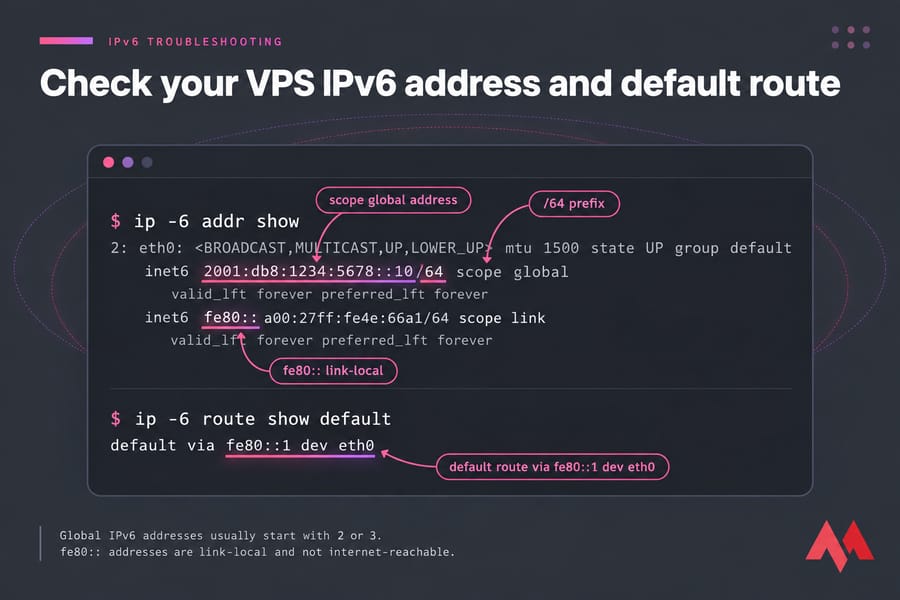
ip -6 addr show
ip -6 route show default
ping -6 -c 4 2001:4860:4860::8888
You want an address with scope global, usually starting with 2 or 3 and often from a /64 prefix. An address starting with fe80:: is link-local and can't be reached from the internet. The route command should print something like default via fe80::1 dev eth0. If it prints nothing, the server can receive packets but can't reply, which looks like a timeout from your side.
Depending on your provider, the address comes from SLAAC, DHCPv6, or a static config in Netplan or NetworkManager. If it's missing, follow the guide to set up IPv6 on Ubuntu, or check whether it was switched off, as covered in enable or disable IPv6 on Ubuntu.
Don't restart networking over SSH. Use the console, and on Ubuntu prefer sudo netplan try, which rolls back after 120 seconds unless you confirm.
How to SSH to an IPv6 VPS correctly
OpenSSH takes a raw IPv6 address without brackets:
ssh root@2001:db8::10
ssh -6 -v root@vps.example.com
scp backup.tar.gz root@[2001:db8::10]:/root/
-6 forces IPv6 when a hostname has both A and AAAA records, and -v shows where it stalls. If it hangs at "Connecting to", you have a network or firewall issue; a failure after "Connection established" is an authentication problem. Brackets belong in scp paths and URLs, not in a plain ssh command.
In PuTTY, paste the address into the Host Name field without brackets and set the protocol to IPv6 under Connection. Windows Terminal uses the built-in OpenSSH client, so the syntax above works there too. See also how to connect to a VPS and SSH into Linux.
Firewall IPv6 SSH and web access checks
IPv4 rules don't always cover IPv6, so check each layer for its own IPv6 entries:
# Ubuntu/Debian (UFW)
grep IPV6 /etc/default/ufw      # must say IPV6=yes
sudo ufw allow 22/tcp
sudo ufw allow 80,443/tcp
sudo ufw status                 # look for "(v6)" lines

# AlmaLinux/Rocky (firewalld)
sudo firewall-cmd --list-all
sudo firewall-cmd --permanent --add-service={ssh,http,https}
sudo firewall-cmd --reload

# Raw rules
sudo ip6tables -L -n
sudo nft list ruleset
Rules written with iptables apply only to IPv4; IPv6 needs ip6tables or an nftables inet table. Your provider's cloud firewall may need its own IPv6 rule (source ::/0). Don't block all ICMPv6, because IPv6 needs it for neighbor discovery and path MTU. To confirm what's exposed, check open ports in Linux.
AAAA record and hostname problems on an IPv6 server
If SSH to the raw address works but the hostname fails, it's DNS. Compare the record with ip -6 addr:
dig AAAA vps.example.com +short
nslookup -type=AAAA vps.example.com   # Windows
The usual culprit is a stale AAAA left over from a rebuild, which stays cached until its TTL expires. An AAAA pointing at a server with broken IPv6 also makes the site fail for some IPv6 visitors while IPv4 users see nothing wrong. Read more about AAAA records and how to use nslookup.
Make Nginx, Apache, and apps listen on IPv6
A "Connection refused" over IPv6 when IPv4 works usually means the service is bound to IPv4 only. In sudo ss -tulpn output, 0.0.0.0:80 is IPv4 only. You need [::]:80, [::]:443, and [::]:22. For Nginx, add IPv6 listeners next to the IPv4 ones:
listen 80;
listen [::]:80;
listen 443 ssl;
listen [::]:443 ssl;
Apache's plain Listen 80 binds both families, but Listen 0.0.0.0:80 limits it to IPv4. For sshd, look for AddressFamily inet or an IPv4-only ListenAddress. Apps that bind to 0.0.0.0 or 127.0.0.1 need the host set to ::. For the full steps, see how to configure Nginx for IPv6.
IPv6-only VPS vs dual-stack: when the problem is architectural
| Factor | IPv6-only | Dual-stack |
|---|---|---|
| Reachable from IPv4-only clients | No, without a tunnel or proxy | Yes |
| Outbound to IPv4-only services | Needs NAT64/DNS64 | Native |
| Best for | Labs, internal services, IPv6 testing | Public sites, admins on mixed networks |
If you connect from networks you don't control, I'd pick dual-stack. An IPv6-only server also can't reach IPv4-only APIs or repositories without NAT64 and DNS64.
Full IPv6 VPS troubleshooting checklist
- Note the exact error.
- Run
ping -6 google.comfrom your machine. - Run
ip -6 addron the VPS via the console. - Run
ip -6 route show default. - Check the OS and cloud firewalls for IPv6 rules.
- Run
ss -tulpnand look for[::]listeners. - Run
dig AAAAand compare with the server address.
Still stuck? Open a ticket with MonoVM support and include the error, the output of steps 3, 4, and 6, your distro, and the IP or hostname.
Need an IPv6 VPS that's easier to manage?
If you can't connect to your IPv6 VPS because the networks you work from are IPv4-only, a dual-stack server fixes that. Every MonoVM IPv6 VPS hosting plan comes with dual-stack networking, so you get an IPv4 address and a routed IPv6 prefix at the same time, plus root access. Plans start at $5.99 a month.

An experienced tech and developer blog writer, specializing in VPS hosting and server technologies. Fueled by a passion for innovation, I break down complex technical concepts into digestible content, simplifying tech for everyone.