Cloud hosting is a type of web hosting that runs your website or application on virtualized resources spread across multiple physical servers, rather than relying on one single machine. In simple terms, that means you get a hosting environment that is usually easier to scale, more resilient during failures, and better suited to changing traffic than traditional single-server hosting.
If you’re still getting your bearings, it helps to first understand what is web hosting. And if you’ve been mixing this up with broader cloud computing, you’re not alone I see that confusion all the time.
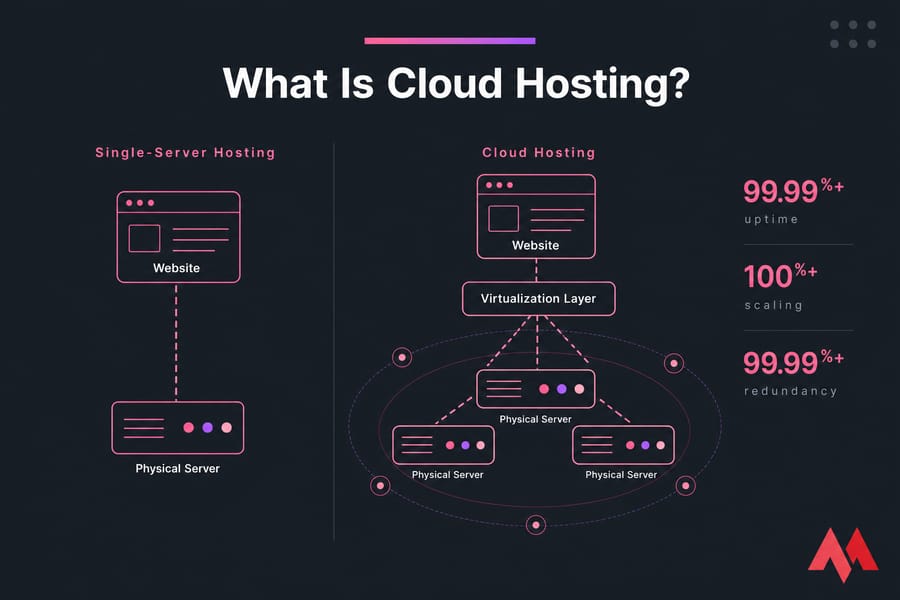
Quick answer: cloud hosting uses pooled and virtualized resources from multiple servers to host websites and apps. The practical upside is better flexibility, higher availability, and more room to grow without moving everything to a completely different platform later.
Cloud hosting definition and meaning
So what is cloud hosting in plain English? It’s hosting delivered through a cloud environment made up of virtualized resources. Instead of your site living on one physical server with hard limits, it runs on a virtual machine or instance that draws CPU, RAM, storage, and network capacity from a wider pool.
That’s the real cloud hosting definition. Not magic. Not “the internet.” Just a hosting model built on distributed infrastructure.
A cloud server is usually the actual virtual server instance you rent inside that cloud environment. Cloud hosting is the broader service model. And cloud VPS usually means a VPS-style virtual server deployed on cloud infrastructure. In practice, that’s why the terms overlap so much. They’re related, but not always identical.
If you’ve already looked up what is a VPS, here’s the simple distinction: a traditional VPS often lives on a single host node, while cloud hosting is built to pull from a more distributed, redundant setup. Some providers blur this line by selling “cloud VPS,” which combines VPS-level isolation and root access with cloud-style architecture.
Why does this matter for modern websites? Because many sites no longer have neat, predictable traffic. A brochure site might stay tiny for years, sure. But an online store can spike on Black Friday, a SaaS dashboard can go from 1,000 to 20,000 users, and an agency can add ten client sites in a quarter without much warning. In those cases, flexibility matters more than buzzwords.
And no, cloud hosting isn’t always the cheapest. I’d be suspicious of any article that says otherwise. What it often gives you is a better balance of uptime, scalability, and operational breathing room.
Now that the definition is clear, let’s look at how cloud hosting actually works behind the scenes.
How cloud hosting works on virtualized infrastructure
Under the hood, cloud hosting starts with physical servers sitting in one or more data centers. Those servers contribute compute, storage, and network resources into a larger pool. Then a virtualization layer typically managed by a hypervisor slices that hardware into virtual machines.
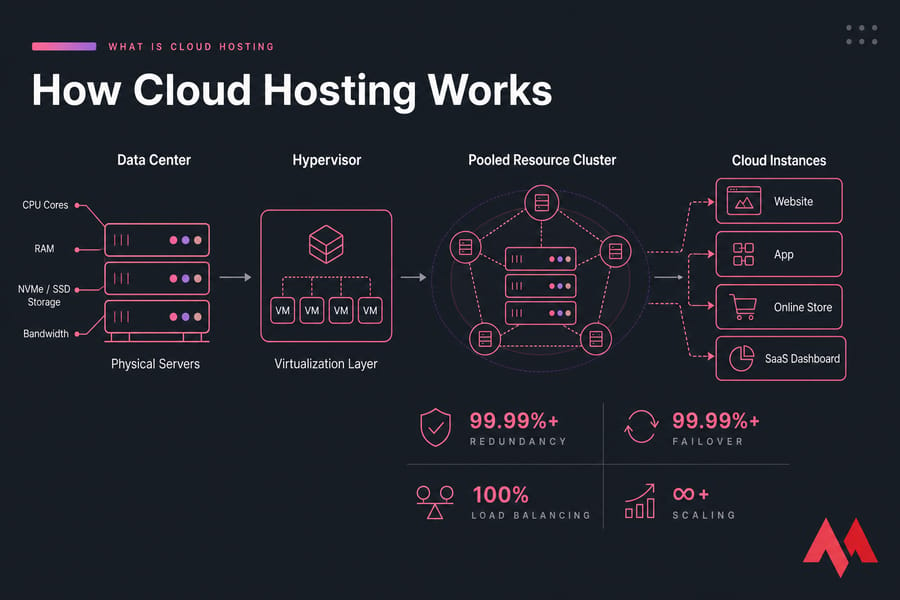
- Physical hardware exists first. Real servers provide CPU cores, RAM, NVMe or SSD storage, and bandwidth.
- Virtualization abstracts the hardware. A hypervisor creates separate virtual machines so each hosted workload has its own environment.
- Resources are pooled. Instead of one site being tied tightly to one box, the hosting platform can allocate resources from a broader infrastructure pool.
- Traffic is distributed more intelligently. Load balancing and orchestration help direct requests where they can be handled best.
- Failure is less catastrophic. If one node has a hardware issue, failover mechanisms can move or restart workloads elsewhere, depending on the provider’s setup.
That’s the short version of how cloud hosting works. And for most buyers, it’s enough.
Here’s the practical angle. On traditional hosting, a sudden traffic jump can slam one machine. If that server runs out of RAM or CPU headroom, performance tanks. Pages crawl. Checkouts fail. Users leave. I’ve seen this happen during routine marketing campaigns, not even huge product launches.
In a better-designed cloud environment, the platform has more room to react. Maybe that means adding resources vertically to your instance. Maybe it means distributing traffic more effectively. Maybe it just means your service survives because storage redundancy and failover prevent a single hardware fault from taking everything offline.
That doesn’t mean every cloud host auto-scales infinitely. Some plans are fixed-size. Some are burstable. Some are heavily managed, others not at all. Provider quality matters a lot. Resource isolation matters too. “Cloud” on a sales page tells you less than people think.
If you want to go one layer deeper, MonoVM also has related explainers on virtualization, virtual machines, and hypervisors useful topics if you like understanding the machinery before you buy.
This architecture is what gives cloud hosting its biggest strengths.
Benefits of cloud hosting for websites and applications
The benefits of cloud hosting are real, but they make the most sense when tied to actual workloads rather than generic claims.
| Benefit | Why it matters |
|---|---|
| Scalability | You can handle growth or traffic surges without rebuilding your hosting setup from scratch. |
| High availability | Multiple servers and redundancy reduce the chance that one hardware failure takes down your site. |
| Performance flexibility | You can choose more CPU, RAM, storage, or bandwidth as your app changes. |
| Better traffic handling | Cloud infrastructure is usually a stronger fit for sudden spikes than low-end fixed hosting. |
| Operational headroom | Growing projects get more room before needing a major migration. |
Better scalability than traditional hosting
This is the headline benefit. Cloud hosting is built for scalable hosting. If your resource needs rise, you can often increase CPU, RAM, or storage more easily than on shared hosting or a rigid single-server setup.
That’s especially useful for stores during promotions, apps with uneven usage patterns, and content sites that occasionally go viral.
High availability and redundancy
Because cloud hosting uses distributed resources and redundancy, it can deliver better uptime than a setup tied to one physical machine. If one host node has a problem, the entire service doesn’t necessarily collapse with it.
Not always, of course. Architecture still varies. But high availability is one of the main reasons businesses move to cloud infrastructure hosting in the first place.
Performance flexibility for growing projects
Cloud plans often let you match resources to the job. Need more RAM for a database-heavy app? More NVMe storage for faster reads and writes? More bandwidth for media delivery? You can usually grow without doing a painful full migration.
For projects that need scalable resources without jumping to dedicated hardware, MonoVM’s Cloud VPS hosting fits this model well. And if storage speed matters, it’s worth reading about What is NVMe VPS hosting or comparing current NVMe VPS plans.
Cost efficiency for variable workloads
Cloud hosting can be cost-effective when your demand changes. You’re not forced to lease a whole dedicated server just because you occasionally need more headroom. That said, fixed predictable workloads don’t always benefit as much. Sometimes a normal VPS is the better value. Honest answer.
Cloud hosting is powerful, but it is not the best fit for every project.
Cloud hosting disadvantages and trade-offs
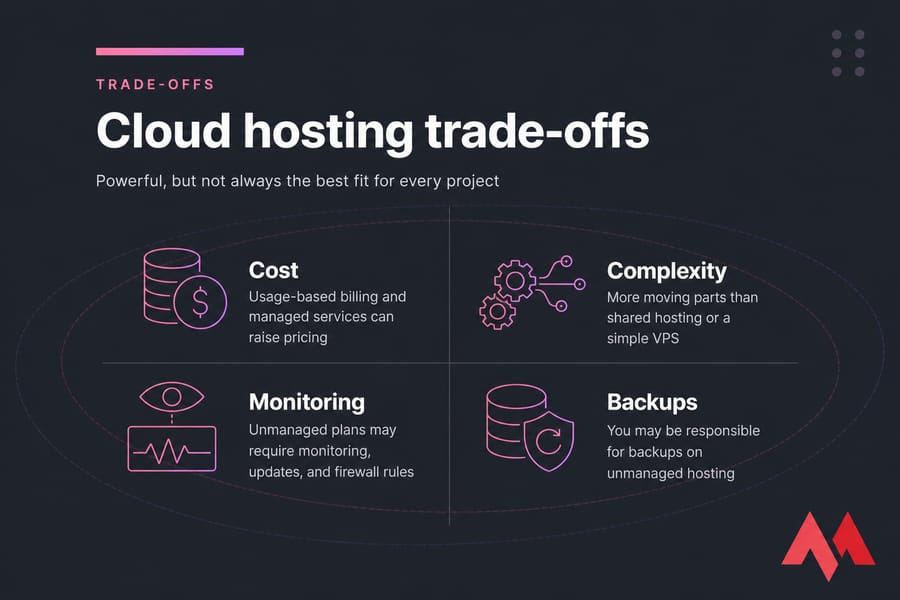
- Cost can rise. Premium cloud architecture, higher uptime targets, managed services, and usage-based billing can push pricing above basic shared hosting or a simple VPS.
- It has more moving parts. Compared with shared hosting, cloud environments can be a bit more complex to understand and manage.
- Small sites may not need it. A static portfolio or tiny local business site often won’t use the extra flexibility enough to justify the jump.
- Performance still depends on the provider. Cloud hosting isn’t automatically fast. Bad storage, weak resource isolation, or oversold infrastructure can still hurt performance.
- Unmanaged plans require work. If you choose unmanaged hosting, you may be responsible for monitoring, updates, firewall rules, and backups.
If you’d rather avoid the admin side, managed services can help. MonoVM has a managed hosting option, and there’s also a useful breakdown of managed or unmanaged server choices.
To decide if these trade-offs are acceptable, compare cloud hosting with other hosting models.
Cloud hosting vs shared hosting, VPS, and dedicated servers
This is where most readers really make the decision. Not at the definition. At the comparison.
| Hosting Type | Cost | Performance | Scalability | Control | Best For |
|---|---|---|---|---|---|
| Shared Hosting | Lowest | Basic, variable | Limited | Low | Small, low-traffic websites |
| VPS | Low to medium | Stronger and more isolated | Moderate | High | Predictable workloads, developers, growing sites |
| Cloud Hosting | Medium to variable | Flexible, often reliable | High | Medium to high | Growing sites, apps, traffic fluctuations |
| Dedicated Server | Highest | Maximum raw resources | Low elasticity | Very high | Heavy workloads, full control, special requirements |
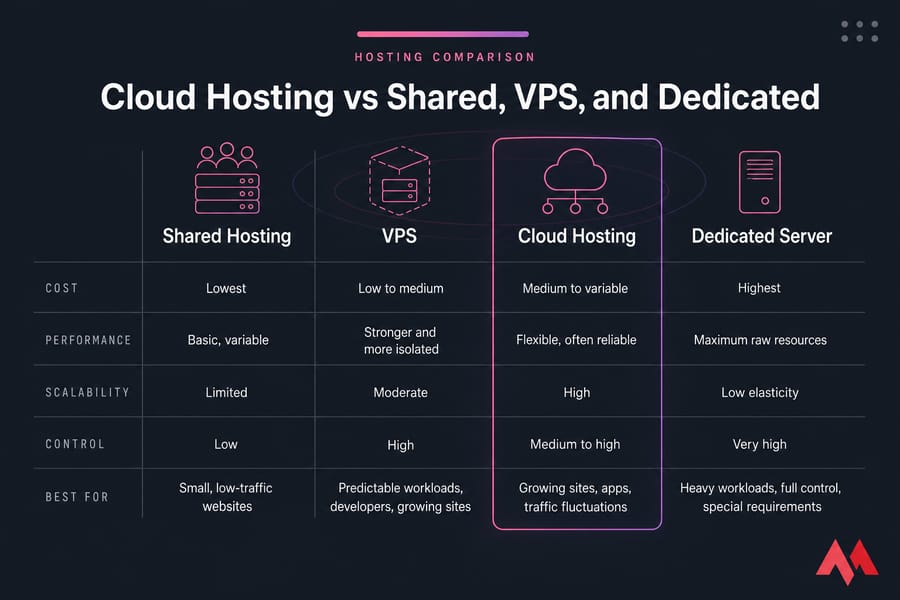
Cloud hosting vs shared hosting
Shared hosting is the budget option. Multiple websites share the same server environment, usually with less isolation and less control. It’s cheap for a reason.
Cloud hosting usually gives you better stability, easier scaling, and stronger resource allocation. If your site matters to revenue or reputation, cloud often makes more sense. But for a tiny starter site, shared hosting can still be enough.
MonoVM’s guide to web hosting vs cloud hosting covers this broader angle too.
Cloud hosting vs VPS hosting
This one trips people up. A VPS gives you an isolated virtual environment with dedicated resource allocation, and often root access, but it may sit on one physical host. Cloud hosting spreads that environment across more flexible, redundant infrastructure.
That said, cloud VPS exists. So VPS and cloud hosting are not always opposites. Some cloud VPS products blend both ideas: VPS-level control plus cloud-style scalability and uptime benefits.
If you want a deeper side-by-side read, check VPS vs cloud hosting.
Cloud hosting vs dedicated server hosting
A dedicated server gives you the whole physical machine. Maximum control. Maximum isolation. Usually maximum price too. It’s ideal when you need custom hardware access, very specific performance tuning, or guaranteed full-machine capacity.
Cloud hosting is more elastic. Dedicated is less flexible, but often stronger for fixed heavy workloads. Neither “wins” universally.
For more detail, see dedicated server vs cloud server.
Which hosting type is best for different needs
I personally think most buyers can narrow it down like this:
- Choose shared hosting if your budget is very tight and the site is small.
- Choose VPS if you want control, predictable pricing, and a stable workload.
- Choose cloud hosting if uptime, redundancy, and scaling matter.
- Choose dedicated if you need full hardware control or very high sustained performance.
If cloud hosting sounds promising, the next question is whether your project actually needs it.
Best cloud hosting use cases for businesses and developers
| Scenario | Cloud Hosting Fit | Why |
|---|---|---|
| Personal blog | Maybe | Useful only if traffic is growing or uptime matters more than low cost. |
| Ecommerce store | Strong | Handles seasonal peaks and checkout-sensitive traffic better. |
| SaaS or API | Strong | Good for changing demand, staging, and resource scaling. |
| Agency sites | Strong | Easier to manage multiple client workloads as they grow. |
| Dev or staging environment | Strong | Flexible provisioning helps teams spin up and adjust environments. |
| Simple static site | Weak to moderate | Often overkill unless reliability needs are unusually high. |
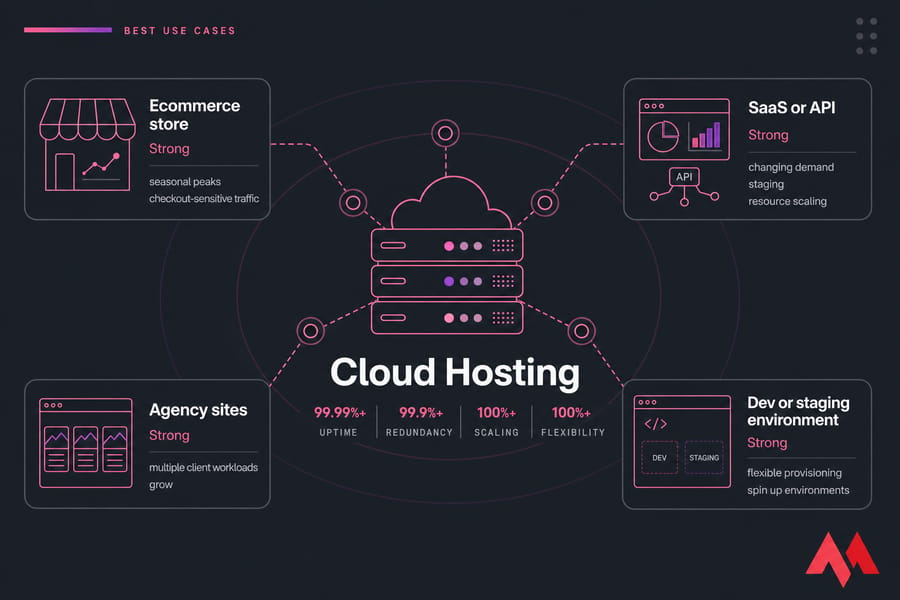
Cloud hosting is a strong fit for ecommerce. Stores get uneven traffic. Sales days, ads, holiday rushes — they don’t arrive politely. If downtime hurts revenue, cloud’s flexibility and uptime profile are genuinely useful.
It also fits SaaS apps, APIs, and development environments. A product team may need staging today, more production RAM next month, and new instances after a feature launch. Cloud makes that less painful.
Agencies benefit too. Hosting one client site is simple. Hosting twenty with different traffic patterns is not. Cloud infrastructure gives you more breathing room as projects stack up.
And for growing businesses, cloud hosting can delay the dreaded migration you didn’t budget time for. That alone can be worth it.
Still, simpler hosting is enough for some projects. If you’re just getting online, guides on how to host a website, how to create a website, or what is WordPress hosting may help you decide whether you even need cloud yet. If you do run WordPress and want more power, WordPress VPS is another practical option.
Once you know your use case, choosing the right plan becomes much easier.
How to choose a cloud hosting plan
Buying cloud hosting without checking the basics is how people end up overpaying or underpowered. Here’s the checklist I’d use.
| Factor | What to Check | Why It Matters |
|---|---|---|
| CPU | Number of vCPUs and workload type | Impacts app responsiveness and traffic handling |
| RAM | Memory needs for your stack | Low RAM causes slowdowns and crashes |
| Storage | NVMe/SSD capacity and speed | Affects database and file performance |
| Bandwidth | Monthly transfer and network limits | Important for media-heavy or busy sites |
| Backups | Frequency, retention, restore process | Critical when something breaks |
| Support | Availability and technical depth | Matters most during outages |
| Location | Nearest data center to users | Helps reduce latency |
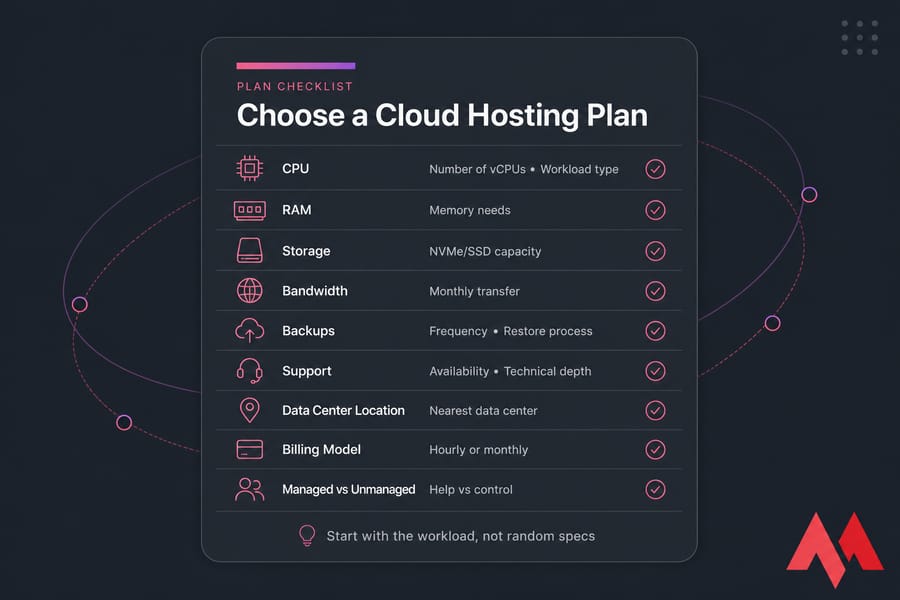
Resources to evaluate: CPU, RAM, storage, bandwidth
Start with the workload, not random specs. A lightweight company site doesn’t need the same resources as a WooCommerce store or API backend. CPU helps with concurrent processing, RAM helps with databases and app memory, storage affects speed and capacity, and bandwidth matters if you serve lots of traffic or large assets.
Managed vs unmanaged cloud hosting
Managed cloud hosting is better if you want help with setup, maintenance, updates, or troubleshooting. Unmanaged is cheaper and gives you more direct control, but you’ll need the skills — or time — to handle the system yourself.
Data center location, backups, and support
Choose a data center close to your audience when possible. Check backup frequency. Ask how restores work. And don’t ignore support quality. A cheap plan with weak support is expensive the first night something breaks.
Security basics matter too: SSL, firewall configuration, account access control, and routine patching.
If you need to add encryption, see SSL certificate options. And if security is still fuzzy, this guide on how to secure your website is worth a read.
When a cloud VPS is the right fit
If you want cloud-style flexibility with VPS-level control, a Cloud VPS plan is often the practical middle ground. That’s especially true for growing sites, agencies, and developers who need root access without jumping straight to dedicated hardware.
Need scalable hosting without jumping to dedicated servers? MonoVM Cloud VPS gives you flexible resources, fast storage, and reliable infrastructure for growing websites, apps, and business workloads.
Before you decide, avoid these common mistakes.
Common cloud hosting mistakes to avoid
- Assuming cloud always means faster. Performance depends on architecture, storage quality, and resource isolation.
- Choosing by price alone. A cheaper plan with poor support or weak backups can cost more later.
- Ignoring backups and security. You still need a backup strategy and a plan to back up a server or VPS.
- Not checking support quality. When things go sideways, responsive support matters. MonoVM’s support team is one place to check before buying.
- Buying the wrong size. Too little capacity hurts performance. Too much wastes money.
- Trusting labels instead of architecture. Some “cloud” products are mostly marketing. Ask how scaling, redundancy, and failover actually work.
Here’s the simplest way to decide whether cloud hosting is worth it for you.
Is cloud hosting worth it for your website?
Usually yes if uptime, scalability, and flexibility matter to your project.
It may not be worth it if your website is tiny, static, low-traffic, and heavily budget-constrained. In that case, shared hosting or a small VPS can be the smarter starting point.
Quick decision checklist
- Your traffic changes often or is growing
- Downtime would hurt revenue or trust
- You expect seasonal spikes
- You need easier scaling than shared hosting can provide
- You want more flexibility without committing to a full dedicated server
When to start with VPS instead
Start with VPS if your workload is predictable, you want strong value, and you’re comfortable with a bit more server control. Cheap and steady can be the right choice no shame in that.
If that sounds like you, compare cheap VPS hosting options.
When to upgrade to cloud hosting
Upgrade when resource pressure, uptime concerns, or traffic swings start stressing your current setup. That’s usually the point where cloud hosting stops being “nice to have” and becomes practical.
If your website is growing or traffic changes often, exploring MonoVM Cloud VPS hosting is a logical next step.
Ready to move to cloud hosting? Compare MonoVM Cloud VPS plans and choose a setup that matches your traffic, performance needs, and budget. If you’re still mapping the field, it also helps to review the broader types of web hosting.

An experienced tech and developer blog writer, specializing in VPS hosting and server technologies. Fueled by a passion for innovation, I break down complex technical concepts into digestible content, simplifying tech for everyone.