![Google Workspace vs Titan Email: Which Wins? ⚡ [2026]](/wp-content/uploads/2026/08/google-workspace-vs-titan-email734-main.webp)
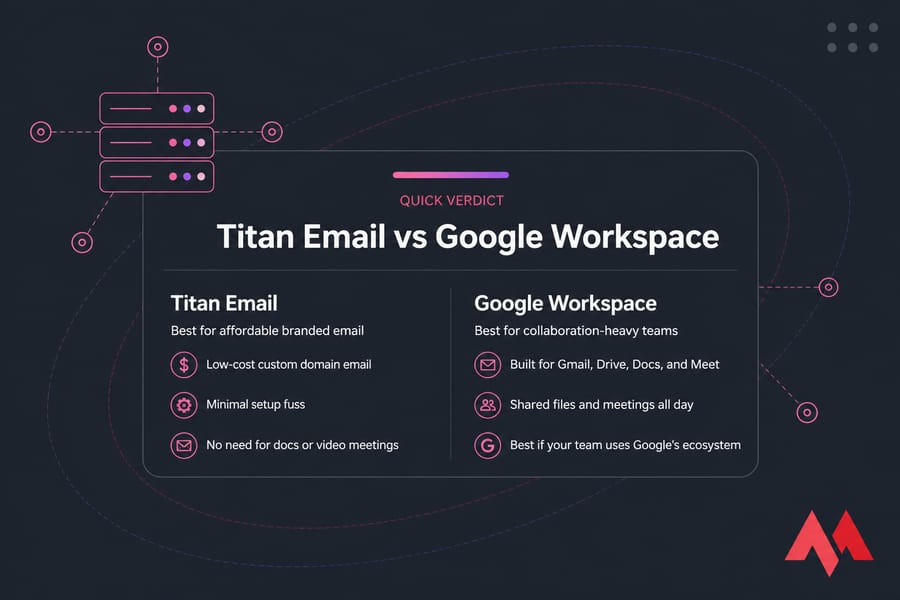
Titan Email is the better pick for small businesses that mainly need affordable, branded email on their own domain with minimal setup fuss. Google Workspace wins when your team actually lives inside Gmail, Drive, Docs, and Meet all day. Neither one is universally better — the deciding factor is whether you're buying email or an entire productivity suite.
Google Workspace vs Titan Email : the quick verdict
- Choose Titan Email if you want professional domain email at a low per-user cost, and you don't need shared docs or video conferencing baked in. MonoVM's Titan business email is built for exactly that.
- Choose Google Workspace if your team collaborates on files daily, runs meetings, and already leans on Google's ecosystem.
One prerequisite before anything else: you need a registered domain name. Branded email doesn't exist without one. Pricing also shifts by plan and region, so treat every figure below as a ballpark and check current rates before you commit.
What each platform actually is
Titan Email is a business email platform. That's the whole pitch. You get custom domain email, a clean webmail interface, calendars, contacts, read receipts, follow-up reminders, and mobile apps. No word processor, no cloud drive, no meeting tool.
Google Workspace is Gmail on your domain plus Google Drive, Google Docs, Google Sheets, Google Meet, shared calendars, and an admin console that controls the lot. You're buying a productivity suite where email happens to be one component.
Why does this distinction matter so much? Because most small businesses I've worked with pay for the suite and use maybe 30% of it. If you're already confused about where email fits into your stack, our breakdown of email hosting vs web hosting clears that up quickly.
Feature comparison for small businesses
| Feature | Titan Email | Google Workspace | Better for |
|---|---|---|---|
| Custom domain email | Yes | Yes | Tie |
| Mailbox storage | ~10–50 GB by plan | 30 GB–5 TB pooled by plan | Google Workspace |
| Email aliases | Included | Included | Tie |
| Webmail interface | Simple, email-focused | Gmail — familiar to most people | Google Workspace |
| Calendar & contacts | Yes | Yes, with deep sharing | Google Workspace |
| Document collaboration | No | Docs, Sheets, Slides | Google Workspace |
| Cloud file storage | No | Google Drive | Google Workspace |
| Video meetings | No | Google Meet | Google Workspace |
| IMAP/POP/SMTP support | Yes | Yes | Tie |
| Mobile apps | iOS & Android | iOS & Android | Tie |
| Cost per user | Low | Moderate to high | Titan Email |
Both work fine with Outlook, Apple Mail, or Thunderbird over IMAP — so you're not locked into either webmail. If protocol choices confuse you, read IMAP vs POP3 vs SMTP and our explainer on how SMTP works before configuring clients.
Pricing comparison by team size
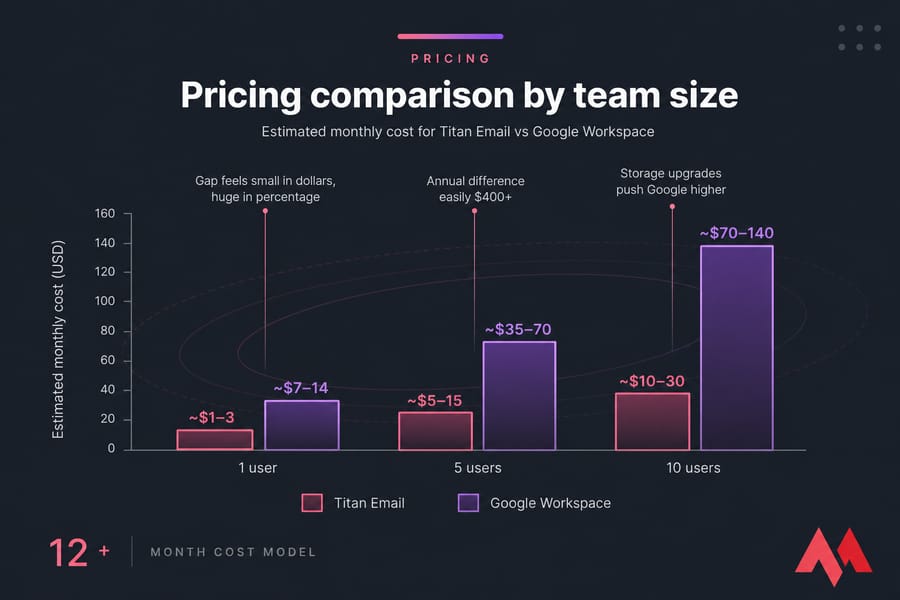
| Team size | Titan Email (est./month) | Google Workspace (est./month) | Notes |
|---|---|---|---|
| 1 user | ~$1–3 | ~$7–14 | Gap feels small in dollars, huge in percentage |
| 5 users | ~$5–15 | ~$35–70 | Annual difference easily $400+ |
| 10 users | ~$10–30 | ~$70–140 | Storage upgrades push Google higher |
Per-user pricing scales fast, and that's the part owners underestimate. Ten people at $12 each is $1,440 a year — real money for a young business. Always check the latest pricing on both vendors, since plan tiers change.
Pro tip: calculate 12-month cost at your expected headcount, not today's. If you plan to double the team, model both. Our roundup of the best email hosting provider options helps if you want a third comparison point.
Setup and admin experience
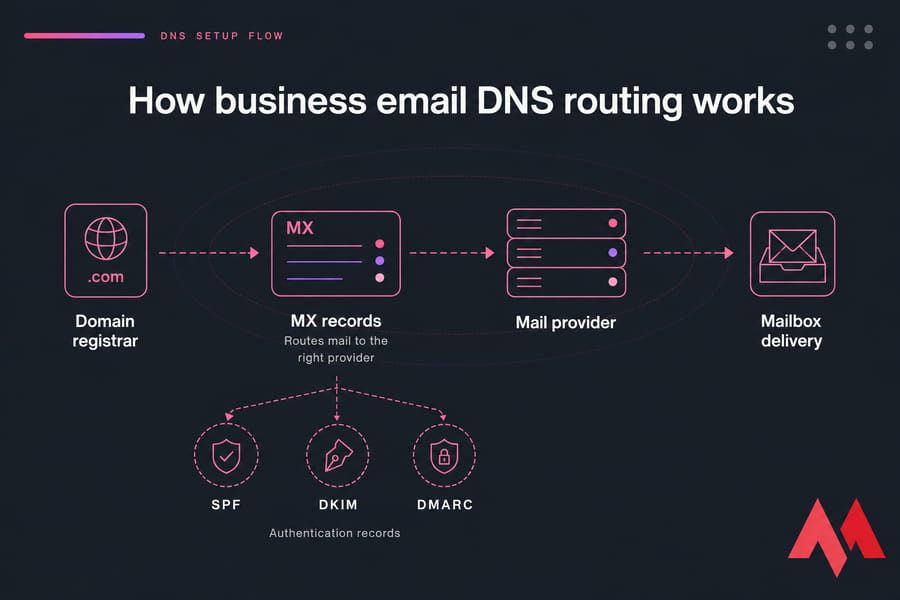
Both need the same basic step: pointing your domain's MX records (the DNS entries that tell the internet where to deliver your mail) at the provider. Google adds a domain verification step through its admin console; Titan's onboarding is shorter and less menu-heavy.
Adding or removing users is straightforward on both. Google's admin console is far more powerful — and far more overwhelming if you've never touched DNS or group policies. Titan gives you fewer levers, which honestly is a feature for non-technical owners.
If you buy Titan through MonoVM, activation and DNS guidance come with it. Walk through setting up Titan Email on MonoVM or the general guide to create business webmail service.
Security and reliability
Both platforms cover the essentials: spam filtering, malware scanning, TLS in transit, two-factor authentication, and support for SPF, DKIM, and DMARC — the three DNS records that prove your mail is genuinely from you and stop spoofers using your domain.
Google's ecosystem is more mature, with deeper threat detection, granular admin policies, and advanced logging. Titan covers standard business needs well without that depth. Here's the uncomfortable truth though: most deliverability disasters come from misconfigured DNS, not from the provider. Set your records properly and follow business email security best practices.
Best email provider by small business use case
| Business type | Recommended | Why |
|---|---|---|
| Solo consultant or freelancer | Titan Email | Branded inbox, near-zero admin, minimal cost |
| Plumbing / electrical / home services (2–4 staff) | Titan Email | Quotes and scheduling by email; no document workflows |
| 5-person marketing agency | Google Workspace | Shared docs and client decks are the daily workflow |
| Remote startup | Google Workspace | Meet, Drive, and shared calendars replace three separate tools |
| Budget-first retail or local shop | Titan Email | Lowest cost per professional mailbox |
Still sizing up your requirements? The difference between business and enterprise emails is a useful sanity check.
Pros and cons at a glance
Titan Email: cheaper per user, faster to set up, focused interface, solid IMAP support. Downsides — no built-in docs or storage, smaller integration ecosystem, fewer advanced admin controls.
Google Workspace: best-in-class collaboration, Gmail's interface everyone already knows, huge third-party integration library, generous storage on higher tiers. Downsides — costs multiply per seat, and plenty of small teams pay for apps they open twice a year.
Curious about the other big rival? See Titan Email vs Microsoft 365.
How to choose between Titan Email and Google Workspace
Run this checklist honestly:
- Do you need only email? → Titan.
- Do you edit shared documents or run video calls weekly? → Google Workspace.
- What's your realistic monthly per-user budget?
- Will your team triple in 18 months?
- Do you want admin that takes ten minutes, not ten hours?
Warning: switching later isn't free. You'll change DNS, move mailboxes, and retrain people. Plan it properly with our guide to migrate business email.
Final verdict: is Titan Email or Google Workspace better?
For most small businesses whose core need is professional, domain-based email, Titan Email is the smarter buy. It costs less, sets up faster, and doesn't bill you for software you'll never open. Google Workspace earns its price only when collaboration is genuinely central to how your team works — and when it is, it's worth every cent.
Ready to set up business email for your company? Get Titan Email through MonoVM Titan business email, or compare our full range of email hosting plans first.
.jpg)
Co-founder with 13+ years of experience, I have played an integral part in our company's growth and success. Having developed strategic plans, secured funding, and managed teams. My involvement extends to overseeing operations, product development, and industry representation, reflecting my versatile role in the business and commitment to its continued prosperity.