Cloud bursting is a hybrid hosting strategy where your main workload runs on dedicated infrastructure, then temporarily expands into cloud VPS resources during traffic spikes or compute-heavy periods. It works best for burstable, stateless workloads, and it keeps you from paying year-round for capacity you only need eleven days out of twelve months.
Cloud Bursting in One Paragraph
That's the definition. The harder question — the one you actually came here for — is when to move workloads from a dedicated server hosting baseline into Cloud VPS hosting, and which pieces of your stack are safe to send over. Let's work through that with real thresholds and real examples.
What Is Cloud Bursting in Hybrid Hosting?
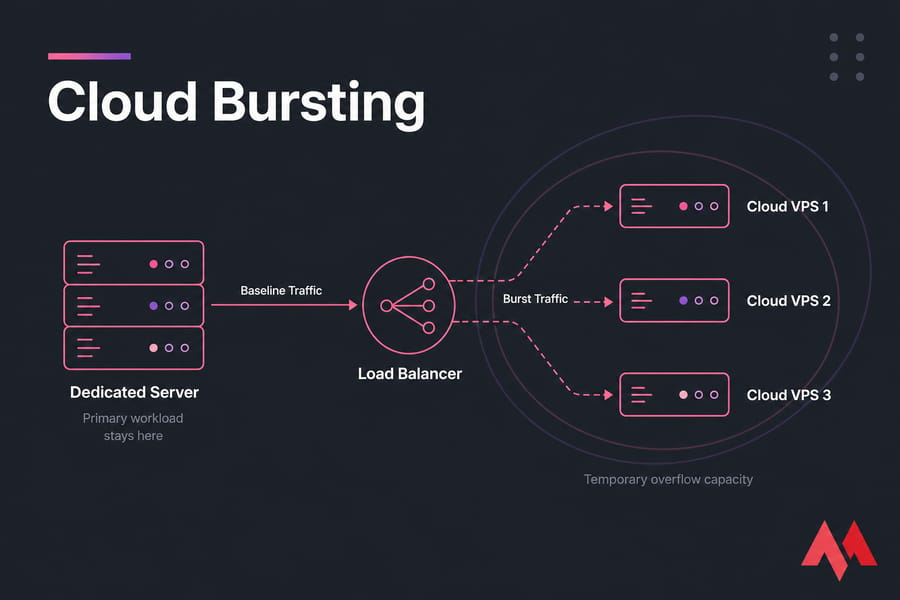
Think of your dedicated server as the floor and cloud VPS as the ceiling that moves. Baseline demand — the traffic you get on a boring Tuesday — lives permanently on hardware you control. When demand jumps past what that hardware comfortably handles, extra Cloud VPS instances spin up, take a share of the load, and get destroyed once the spike passes.
This is not the same thing as migrating to the cloud. Full migration means your primary infrastructure moves permanently. Cloud bursting means your primary infrastructure stays exactly where it is, and elastic capacity gets bolted on temporarily.
Why keep dedicated as the base? Predictable performance, no noisy neighbours, fixed monthly cost, and full hardware control. In my experience, teams running steady 60–70% utilisation on bare metal get better price-per-request than anything cloud-native — right up until a spike hits and they're stuck. That's the gap bursting fills.
And why Cloud VPS as the burst target rather than a bigger box? Because KVM-based virtual machines provision in minutes, bill by the period you use them, and can sit in whichever region your spike is coming from. If you're still fuzzy on the distinction, the VPS vs cloud hosting breakdown covers it properly.
How Cloud Bursting Works Between a Dedicated Server and Cloud VPS
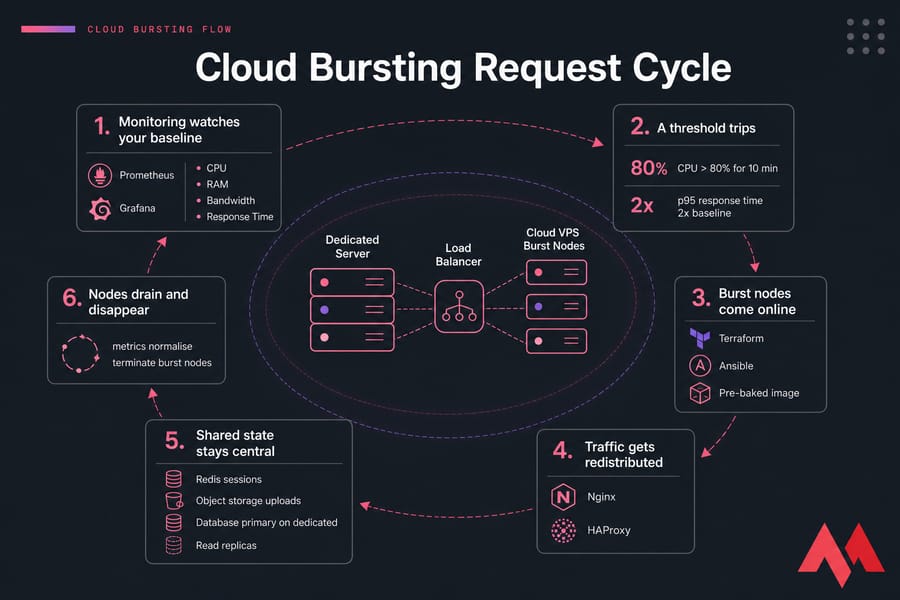
Mechanically, it's less exotic than the term suggests. Here's the flow:
- Monitoring watches your baseline. Prometheus and Grafana, or whatever agent your panel ships with, tracks CPU, RAM, bandwidth, and response time on the dedicated node.
- A threshold trips. Say sustained CPU above 80% for ten minutes, or p95 response time doubling.
- Burst nodes come online. Manually, or via Terraform and Ansible if you've templated it. A pre-baked image matters here — nobody wants to install PHP during a flash sale.
- Traffic gets redistributed. Nginx or HAProxy acting as a reverse proxy adds the new backends to its pool. DNS-based routing works too, but TTL caching makes it sloppy.
- Shared state stays central. Sessions live in Redis, uploads go to object storage, the database primary stays on dedicated with read replicas where needed.
- Nodes drain and disappear. Once metrics normalise, connections drain and the VPS instances are terminated.
Step 5 is where most implementations fall apart. If a user's shopping cart lives in a PHP session file on local disk, load balancing them onto a burst node logs them out. You'll fix state handling before you fix anything else.
When to Move Workloads to Cloud VPS Instead of Scaling Dedicated Hardware
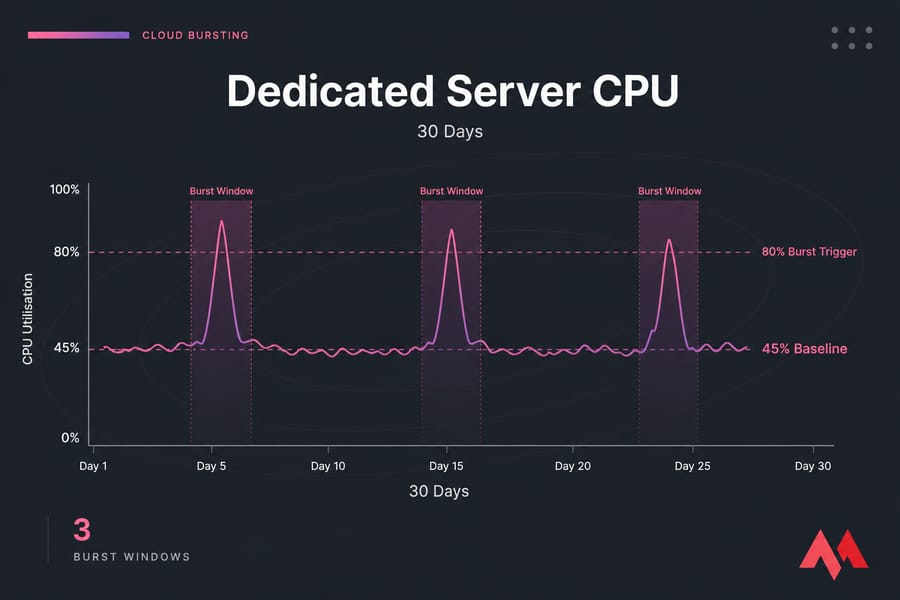
Here's the practical rule I use: track the duration and frequency of your peaks, not just their height. A spike that lasts four hours twice a year is a bursting problem. A spike that lasts eighteen hours a day is a capacity problem, and you need a bigger server.
| Signal | What it means | Warning level | Likely action |
|---|---|---|---|
| CPU utilisation | Compute saturation during peaks | >75–80% sustained for 10+ min | Burst the app/web tier |
| RAM & swap | Memory pressure, disk thrashing | Any consistent swap activity | Add memory, or burst workers |
| Bandwidth | Port or transfer cap approaching | >70% of committed throughput | Offload to CDN or burst nodes |
| p95 response time | Users feeling the queue | 2× your normal baseline | Burst immediately |
| Queue depth | Background jobs falling behind | Backlog growing for >15 min | Burst additional workers |
| Storage IOPS | Disk is the bottleneck | Latency above 20ms on writes | Usually not a burst fix |
Don't treat those numbers as gospel — a video transcoder happily sits at 95% CPU all day. But if you don't know your own baselines, start there. The VM monitoring metrics guide covers what to instrument and why.
Then there's the frequency test. Roughly: fewer than 15–20% of hours in a month running hot means bursting wins on cost. Between 20% and 50%, it's a coin flip that depends on how much ops time you can spare. Above 50%, buy the bigger dedicated box and stop over-engineering.
Release cycles count as triggers too. Deploy days, feature launches, marketing campaigns with a known start time — these are scheduled spikes, which are the easiest kind to burst because you can pre-warm capacity instead of reacting.
Best Workloads for Cloud Bursting: Stateless vs Stateful
Quick definitions, because the terms get thrown around loosely. A stateless service holds no data that matters between requests — kill it mid-flight and nothing is lost. A stateful service holds data locally: databases, session stores, uploaded files, in-memory caches with unique contents.
Stateless burst beautifully. Stateful ones will hurt you.
| Workload | Burst readiness | Why |
|---|---|---|
| Web front end (Nginx + app) | Excellent | Identical, disposable, horizontally scalable |
| REST/GraphQL API tier | Excellent | Stateless by design if tokens replace sessions |
| Queue workers, background jobs | Excellent | Pull work from a central broker, no coordination needed |
| Rendering, transcoding, CI/CD runners | Very good | Batch, tolerant of latency, CPU-bound |
| Read replicas | Moderate | Replication lag over WAN needs testing |
| Distributed cache node | Moderate | Cold cache adds latency before it helps |
| Primary database | Poor | Write consistency and cross-site latency |
| Large file storage / storage-heavy monolith | Poor | Sync cost and time exceed the spike duration |
Containers help here — a Docker image or Kubernetes deployment makes "spin up five more of exactly this" trivial. But you don't need Kubernetes. Plenty of teams do this with a golden VM image and an Ansible playbook, and honestly that's easier to debug at 2am.
Cloud VPS for Peak Traffic: Real Use Cases
eCommerce flash sale. Black Friday, a 6× traffic multiplier over four hours. Dedicated keeps the MySQL primary, checkout logic, and admin panel. Cloud VPS takes extra web/app nodes behind HAProxy, plus the email and invoice queue workers. Sessions move to Redis a week earlier.
SaaS feature launch. A public API surge after a Product Hunt appearance. The API tier bursts to eight nodes across two regions; the database and billing service never move. Once the curve flattens, you're back to two nodes.
Media and content delivery. A live event or a big file release. CDN handles the bulk, but origin capacity and thumbnail/transcode jobs burst to VPS instances. Picking nodes from global VPS locations near your audience trims real milliseconds here.
Game backends. Weekend match volume and event weekends. Game servers themselves are session-heavy, so what bursts is matchmaking, leaderboards, and telemetry ingestion — not the persistent world state.
Analytics batch windows. Nightly ETL that hammers CPU for three hours. Rent compute for those three hours, destroy it after. This is the cleanest bursting case there is, and the one teams most often overlook.
When Cloud Bursting Is a Bad Fit
I'd rather talk you out of this than watch it fail. Red flags:
- Data sovereignty or compliance limits. If regulated data can't leave a specific facility or jurisdiction, burst nodes can't process it. Period.
- Ultra-low-latency internal systems. Anything where a 5–15ms cross-site hop breaks the application — high-frequency processing, tightly coupled microservices chattering hundreds of times per request.
- Per-core or node-locked licensing. Some commercial databases and enterprise software make each burst node an accounting event. Check before you architect.
- Storage-heavy stateful systems. If you need to sync 800GB before a node is useful, the spike is over before you're ready.
- Permanently high load. Bursting is for peaks. If you're always at the peak, buy more baseline.
Cloud Bursting vs Autoscaling vs Full Migration
| Model | Best for | Pros | Cons |
|---|---|---|---|
| Bigger dedicated server | Steady, growing, latency-sensitive load | Predictable cost, best raw performance | Idle capacity, slow to change |
| Cloud bursting | Stable base + occasional spikes | Pay for peaks only, keeps dedicated benefits | Hybrid complexity, state handling required |
| Autoscaling | Cloud-native apps with continuous variability | Fully automated, fine-grained | Assumes you're already all-cloud |
| Full cloud migration | Unpredictable growth, global footprint | Maximum elasticity | Higher steady-state cost, migration risk |
The short version: autoscaling adjusts resources within one environment automatically. Cloud bursting spans two environments — hardware plus cloud. Load balancing is neither; it's the traffic-distribution mechanism both rely on. For a deeper cost and control comparison, see dedicated server vs cloud server.
Building a Workload Migration Strategy
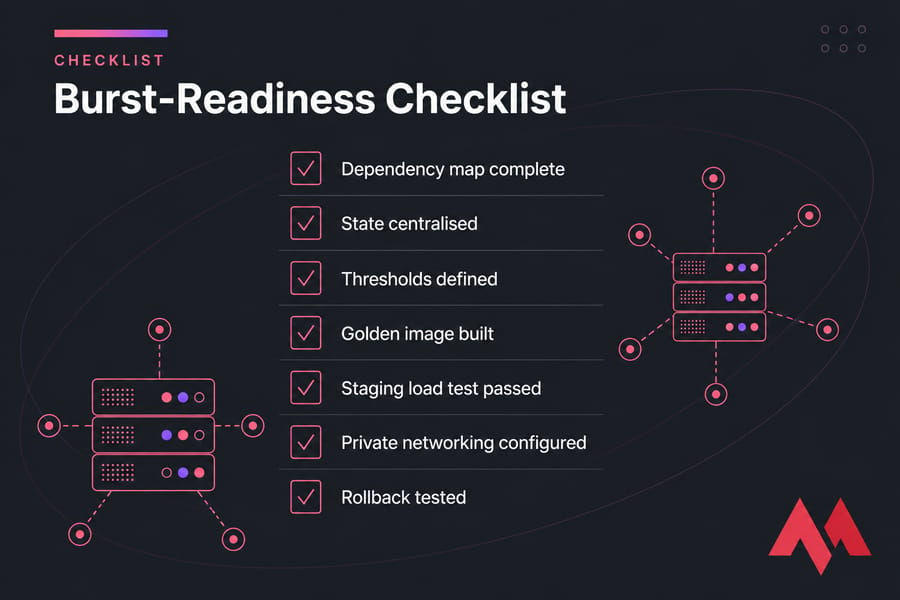
Seven steps, in order. Skipping any of them is how this goes sideways.
- Audit dependencies. Map every service, what it talks to, and where it writes. You will find at least one surprise cron job.
- Classify by burst readiness. Green, amber, red — use the suitability table above.
- Centralise state. Sessions to Redis, uploads to object storage, config out of local files. This is the actual project; everything else is plumbing.
- Define thresholds and triggers. Numbers, durations, and cooldowns. A trigger without a cooldown flaps.
- Test in staging. Load-test a burst cycle end to end. If you don't have one, set up a staging environment first.
- Lock down networking. Private links or VPN between sites, firewall rules that only allow what's needed, and secure SSH on a VPS with keys only.
- Write the rollback plan. Fresh snapshots, a documented way to back up a server or VPS, and a one-command path back to dedicated-only.
Pilot with one workload — the queue workers are usually the safest — before touching the web tier.
Cost, Performance, and Security Trade-Offs
The savings are real but not automatic. You stop provisioning for your worst hour and start provisioning for your average, which for most bursty workloads cuts idle waste substantially. Flexera's annual cloud reports have put self-estimated cloud waste around 30% for years — bursting is one of the few strategies that attacks that from the right side, by keeping the steady portion on fixed-cost hardware.
Hidden costs to budget for: egress and cross-site data transfer, orchestration tooling, and the ops hours nobody puts on the invoice. If your team is small, managed hosting often costs less than the engineering time you'd burn maintaining this yourself.
On performance, watch three things: replication lag on any read replica you burst, cold-start penalties on cache and application boot, and the added network hop between sites. Warm your caches before the spike, not during it. And once you're stable, revisit improve VPS performance tuning so each burst node earns its keep.
Security-wise: encrypt everything in transit with TLS, keep burst nodes off public SSH, scope firewall rules to specific source IPs, and snapshot before every burst cycle. A short-lived node is still an attack surface.
Common Mistakes to Avoid
- Bursting the database first. Consequence: write conflicts and replication lag. Fix: burst the web and worker tiers, leave the primary put.
- Leaving sessions on local disk. Consequence: users randomly logged out. Fix: shared session store before any burst.
- No baseline observability. Consequence: you can't tell a spike from a bug. Fix: instrument first, automate second.
- Ignoring the network path. Consequence: burst nodes are slower than the server they're helping. Fix: pick a nearby region and measure round-trip time.
- No rollback plan. Consequence: an outage that started as an optimisation. Fix: rehearse the teardown.
- Over-engineering a small, predictable site. Consequence: complexity with no ROI. Fix: just buy the next server tier up.
Need Flexible Scaling? MonoVM Cloud VPS and Dedicated Servers
Hybrid only works if both halves are solid. MonoVM's dedicated servers give you the stable, fixed-cost base for your database, core services, and anything latency-sensitive. Cloud VPS hosting handles the other side — burst web nodes, extra workers, staging environments, overflow API capacity — with root access and quick provisioning across a wide set of global regions.
If you're unsure whether your architecture is burst-ready, 24/7 technical support can sanity-check the plan before you move production traffic. That conversation costs nothing and has saved more than a few weekends.
Explore Cloud VPS plans for burst capacity, or compare dedicated server configurations if the smarter move is a bigger baseline. Either answer is fine — the wrong answer is guessing.
.jpg)
Co-founder with 13+ years of experience, I have played an integral part in our company's growth and success. Having developed strategic plans, secured funding, and managed teams. My involvement extends to overseeing operations, product development, and industry representation, reflecting my versatile role in the business and commitment to its continued prosperity.