
Which VPS Virtualization Is Better for Performance and Isolation? If you want the short version, here it is: KVM is usually the better VPS choice for modern workloads because it gives you stronger isolation, better kernel independence, and more consistent performance under pressure. OpenVZ can still be useful for cheap, lightweight Linux-only tasks, but it comes with more limits. When selecting a reliable backbone for high-traffic environments, scaling up to an optimized vps server infrastructure ensures your operational layers have guaranteed structural support from the ground up.
Before comparing KVM and OpenVZ, you should understand one thing: both are VPS virtualization technologies, but they work very differently at the kernel and isolation level. That single difference affects performance, security, Docker support, OS flexibility, and how painful your future upgrades might be.
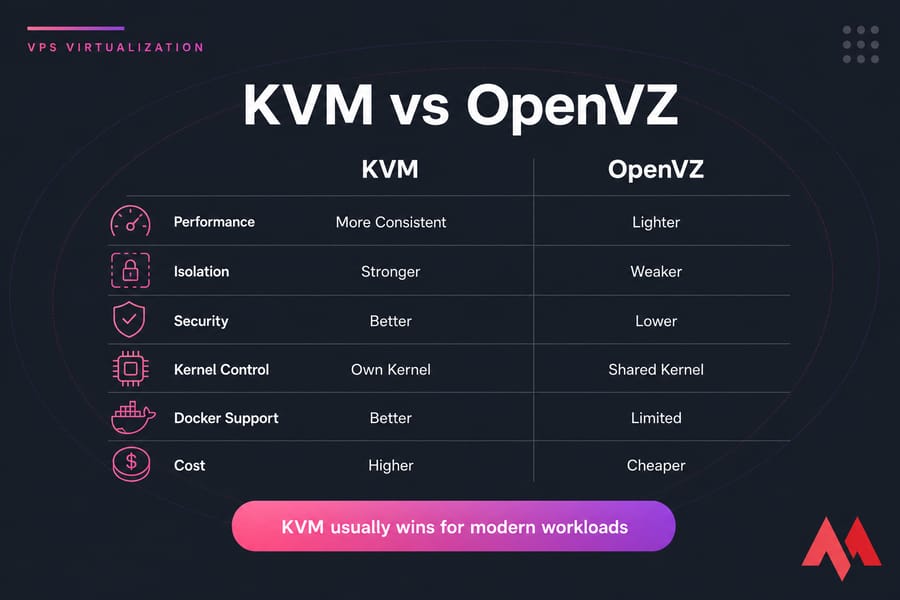
⚡ KVM vs OpenVZ at a glance: the short answer
KVM is usually better than OpenVZ for VPS hosting when performance consistency, security, and isolation matter. KVM uses full virtualization with its own kernel, while OpenVZ uses container-based virtualization with a shared host kernel. OpenVZ can be lighter and cheaper, but KVM offers stronger isolation, flexibility, and compatibility.
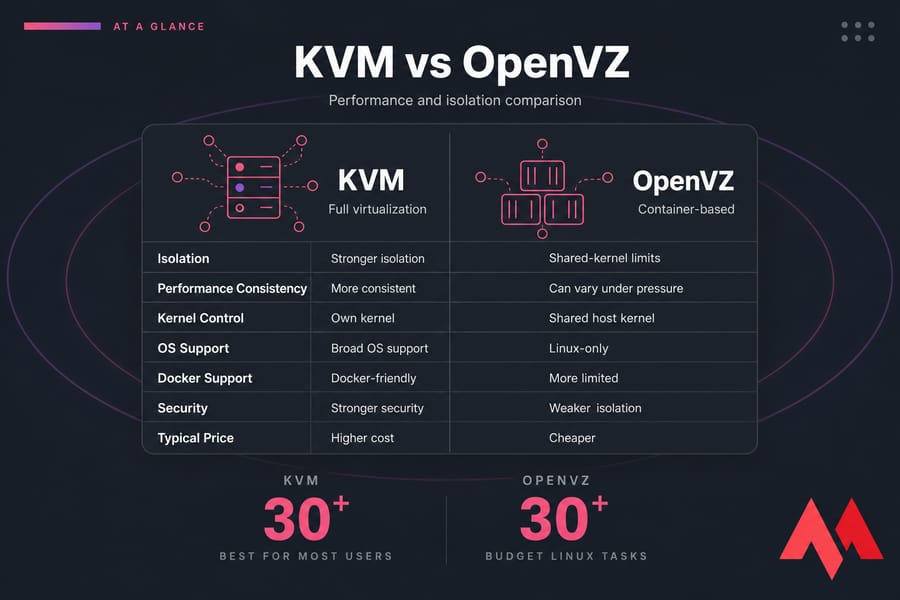
🔍 Is KVM or OpenVZ better for most VPS users?
For most people, KVM wins. If you're hosting a production website, running a bot, deploying an app, building with Docker, or you just don't want weird restrictions later, KVM is the safer bet. I’ve seen plenty of buyers pick the cheaper virtualization first, then move a month later because they hit a wall. For budgets that are tightly restrained but still require full environment independence, opting for a strategically optimized cheap vps hosting platform powered by genuine hypervisors bridges the gap without sacrificing vital root-level features.
If you want a deeper technical background, MonoVM’s guide to KVM virtualization is a good companion read.
🔍 When OpenVZ still makes sense
OpenVZ still has a place. If your workload is simple, Linux-only, low-risk, and very budget-sensitive, it can be efficient. Think lightweight scripts, small internal tools, or basic test environments where kernel-level flexibility doesn't matter.
🔍 Quick recommendation by use case
- Choose KVM for websites, eCommerce, VPNs, Docker, game servers, Windows VPS, control panels, and trading bots.
- Choose OpenVZ for low-cost Linux containers running small, predictable workloads.
- Choose KVM if you're unsure because it reduces future limitations.
To understand why the answer is usually KVM, start with how each technology works.
⚙️ What is KVM virtualization in VPS hosting?
KVM stands for Kernel-based Virtual Machine. It’s a full virtualization technology built into the Linux kernel that turns a physical server into a hypervisor-capable host. In plain English, that means the host can run multiple virtual machines, and each one behaves much more like an independent server.
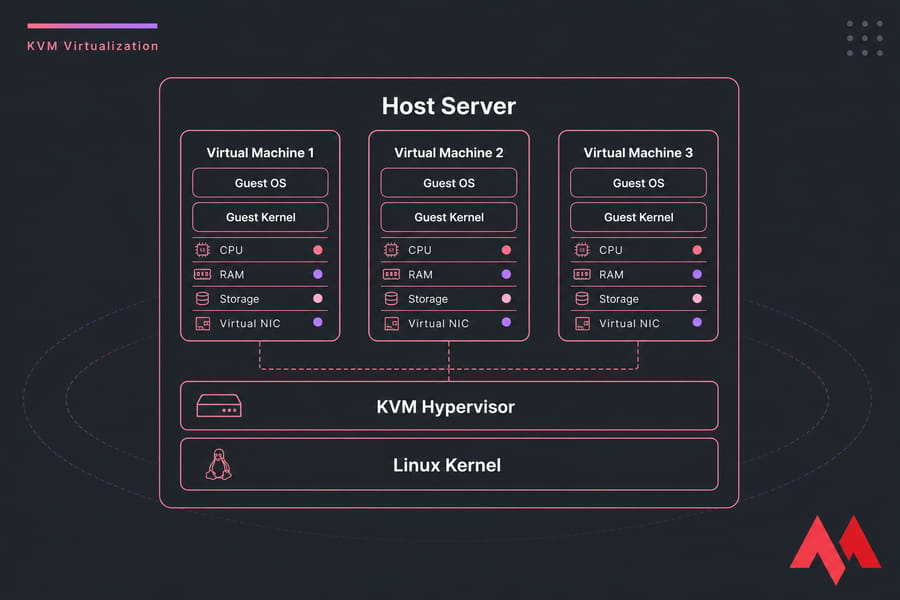
⚙️ How KVM uses full virtualization
KVM is just one approach to virtualization. To understand where it fits in the bigger picture, read about the different types of virtual machines and how they compare.
With KVM, each VPS gets virtual hardware and its own guest OS environment. Tools like QEMU are commonly used alongside KVM to emulate hardware and manage virtual machines. The guest OS sees a virtualized machine with its own disk, memory, CPU allocation, and kernel space. If you're new to the concept, here's a clear explanation of what is a virtual machine and how it works.
That matters more than it sounds. Because the VM is isolated at a deeper level, you get behavior that feels closer to a real standalone server than a container sharing the host’s kernel.
⚙️ How guest kernels work in KVM
Each KVM VPS runs its own kernel. So if you need a specific Linux distribution setup, custom kernel modules, firewall extensions, or even a Windows install, KVM is built for that kind of independence. Hardware virtualization features like Intel VT-x and AMD-V make this practical on modern servers. Understanding the deeper role of core core components by reviewing what is kernel in linux explains exactly why having an unshared, isolated kernel boundary mitigates systemic software vulnerabilities across instances.
You still depend on the provider’s node quality, of course. KVM doesn't magically mean dedicated hardware or zero contention. But it does mean your VPS has a cleaner separation from other tenants.
⚙️ Why hosting providers market KVM as premium VPS
Because for many buyers, it is. A KVM VPS hosting plan usually appeals to users who care about isolation, custom OS support, and predictable behavior. That's why KVM shows up so often on premium Linux and Windows VPS offerings.
OpenVZ works very differently.
📦 What is OpenVZ virtualization and how does it work?
OpenVZ is operating-system-level virtualization. Instead of creating fully separate virtual machines with their own kernels, it creates containers that share the host node’s Linux kernel. That’s the big idea behind OpenVZ virtualization.
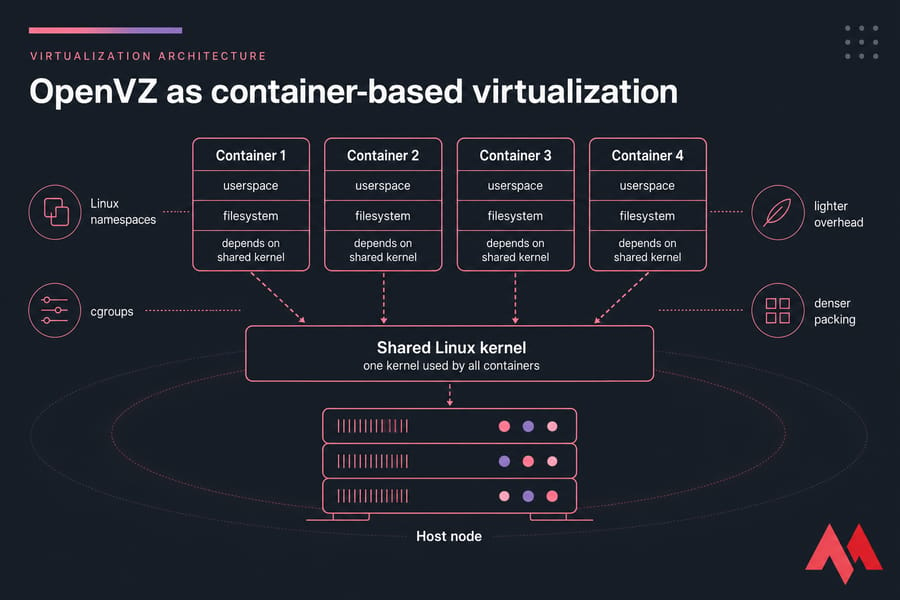
📦 OpenVZ as container-based virtualization
In an OpenVZ setup, each VPS is really a containerized environment. It has its own filesystem, processes, network stack, and user space, but not its own kernel. Isolation is created using Linux namespaces and cgroups rather than full hardware virtualization.
If that sounds familiar, it's because the logic is close to other container models. If you want the broader concept, this MonoVM article on VM vs containers explains the difference well.
📦 How the shared kernel model affects VPS behavior
The shared kernel model is why OpenVZ is lighter. There's less overhead, less duplication, and providers can often pack containers more densely onto a host node. But that same design also means less independence. Your VPS depends more heavily on what the host kernel allows.
So if you need a custom kernel, special kernel modules, Windows support, or certain Docker-related features, OpenVZ can get restrictive pretty quickly. That's where people get frustrated.
📦 Why OpenVZ plans are often cheaper
OpenVZ plans are often cheaper because they're efficient. Providers can use system resources very tightly, which can lower costs. For basic Linux workloads, that efficiency can be perfectly fine.
And to be fair, not every OpenVZ deployment is bad. A well-managed node with sensible resource allocation can perform decently. But the key difference is not branding—it’s architecture. If you want a broader refresher, here's virtualization explained.
🏗️ Container virtualization vs full virtualization: core architecture differences
This is the section that usually clears everything up. KVM and OpenVZ aren't just two brands of the same thing. They're different virtualization models.
OpenVZ uses container-based virtualization. KVM uses full virtualization through a hypervisor model. If you’re fuzzy on that term, MonoVM’s article on what is a hypervisor helps.
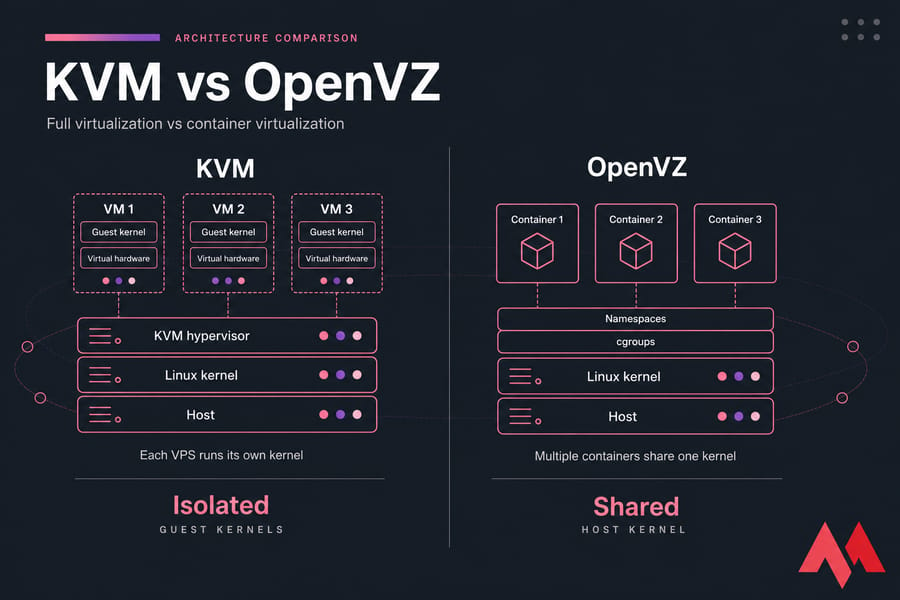
🏗️ Shared kernel vs isolated guest kernel
Think of OpenVZ like renting apartments in one building where everyone relies on the same plumbing and central heating. You have your own room, sure, but a lot of critical infrastructure is shared. KVM is closer to having separate houses in the same neighborhood. You still share the physical land underneath in a broad sense, but your systems are much more independent.
That one change affects compatibility, security exposure, and administrative freedom.
🏗️ How namespaces and cgroups affect OpenVZ
OpenVZ uses Linux namespaces to isolate processes, users, network stacks, and filesystems. It uses cgroups to manage and limit CPU, memory, and other resources. That's efficient, and for some workloads it's enough.
But “enough” isn't the same as “best.” Resource accounting in container-based systems can feel tighter on paper while still being more exposed to host-level policy decisions and shared-kernel limitations.
🏗️ How KVM uses hypervisor-based isolation
KVM presents each guest as a virtual machine with virtual hardware. The guest kernel runs independently from the host kernel, which is why KVM supports broader OS choices and stronger separation. In practice, that makes it easier to run custom Linux images, Windows VPS instances, VPN software, app stacks, and control panels without hitting strange roadblocks.
| Feature | KVM | OpenVZ | Better Choice |
|---|---|---|---|
| Virtualization model | Full virtualization | Container-based virtualization | KVM |
| Kernel | Own guest kernel | Shared host kernel | KVM |
| OS support | Linux and Windows | Mainly Linux-only | KVM |
| Isolation | Stronger VM-level separation | Lighter container isolation | KVM |
| Overhead | Slightly higher | Lower | OpenVZ |
| Custom kernel support | Yes | Limited by host | KVM |
| Docker friendliness | Usually better | Can be limited | KVM |
| Typical pricing | Usually higher | Usually lower | OpenVZ |
| Performance consistency | Often more predictable | Depends heavily on node quality | KVM |
| Best fit | Modern production workloads | Budget Linux-only tasks | Depends on workload |
Lighter doesn't always mean better. Once architecture is clear, performance differences make more sense.
🏎️ KVM vs OpenVZ performance: CPU, RAM, disk I/O, and stability
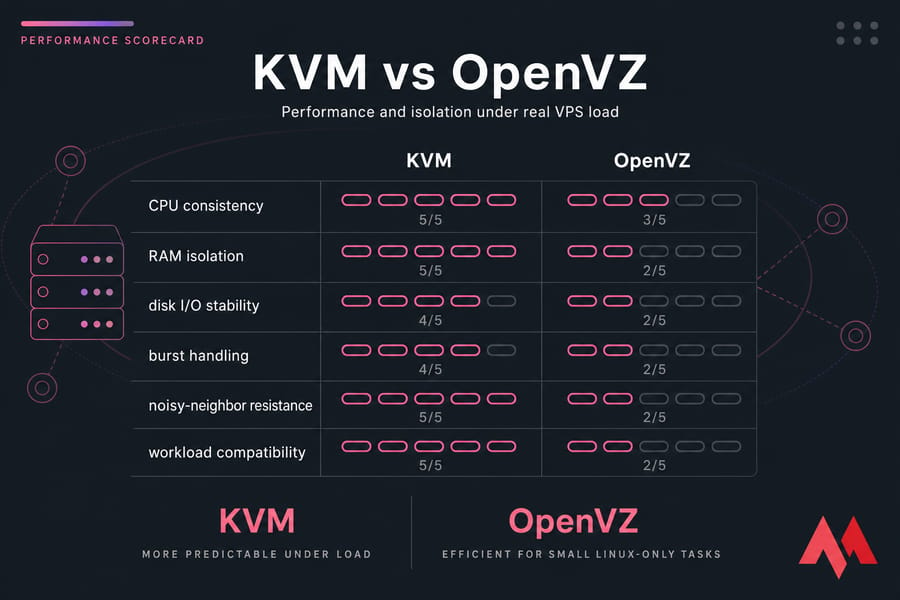
When people ask about openvz vs kvm performance, they usually mean one of three things: which is faster, which feels steadier, and which falls apart less under load. Those are not the same question.
🏎️ Which is faster for lightweight workloads?
For very small Linux-only tasks, OpenVZ can feel fast because the overhead is low. There's less emulation, less duplication, and the container model is efficient. If you're running a tiny script runner, a basic static site, or a disposable dev box, OpenVZ may perform perfectly well.
That's the part some KVM-only marketing skips. OpenVZ isn't slow by default.
🏎️ Which delivers more consistent performance under load?
KVM usually does better here. For real-world VPS buyers, consistency matters more than a tiny efficiency gain in ideal conditions. A VM with stronger isolation tends to behave more predictably when neighboring tenants get busy, especially on CPU and memory-heavy workloads.
I personally care more about consistency than peak synthetic speed. A server that does 5% better in a clean test but collapses during contention is not the better server.
🏎️ How overselling affects OpenVZ vs KVM
This is where things get real. In many hosting environments, OpenVZ has historically been more vulnerable to aggressive overselling because container density can be pushed hard. That doesn't mean every OpenVZ provider oversells. But the model makes it tempting.
When too many containers share a node, you may see CPU steal time, slower disk response, RAM pressure, or general instability. KVM nodes can also be oversold — absolutely — but KVM environments often provide firmer isolation boundaries and more predictable resource behavior.
And yes, provider quality matters just as much as the virtualization layer. Fast CPUs, NVMe storage, sane node density, and honest resource allocation make a huge difference. If you want to test a server properly, these VPS benchmark tools are worth using. If your stack handles disk-intensive databases or high concurrent access, matching these hardware configurations to a specialized ssd vps plan balances low latency with steady input-output capacity.
| Metric | KVM | OpenVZ | Notes |
|---|---|---|---|
| CPU overhead | Slightly higher | Usually lower | OpenVZ can be efficient for small tasks |
| CPU consistency | Often more stable | More dependent on node contention | Useful for bots, apps, and production sites |
| RAM isolation | Generally stronger | Can vary by provider policy | Important for memory-sensitive apps |
| Disk I/O consistency | Often more predictable | Can fluctuate more on crowded nodes | Storage type still matters a lot |
| Performance under load | Usually steadier | Can degrade faster with noisy neighbors | Especially noticeable on oversold systems |
| Burst efficiency | Good | Can be strong for lightweight bursts | Depends on scheduler and host policy |
| Modern app compatibility | Better | More limited | Impacts practical performance, not just raw speed |
Pro tip: low overhead does not automatically equal better real-world VPS performance. Stability, disk I/O consistency, and neighbor behavior usually matter more over time.
If your server feels sluggish, the problem may be node quality, storage, or abuse by nearby tenants rather than virtualization alone. This guide on why a VPS is slow is useful, and so is MonoVM’s article on how to improve the performance of VPS. Storage plays a huge role too, which is why NVMe VPS plans often feel noticeably better.
Performance alone isn’t enough if isolation is weak.
🛡️ KVM vs OpenVZ isolation and security for VPS hosting
If you're comparing kvm vs openvz security, KVM generally comes out ahead. Not because OpenVZ is automatically unsafe, but because stronger tenant isolation gives you a smaller blast radius when something goes wrong.
🛡️ Which offers better tenant isolation?
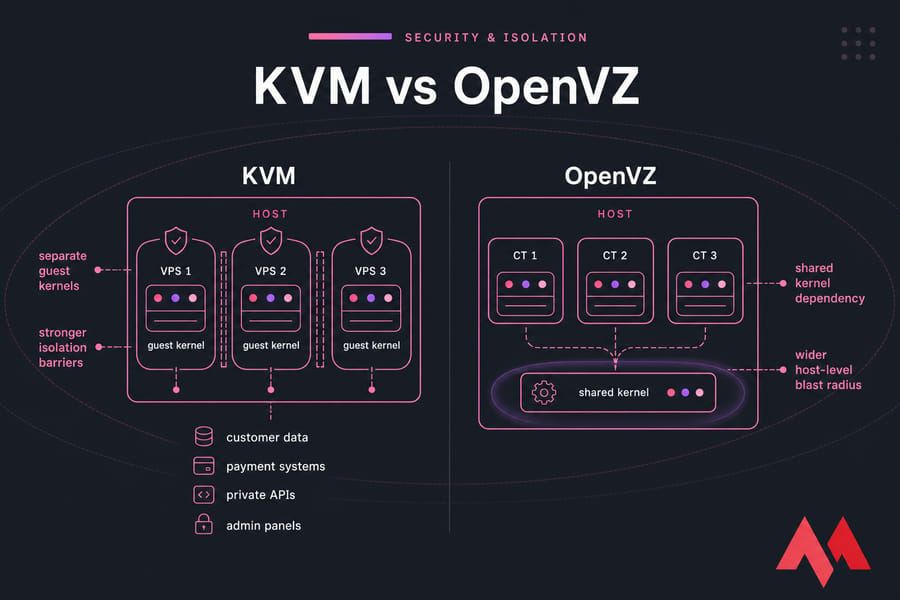
KVM usually offers better VPS isolation. Each VM runs with its own guest kernel, which creates a cleaner separation between tenants on the same host node. That matters in multi-tenant environments where you don't fully trust what the other customers on the node are doing.
OpenVZ isolates containers well enough for many ordinary tasks, but all containers still depend on the same shared kernel. That shared dependency changes the risk profile.
🛡️ Security impact of shared kernel vs dedicated kernel
With OpenVZ, the host kernel is a central point of trust. If the provider's kernel hardening, patching, or host configuration is weak, all containers depend on that shared foundation. In KVM, each VPS has more independence because the guest kernel is separate from the host's kernel boundary.
That's one reason KVM is often preferred for workloads involving customer data, payment systems, private APIs, admin panels, or business-critical apps. Compliance-sensitive teams tend to prefer the cleaner isolation model too.
Still, let's not oversell it. A badly managed KVM node can be a mess. Good patching, firewall policy, monitoring, and host security still matter. If you're tightening a server, these guides on VPS security tips, how to secure a Linux VPS, are worth bookmarking. For system engineers seeking to evaluate active process bottlenecks across multi-tenant setups, employing specialized vps monitoring tools will flag illegal host resource spikes immediately before performance dips.
🛡️ Noisy neighbor risk in OpenVZ and KVM environments
Noisy neighbors are one of those things hosting companies don't love talking about, but buyers should. A noisy neighbor is another tenant whose workload eats CPU cycles, disk bandwidth, RAM, or other shared resources. On weaker isolation models, you'll feel that faster.
In many OpenVZ environments, noisy-neighbor effects can be more noticeable because of dense packing and the shared-kernel design. KVM usually reduces that exposure, though it doesn't remove it entirely. The host node still matters. So does provider discipline.
Warning: shared-kernel environments can limit security separation and operational flexibility, especially for sensitive or high-change workloads.
Isolation often matters most when your stack needs flexibility too.
🛠️ KVM vs OpenVZ flexibility: OS support, Docker, custom kernels, and control
This is where KVM really pulls away for many buyers. If you need freedom not just root access on paper, but actual control over what you can run — KVM is usually the better answer.
🛠️ Can you run Docker on OpenVZ?
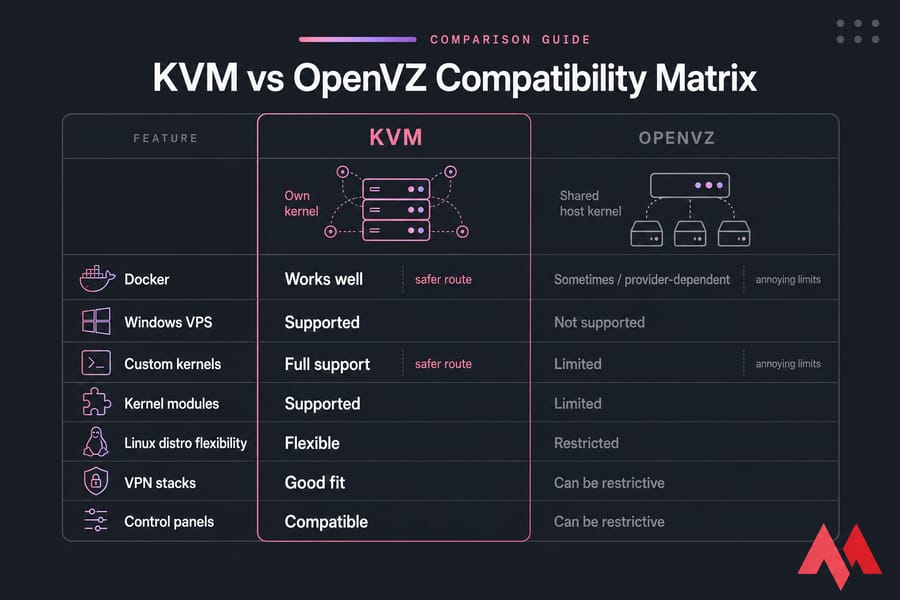
Sometimes, but this is where things get annoying. Docker on OpenVZ can be limited or problematic depending on the host kernel, enabled features, and provider configuration. Some setups work. Some half-work. Some become a time sink.
If Docker is central to your workflow, I'd avoid gambling. A Docker VPS on KVM is the safer route, and if you're building your stack now, this guide on installing Docker on Linux can help.
🛠️ Why KVM is better for custom OS and kernel modules
KVM supports a much wider range of Linux distributions and is also far more suitable for Windows VPS use cases. Because each VM gets its own kernel, you can use custom kernel settings, modules, firewall features, and system tuning that often aren't available in OpenVZ.
That matters for VPN software, certain security tools, control panels, advanced networking, custom filesystems, and niche application stacks. If you need to load kernel modules or expect unusual system behavior, OpenVZ can become restrictive fast.
🛠️ Which one is better for developers and sysadmins?
For developers and sysadmins, KVM is usually the better long-term option. It gives you broader OS support, fewer surprises, and a hosting environment that feels closer to a real machine. That's useful for app deployment, CI jobs, staging environments, self-hosting, and anything that might evolve later. If your development workflow involves segregating logical microservices within distinct routing boundaries, researching a virtual private cloud layout gives deep architectural insights into structural network safety.
OpenVZ can still work for simple Linux-only test boxes. But if your environment might grow into Node.js hosting, automation, AI tooling, or containerized apps, a flexible base saves headaches. MonoVM’s pages on Linux VPS hosting, running ChatGPT on VPS, and Node.js VPS point toward the kind of workloads that usually fit KVM better.
Quick summary: need Docker, a custom kernel, special modules, or Windows? Choose KVM.
The best choice depends on what you plan to run.
🎯 Best use cases for KVM and OpenVZ VPS
This is the part most buyers actually care about. Not the theory the fit. So here’s the practical version.
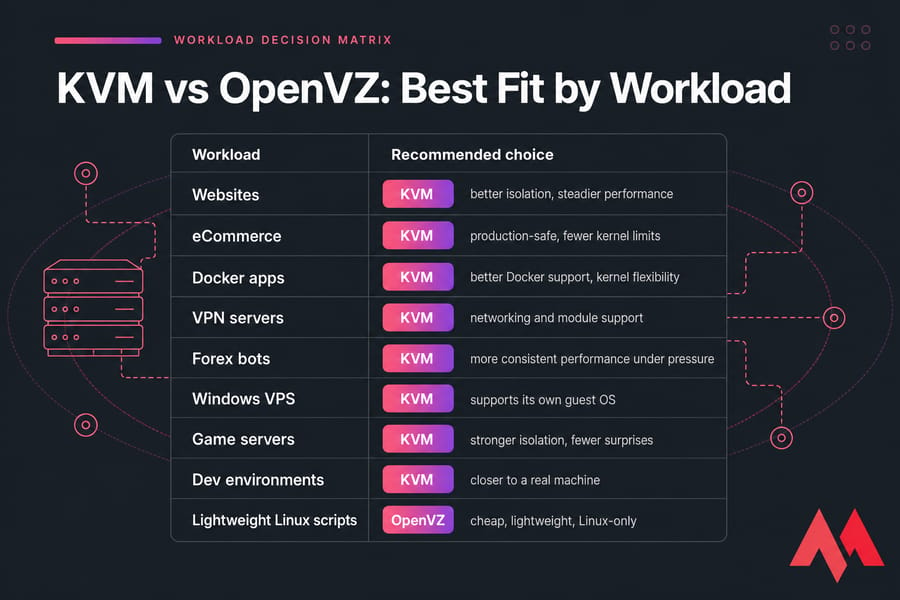
🎯 Best for websites and control panels
For production websites, WordPress stacks, eCommerce stores, and control panels, I’d usually recommend KVM. These workloads benefit from steadier RAM behavior, better disk consistency, stronger separation, and fewer kernel limitations. If you're planning to run cPanel-like tooling, mail services, or a full web stack, the extra freedom matters. Deploying a dedicated cpanel vps server ensures that heavy administrative loops do not face unexpected restrictions from shared hypervisor configurations.
🎯 Best for VPN, containers, and dev environments
KVM is also the stronger choice for VPN servers, Docker app hosting, and development environments that mimic production. VPN software often needs networking behavior and kernel support that you don't want to fight for. That's why options like OpenVPN server hosting are a natural KVM fit.
Same with app containers. If your workflow depends on images, orchestration experiments, or nested tooling, KVM gives you fewer surprises than OpenVZ.
🎯 Best for Forex VPS, bots, and latency-sensitive apps
For trading bots and Forex automation, KVM is usually preferred. You're not just paying for raw speed. You're paying for consistency, isolation, and reduced risk from neighboring workloads. A bot that misses execution windows because the node gets noisy isn't “cheap” anymore.
That’s why many users looking at Forex VPS plans lean toward KVM-backed environments.
🎯 Best for budget Linux-only workloads
OpenVZ still makes sense when the workload is genuinely simple. Lightweight scripts, internal cron jobs, tiny static sites, disposable test containers, or basic Linux utilities can be fine on OpenVZ if the provider is reputable and the limits suit you.
But if there’s any real chance the project will grow, KVM is usually cheaper in the long run because you avoid a migration later.
| Use Case | Recommended Option | Why | Risk If Wrong |
|---|---|---|---|
| Production website | KVM | Better isolation and steadier performance | Slowdowns and platform limits |
| eCommerce store | KVM | Cleaner separation for sensitive traffic and plugins | Inconsistent behavior under load |
| Docker app hosting | KVM | Better compatibility and kernel freedom | Container issues or unsupported features |
| VPN server | KVM | More reliable networking and module support | Feature restrictions or setup friction |
| Game server | KVM | More predictable resource behavior | Lag from contention |
| Forex trading bot | KVM | Consistency and isolation matter more than cheap pricing | Execution instability |
| Windows VPS | KVM | Full virtualization support | Not supported properly on OpenVZ |
| Simple Linux scripts | OpenVZ | Cheap and lightweight for basic tasks | Mostly acceptable if needs stay simple |
| Basic dev/test box | OpenVZ or KVM | Depends on how close it needs to match production | Environment mismatch later |
| Minecraft or game hosting | KVM | Steadier CPU and memory behavior | Performance spikes and lag |
If you need gaming or app-specific hosting, pages like Minecraft VPS show the kind of workload where predictable resource handling matters.
If your workload may grow, choosing the wrong virtualization can become expensive.
📊 OpenVZ vs KVM pros and cons
By now, the pattern is probably obvious. KVM is the better default. OpenVZ is the cheaper specialist option. But trade-offs are real, so here they are plainly.
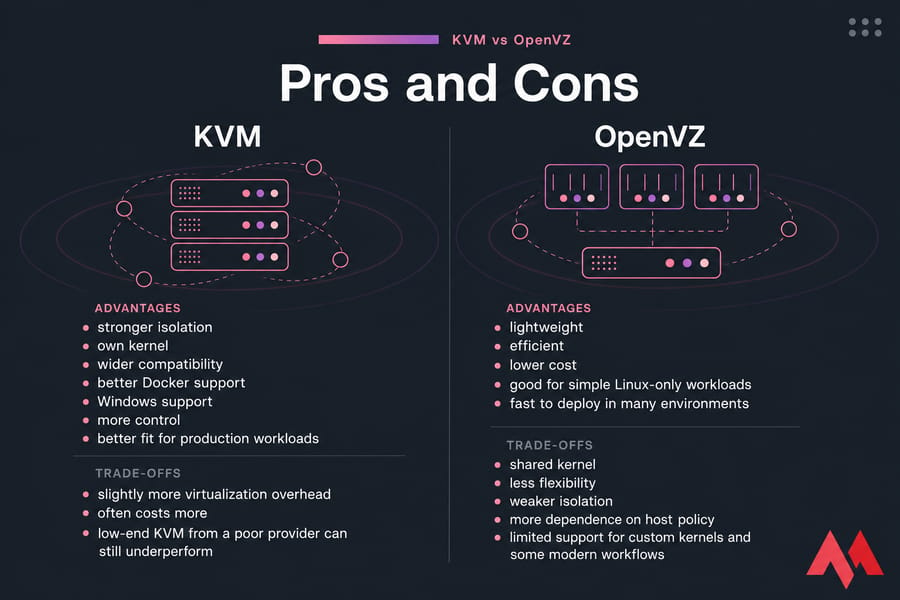
📊 KVM advantages and trade-offs
- Pros: stronger isolation, own kernel, wider compatibility, better Docker support, Windows support, more control, better fit for production workloads.
- Cons: slightly more virtualization overhead, often costs more, and low-end KVM from a poor provider can still underperform.
📊 OpenVZ advantages and trade-offs
- Pros: lightweight, efficient, lower cost, good for simple Linux-only workloads, fast to deploy in many environments.
- Cons: shared kernel, less flexibility, weaker isolation, more dependence on host policy, limited support for custom kernels and some modern workflows.
📊 The hidden costs of choosing the wrong virtualization
The hidden cost isn't just performance. It's time. Migration time, troubleshooting time, compatibility time. I've seen teams save a few dollars on an OpenVZ plan, then burn hours trying to work around Docker issues or kernel limitations. That's not really cheaper.
If you're comparing related infrastructure models, MonoVM also has good breakdowns for VPS vs VDS and cloud servers vs VPS. And if you're weighing hypervisor families, you may also want to read KVM vs Xen and KVM vs VMware. Furthermore, inspecting structural discrepancies using our comparison of KVM vs Proxmox highlights whether automated virtualization management or raw hypervisor tasks fit your administration style.
Here’s how to make the final choice based on your constraints.
📋 How to choose between KVM or OpenVZ for your VPS
You don't need a complicated framework here. A few honest questions will usually settle it.
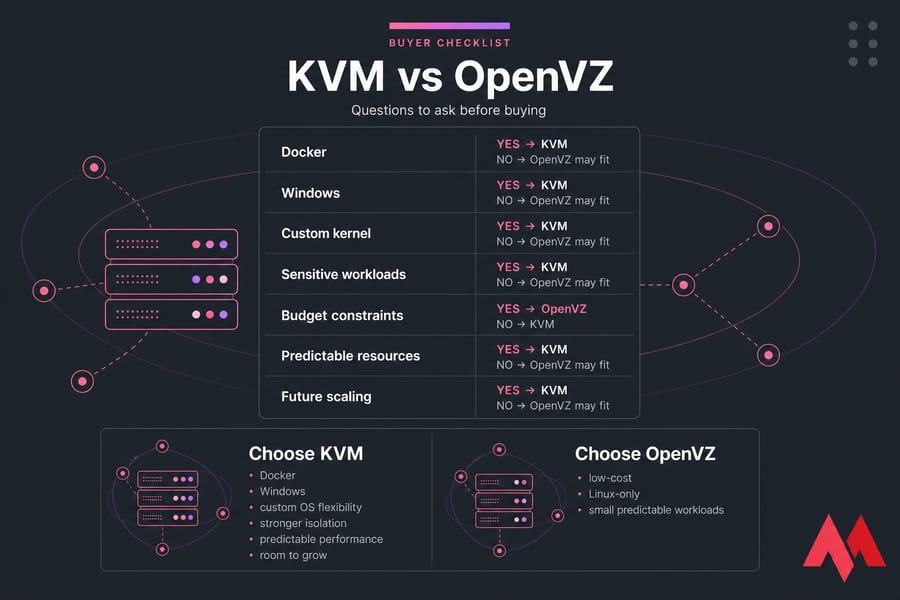
📋 Questions to ask before buying
- Do you need a custom kernel or kernel modules?
- Do you need Docker or container-heavy workflows?
- Do you need Windows rather than Linux?
- Is your workload sensitive, customer-facing, or business-critical?
- Do you need predictable CPU, RAM, and disk behavior?
- Are you planning to scale or add services later?
- Is your budget so tight that lower cost matters more than flexibility?
📋 Signs you should upgrade from OpenVZ to KVM
If you're already on OpenVZ, migrate openvz to kvm when you start hitting platform limits. Common signs include Docker friction, kernel module restrictions, unstable performance during busy periods, security concerns, or the need to run software the host kernel doesn't support well. For applications transitioning into complex enterprise orchestration, reading our guide on kubernetes and docker clarifies how microservice frameworks adapt smoothly over true hardware virtualization layers.
Another clue: you’ve started making purchasing decisions around what the VPS allows instead of what your project needs. That's usually when the platform has become the bottleneck.
📋 Buyer checklist for virtualization selection
Choose KVM if:
- You want stronger isolation.
- You need Docker, VPN tooling, or custom OS flexibility.
- You need Windows or specialized Linux setups.
- You care about long-term stability more than the absolute lowest price.
- You expect the workload to grow.
Choose OpenVZ if:
- Your workload is simple, Linux-only, and low-risk.
- You want the cheapest workable VPS option.
- You don't need custom kernels or advanced platform features.
- You accept that flexibility and isolation will be weaker.
For a broader purchasing framework, this guide on what to consider when choosing VPS hosting is worth reading.
Need better isolation than OpenVZ can offer? If your project needs predictable performance, Docker compatibility, custom OS flexibility, or stronger tenant separation, MonoVM’s KVM VPS plans are built for modern workloads.
For most readers, the final answer is straightforward.
🏆 Final verdict: is KVM better than OpenVZ?
Yes — for most modern VPS users, KVM is better than OpenVZ. It gives you stronger isolation, better security boundaries, wider OS support, more control, and fewer platform limitations. If you care about performance consistency and flexibility, KVM is the better default choice.
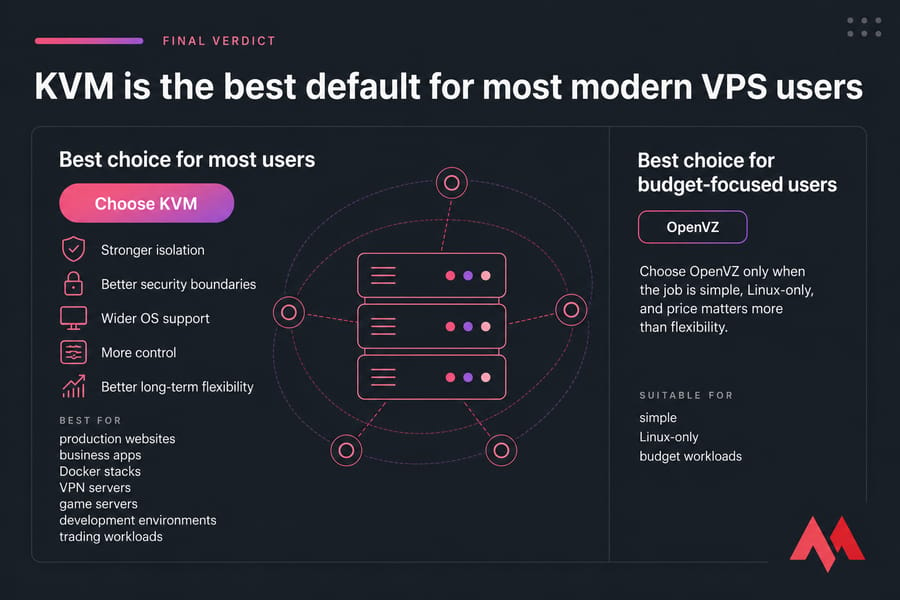
🏆 Best choice for most users
Choose KVM for production websites, business apps, Docker stacks, VPN servers, game servers, development environments, and trading workloads. It simply fits more real-world scenarios with fewer compromises.
🏆 Best choice for budget-focused users
Choose OpenVZ only when the job is simple, Linux-only, and price matters more than flexibility. It's not useless. It's just narrower.
🏆 When MonoVM KVM VPS is the safer long-term option
If you want a VPS that won't box you in later, MonoVM's KVM VPS hosting is the safer long-term path. You get full root or admin access, Linux and Windows options, 25+ VPS locations worldwide, NVMe-powered plans where available, and 24/7 support. For a complete overview of available virtualization products, visit MonoVM's VM hosting page.
Choose a VPS virtualization that won’t limit you later. For lightweight, budget Linux containers, OpenVZ can still work. But if you want stronger isolation, broader OS support, and better long-term flexibility, KVM is the smarter choice. You can also check MonoVM’s support resources, browse company awards, or review the general FAQ before buying.
⚠️ Common Architectural Mistakes to Avoid with VPS Servers
Many developers and business owners look only at the price tag or raw resource limits when purchasing a server, which can lead to frustrating technical bottlenecks down the line:
- Assuming Root Access Grants Global Privilege: On OpenVZ, you may be the root user inside your specific container environment, but you are still strictly bound by the master host kernel. If your application or custom firewall configurations require loading custom kernel modules, you will face errors.
- Treating Containerized Memory as Dedicated Physical Allocation: Operating system-level virtualization shares memory dynamically. If a host node is aggressively oversold, your system may suffer out-of-memory crashes even if your internal tracking scripts indicate you have free RAM left.
- Ignoring Disk Read/Write Noisy Neighbor Impacts: Even if a host node uses solid-state hardware, container virtualization routes disk storage traffic through tight, shared channels. One neighboring client handling intense database operations can slow down your site's disk queue instantly.
💡 Expert Performance Tuning Guidelines for Virtual Servers
No matter whether you deploy your production code on an isolated container setup or a dedicated hardware-assisted hypervisor, applying these performance tuning strategies preserves runtime reliability:
- Monitor CPU Steal Time Regularly: Use command-line analytics tools to track your CPU metrics. If your steal time percentage climbs above zero consistently, your virtual server is waiting for processing loops because of hypervisor contention, indicating it is time to shift to a dedicated environment.
- Utilize Premium NVMe Arrays for Database Stacks: Traditional solid-state or magnetic legacy arrays bottleneck under heavy parallel inputs. Ensuring your hypervisor operates over modern high-speed configurations keeps response times flat.
- Isolate Sensitive APIs and Payment Forms: Never run compliance-heavy code inside a container infrastructure where the core kernel layer is exposed across multiple public tenants. Use the hardware separation native to isolated environments to mitigate security risks.

An experienced tech and developer blog writer, specializing in VPS hosting and server technologies. Fueled by a passion for innovation, I break down complex technical concepts into digestible content, simplifying tech for everyone.