If you want the short version, here it is: virtual machine security best practices come down to isolation, hardening, patching, access control, network segmentation, monitoring, and protecting snapshots and backups. Good VM security is layered. You need controls at the host, hypervisor, guest OS, network, identity, storage, and management plane—not just antivirus on the VM.
People often assume virtualization equals safety. It doesn't. A VM can still get compromised through exposed SSH or RDP, stale images, weak credentials, bad firewall rules, or a poorly protected admin console. I've seen all of those in real environments, and most of them weren't fancy attacks. Just preventable mistakes.
Before you start changing settings, know five things: which platform you're running on (KVM, VMware, Hyper-V, VirtualBox, Proxmox VE, or a cloud abstraction), whether the guest is Linux or Windows, who controls the host layer, which ports the VM actually needs, and where your backups and snapshots live.
What is virtual machine security and why does it matter?
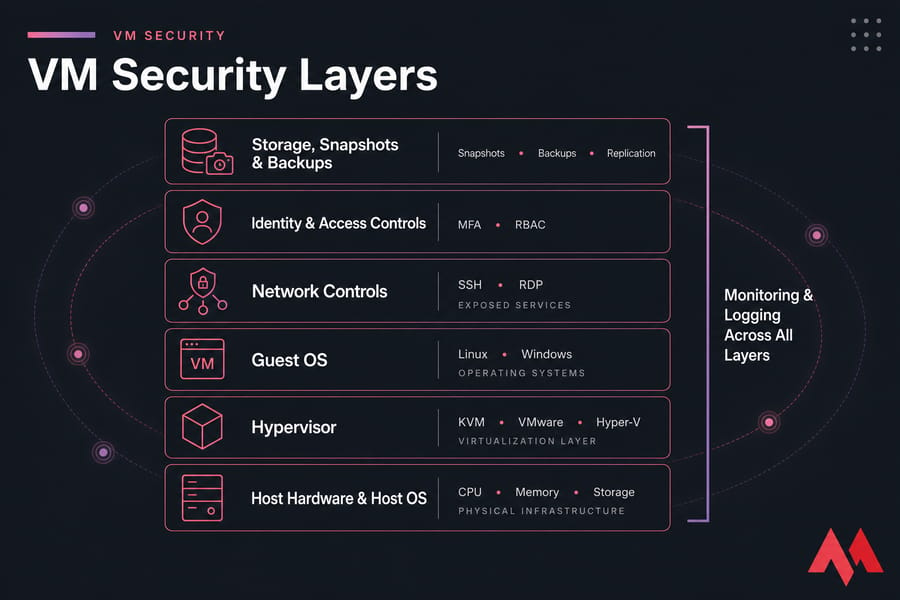
Virtual machine security is the practice of protecting the VM itself and every layer it depends on: host, hypervisor, guest OS, network paths, admin access, storage, and recovery assets.
If you need a refresher on what is virtual machine or what is hypervisor, those are worth reading first.
And yes, the layers matter. A KVM guest, a VMware ESXi guest, a Hyper-V VM, and even a VirtualBox lab machine all inherit risk from the system underneath them. The guest OS can be perfectly patched and still be exposed if the management interface is public, the virtual switch is misconfigured, or backups are wide open.
VM security applies in a bunch of places:
- VPS environments running public websites or APIs
- Cloud VMs hosting apps, databases, and internal tools
- Windows and Linux dev/test labs
- Production workloads that need separation between services
- VDI and internal business systems
How is it different from physical server security? Mostly in the number of shared layers. A physical server has fewer abstraction points. A VM adds a hypervisor, virtual disks, virtual switches, templates, snapshots, cloned images, and a management plane. That gives you flexibility and isolation, but also more places to make a mess.
Responsibility changes depending on the environment too. In a self-managed setup, you may control the host OS, hypervisor, storage, and guest. In a hosted VPS, the provider secures the physical hardware and virtualization stack, while you secure the guest OS, services, user access, firewall rules, and application layer. That's the shared responsibility model in plain English.
Key takeaway: Virtualization adds separation, not automatic security. Treat a VM as part of a layered system, not a magic security boundary.
What parts of a VM environment need protection?
- Host hardware and host OS: physical access, firmware, host patching
- Hypervisor: KVM, VMware ESXi, Hyper-V, or another virtualization layer
- Guest OS: Linux or Windows hardening, updates, services, local users
- Network: VLANs, virtual switches, security groups, east-west traffic
- Identity: SSH keys, RDP controls, MFA, RBAC, service accounts
- Storage: virtual disks, shared storage, encryption, cleanup after deprovisioning
- Recovery assets: snapshots, backups, templates, golden images
- Management plane: admin consoles, APIs, orchestration tools, audit logs
How VM security differs from physical server security
The big difference is shared infrastructure. Multiple guests can sit on one host. They may share CPU, memory scheduling, storage backends, and network fabric. That means your blast radius depends not only on the guest, but also on segmentation and hypervisor hygiene.
Who is responsible in hosted vs self-managed VM environments?
If you're renting a VPS, you probably can't patch the provider's hypervisor—and you shouldn't pretend you can. What you can do is choose a provider with strong infrastructure controls, then lock down your own VM. If you're running your own cluster, the burden is heavier. You're the one responsible for the host, the admin plane, and the guests.
Virtual machine isolation: why separation is your first security control
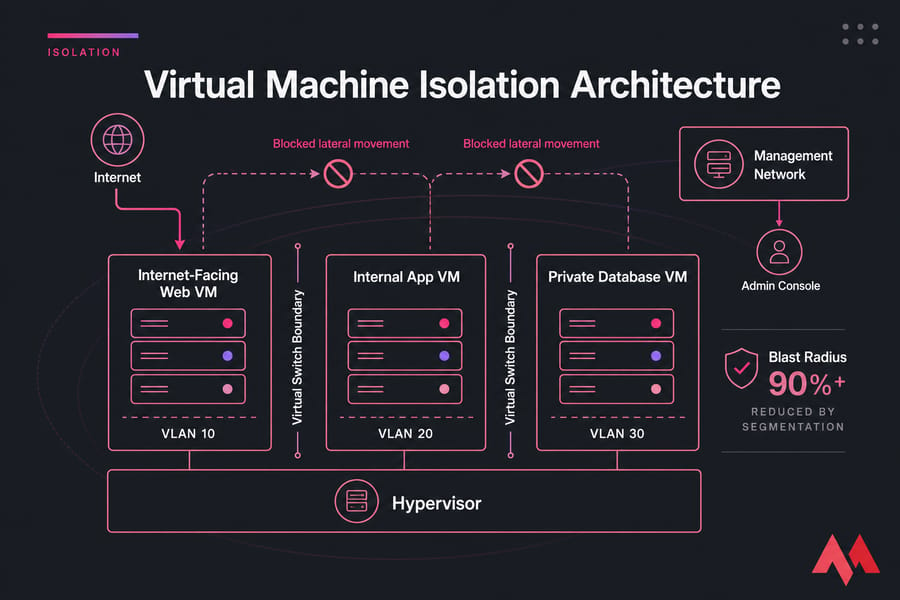
Virtual machine isolation is the first thing people mention, and for good reason. A hypervisor separates guests at the CPU, memory, storage, and network layers. In practice, that means a compromise in one VM doesn't automatically hand an attacker the whole host or every neighbor. That's the goal, anyway.
What isolation really buys you is blast radius reduction. If your public web VM gets popped, a properly isolated private database VM on another VLAN, another virtual switch, or at least another tightly filtered segment is much harder to reach. That's the difference between “one ugly incident” and “whole environment on fire.”
How VM isolation works at the hypervisor level
The hypervisor presents abstracted hardware to each guest OS. Each VM gets its own virtual CPU allocation, memory map, virtual NICs, and virtual disk devices. On KVM, VMware, and Hyper-V, that separation is much stronger than container-style shared kernel isolation. It isn't perfect, but it's a solid security boundary when the stack is patched and configured well.
If you're comparing platforms, MonoVM's guide on KVM virtualization is useful context. KVM-style virtualization is popular because it gives you full guest OS isolation rather than just process separation.
Where isolation can fail: VM escape, shared resources, and misconfiguration
Now here's the thing. Isolation can fail in a few very real ways.
- VM escape: a hypervisor flaw lets code break out of the guest and interact with the host or other guests. Rare, but serious.
- Shared folders or device passthrough mistakes: convenience features can weaken boundaries.
- Bridged networking and flat segments: if everything talks to everything, isolation is mostly theoretical.
- Shared storage exposure: bad permissions can leak disks, backups, or templates.
- Public management access: if the admin plane is exposed, an attacker may not need the guest at all.
A simple definition of VM escape: it means an attacker starts inside one VM and manages to break through the hypervisor boundary. You don't need to obsess over it every day, but you absolutely should patch to reduce the chance.
Warning: A VM can still be exposed through weak admin access, shared resources, unsafe shared folders, or hypervisor flaws. “It's virtualized” is not a defense plan.
How to separate workloads by trust level
This is where good architecture beats after-the-fact cleanup.
- Keep internet-facing workloads separate from internal-only systems.
- Split dev, test, and production. Don't put them on the same flat network because it's “just temporary.” Temporary tends to live forever.
- Don't mix high-trust and low-trust workloads on the same segment.
- Use a separate management network for hypervisor and admin interfaces.
- Prefer private networking and filtered jumps over direct public admin exposure.
If you're weighing VM boundaries against container boundaries, the VM vs containers comparison helps frame the trade-offs.
Isolation helps a lot, but weak configuration still exposes the VM to common attack paths. So the next question is obvious: what actually goes wrong most often?
VM security risks: the most common threats to virtual machines
Most VM security risks aren't exotic. They're boring, repeatable, and expensive. An unpatched guest OS, an old template with embedded credentials, a public RDP port, or a snapshot repository nobody locked down—that's the stuff that gets people in trouble.
If you want a broader threat background, MonoVM also has useful reading on what is a cyber threat and the most common cyber security threats and how to mitigate them. But for VMs, the threat model needs to be more specific.
Unpatched guest operating systems
This is still the number one issue in many environments. Linux and Windows VMs age fast. Dormant dev instances are especially bad for this. I've seen six-month-old lab VMs brought back online with old packages, old TLS configs, and old credentials still sitting there like a trap.
Hypervisor vulnerabilities and management plane exposure
Even if the guest is healthy, the hypervisor and management plane matter. Admin consoles, APIs, orchestration tools, and virtualization dashboards are high-value targets. If they're reachable from the public internet or a broad corporate network, you're giving attackers a better prize than a single guest.
Credential theft, brute force attacks, and lateral movement
Public SSH and RDP endpoints get hammered constantly. Weak passwords, reused passwords, shared admin accounts, and no MFA make that worse. Once inside one VM, attackers try lateral movement—pivoting into other machines over open east-west paths.
Insecure snapshots, templates, and cloned images
Snapshots are useful. Templates are useful. Golden images are useful. They also collect sins over time. Old software, cached secrets, hardcoded tokens, test keys, forgotten local admins—I've found all of those inside cloned images in production.
| Threat | How it happens | Impact | Best mitigation |
|---|---|---|---|
| Unpatched guest OS | Missed updates on Linux or Windows VM | Remote code execution, privilege escalation, compromise | Set patch cadence, prioritize critical fixes, scan regularly |
| Exposed SSH or RDP | Admin services open to the internet | Brute force, credential stuffing, direct intrusion | Use VPN or bastion, allowlist IPs, require keys or MFA |
| Weak or reused credentials | Shared admin logins or poor password hygiene | Account takeover, lateral movement | Least privilege, unique accounts, rotation, MFA |
| Over-permissive firewall rules | Wide-open inbound or outbound access | Expanded attack surface, data exfiltration | Default deny, only open required ports |
| Stale templates and cloned images | Old images reused without validation | Inherited vulnerabilities and embedded secrets | Maintain hardened golden images, age out old versions |
| Insecure snapshots | Snapshots stored without access control | Data exposure, unsafe rollback | Restrict access, encrypt storage, treat as sensitive assets |
| Management plane exposure | Public admin consoles or APIs | Environment-wide compromise | Private admin network, RBAC, MFA, audit logging |
| Lateral movement between VMs | Flat network or permissive east-west traffic | One breach spreads across workloads | Microsegmentation, firewalling, monitoring |
| Shared storage leakage | Bad permissions or sloppy deprovisioning | Data disclosure, compliance issues | Encrypt storage, sanitize retired assets, review access |
| VM escape or hypervisor flaw | Exploited virtualization vulnerability | Host-level or multi-tenant impact | Fast hypervisor patching, minimize attack surface |
So yes, there are many ways a VM can be exposed. But the fix isn't “buy another security tool.” Start with hardening.
Virtual machine hardening checklist for Linux and Windows guests
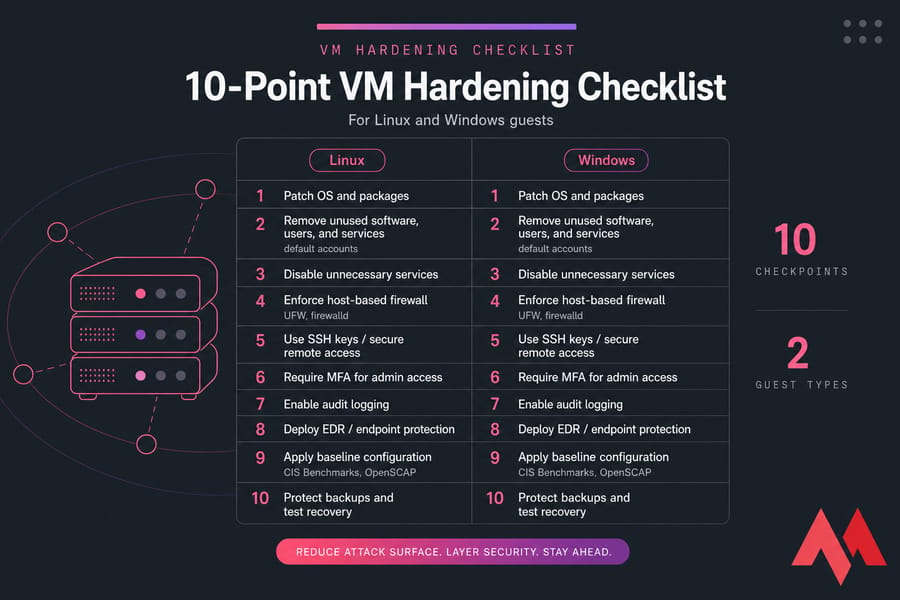
Virtual machine hardening is the work of taking a default guest and turning it into a controlled, minimal, auditable system. That's the practical definition. You remove what's unnecessary, secure what remains, and make the VM predictable.
My rule of thumb: the fewer moving parts inside a VM, the easier it is to defend. Default builds are too generous. Too many packages. Too many services. Too many users. Too much trust.
Remove unused software, users, and services
Start by changing defaults immediately after provisioning. Rename or disable default accounts where appropriate, remove sample apps, uninstall packages you don't need, and disable unused services. If the VM doesn't need mail, FTP, print services, SMB exposure, or GUI components, don't keep them around.
This is attack surface reduction in its simplest form. It works.
Apply secure baseline settings and CIS-style controls
Use a baseline. Seriously. Ad hoc hardening gets inconsistent fast. CIS Benchmarks and OpenSCAP-style checks are helpful because they force repeatable decisions. You won't apply every recommendation in every workload, but they give you a structured starting point.
Good baseline controls usually include:
- Password and lockout policies
- Audit logging enabled
- Unused accounts removed or disabled
- Restrictive file and folder permissions
- NTP or equivalent time sync
- Secure boot where the platform supports it
- Minimal installed components
Pro tip: Build from a hardened golden image instead of repeating manual setup every time. Manual repetition is where drift and shortcuts creep in.
Lock down ports, firewall rules, and remote access
Every guest should run a host-based firewall. On Linux, that often means UFW or firewalld. On Windows, it's Windows Defender Firewall. Even if you also have cloud security groups or upstream ACLs, keep the local firewall. Defense in depth still matters.
Only expose services the VM actually needs. A public web VM might need 80 and 443. Your database VM almost certainly shouldn't. A Linux admin box may need SSH from a limited IP range. A Windows VM might need RDP, but ideally only through a VPN, gateway, or bastion path.
If you need platform-specific help, MonoVM has guides to secure a Linux server, secure Windows Server, and configure secure SSH access.
Enforce patching, malware protection, and file integrity checks
Patch the OS, but don't stop there. Patch packages, runtimes, agents, management tools, and application dependencies. A VM patch management routine should include emergency handling for critical flaws, plus a regular maintenance window for everything else.
For Linux VMs, file integrity monitoring can catch changed binaries or suspicious configuration edits. On Windows, Microsoft Defender is the obvious starting point, and many teams layer an EDR tool on top—CrowdStrike, SentinelOne, and similar tools fit here depending on budget and environment.
Fail2Ban can be useful on Linux for noisy brute-force attempts, though it should never be your only control.
Linux and Windows guest notes
| Control | Linux VM | Windows VM |
|---|---|---|
| Patch management | Update distro packages and app repos regularly | Apply Windows Update plus third-party app patches |
| Firewall | Use UFW or firewalld with default deny where practical | Use Windows Defender Firewall with restricted inbound rules |
| Remote access | Prefer SSH keys, disable password auth if possible | Harden RDP, restrict source IPs, use gateway or VPN |
| Least privilege | Limit sudo access and review groups | Limit local admin rights and use role separation |
| Audit logging | Collect auth logs, sudo events, process activity | Collect security logs, PowerShell events, login events |
| Malware protection | Use EDR/AV as workload requires | Enable Defender or another managed EDR agent |
| Service reduction | Disable unused daemons and packages | Remove unnecessary roles, features, and services |
| File permissions | Review ownership, SSH directory rights, app secrets | Review NTFS permissions and service account access |
| Time sync | Use NTP or chrony | Ensure Windows time service is healthy |
| Baseline checks | Use CIS/OpenSCAP style reviews | Use CIS-style baselines and policy auditing |
| Secrets hygiene | Remove tokens and keys from images and scripts | Remove saved credentials and hardcoded secrets |
VM hardening checklist by priority
| Task | Priority | Owner | Why it matters |
|---|---|---|---|
| Patch OS and installed software | Critical | Guest admin | Closes known vulnerabilities quickly |
| Remove unused services and packages | High | Guest admin | Shrinks attack surface |
| Enable host-based firewall | High | Guest admin | Limits unwanted inbound access |
| Replace password-only admin access | Critical | Guest admin | Blocks easy brute force wins |
| Review users and privileges | High | Guest admin | Prevents privilege creep |
| Enable logging and retention | High | Ops/SecOps | Supports detection and investigation |
| Deploy Defender or EDR | Medium | Ops/SecOps | Improves detection and response |
| Validate image baseline | High | Platform team | Stops insecure clones from spreading |
Hardening the guest is essential—but the host and hypervisor layer can still undermine everything if you ignore them.
Need a more secure foundation for your virtual machines?
MonoVM offers KVM VPS hosting, Linux VPS hosting, and Windows VPS hosting plans built for isolation, performance, and full administrative control. If you want to apply VM security best practices on a reliable stack, that's a practical place to start.
Hypervisor security best practices for host and management layer protection
Guest hardening is only half the story. Hypervisor security matters because the host and management layer sit underneath every VM. One weak admin console can expose many guests at once.
Secure the host OS and hypervisor updates
If you run your own platform, keep the host OS and hypervisor patched on a disciplined schedule. That includes KVM hosts, VMware ESXi, and Hyper-V deployments. Don't add unnecessary services to the host. A virtualization node should be boring on purpose.
For self-managed environments, physical host security matters too. Console access, firmware settings, removable media, and out-of-band management need controls. Not glamorous. Still necessary.
Restrict admin consoles, APIs, and management interfaces
Management interfaces should never be casually public. Limit admin consoles and APIs to trusted IPs, VPN-connected ranges, or a dedicated admin network. Require MFA and RBAC. Audit every meaningful action.
If you want more platform context, MonoVM covers KVM vs VMware and Windows Server Hyper-V.
Separate management traffic from production traffic
This is one of those controls people skip until something ugly happens. Don't run management traffic over the same broad segment as production workloads if you can avoid it. Separate management traffic makes lateral movement harder and monitoring clearer.
Limit privilege and audit administrator actions
Use role-based access control. Not every admin needs full platform-wide rights. Log console access, VM creation, template changes, snapshot exports, and permission changes. Review those logs. Otherwise you're collecting evidence no one ever reads.
| Layer | Provider responsibility in hosted VPS | Customer responsibility |
|---|---|---|
| Physical hardware | Server, power, racks, physical controls | None directly |
| Hypervisor | Patch and protect virtualization layer | Choose trustworthy provider, report abuse if needed |
| Management interface | Secure provider-side platform access | Protect account login, MFA, portal hygiene |
| Guest OS | Usually not managed unless service includes it | Patching, hardening, accounts, firewall, apps |
| Backups and configs | Depends on service plan | Retention, restore testing, access control |
If you're using a hosted VPS, choosing a provider with strong infrastructure controls and KVM isolation reduces your exposure at the virtualization layer. And if you need to report suspicious abuse or compromised activity, MonoVM's abuse contact should be part of your incident workflow. For physical environment context, there's also guidance on a secure data center.
Once the host and management plane are under control, the next choke point is the network between VMs.
VM network security best practices: segmentation, east-west traffic, and firewalls
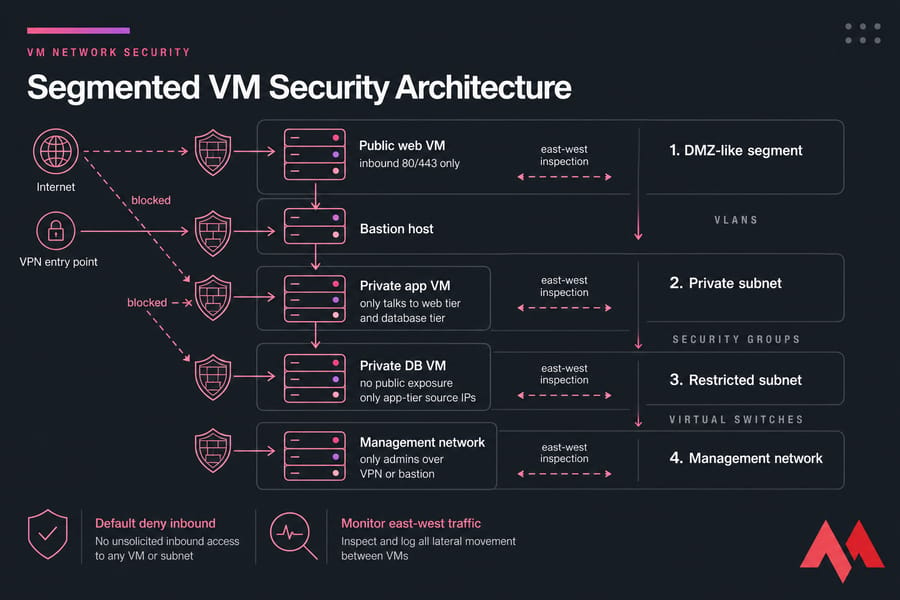
VM network security is where architecture turns into real containment. A public-facing app VM and an internal database VM should not live like roommates with no locks on the doors.
Use VLANs, security groups, or virtual switches to segment traffic
Segment by function and trust. Web, app, database, admin, backup, and monitoring traffic don't all belong in one flat range. Use VLANs, security groups, or virtual switch policy depending on your environment.
A good simple pattern looks like this:
- Public web VM: inbound 80/443 only
- Private app VM: only talks to web tier and database tier
- Private DB VM: no public exposure, only app-tier source IPs
- Management network: only admins over VPN or bastion
Inspect east-west traffic between virtual machines
North-south traffic gets attention because it's internet-facing. East-west traffic is what attackers use after landing inside. Monitor and filter lateral connections between VMs. Even basic logging of unusual connections between segments can reveal a lot.
You don't always need full IDS/IPS everywhere. But you do need visibility into who talks to whom, on which ports, and how often.
Close unnecessary ports and services
Default deny inbound unless there's a clear reason to open something. For sensitive workloads, limit outbound too. That's especially helpful for databases, internal processing nodes, and administrative systems that shouldn't be making random internet connections.
If you're auditing exposure, these guides on what is a firewall, how to check open ports in Linux, and SSH port forwarding are handy.
When to use VPNs, bastions, or private networking
If admins are connecting directly to SSH or RDP from random public IPs, fix that first. Use private networking, a bastion host, or a VPN gateway. For some teams, a dedicated VPN server is the cleanest answer.
A bastion/jump host isn't glamorous, but it gives you one narrow place to harden, log, and restrict. That's much better than fifteen public admin ports spread across fifteen VMs.
Next layer: human access. Because networking alone won't save you from weak credentials.
Secure VM access control with MFA, SSH keys, and least privilege
Secure VM access starts with a blunt rule: stop relying on password-only admin logins whenever possible. That applies to SSH, RDP, provider dashboards, and remote management tools.
Replace password-only access wherever possible
For Linux VMs, use SSH keys instead of passwords. Better yet, disable SSH password authentication once key-based access is confirmed.
If you need a walkthrough, see how to create an SSH key and what is an SSH key.
For management portals and remote access gateways, enable MFA.
MonoVM has a plain-language explainer on two-factor authentication. If you're managing Windows systems over RDP, pair that with gateway restrictions and MFA where possible.
Create role-based accounts instead of shared admin logins
Shared root and Administrator credentials are a headache waiting to happen. Use unique named accounts, even in small teams. That gives you accountability, cleaner offboarding, and far better audit trails.
Secure RDP, SSH, and remote management tools
RDP hardening basics are pretty straightforward:
- Don't expose 3389 broadly to the internet
- Restrict source IPs
- Use VPN, gateway, or bastion access
- Keep the guest patched
- Require strong authentication
For SSH, keep it simple too:
- Use keys
- Restrict by IP if possible
- Limit sudo rights
- Log auth attempts
- Rotate keys when staff or roles change
MonoVM also has targeted guides to secure RDP access and enhancing RDP with multi-factor authentication.
Rotate credentials and keys on a schedule
Not every team has a full enterprise secret manager. That's fine. You can still rotate credentials and SSH keys on a schedule, remove dormant accounts, and keep service accounts tightly scoped. Just don't bake secrets into templates or startup scripts and forget about them.
Access controls reduce entry points, but recovery assets must be secured too. That's where a lot of teams get lazy.
VM backup security: how to protect snapshots, images, and recovery points
VM backup security is usually under-discussed, which is odd because restore assets often contain everything an attacker wants. Disk contents. Credentials. App configs. Tokens. Sometimes even old customer data you thought was gone.
Why snapshots are not full backup strategy
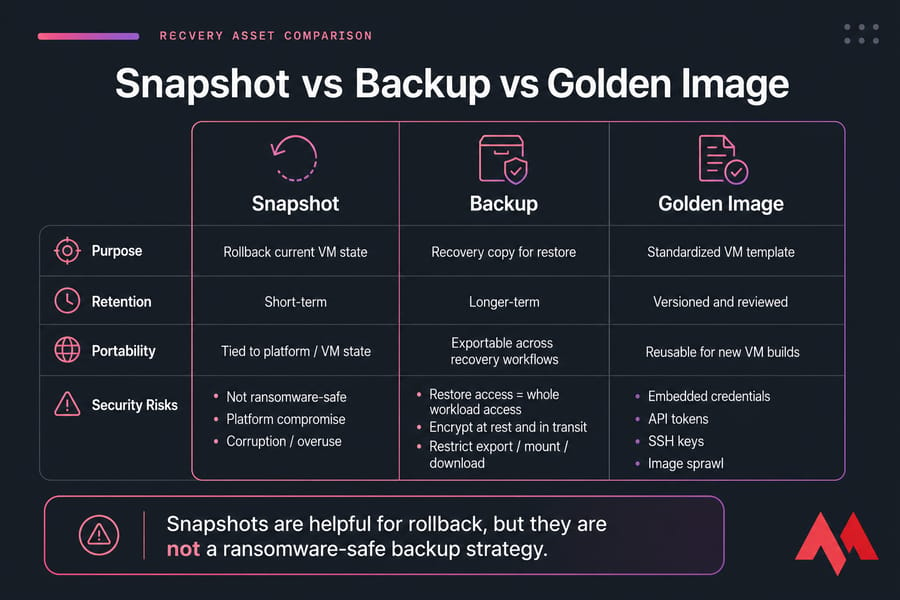
A snapshot is not the same as a backup. A snapshot is mostly a rollback tool tied to the VM's current state and platform. Useful? Absolutely. Safe enough as your only recovery strategy? No.
Snapshots can be corrupted, overused, or exposed through the same platform compromise you're trying to recover from. They also aren't automatically ransomware-safe.
Warning: Snapshots are helpful for rollback, but they are not a ransomware-safe backup strategy.
Secure golden images and prevent image sprawl
Golden images should be versioned, reviewed, and scrubbed before release. Remove embedded credentials, API tokens, SSH keys, saved RDP profiles, temporary files, installer leftovers, and stale software. Image sprawl is real. Once old templates pile up, people start cloning whatever is convenient.
Encrypt backup storage and control restore permissions
Backups and repositories should be encrypted at rest and in transit. Restrict who can restore, export, download, or mount them. Restore permissions are often too broad in smaller teams. That's risky because restore access is basically access to the whole workload.
Test restoration without reintroducing vulnerabilities
Test restores regularly, but don't restore blindly into production. Restore into an isolated environment first, validate the system, patch obvious gaps, rotate credentials if needed, then promote it back into service. Otherwise you're just reintroducing the same vulnerabilities from last month.
| Asset type | Primary use | Security risk | Best practice |
|---|---|---|---|
| Snapshot | Short-term rollback | Not isolated from platform compromise, often over-retained | Use briefly, restrict access, don't treat as full backup |
| Backup | Recovery and disaster resilience | Repository theft, ransomware targeting, broad restore access | Encrypt, isolate, make immutable where possible, test restore |
| Golden image | Standardized provisioning | Embedded secrets, stale packages, config drift | Version, sanitize, patch, and review regularly |
| Cloned template | Fast VM deployment | Inherited flaws spread widely | Approve and age out old versions |
If you need more backup mechanics, see how to back up a server or VPS and MonoVM's guide to Windows Server backup.
Backups help you recover. Monitoring helps you notice trouble before recovery becomes necessary.
Virtual machine monitoring and threat detection
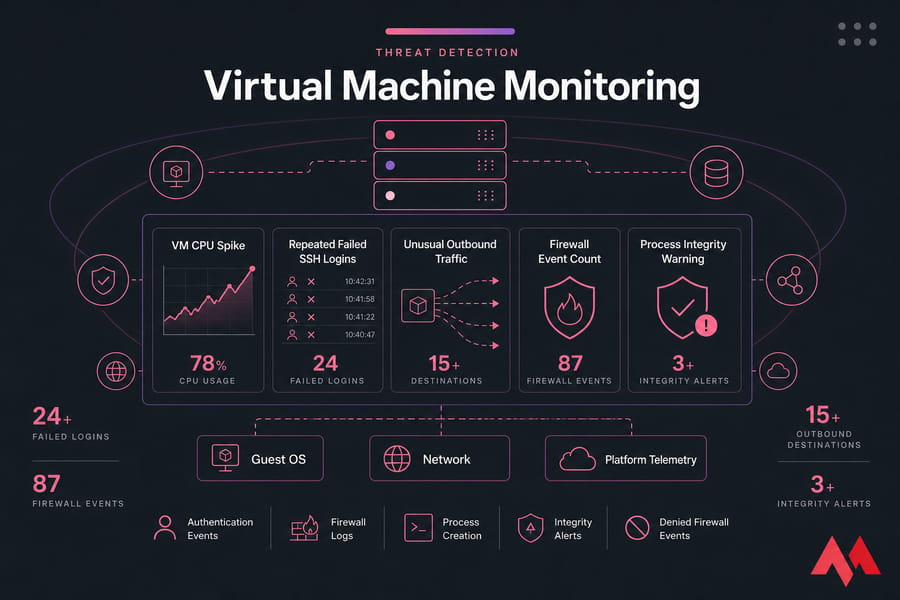
Virtual machine monitoring should pull from three places at minimum: the guest OS, the network, and whatever platform telemetry you have access to. You don't need a giant SIEM to get value here. You do need useful signals.
What logs to collect from guest, host, and network layers
From the guest, collect authentication events, firewall logs, package or update events, process creation, service changes, and integrity alerts where available. On Linux, auth logs and sudo activity matter a lot. On Windows, security logs, PowerShell events, and Defender alerts are key.
If you control the platform, host and hypervisor logs matter too—especially admin actions and configuration changes. From the network, track connection attempts, flow records, denied firewall events, and unusual cross-segment traffic.
Which alerts matter most for VM environments
Some alerts are noisy. Some are gold. The ones I'd watch first:
- Repeated failed SSH or RDP logins
- Sudden outbound traffic spikes
- New processes running from odd paths
- Security tools being disabled
- Unexpected privilege changes
- Database VM making random internet connections
- Dormant VM waking up and generating traffic
Tools for vulnerability scanning, EDR, and performance correlation
For monitoring and performance correlation, Zabbix, Prometheus, Grafana, and Nagios are common choices. For endpoint protection, Microsoft Defender is the baseline in many Windows environments, while EDR platforms add deeper detection on top. Vulnerability scanning should run on a schedule that matches the VM's exposure and business criticality.
Performance monitoring and security detection overlap more than people think. A VM pegging CPU, exhausting disk, or opening hundreds of outbound sessions may be having a performance problem—or it may be compromised. You need both lenses.
If you want tooling ideas, MonoVM's article on VPS monitoring tools is a good next read, and AI cybersecurity tools can help you evaluate newer detection options.
Signs a VM may be compromised
| Signal | Why it matters | Tool source | Response action |
|---|---|---|---|
| Repeated login failures | Could indicate brute force or credential stuffing | Auth logs, firewall, Fail2Ban, Defender | Block source, review exposure, rotate affected credentials |
| Unexpected outbound traffic | May indicate malware, C2, or data exfiltration | Netflow, firewall, IDS/IPS | Isolate VM, inspect processes, capture evidence |
| Unauthorized process creation | Often one of the earliest compromise indicators | EDR, audit logs | Kill process if needed, investigate parent chain |
| Disabled security agent | Attackers often try to blind detection first | EDR, config monitoring | Escalate immediately, isolate host |
| Unusual resource spikes | Can indicate abuse, crypto mining, or runaway code | Prometheus, Zabbix, Grafana | Compare with change history and process list |
| New east-west connections | Lateral movement between VMs | Firewall logs, IDS/IPS, flow records | Block path, verify segmentation policy |
Quick note: You don't have to “monitor everything.” Start with admin access, patch status, firewall logs, process anomalies, and outbound traffic. That's usually where the useful signal is.
Common virtual machine security mistakes that create avoidable risk
Some mistakes show up over and over. Not because people are careless, exactly. More because VM sprawl makes shortcuts feel harmless—until they aren't.
- Treating VMs as disposable and leaving them unpatched. Disposable infrastructure still gets attacked.
- Overtrusting default settings. Default isn't hardened. It's installable.
- Using default credentials or weak passwords. Still happening. Still bad.
- Thinking changing the default port is enough. It reduces noise, not risk.
- Forgetting dormant VMs. Old dev boxes are frequent weak points.
- Cloning insecure templates. One bad image becomes ten bad VMs fast.
- Storing secrets in images. API keys and private keys do not belong in templates.
- Exposing management ports publicly. SSH, RDP, and admin tools should be restricted.
- Overusing snapshots. They're not long-term backup policy.
- Assuming the provider secures the guest OS automatically. In unmanaged environments, that's your job.
If you want a broader VPS-focused checklist, MonoVM also has practical VPS security tips and guidance on how to manage a VPS server.
So where do VMs fit compared with containers and VPS hosting models? That's where a lot of confusion starts.
VM vs containers vs VPS security: what changes and what does not
This comparison trips people up because “VM” and “VPS” aren't the same kind of thing. A VM is a virtualization concept. A VPS is a hosting model that usually uses virtualization under the hood. Containers are another isolation model altogether.
Which environment offers stronger isolation
In general, VMs offer stronger isolation than containers because each VM has its own guest OS and sits behind the hypervisor boundary. Containers usually share the host kernel. That doesn't make containers bad. It just changes the risk model.
Shared kernel vs full guest OS implications
With containers, kernel-level issues can matter more broadly because workloads share that kernel. With VMs, the hypervisor boundary adds separation, though it also introduces its own management and patching demands. Shared hosting is weaker still because tenants often share more of the software stack and have far less control over segmentation.
How hosting model affects your security responsibilities
A VPS can be unmanaged or managed. In an unmanaged VPS, you're usually responsible for guest hardening, patching, firewall rules, monitoring, and app security. In managed hosting, some of that operational burden shifts to the provider. Your responsibility doesn't disappear, but it does shrink in useful ways.
| Factor | VM | Containers | VPS |
|---|---|---|---|
| Isolation model | Guest OS isolated by hypervisor | Processes isolated, usually shared kernel | Often a hosted VM with provider-managed infrastructure |
| Kernel sharing | No shared guest kernel | Yes, typically shared host kernel | Depends on virtualization platform underneath |
| Security boundary strength | Generally stronger | Lighter, more dependent on host hardening | Varies by provider and virtualization type |
| Patch responsibility | Guest OS and apps | Container image, host, orchestrator | Guest usually customer-managed unless managed plan |
| Best use case | Mixed workloads, stronger separation, legacy apps | Fast deployment, microservices, ephemeral workloads | Hosted workloads without owning physical hardware |
| Admin control | High | High but different tooling | High in unmanaged plans, shared with provider in managed |
| Backup/image risk | Snapshots and templates matter a lot | Image registry and secret hygiene matter more | Depends on service and backup design |
| Networking focus | Segmentation and east-west filtering | Overlay networking and service policy | Public/private interface design and guest firewalling |
| Typical security advantage | Better blast-radius control | Speed and consistency when image hygiene is strong | No physical host management burden |
For more detail, compare VM vs containers, VM vs VPS, and KVM vs OpenVZ.
Quick summary: VMs usually provide stronger isolation than containers, but configuration still decides real security. And a VPS is only as safe as both the provider's infrastructure and your guest-side controls.
When you need clearer separation between workloads, a VM is often the better choice. When you need low-overhead application packaging, containers can make sense—as long as you harden the host and image pipeline. Shared hosting, frankly, gives you the weakest isolation baseline of the three.
Final VM hardening checklist and next steps
If you've skimmed everything above, start here. This 10-point list covers the highest-impact moves for most environments.
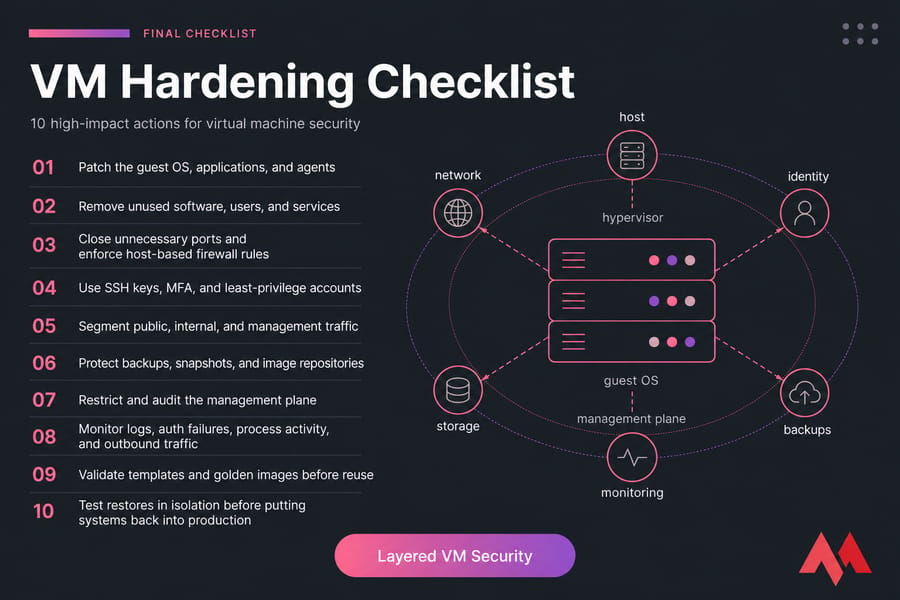
- Patch the guest OS, applications, and agents.
- Remove unused software, users, and services.
- Close unnecessary ports and enforce host-based firewall rules.
- Use SSH keys, MFA, and least-privilege accounts.
- Segment public, internal, and management traffic.
- Protect backups, snapshots, and image repositories.
- Restrict and audit the management plane.
- Monitor logs, auth failures, process activity, and outbound traffic.
- Validate templates and golden images before reuse.
- Test restores in isolation before putting systems back into production.
MonoVM also offers practical trust signals that matter in real operations: 25+ global locations, full root/admin access, KVM-based virtualization options, and 24/7 technical support. You can check awards and support if you're evaluating providers.
Bottom line? The best virtual machine security best practices are not exotic. Isolate workloads. Harden the guest. Protect the hypervisor and admin plane. Segment the network. Secure access. Lock down backups. Monitor continuously. Do those well, and you've already reduced most of the real-world risk.
Build safer virtual machines on a stronger hosting stack
Security starts with hardening, but it also depends on the environment underneath. Explore MonoVM's VM Hosting, Linux VPS, and Windows VPS solutions for isolated, flexible hosting that supports serious VM security.

An experienced tech and developer blog writer, specializing in VPS hosting and server technologies. Fueled by a passion for innovation, I break down complex technical concepts into digestible content, simplifying tech for everyone.