When we talk about digital infrastructure, two main approaches, virtual machines (VMs) and containers, have defined our environment for decades. But which of these should be your first choice for application deployment? Let's make one thing clear from the start: we should no longer think of "VM vs Containers" as an absolute comparison. Instead, we need to understand when and for what purpose each should be used. Ready to find out the answer? Join us at MonoVM as we explore the difference between a VM and a container and discover the ideal use cases for each. For those mapping out a clear architectural design, choosing between highly isolated solutions like VPS server systems or container runtimes can make or break infrastructure scalability.
🧩 TL; DR: VM vs Containers Quick Comparison
If you are short on time and want a quick overview before diving into details, this table sums up the key differences between virtual machines and containers at a glance.
| Feature | Virtual Machine (VM) | Container |
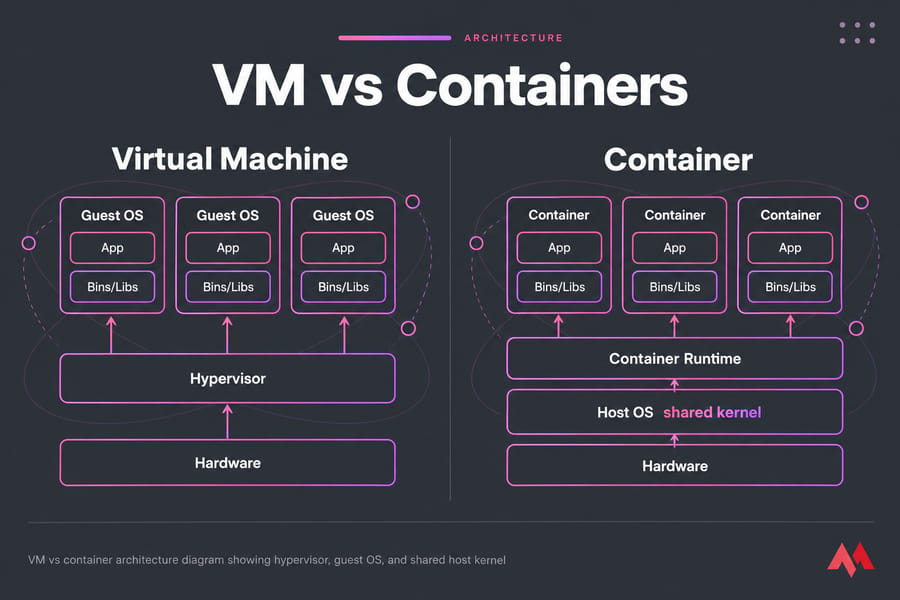
| Virtualization Layer | Hardware layer (runs on a hypervisor) | Host operating system layer (shares the kernel) |
| Operating System | Each VM has its own kernel and full OS (independent boot) | Containers share the host kernel |
| Image Size | Usually in gigabytes (includes full OS) | A few megabytes (only libraries and the app) |
| Startup Time | Several minutes (requires OS boot) | A few seconds (uses existing kernel) |
| Resource Usage | Higher (CPU/memory for full OS) | Lower (reduced CPU/memory footprint) |
| Isolation | Hardware-level – completely isolated | Process-level – lighter isolation |
| Portability | Lower (OS installation required) | Highly portable (lightweight by design) |
| Management | Managed via hypervisors (VMware/KVM) or cloud platforms | Managed with containerization and orchestration tools (Docker/K8s) |
| Typical Use Case | Legacy applications, diverse OS requirements, high security | Microservices, web apps, CI/CD, cloud-native apps |
We will probe into both technologies in the next sections to understand VM vs container architecture, their benefits and drawbacks, and the best application of each in 2026.
🎯 VM vs Containers: The Short Answer
A virtual machine (VM) virtualizes hardware. Each VM runs its own full guest OS on top of a hypervisor. A container virtualizes at the OS level instead. It packages an app and its dependencies and shares the host's kernel. That's why containers are lighter and start faster, while VMs give you stronger isolation. Google Cloud's own explainer describes the split the same way.
Most teams don't pick just one. They run containers inside VMs, and I'll get to why further down.
🖥️ What is a Virtual Machine (VM)?
.jpg?1763034545893)
A virtual machine (VM) is essentially a complete simulation of a physical computer. When you create a VM, it includes a virtual hard disk, virtual CPU, virtual network adapters, and most importantly, its own fully independent guest operating system (Guest OS). If you want to understand the comprehensive framework behind how these digital resources are divided on a single computer host, check out our guide on What is VM to grasp the basic concepts first.
Virtual machine environments are managed by middleware known as a hypervisor. The hypervisor is responsible for creating, running, and controlling VMs on physical hardware, and it comes in two main types. To read more about how this management abstract layer operates directly on physical components, check out our deep-dive article covering What is a hypervisor. Generally, they are classified as follows:
- Type 1 (Bare Metal): Examples include VMware ESXi and KVM, which run directly on physical hardware. This model delivers the highest performance and lowest overhead since it does not rely on a host operating system. Organizations searching for robust bare-metal virtualization platforms often turn to enterprise solutions such as a dedicated KVM VPS to achieve native speed.
- Type 2 (Hosted): Examples include VirtualBox and VMware Workstation, which are installed on top of an existing operating system. These are typically used for end-user or development environments.
Isolation in VMs occurs at the hardware level, meaning each VM is completely separated from others and from the host, as if it were running on its own dedicated physical machine. For more details, see Virtual Machine Types.
⚙️ How Virtual Machines Work
A hypervisor carves physical hardware into virtual CPUs, memory, disks and NICs. Type 1 hypervisors such as KVM, VMware ESXi and Hyper-V run directly on bare metal. Type 2 hypervisors like VirtualBox run on top of a desktop OS. Every VM boots its own kernel, so you can run Windows next to Linux on the same box.
⚙️ Advantages of virtual machines
Virtual machines offer several key benefits:
- The guest operating system behaves exactly like a standard operating system and is unaware that it is running on a hypervisor and not on physical hardware. This absolute system compatibility means you can effortlessly deploy a specialized Windows VPS or an agile Linux instance with full kernel privileges.
- A virtual machine can be "registered" as a single file and simply moved or replicated to another location.
These benefits make VMs flexible and portable, ideal when full OS functionality and easy migration are needed.
⚠️ Disadvantages of virtual machines
VMs also come with some trade-offs:
- A virtual machine is demanding in terms of disk space, computing power and RAM, because it is a complete operating system.
- A virtual machine is slightly slower than the host operating system due to the presence of the hypervisor layer, but this slowdown remains minimal.
These points show that VMs need more resources and maintenance compared to lighter alternatives.
If you'd like to learn how these concepts apply in a Linux environment, check out What is a Linux Virtual Machine for a deeper look.
📦 What is a Container?
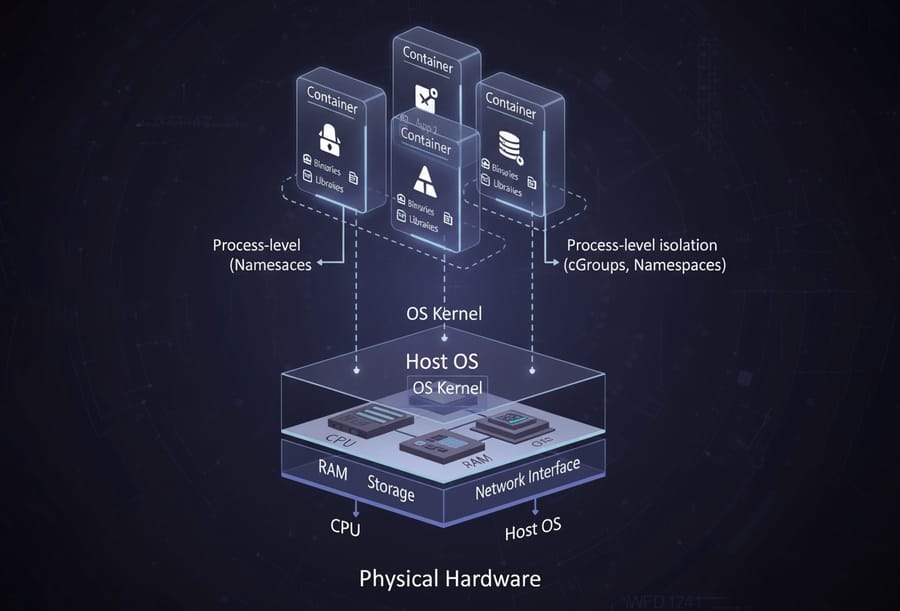
Containers follow a completely different philosophy compared to virtual machines. A container is a lightweight software package that includes only the application code and all its necessary dependencies such as libraries and binaries. Developers looking to host web microservices with minimum resource consumption frequently order a high-performance Docker VPS instance to run container images natively on a optimized host system.
The most important distinction is that containers do not carry a full operating system. The secret behind their speed and efficiency lies in kernel sharing. Containers use the host operating system's kernel instead of running their own. If you want to understand exactly what a kernel does inside your OS ecosystem, read our fundamental guide on What is kernel in Linux.
Isolation in this model happens at the process level and within user space. Mechanisms such as cGroups for resource control and limitation and Namespaces for isolating processes, networking, and file systems provide this separation.
📦 How Containers Work
Containers are ordinary processes, fenced off by Linux kernel features. Namespaces control what a process can see, and cgroups control how much CPU and memory it can use. A runtime such as containerd or runc starts them from immutable, layered images. Those images follow the Open Container Initiative (OCI) specs, so the same image you build on a laptop runs on any compliant registry and runtime.
🧠 Why the Shared Kernel Matters
This one design choice drives almost every trade-off in the comparison. There's no guest OS to boot, so containers start fast and stay small. But every container on a host trusts the same kernel. If that kernel gets compromised, all of them do. One more consequence: Linux containers need a Linux kernel, so you can't natively run Windows containers on a Linux host.
🚀 Advantages of containers
Containers offer several benefits such as:
- Containers are "lightweight" in that they only run the processes required for a given workload, which saves computing power, RAM, and disk space compared to virtual machines.
- Container startup is generally fast, but it depends on the software being run. In any case, software will always start faster in a container than in a virtual machine.
- There are public repositories offering a large number of container images for various applications, such as Docker Hub. Developers can follow specialized guides like how to install Docker on Ubuntu to build local container setups within minutes.
These advantages make containers ideal for fast, efficient, and scalable deployments.
🛑 Disadvantages of containers
Despite their efficiency, containers come with some limitations that you should consider:
- It is not possible to run a complete operating system in a container.
- It is not possible to save a container in a single file and move it.
- The root filesystem is ephemeral, meaning that anything you write to this filesystem will be destroyed when the container is closed.
These limitations show that while containers are efficient and agile, they have constraints in persistence, isolation, and full OS functionality.
🔧 VM vs Container Architecture Diagram
⚡ VM vs Container Performance
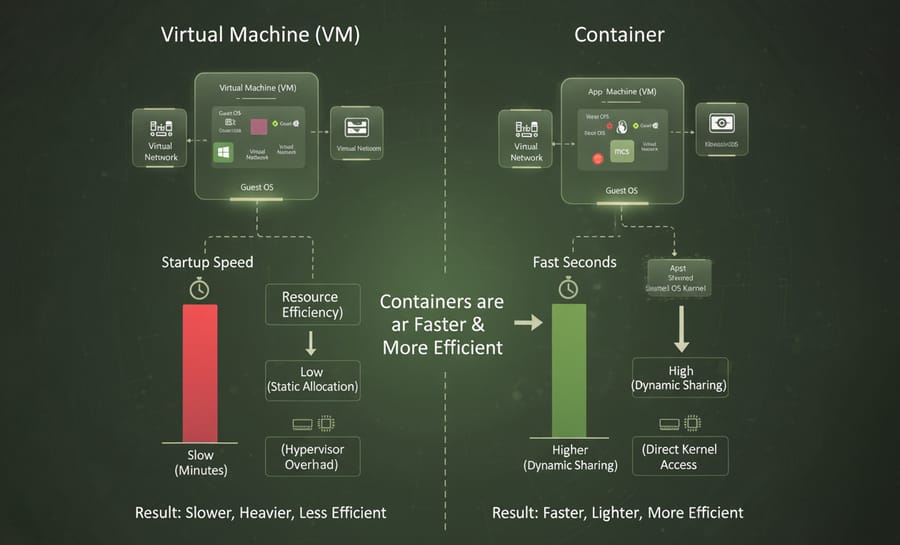
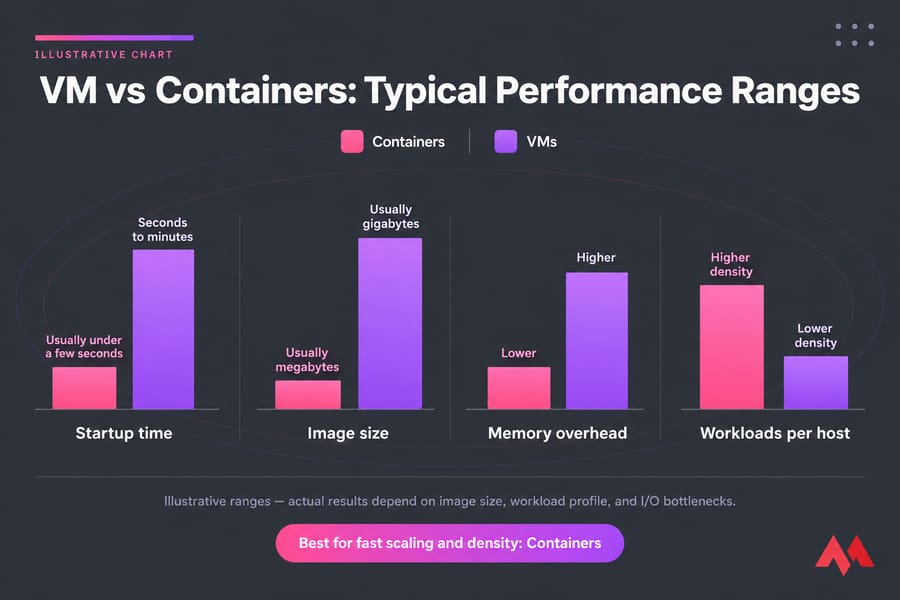
Containers usually win on startup and density. They don't boot an OS, so they come up in seconds, and you can fit noticeably more of them on a host than you could VMs. I'm not going to quote a universal "3x" figure, though. The real number depends on how big your images are and how hungry your workloads are.
The gap shrinks with I/O. On modern KVM with virtio drivers and NVMe storage, a well-tuned VM gets close to bare-metal throughput for most workloads. I've seen teams move to containers expecting big speed gains and find nothing measurable, because the database was the bottleneck all along.
1. Startup Speed (Boot Time)
In a virtual machine, you need to wait for the full operating system to boot, which often takes a considerable amount of time and may last several minutes. Containers, on the other hand, share the host operating system kernel and only run the application process, eliminating the need to boot an entire OS. This capability allows you to start, stop, and restart containers within seconds.
2. Resource Efficiency (RAM and CPU)
In virtual machines, system resources are fully and statically allocated to each VM. For example, even if part of the RAM is not used, it remains reserved. Containers, however, use resources dynamically and in a shared manner, resulting in better efficiency and concurrency. The concept of density becomes crucial here. Because containers are lightweight and optimized, a single physical server can host two to three times more containers than virtual machines. For users running resource-heavy environments, deploying on highly performant hardware like NVMe VPS instances ensures that data access speeds keep up with dynamic resource requests.
3. Input/Output Performance
Containers generally deliver better I/O performance compared to VMs because they do not carry the overhead of a hypervisor and can directly access the host kernel. When resource pressure is high, containerized applications tend to outperform those running on hypervisors. In traditional virtualization, the guest OS inside a VM must manage its own memory demands, consuming a large portion of the host RAM, while containers avoid this overhead.
Verdict: containers for fast scaling and density. VMs are fine for steady, long-running workloads.
Performance Conclusion: Which One Performs Better?
So, in pure performance terms, containers are faster, lighter, and more resource efficient. Also, the fast startup time of containers directly contributes to scalability, making them ideal for microservices architectures. In these environments, small services must be scaled automatically and rapidly according to demand.
🛡️ Security and Isolation
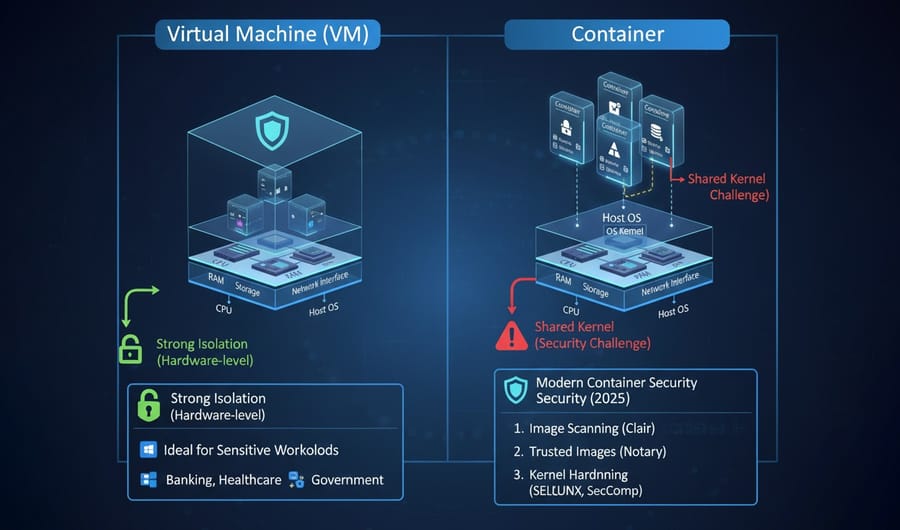
When it comes to infrastructure, isolation and security work as two sides of the same coin. In this section, you'll learn how VMs and containers each provide different layers of protection for your environment.
1. Strong Isolation with Virtual Machines
Virtual machines offer the highest level of isolation because separation happens at the hardware layer. Each VM is completely independent from the host and from other machines, which means that if one is compromised, the damage typically does not spread to others. This makes VMs ideal for multi-tenant environments and sensitive workloads such as banking systems, healthcare platforms, and government applications. If you require full control over the underlying platform without any noise from other tenants, choosing a full dedicated server option gives you ultimate security boundaries.
2. The Security Challenge of Containers
The biggest security concern with containers lies in the shared host kernel. Although containers are isolated from one another, they all rely on the same kernel. In a container escape attack, a hacker could gain access to the host kernel and potentially to other containers. This risk has made container security one of the top challenges for organizations in 2026.
3. Modern Container Security Solutions (2026)
To use containers securely, security must be integrated early in the development process (Shift-Left Security). It should begin as soon as images are built. Key strategies include:
- Image scanning and verification: Always use trusted and official images. Scan them for vulnerabilities using tools like Clair, and sign verified images with Notary.
- Kernel isolation hardening: Strengthen container isolation with kernel-level security features such as User Namespaces, SELinux, and SecComp.
4. Hardening Containers for Production
Containers can be safe in production if you configure them properly. The checklist I use:
- Run rootless containers and drop Linux capabilities you don't need
- Apply seccomp profiles plus AppArmor or SELinux policies
- Scan images, then sign and verify them before deployment
- Use Kubernetes admission controllers to block privileged pods
- Patch node kernels on a schedule (people skip this all the time)
- Consider sandboxed runtimes like gVisor or Kata Containers for untrusted workloads
Although containers are lightweight and efficient, maintaining their security can be costly. Their weaker isolation model demands investment in network security, vulnerability scanning, and runtime protection.
Security Conclusion: Which One Offers Better Security?
In summary, virtual machines still provide a stronger security model than containers. Their independent hardware-level isolation significantly reduces the risk of cross-environment attacks, making them the safer choice for highly sensitive workloads.
💰 VM vs Container Cost (TCO)
.jpg?1763034484296)
Understanding the financial impact of these two technologies goes far beyond comparing license prices. To calculate the true TCO, you must consider hardware, operational, and management costs together.
1. Operational Costs
As mentioned earlier, you can run significantly more containers than VMs on a single server. This higher workload density reduces the need for additional hardware, power consumption, and physical space. Moreover, operating system updates in containerized environments are applied once to the shared image, streamlining maintenance and improving operational efficiency.
2. Licensing Costs
Containerization tools such as Docker and Kubernetes are typically open-source and license-free, whereas traditional virtualization solutions like VMware vSphere require costly licenses. However, increased competition from containers has pushed virtualization vendors to reduce ownership costs with new offerings such as HPE Morpheus and other hybrid management platforms.
3. Expertise and Complexity Costs
Although containers are more hardware-efficient, microservice architectures and Kubernetes orchestration introduce significant complexity. They require skilled DevOps engineers and dedicated security teams. In contrast, managing VMs in traditional environments is simpler, and most organizations already have experienced IT administrators for these systems.
4. The Real Math
On infrastructure alone, containers usually cost less. Higher density means fewer hosts, and you're not paying for a guest OS license on every instance (Windows Server licensing adds up fast). Don't stop the math there, though. Kubernetes isn't free to run. You'll pay for observability tooling, networking complexity, and engineers who actually understand the control plane. A small team running three apps can easily spend more on container operations than they save on hardware.
Over the long term, containers pay off at scale. Below that, a few well-sized VMs are often cheaper overall.
Cost Conclusion: The Real TCO Is a Balance of Trade-offs
While containers reduce hardware and infrastructure expenses, they increase human resource and security costs. VMs, on the other hand, come with higher hardware and licensing expenses but are easier to maintain and secure. If your organization already has strong expertise in Cloud-Native development and Kubernetes, containers will likely offer a more cost-effective solution in the long term. For startups focused on minimizing investment while keeping scalability open, opting for specialized environments like a cheap VPS hosting package allows them to test deployment pipelines smoothly without extensive overhead.
🌳 The Strategic Decision Tree 2026
Ultimately, your choice should be guided by your specific use cases. In 2026, the best option is the one that aligns most closely with your business requirements.
When Should You Choose Virtual Machines?
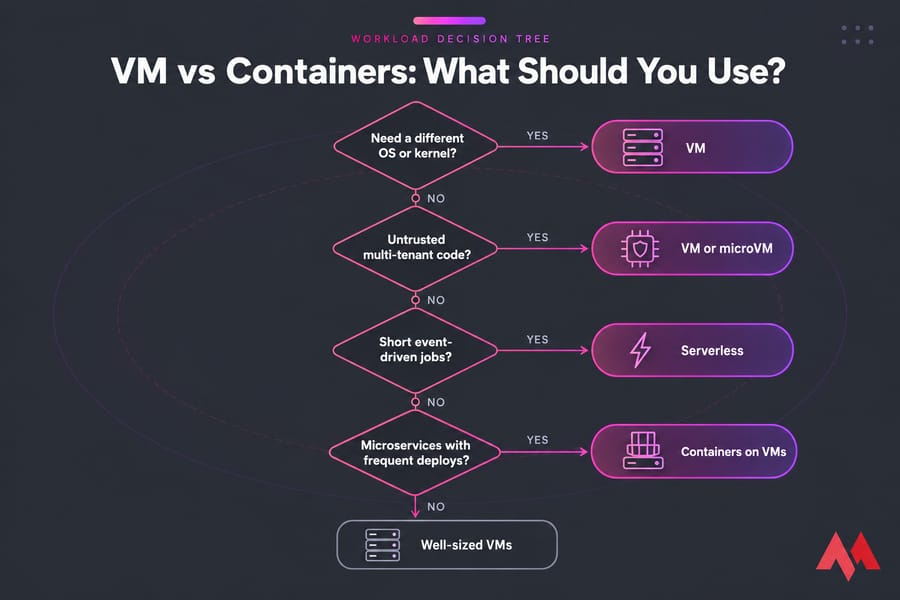
If any of the following conditions apply to your environment, VMs remain your essential tool:
- Need for full hardware-level isolation: Ideal for environments with strict security or regulatory requirements, or when handling confidential and sensitive data.
- Legacy applications and monoliths: Older, monolithic programs that cannot easily be refactored into microservices and require a full, stable operating system.
- Heterogeneous operating systems: When you must run guest operating systems with different kernels (for example, a Windows VM on a Linux host), VMs offer the only complete isolation solution.
- Kernel-level and OS control: When specialized configurations or direct management of the guest operating system are required.
When Are Containers the Better Choice?
If your organization is moving toward modern architectures, containers (especially orchestrated by Kubernetes) are your primary enablers:
- Microservices architecture: Perfect for breaking applications into small, independent services that need fast, granular horizontal scaling.
- DevOps and CI/CD workflows: Best for teams with rapid release cycles that require instant deployment of new versions across development, testing, and production environments.
- Cost optimization and high density: When your goal is to maximize hardware efficiency and reduce total cost of ownership using open-source platforms.
- Serverless and edge computing: In these scenarios, lightweight microVMs like Firecracker are recommended for their exceptional speed and minimal overhead.
Workload Fit Cheat Sheet
| Workload | Best Fit |
| Legacy monolith (lift and shift) | VM |
| Microservices, stateless APIs | Containers |
| CI/CD runners | Containers |
| Mixed Windows and Linux needs | VM |
| Regulated or multi-tenant workloads | VM, or containers inside VMs |
| Bursty, event-driven tasks | Serverless or microVMs |
The Winning Strategy for 2026: Combining VMs and Containers
The defining trend of 2026 is not competition but intelligent coexistence. Many large organizations now run their Kubernetes clusters on top of virtual machines.
This hybrid approach allows you to leverage the best of both worlds:
- Isolation advantage of VMs: You gain the security of VM-level separation, isolating container hosts from each other and creating a strong defensive layer against container escape attacks.
- Availability advantage of VMs: Mature features like High Availability (HA) and infrastructure management tools (for example, vMotion in VMware) ensure continuous uptime and seamless migration for critical container workloads. Developers can read through comparisons like KVM vs VMware to determine which specific hypervisor system fits their hybrid virtualization map.
Even Microsoft has adopted this hybrid strategy for Windows users. Hyper-V containers are, in fact, containers that run inside lightweight VMs to provide stronger isolation than traditional Windows process-based containers.
This combined model delivers the agility that modern applications demand while maintaining the high level of isolation, reliability, and management maturity offered by virtual machines.
🐳 Containers Inside VMs: Why Many Teams Use Both
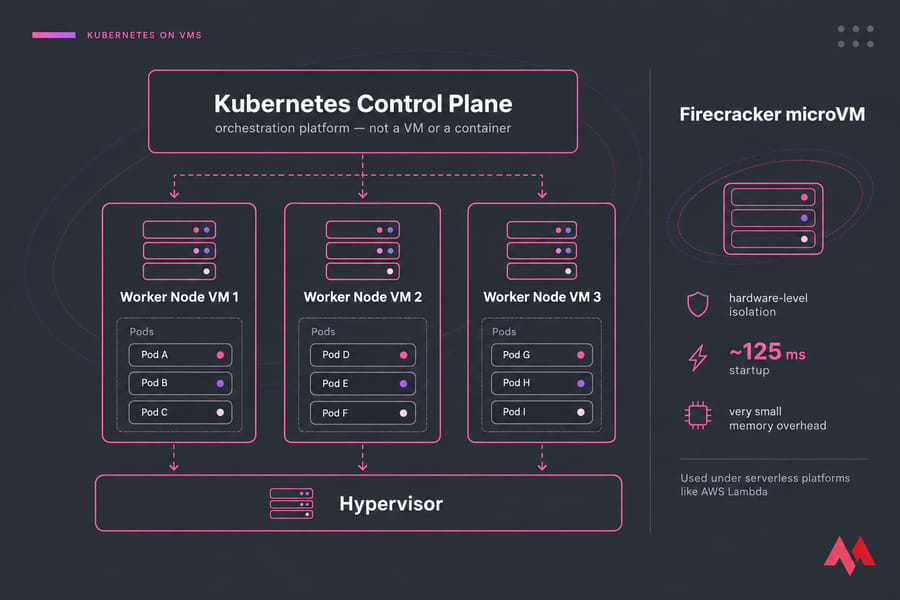
The "VM vs containers" framing is a bit misleading, because in practice it's usually both. Managed services like GKE and EKS run your Kubernetes nodes on VMs. The VM gives each tenant or environment a hard boundary, and containers give developers fast, repeatable deploys inside it.
One clarification, since it trips people up: Kubernetes is an orchestration platform. It's not a container or a VM. It schedules pods across nodes, and those nodes are usually VMs.
MicroVMs blur the line even further. Firecracker, which powers AWS Lambda, gives each workload hardware-level isolation, with startup times of around 125 ms and very small memory overhead.
☁️ VM vs Containers vs Serverless
Serverless takes away the infrastructure layer completely. You deploy functions, they run when an event triggers them, and you pay per invocation. It works well for short-lived, spiky jobs like webhooks, image resizing and scheduled tasks. It's a poor fit for long-running processes, stateful workloads or anything sensitive to cold starts. Under the hood, it's still containers or microVMs.
⚠️ Common Mistakes and Pitfalls
Even experienced teams can make strategic errors when choosing between VMs and containers. Below are some of the most frequent ones to avoid:
- Using containers when full isolation is needed: If your app requires kernel-level separation or OS-specific features, containers are not the right choice. Running multiple operating systems without VMs simply is not possible.
- Underestimating container management complexity: Containers seem simple, but managing them at scale needs orchestration tools like Kubernetes for automation, stability, and security.
- Ignoring VM overhead when unnecessary: If you do not need full OS functionality, using a VM wastes resources. A small microservice running on a multi-gigabyte VM is costly, while a container can handle it faster and cheaper.
- Skipping container security hardening: Since containers share the host kernel, ignoring features like namespaces, SELinux, or image scans can create preventable security risks.
- Combining VMs and containers without strategy: A hybrid setup is powerful only if well-planned. Running containers inside VMs without resource or isolation awareness can lead to inefficiency.
- Containerizing a stateful monolith and expecting it to suddenly scale.
- Adopting Kubernetes for two services that one VM would handle fine.
- Treating containers as a security boundary for untrusted tenants.
- Forgetting that container hosts still need kernel patching.
By avoiding these pitfalls, you can design a smarter, more efficient infrastructure where VMs and containers work together effectively.
🔍 Other Related Comparisons & Scenarios
Finally, it is helpful to take a quick look at other related virtualization models to clarify where each fits in modern infrastructure. The table below provides a concise comparison of the most common approaches:
| Scenario / Comparison | Description |
| VM vs Containers vs Serverless | Serverless, such as AWS Lambda, runs functions only when triggered and does not require managing infrastructure. In contrast, VMs and containers stay active and pre-allocate resources. |
| Docker Containers vs VM | Docker runs applications in lightweight containers that share the host operating system, while VMs emulate complete operating systems and are heavier to start and manage. |
| LXC Containers vs VM | LXC isolates Linux processes using namespaces while sharing the same kernel, making it faster and lighter than full virtualization but with less isolation. |
| Linux Containers vs VM | Linux containers such as Docker, LXC, or Podman rely on the host kernel, whereas each VM includes its own kernel. This makes containers smaller and faster to launch. |
| VM vs Container vs Bare Metal | Bare metal runs directly on physical hardware with no virtualization layer, giving maximum performance and minimal latency but less flexibility for scaling. |
For a closer look at how virtual machines differ from virtual desktop environments, see VDI vs VM for a detailed comparison.
🎯 Conclusion
Your 2026 decision should be an informed one. If maximum security and full isolation are your priorities, choose virtual machines. If agility, fast scaling, and optimized TCO matter most, go for containers with Kubernetes orchestration. Still, the smartest approach is combining both. Use VMs when you need strong isolation, different operating systems, or a home for legacy apps. Use containers when you need speed, density and portable deploys. If you're building anything serious, you'll most likely end up running containers on VMs. Pick based on the workload, not on what's trending.
Looking for fast and secure virtual machine hosting to power your apps or websites? Check out our main hosting platform and get started in minutes.

An experienced tech and developer blog writer, specializing in VPS hosting and server technologies. Fueled by a passion for innovation, I break down complex technical concepts into digestible content, simplifying tech for everyone.