
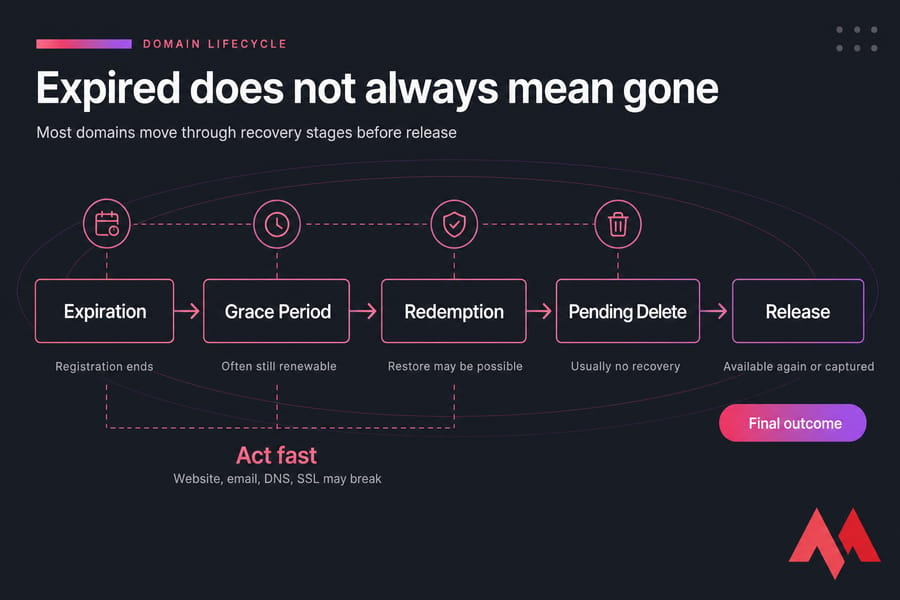
When a domain expires, it usually doesn't become available to everyone right away. In most cases, it moves through a short domain lifecycle: expiration, a possible grace period, a possible redemption period, then pending delete before release. During that window, your website, email, DNS, and SSL-dependent services may break, but you may still be able to recover the name if you act fast.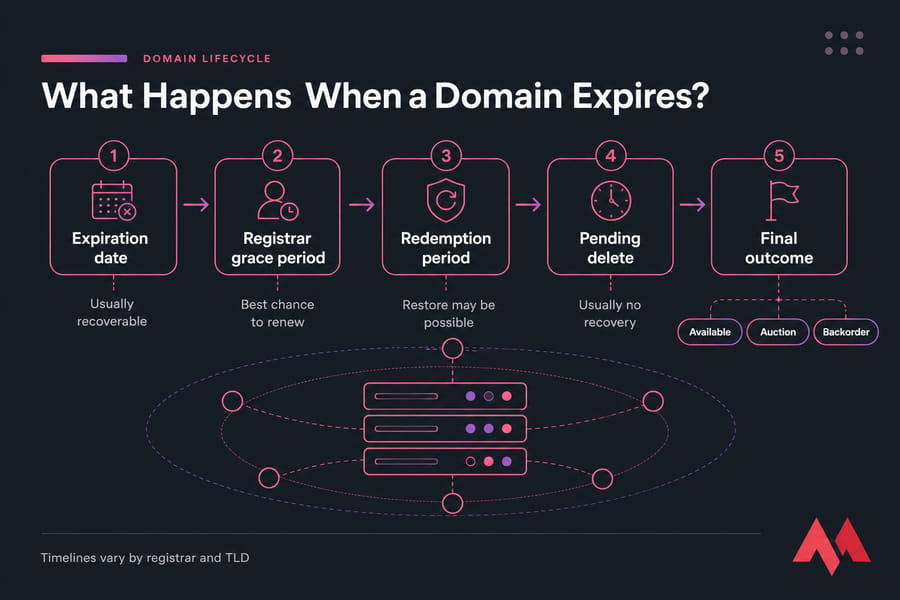
Key takeaway: an expired domain is often still recoverable — but only for a limited time.
What happens when a domain expires after the renewal date passes?
If you're searching for what happens when a domain expires, the short answer is this: the registration term ends, but the domain usually doesn't vanish on the same second. Instead, the registrar and registry move it into one or more post-expiration statuses that decide whether you can still renew, restore, or lose it.
That distinction matters. A domain expiration date is just the point where the paid registration ends. What happens next depends on the registrar, the registry operator for that extension, and the TLD itself. A .com domain may follow a familiar ICANN-style lifecycle, while some country-code domains use different rules, shorter windows, or no meaningful recovery window at all.
I've seen this trip people up more than once. They hear "expired" and assume the name is gone forever. Or worse, they assume nothing bad happens for 30 days and leave it alone. Both assumptions can be expensive.
Is a domain deleted immediately after expiration?
Usually, no. Many domains first enter a registrar grace period or auto-renew period where the previous owner can still renew them. But not every registrar handles this the same way, and not every TLD offers the same timing. That's why the safest move is to log in immediately and verify the actual status.
Why expired domains usually stay recoverable for a limited time
The domain lifecycle exists because registrars and registries don't always delete names the moment billing fails. There may be internal holding periods, registry status changes, or restore options. That gives you a last chance to fix an auto-renew failure, update a payment method, or complete a standard renewal.
Still, the clock is running. During these stages, your website may stop resolving, email can fail silently, and another buyer may already be watching the name. If you need a quick refresher on the basics, see what is domain name and the difference between domain vs hosting.
To know whether your domain is still recoverable, you need to understand which stage it's in.
Domain expiration timeline: grace period, redemption period, and pending delete
This is where things get concrete. Most expired domain cases follow a rough pattern: expiration date, possible grace period, possible redemption period, pending delete, then release or aftermarket handling. The exact timeline varies by registrar and TLD, so treat the ranges below as typical — not guaranteed.
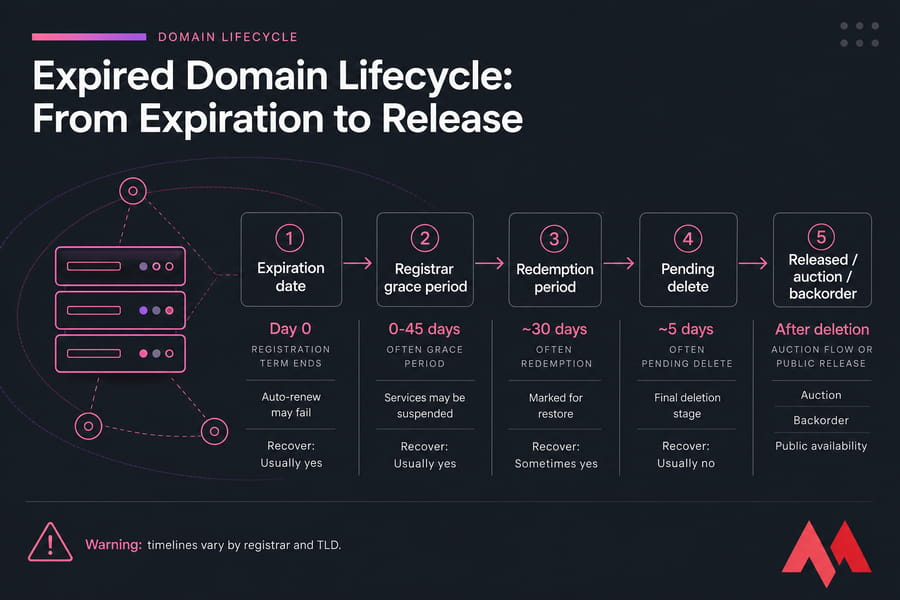
| Stage | Typical Duration | What Happens | Can You Recover It? | Typical Cost | Urgency |
|---|---|---|---|---|---|
| Expiration date | Day 0 | Registration term ends; auto-renew may fail or not process | Usually yes | Standard renewal fee | High |
| Registrar grace period | Often 0-45 days | Domain may be held by registrar; services may be suspended | Usually yes | Standard renewal fee | Very high |
| Redemption period | Often around 30 days | Domain is removed from normal renewal path and marked for restore | Sometimes yes | Renewal fee plus redemption or restore fee | Critical |
| Pending delete | Often around 5 days | Final deletion stage at registry level | Usually no | No normal recovery available | Extreme |
| Released / auction / backorder | After deletion or registrar auction flow | Domain may be re-registered, auctioned, or captured by backorder | Only if you win or register it again | Registration, auction, or backorder cost | Competitive |
Warning: grace and redemption periods vary by registrar and TLD. Always verify current WHOIS status, registrar notices, and account-level messages before assuming you still have time.
Stage 1: Expiration date and auto-renew failure
The expiration date is the official end of the paid term. Sometimes auto-renew works and you never notice. Sometimes the card expired, the billing email went to an old inbox, or the registrar couldn't charge the payment method. That's when the trouble starts.
At this point, the WHOIS or registry status may change, and you may see terms like autoRenewPeriod, clientHold, or registrar-hold style states depending on the provider. You don't need to memorize EPP status codes, honestly. You just need to know that a status change can affect whether the domain still resolves.
Stage 2: Registrar grace period
The domain grace period is usually your best recovery window. In many cases, you can still renew your domain for the normal renewal fee during this stage. Some registrars leave DNS working for a while. Others suspend nameservers quickly or replace your site with a parked page.
This is the stage where a small business owner often gets lucky. Say Priya misses a billing email over a holiday weekend, notices the site is acting odd on Monday, logs in, renews the domain, and gets it back with minimal damage. That's the ideal outcome.
Stage 3: Redemption period and restore fees
Once a domain enters the domain redemption period, recovery gets harder. The registrar may no longer offer normal renewal from the dashboard. Instead, you usually need a restore request, and registrars often charge an additional redemption fee on top of the renewal fee.
This is also where stress goes up fast. If an agency, former developer, or old employee controlled the registrar login, you're now losing time while trying to prove ownership and regain access. I've seen domains sit in redemption for days because nobody knew which account actually held the registration.
Stage 4: Pending delete before public release
Pending delete is the final deletion stage. In most cases, you can't renew or restore the domain through standard channels anymore. The registry is preparing to remove it completely, and once that process finishes, it may become available to the public.
For many gTLDs, this stage is often about five days. Not always. But usually short enough that waiting is a bad bet.
Stage 5: Re-registration, auction, or backorder
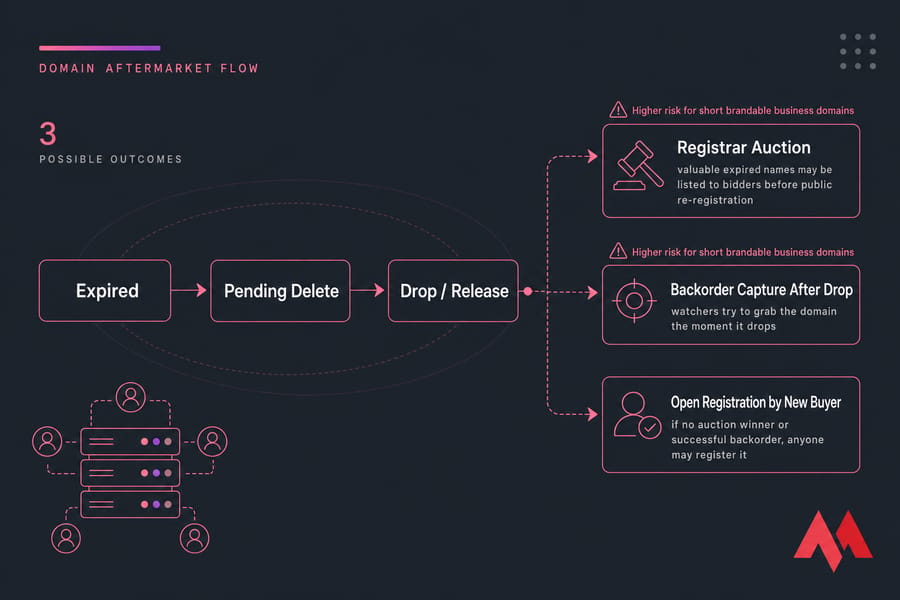
After the deletion cycle ends, the name may drop and become available again. But that's not the only outcome. Some registrars send valuable domains into auction before general release, especially short, brandable, or commercially useful names. Others are caught by backorder services the moment they drop.
If you need to verify the current registry status, pricing, or next step, use MonoVM to check the domain status with WHOIS and review domain pricing before you lose more time.
Now let's look at what these stages mean for your actual website, email, and DNS.
What happens to your website, email, DNS, and SSL when a domain expires?
Here's what that means in practice: a domain expiration isn't just a registration issue. It can ripple into every service tied to that domain name. That's why people panic when the domain expired message shows up — they're not only worried about ownership. They're worried because the whole online setup may start breaking.
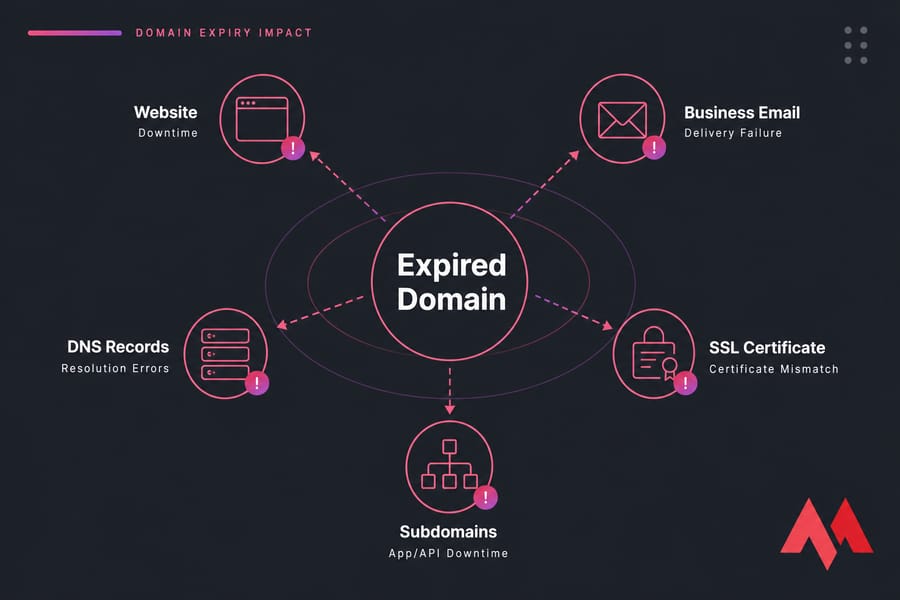
| Service | What May Happen After Expiry | Risk to Business | What to Check After Recovery |
|---|---|---|---|
| Website | Site may stop resolving, load a parking page, or show errors | Lost traffic, sales, credibility | Homepage, redirects, CDN, nameservers |
| Inbound or outbound mail may fail or bounce | Missed leads, support issues, invoice loss | MX records, mailbox sync, test send/receive | |
| DNS | Records may be disabled, reset, or stop resolving | Multiple services break at once | A, AAAA, CNAME, MX, TXT, SPF, DKIM |
| SSL certificate | Certificate may still exist but become useless if domain doesn't resolve properly | Browser warnings, broken trust | Certificate status, validation, HTTPS redirect |
| Subdomains | Subdomains usually fail with the main domain | App, portal, or API downtime | Subdomain DNS and service routing |
Does the website go offline right away?
Not always right away, but it can happen fast. Some registrars keep DNS resolution alive briefly during the domain renewal grace period. Others suspend the domain or change nameserver behavior early, which can send visitors to a parked page or produce DNS errors.
Will business email stop working?
Often, yes — and email is usually the nastier failure. A website outage is obvious. Email disruption can be quiet. Messages may bounce, incoming mail may never arrive, and nobody on your team notices until customers start calling.
Warning: your website may not be the biggest risk — business email often breaks first and silently costs leads.
If you rely on custom mailboxes for sales, support, or invoices, test them the moment the domain is restored. And if you're using a separate mail service, check that the MX records still match. For related setup issues, MonoVM's email hosting resources can help.
What happens to DNS records and nameservers?
DNS is the traffic cop here. If the registrar places the domain on hold, or if nameserver suspension kicks in, A records, MX records, and other entries may stop resolving correctly. In some cases the records remain in the panel but don't matter because the domain itself isn't active.
After recovery, don't assume everything snaps back on its own. Check nameservers, then confirm core records. If you need to troubleshoot resolution, use a DNS checker and review the registrar controls in this guide on how to manage your domain control panel.
Can SSL certificates still work on an expired domain?
Technically, the certificate file may still be installed on the server. But if the domain no longer resolves properly, or if validation and ownership checks fail, HTTPS won't help much. Users may hit certificate mismatches, browser warnings, or just never reach the server in the first place.
I've had clients assume "the SSL is still valid, so the site should be okay." Nope. SSL depends on the domain resolving correctly and the browser reaching the right service. If you need new certificate coverage after recovery, see MonoVM's SSL certificate options.
If your domain is still in grace or redemption, fast action can usually limit this downtime.
Grace period vs redemption period: what's the difference?
People mix these up all the time. Fair enough — both happen after expiration, and both can still allow recovery. But they're not the same stage, and the price difference can be painful.
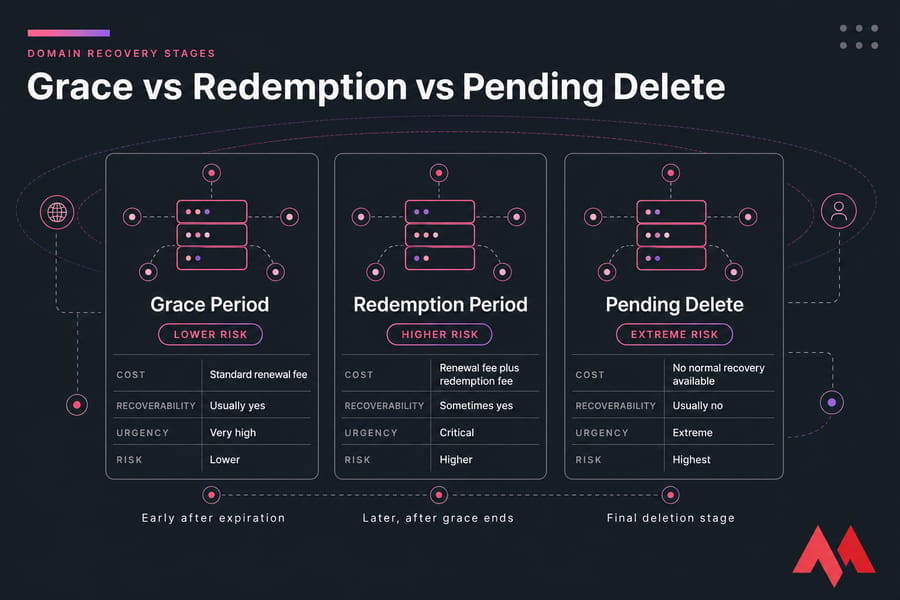
| Factor | Grace Period | Redemption Period |
|---|---|---|
| When it happens | Early after expiration | Later, after grace ends |
| Recovery method | Normal renewal is often possible | Restore request is usually required |
| Cost | Usually standard renewal fee | Renewal fee plus redemption fee |
| Risk level | Lower | Higher |
| Service disruption | Possible | More likely and often longer |
| Time left | More room to act | Shorter, more urgent |
| Chance of normal recovery | Usually better | More limited |
| What comes next | Redemption or closure of recovery window | Pending delete |
Which stage is cheaper to recover from?
Grace period, almost always. If the registrar still allows a standard renewal, you may only pay the normal renewal fee. Once the name moves into redemption, registrars often add a restore fee or redemption fee, and that can turn a simple mistake into an annoying bill.
Which stage is riskier?
Redemption is riskier because you're closer to losing the domain entirely. Pending delete is riskier still — at that point, standard recovery is usually over. So the practical rule is simple: recover in grace if you possibly can.
Do all registrars and TLDs use the same timeline?
No, and this is the part beginners skip. A registrar may provide one recovery flow for .com and a different one for a country-code TLD. Registry rules, ICANN-style lifecycle patterns, and provider policies all affect the timeline.
Quick summary: grace = lower cost, easier recovery. Redemption = higher cost, higher risk. Pending delete = usually too late.
If it's already beyond that, read about a domain backorder service before the name drops.
How to recover an expired domain before it is deleted
If you need to recover expired domain access, don't overthink it. Move stage by stage. The goal is to confirm the current status, renew if possible, restore if necessary, then verify all connected services.
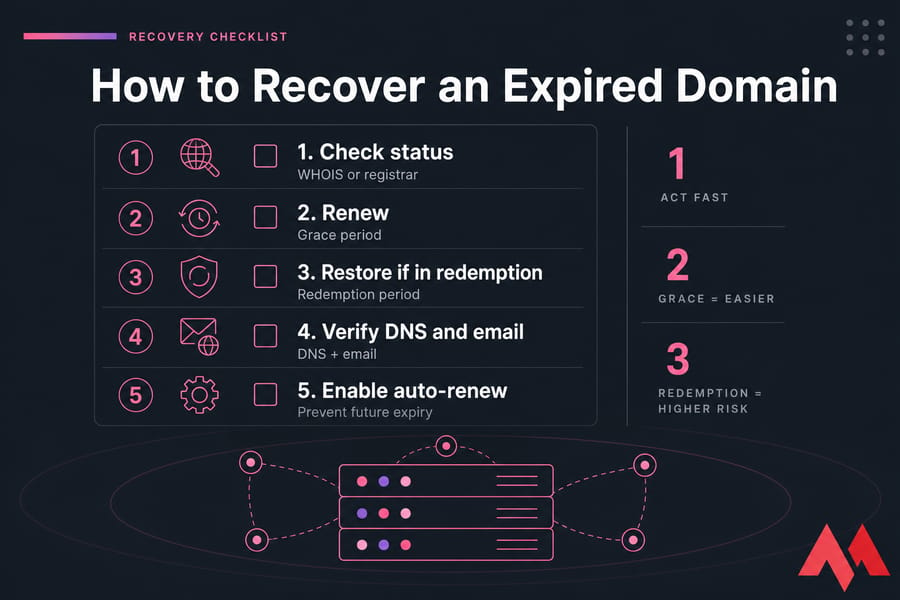
Before you try to recover your domain:
- Registrar login access
- Working billing method
- Correct domain spelling
- Recent renewal emails or invoices
- Current WHOIS or registrar status
- Backup of DNS records if you have one
Step 1: Check the domain status with WHOIS or your registrar
First, confirm where the domain sits in the lifecycle. Log in to the registrar dashboard and look for terms like expired, grace period, redemption, pending delete, or registrar hold.
If the WHOIS data is limited because of privacy or TLD policy, that's normal. You're mostly looking for status clues, registrar details, and whether the name still appears tied to your registration. If needed, contact support right away.
Step 2: Renew during the grace period if available
If the domain is still in the registrar grace period, renew it immediately. Don't wait for a better time of day, and don't assume "tomorrow is fine." Pay the renewal fee, save the invoice, and check for confirmation emails.
This is the easiest win. One of the most common scenarios is a business owner missing a failed-card notice, logging in, updating payment, and restoring service within minutes. That's annoying, sure, but fixable.
Step 3: Pay the redemption fee if the domain is restorable
If the domain is in redemptionPeriod or a similar restore state, ask the registrar for the exact restore process. In many cases you'll need to approve a redemption fee plus the renewal fee. That extra cost stings, but if the domain matters to your brand, it's usually better than losing it.
Now here's the thing: restoring the domain registration doesn't always restore every technical setting. If nameservers were changed, or if services were suspended, you'll still need to review the setup after the restore finishes.
Step 4: Confirm DNS, email, and hosting after recovery
Even if the domain comes back, your work isn't done. Check nameservers, A records, MX records, TXT entries, subdomains, SSL behavior, and the site itself. Test email send and receive. Open the homepage, login portal, and any customer-facing app URLs.
This is where people lose another few hours. They fix the ownership problem, then forget the operational checks.
Step 5: Turn on auto-renew and renewal alerts
Once the domain is safe, clean up the root cause. Enable auto-renew, verify the card on file, update the admin or billing email, and set your own calendar reminder anyway. I personally like having both auto-renew and an off-platform reminder. One system is nice. Two is safer.
- Log in to the registrar account
- Confirm the exact status
- Attempt normal renewal
- If needed, request restore and pay the redemption fee
- Check DNS, nameservers, website, and email
- Save invoice and confirmation records
- Enable auto-renew and alerts
Pro tip: recovering during grace is usually cheaper than restoring in redemption.
Need to Check If Your Expired Domain Can Still Be Recovered?
Use MonoVM's WHOIS lookup and domain tools to verify current status, confirm ownership details, and see your next best step before the domain is lost for good. MonoVM supports instant domain search, WHOIS lookup, domain renewal, and transfer help across 700+ TLDs.
If you've lost access to the registrar account itself, escalate fast. Contact the registrar, gather invoices, business proof, prior registration details, and any renewal notices. And don't start with a transfer if immediate renewal is still possible — recovery first, transfer later.
What if your domain is in pending delete or already dropped?
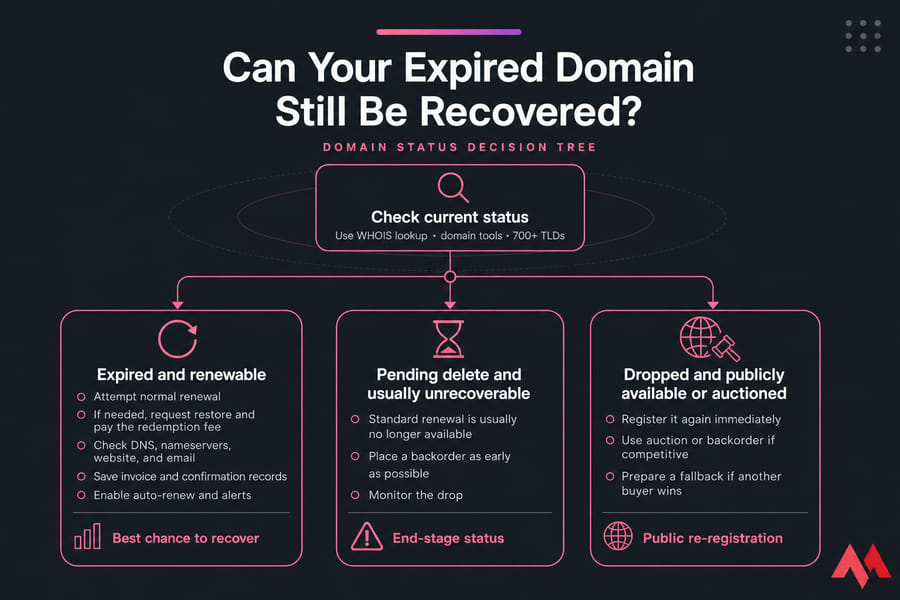
This is the hard part. If your domain is in pending delete, standard renewal is usually no longer available. The registry is finishing the deletion process, and in most cases neither you nor the registrar can stop it through a normal renewal flow.
Can you still renew a domain in pending delete?
Usually no. Pending delete is not the same thing as expired. An expired domain may still be recoverable. A domain in pending delete is typically at the end of the road for ordinary recovery.
When should you use a domain backorder service?
If the domain is beyond recovery, place a backorder as early as possible. A domain backorder service can try to capture the name the moment it drops or becomes available through supported channels. It doesn't guarantee success, but it gives you a fighting chance.
What if another buyer already registered the domain?
Then you're in negotiation territory, not recovery. At that point, someone else may legally control the domain unless there is a trademark or ownership dispute issue outside normal registrar recovery. If the name is gone, quickly check if the domain is still available, monitor the drop, and prepare a fallback.
A realistic example: a business lets a domain drift into pending delete, a competitor or investor watches it, and the name is grabbed the moment it drops. That's why waiting for the last stage is such a gamble.
If recovery is no longer possible, your next best option is backorder or immediate re-registration monitoring. You may also need to register a new domain as a backup while the original remains unavailable.
Expired domain auctions and backorders: can someone else take your domain?
Yes, eventually they can. And some names attract buyers before they even fully drop.
Some registrars route valuable expired domains into auction rather than letting them go straight to public re-registration. This tends to happen with short brandable names, domains with business value, or names with age and history that make them more attractive on the aftermarket.
Why some expired domains go to auction before deletion
A registrar may have an expired-domain auction process built into its aftermarket system. That means your domain might be listed to bidders while you still think it's just "expired." Policies differ, so check the registrar's terms and the domain's live status instead of guessing.
How backorders work
A backorder is basically a standing attempt to grab the domain once it becomes available through the drop or supported release process. It's common for businesses trying to reclaim lost names, and it's also used by buyers hunting expired domains with brand or traffic potential.
When you still have a chance to reclaim the name
If the domain is still in grace or redemption, recovery through the registrar is far safer than waiting for the aftermarket. If it has already moved out of your control, backorder and availability monitoring are your next best shots. And if it's a high-value business name, don't assume you'll be the only one trying.
If recovery is still possible, renewing now is far safer than waiting for the aftermarket.
Common expired domain mistakes that make recovery harder
This part is a bit tedious, honestly, but it matters. Most painful domain losses don't come from obscure registry rules. They come from ordinary mistakes.
- Ignoring renewal emails. Reminders were sent, but nobody watched the inbox.
- Letting the card expire. Auto-renew doesn't help if billing fails.
- Using an inaccessible admin email. Old employee, old agency, dead mailbox — classic problem.
- Assuming the hosting company controls the domain. Hosting and registration are often separate.
- Waiting until pending delete. The cheapest, easiest recovery window is earlier.
- Not documenting DNS settings. If records change during recovery, rebuilding from memory is no fun.
- Forgetting the email outage impact. The website isn't the only casualty.
The easiest expired-domain recovery is the one you never need.
How to prevent domain expiration with better renewal management
Good renewal management is boring — which is exactly why it works. You want a setup that keeps the domain alive even when people are busy, team members change, or billing gets messy.
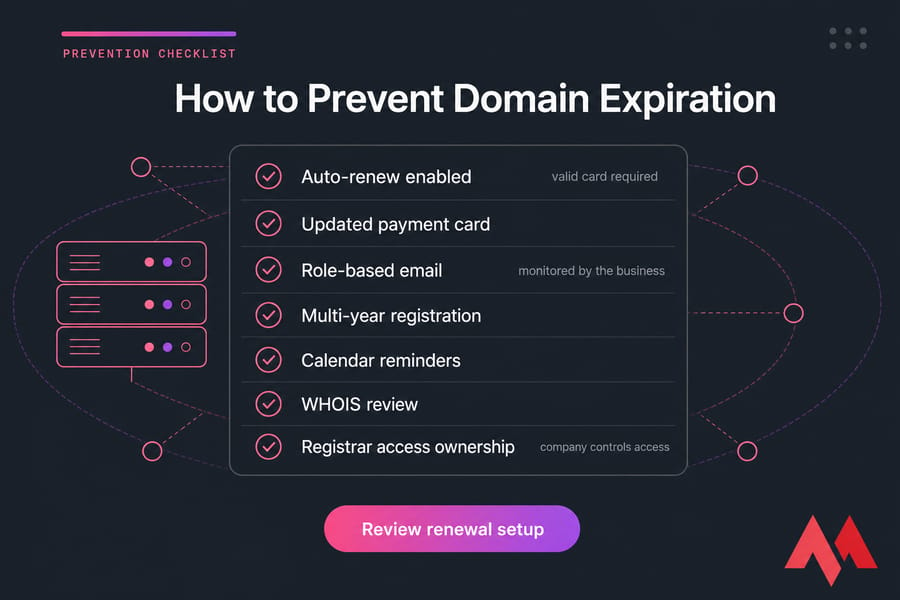
Auto-renew best practices
Turn on auto-renew for every important domain. Then verify it actually has a valid card behind it. I never trust the toggle alone. Check the payment method, the billing profile, and the renewal date manually.
Keep contact and payment details updated
If the billing card expires or the admin email belongs to someone who left the company, you're setting yourself up for trouble. Keep WHOIS-related contact details current where required, and make sure renewal notices go to an address the business actively monitors.
Register domains for multiple years
For your primary brand, multi-year registration can reduce risk. It won't replace monitoring, but it gives you more breathing room. If a domain is business-critical, don't run it one year at a time unless you enjoy unnecessary adrenaline.
Separate ownership, billing, and technical access clearly
This is huge for agencies and small teams. The company should own the registrar account or at least control access to it. Developers can manage DNS. Finance can manage billing. But no single vendor or former staff member should be the only path back into the account.
It's also smart to review related protections like domain privacy protection, especially if public contact exposure has made account management messy.
Stat-level reality: a failed card, old billing email, or disabled auto-renew causes a lot of preventable domain losses.
What Happens When a Domain Expires? Final takeaway
So, what happens when a domain expires? Usually, it moves through a recovery window first — often grace period, then redemption period, then pending delete before release. Your website, email, DNS, SSL behavior, and subdomains can all be affected along the way.
The practical answer is simple: don't guess, and don't wait. Check the current status, renew during grace if you can, pay the restore fee during redemption if you must, and prepare a backorder or replacement plan if the domain is already beyond recovery.
Protect Your Domain Before It's Too Late
Whether you need to renew an expired domain, transfer your names to a more reliable registrar, or register a backup domain, MonoVM gives you the tools to keep your online identity secure. You'll get domain renewal and transfer support, instant search and WHOIS lookup, and access to 700+ TLDs.

An experienced tech and developer blog writer, specializing in VPS hosting and server technologies. Fueled by a passion for innovation, I break down complex technical concepts into digestible content, simplifying tech for everyone.