A business email security checklist should include 2FA for every account, strong password rules, SPF, DKIM, and DMARC email authentication, TLS encryption, anti-spam filtering, access controls, mailbox backups, and regular audits. Together, those controls reduce account takeover, domain spoofing, phishing success, spam abuse, and data leakage.
If you run a small business, this stuff can feel more confusing than it should. One panel says DKIM is on, another says DMARC is missing, and somebody on the team is still forwarding mail to a personal Gmail account. I've seen setups like that in production more times than I'd like to admit.
What a business email security checklist should include
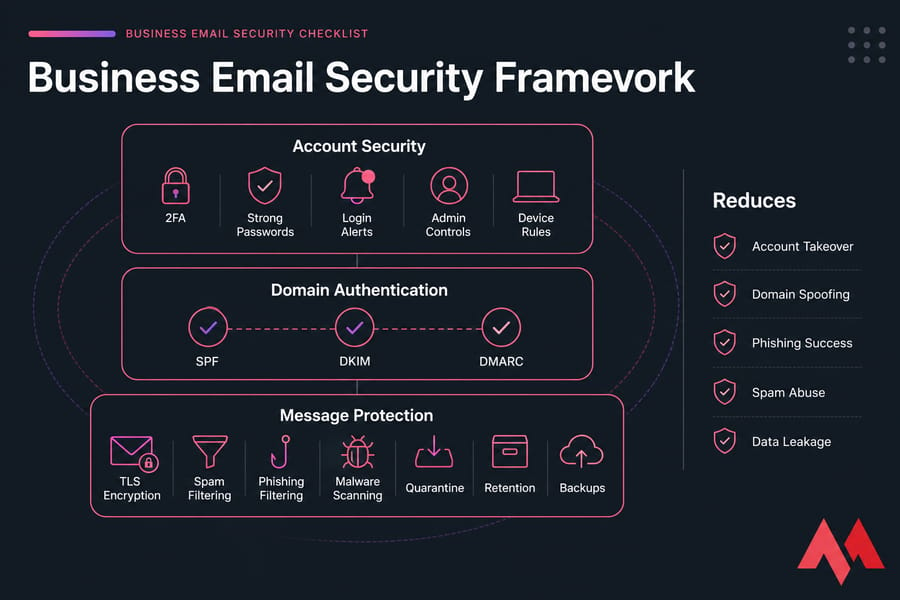
Good business email security isn't one setting. It's three layers working together.
First, there's account security: 2FA, strong passwords, login alerts, admin controls, and device rules. This stops mailbox compromise, or at least makes it much harder.
Second, there's domain authentication: SPF, DKIM, and DMARC. These DNS-based controls tell receiving mail systems which senders are legitimate, whether a message was signed properly, and what to do with spoofed mail. DKIM matters, yes, but treating DKIM by itself is a mistake. SPF + DKIM + DMARC need to be thought of as one system.
Third, there's message protection: TLS for transport encryption, filtering for spam and phishing, malware scanning, quarantine, retention, and backups. That part protects the contents of messages and helps your team avoid dangerous mail before they click anything dumb at 4:58 PM on a Friday.
This checklist is aimed at SMBs, not giant enterprises with a full security team. If you're using Titan, cPanel mail, DirectAdmin, Google Workspace, Microsoft 365, or some hosted webmail setup, the same principles apply. If you're still comparing providers, MonoVM also has a useful guide to the best email hosting provider options.
Key takeaway: business email security requires account security, domain authentication, and message protection together. Start with the highest-impact controls first.
Business email security checklist: 12 must-do protections
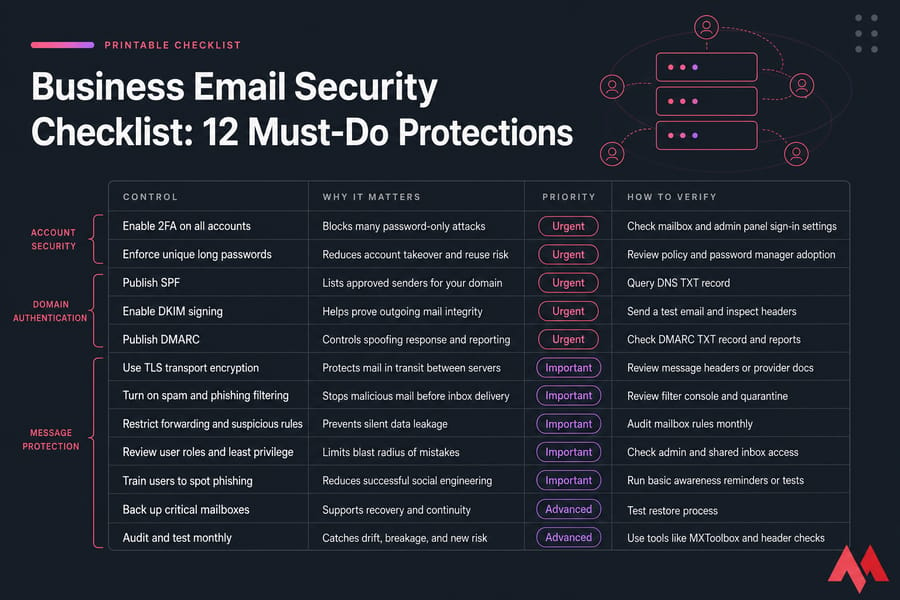
| Control | Why It Matters | Priority | How to Verify |
|---|---|---|---|
| Enable 2FA on all accounts | Blocks many password-only attacks | Urgent | Check mailbox and admin panel sign-in settings |
| Enforce unique long passwords | Reduces account takeover and reuse risk | Urgent | Review policy and password manager adoption |
| Publish SPF | Lists approved senders for your domain | Urgent | Query DNS TXT record |
| Enable DKIM signing | Helps prove outgoing mail integrity | Urgent | Send a test email and inspect headers |
| Publish DMARC | Controls spoofing response and reporting | Urgent | Check DMARC TXT record and reports |
| Use TLS transport encryption | Protects mail in transit between servers | Important | Review message headers or provider docs |
| Turn on spam and phishing filtering | Stops malicious mail before inbox delivery | Important | Review filter console and quarantine |
| Restrict forwarding and suspicious rules | Prevents silent data leakage | Important | Audit mailbox rules monthly |
| Review user roles and least privilege | Limits blast radius of mistakes | Important | Check admin and shared inbox access |
| Train users to spot phishing | Reduces successful social engineering | Important | Run basic awareness reminders or tests |
| Back up critical mailboxes | Supports recovery and continuity | Advanced | Test restore process |
| Audit and test monthly | Catches drift, breakage, and new risk | Advanced | Use tools like MXToolbox and header checks |
Before you begin, make sure you have access to your domain DNS, your email admin panel, a list of approved sending services, and a clear picture of your current provider. If you're still setting up business webmail, see how to activate and create a business webmail service.
Below, I'll break down how to implement the controls that matter most.
How to secure business email accounts with 2FA and password policies
Passwords alone fail all the time. They get reused, phished, guessed, logged on infected devices, or exposed in old breaches. That's why every admin account should use 2FA first, then every regular mailbox right after that.
If your team needs a refresher on the basics, here's a plain-English explanation of what two-factor authentication (2FA) is.
Should every mailbox use 2FA?
Yes. Start with admins, shared mailboxes with elevated access, finance, HR, and executives. But don't stop there. Attackers love the "unimportant" inbox because it often has password reset emails, invoices, and internal conversations.
Best 2FA methods for business email
- Best: authenticator app
- Stronger: hardware security key
- Fallback only: SMS
I personally prefer authenticator apps for most SMBs because they're practical. Hardware keys are excellent for admins and high-risk users. SMS is better than nothing, but it shouldn't be your first choice.
Password rules that reduce account takeover
| Policy | Recommended Baseline |
|---|---|
| Password length | Use long passphrases, ideally 14+ characters |
| Reuse | Never reuse passwords across services |
| Sharing | No shared credentials between staff |
| Storage | Use a password manager |
| Alerts | Enable login and new device alerts |
| Sessions | Use conditional access or session limits where available |
If you need help setting sane password rules, MonoVM has a practical post on how to choose a strong password.
Pro tip: enforce 2FA on admins first, then all users, then external apps and legacy access methods. After securing logins, secure the domain itself.
SPF, DKIM, and DMARC setup for email authentication
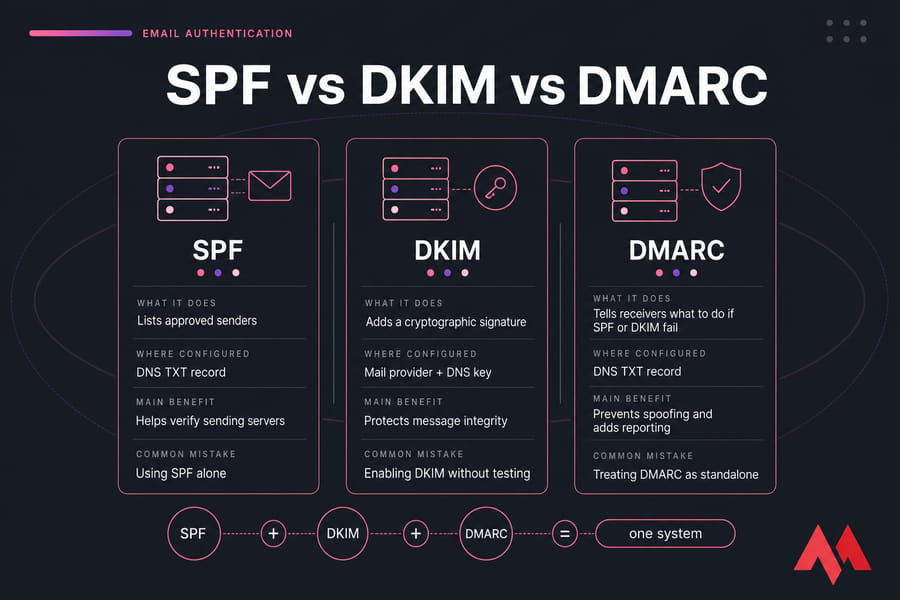
If you only fix one technical area after 2FA, make it this one. SPF, DKIM, and DMARC are the core of email spoofing prevention and deliverability protection.
They also protect your brand. A spoofed invoice email that appears to come from your domain can damage trust fast. CISA and Microsoft both keep warning about business email compromise for a reason — email is still one of the most abused channels in the real world.
What SPF does and its limitations
SPF, or Sender Policy Framework, is a DNS TXT record that lists which servers or services are allowed to send mail for your domain. Think of it as a guest list.
But SPF has limits. It doesn't sign the message content, and forwarding can complicate evaluation. That's why SPF alone is not enough.
How DKIM protects message integrity
DKIM, or DomainKeys Identified Mail, adds a cryptographic signature to outgoing mail. The receiving server checks that signature against a public key in DNS. If the message was altered in transit, or if the signature doesn't match, verification fails.
For a lot of SMBs, DKIM gets enabled in the mail provider panel with a DNS record added afterward. Simple enough. Still, test it. Publishing DKIM and assuming it works is how you end up with silent failures.
How DMARC prevents spoofing and improves enforcement
DMARC, or Domain-based Message Authentication, Reporting, and Conformance, builds on SPF and DKIM. It tells receiving servers what to do when a message fails authentication, and it sends reports back so you can see abuse and misconfigurations.
DMARC also introduces alignment. That means SPF and/or DKIM must not just pass, but align with the visible From domain. That's the part many beginners miss.
Which DMARC policy to use: none, quarantine, or reject
| Standard | What It Does | Where Configured | Main Benefit | Common Mistake |
|---|---|---|---|---|
| SPF | Authorizes sending servers | DNS TXT record | Reduces unauthorized sending | Forgetting third-party senders |
| DKIM | Signs outgoing messages | Mail provider + DNS | Protects message integrity | Enabling without verification |
| DMARC p=none | Monitors failures only | DNS TXT record | Visibility into auth results | Leaving it there forever |
| DMARC p=quarantine | Flags or isolates failures | DNS TXT record | Better spoofing control | Moving too fast without reports |
| DMARC p=reject | Rejects failing mail | DNS TXT record | Strongest anti-spoofing stance | Using before inventory is complete |
Recommended implementation order:
- Inventory every approved sender: mailbox platform, CRM, billing tool, support desk, newsletter service, website forms, and custom SMTP relays.
- Publish SPF.
- Enable DKIM signing.
- Publish DMARC with
p=none. - Review reports for a couple of weeks.
- Move to
quarantine, thenrejectonce you're confident.
That inventory step is tedious, honestly, but it's where most SPF DKIM DMARC setup problems begin. A marketing platform or ticketing app left out of SPF can break legitimate mail. An old sender nobody remembers can keep failing DMARC.
For hands-on help, MonoVM has guides on how to create a DMARC record in cPanel and what a DMARC record does. You can test records with MXToolbox, DMARCian, and Google Admin Toolbox. If mail is landing in junk despite correct records, also check whether your domain or IP shows up on DNS blocklists using resources related to DNSBL checks.
Warning: DKIM without SPF and DMARC does not stop full domain spoofing. Authentication proves legitimacy; encryption protects contents in transit.
Email encryption for business: TLS, mailbox encryption, and secure sending
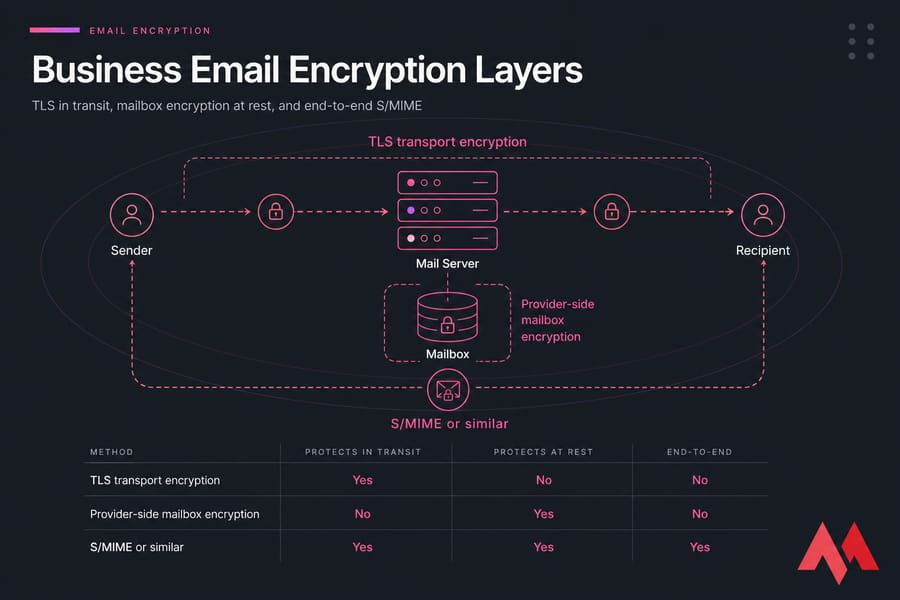
Email encryption gets oversimplified a lot. You'll hear "it's encrypted" when what people really mean is "the connection used TLS."
| Method | Protects In Transit | Protects At Rest | End-to-End | Best For |
|---|---|---|---|---|
| TLS transport encryption | Yes | No | No | Baseline secure mail delivery |
| Provider-side mailbox encryption | No | Yes | No | Stored mailbox protection |
| S/MIME or similar | Yes | Yes | Yes | High-sensitivity communication |
TLS, or Transport Layer Security, secures connections between clients and servers or between mail servers. That's essential, and you want it everywhere. If you need a refresher, here's a clear breakdown of TLS vs SSL differences. SSL/TLS certificates also matter because they help secure those connections.
Mailbox or provider-side encryption protects stored data on the provider's systems. That's useful, but it doesn't mean your recipient's mailbox is equally protected.
End-to-end encryption, often using S/MIME, keeps message contents readable only to the intended parties. That's more appropriate for contracts, HR data, customer records, financial details, or regulated information. Even then, email may not be the best place for highly sensitive files. A secure portal or password-protected document link is often safer.
For more background, see what data encryption means and, if you need certificates for secure services around your stack, MonoVM also offers SSL certificates.
Warning: TLS secures transport, not full end-to-end confidentiality. Next, stop malicious mail before users ever open it.
Anti-spam and anti-phishing controls for company email
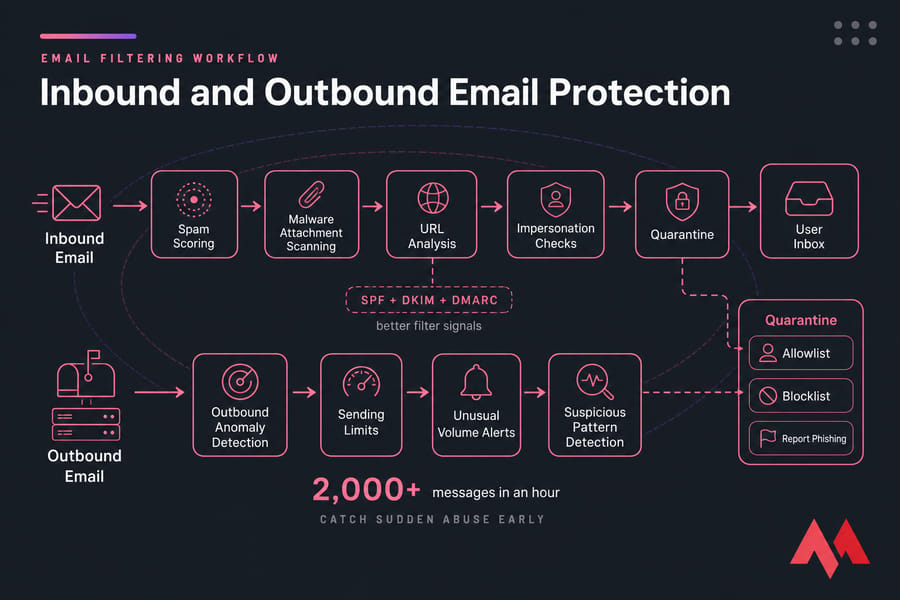
Anti-spam controls should cover both directions. Most teams focus on inbound mail, which makes sense, but outbound abuse matters too. A compromised mailbox sending spam can wreck domain reputation fast.
Your inbound stack should include spam scoring, malware attachment scanning, URL analysis, impersonation checks, and quarantine. Authentication helps here too. When SPF + DKIM + DMARC are set up properly, filters have better signals to work with.
Outbound controls should include sending limits, alerts for unusual volume, and detection for suspicious patterns. If one mailbox suddenly sends 2,000 messages in an hour, you want that caught early.
Quarantine matters just as much as filtering. Give users a simple review process, maintain allowlists and blocklists carefully, and expect some false positives during tuning. Review them weekly at first. That little bit of housekeeping saves a lot of "where did my invoice go?" support chatter.
Also add a dead-simple "report phishing" process. One button is ideal. At minimum, give staff a known path for escalating suspicious mail.
For related reading, MonoVM has explainers on bulk email vs spam, what spam is on the internet, and broader common cyber security threats.
Need secure business email without the setup headache? If managing SPF, DKIM, DMARC, spam filtering, and mailbox security manually is slowing your team down, review MonoVM's email hosting solutions.
Business email access control with user roles, devices, and least privilege
Don't use the same account for admin work and everyday email. Give admins a separate privileged account, protect it harder, and use it only when needed. That's basic least privilege, and it works.
Shared inboxes need governance too. Sales@, billing@, and support@ shouldn't turn into mystery mailboxes with six ex-employees still attached. Define owners, review delegates, and avoid shared passwords whenever the platform supports proper access delegation.
For mobile and remote access, set rules: screen lock, approved apps, account removal on lost devices, and no legacy app passwords if you can help it. Limit auto-forwarding to external addresses unless there's a documented business need.
Offboarding checklist:
- Disable the account immediately
- Reset active sessions
- Revoke app passwords and tokens
- Remove forwarding and mailbox delegation
- Transfer needed data to the manager or shared inbox owner
If you're managing mailboxes in hosting panels, these guides can help: create an email account in cPanel and create email accounts in DirectAdmin.
Email monitoring, backups, and audit logging best practices
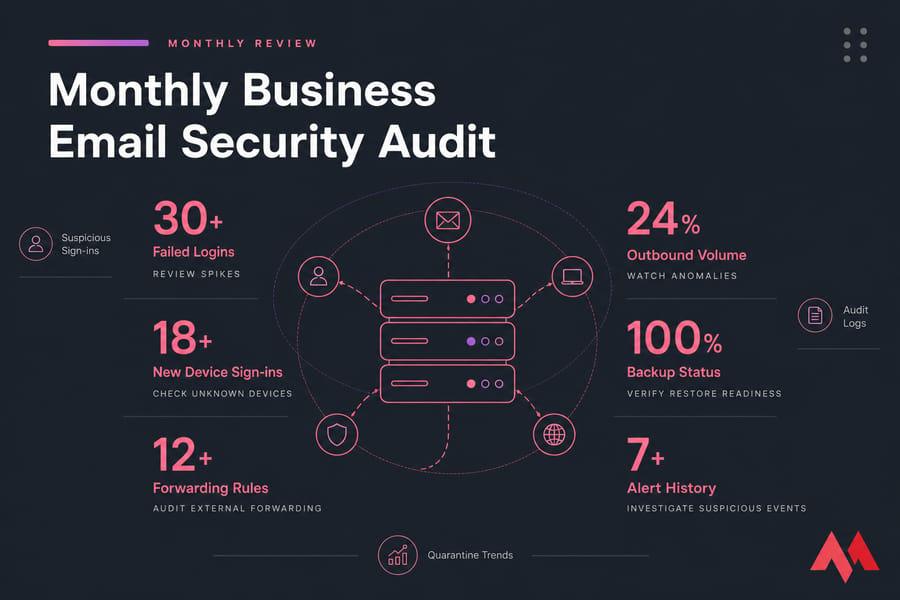
Monitoring is where secure setups stay secure. A lot of email problems don't come from bad defaults. They come from drift.
Every month, review failed login spikes, new device sign-ins, mailbox forwarding rules, and outbound volume anomalies. If your provider supports alerts for suspicious sign-ins or unusual behavior, turn them on.
Backups matter most for executive, finance, HR, and customer-facing mailboxes. So do retention policies. During an incident, you'll want both recovery options and a useful trail.
Audit logs are critical when investigating compromise. They show who logged in, from where, when rules changed, and what actions were taken. Without logs, you're mostly guessing.
| Cadence | What to Review |
|---|---|
| Monthly | Failed logins, forwarding rules, new devices, outbound spikes, quarantine trends |
| Quarterly | User access, inactive accounts, third-party senders, restore tests, policy updates |
For broader backup practices, you can also review how to back up a website and how to back up a server or VPS.
Common business email security mistakes that weaken protection
| Mistake | Risk | Fix |
|---|---|---|
| No 2FA on admin accounts | Fastest path to full mailbox control | Enforce 2FA immediately |
| SPF only, no DKIM or DMARC | Weak spoofing defense | Deploy SPF + DKIM + DMARC together |
| DMARC p=none forever | No enforcement against abuse | Move to quarantine, then reject |
| No sender inventory | Legitimate services fail auth | Track every third-party sender |
| Ignoring inactive accounts | Easy takeover targets | Disable or remove them |
| Trusting TLS as total privacy | False sense of confidentiality | Use secure sending for sensitive data |
| No DNS testing after changes | Silent auth failures | Verify with tools and test emails |
One more thing: if a mailbox gets compromised and starts spamming, your domain can end up blacklisted. That's a deliverability problem and a trust problem. If that has already happened, read why domains get blacklisted and how to delist them.
Tools to test your email security checklist
| Tool | Use Case | Free/Paid | Best For |
|---|---|---|---|
| MXToolbox | SPF, DKIM, DMARC, MX, blacklist checks | Free/Paid | Fast validation |
| DMARCian | DMARC analysis and reporting | Free/Paid | DMARC troubleshooting |
| Google Admin Toolbox | Header analysis and diagnostics | Free | Message inspection |
| Mail headers | Check SPF pass, DKIM pass, DMARC pass, TLS | Free | Real-world testing |
| Spamhaus-style blacklist checks | Reputation and listing status | Free/Paid | Deliverability issues |
What should you verify? SPF pass, DKIM pass, DMARC alignment/pass, TLS usage, and whether the message was scored as spam. Send a test email to another provider, open the full headers, and confirm the results. If you're doing DNS checks manually, MonoVM also has resources on a DNS checker, the nslookup command, and both how SMTP works and SMTP explained.
When secure email hosting is the better option for your business
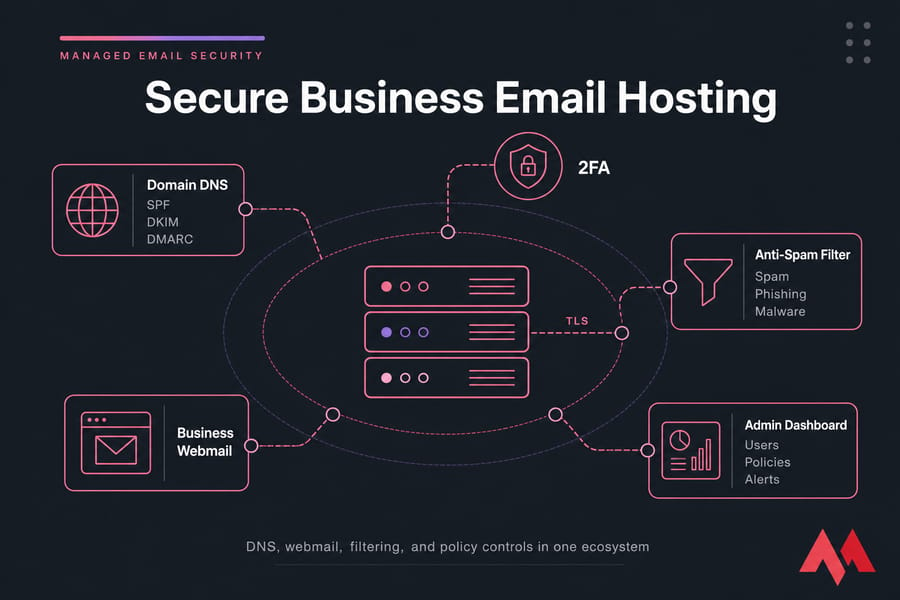
If your current mail setup has weak filtering, poor admin visibility, messy DNS controls, or no easy way to enforce 2FA and user policy, it may be time to stop patching around it.
Look for a provider that supports modern authentication, SPF/DKIM/DMARC, reliable webmail security, anti-spam controls, solid uptime, and decent support. Simplicity counts here. When domain, hosting, and email live in the same ecosystem, routine changes are usually easier and less error-prone.
MonoVM offers business email hosting with Titan and broader email hosting solutions. If you're already on Titan or considering it, see setting up Titan Email on MonoVM. And if a security cleanup means moving providers, here's how to migrate business email safely.
Quick summary if you only have 30 minutes: enable 2FA on admins, inventory all senders, publish SPF + DKIM + DMARC, turn on spam filtering, and audit forwarding rules. Do those first. This week, review backups, user roles, and encryption needs. Upgrade hosting if your platform makes basic controls hard to manage.
Ready to secure your business email stack? Choose a platform that supports modern authentication, cleaner administration, and dependable hosting. MonoVM offers business email and Titan email solutions that help teams stay secure and easier to manage. You can explore secure business email with Titan or migrate business email if your current setup is holding you back.

An experienced tech and developer blog writer, specializing in VPS hosting and server technologies. Fueled by a passion for innovation, I break down complex technical concepts into digestible content, simplifying tech for everyone.