Here's the honest verdict before you read another paragraph: a self-hosted VPN gives you control over the server, the protocol, and the exit endpoint but it doesn't automatically make you more private than a commercial VPN. The "real privacy differences" between the two aren't what most blog posts claim. They depend on your threat model.
If you need secure remote access to a home lab, a NAS, or a private dashboard, self-hosting wins. If you want to blend into a pool of users, hop between countries, or unblock streaming, a commercial provider almost always does it better.
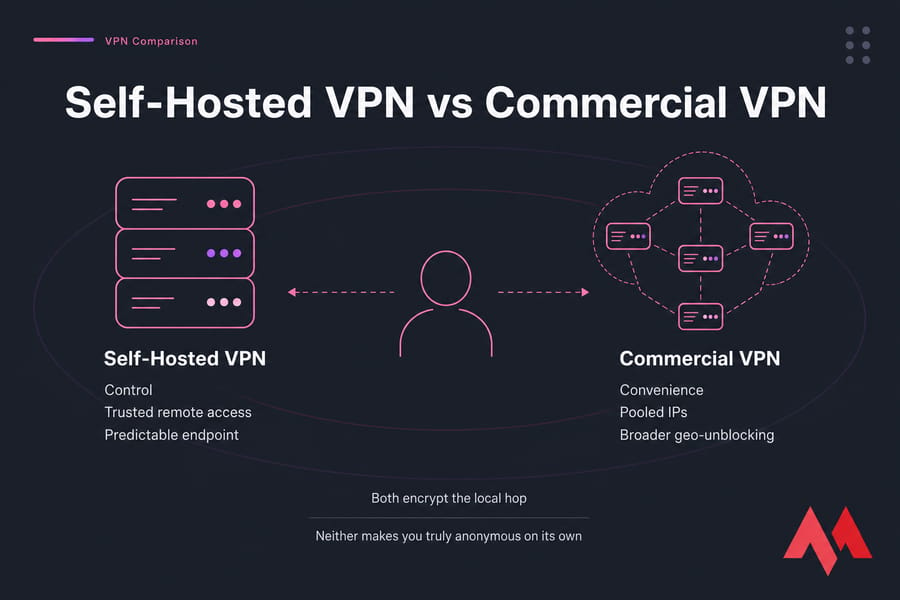
- Self-hosted VPN → control, trusted remote access, predictable endpoint
- Commercial VPN → convenience, pooled IPs, broader geo-unblocking
- Both → encrypt the local hop (your café Wi-Fi, your hotel network)
- Neither → makes you truly anonymous on its own
To pick correctly, start with the basics. If VPNs are still fuzzy, our explainer on what a VPN is and how it works is the quickest catch-up.
What is a self-hosted VPN, and how is it different from a VPN provider?
A self-hosted VPN is one you run yourself. You spin up a server, install software like WireGuard or OpenVPN, generate keys, and connect your devices to it. The server can sit at home on a Raspberry Pi, or it can run on a VPS in a datacenter. You're the operator, the admin, and — importantly — the only user.
A commercial VPN is a subscription service. NordVPN, Mullvad, Proton VPN, ExpressVPN — they all run massive fleets of servers across dozens of countries, and you share those servers with thousands of other paying customers.
Home-hosted VPN vs VPS-hosted VPN
This distinction matters a lot, and most articles skip it. A home-hosted VPN routes your traffic back through your home internet connection. Useful for accessing your LAN remotely. Useless for hiding from your ISP, because your ISP is the exit. A VPS-hosted VPN, on the other hand, gives you a datacenter IP — different jurisdiction, different ISP, no CGNAT headaches, usually faster upload.
If you want a deeper take on the infrastructure difference, see VPS vs VPN.
Who can still see your traffic? The real privacy comparison
Privacy isn't a yes/no switch. It's a question of who sees what. Here's the honest breakdown.
| Observer | Home-hosted VPN | VPS-hosted VPN | Commercial VPN |
|---|---|---|---|
| Your local ISP | Sees encrypted tunnel to your home, then your home ISP sees the rest | Sees encrypted tunnel to the VPS only | Sees encrypted tunnel to provider only |
| VPS provider / home ISP at exit | Your home ISP sees all destinations | VPS host can see destination IPs and metadata | Provider sees destinations (depending on logging policy) |
| Websites you visit | See your home IP | See a dedicated VPS datacenter IP linked to you | See a shared IP used by many customers |
| DNS resolver | Whatever resolver you configure | Whatever resolver you configure | Usually provider's resolver |
Look closely at the "websites" row. With a self-hosted VPN, every site you visit sees the same exit IP, every time. That IP is rented in your name (or your company's name) from a hosting provider. From an anonymity perspective, that's a fingerprint, not a disguise.
Commercial VPNs put you in a pool. A hundred other users might be sharing that exit IP at the same moment. That's plausible deniability you simply cannot replicate alone.
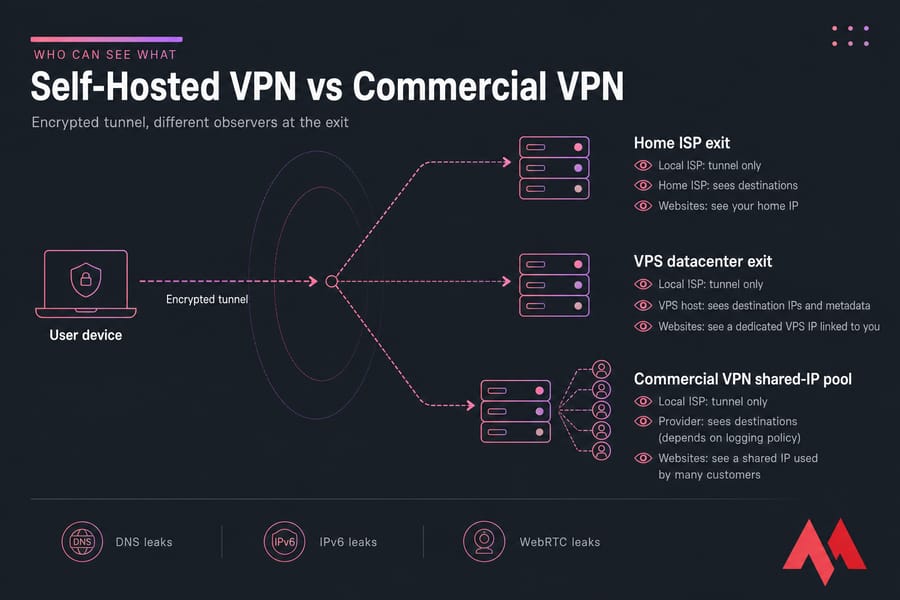
And don't forget the leaks. DNS leaks, IPv6 leaks, WebRTC leaks all of them can punch holes in either setup if you don't lock them down.
Curious about the broader IP question? Our guide on how to hide your IP address covers the wider picture.
Key takeaway: Self-hosting improves control. It does not automatically improve anonymity. Different problem, different tool.
Self-hosted VPN pros and cons
Pros
- Full server control — your keys, your config, your firewall rules
- Trusted remote access — perfect for home labs, NAS, internal dashboards
- Predictable performance — no noisy neighbors fighting for bandwidth
- No third-party logging policy to trust — you write the policy
- One-time-ish cost — a low-spec VPS handles a small household easily
Cons
- You're the sysadmin — patching, hardening, monitoring, incident response
- Single fixed exit IP — websites see the same address every visit
- Weak for geo-unblocking — one country, often a flagged datacenter range
- No pooled anonymity — your traffic is the only traffic
- No consumer features — no built-in kill switch app, no one-click country swap
And while we're at it, let's kill a myth: "I run my own VPN, so I'm anonymous." No. You rented that server with a payment method tied to your real identity. The exit IP is registered to you. Anonymity isn't a side effect of self-hosting — it's a separate discipline involving Tor, payment hygiene, and operational security most people aren't actually doing.
If you do go this route, lock the server down. Read up on configuring secure SSH on a VPS and securing your Linux VPS before you do anything else. An unhardened VPN server is worse than no VPN.
Commercial VPN pros and cons
Commercial providers earn their keep on convenience and scale.
- Easy apps on every platform, kill switches, split tunneling, one-click country swap
- Dozens of exit countries — handy for travel and content access
- Shared IP pools that make your traffic blend with thousands of others
- Streaming-optimized infrastructure with rotating IP ranges
The trade-offs are real, though. You're trusting a private company with metadata. "No-logs" policies range from genuinely audited to marketing fluff. Performance varies by load, and some providers get blocked by services that hate VPN traffic. Subscriptions add up over years.
One nuance worth repeating — being one of 500 users sharing an exit IP is often better for casual privacy than being the only user on your own crisp, clean, traceable IP.
Use cases: remote access, public Wi-Fi, travel, streaming
| Use case | Recommended | Why |
|---|---|---|
| Remote access to home NAS or lab | Self-hosted (home) | You need to land inside your LAN |
| Café/hotel Wi-Fi protection | Either | Both encrypt the risky local hop |
| Travel across many countries | Commercial | Multiple exit regions out of the box |
| Streaming foreign Netflix libraries | Commercial | IP rotation; datacenter IPs get flagged fast |
| Admin access to company VPS fleet | Self-hosted (VPS) | Custom routing, audit control, fixed allowlist IP |
| Casual privacy from local ISP | Either | Both shift the trust point elsewhere |
Home-hosted VPNs hit a wall fast when you travel. Residential uploads are slow, CGNAT can block port forwarding entirely, and a single home connection going down means your VPN is offline until you get back. A VPS sidesteps all of that.
Streaming, torrenting, and geo-unblocking
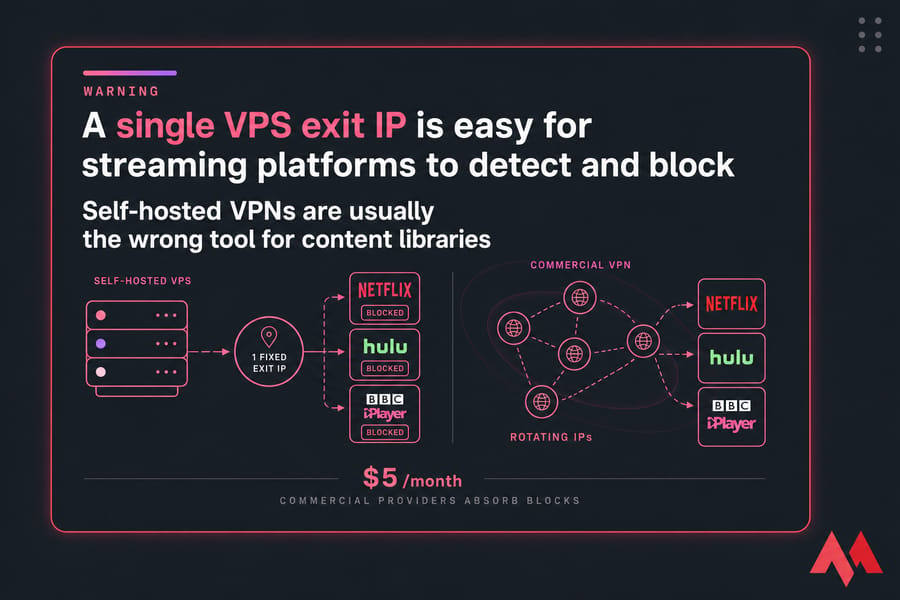
Here's where self-hosting genuinely disappoints. Streaming platforms have entire teams whose job is detecting datacenter IPs. A self-hosted VPN sits on one — your VPS provider's ASN is publicly known, and Netflix, Hulu, and BBC iPlayer block those ranges in bulk.
Commercial VPNs fight this war daily. They rotate IPs, lease residential ranges, and absorb the blocks for you. It's not glamorous, but it's why people pay $5/month.
On torrenting and similar high-risk activity: a self-hosted VPN ties that traffic directly to your hosting account. Read your VPS provider's acceptable-use policy first. Always.
WireGuard, OpenVPN, and protocol choices
| Protocol | Strengths | Watch out for |
|---|---|---|
| WireGuard | Fast, modern ChaCha20 crypto, tiny config | Static IP assignments by default |
| OpenVPN | Mature, AES-256, works through stubborn firewalls | Heavier, slower, fiddlier setup |
| IPSec/L2TP | Built into most OSes | Legacy; use only for compatibility |
| PPTP | None worth listing | Cryptographically broken. Don't. |
For most self-hosters, WireGuard is the right starting point. It's faster, the codebase is smaller, and the config files are short enough to actually understand. OpenVPN is still excellent if you need TCP-443 stealth to slip past restrictive networks.
Our full WireGuard vs OpenVPN piece goes deeper.
Beyond protocol choice: keys rotated, SSH on a non-default port with key-only auth, UFW or iptables locking everything except the VPN port, and unattended-upgrades enabled. That's the floor, not the ceiling.
Cost and maintenance
| User type | Self-hosted cost factors | Commercial cost factors | Usually better value |
|---|---|---|---|
| Solo admin / remote worker | $3–7/mo VPS + setup time | $3–10/mo subscription | Self-hosted |
| Family of four | One VPS, multiple peers | One subscription, 5–10 devices | Tie — pick on use case |
| Frequent traveler / streamer | Single country, IP blocks likely | Dozens of countries, app polish | Commercial |
| Privacy hobbyist | Time-heavy; full control | Outsourced trust | Depends on threat model |
The hidden cost of self-hosting is your time. An hour of setup, then maybe 20 minutes a month of patching and checking logs — until something breaks at 11pm and you're the on-call engineer.
Which should you choose? A use-case decision matrix
- Need to reach your home LAN remotely? Self-hosted at home (or VPS with a site-to-site link).
- Want to hide browsing from your local ISP? Either works. Pick on convenience.
- Care most about blending in with other users? Commercial. Pooled IPs win.
- Travel a lot, hop between countries? Commercial.
- Watch geo-locked streaming? Commercial.
- Run a small team that needs an allowlisted IP into company systems? Self-hosted on a VPS.
- Just want simple café Wi-Fi protection? Whichever you'll actually leave turned on.
The wrong move is treating these two as the same product. They're not. They solve overlapping but distinct problems.
How to host your own VPN on a VPS
If self-hosting fits your goal, here's the lean version of the deployment path:
- Pick a VPS location close to where you'll connect from (lower latency = happier daily use)
- Deploy Ubuntu 22.04 or Debian 12 — both are well-supported by every VPN tool
- Harden SSH first: key-only auth, non-default port, fail2ban
- Install WireGuard (or OpenVPN if you need TCP-443) and generate keys
- Configure UFW: allow the VPN port, deny everything else inbound
- Test for DNS and IPv6 leaks before you trust the setup
For step-by-step walkthroughs, see setting up a VPN on a VPS server, installing OpenVPN on a VPS, and setting up WireGuard VPN.
If you'd rather start from a server pre-built for the job, our Linux VPS hosting, dedicated OpenVPN server, and broader VPN server hosting plans are the practical starting points.
Final verdict
If you need control, remote access, or a private endpoint into your own infrastructure — self-host, ideally on a VPS rather than a flaky home connection. If you need convenience, multiple exit countries, streaming access, or the soft anonymity of a shared IP pool pay a commercial provider. Most people will end up using both, for different reasons, on different days. That's not a cop-out. That's the realistic answer.

An experienced tech and developer blog writer, specializing in VPS hosting and server technologies. Fueled by a passion for innovation, I break down complex technical concepts into digestible content, simplifying tech for everyone.