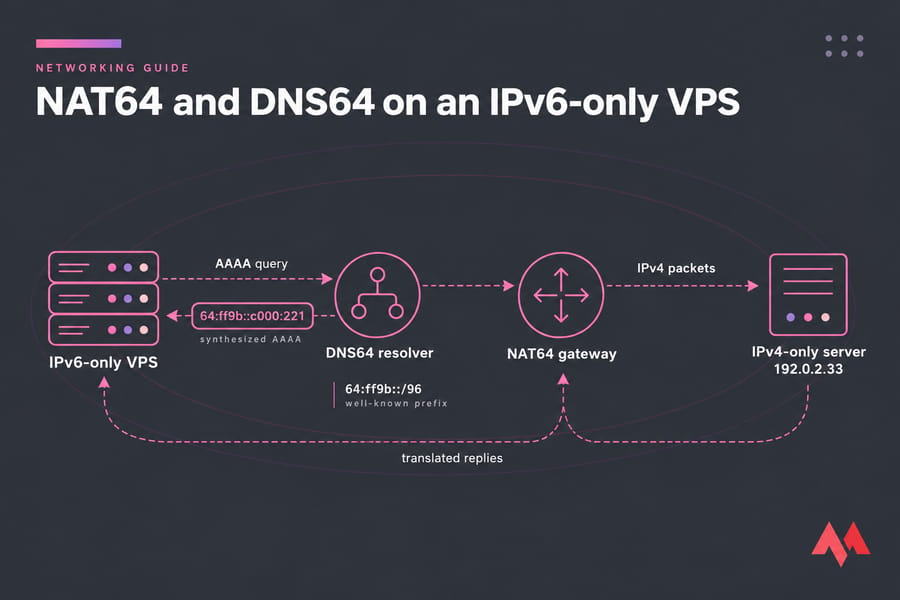
NAT64 and DNS64 let an IPv6-only VPS reach services that only have IPv4 addresses. DNS64 builds a synthesized AAAA record from a domain's IPv4 A record, and NAT64 at the gateway translates your server's outbound IPv6 packets to IPv4. Together they let an IPv6-only server install packages, call APIs and send webhooks without a public IPv4 address. Apps that connect to IPv4 literals (raw addresses like 203.0.113.10) can still fail.
If you need a refresher on what IPv6 is or how A and AAAA records differ, start there. If you're deciding whether to buy IPv6 VPS hosting, read the testing and limitations sections first.
What NAT64 and DNS64 do on an IPv6-only VPS
They do separate jobs, and most outbound traffic needs both.
| Component | What it does | Defined in | What breaks without it |
|---|---|---|---|
| DNS64 | Returns a synthesized AAAA record when a name has only an A record | RFC 6147 | The VPS gets an IPv4 address it has no route to |
| NAT64 | Translates IPv6 packets to IPv4 and keeps state so the replies can come back | RFC 6146 | Connections to the synthesized address time out |
| Well-known prefix | 64:ff9b::/96, the range that carries embedded IPv4 addresses |
RFC 6052 | DNS64 and NAT64 can't agree on an address format |
Why IPv6-only servers still need the IPv4 internet
Public IPv4 addresses are scarce, and many providers now charge extra for them, which is the main reason IPv6-only instances exist. Much of the internet still has no AAAA records, though, so an IPv6-only VPS ends up depending on IPv4-only destinations such as:
- package mirrors and container registries
- third-party APIs, payment gateways and license servers
- webhook endpoints and older SaaS tools
- Git hosts and CDNs that serve over IPv4 only
Nearly all of this is outbound traffic your server starts. Before you pick a host, ask whether it provides NAT64/DNS64. If it doesn't, you'll have to run your own translator or switch to a public DNS64 resolver. The guide to migrating from IPv4 to IPv6 covers the wider transition.
How DNS64 builds synthesized AAAA records
DNS64 runs inside the recursive resolver and never touches anyone's authoritative zone. A lookup goes like this:
- Your VPS asks the resolver for the AAAA record of
api.example.com. - The resolver queries the authoritative server. If a real AAAA record exists, it returns that unchanged.
- If there's only an A record (say
192.0.2.33), the resolver appends those 32 bits to the NAT64 prefix, giving64:ff9b::c000:221(also written64:ff9b::192.0.2.33).
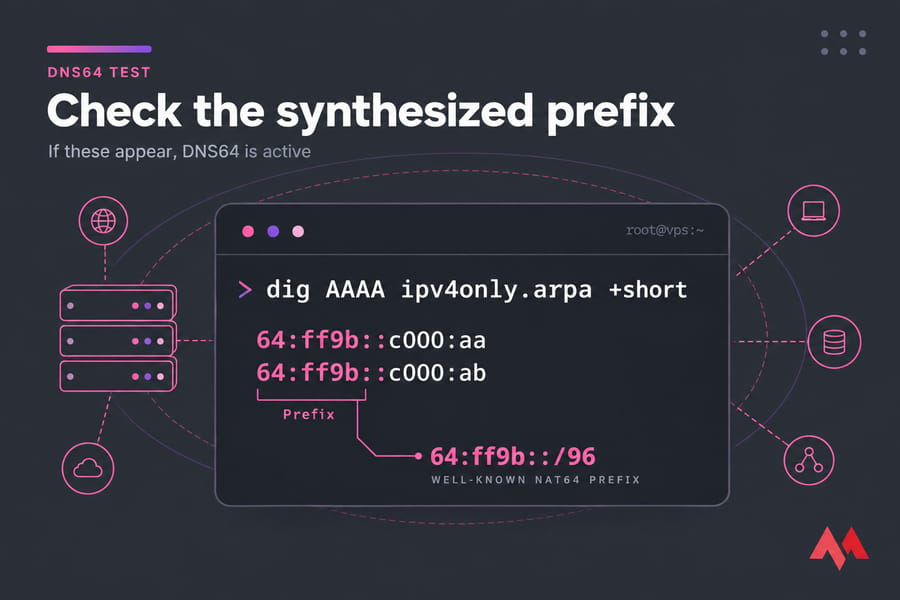
RFC 6052 reserves 64:ff9b::/96 as the well-known prefix, but some networks use their own network-specific prefix, usually written Pref64::/n. The resolver and the translator have to use the same one. Hosts can discover the prefix by querying ipv4only.arpa, a name defined in RFC 7050 whose only A records are 192.0.0.170 and 192.0.0.171. If the prefix lengths are unfamiliar, see AAAA records and IPv6 subnets explained.
How NAT64 translates IPv6 traffic to IPv4
A packet your VPS sends to 64:ff9b::c000:221 follows the route for that prefix to the NAT64 gateway. The gateway reads the last 32 bits as the IPv4 destination, rewrites the source to one of its own public IPv4 addresses and ports, and records a binding so replies can be translated back to your IPv6 address. Stateful NAT64 (RFC 6146) handles TCP, UDP and ICMP, and many IPv6 clients share the same pool of IPv4 addresses.
The binding is only created when the IPv6 side starts the connection, so NAT64 works for outbound traffic only. An IPv4-only visitor can't reach a website on your IPv6-only VPS through it. On AWS, for example, NAT64 runs on the NAT gateway, and you route 64:ff9b::/96 to that gateway yourself.
NAT64 and DNS64 vs dual-stack hosting
| Model | Pros | Cons | Best for |
|---|---|---|---|
| IPv6-only plus NAT64/DNS64 | No IPv4 address to pay for, and only one stack to firewall | Fails on IPv4 literals, no inbound IPv4, and it depends on the provider's resolver | Outbound-heavy workloads whose dependencies you've tested |
| Dual-stack VPS | Everything works, inbound and outbound | Costs more, and you have two stacks to secure | Public websites, legacy integrations |
| IPv4-only | Works with the most software | Can't reach IPv6-only peers and needs a scarce address | Legacy software you can't change |
Dual-stack is simpler to run. IPv6-only costs less but only works if you test your dependencies first, and if your site has to answer IPv4 visitors directly, you need a real IPv4 address. IPv4 vs IPv6 goes into the protocol differences.
How to test DNS64 and NAT64 on your VPS
These commands work on most Linux distributions. dig is in dnsutils (Debian/Ubuntu) or bind-utils (RHEL family).
1. Check that the server really is IPv6-only and see where traffic is routed:
ip -4 addr show scope global
ip -6 addr show scope global
ip -6 route
2. Find out which resolver the server uses:
resolvectl status    # systemd-resolved
cat /etc/resolv.conf
3. Query the well-known name:
dig AAAA ipv4only.arpa +shortIf DNS64 is active, you'll get addresses such as 64:ff9b::c000:aa and 64:ff9b::c000:ab, which also show you the prefix. An empty answer means the resolver doesn't do DNS64.
4. Resolve an IPv4-only dependency the way your applications do:
getent ahosts your-ipv4-only-api.example5. Make an actual connection:
curl -6 -sI https://your-ipv4-only-api.exampleIf the name resolves but the connection times out, DNS64 works and NAT64 doesn't, so check the 64:ff9b::/96 route. On non-Linux clients you can run the same queries with the nslookup command.
Common NAT64 and DNS64 limitations and fixes
| Problem | Likely cause | Fix |
|---|---|---|
| App fails while dig works | IPv4 literals in config or code | Use hostnames, or add a CLAT (464XLAT) |
| Nothing resolves after you change DNS | The new public resolver has no DNS64 | Go back to the provider resolver, or use Google's DNS64 at 2001:4860:4860::6464 |
| Validation errors on synthesized answers | The host validates DNSSEC itself | Validate at the DNS64 resolver, or run DNS64 locally after validation |
| Partner API returns 403 | Its IPv4 allowlist doesn't include the translator's address | Get the translator's egress IPv4 addresses added, or use a dedicated IPv4 |
| Docker or apt fail with only some mirrors | A container's DNS bypasses the host resolver, or a mirror is IPv4-only | Point the daemon's DNS at the DNS64 resolver and test each registry |
RFC 8683 names IPv4 literals, non-IPv6-compliant APIs and DNSSEC-validating hosts as the cases plain NAT64/DNS64 can't handle. In 464XLAT, a CLAT on the host translates IPv4 traffic to IPv6, which then goes through NAT64 as usual. For resolver problems, see troubleshoot Linux VPS issues.
Which workloads suit an IPv6-only VPS
Reverse proxies in front of IPv6-native upstreams (see how to configure Nginx for IPv6), staging and lab boxes, internal services, and modern stacks with tested dependencies usually run fine on IPv6-only. Test CI/CD runners, container hosts that pull from several registries, and anything that leans on SaaS APIs before you move them. Keep a workload dual-stack if it needs inbound IPv4, ships with hard-coded IPv4 endpoints, or talks to partners that allowlist by IPv4 address. A standard Linux VPS hosting plan with IPv4 is the safer choice for those.
Checklist before an IPv6-only production rollout
- List every outbound domain the app calls, and test each one with
getentandcurl -6. - Get written confirmation that your provider offers NAT64/DNS64, and which prefix it uses.
- Don't change the resolver without checking it for DNS64. If you change how addresses are assigned, read SLAAC vs DHCPv6 first.
- Alert on failed outbound connections, and keep a dual-stack fallback host for anything critical.
- Write down every exception that still needs IPv4.
To deploy, compare the IPv6 VPS hosting plans, or ask the technical support team whether IPv6-only, dual-stack or a standard VPS fits your workload.

An experienced tech and developer blog writer, specializing in VPS hosting and server technologies. Fueled by a passion for innovation, I break down complex technical concepts into digestible content, simplifying tech for everyone.