![SLAAC vs DHCPv6: 🌐 Key Differences Explained [2026]](/wp-content/uploads/2026/09/slaac-vs-dhcpv6627-main.webp)
SLAAC and DHCPv6 are the two ways hosts get IPv6 addresses. With SLAAC (Stateless Address Autoconfiguration), a device builds its own address from a prefix advertised by the router. With DHCPv6, a server either hands out addresses or supplies extra settings like DNS. SLAAC is simpler; DHCPv6 gives you central control, logging, and policy. And no, they're not mutually exclusive — plenty of production networks run both.
SLAAC vs DHCPv6 at a glance
If you need a refresher first, MonoVM's explainers on what IPv6 is, IPv4 vs IPv6, and what DHCP is cover the groundwork.
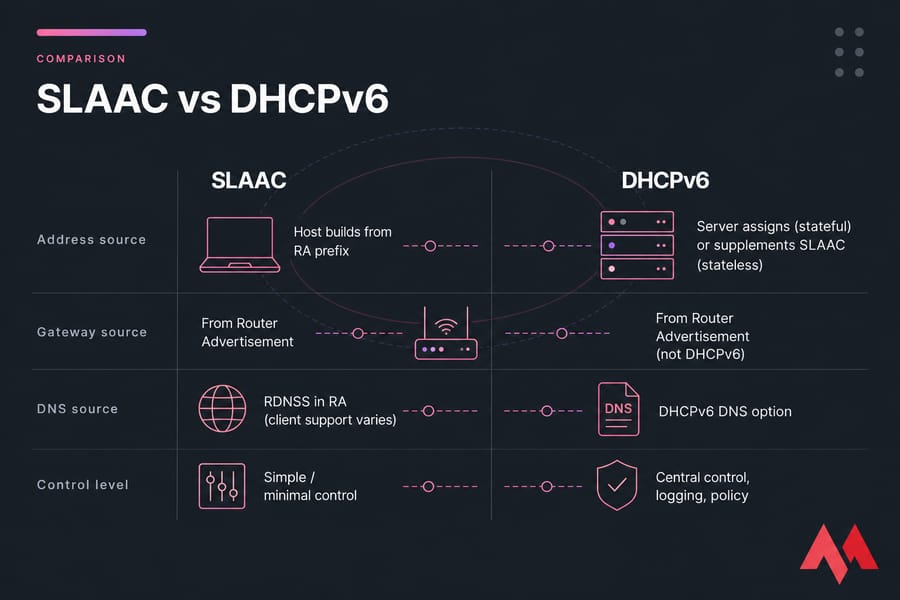
| Feature | SLAAC | DHCPv6 |
|---|---|---|
| Address creation | Host builds it from RA prefix | Server assigns (stateful) or host uses SLAAC (stateless) |
| Server needed | No | Yes |
| Default gateway | From Router Advertisement | From Router Advertisement (not DHCPv6) |
| DNS servers | Via RDNSS in RA, if the client supports it | Yes, standard DHCPv6 option |
| Address tracking | Weak — no lease database | Strong — leases and logs |
| Admin overhead | Minimal | Moderate |
| Client support | Universal | Good, with gaps (notably Android) |
| Core RFC | RFC 4862 | RFC 8415 |
What is SLAAC in IPv6?
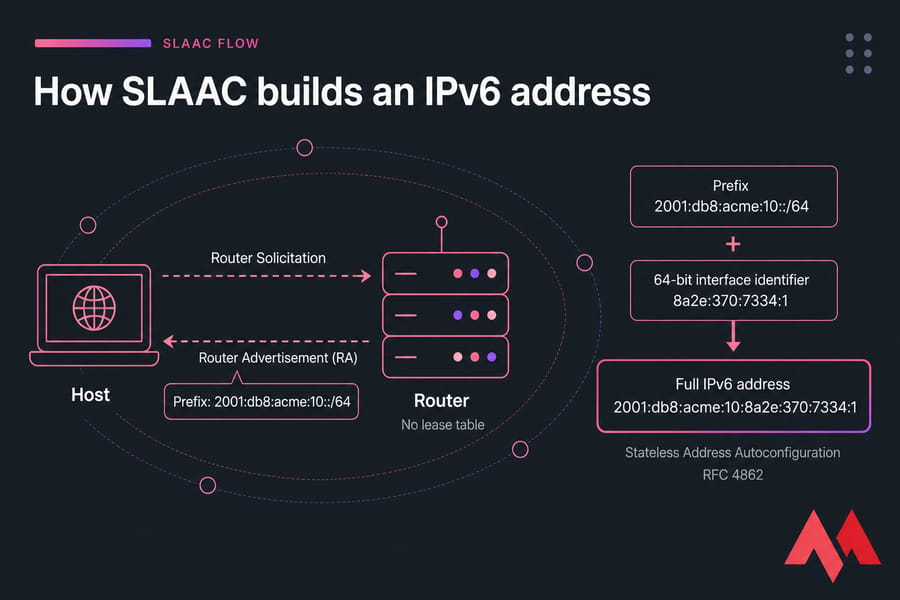
Stateless Address Autoconfiguration, defined in RFC 4862, lets a host configure itself with zero help from any server. Here's the flow: the host comes up, sends a Router Solicitation, and the router replies with a Router Advertisement (RA) containing one or more /64 prefixes. The host takes that prefix, generates its own 64-bit interface identifier, glues the two together, runs duplicate address detection, and it's online.
Say your router advertises 2001:db8:acme:10::/64. A host might end up with 2001:db8:acme:10:8a2e:370:7334:1 — the router never knew, never approved it, and keeps no record. That's what "stateless" means. No lease table, no state.
The interface identifier isn't always EUI-64 (derived from the MAC address). Modern Linux, Windows, macOS, iOS, and Android default to privacy extensions or stable-privacy addressing, so you'll typically see several addresses per interface: one stable, one or more rotating temporary ones. That's normal IPv6 behavior, not a bug.
What is DHCPv6 and how does it work?
DHCPv6 (RFC 8415) looks familiar if you know IPv4 DHCP, but it behaves differently in one big way — it doesn't hand out a default gateway. Ever. More on that in a second.
Stateful vs stateless DHCPv6
- Stateful DHCPv6 — the server allocates the actual IPv6 address, tracks the lease, and can also deliver DNS, NTP, domain search lists, and other options. This is the mode you want when you need an audit trail.
- Stateless DHCPv6 — hosts still get their addresses via SLAAC. The DHCPv6 server only supplies the extra configuration (usually DNS). No leases, no address database.
People conflate the two constantly. Stateless DHCPv6 is not SLAAC — it's a supplement that runs alongside it. Common server implementations include ISC Kea, the older isc-dhcp-server, Windows Server's DHCP role, and RouterOS on MikroTik gear.
Router Advertisement IPv6 basics: RA flags, gateway, and DNS
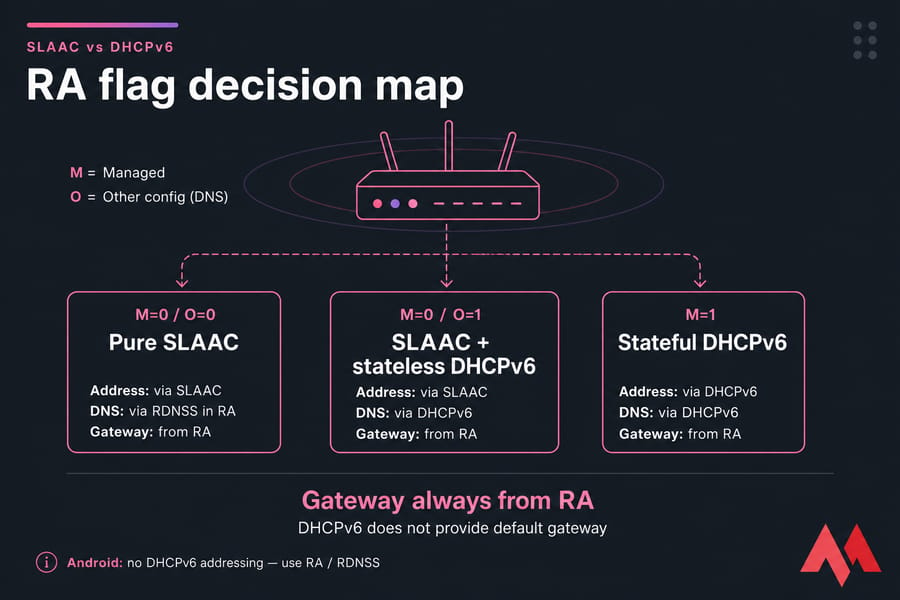
This is the section most articles get wrong, so pay attention here. Router Advertisements come from Neighbor Discovery (RFC 4861), and they carry two flags that tell hosts what to do:
- M flag (Managed) — "get your address from DHCPv6."
- O flag (Other) — "get your other config, like DNS, from DHCPv6."
Warning: DHCPv6 does not provide the default gateway in IPv6. The gateway comes from the RA's router lifetime field. If you disable RA on your router because "DHCPv6 handles everything," your clients will get addresses and go nowhere. I've watched people burn an afternoon on exactly this.
DNS has two delivery paths: the RDNSS option inside RA (RFC 8106), or the DHCPv6 DNS option. Support varies. Android doesn't do DHCPv6 addressing at all, so RDNSS is the only way to feed it DNS via the network. Older Windows builds prefer DHCPv6. Check both before you commit.
SLAAC vs DHCPv6: advantages and trade-offs
SLAAC wins on: simplicity, zero infrastructure, instant client onboarding, and universal OS support. It's fine for the vast majority of LANs.
SLAAC struggles with: host tracking, per-device policy, and predictable addressing. Privacy extensions mean a machine's address changes on a schedule, which makes firewall rules and log correlation harder.
DHCPv6 wins on: centralized management, lease logging, auditability, and consistent option delivery across a fleet. If compliance asks "which device held this address on Tuesday," DHCPv6 answers it.
DHCPv6 costs you: another service to run and monitor, relay configuration on every VLAN, client-support edge cases, and — again — it still depends on RA for the gateway.
When to use SLAAC vs DHCPv6 in real networks
| Environment | Best choice | Why |
|---|---|---|
| Home / small office | SLAAC (M=0, O=0) | Nothing to run, everything works |
| Small office needing custom DNS | SLAAC + stateless DHCPv6 (O=1) | Simple addressing, controlled resolvers |
| Enterprise LAN, compliance-heavy | Stateful DHCPv6 (M=1) | Lease records, per-device policy, auditing |
| Guest / BYOD Wi-Fi | SLAAC + RDNSS | Android clients won't take DHCPv6 addresses |
| Linux VPS with a static /64 | Static config or SLAAC | Server addresses should be predictable |
| MikroTik / RouterOS edge | RA + stateless DHCPv6, prefix delegation downstream | Matches how RouterOS handles IPv6 cleanly |
On a VPS the decision is often made for you. Most providers hand you a routed /64 or a set of addresses on a shared segment, and you pin them statically — see configure IPv6 on Ubuntu or the walkthrough on how to set up IPv6 on Ubuntu with Netplan or systemd-networkd. RouterOS folks testing RA and DHCPv6 combinations can spin up a lab quickly if you set up a MikroTik VPS rather than tying up production hardware.
Testing dual-stack behavior properly needs real routed IPv6, not a NAT'd lab. IPv6 VPS hosting gives you that in a few minutes.
Common mistakes and troubleshooting
| Symptom | Likely cause | Fix |
|---|---|---|
| Has IPv6 address, no connectivity | RA disabled or router lifetime = 0 | Re-enable RA with a non-zero lifetime |
| Has address, no DNS | O flag off, or client ignores RDNSS | Set O=1 and run stateless DHCPv6, or add RDNSS |
| Expected a DHCPv6 lease, got SLAAC | M=0, or the A flag left on in the prefix | Set M=1 and clear the autonomous flag |
| Several IPv6 addresses on one NIC | Privacy/temporary addresses — normal | Disable privacy extensions on servers only if needed |
| Android clients get no address | Android doesn't support stateful DHCPv6 | Provide SLAAC on that segment |
For DNS verification, the nslookup command is your fastest check, and after any config change you'll likely need to restart networking on Linux.
How to choose for your server or VPS
Run through this checklist:
- Do you need lease logs and audit trails? → DHCPv6 stateful.
- Is client diversity high (phones, IoT)? → SLAAC must be available.
- Do your clients support RDNSS? → If yes, you may skip DHCPv6 entirely.
- Is this a routed prefix or a shared segment? Ask your provider — it changes everything.
- Do server addresses need to stay fixed? → Static beats both.
Understanding the broader types of IP addresses helps here too. When you're ready to deploy, Linux VPS and MikroTik VPS hosting both ship IPv6-ready, and you can contact support 24/7 if your prefix behaves oddly.

An experienced tech and developer blog writer, specializing in VPS hosting and server technologies. Fueled by a passion for innovation, I break down complex technical concepts into digestible content, simplifying tech for everyone.