
An AAAA record is a DNS record that points a domain or subdomain to an IPv6 address. To point your domain to an IPv6 VPS, open your DNS zone, add an AAAA record for the hostname you want, paste in your VPS's public IPv6 address, save it, and verify the change with a DNS lookup.
That's the short version. But if you've ever added an AAAA record and watched your browser sit there spinning, you already know DNS is only half the job. The other half lives on the server.
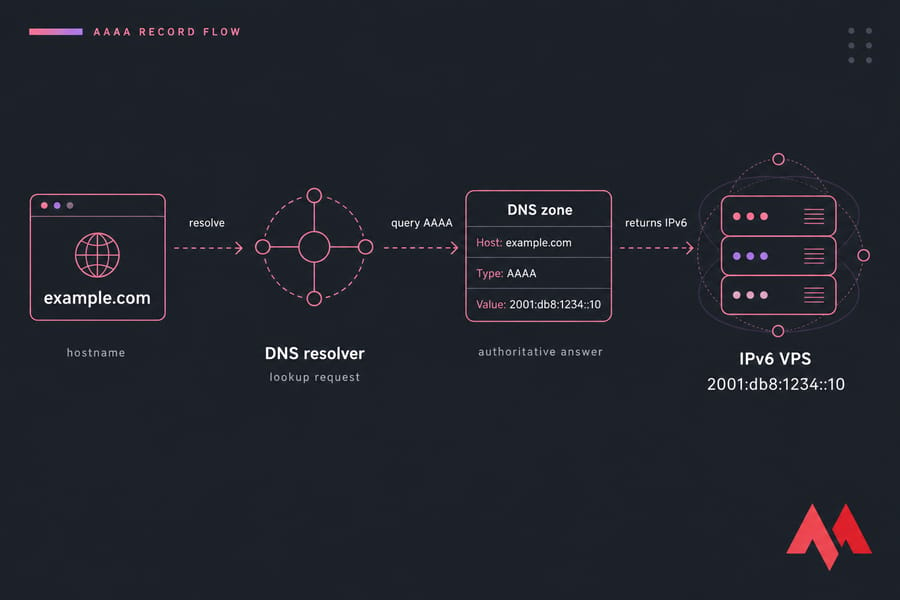
What Is an AAAA Record in DNS?
An AAAA record (people say "quad-A") maps a hostname to an IPv6 address. That's it. It does the same job as an A record, just for the newer, longer address format.
What the AAAA record stores
Three things matter in the record: the hostname, the record type, and the value. The value is a single 128-bit IPv6 address written in hex, like 2001:0db8:85a3::8a2e:0370:7334. No port, no protocol, no path — just the address.
Why IPv6 uses AAAA instead of A
An IPv4 address is 32 bits. IPv6 is 128 bits — four times bigger. That's literally where the name comes from: four A's for four times the address size. It's one of the rare naming decisions in networking that actually makes sense.
When you need an AAAA record
- Your website or app runs on a server with a public IPv6 address
- You want IPv6-only clients (increasingly common on mobile networks) to reach you directly
- You're running an API, mail hostname, or panel subdomain on an IPv6-capable box
- You're building a dual-stack setup and want both A and AAAA answers available
If you're fuzzy on the fundamentals underneath all this, our guide on what DNS is covers the resolution basics in plain language.
How an AAAA Record Works With an IPv6 Address
Here's the actual sequence when someone types your domain into a browser:
- The browser asks the operating system to resolve
example.com. - The resolver (your ISP's, or something like 1.1.1.1) queries the authoritative nameservers for your zone.
- On a dual-stack client, the resolver typically asks for both A and AAAA records.
- Your zone answers with the AAAA value — the IPv6 address of your VPS.
- The browser opens a TCP connection to that address on port 443 (or 80).
- Your web server responds. Page loads.
How resolvers pick between answers
If both A and AAAA exist, most modern clients use Happy Eyeballs — they race an IPv4 and an IPv6 connection and use whichever wins. In practice, IPv6 usually wins on networks that support it properly.
Why your VPS must already support IPv6
This is the part that trips people up. DNS just hands out an address. If your VPS doesn't have a globally routable IPv6 address, or your web server isn't bound to it, the browser gets an address it can't connect to and the page fails.
Step one is always confirming the server side. Worth reading up on what IPv6 is if the addressing format still feels alien.
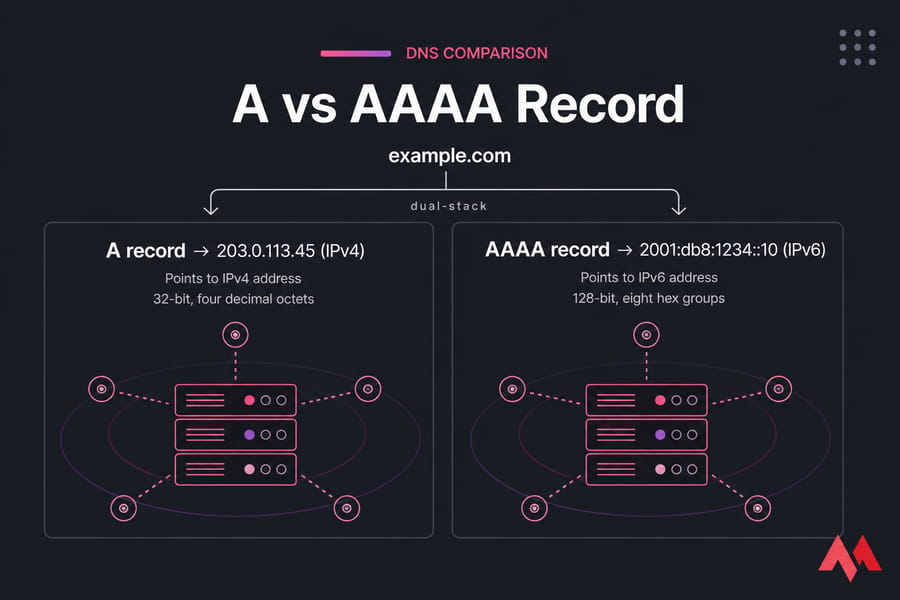
A Record vs AAAA Record: What's the Difference?
| Record Type | Points To | IP Format | Example Value | Best Use |
|---|---|---|---|---|
| A | IPv4 address | 32-bit, four decimal octets | 203.0.113.45 |
Universal reachability; still required for most public sites |
| AAAA | IPv6 address | 128-bit, eight hex groups | 2001:db8:1234::10 |
IPv6-native clients, dual-stack hosting, IPv6-only servers |
Quick summary: A = IPv4, AAAA = IPv6, and most production sites should publish both.
Can you use A and AAAA together?
Yes, and you usually should. Publishing both is called dual-stack. The same hostname gets an A record pointing at your IPv4 and an AAAA pointing at your IPv6, and clients choose based on what their network supports.
I've seen people delete the A record the moment IPv6 works, then get a support ticket from someone on a corporate network with no IPv6 path at all. Don't do that unless IPv6-only is a deliberate decision. For a deeper protocol comparison, see IPv4 vs IPv6.
Before You Point a Domain to an IPv6 VPS
Run this pre-flight check first. Five minutes here saves an hour of "why isn't it loading."
1. Find your VPS public IPv6 address
ip -6 addr show scope globalYou want an address in the global scope — something starting with 2 or 3. Addresses beginning fe80:: are link-local and useless for DNS. Confirm outbound reachability too:
curl -6 https://ifconfig.co2. Confirm your web server listens on IPv6
ss -tlnp | grep -E ':80|:443'If you only see 0.0.0.0:80, you're IPv4-only. In Nginx you want listen [::]:443 ssl; alongside the IPv4 listen line. Apache uses Listen 443 which binds both stacks on most builds — but verify, don't assume.
3. Check the firewall
UFW, firewalld, and iptables all treat IPv6 separately. ip6tables -L -n will show you the v6 chains. A rule that allows port 443 over IPv4 does nothing for IPv6 traffic unless it's mirrored.
4. Confirm your nameservers are correct
Editing DNS at your registrar does nothing if your domain's nameservers point somewhere else (Cloudflare, your host, a third-party DNS provider). Edit the zone wherever the authoritative nameservers actually live. If you're new to the whole flow, our guide on how to set up a domain on a VPS walks through that distinction.
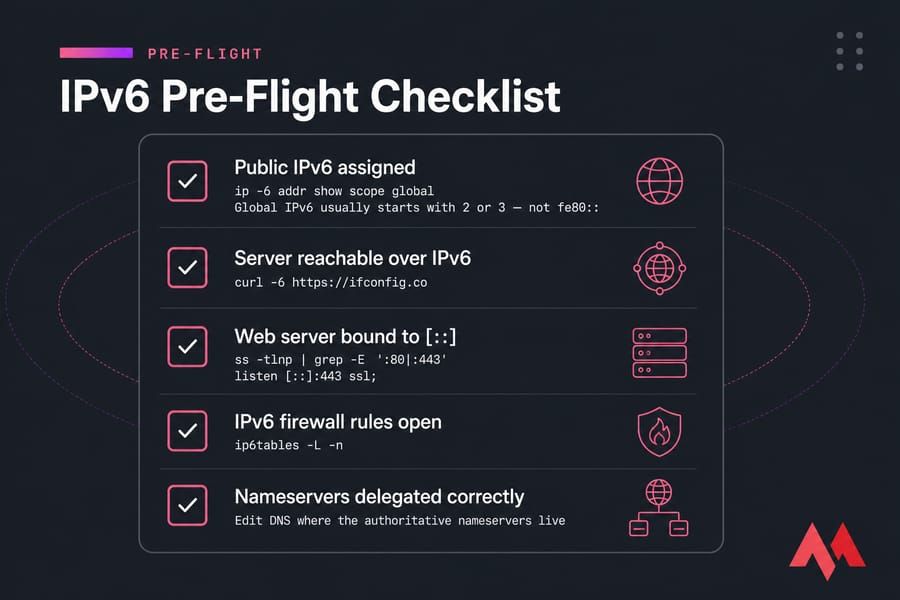
, IPv6 firewall rules open, nameservers delegated correctly]
No public IPv6 on your current server?
Some budget providers hand out IPv6 only on request, or not at all. If yours doesn't, IPv6 VPS hosting from MonoVM ships with a routable IPv6 block out of the box, so you skip the workarounds entirely.
How to Add an AAAA Record and Point a Domain to IPv6
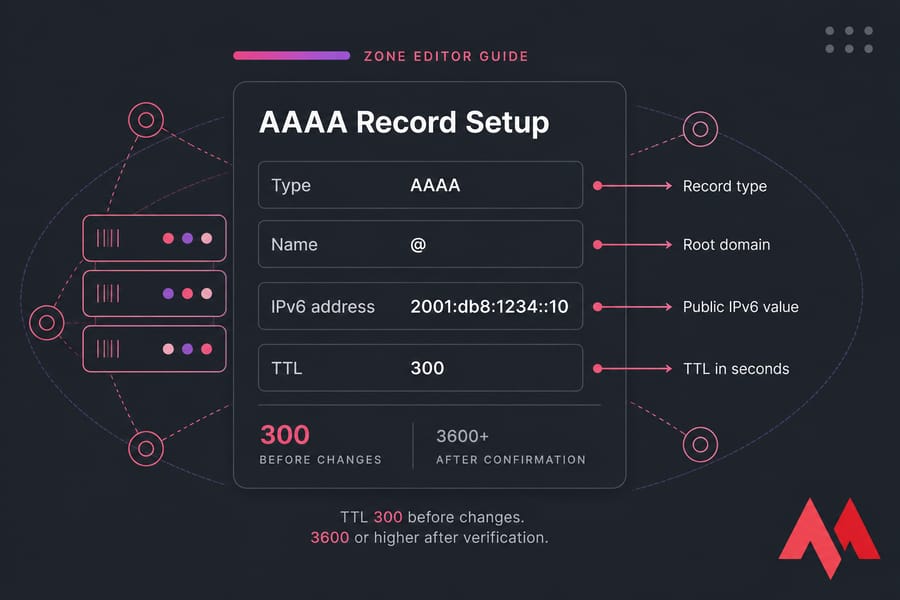
The field names vary slightly between Cloudflare, cPanel's Zone Editor, DirectAdmin, and registrar panels, but the five values you enter are always the same.
Step 1: Open your DNS zone editor
Log into whichever provider is authoritative for your domain. In cPanel it's Zone Editor. In Cloudflare it's the DNS > Records tab. In DirectAdmin it's DNS Management.
Step 2: Choose the hostname
Use @ for the root (apex) domain, www for the www version, or any label like app or api for a subdomain. Some panels want the bare label, others want the fully qualified name. When in doubt, copy the format of an existing record in the same zone.
Step 3: Enter the AAAA record value
Set the type to AAAA and paste your VPS's public IPv6 address into the value field. Compressed notation is fine — 2001:db8:1234:0000:0000:0000:0000:0010 and 2001:db8:1234::10 are the same address. Just don't invent a compression that isn't valid; the double colon can only appear once.
Step 4: Set TTL and save
Drop the TTL to 300 seconds before you start making changes. Once everything's confirmed working, raise it to 3600 or higher to cut resolver load. Pro tip: lower the TTL a day before a migration, not during it — old cached values honor the old TTL.
Step 5: Wait for propagation
New records usually resolve within minutes. Changes to existing records take as long as the previous TTL. Globally, allow up to 24–48 hours for the stragglers. Our breakdown of DNS propagation explains why some resolvers lag.
Warning: don't delete your A record while adding the AAAA unless you genuinely want IPv6-only access.
A note on Cloudflare
If the orange cloud is on (proxied), Cloudflare hides your real IPv6 and serves traffic from its own anycast addresses. Your AAAA still matters as the origin address, but dig won't show it. Switch to DNS-only (grey cloud) if you need the real value visible.
Root Domain and Subdomain AAAA Record Examples
| Host | Type | Value | TTL | Use Case |
|---|---|---|---|---|
@ |
AAAA | 2001:db8:1234::10 |
300 | Apex domain — example.com |
www |
AAAA | 2001:db8:1234::10 |
300 | www.example.com on the same VPS |
www |
CNAME | example.com |
3600 | Alternative: inherits both A and AAAA from apex |
app |
AAAA | 2001:db8:1234::25 |
300 | App server on a different IPv6 |
api |
AAAA | 2001:db8:1234::30 |
300 | API endpoint |
The CNAME approach for www is my preference when both point to the same box — change the apex once and www follows automatically. Note that these example addresses use the 2001:db8::/32 documentation range; substitute your real address.
How to Verify an AAAA DNS Record
Never trust the panel's "saved successfully" message. Query it yourself.
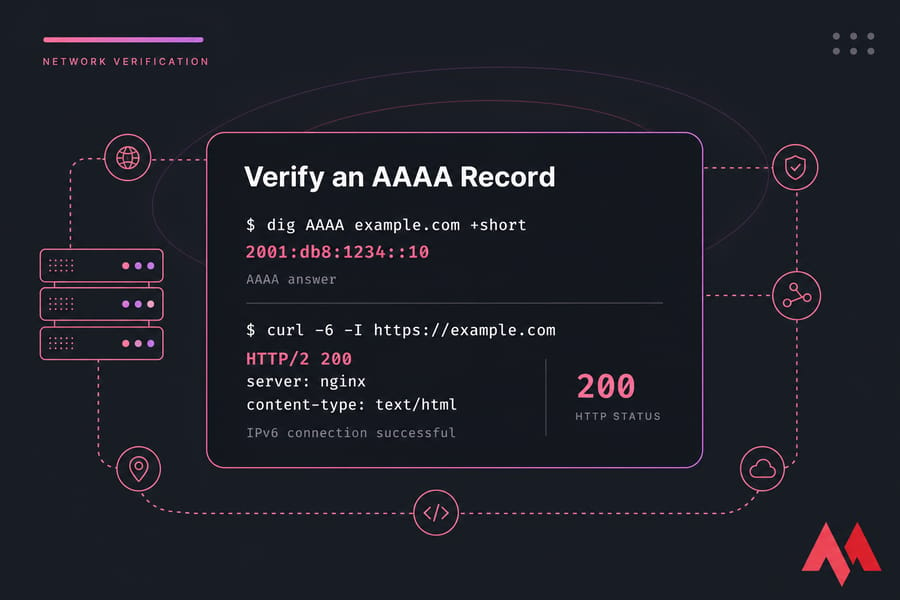
Check with dig
dig AAAA example.com +shortA working record returns a single line with your IPv6 address. Empty output means the record isn't live yet, or it's on a different hostname than you think. Query a public resolver directly to bypass local caching:
dig @1.1.1.1 AAAA example.comCheck with nslookup
nslookup -type=AAAA example.comThis works on Windows, macOS, and Linux without installing anything, which makes it the safe default when you're on someone else's machine. More usage patterns in our guide on how to use nslookup to check DNS.
Test the connection end to end
curl -6 -I https://example.comAlso try ping6 example.com — though remember ICMPv6 might be filtered, so a failed ping isn't proof of a broken record. To see what resolvers around the world are returning, run it through DNS checker tools.
AAAA Record Not Working? Common IPv6 DNS Problems
| Symptom | Likely Cause | How to Check | Fix |
|---|---|---|---|
| dig returns nothing | Not propagated, or wrong zone edited | dig @1.1.1.1 AAAA example.com |
Confirm nameservers; wait out the old TTL |
| Old address still returned | Stale resolver or OS cache | Query a different public resolver | Flush local DNS cache; wait for TTL expiry |
| Record resolves, connection times out | Web server not bound to IPv6 | ss -tlnp | grep 443 |
Add listen [::]:443 ssl; and reload Nginx |
| Connection refused over IPv6 only | IPv6 firewall rules missing | ip6tables -L -n |
Mirror your IPv4 rules for v6 |
| Certificate warning after switch | Cert issued for a different hostname or not reissued | Browser cert details | Reissue the certificate for the live hostname |
| Works for you, not for others | Client-side network has no IPv6 path | Test from a mobile network | Keep a valid A record for dual-stack coverage |
| Address typed wrong | Truncated or mis-compressed IPv6 | Compare zone value to ip -6 addr |
Re-paste the full address, never retype it |
Warning: a perfectly correct AAAA record will still fail if Nginx or Apache isn't listening on IPv6. That's the single most common cause I run into.
If you're seeing browser-level errors instead, our fixes for ERR_NAME_NOT_RESOLVED and DNS_PROBE_FINISHED_NXDOMAIN cover the client side.
Dual-Stack DNS Best Practices for IPv4 and IPv6
- Publish both records for public-facing hostnames unless you have a specific reason not to. Global IPv6 adoption keeps climbing, but plenty of networks are still IPv4-only.
- Lower TTL before changes, not after. 300 seconds during a migration window, back to 3600+ once stable.
- Test both stacks separately with
curl -4andcurl -6before you consider the job done. - Make sure your certificate covers every hostname you've pointed. Let's Encrypt validates over whichever stack the CA reaches you on — if HTTP-01 validation only works over IPv4, renewals can break silently once you go IPv6-only.
- Don't confuse AAAA with PTR. Forward DNS (AAAA) maps name to address. Reverse DNS is the opposite direction and isn't needed for web hosting — it matters for mail. See PTR record for the difference.
- Behind a CDN or reverse proxy? Your AAAA becomes the origin address. Make sure the proxy can actually reach it over IPv6.
Next Steps After Connecting Your Domain to an IPv6 VPS
DNS resolves, the site loads. Three things left.
Get HTTPS working properly. Issue or reissue a certificate for the hostname now that DNS points where it should — here's how to install SSL on a VPS.
Monitor DNS and uptime. Set up a check that tests over IPv6 specifically. Plenty of monitoring services default to IPv4 and will happily report "up" while IPv6 users get nothing.
Harden the box. A publicly routable IPv6 address is exactly that — public. Our guide on how to secure a Linux VPS covers SSH keys, fail2ban, and firewall basics for both stacks.
Launch your domain on an IPv6 VPS with confidence
Hosting a site, an API, or a custom app? MonoVM's IPv6-ready VPS plans come with full root access, a choice of Linux and Windows images, global locations, and 24/7 support — so DNS-to-server mapping just works, no tunnels or workarounds. Get an IPv6 VPS and point your domain today.

An experienced tech and developer blog writer, specializing in VPS hosting and server technologies. Fueled by a passion for innovation, I break down complex technical concepts into digestible content, simplifying tech for everyone.