Here's the short version. An IPv6 /64 is the standard subnet size for a single LAN segment, and a /48 is a bigger allocation that holds 65,536 /64 subnets. You assign one /64 per network segment, and you use /48 or /56 blocks above that to organise sites, VLANs, and customer address allocation. That's IPv6 subnetting in two sentences.
Now the part that trips people up. In IPv4 you count hosts. In IPv6 you count subnets. Stop doing host math and half the confusion disappears.
What IPv6 subnetting actually means
Before you go further, you should be comfortable with CIDR slash notation and know that IPv6 addresses are written in hexadecimal. IPv4 subnetting experience helps, but it can also work against you — more on that later. If you need the protocol basics first, read what IPv6 is and how it works.
Prefix length, subnet ID, interface ID
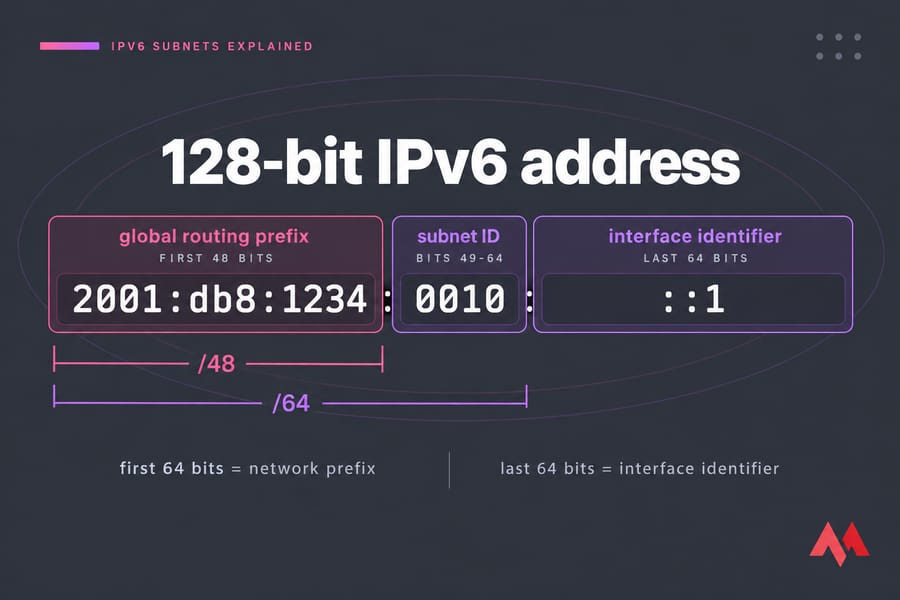
An IPv6 address is 128 bits. The prefix length tells you how many of those leading bits are fixed network. In a typical global unicast address like 2001:db8:1234:0010::/64, the first 64 bits are the network prefix and the last 64 are the interface identifier — the host portion, generated by SLAAC or set statically.
A /128 is a single address. A /64 is one LAN. Everything shorter than /64 is a container for LANs, not a LAN itself.
Why the IPv6 /64 subnet is the standard for LANs
Because stateless address autoconfiguration expects it. SLAAC builds an address by combining the /64 prefix advertised in a Router Advertisement with a 64-bit interface identifier. Shorten the prefix to /80 or /112 and SLAAC simply stops working on that link. Neighbour Discovery behaviour, privacy addresses, and a pile of vendor defaults all assume 64 bits of interface ID.
So the rule is boring and useful: one /64 per VLAN, per LAN, per routed segment. Server networks, user networks, DMZs, container networks — each gets its own /64. If you want the detail on how hosts actually pick up those addresses, our breakdown of SLAAC vs DHCPv6 covers it.
Are there exceptions? A few. Point-to-point router links are sometimes numbered as /127 to sidestep an old neighbour-cache attack, and loopbacks are /128. Those are deliberate, documented exceptions — not a licence to carve LANs into /112s.
I've watched an engineer assign /120s across an office "to keep things tidy like IPv4." Wireless clients wouldn't autoconfigure. Three days of troubleshooting for zero benefit. Don't shrink a LAN below /64 to save space you don't need to save.
What an IPv6 /48 allocation gives you
Take 64 minus 48. That leaves 16 bits of subnet ID, and 2¹⁶ = 65,536 /64 subnets. The RIPE NCC puts it the same way: because IPv6 LANs are /64s, a /48 prefix gives an end user's site 65,536 LANs.
Written out, a /48 looks like this:
2001:db8:1234::/48          ← the allocation
2001:db8:1234:0001::/64     ← subnet 1
2001:db8:1234:0010::/64     ← subnet 16
2001:db8:1234:ffff::/64     ← subnet 65,536
Only the fourth hextet changes. That's your entire subnetting playground — one 16-bit field. Read it left to right and you can eyeball which site a prefix belongs to without a calculator. If prefix math still feels shaky, brush up with our guide to CIDR calculations.
A /48 isn't "a big subnet." It's a planning container.
IPv6 /48 vs /56 vs /64: picking a prefix size
| Prefix | What it represents | Number of /64s | Best use case |
|---|---|---|---|
| /48 | Site or large customer allocation | 65,536 | Enterprise site, campus, multi-VLAN datacenter, ISP POP |
| /52 | Sub-site block | 4,096 | Building or department inside a /48 |
| /56 | Small end-site delegation | 256 | Home, branch office, SMB, broadband subscriber |
| /60 | Minimal delegation | 16 | Tight subscriber CPE delegations |
| /64 | One subnet | 1 | A single VLAN, LAN, or routed VPS network |
| /128 | One address | — | Loopback, single host interface |
RFC 6177 dropped the old "every end site gets a /48" advice and pushed operators toward giving every site more than a single /64 while not defaulting everyone to /48. That's why /56 became the common broadband delegation. For a business site with real VLAN growth, ask for the /48.
How IPv6 address allocation works: RIR to interface
Three words get mixed up constantly, so let's separate them.
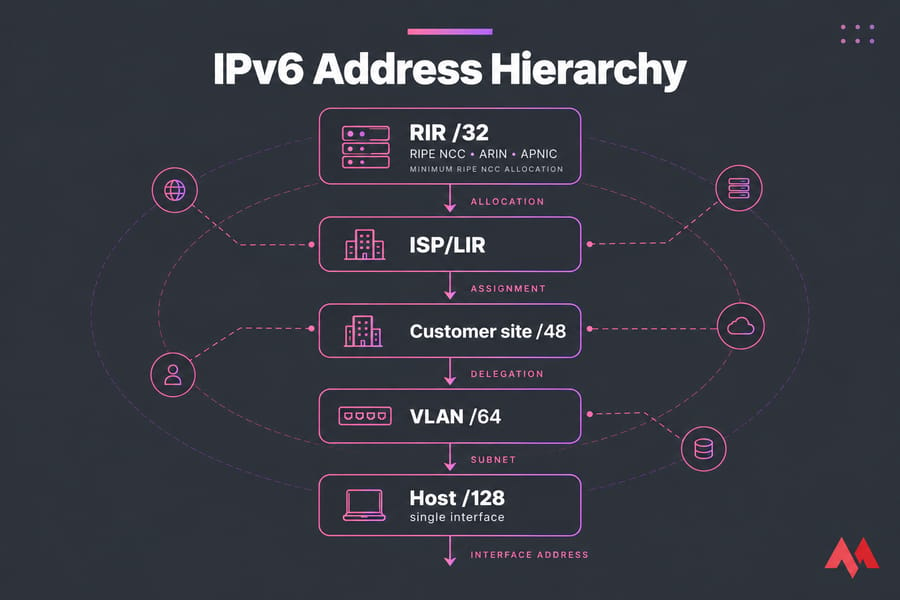
- Allocation — space an RIR (RIPE NCC, ARIN, APNIC) gives an ISP or LIR to hand out further. Minimum RIPE NCC allocation is a /32.
- Assignment — space given to an end site for its own use, typically a /48 or /56.
- Delegation — a prefix handed dynamically to a router via DHCPv6 prefix delegation (DHCPv6-PD), which the CPE then splits into /64s for its internal links.
- Subnet — the /64 on a link. Interface address — the single /128 on a NIC.
The chain runs: RIR → ISP/LIR → site assignment → VLAN /64 → host address. Keep that hierarchy in your head and aggregation stays easy.
How to subnet a /48 into usable /64 networks
Work on nibble boundaries. A nibble is 4 bits — one hex character — so /52, /56, and /60 are the clean cuts between /48 and /64. Plan on those and every prefix stays readable.
- Start with your /48.
- Reserve /52 or /56 chunks by site or function. Leave gaps.
- Assign one /64 per VLAN inside each chunk.
- Summarise at the chunk boundary when you advertise routes.
Worked example on 2001:db8:1234::/48:
| Prefix | Role | Notes |
|---|---|---|
| 2001:db8:1234:1000::/52 | HQ site | 4,096 /64s available |
| 2001:db8:1234:1010::/64 | HQ servers | Static addressing |
| 2001:db8:1234:1020::/64 | HQ management VLAN | Filtered at the edge |
| 2001:db8:1234:1030::/64 | HQ public services | AAAA records point here |
| 2001:db8:1234:2000::/52 | Cloud workloads | Summarised as one route |
| 2001:db8:1234:2010::/64 | VPS front end | Dual-stack web tier |
| 2001:db8:1234:2020::/64 | Container network | Routed to the host |
| 2001:db8:1234:3000::/52 | Branch offices | /56 per branch |
Real-world plans: VLANs, VPS, and customers
Office: one /64 per VLAN — staff, voice, guest, printers, management. Datacenter: a /56 per rack or tenant, /64 per segment inside it. Customer delegation: /56 by default via DHCPv6-PD, /48 on request for multi-site businesses.
For a single server, reality is simpler. Most VPS instances need one address from the provider's /64. But if you're running containers, multiple public services, or per-app segmentation, a routed /64 to the instance saves you a lot of NAT-shaped pain. Testing dual-stack apps and AAAA records is far easier on IPv6 VPS hosting than on a local network you'd have to renumber. A Linux VPS handles single-segment testing fine; step up to a cloud VPS when you need several segments at once.
Common IPv6 subnetting mistakes
- IPv4 scarcity thinking. You're not running out. Waste bits deliberately — it buys readability. See IPv4 vs IPv6 differences.
- Counting usable hosts in a /64. Don't. The number is meaningless in practice.
- Random /64 assignment. Scattered prefixes kill route summarization forever.
- No growth room. Reserve at least as much as you assign.
- Ignoring nibble boundaries. A /50 is legal and horrible to read.
Tools and next steps
Use an IPv6 subnet calculator to check your plan, not to design it. RIPE NCC's addressing-plan documents and CIDR reference charts are solid free references. Then go implement: set up IPv6 on Ubuntu, follow the alternate path to configure IPv6 on Ubuntu, and publish AAAA records for IPv6 once your addresses are live.
Put your IPv6 address plan into practice. Whether you're assigning a single /64 or laying out a full /48, spin up an IPv6-ready instance and test routing, reverse DNS, and firewall rules for real. Get an IPv6 VPS.

An experienced tech and developer blog writer, specializing in VPS hosting and server technologies. Fueled by a passion for innovation, I break down complex technical concepts into digestible content, simplifying tech for everyone.