![How to Migrate from IPv4 to IPv6: Complete Guide [2026]](/wp-content/uploads/2026/10/how-to-migrate-ipv4-to-ipv675-main.webp)
If you're looking up how to migrate from IPv4 to IPv6, you probably expect a single command that flips a switch. That command doesn't exist. Moving from IPv4 to IPv6 is an operational change. It touches DNS, firewalls, web server listeners, logging and every application that ever assumed an address looks like 203.0.113.10. You can do it with very little disruption, though, if you do it in stages.
Quick answer: The safest way to migrate from IPv4 to IPv6 is to run dual-stack first. Audit your network and applications, get IPv6 addresses, enable IPv6 on your servers and firewalls, add AAAA DNS records, test reachability and monitor traffic. Only think about going IPv6-only after every service works reliably over both protocols.
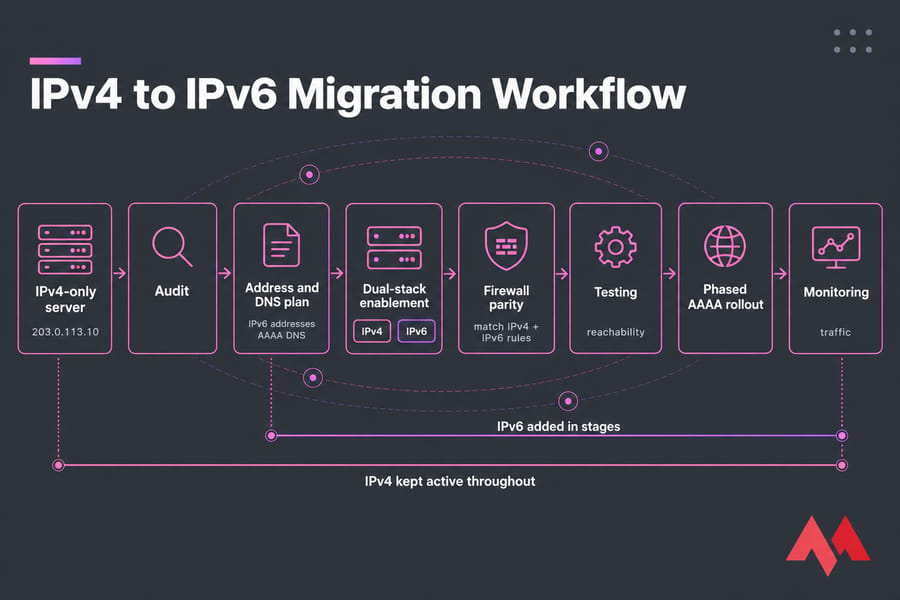
What an IPv4 to IPv6 Migration Actually Involves
Most people don't "migrate" in the sense of replacing one protocol with the other. You add IPv6 next to IPv4, run both for a while (often years) and slowly cut your dependence on IPv4. If you'd like a refresher on the protocol first, start with the IPv4 vs IPv6 differences or this explainer on what IPv6 is and how it works.
Why IPv4 exhaustion pushes migration planning
The regional registries ran out of free IPv4 space years ago. Today, extra IPv4 addresses cost real money on the transfer market, and many mobile carriers put their users behind carrier-grade NAT. Client-side IPv6 keeps growing. In 2026, APNIC reported that roughly half of Google's users now reach its services over IPv6. That's a large share of your visitors who could connect to you natively.
Why most teams start with dual-stack, not IPv6-only
Half of users isn't all of them. A lot of APIs, payment gateways, package mirrors and partner systems still only speak IPv4. Cloud platforms push you toward dual-stack too. AWS's VPC migration guidance treats dual-stack as the route forward and says there's no direct migration path from IPv4-only subnets to IPv6-only subnets. On Google Cloud, you can convert existing subnets to dual-stack while VMs keep their IPv4 connectivity.
What changes for servers, DNS, apps, and firewalls
- Servers: interfaces need IPv6 addresses and routes, and services have to listen on IPv6.
- DNS: you add AAAA records next to your existing A records.
- Firewalls: you need a second rule set. In many setups, IPv4 rules don't apply to IPv6 traffic at all.
- Apps: logging, rate limits, allowlists and database columns all need to handle 128-bit addresses.
Choose the Right IPv6 Migration Strategy for Your Environment
There are four transition methods you'll hear about. For a typical VPS or small fleet, only one of them makes sense as a starting point.
Dual-stack vs IPv6-only vs translation methods
| Strategy | Best For | Pros | Cons | Risk Level |
|---|---|---|---|---|
| Dual-stack | Websites, APIs, VPS fleets, SMBs | Nothing breaks for IPv4 users; you can roll back per service | Two rule sets and two sets of monitoring to maintain | Low |
| IPv6-only | New greenfield workloads, large internal fleets | Simplest network design in the long run; no IPv4 costs | Can't reach IPv4-only services without translation | High (early on) |
| NAT64/DNS64 | IPv6-only clients that need to reach IPv4 services | Lets you drop IPv4 internally | Breaks IPv4 literals; adds a gateway you have to run | Medium |
| Tunneling (6in4, etc.) | Hosts with no native IPv6 from the provider | Gets you IPv6 today | Extra latency, MTU problems, another thing to fail | Medium |
When dual-stack is the safest option
For almost everyone reading this. Google Cloud's own migration walkthrough moves workloads to dual-stack instead of switching them straight to IPv6-only. In my experience, teams that skip this stage end up rebuilding their IPv4 paths in a hurry the first time some third-party webhook stops arriving.
When NAT64 and DNS64 make sense
Use NAT64/DNS64 when you already run IPv6-only workloads and they still need to call IPv4-only endpoints. DNS64 creates a synthetic AAAA record from an A record. The NAT64 gateway then translates the traffic. AWS describes how its NAT gateway lets IPv6-only workloads communicate with IPv4-only services. This is a tool for later in the migration, not where you start.
Why tunneling should usually be temporary
Tunnels are a stopgap for hosts whose provider doesn't offer native IPv6. They add encapsulation overhead and cause MTU headaches. If your host can't give you native IPv6, that's a reason to change hosts, not to keep a tunnel forever.
Audit Infrastructure and Application IPv6 Compatibility
This step is a bit tedious. It's also the one that prevents most outages. Before you start, confirm you have the basics:
- Root or admin access to the VPS, server or cloud network
- Control over your domain's DNS zone
- Access to the host firewall and any provider-level firewall
- A fresh snapshot or backup
- Access to logs and monitoring
- A list of every public service and the port it uses
- Confirmation that your provider routes IPv6 to your server
Check routers, VPS plans, OS support, and control panels
Modern Linux kernels and Windows Server releases support IPv6 out of the box. What's usually missing is the provider allocation. Check whether you get a single address or a routed prefix. Control panels such as cPanel and Plesk handle IPv6, but sometimes it has to be switched on per domain.
Review web servers, databases, APIs, and monitoring tools
| Component | IPv6 Ready? | Check Required | Owner | Status |
|---|---|---|---|---|
| DNS | Usually | Provider accepts AAAA records; registrar glue if you self-host NS | Ops | Pending |
| Firewall | Separate rules | ip6tables/nftables/ufw IPv6 enabled | Security | Pending |
| Load balancer | Varies | IPv6 listener and backend health checks | Ops | Pending |
| Web server (Nginx/Apache) | Yes | Listen directives include [::] |
Dev/Ops | Pending |
| Database | Yes | Bind address, user host grants | DBA | Pending |
| Logging/analytics | Often not | Parsers, geo-IP, column widths | Dev | Pending |
| Monitoring | Varies | Separate IPv6 probes | Ops | Pending |
| APIs/allowlists | Often not | Partner allowlists, IP-based auth | Dev | Pending |
Identify hard-coded IPv4 dependencies
Grep your configs and code for IPv4 literals, for example grep -rE "([0-9]{1,3}\.){3}[0-9]{1,3}" /etc /var/www. Also look for VARCHAR(15) IP columns, regexes that only match dotted quads, and AF_INET-only sockets. Don't forget your team, either. If nobody on call can read an IPv6 address calmly at 3 a.m., include some training in the plan.
Plan IPv6 Addressing, Subnets, and DNS Records
Understand /64 subnets, prefixes, and global unicast addresses
Public IPv6 addresses are global unicast addresses (GUAs), currently allocated from 2000::/3. The standard LAN or segment size is a /64. On Google Cloud, for example, dual-stack subnets get /64 ranges. Don't subnet smaller than /64 unless you have a very specific reason. If prefixes still confuse you, this guide to IPv6 subnet prefixes and /64s covers them.
Decide between SLAAC and DHCPv6
With SLAAC, hosts build their own addresses from router advertisements, which is simple and needs no server. DHCPv6 gives you central control and lease tracking. For servers, I prefer static addresses taken from the routed prefix, so the AAAA record never changes. The trade-offs are covered in SLAAC vs DHCPv6.
Add AAAA records without breaking existing A records
Keep the A record and add an AAAA record alongside it. Clients that support IPv6 will generally prefer it, and Happy Eyeballs falls back to IPv4 if the IPv6 connection fails.
| Record | Name | Before | After |
|---|---|---|---|
| A | example.com | 203.0.113.10 | 203.0.113.10 (unchanged) |
| AAAA | example.com | — | 2001:db8:10::10 |
| AAAA | www | — | 2001:db8:10::10 |
Warning: don't publish AAAA records until the service actually answers over IPv6. Lower the TTL to around 300 seconds a day ahead of the change so you can back it out fast. More on the record type: AAAA records.
Review reverse DNS and logging formats
Mail servers in particular need a PTR record for their IPv6 address, because many receivers reject mail from addresses without reverse DNS. Ask your provider whether you can set IPv6 PTRs yourself.
Enable IPv6 on Your Server or VPS
The sequence is the same on every OS:
- Verify the IPv6 address or prefix your provider assigned.
- Confirm it's configured on the interface, with a default route.
- Make sure IPv6 isn't disabled in the OS.
- Bind your services to IPv6.
- Leave IPv4 exactly as it is.
On MonoVM, step 1 is already done. All VPS plans ship with full dual-stack: an IPv4 address plus a routed IPv6 prefix.
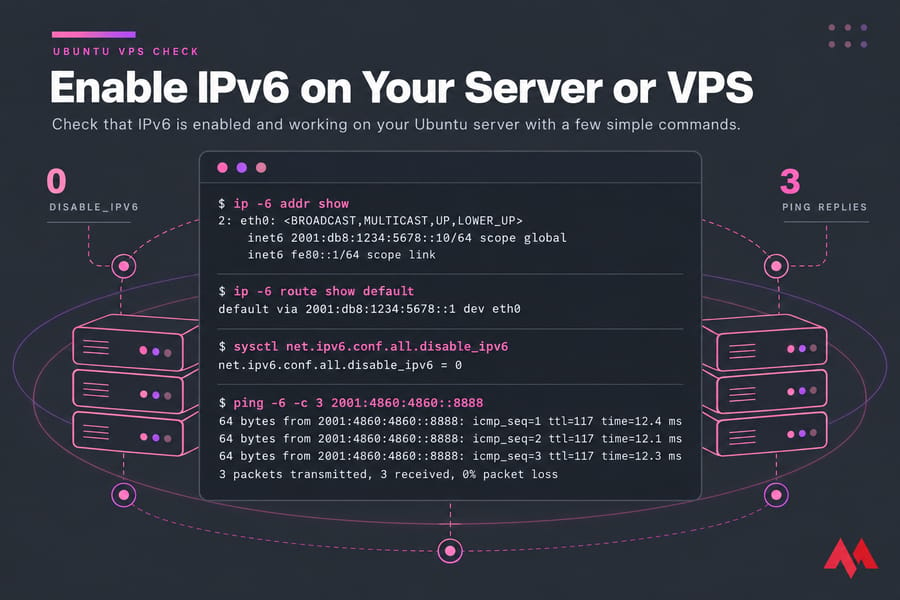
Linux server IPv6 enablement checklist
ip -6 addr show
ip -6 route show default
sysctl net.ipv6.conf.all.disable_ipv6   # should return 0
ping -6 -c 3 2001:4860:4860::8888
On Ubuntu, the address normally goes into Netplan. Two walkthroughs cover it: configure IPv6 on Ubuntu, and a longer guide to set up IPv6 on Ubuntu Linux server instances.
Windows Server IPv6 enablement checklist
- Check that "Internet Protocol Version 6 (TCP/IPv6)" is ticked on the adapter.
- Set the static address, prefix length (64) and gateway, or confirm SLAAC picked one up.
- Run
ipconfigandTest-NetConnection -ComputerName ipv6.google.com. - Check IIS site bindings for "All Unassigned" or the explicit IPv6 address.
Full steps: set up IPv6 on Windows.
Configure web services to listen on IPv6
A very common surprise: the server has IPv6, DNS points to it, and Nginx is still only listening on 0.0.0.0. Add these lines:
server {
    listen 80;
    listen [::]:80;
    listen 443 ssl;
    listen [::]:443 ssl;
    server_name example.com www.example.com;
}
Apache's Listen 80 already binds to both stacks. If you used Listen 0.0.0.0:80, though, it won't, so add Listen [::]:80. Afterwards, run ss -tlnp and confirm you see [::]:443. For edge cases like ipv6only and default_server, see how to configure Nginx for IPv6.
Keep IPv4 running during the first rollout
Leave IPv4 alone at this stage. Most of the migration comes down to parity: the same service with the same security, now also reachable over a second protocol.
Configure IPv6 Firewall Rules and Security Policies
Here's where I've seen production break, and where I've seen servers get exposed. On many systems, iptables rules don't cover IPv6 traffic. ip6tables is a separate table. So a server that's locked down over IPv4 can have SSH and the database wide open over IPv6.
Allow essential traffic including ICMPv6
Pro tip: don't block ICMPv6 wholesale. IPv6 relies on it for Neighbor Discovery, router advertisements and Packet Too Big messages. Routers don't fragment IPv6 packets, so path MTU discovery depends on those messages. Block them and you get odd hangs on large TLS responses. In Google Cloud's migration example, the custom IPv6 firewall rules cover HTTP, HTTPS, SSH, RDP and ICMPv6.
Mirror IPv4 security policies carefully
Copy the intent of your IPv4 rules, not the literal syntax:
- ufw: set
IPV6=yesin/etc/default/ufw, then reload. - nftables: use the
inetfamily so one rule set covers both protocols. - firewalld: zones apply to both stacks, but check any rich rules that contain IPv4 addresses.
- Re-create IP allowlists (admin panels, SSH) with your team's IPv6 prefixes.
Validate load balancer and WAF behavior
Cloud security groups, network ACLs, load balancers and WAFs all keep separate IPv6 rule lists. Check each one. Also make sure the real client IP still reaches your app through X-Forwarded-For when the client connects over IPv6. Run nmap -6 from an outside host to see what's actually exposed.
Test IPv6 Connectivity, DNS, and Application Performance
Verify DNS with dig and nslookup
dig AAAA example.com +short
nslookup -type=AAAA example.com 1.1.1.1
A record you just added may take a while to show up everywhere because of DNS propagation. If nslookup is new to you, start with this nslookup command guide.
Test reachability with ping, curl, and browser checks
ping -6 -c 4 example.com
curl -6 -I https://example.com
curl -4 -I https://example.com
Run these from a machine outside your network. A test from the server itself proves almost nothing. Then load the site in a browser on an IPv6-capable mobile network.
| Test | Tool | Expected Result | Pass/Fail |
|---|---|---|---|
| AAAA resolves | dig AAAA | Returns your GUA | — |
| ICMP reachability | ping -6 | Replies, stable latency | — |
| HTTPS over IPv6 | curl -6 -I | Same status and headers as IPv4 | — |
| TLS certificate | curl -6 -v | Valid chain, no SNI mismatch | — |
| Redirects | curl -6 -L | No loops, no hard-coded IPv4 URLs | — |
Confirm app logs, analytics, and rate limits handle IPv6
Look at your access logs and confirm the IPv6 entries are complete, not cut off. Check that rate limiters group by sensible prefixes. Throttling one /128 is pointless when a single client can rotate through a whole /64.
Compare IPv4 and IPv6 results side by side
You're done testing when you have reachability over both protocols, identical responses, comparable latency and no new application errors.
Roll Out Your Dual-Stack IPv6 Migration in Phases
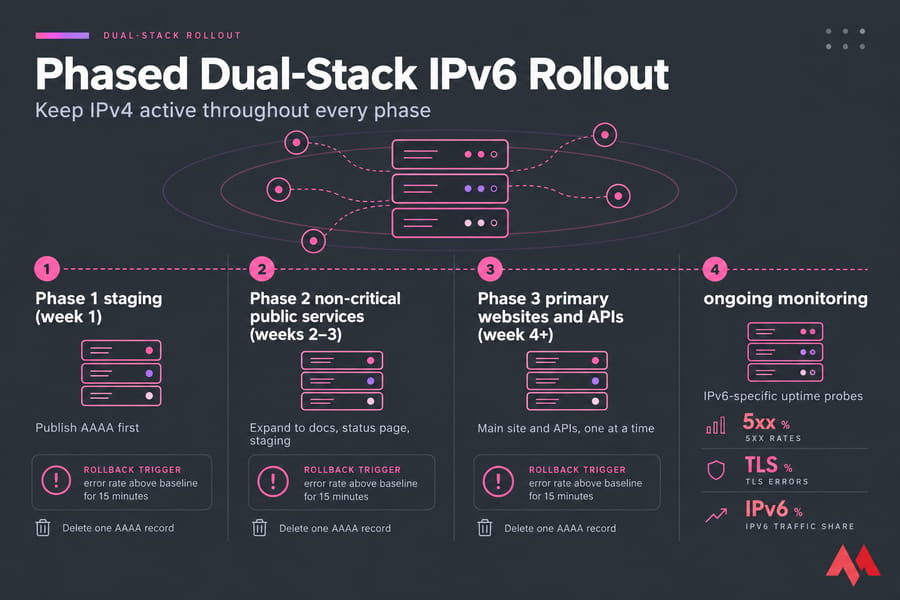
Start with staging or non-critical services
Pick a status page, a docs subdomain or staging. Publish the AAAA record there first and let real traffic run on it for a week.
Expand to public web services
Next come the main site and the APIs, one at a time. Only services that passed every test above get an AAAA record.
Monitor errors, latency, and traffic share
Add IPv6-specific uptime probes. Watch 5xx rates, TLS errors and the share of requests arriving over IPv6. If IPv6 traffic share is stuck at zero, something is wrong.
Prepare a rollback plan before each change
Warning: every phase needs a rollback trigger (for example, error rate above baseline for 15 minutes) and a named owner. With low TTLs, rolling back usually means deleting one AAAA record. Take a snapshot before you change any configuration.
Common IPv6 Migration Mistakes and How to Avoid Them
Publishing AAAA records before services listen on IPv6
This is the classic. Happy Eyeballs can hide it in browsers, but API clients and older tools just time out. Verify with curl -6 first, then touch DNS.
Blocking ICMPv6 and breaking path discovery
Small requests work and large ones hang. That pattern almost always points to Packet Too Big messages being filtered somewhere along the path.
Forgetting security groups, ACLs, or reverse proxy configs
The host firewall allows the traffic, but the cloud security group silently drops it. Or the reverse proxy only listens on IPv4. Check every layer.
Assuming every application is IPv6-ready
Legacy apps that store IPs as integers, licensing servers that check IPv4 addresses, and partner allowlists that you can't update quickly all break in ways no network test will catch. Two related mistakes: treating IPv6 subnets like IPv4 ones (carving prefixes smaller than /64 breaks SLAAC), and going IPv6-only before dual-stack has run cleanly for a while.
When to Consider IPv6-Only After Dual-Stack
Signs your environment is ready
- All internal services, dependencies and package sources are reachable over IPv6.
- Monitoring, logging and security tooling fully support IPv6.
- Outbound calls to IPv4-only services are mapped and covered by NAT64/DNS64.
- Your team has run dual-stack without incidents for months.
Cases where IPv4 still needs to stay
Any public-facing website should keep its A record for the foreseeable future. A big share of the internet still can't reach IPv6. IPv6-only fits best for internal or back-end tiers, such as app servers behind a dual-stack load balancer. Cloud-specific limits matter as well: on AWS, for example, IPv6-only usually means new subnets rather than converting your existing IPv4 ones.
Long-term operations and documentation updates
Update runbooks, network diagrams, the address plan and the on-call checklists so they include IPv6 commands. IPv6 work you don't document tends to get reverted by the next person who doesn't understand it.
If your current host makes IPv6 harder than it should be, you'll save time by moving the workload to infrastructure that already supports it. MonoVM's IPv6 VPS hosting includes native dual-stack with IPv4 plus a routed IPv6 prefix and no tunnel. That lets you focus on the audit, testing and phased rollout described here. Get an IPv6 VPS and start your first dual-stack phase this week.

An experienced tech and developer blog writer, specializing in VPS hosting and server technologies. Fueled by a passion for innovation, I break down complex technical concepts into digestible content, simplifying tech for everyone.