![IPv6 Security: 🔐 Risks, Best Practices & Protection [2026]](/wp-content/uploads/2026/10/ipv6-security304-main.webp)
IPv6 security means protecting IPv6-enabled networks, servers, and applications from problems like rogue router advertisements, Neighbor Discovery abuse, misconfigured firewalls, and dual-stack exposure. Most IPv6 security best practices come down to two things. First, apply controls that match your IPv4 controls. Second, turn on protections that only IPv6 needs. IPv6 isn't unsafe. IPv6 that nobody manages is the risk.
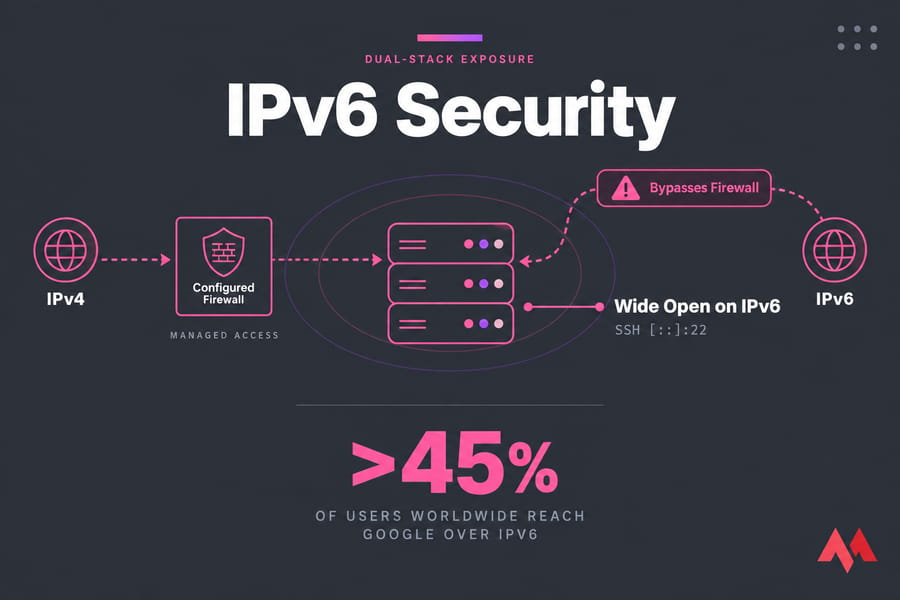
One fact makes this urgent. Your servers are probably reachable over IPv6 already, even if your team has never thought about it. According to Google's statistics, more than 45% of users worldwide now reach Google over IPv6. Most modern operating systems turn IPv6 on by default. I've audited "IPv4-only" VPS fleets where SSH was locked down on IPv4 and wide open on IPv6.
Is IPv6 More Secure Than IPv4?
No. It isn't less secure either. If you need a refresher on what IPv6 is or the main IPv4 vs IPv6 differences, start with those guides. Here's the short version for security.
| Claim | Reality | What to do |
|---|---|---|
| "IPv6 has IPsec built in" | IPsec support used to be required. Actually using it is optional and rare. | Encrypt at the application layer (TLS, SSH) |
| "Address space is too big to scan" | Attackers find addresses through DNS, logs, and predictable patterns | Assume every published address will be found |
| "No NAT means less protection" | NAT was never a firewall | Default-deny inbound on every stack |
| "Our IPv4 rules cover everything" | Most firewalls and cloud ACLs keep IPv6 rules separate | Audit both rulesets side by side |
RFC 7381 recommends making your security policy for IPv6 match the one for IPv4. That point about matching policies is the theme of the rest of this article.
Common IPv6 Security Risks
- Dual-stack blind spots. A service might listen on
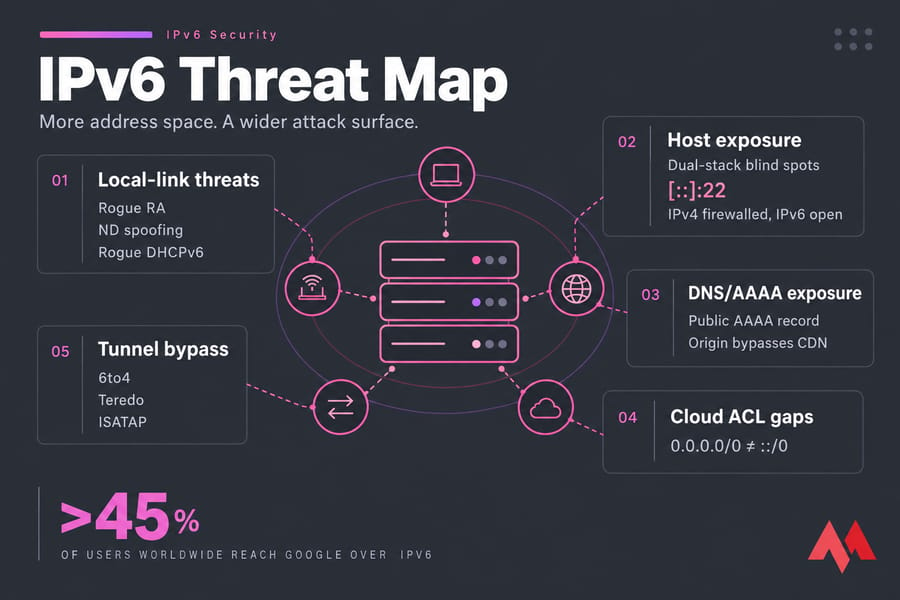
[::]:22while your firewall only filters IPv4. - Rogue Router Advertisements. Any host on the local network segment can send Router Advertisements (RAs). A rogue RA can make other hosts treat the attacker as their default gateway or give them bad SLAAC prefixes.
- Neighbor Discovery abuse. Spoofed neighbor advertisements are IPv6's version of ARP poisoning. Floods of traffic to nonexistent addresses in a subnet can also exhaust a router's neighbor cache.
- Rogue DHCPv6 servers. RFC 8415 covers this threat. A fake DHCPv6 server can hand out malicious DNS servers. For the differences between the two address-assignment methods, see SLAAC vs DHCPv6.
- Extension headers and fragmentation. Attackers can split or wrap packets so a filter can't see what's inside. RFC 6980 bans fragmentation in Neighbor Discovery messages for exactly this reason.
- Tunneling. Automatic tunnels like 6to4, Teredo, and ISATAP can carry traffic past your perimeter firewall without inspection.
IPv6 First-Hop Security Best Practices
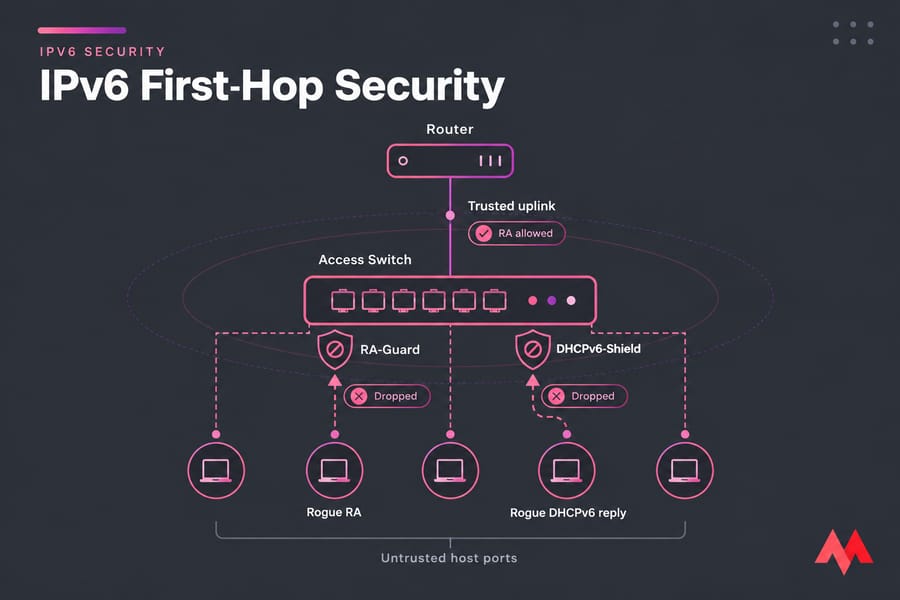
"First-hop security" means controls on the switch or router closest to your hosts. RFC 9099 lists the main ones:
- RA-Guard: only trusted switch ports (the ones facing real routers) are allowed to send RAs. The switch drops RAs from every other port.
- DHCPv6-Shield: works the same way for DHCPv6 server replies.
- SAVI (Source Address Validation Improvement): links each source address to the port it was first seen on, which blocks spoofed addresses.
One caveat matters a lot. RFC 7113 documents that some popular RA-Guard implementations could be bypassed by adding IPv6 extension headers to the RA. Ask your vendor whether their implementation (Cisco's, for example) handles extension headers properly. These controls also only work on Layer 2 networks you own. On a rented VPS the provider controls that layer, so your own host and edge controls carry more of the load. Planning clean prefixes helps too. See IPv6 subnets explained.
IPv6 Firewall Rules and Access Control
Start by denying all inbound traffic by default. Then open only what you need. One difference trips people up constantly: you can't drop all ICMPv6. IPv6 depends on it for neighbor discovery, router discovery, and path MTU discovery. Block it all and you'll spend an afternoon debugging connections that hang for no obvious reason. Allow types 1–4 (destination unreachable, packet too big, time exceeded, parameter problem), echo requests (128) and echo replies (129) if you want ping, and the Neighbor Discovery types 133–136.
table inet filter {
  chain input {
    type filter hook input priority 0; policy drop;
    ct state established,related accept
    iif lo accept
    meta l4proto ipv6-icmp icmpv6 type { destination-unreachable, packet-too-big, time-exceeded, parameter-problem, echo-request, nd-router-advert, nd-neighbor-solicit, nd-neighbor-advert } accept
    tcp dport { 22, 443 } accept
  }
}
Using an inet table applies the same rules to IPv4 and IPv6 at once, which is the easiest way to keep the two in step. UFW users should check that IPV6=yes is set in /etc/default/ufw. Our guides on how to configure UFW and check open ports in Linux cover the details. Windows Firewall rules usually apply to both stacks, but confirm the scope of each rule.
Cloud firewalls are a separate case. In AWS security groups and network ACLs, a rule for 0.0.0.0/0 does not include ::/0. IPv6 needs its own rules, so review both lists every time.
Dual-Stack Security and AAAA Records
An AAAA record publishes your server's IPv6 address, so anything listening on IPv6 can now be reached. Here's a common failure. A site sits behind a CDN that hides its IPv4 origin, but the origin's AAAA record is still public. Attackers just go around the CDN. Cloudflare and similar services may also handle IPv4 and IPv6 differently, so test each one. Publish AAAA records only after you've confirmed your firewall covers IPv6. When you configure Nginx for IPv6, make each listen [::] directive deliberate. For internal-only services, use unique local addresses (ULA, fd00::/8) instead of public global unicast addresses.
IPv6 Security Checklist for VPS and Dedicated Servers
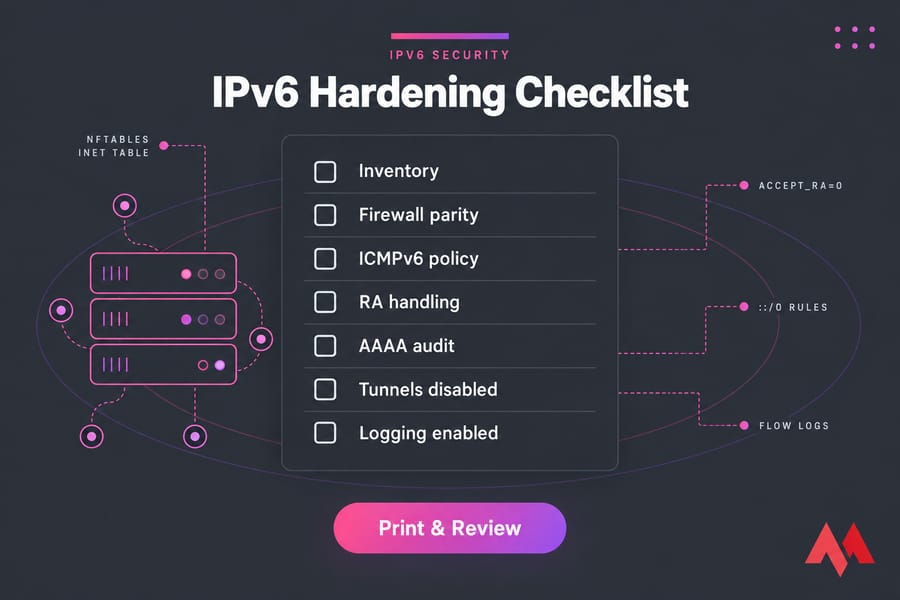
If you only do five things: take inventory, match your firewall rules across both stacks, protect ND/RA, audit DNS, and log IPv6 traffic.
- Linux: run
ip -6 addrandss -tulpn6to see addresses and listening services. Use an nftablesinettable. Make sure SSH accepts keys only, on both stacks (see secure SSH on a VPS). Unless the server is a router, setnet.ipv6.conf.all.accept_ra=0when your addressing is static. Guides: set up IPv6 on Ubuntu, configure IPv6 on Ubuntu, secure a Linux VPS. - Windows Server: restrict RDP over IPv6 and disable the Teredo, 6to4, and ISATAP interfaces if you don't use them. Walkthrough: set up IPv6 on Windows.
- Cloud/VPC: write separate
::/0rules in security groups and NACLs, turn on flow logs, and check egress-only gateways. - Everywhere: patch the kernel's network stack, document which prefixes go where, and check reverse DNS.
Setting up new servers? An IPv6 VPS hosting plan with full root access lets you apply all of this on day one. MonoVM's Linux VPS and cloud VPS plans support dual-stack.
IPv6 Security Monitoring and Logging
Monitoring catches what hardening misses. Log IPv6 firewall drops separately, collect VPC flow logs, and watch for neighbor discovery anomalies like neighbor cache churn or unexpected RAs. Every month, scan your server's IPv6 address from an outside host using nmap -6, then compare the results with an IPv4 scan. Any difference is drift. The VPS monitoring tools guide covers dashboards.
Should You Disable IPv6 or Secure It?
Disabling IPv6 for a short time is fine while you troubleshoot, or while you finish your controls on hosts where nobody is managing it. Long term, though, Microsoft advises against disabling IPv6 on Windows. Its recommended alternative is to set IPv4 as the preferred protocol. Disabling IPv6 also leaves you with an outage waiting to happen as more users arrive over IPv6. Secure it instead. For public-facing workloads, pair those controls with a DDoS protected VPS that filters both stacks.

An experienced tech and developer blog writer, specializing in VPS hosting and server technologies. Fueled by a passion for innovation, I break down complex technical concepts into digestible content, simplifying tech for everyone.