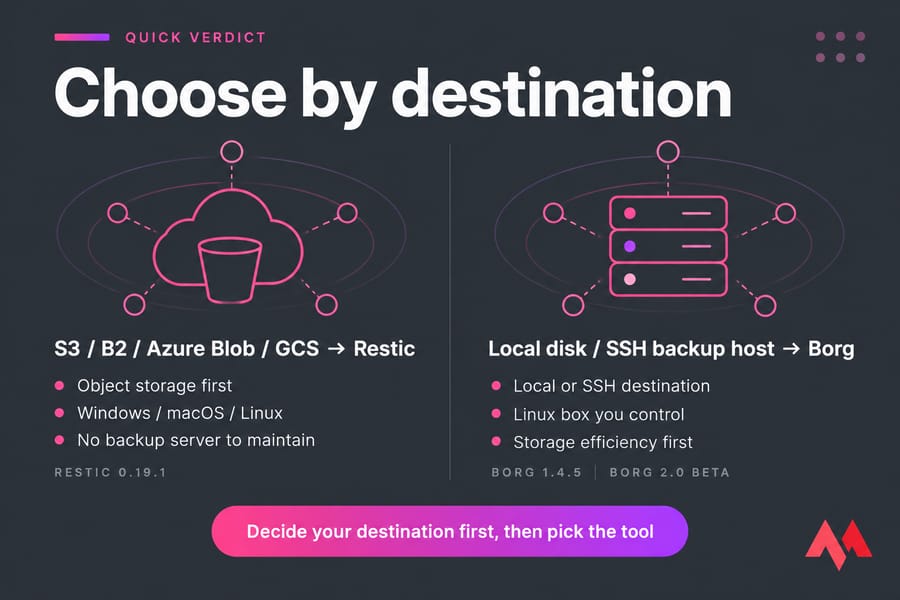
If your backup target is S3-compatible object storage — Backblaze B2, Wasabi, Amazon S3, Azure Blob, Google Cloud Storage — use Restic. If your target is a local disk or an SSH-accessible Linux box you control, use Borg. That's the decision in one line, and it holds up for most Linux server and VPS setups.
Both are excellent, genuinely production-grade tools. But they were built around different assumptions about where the repository lives, and that assumption is what you'll live with for years.
- Object storage or mixed OS fleet (Windows/macOS/Linux)? Restic.
- Backup server over SSH, Linux-only, storage efficiency first? Borg.
- Not sure yet? Decide your destination first, then pick the tool. Never the reverse.
Versions, so you know what we're talking about: Restic's stable documentation currently sits at 0.19.1, and Borg's stable docs at 1.4.5, with Borg 2.0 still in beta. Pick from the stable branch — this isn't the place to chase a release candidate.
What Restic and Borg have in common
Before the differences, let's clear the ground. These tools overlap more than the internet arguments suggest.
Both do deduplicated, snapshot-based backups using content-defined chunking. Both encrypt client-side, before anything leaves your server. Both verify integrity with authenticated encryption, so tampered data fails loudly instead of silently restoring garbage. Both let you mount a backup through FUSE and browse it like a normal directory — which, honestly, is the feature you'll appreciate most at 2 AM.
And both are a different species from rsync command-based mirroring. A sync copies the current state. A backup keeps history. If someone encrypts your files on Tuesday and you sync on Wednesday, you've just replicated the damage. For the broader implementation picture, our guide on how to back up a server or VPS covers scheduling and retention basics, and how to back up a website handles the app-level side.
BorgBackup vs Restic: side-by-side
| Criteria | Restic | Borg | Better choice |
|---|---|---|---|
| Best target | Object storage, REST, SFTP | Local disk, SSH host running Borg | Depends on destination |
| Native S3 / B2 / Azure / GCS | Yes, built in | No — needs rclone or a mounted layer | Restic |
| Remote model | Backend-agnostic, no server agent | Borg must be installed on both ends | Restic for reach, Borg for control |
| Windows support | Native binary | Linux/BSD/macOS; Windows via WSL only | Restic |
| Install | Single static Go binary | Python package or distro package | Restic |
| Compression | zstd, repository format v2 | lz4, zstd, zlib, lzma (tunable levels) | Borg |
| Append-only mode | Backend-dependent (bucket policies, REST server flag) | Built in via borg serve --append-only |
Borg |
| Maintenance | restic forget + restic prune |
borg prune + borg compact |
Roughly equal effort |
| Concurrent clients per repo | Multiple, handled natively | One at a time (lock-based) | Restic |
Bottom line: the repository model is the row that decides everything else.
Storage backends: where your repository actually lives
Restic talks to a long list of backends directly — local, SFTP, REST server, S3-compatible, Azure Blob, Google Cloud Storage, Backblaze B2, plus anything rclone can reach. Nothing needs to run on the other end. That's why a $3/month bucket works as a backup target.
Borg expects either a local path or an SSH host with Borg installed, because the remote side does real work: chunk indexing, compaction, transactions. You can push a Borg repo onto object storage through rclone mounts, and people do it — but it's slower, fussier, and a lock can leave you cleaning up manually. I wouldn't call it equivalent.
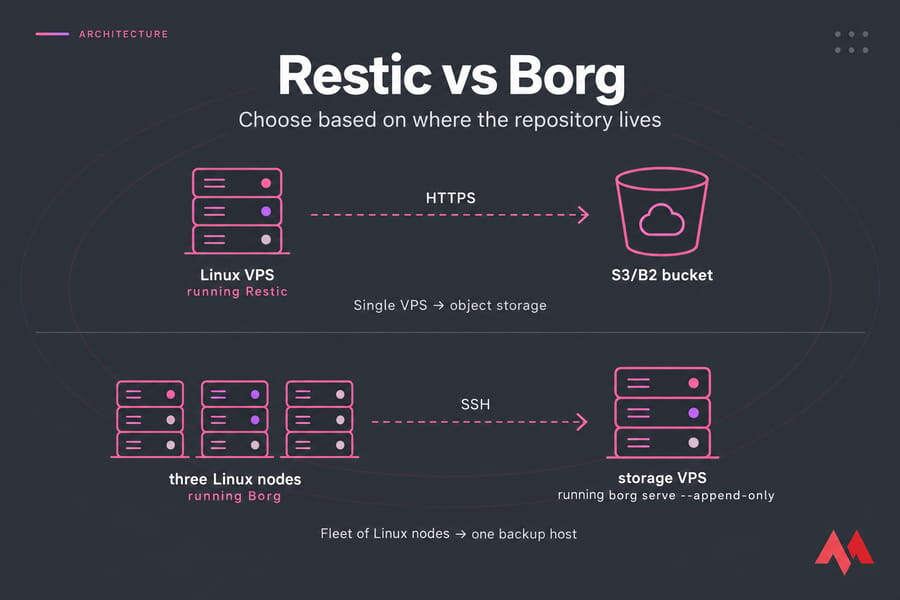
So what does this mean architecturally? Two clean patterns:
- Single VPS → B2/S3 bucket with Restic. Cheap, offsite by default, zero servers to maintain.
- Fleet of Linux nodes → one backup host over SSH with Borg. A storage VPS is a natural fit here, and you keep full control of retention. If you're moving an existing archive over, see migrate large files and backups to a storage VPS.
Building your own destination instead of renting bucket space? Create your own cloud storage walks through that path.
Compression, dedup, and why benchmarks mislead
Borg has the stronger reputation for storage efficiency, and it's mostly earned — it gives you lz4, zstd, zlib and lzma with tunable levels, and its repository layout is optimized for a local or SSH-attached disk. Restic added compression with repository format v2 and defaults to zstd, which closed most of the practical gap for typical server data.
Here's where I'll push back on the benchmark charts you've seen. Results swing wildly based on file mix (text compresses, JPEGs don't), CPU cores available for chunking, WAN latency to the repo, whether the local cache is warm, and how aggressively you prune. A test on 40 GB of VM images tells you nothing about your 200 GB of PHP files and MySQL dumps.
Restore throughput is usually disk-bound before it's tool-bound, which is why an NVMe VPS changes recovery time more than switching tools will.
Security, append-only, and what encryption doesn't give you
Both tools encrypt client-side with AES-256 and authenticate with HMAC-SHA256, so a compromised storage provider sees ciphertext and nothing else. Good. But encryption isn't immutability.
Think about the real threat: your web server gets popped, and the attacker has the repo credentials sitting in a cron script. They can delete everything. Borg answers this with append-only repositories — borg init --append-only, or per-key restriction via command="borg serve --append-only" in authorized_keys. Restic relies on the backend: bucket object-lock or versioning policies, or the REST server's append-only flag.
Layer it properly. Harden the client too — our guide on how to secure a Linux server is the companion read here.
Restore and day-2 operations
This is the part everyone skips, then regrets.
Restic separates policy from cleanup: restic forget --keep-daily 7 --keep-weekly 4 drops snapshot references, then restic prune reclaims space. Borg does borg prune for retention and borg compact to actually free disk. Same idea, different verbs. Both need check runs to catch corruption early.
A monthly rhythm that works: prune weekly, verify data monthly, and restore a real file to a scratch directory every month. Not a listing — an actual restore. If the box misbehaves during recovery, troubleshooting a Linux VPS covers the usual suspects.
Common mistakes when choosing
- Picking by one benchmark chart. Your dataset isn't their dataset.
- Choosing the tool before the destination. Guaranteed migration later.
- Never testing a restore. Untested backups are just expensive storage.
- Treating sync as backup. No history, no protection from ransomware or
rm -rf. - Skipping prune and compact. Repos grow until the disk fills, always at the worst moment.
Final recommendation: Restic or Borg?
| Scenario | Better tool | Why |
|---|---|---|
| Single web/WordPress VPS → B2 or S3 | Restic | Native object storage, one binary, no agent |
| Multiple Linux servers → one backup host | Borg | SSH repo model, append-only keys, tight dedup |
| Mixed Windows + Linux machines | Restic | Borg on Windows needs WSL |
| Homelab with a NAS or spare disk | Borg | Local repo is its home turf |
| Cheapest possible offsite copy | Restic | Object storage pricing beats renting a server |
| Maximum storage efficiency, controlled repo | Borg | More compression algorithms and levels |
For most readers running a Linux VPS with offsite object storage, start with Restic. If you're building a dedicated backup box, Borg over SSH is the better-engineered fit. And yes — running both, in different environments, is perfectly normal.
Need somewhere to send those backups? Get VPS hosting built for backup targets across 25+ locations, or spin up a storage-heavy node for long-term retention.

An experienced tech and developer blog writer, specializing in VPS hosting and server technologies. Fueled by a passion for innovation, I break down complex technical concepts into digestible content, simplifying tech for everyone.