
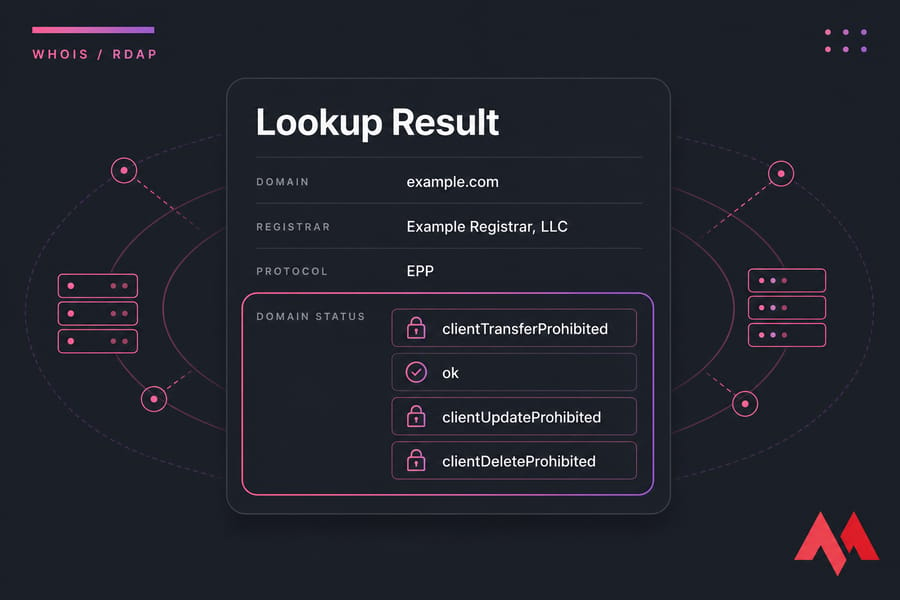
Domain status codes are short labels shown in WHOIS or RDAP that describe a domain's current administrative condition — whether it's active, locked, expired, in redemption, or heading toward deletion. Codes like clientTransferProhibited usually mean the domain is locked against transfer, while redemptionPeriod and pendingDelete can signal an expired domain at real risk of loss.
What are domain status codes in WHOIS and RDAP?
Most of these are technically EPP status codes. EPP stands for Extensible Provisioning Protocol — the language registrars and registries use to talk to each other behind the scenes. You don't need to know the protocol. You just need to know what the label on your domain is telling you.
New to domains? Read our guide on What is a Domain Name? before learning how domain status codes work.
What a domain status actually tells you
A status code describes the state of the domain record not necessarily your website. That's the part people get wrong. A domain can show a scary-looking "prohibited" code while your site and email keep humming along perfectly fine.
You'll spot these codes in three main places: your registrar dashboard, a WHOIS lookup, or an RDAP query. RDAP is the newer, structured replacement for classic WHOIS. If you're curious how they differ, we've covered WHOIS vs RDAP in detail.
Why one domain can have multiple statuses
Here's something that trips people up constantly. A single domain can carry several status codes at once. It might show clientTransferProhibited, clientUpdateProhibited, and clientDeleteProhibited all together that's just a bundle of protections your registrar applied. Totally normal.
ICANN sets the rules for gTLDs, registries like Verisign run the .com/.net infrastructure, and your registrar sits between you and them. Each layer can apply codes.
Are domain status codes the same as DNS errors?
No. And this matters. A domain status code is an administrative flag. A DNS error is about name resolution — whether the internet can find your server. They're separate systems. A domain can be perfectly "ok" at the registry level and still fail to load because of a misconfigured nameserver.
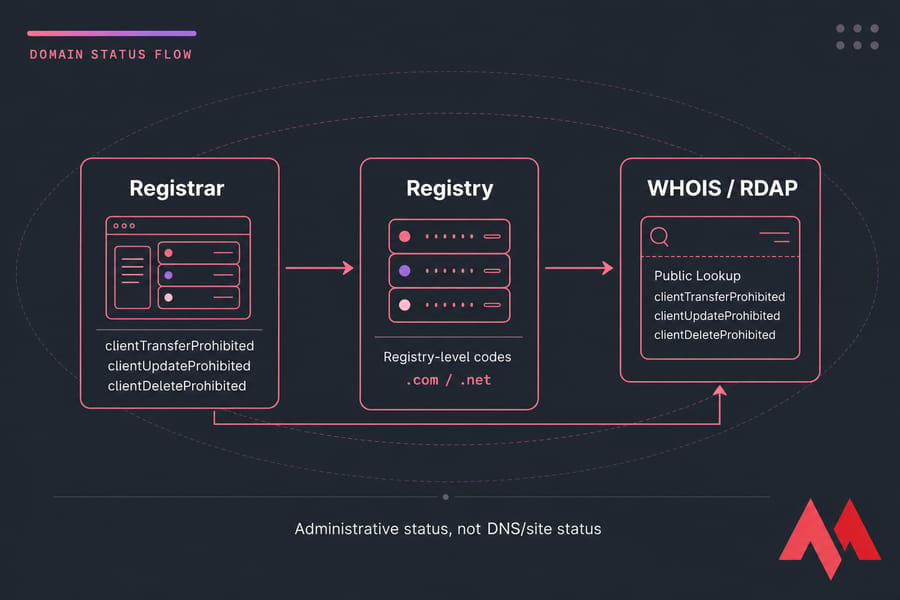
Key takeaway: Domain status codes don't all mean trouble. Some are normal protections you'll want to keep. Others signal urgent expiration risk. The table below tells you which is which.
Quick lookup table for common domain status codes
This is the section to bookmark. Use it to identify whether your domain is normal, restricted, or genuinely at risk. I've color-coded severity into three buckets: Normal (green — nothing to do), Warning (yellow — pay attention), and Critical (red — act now).
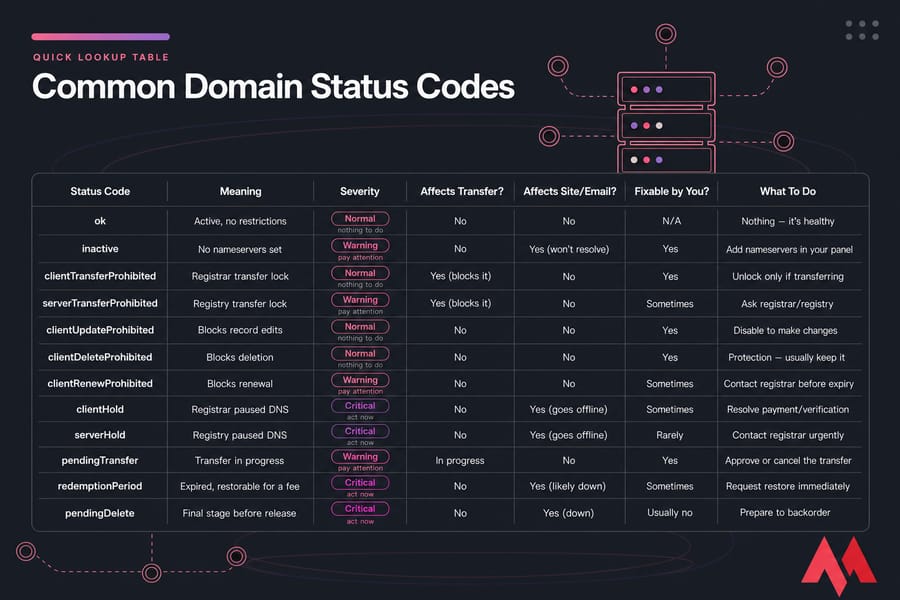
| Status Code | Meaning | Severity | Affects Transfer? | Affects Site/Email? | Fixable by You? | What To Do |
|---|---|---|---|---|---|---|
ok |
Active, no restrictions | Normal | No | No | N/A | Nothing — it's healthy |
inactive |
No nameservers set | Warning | No | Yes (won't resolve) | Yes | Add nameservers in your panel |
clientTransferProhibited |
Registrar transfer lock | Normal | Yes (blocks it) | No | Yes | Unlock only if transferring |
serverTransferProhibited |
Registry transfer lock | Warning | Yes (blocks it) | No | Sometimes | Ask registrar/registry |
clientUpdateProhibited |
Blocks record edits | Normal | No | No | Yes | Disable to make changes |
clientDeleteProhibited |
Blocks deletion | Normal | No | No | Yes | Protection — usually keep it |
clientRenewProhibited |
Blocks renewal | Warning | No | No | Sometimes | Contact registrar before expiry |
clientHold |
Registrar paused DNS | Critical | No | Yes (goes offline) | Sometimes | Resolve payment/verification |
serverHold |
Registry paused DNS | Critical | No | Yes (goes offline) | Rarely | Contact registrar urgently |
pendingTransfer |
Transfer in progress | Warning | In progress | No | Yes | Approve or cancel the transfer |
redemptionPeriod |
Expired, restorable for a fee | Critical | No | Yes (likely down) | Sometimes | Request restore immediately |
pendingDelete |
Final stage before release | Critical | No | Yes (down) | Usually no | Prepare to backorder |
A quick reminder before you panic at anything red: timing and exact behavior vary by TLD and registrar. A .com behaves differently from a country-code domain. Always confirm specifics with your registrar. Below, we break down the most misunderstood statuses in detail. Related reading if you're heading toward expiry: what happens when a domain expires and how to transfer a domain.
What does clientTransferProhibited mean on a domain?
This is the code people search for most, usually in a mild panic. Good news: clientTransferProhibited — "client transfer prohibited" in plain English — is almost always normal. It means your registrar has placed a transfer lock on the domain.
The word "client" here refers to the registrar (the client of the registry), not you. It's a protection. The lock stops anyone from yanking your domain away to another registrar without authorization.
Is clientTransferProhibited normal or a problem?
Normal. In fact, you want it there most of the time. It shows up for a few routine reasons:
- You just registered the domain
- You recently transferred it in
- Registrar lock is enabled by default (many do this)
- Extra security or ownership verification
Pro tip: A transfer lock protects your domain and does not take your site offline. Don't remove it unless you're actually moving the domain to another registrar.
How to remove clientTransferProhibited
Only unlock it when you genuinely intend to transfer. Here's the flow:
- Log into your registrar dashboard and find the domain lock (or "registrar lock") setting.
- Toggle it off. The
clientTransferProhibitedstatus should clear within minutes to a few hours. - Request your authorization code — grab our guide on the EPP code for domain transfers if you're unsure where to find it.
One caveat that catches people: ICANN enforces a 60-day transfer restriction after a domain is registered or transferred. Even with the lock off, you may have to wait out that window. That's a separate policy from the status code itself.
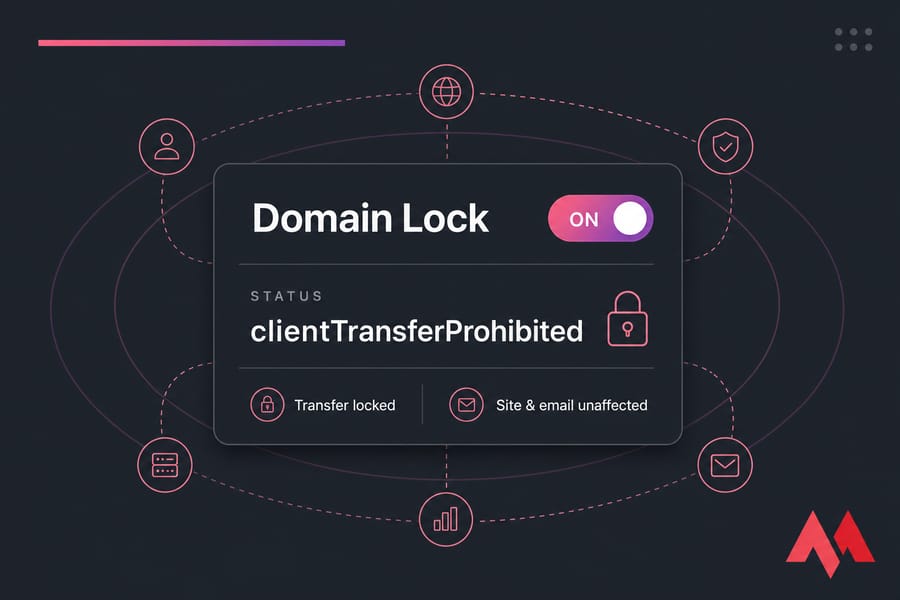
Does clientTransferProhibited affect your website or email?
No. This is the key reassurance. A transfer lock touches nothing about DNS, hosting, or mail delivery. Your site loads. Your email flows. The only thing it blocks is an outbound transfer. If your goal is to move the domain, unlock it first and confirm your transfer window and EPP code before starting a domain transfer.
What redemptionPeriod and pendingDelete mean after domain expiration
Now the urgent stuff. These two codes appear after a domain expires, and they mark different points on a countdown you don't want to ignore.
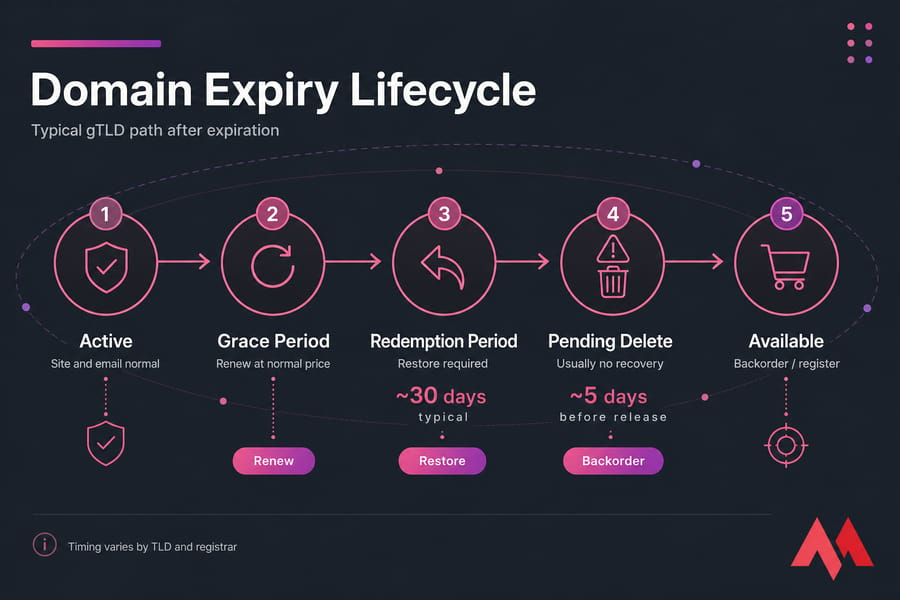
When a domain lapses, it doesn't vanish instantly. It moves through stages. First comes an auto-renew grace period where you can usually renew at the normal price. Miss that, and things get more expensive and more precarious.
What happens during redemptionPeriod
redemptionPeriod means the domain has expired and dropped out of its normal active state. Your website and email have probably stopped working by now. But — and this matters — the domain is often still recoverable.
Recovery here goes through a restore process, not a standard renewal. It almost always carries an extra restore fee (frequently in the tens to over a hundred dollars, depending on the TLD). Contact your registrar and specifically ask to restore the domain, not renew it. If it's still in redemption, you can usually get it back.
Can you recover a domain in pendingDelete?
Usually no. Once a domain hits pendingDelete, the redemption window has closed. This is the final stage before the registry releases the name back to the public pool. Standard registrar restore no longer works.
Warning: Once a domain reaches pendingDelete, recovery through your registrar is usually no longer possible. Your realistic option at this point is a domain backorder to try catching it the moment it drops.
How long domains stay in each stage
For most gTLDs like .com, the pattern is recognizable: a grace period after expiry, then roughly 30 days of redemption, then about 5 days of pending delete before release. But I'll say it plainly — those numbers are not universal. Country-code TLDs and some newer extensions run entirely different timelines.
If your domain has already entered redemption, act immediately. Waiting pushes it into pending delete, where recovery usually ends. Renew eligible domains through domain renewal before that happens, and read what happens when a domain expires for the full picture.
Other important domain statuses: clientHold, serverHold, ok, and inactive
These four cover the rest of what you'll commonly run into. Two of them can take your site down. Two of them usually mean everything's fine or nearly so.
What clientHold does to DNS resolution
clientHold is one to take seriously. It means your registrar has told the registry to stop publishing the domain in DNS. The result? Your website goes dark and email stops delivering. This often happens after a missed payment, a WHOIS verification you never completed, or a policy issue. Fix the underlying cause — usually in your registrar account or via a verification email — and the hold gets lifted.
What serverHold usually indicates
serverHold is the registry-level version, and it's typically more serious. Think compliance issues, abuse reports, legal action, or unpaid registry-side obligations. You generally can't clear this one yourself. It requires registrar support, and sometimes registry or policy resolution.
When ok is a healthy status
ok — sometimes shown as "active" is exactly what it sounds like. The domain is registered, active, and carries no special restrictions. No transfer locks, no holds, nothing pending. If you see ok and nothing else, relax.
Why a domain shows inactive
Don't confuse inactive with expired or deleted. It usually just means the domain has no nameservers assigned, or DNS delegation is incomplete. The registration itself can be perfectly valid. Add nameservers in your control panel and the status clears.
| Status | Website loads? | Email works? | Transfer blocked? |
|---|---|---|---|
clientHold |
No | No | No |
serverHold |
No | No | No |
ok |
Yes | Yes | No |
inactive |
No | Depends | No |
Not sure whether it's the status or DNS? Run a lookup with our DNS checker or brush up on what DNS is. The next distinction tells you whether you can fix things yourself.
Client vs server domain status codes: what's the difference?
Once you notice the pattern, half of these codes explain themselves. Everything starting with client was set by your registrar. Everything starting with server was set by the registry.
Quick summary: client* = registrar-set. server* = registry-set.
| Prefix | Set By | Typical Cause | Your Control Level |
|---|---|---|---|
client* |
Registrar | Locks, protections, account settings | High — usually fixable in your dashboard |
server* |
Registry | Compliance, abuse review, legal, policy | Low — needs registrar/registry help |
So clientTransferProhibited is a lock you toggle yourself, while serverTransferProhibited is a lock the registry controls. Same with clientHold versus serverHold. The client version is your problem to solve; the server version needs backup. If the registrar/registry split is fuzzy, our breakdown of registrar vs registry clears it up. Once you know who set the status, you can pick the right fix.
How to fix a domain status problem step by step
Here's a practical checklist that works regardless of which code you're staring at.
- Look it up first. Confirm the exact status in your registrar dashboard and in WHOIS/RDAP. They should match.
- Categorize it. Is it a lock, an expiration code, a hold, or a pending transfer? The category decides your action.
- If it's a transfer lock (
clientTransferProhibited) and you want to transfer: unlock in your dashboard, grab your EPP code, confirm the 60-day window has passed. - If it's expired (
redemptionPeriod): request a restore from your registrar immediately. Ask about the fee upfront. - If it's on hold (
clientHold/serverHold): check for unpaid invoices, incomplete WHOIS verification, or compliance emails. Resolve, then request the hold be lifted. - If it's near deletion (
pendingDelete): recovery is unlikely. Set up a backorder or line up an alternative name. - When stuck, contact support with the exact code string. It saves everyone time.
MonoVM's support team can walk you through unlocking, renewing, or restoring a supported domain. Understanding the fix gets easier when you can see where the domain sits in its lifecycle.
Domain lifecycle timeline: active, expired, redemption, pending delete, available
Every domain follows the same broad arc. Knowing the stages tells you how much time you've got and what your options are at each point.
- Active registration. The domain is yours and working. Status usually shows
okplus any locks you've enabled. - Auto-renew and grace period. After the expiration date, most gTLDs give a grace window where you can renew at normal cost.
- Redemption grace period. Miss the grace window and the domain enters
redemptionPeriod. Recoverable, but for a restore fee. - Pending delete. The domain shows
pendingDelete. No more standard recovery. It's queued for release. - Dropped / available. The registry deletes the name and it returns to the public pool, where anyone can re-register it.
Fact: Timing varies by TLD and registrar, so always confirm the exact recovery window with your registrar before assuming a domain is gone or safe.
This is exactly why drop timing matters for expired domains and domain backordering — catching a good name the instant it drops is a real strategy. Before you act, avoid these common interpretation errors.
Common mistakes people make when reading domain status codes
- Assuming every "prohibited" code is bad. Most
client*Prohibitedcodes are protections you actively want. - Ignoring redemption deadlines. Every day in
redemptionPeriodbrings you closer topendingDelete. Don't sit on it. - Thinking a transfer lock took your site down. It didn't. Transfer locks never affect DNS. Look at hold statuses or nameservers instead.
- Confusing
inactivewith deletion. Inactive usually just means missing nameservers, not a lost domain. - Only checking one source. Cross-check your registrar dashboard against WHOIS or RDAP. They can lag or differ.
- Waiting too long to contact support. When in doubt, reach out early. Restore windows don't wait.
Best tools to check domain status codes and ownership details
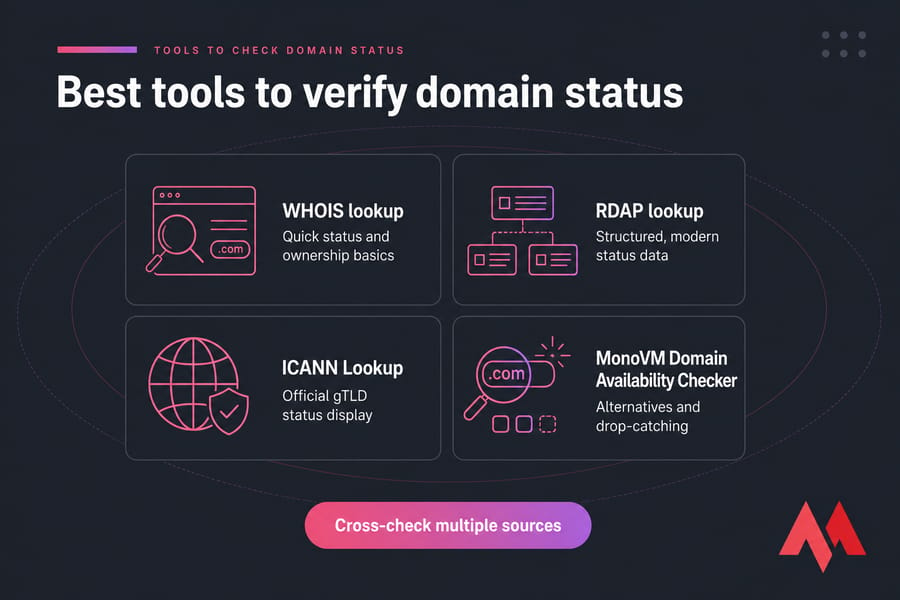
Want to verify a status right now? These are the fastest places to look.
| Tool | Best For | Shows Status? | Shows Ownership? |
|---|---|---|---|
| Registrar dashboard | Managing and fixing your own domains | Yes | Yes |
| ICANN Lookup | Official gTLD status display | Yes | Limited |
| MonoVM WHOIS lookup | Quick status and ownership basics | Yes | Yes |
| RDAP lookup | Structured, modern status data | Yes | Yes |
| Domain availability checker | Alternatives and drop-catching | No | No |
For your own domains, start in the registrar dashboard it shows the real, editable status. For public records, WHOIS or RDAP works. For finding a replacement name, use the availability checker. Browse extensions across 700+ TLDs on the domain registration page.
Need to renew, transfer, or recover control of a domain?
If your domain is locked, expiring, or showing a warning status, MonoVM helps you check availability, renew eligible domains, and transfer supported domains with less friction. A code like clientTransferProhibited is often harmless — but redemptionPeriod and pendingDelete demand fast action. Transfer a domain, renew a domain, or buy a new domain name before it's gone.

An experienced tech and developer blog writer, specializing in VPS hosting and server technologies. Fueled by a passion for innovation, I break down complex technical concepts into digestible content, simplifying tech for everyone.