Short answer: yes, a Windows VPS is a solid home for web scraping tools and automation bots. It stays online when your laptop doesn't, gives you full desktop access over remote desktop, and runs Selenium, Playwright, Python scripts, and Task Scheduler jobs exactly the way they'd run on your own machine — just without the machine.
I've watched too many people lose a week of scraped data because Windows Update rebooted their desktop at 3 a.m. A server built for this doesn't have that problem (well, not if you configure it right — more on that later).
What a Windows VPS actually does for scraping
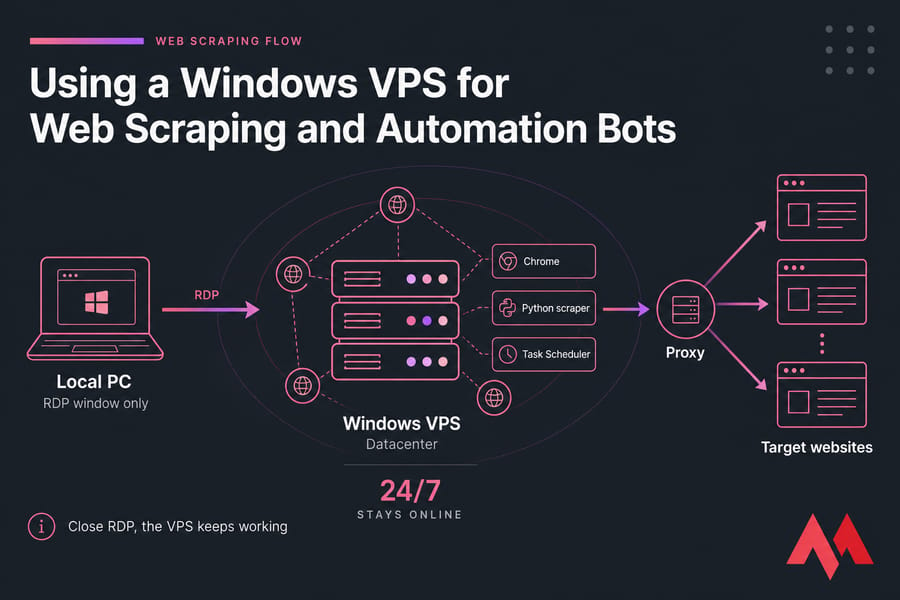
A Windows VPS is a virtual machine running Windows Server in a datacenter, with resources reserved for you and administrator rights included. You reach it through Remote Desktop — if that term is fuzzy, here's a plain explanation of what RDP is.
The key thing beginners miss: the VPS is the computer. RDP is just the window you look through. Close the window, the machine keeps working. That's the whole difference between a VPS and a plain RDP account, and it's covered well in this breakdown of VPS vs RDP.
So your scraper runs on datacenter hardware, on a datacenter connection, on a schedule you control. Your laptop can be closed, asleep, or in another country.
Why not just run bots on your home PC?
You can. It just breaks constantly.
- Uptime. Power cuts, Wi-Fi drops, and forced restarts kill overnight jobs. A VPS runs 24/7 on redundant infrastructure.
- Isolation. Your browser automation doesn't fight your actual browsing session, cookies, or CPU.
- GUI access. Windows gives you a real desktop, so non-headless browser flows, visual macro tools, and Windows-only software all just work.
- IP separation. If a target site rate-limits your scraper, it's not your home connection getting flagged.
- Remote control. Check on your bots from a phone or a hotel laptop.
Plenty of other Windows VPS use cases follow the same logic — always-on beats always-nearby.
What people actually automate on these servers
Realistic workloads, not spam farms:
- Price and stock monitoring across competitor product pages
- Marketplace or job listing collection on a nightly schedule
- Logging into a dashboard and exporting a report every morning
- Form-filling and internal data entry between systems that lack APIs
- API polling and webhook relays with PowerShell or Python
- Content change monitoring with screenshots for proof
Lightweight HTTP scraping — no browser, just requests — honestly runs fine on Linux for less money. Windows earns its keep the moment a real browser window is involved.
Windows VPS vs Linux VPS for web scraping
| Factor | Windows VPS | Linux VPS | Best choice |
|---|---|---|---|
| GUI browser automation | Native desktop, easy debugging | Needs Xvfb or headless mode | Windows |
| Resource overhead | Higher (OS + GUI) | Lower, more RAM for your bots | Linux |
| Headless scraping at scale | Works, less efficient | Built for it | Linux |
| Beginner friendliness | Point-and-click familiar | Command line required | Windows |
| Cost | Includes licensing | Usually cheaper | Linux |
| Windows-only tools | Full support | Not possible | Windows |
My rule: if you want to see the browser doing the work, pick Windows. If your bot is pure code sending HTTP requests, pick a Linux VPS. The deeper OS-level trade-offs are laid out in this Windows Server vs Linux Server comparison.
What specs do you need?
| Workload | vCPU | RAM | Storage | Notes |
|---|---|---|---|---|
| HTTP / API scraping, no browser | 2 | 2–4 GB | 40 GB SSD | Cheapest tier is usually enough |
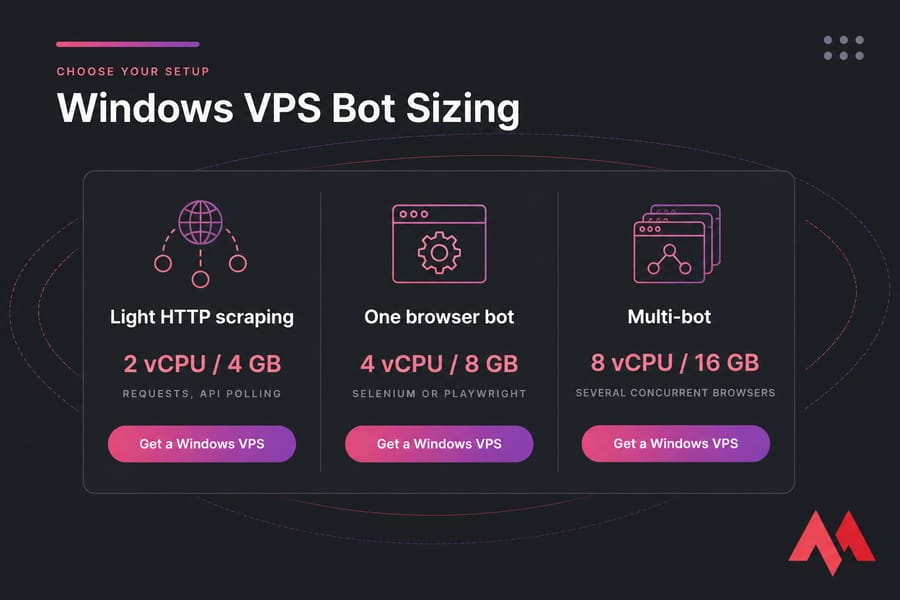
| One Selenium or Playwright bot | 2–4 | 4–8 GB | 60 GB NVMe | Chrome alone can eat 1–2 GB |
| 2–3 concurrent browser bots | 4 | 8–12 GB | 80 GB NVMe | Watch RAM before CPU |
| Multi-bot / production scraping | 8+ | 16 GB+ | 120 GB+ NVMe | Consider splitting across servers |
Budget roughly 2 GB of RAM per running browser instance and you won't be far off. NVMe matters more than people expect here — browser cache, temp profiles, logs, and screenshots hammer the disk. Here's why NVMe VPS hosting makes a difference for write-heavy jobs.
Also think about location. A server close to your target sites shaves latency off every request, and datacenter IP reputation varies — some targets treat datacenter ranges differently, which is where proxies come in.
Need a Windows VPS That Can Run Bots 24/7?
Full administrator access, stable uptime, and enough CPU and RAM for browser automation, Python scripts, and recurring scraping jobs. View Windows VPS plans and pick the tier that matches your bot count.
Setting it up, step by step
- Connect over RDP. Use Microsoft Remote Desktop with the IP and credentials from your provider. Stuck? This guide on how to connect to your VPS covers the basics, and there's a full walkthrough on how to set up a Windows VPS.
- Harden first, install second. Change the default admin password, run Windows Update once, then set updates to a maintenance window so they don't reboot mid-scrape.
- Install browsers. Chrome, Edge, or Firefox — whichever your framework targets. Match your WebDriver version to the browser version.
- Install your runtime. Python for Selenium and requests-based scrapers (install Python on Windows), or Node.js for Puppeteer and Playwright (install Node.js and npm). Tick "Add to PATH."
- Organize your files. One folder per bot, with subfolders for logs and output. Future you will be grateful.
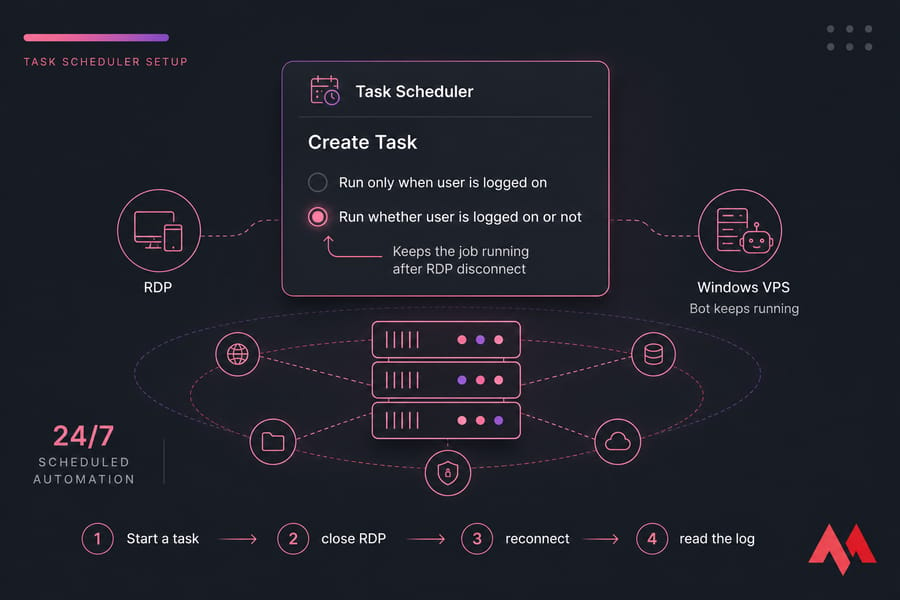
- Schedule it. Open Task Scheduler, create a task, and — this is the part everyone gets wrong — select "Run whether user is logged on or not." That's what keeps the job alive after you disconnect.
- Test the disconnect. Start a task, close RDP, wait, reconnect, read the log. Don't assume. Verify.
Tools worth running
| Tool | Language | Best for | Resource load |
|---|---|---|---|
| Selenium | Python, Java, C# | Login flows, legacy sites, visual debugging | High |
| Playwright | Python, Node.js | Modern SPAs, auto-waiting, multi-browser | Medium-high |
| Puppeteer | Node.js | Chromium-only jobs, PDF and screenshot capture | Medium |
| requests + BeautifulSoup | Python | Static HTML, APIs, high volume | Very low |
| PowerShell | Native | File moves, API calls, glue scripts | Minimal |
If Playwright can do the job, use it over Selenium. Fewer flaky waits, less memory per session.
Security and staying on the right side of things
An unattended server with open RDP is a magnet. Lock it down before your bots go live:
- Long unique admin password, and rename or disable the default account
- Restrict RDP to your own IP range in Windows Firewall — see secure RDP access
- Apply the wider hardening steps in this guide to secure your Windows Server
- Keep browsers and drivers patched; stale drivers break automation anyway
- Back up your Windows Server — or at minimum, keep scripts in Git
On the scraping side: read robots.txt, rate-limit your requests, identify your bot honestly where appropriate, and check the site's terms. A VPS doesn't make you anonymous and it doesn't make you compliant. Proxies are an operational tool for distributing load and avoiding blanket IP bans — they aren't a shield.
Common problems and quick fixes
| Problem | Likely cause | Fix |
|---|---|---|
| Bot dies when RDP closes | Task tied to interactive session | Set "Run whether user is logged on or not" |
| RAM maxed out | Zombie browser processes piling up | Close drivers properly; kill orphan chrome.exe on schedule |
| Jobs vanish overnight | Windows Update reboot | Set active hours; enable "Run task as soon as possible after a missed start" |
| Disk full | Logs, screenshots, browser profiles | Rotate logs weekly, clear temp profiles |
| Sudden CAPTCHAs and 403s | Request rate or IP reputation | Slow down, randomize timing, rotate proxies |
If services keep dropping, this article on fixing random service crashes on Windows VPS helps, and for access problems there's a guide to troubleshooting RDP connection issues. Sluggish overall? Start with improving VPS performance before buying more RAM.
Is a Windows VPS right for your automation workflow?
Pick Windows when you need a visible browser, Windows-only tools, or a setup you can debug by looking at it. Pick Linux when your scrapers are headless and you'd rather spend the licensing money on RAM. Once you're running more than four or five concurrent browsers, split across two servers instead of buying one giant box.
For solo operators and small teams running Selenium, Playwright, or Python bots, a Windows VPS with full admin access beats a consumer desktop on every axis that matters — uptime, isolation, and remote control. Compare the Windows VPS features and pick a plan sized to your bot count, then scale as the workload grows.
View Windows VPS plans and pick the tier that matches your bot count.

An experienced tech and developer blog writer, specializing in VPS hosting and server technologies. Fueled by a passion for innovation, I break down complex technical concepts into digestible content, simplifying tech for everyone.