
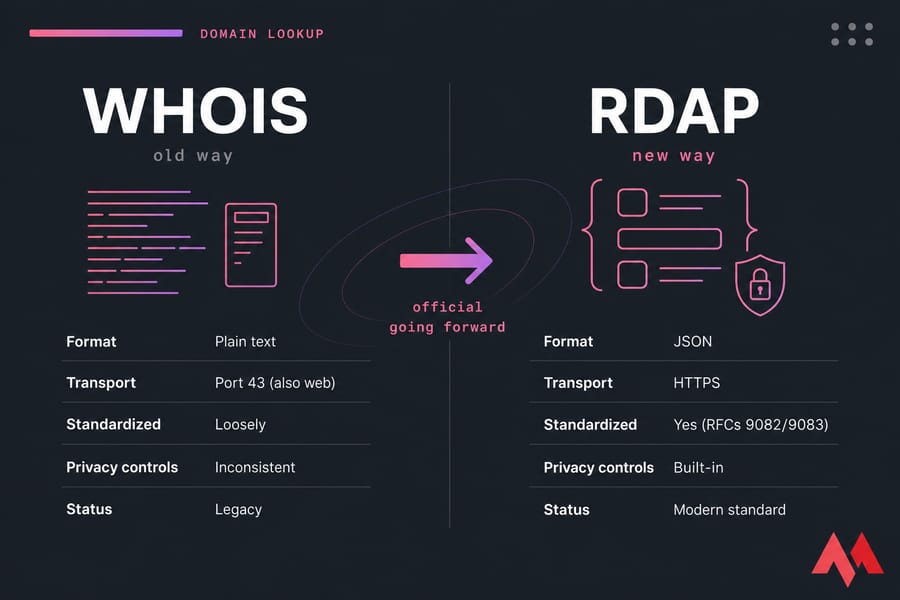
Short version? WHOIS is the old way of looking up domain registration data. RDAP is the new way. Both answer the same basic question "who registered this domain and what's the record look like?" but they go about it very differently.
WHOIS spits back plain text, which varies wildly depending on which registrar or registry you query. RDAP returns structured JSON over HTTPS, with standardized fields, proper error codes, and built-in support for redaction and access control. ICANN has been steering the whole gTLD ecosystem toward RDAP for years now. So if you're wondering which one is "official" going forward, it's RDAP.
| Feature | WHOIS | RDAP |
|---|---|---|
| Format | Plain text | JSON |
| Transport | Port 43 (also web) | HTTPS |
| Standardized | Loosely | Yes (RFCs 9082/9083) |
| Privacy controls | Inconsistent | Built-in |
| Status | Legacy | Modern standard |
Is RDAP just a new version of WHOIS?
Sort of, but not really. RDAP solves the same problem querying domain registration data but it's a completely different protocol underneath. Think of it less as "WHOIS 2.0" and more as a clean rebuild using modern web standards.
Which lookup protocol should you use today?
For casual research, either works. For anything involving automation, APIs, or compliance, RDAP is the right call. I'll get into the specifics below.
What is WHOIS in domain lookup?
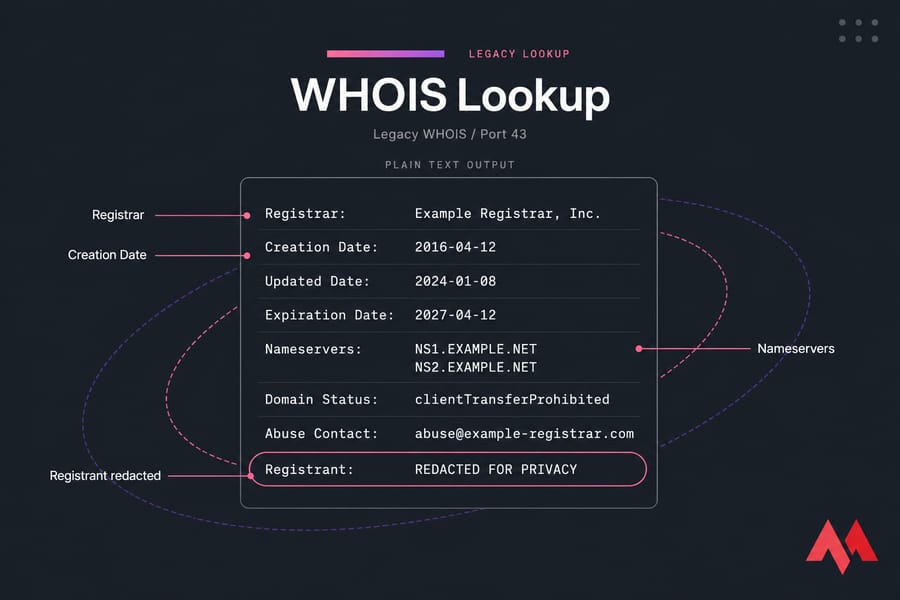
WHOIS is a protocol from the early 1980s that lets you query a server for registration information about a domain (or an IP block, for that matter). It's defined loosely in RFC 3912, and historically it ran over port 43 as a simple text-in, text-out exchange.
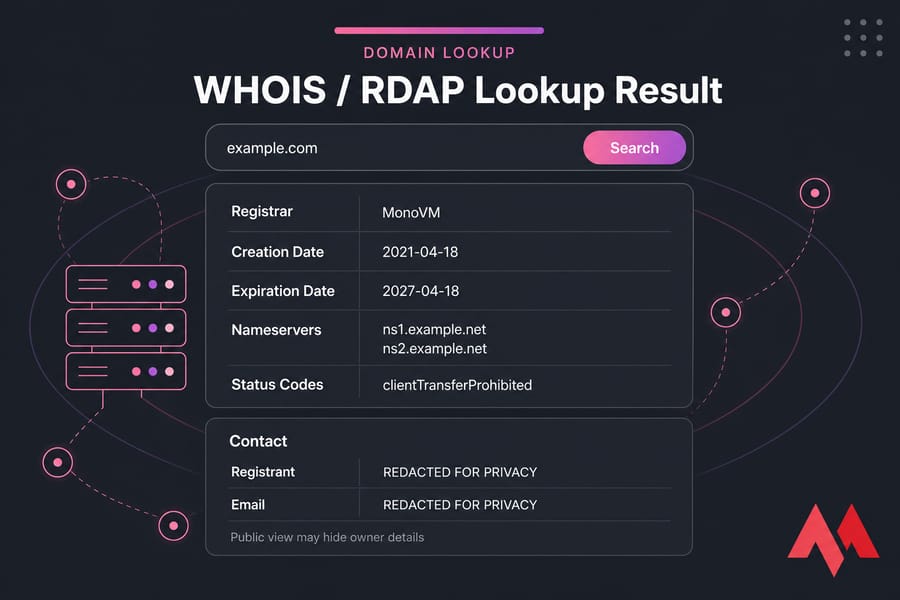
When you run a WHOIS lookup, you typically see fields like:
- Registrar of record
- Creation, updated, and expiration dates
- Nameservers
- Domain status codes (e.g.
clientTransferProhibited) - Registrant, admin, and tech contact data (historically)
- Abuse contact
Here's the catch: there's no strict format. One registrar's output might list "Registrant Organization" while another uses "Owner Name." Field order shifts. Spacing varies. If you're parsing this stuff programmatically, you've probably already cursed at it.
WHOIS also got a lot harder to use over the last several years. Once WHOIS privacy protection services became common, and once GDPR rolled in, most public WHOIS responses started showing "REDACTED FOR PRIVACY" where the registrant's name and email used to sit. If you're trying to find out who owns a domain today, you'll often hit a wall and that's by design, not a bug.
What is RDAP and how does RDAP lookup work?
RDAP stands for Registration Data Access Protocol. It was developed by the IETF as a modern successor to WHOIS, with the main RFCs being 9082 (query format) and 9083 (response format). ICANN formally required gTLD registrars and registries to support it back in 2019.
Mechanically, RDAP is just an HTTPS API. You send a GET request to an RDAP server's endpoint something like https://rdap.example/domain/example.com and you get back a JSON document.
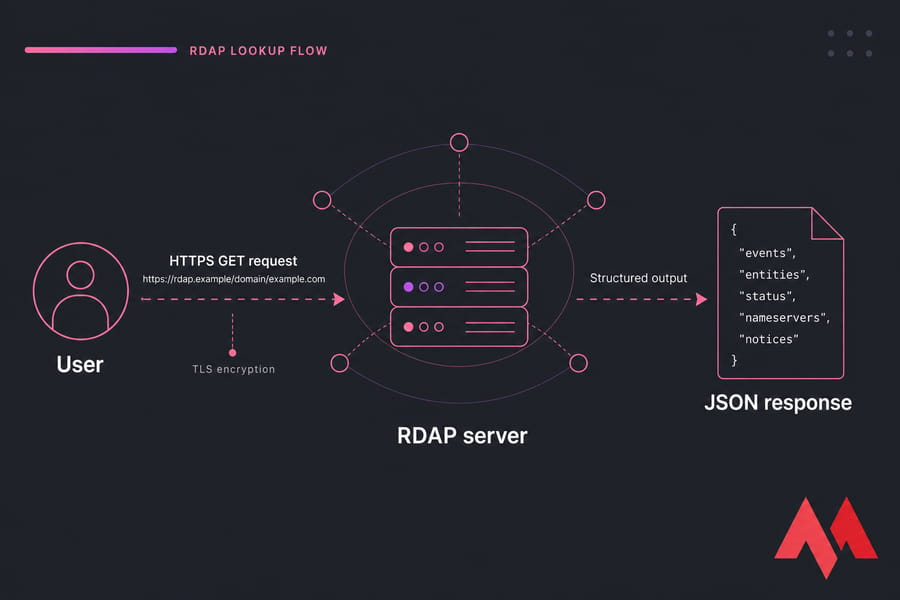
That JSON response is structured, predictable, and machine-readable. It contains things like:
- Standardized event entries (registration, expiration, last changed)
- Entities with roles (registrar, registrant, technical, abuse)
- Status codes mapped to a controlled vocabulary
- Nameserver objects with their own properties
- Links to related resources (like the registrar's own RDAP server)
- Notices and remarks explaining redacted fields
Why does any of this matter? Because parsing structured data is night-and-day easier than scraping inconsistent text. RDAP also supports HTTPS encryption out of the box, proper HTTP status codes (so a 404 actually means "not found" instead of a weird text string), internationalized contact data, and differentiated access meaning authorized parties like law enforcement or trademark holders can request more data than anonymous public users.
There's also a bootstrap mechanism: IANA publishes a registry of which RDAP server handles which TLD, so clients can automatically route queries to the right place. WHOIS never had anything that clean.
WHOIS vs RDAP comparison: key differences that matter
Here's the side-by-side that actually answers the question most people came for.
| Feature | WHOIS | RDAP | Why it matters |
|---|---|---|---|
| Protocol age | Early 1980s (RFC 3912) | Standardized 2015, ICANN-required 2019 | RDAP is built on modern web foundations |
| Response format | Free-form plain text | Structured JSON | Apps can parse RDAP reliably; WHOIS needs custom parsers per registrar |
| Transport | TCP port 43 (also HTTP) | HTTPS | RDAP is encrypted by default |
| Standardization | Loose conventions | IETF RFCs + ICANN gTLD profile | RDAP responses are predictable across providers |
| Error handling | Text strings | HTTP status codes + JSON errors | Easier to handle programmatically |
| Privacy / redaction | Ad hoc | Explicit redaction signals | Clients know what was hidden and why |
| Differentiated access | Not really | Supported via authentication | Authorized parties can get more data |
| Internationalization | Limited (often ASCII) | Full Unicode (jCard, UTF-8) | Non-Latin scripts work properly |
| Search consistency | Varies by registry | Defined query patterns | Same query works across servers |
| Bootstrap discovery | Manual | IANA registry | Clients auto-route to correct server |
| Future readiness | Legacy | Standard going forward | RDAP is where the ecosystem is heading |
The two things that matter most in practice? Format and privacy. RDAP's JSON output makes it trivial for tools to display the right field in the right place. And RDAP's explicit redaction signals mean you actually know when data was withheld, instead of guessing whether a registrar just formatted things weirdly.
WHOIS privacy, GDPR, and why domain owner data is redacted
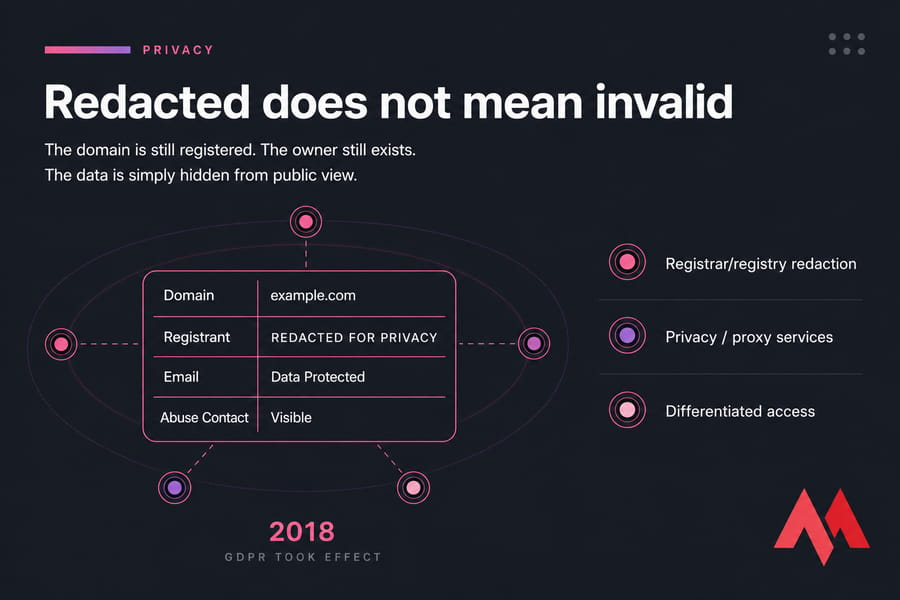
This is the part that confuses most people. You run a lookup on a domain, and instead of seeing a name and email, you see "REDACTED FOR PRIVACY" or "Data Protected." Is the domain fake? Is the tool broken? Neither.
After GDPR took effect in 2018, ICANN issued a Temporary Specification later evolved into ongoing policy that required registrars to stop publishing personal contact details of registrants in public lookup responses. The data still exists in the registrar's system. It's just not handed out to anonymous queries anymore.
There are actually three different reasons you might see hidden data:
- Registrar/registry redaction — applied automatically to comply with privacy regulations
- Privacy / proxy services — the registrant paid for a service that substitutes the proxy's contact info for theirs
- Differentiated access — public users see less; authorized requesters (with proper credentials) can request more
So if you're trying to contact a domain owner for legitimate reasons, your path is usually the abuse contact (still typically visible), the registrar's own contact form, or — if you have a formal legal basis — a proper request through the registrar. For the curious: no, you can't just "look up" private owner data anymore. That ship sailed. Domain privacy protection is now the default mindset, not the exception.
ICANN RDAP adoption: is RDAP replacing WHOIS?
Yes — operationally, RDAP is the strategic direction. ICANN required all gTLD registries and registrars to deploy RDAP services by August 2019. In early 2025, ICANN began the formal sunset of the legacy WHOIS service requirement for gTLDs, meaning registrars are no longer obligated to run port-43 WHOIS for those domains.
That said, "replacing" isn't the same as "instantly vanishing." Plenty of ccTLDs (country-code TLDs like .de or .uk) still run their own WHOIS services on their own timelines. Lots of lookup tools still use the word "WHOIS" because users recognize it. And the underlying registration data is the same regardless of which protocol you queried.
So when someone asks "is WHOIS dead?" my honest answer is: the protocol is being retired in the gTLD world, the term is sticking around as familiar shorthand, and most users won't notice the switch because their lookup tools handle it for them.
How to perform a WHOIS or RDAP domain lookup
For most people, this is dead simple:
- Open a web-based lookup tool for instance, MonoVM's WHOIS lookup tool.
- Type in the domain name (just the name, no
https://). - Review the result: registrar, creation/expiration dates, nameservers, status codes, and any visible contact data.
- If fields show "redacted," that's normal — you're seeing the public view.
If your goal isn't research but registration, you want a different tool. Use a domain availability checker when you want to buy the name, not inspect an existing record. The two are easy to confuse — and I've watched people run WHOIS on a domain they wanted to register, get back a record, and assume the domain was taken when really they were just checking the wrong thing.
When WHOIS still appears and when RDAP is better
| You're a… | Use this | Why |
|---|---|---|
| Domain buyer doing quick research | Either — whichever your tool uses | You just want dates, status, and nameservers |
| Developer building an integration | RDAP | JSON, proper HTTP errors, predictable schema |
| Security or abuse investigator | RDAP, with authenticated access where possible | Standardized abuse contact, differentiated access |
| Bulk lookup workflow | RDAP | Easier to parse and rate-limit cleanly |
| Casual user on a registrar's website | Whatever they show you | Underlying data is the same |
Common domain lookup mistakes to avoid
- Assuming redacted means fake. The domain is registered. The owner exists. You just can't see their name.
- Mistaking the registrar for the owner. The registrar (e.g. GoDaddy, Namecheap, MonoVM) is the company that processed the registration not the person who owns the name. The registrar vs registry distinction trips up almost everyone the first time.
- Treating WHOIS output as standardized. It isn't. Field names and order vary by provider.
- Ignoring status codes. Things like
clientTransferProhibitedorpendingDeletetell you what's actually happening with the domain. - Running an ownership lookup when you meant availability. If you want to buy a name, use a domain checker not WHOIS.
- Trusting cached results. Records change. Refresh from the authoritative source if it matters.
Once you've verified the domain you want, the next step is action register a new name, transfer an existing one, or renew before expiration. If you're planning a move between registrars, you'll also want to know about the EPP code that authorizes the transfer.

An experienced tech and developer blog writer, specializing in VPS hosting and server technologies. Fueled by a passion for innovation, I break down complex technical concepts into digestible content, simplifying tech for everyone.