Quick answer: A bare metal server gives one tenant the entire physical machine with no hypervisor, delivering maximum, predictable performance and physical isolation. A virtual machine shares that hardware through a hypervisor, trading a few percent of performance for elasticity, snapshots, and lower entry cost. Choose bare metal for sustained, latency-sensitive or compliance-bound workloads; choose VMs for variable, fast-scaling ones.
That's the short version of bare metal vs VM. The longer version — the one you can actually take to a CTO — needs numbers, licensing math, and an honest look at what you give up. So let's do that. Here's how a bare metal server vs virtual machine decision breaks down across the four things people actually argue about.
| Factor | Bare Metal Server | Virtual Machine |
|---|---|---|
| Performance | Full hardware, no virtualization tax | ~1–5% overhead when tuned; far more when contended |
| Cost model | Higher fixed monthly, cheaper at high utilization | Low entry, pay-per-instance, cheaper when idle |
| Security | Single tenant, no hypervisor attack surface | Hypervisor isolation plus shared-host risk |
| Best for | Databases, AI/GPU, HFT, licensed enterprise apps | Web/app tiers, dev/test, microservices, spiky traffic |
Before you compare: three things to know
- A VM always runs on bare metal. This isn't a vendor comparison — it's a layer comparison. The question is whether you own the physical layer or a hypervisor mediates it.
- Not all VMs are equal. A 2 vCPU shared-core instance and a 32 vCPU dedicated-core KVM virtualization instance with CPU pinning are barely the same product.
- "Bare metal cloud" is still bare metal. Hourly billing and API provisioning killed the old "takes three days to deploy" objection.
What Is a Bare Metal Server? Single-Tenant Hardware Explained
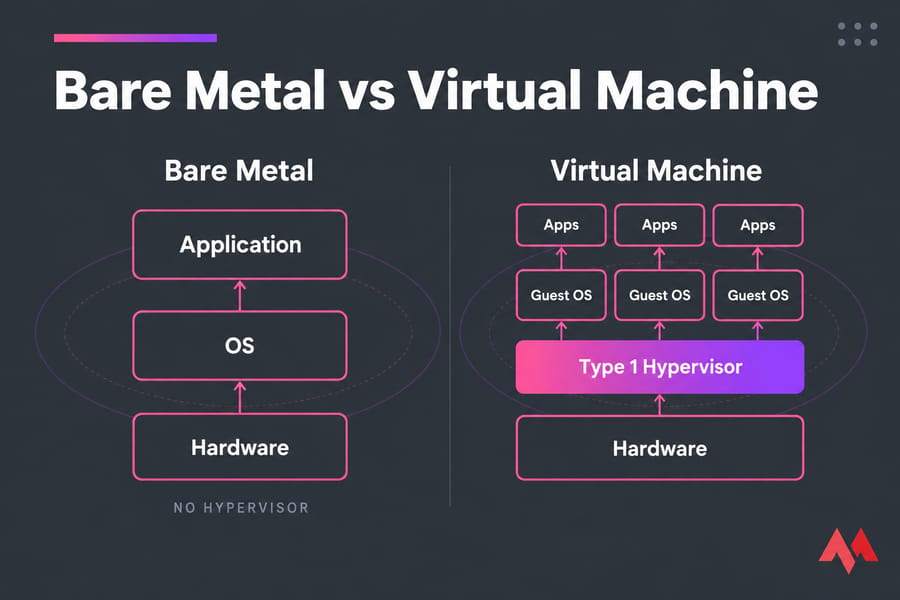
A bare metal server is one physical machine assigned to one tenant, with the operating system installed directly on the hardware. Nothing sits between your application and the CPU, RAM, NIC, or disks. No scheduler deciding which guest gets a core slice this millisecond.
That means you control layers a VM never exposes. BIOS/UEFI settings, CPU C-states and power profiles, RAID controller configuration, NIC offload flags, kernel boot parameters, huge pages, NUMA topology. You also get out-of-band management through IPMI, BMC, or Redfish — power cycling, remote console, and OS reinstall without anyone touching a rack.
What you control on bare metal that you simply can't on a VM:
- BIOS/UEFI and firmware revisions
- RAID level, controller cache policy, and disk layout
- Kernel tuning: huge pages, scheduler, IRQ affinity
- Native PCIe and GPU access without passthrough caveats
- The full CPU feature set of the AMD EPYC or Intel Xeon you're renting
Bare metal server vs dedicated server: is there a difference?
Practically, no. It's the same hardware. "Bare metal" is the modern term that emphasizes the absence of a virtualization layer, and it's the label usually attached to API-provisioned, hourly-billed physical servers. If you want the classic framing, our explainer on what a dedicated server is covers it. One myth worth killing: bare metal servers absolutely do have an operating system. They just don't have a hypervisor.
What Is a Virtual Machine? How the Hypervisor Layer Works
A hypervisor carves one physical host into isolated guests, each with its own kernel, virtual disk, and virtual NIC. It schedules vCPUs onto physical cores, mediates memory, and presents paravirtualized devices through virtio so the guest doesn't pay an emulation penalty. If you want the fundamentals first, start with what is a virtual machine.
And that's the key point — modern VMs are not emulation. Intel VT-x, AMD-V, and IOMMU (VT-d / AMD-Vi) push most of the isolation work into silicon. That's exactly why CPU overhead is measured in low single digits rather than the 20–30% people still quote from 2008.
Type 1 vs Type 2 hypervisors
| Model | Examples | Where it's used |
|---|---|---|
| Type 1 (bare metal hypervisor) | VMware ESXi, KVM/QEMU, Hyper-V, Xen, Proxmox VE | Every serious hosting and enterprise deployment |
| Type 2 (hosted) | VirtualBox, VMware Workstation | Desktops and labs only |
| Containers | Docker, containerd, LXC | Shared kernel, process-level isolation, not a VM |
If you want the mechanics in depth, read how a hypervisor works. Platform choice matters too — see VMware versus Proxmox VE, and if you're still mapping out the landscape, virtual machine types is a useful next stop.
vCPU, oversubscription, and CPU steal time
A vCPU is not a core. Providers oversubscribe — 3:1, 5:1, sometimes worse on budget plans. When the host is saturated, your guest waits for a physical core and that wait shows up as steal time. It's the single most useful diagnostic a VM buyer can run:
vmstat 1 5
# watch the "st" column under cpu
# consistently above 2–3% = your host is oversold
For a full breakdown of ready time, co-stop, ballooning, and datastore latency, see our guide to VM monitoring metrics.
Vocabulary check, because hosts label the same technology three ways: a VPS is a commercially packaged VM, a VDS is a VM with dedicated non-oversubscribed cores, and a "cloud VM" is a VM on pooled API-driven infrastructure. More on the difference between a VM and a VPS.
Bare Metal vs Virtual Machine: Side-by-Side Comparison
| Factor | Bare Metal Server | Virtual Machine |
|---|---|---|
| Virtualization layer | None | Type 1 hypervisor |
| Tenancy | Single tenant | Multi-tenant (usually) |
| Raw performance | 100% of hardware | ~95–99% when tuned and pinned |
| Performance consistency | Highly predictable | Varies with host contention |
| Noisy neighbor risk | None | Real on shared-core plans |
| Provisioning time | Minutes via automated BMC | Seconds to ~90s |
| Scaling | Vertical; horizontal by adding machines | Vertical and horizontal, on demand |
| Snapshots | Filesystem or agent-level only | Native hypervisor snapshots |
| Live migration | Not available | vMotion, KVM live migration |
| Hardware control | BIOS, firmware, RAID, kernel | Abstracted away |
| GPU / PCIe access | Native | Passthrough or vGPU, with caveats |
| Entry cost | Higher fixed monthly | Low and granular |
| Cost at high sustained load | Lower per unit of work | Higher |
| Typical fit | DB, AI, HFT, compliance | Web, app, dev/test, spiky traffic |
Two rows decide most real cases: performance consistency and cost at high sustained utilization. Everything else is negotiable. If you want the purchasing angle instead of the architectural one, we cover VPS vs dedicated server from a hosting-buyer perspective.
Performance Benchmarks: How Much Overhead Does Virtualization Add?
Hypervisor overhead is not one number. Anyone who gives you a single figure is selling something. It ranges from low single digits on CPU-bound work to well over 30% on network-heavy work under contention.
| Workload class | Reported bare metal vs VM gap | Source |
|---|---|---|
| CPU, single-threaded, pinned KVM vCPU | ~1.6–3.0% overhead | CubePath sysbench comparison |
| General hypervisor overhead (mixed) | ~5–10% of server resources | PhoenixNAP |
| KVM vs ESXi CPU overhead | KVM ~3–5%; ESXi ~5–15% | commandlinux / hostingb2b analyses |
| Network-related tasks, shared instance | ~35% performance drop, ~50% longer execution, ~35% added latency | RedSwitches |
| Network block storage vs local NVMe | ~0.5–2 ms added I/O latency per request | InMotion Hosting |
| AI real-time inference | Lower time-to-first-token and time-per-output-token on bare metal | RunPod |
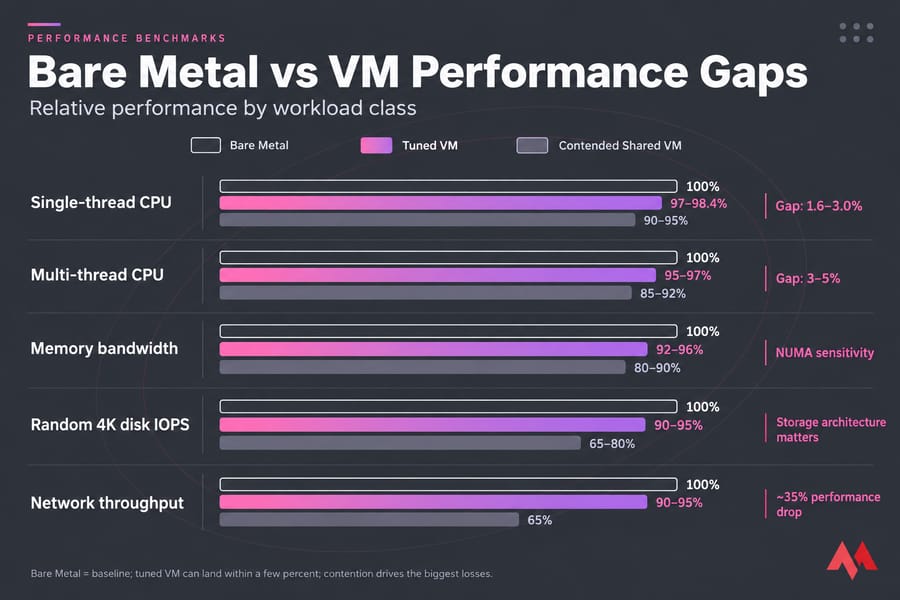
Why do the gaps differ so much? CPU is cheap to virtualize because VT-x and AMD-V do the heavy lifting. Memory bandwidth degrades when a VM's vCPUs straddle NUMA nodes. Storage suffers most when the provider uses network-attached block storage instead of local NVMe — that's an architecture choice, not a virtualization tax. Network takes the biggest hit from virtual switching and shared NIC queues.
Here's the nuance most pages skip: most "bare metal is 30% faster" claims are really measuring contention, not virtualization. A pinned, NUMA-aligned KVM guest on local NVMe lands within a few percent of bare metal. A 2 vCPU shared-core instance on an oversold host does not. Same technology, wildly different result.
Benchmark your own workload
Don't trust anyone's numbers, including these. Run sysbench for CPU and OLTP, fio for 4K random read/write IOPS and latency percentiles, and iperf3 for throughput. Phoronix Test Suite if you want breadth. Then watch %st in vmstat and graph it in Prometheus/Grafana for a full week — p99 latency under real traffic tells you more than any peak number.
Cost and Licensing: The TCO Most Comparisons Ignore
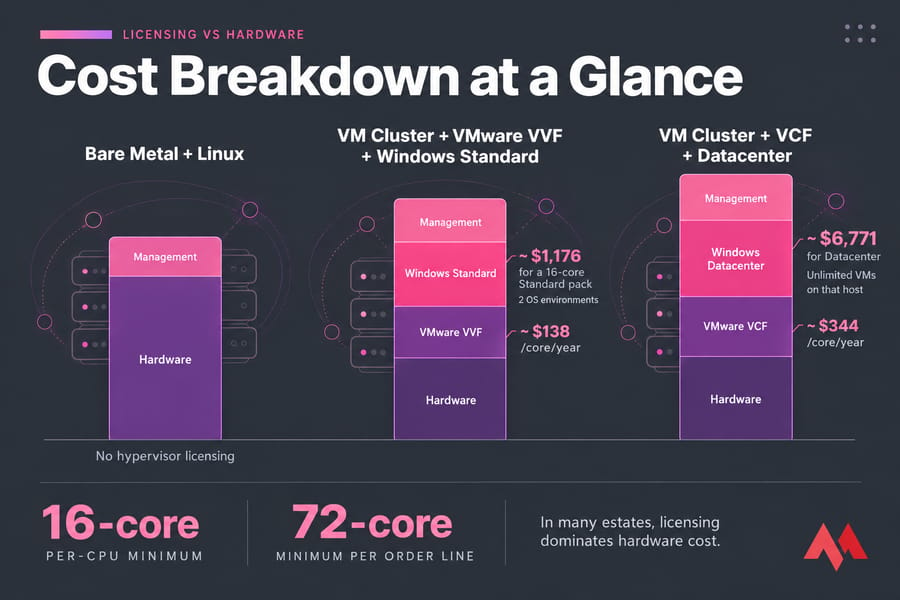
Hardware is rarely the deciding cost. Licensing frequently is, and after Broadcom's changes it often dominates the entire model.
VMware moved to per-core subscriptions. Recent analyses put vSphere Foundation (VVF) around $138/core/year and VMware Cloud Foundation (VCF) around $344/core/year at 1-year list pricing (AceMQ, 2026), with advisors quoting $150–190/core/year in real deals (Glaeser IT). Two rules hurt small estates badly: a 16-core-per-CPU minimum, and since April 2025 a 72-core minimum per order line. If you run a modest 3-node cluster, you may be paying for cores you don't have.
Windows Server 2025 stacks on top: roughly $1,176 for a 16-core Standard pack and $6,771 for Datacenter, with 8 cores per CPU and 16 cores per server as minimums. Standard licenses two OS environments; Datacenter licenses unlimited VMs on that host. Then add CALs per user or device.
The utilization threshold
The break-even rule I use is simple. Add up your monthly VM spend for a workload group, then compare it to a bare metal box that fits the same peak demand. If your sustained utilization sits above roughly 60–70% around the clock, bare metal almost always wins per unit of work. Below 30%, VMs win, because you're paying for idle silicon on a dedicated box.
Spiky traffic? VMs. Flat, always-on load? Bare metal. That's most of the calculation.
Security and Isolation: Physical Separation vs Hypervisor Boundaries
Bare metal removes an entire attack surface. It also hands you responsibilities you may not want.
The hypervisor risk is real and documented. VMware patched three ESXi vulnerabilities in March 2025 — CVE-2025-22224 (CVSS 9.3), CVE-2025-22225, and CVE-2025-22226 — chained to enable VM escape, and they were exploited in the wild according to reporting from Kaspersky, Huntress, and Arete. On a multi-tenant host, a successful escape means someone else's compromise becomes your problem. If you're strengthening the VM side of your stack, the same logic applies to virtual machine security best practices.
But bare metal isn't a security freebie. You inherit BMC/IPMI exposure (never put that interface on the public internet — I've seen it done, and it ends badly), firmware and microcode patching, RAID controller updates, and full responsibility for OS hardening. You also lose hypervisor snapshot rollback, which is a genuinely useful ransomware recovery tool.
| Bare metal removes | Bare metal makes you own |
|---|---|
| Hypervisor escape risk | BMC/IPMI attack surface |
| Shared-host side channels | Firmware and microcode patching |
| Noisy-neighbor data exposure | All OS-level hardening |
| Provider-side hypervisor CVEs | No snapshot-based rollback |
On compliance: PCI DSS, HIPAA, GDPR, SOC 2 and ISO 27001 don't mandate bare metal. But single tenancy makes the audit conversation shorter, especially around data residency and shared-resource controls. Fewer compensating controls to document.
Scalability, Provisioning Speed and Disaster Recovery
The "bare metal takes days" objection is outdated. NetActuate reports under 10 minutes for a pre-racked server with a working BMC; Oracle Cloud quotes 5–10 minutes for bare metal instances versus sub-90 seconds for VMs. Still slower — but not a different order of magnitude anymore.
What you genuinely lose on bare metal is mobility. No live migration. No vMotion-style evacuation before maintenance. No instant HA restart on another host. If a PSU dies at 3am, you're waiting on a hands-on-hardware fix or a failover you built yourself.
That's the honest trade, and it's why the answer for a lot of teams is neither/both. Keep the elastic tier virtual. Keep the heavy tier physical.
Best Use Cases for Bare Metal Servers
- Databases and analytics: PostgreSQL, MySQL, ClickHouse, Elasticsearch. High sustained IOPS and predictable p99 latency matter more than elasticity.
- AI/ML training and GPU inference: native PCIe access, no passthrough quirks, full NVLink topology.
- Game servers and HFT: tick-rate stability and microsecond latency are destroyed by steal time.
- Licensing-heavy enterprise apps: when per-core licensing means virtualization overhead literally costs money.
- Bare metal Kubernetes: higher pod density, no double abstraction. Worth reading alongside our comparison of VMs versus containers.
Best Use Cases for Virtual Machines
- Web and app tiers: variable traffic, horizontal scaling, cheap redundancy.
- Dev, test, staging, CI/CD runners: snapshot, break, restore, destroy. Bare metal makes this miserable.
- Multi-OS and legacy support: Windows virtual machines and Linux virtual machines on one host; old apps pinned to old kernels.
- Disaster recovery: replicated VMs restart in minutes on other hardware.
- Virtual desktops and VDI: if you're weighing the two delivery models, this VDI vs VM breakdown is the right starting point.
Bare Metal or VM? A 7-Question Decision Framework
Score one point for bare metal on each "yes":
- Is sustained utilization above 60% around the clock?
- Is p99 latency a contractual or revenue-critical metric?
- Do you need native GPU or PCIe device access?
- Are you paying per-core licenses for the software running on it?
- Does an auditor need documented single tenancy?
- Is the workload stable and predictable over 12+ months?
- Do you have the ops capability to own firmware, BMC, and HA yourself?
Five or more: go bare metal. Two or fewer: stay on VMs. Three or four: build the hybrid.
Pattern 3 — the hybrid split stack
This is what mature teams actually run. Web and app tier on virtualized instances for elasticity and easy rollback. Database, GPU, or licensing-heavy tier on bare metal for consistency and cost control. Connect them over private networking. You get the snapshots where you need them and the raw throughput where it pays.
How to Get Near-Bare-Metal Performance From a VM
If you can't move to bare metal yet, close the gap. Start with our practical guide on how to optimize VM performance, or if you're provisioning a fresh guest, how to set up a virtual machine walks through the basics:
- Buy dedicated-core (VDS-class) instances, not shared-core
- Enable CPU pinning and keep vCPUs inside a single NUMA node
- Use huge pages for database and JVM workloads
- Insist on local NVMe, not network-attached block storage
- Use virtio drivers everywhere; SR-IOV or PCIe passthrough for network-heavy guests
- Monitor steal time continuously and escalate if it stays above 3%
Common Mistakes When Choosing Between Bare Metal and VMs
- Buying bare metal for a workload that idles 80% of the day. You're renting silence.
- Blaming virtualization for what's really oversubscription. Check
%stfirst. - Ignoring licensing until after the hardware order. It can dwarf the hardware line.
- Migrating to bare metal without replacing HA. Losing live migration with no plan is how you eat a 4-hour outage.
- Assuming bare metal is automatically more secure. Exposed IPMI says otherwise.
- Forcing a binary choice. The split stack usually beats both.
Ready to act on it? Compare MonoVM dedicated server configurations for the heavy tier, or spin up a KVM VPS for everything that needs to scale on demand. You can also browse the full VM hosting stack if you want both under one roof.

An experienced tech and developer blog writer, specializing in VPS hosting and server technologies. Fueled by a passion for innovation, I break down complex technical concepts into digestible content, simplifying tech for everyone.