
If you only want the answer, here it is: npm, Yarn, and pnpm are all Node.js package managers, but they differ in speed, disk usage, workspace support, and compatibility. npm is the safest default, pnpm is often the best choice for performance and monorepos, and Yarn is useful in teams already invested in its workflow—especially Yarn Berry features.
If you're new to this space, you should already know the basics of what is Node.js and how a package.json file works. This page compares package managers, not runtimes, frameworks, or build tools. If you still need a local setup, start by learning how to install Node.js and npm and how to check your Node.js version.
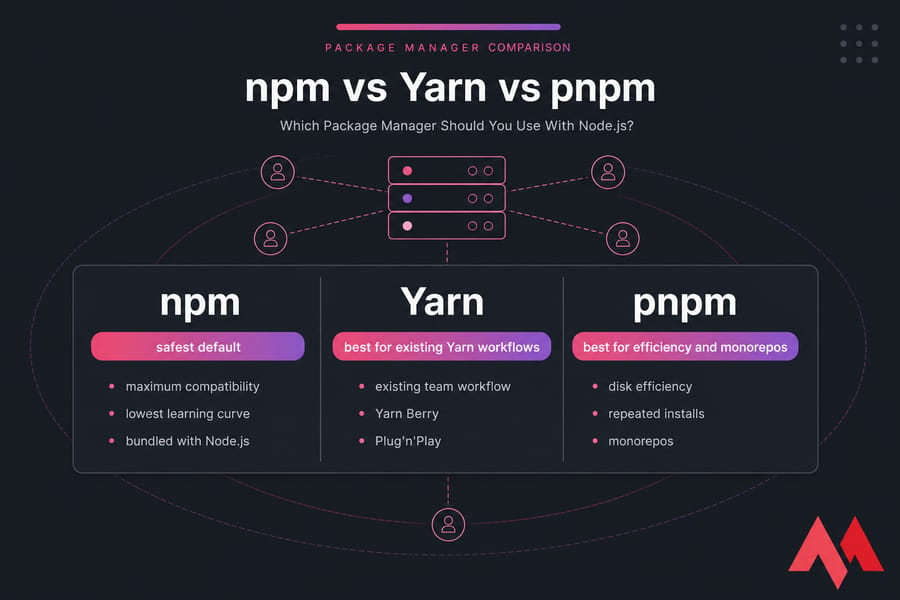
- Use npm if you want maximum compatibility, the lowest learning curve, and the easiest match with tutorials, hosting docs, and standard Node.js workflows.
- Use pnpm if you're starting a modern project, care about disk efficiency, or run a monorepo with workspaces and shared packages.
- Use Yarn if your team already uses it, or if you specifically want Yarn Berry features like Plug'n'Play and stricter workflow controls.
Which package manager is best for beginners?
npm. It's bundled with Node.js, most beginner guides assume it, and you won't spend your first afternoon debugging tooling differences that have nothing to do with your app.
Which package manager is best for teams and production apps?
For most teams, the real choice is npm vs pnpm. npm wins on compatibility and familiarity. pnpm wins on repeated install efficiency, storage savings, and monorepo ergonomics. Yarn still makes sense, but mostly when you're continuing an existing Yarn workflow rather than choosing fresh.
Which package manager is best for monorepos?
pnpm is usually the strongest pick for monorepos. Yarn is also capable, especially Yarn Berry, while npm workspaces have improved a lot but still feel more basic in larger multi-package repos.
| Scenario | Best Choice | Why | Caveat |
|---|---|---|---|
| Beginner app | npm | Bundled with Node.js and easiest to follow in tutorials | Not the most disk-efficient |
| Solo developer building a Next.js app | pnpm | Fast repeated installs and cleaner workspace handling | Occasional compatibility checks still matter |
| Startup or product team | pnpm | Good balance of speed, storage savings, and team consistency | Team should test CI and Docker carefully |
| Enterprise or compatibility-first team | npm | Broad ecosystem support and fewer surprises | Less opinionated for advanced workflows |
| Existing Yarn-based repo | Yarn | Switching may add churn without enough payoff | You must distinguish Classic from Berry |
| Large monorepo | pnpm | Strong workspace support and efficient shared storage | Stricter layout can expose sloppy dependencies |
| Tutorial parity or copy-paste simplicity | npm | Most docs and examples work out of the box | You give up some efficiency |
| CI-heavy pipelines or constrained VPS | pnpm | Storage model helps on repeated installs and smaller disks | Needs a bit more setup discipline |
If you want the reasoning behind these recommendations, the next sections break down how each package manager works.
What is a Node.js package manager and how do npm, Yarn, and pnpm work?
A Node.js package manager handles dependency installation, version resolution, lockfiles, and project scripts. In plain English, it reads your package.json, figures out which packages your app needs, pulls them from a registry, and makes them available to your project.
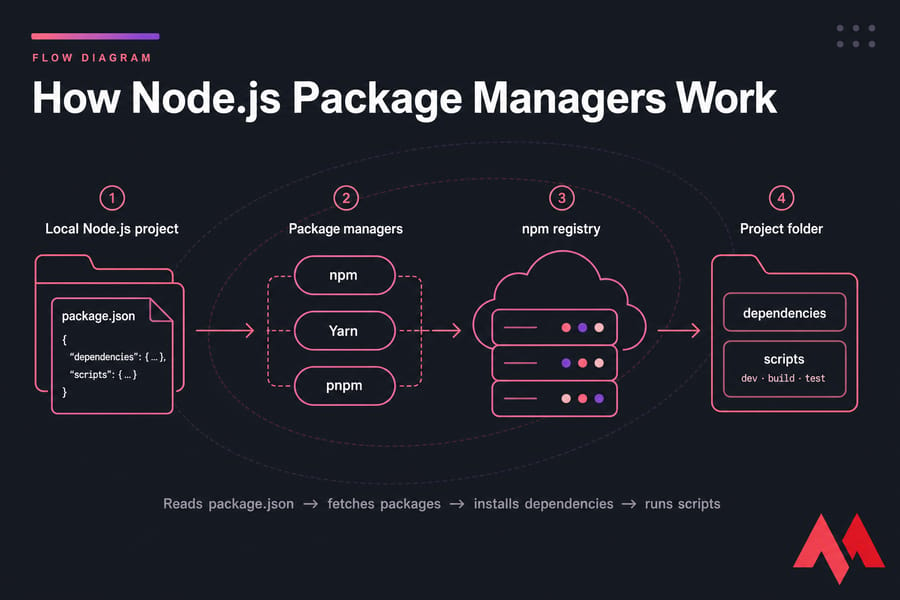
All three tools work with the same general ecosystem. You declare dependencies in package.json, run an install command, and the package manager fetches packages from the npm registry or another configured registry. It also runs scripts like dev, build, and test. That's the shared part.
Where things start to differ is in how each tool resolves versions, stores package data, structures node_modules, and handles workspaces. And yes, those differences absolutely matter once your app gets bigger, your team grows, or your CI pipeline starts burning minutes for no good reason.
What npm does in a Node.js project
npm is the default Node.js package manager. It ships with Node.js, so once you've installed Node, npm is already there. For a lot of people, that's enough reason to use it.
npm installs dependencies, generates package-lock.json, runs scripts from package.json, and supports modern features like workspaces. Older articles love to paint npm as slow and clunky. That's dated, honestly. Modern npm is much better than its reputation from years ago.
How Yarn works
Yarn started as an alternative focused on performance, consistency, and developer workflow. But here's the part many comparison articles botch: Yarn isn't one thing anymore. You need to separate Yarn Classic from Yarn Berry.
Yarn Classic behaves more like what many developers expect from a traditional package manager. Yarn Berry introduces a newer architecture, extra workflow controls, and optional Plug'n'Play instead of the usual node_modules layout. That's powerful — but also where compatibility questions start to creep in.
How pnpm works differently
pnpm uses a content-addressable store and links packages into projects rather than copying dependency trees in the usual way. The result is less duplicate data on disk and often faster repeated installs, especially when you're working across multiple projects or a monorepo.
In practice, pnpm is stricter. That's mostly a good thing. I've seen it expose broken dependency assumptions that npm had quietly tolerated for months. Annoying at first, sure. Useful in the long run? Usually yes.
Now that the basic roles are clear, let’s compare the real differences that affect day-to-day development.
npm vs Yarn vs pnpm differences: feature comparison table
This is where the npm Yarn pnpm difference becomes easier to see. Instead of vague claims about one being "better," you want to compare lockfiles, install behavior, workspace support, compatibility, and how each tool handles node_modules.
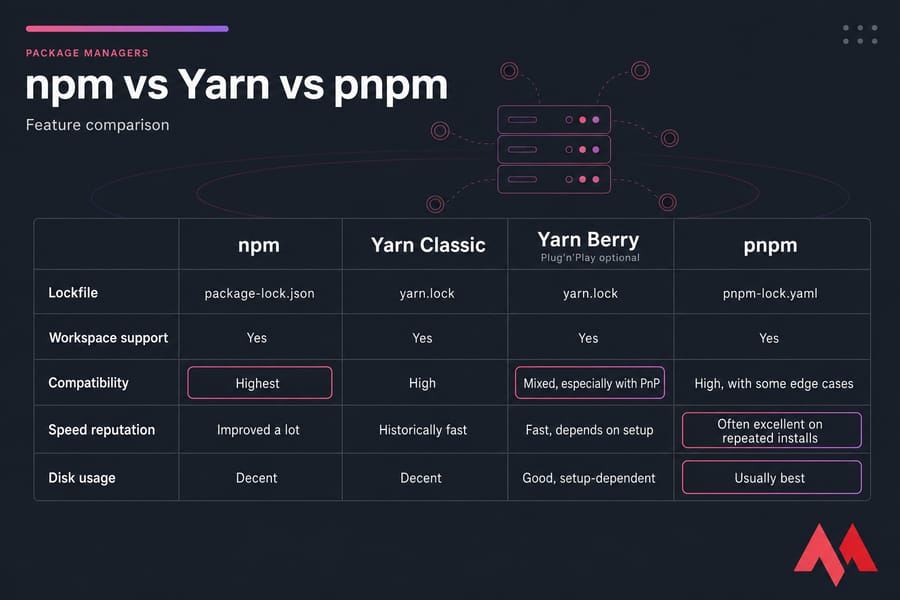
| Feature | npm | Yarn Classic | Yarn Berry | pnpm |
|---|---|---|---|---|
| Bundled with Node.js | Yes | No | No | No |
| Lockfile | package-lock.json | yarn.lock | yarn.lock | pnpm-lock.yaml |
| Default install command | npm install | yarn | yarn | pnpm install |
| Workspace support | Yes | Yes | Yes | Yes |
| node_modules model | Traditional | Traditional | Can use node_modules or Plug'n'Play | Linked from global content-addressable store |
| Speed reputation | Improved a lot | Historically fast | Fast, depends on setup | Often excellent on repeated installs |
| Disk efficiency | Decent | Decent | Good, setup-dependent | Usually best |
| Ecosystem compatibility | Highest | High | Mixed, especially with PnP | High, with some edge cases |
| Learning curve | Lowest | Low | Higher | Moderate |
| CI fit | Strong | Strong | Strong with correct config | Very strong |
| Docker fit | Strong | Strong | Mixed depending on workflow | Very strong |
| Best-fit scenario | Safe default and broad compatibility | Legacy Yarn teams | Teams invested in Berry features | Modern projects and monorepos |
Lockfiles and dependency resolution
npm creates package-lock.json, Yarn uses yarn.lock, and pnpm uses pnpm-lock.yaml. All three exist for the same reason: deterministic installs. If your local machine, CI runner, and production server install different dependency trees, you'll hate your life pretty quickly.
Lockfile behavior matters more in teams than in solo hobby projects. And no, you should never keep multiple lockfiles in one repository. If you need to check your npm version before comparing behavior, do that first.
node_modules handling and storage model
npm and Yarn Classic usually work with a traditional node_modules layout. Yarn Berry can avoid that with Plug'n'Play. pnpm keeps package contents in a shared store and links them into each project. That's why pnpm often wins on disk space.
This storage model isn't just trivia. It affects compatibility, dependency strictness, and how your repo behaves in Docker or CI.
Workspace and monorepo support
All three support workspaces now, which is good news. But the quality of the experience isn't identical. npm workspaces are solid for simpler setups. Yarn and pnpm generally feel more mature when your repo has lots of apps, shared libraries, and build orchestration.
npm vs Yarn vs pnpm performance: install speed, cache, and disk usage
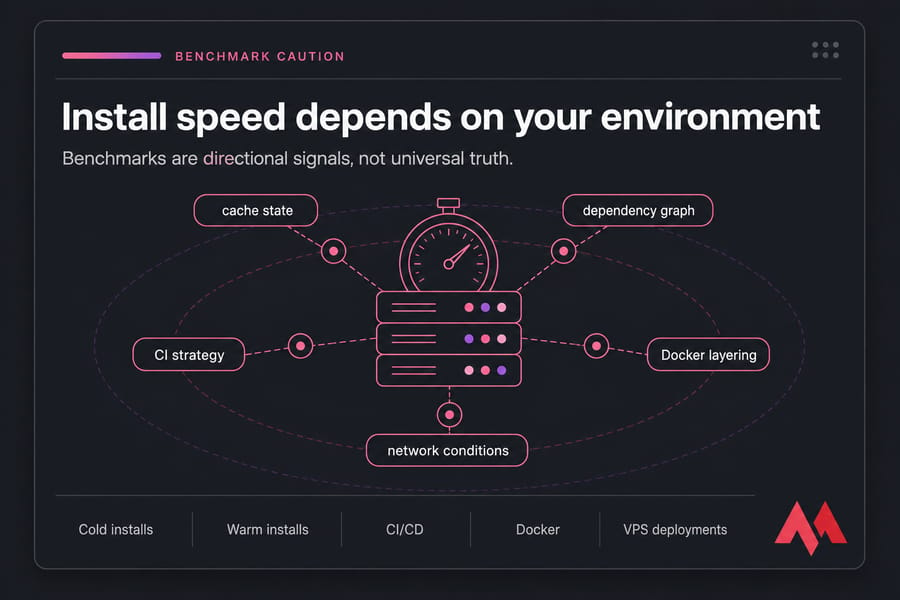
Performance is the section people jump to first. Fair enough. But this is also where comparison pages get sloppy. Package manager speed depends on cold installs vs warm installs, dependency graph size, cache state, CI/CD setup, registry latency, Docker layering, and plain old network conditions.
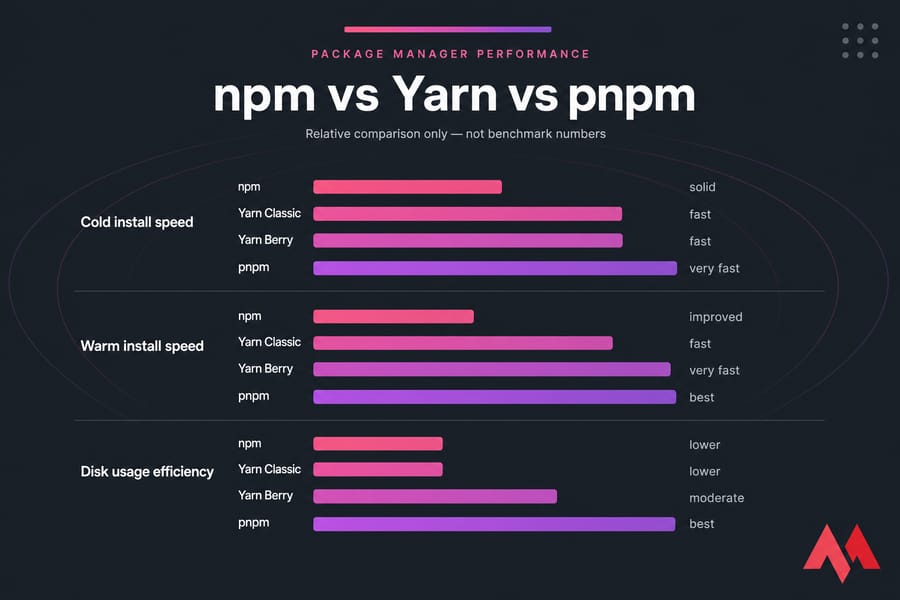
So, is pnpm faster than npm? Often, yes — especially on repeated installs and in environments where its shared store can do real work. But "often" is the honest word here. Not "always."
Which package manager is fastest?
On repeated installs, pnpm frequently comes out ahead because it reuses packages from its store efficiently. Yarn can also be very quick, depending on whether you're using Classic or Berry and how your workflow is configured. npm has improved a lot and is no longer the obvious loser many older blog posts make it out to be.
For a small solo Next.js app, the difference may feel minor. For a React monorepo with shared UI packages, several apps, and CI jobs running all day, it starts to matter a lot more. Minutes add up. Bills do too.
In my experience, teams chasing raw benchmark bragging rights miss the real point. What you care about is consistent install time under your actual conditions: local development, GitHub Actions, Docker builds, and production deployment pipelines.
Which one uses the least disk space?
pnpm is usually the clear winner on disk space. Its content-addressable store keeps package data once, then links it into projects. That's especially handy if you have multiple repos on the same machine or a big monorepo with repeated dependency overlap.
npm and Yarn can still be perfectly usable, but they typically duplicate more package data across projects. On a fat workstation, maybe you don't care. On a smaller VPS, a shared CI runner, or a Docker-heavy setup, you probably will.
That matters on infrastructure more than people realize. If you're planning to deploy a Node.js on VPS, storage efficiency and predictable installs are not abstract concerns. They're part of keeping deploys fast and keeping small plans from feeling cramped.
Why benchmarks do not tell the whole story
Benchmarks are useful directional signals. That's it. They are not universal truth.
A package manager can win a benchmark and still be the wrong choice for your team if it breaks a toolchain assumption, complicates onboarding, or causes weird CI behavior. I've seen this happen with both Yarn Berry and pnpm in repos that had hidden dependency issues.
- Cold installs: network and registry latency matter a lot.
- Warm installs: cache and local store design matter more.
- CI/CD: caching strategy often changes the result.
- Docker: layer design and lockfile stability matter almost as much as package manager choice.
- VPS deployments: disk limits and repeated build patterns can make pnpm more attractive.
If you're comparing system-level behavior, tools used to benchmark servers can also help you understand the machine you're building on. MonoVM has related reads on VPS benchmark tools and how to improve the performace of VPS. Not glamorous, but useful.
Run Your Node.js App on a Faster VPS
After choosing npm, Yarn, or pnpm, the next step is deploying your app on reliable infrastructure. Performance matters most in larger repos—which is why workspace support deserves its own comparison.
pnpm monorepo and workspaces vs npm workspaces vs Yarn workspaces
Workspaces let you manage multiple packages inside one repository. Think a frontend app, a backend API, and a shared UI or utility package living together in one monorepo. One lockfile. Shared dependency management. Cleaner linking between local packages.
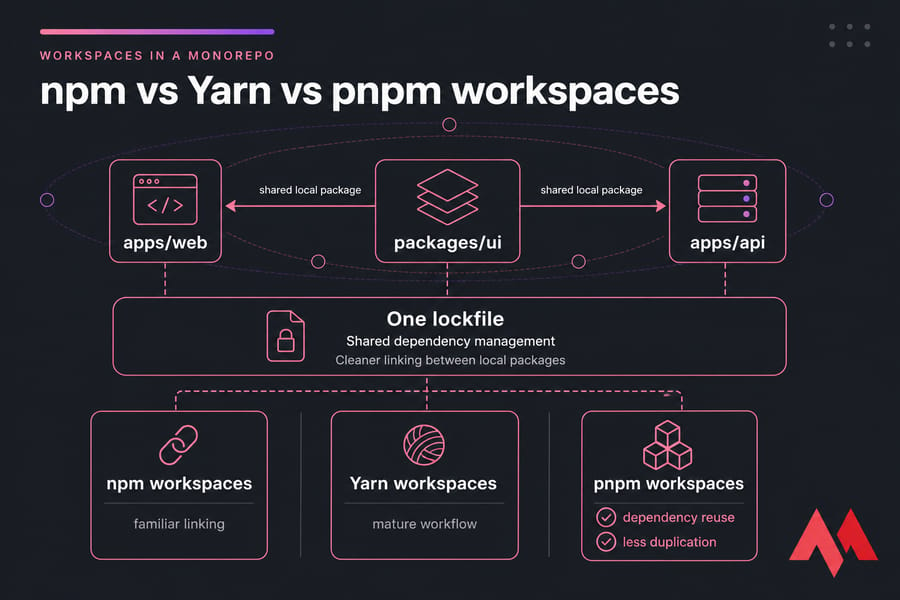
All three package managers support workspaces. The difference is how well they scale once the repo stops being cute and starts being real.
Which tool handles large repos best?
For larger monorepos, pnpm is usually my first recommendation. Its storage model and workspace behavior fit well with the way modern repos are structured, especially when you're using Turborepo, Nx, Vite, React, or multiple Node.js services in the same codebase.
Yarn workspaces are mature too, and teams already on Yarn often stick with it for good reason. npm workspaces are capable, but they still feel more straightforward than deeply optimized. That's not an insult. Sometimes straightforward is fine.
If you're choosing for a small startup repo with two apps and one shared package, any of the three can work. If you're managing dozens of packages, multiple CI pipelines, and lots of cross-package linking, pnpm usually feels better day to day.
How workspace linking differs
npm links local workspace packages in a familiar, traditional way. Yarn does similar things, but Yarn Berry can layer in stricter dependency control depending on configuration. pnpm links packages through its own store model, which can reduce duplication and expose undeclared dependency access that other setups quietly allow.
That last point is important. pnpm can surface problems where one package relies on a dependency it never declared directly. I've seen older repos pass installs under npm, then break under pnpm because the repo had been relying on hoisting accidents. That's not pnpm being broken. That's pnpm refusing to hide your mess.
Best package manager for Turborepo, Nx, and modern monorepos
For Turborepo and Nx-style repos, pnpm is often the strongest overall fit. It handles local packages well, keeps storage lean, and plays nicely with large dependency graphs. Yarn is still a serious option, especially if your tooling and team are already aligned around it. npm can work, but it usually isn't the first choice once the monorepo gets complex.
| Monorepo Need | npm | Yarn | pnpm |
|---|---|---|---|
| Simple workspaces | Good | Good | Good |
| Large package count | Fair | Good | Very good |
| Local package linking | Good | Good | Very good |
| Dependency deduplication | Fair | Good | Very good |
| Team familiarity | Highest | Depends on team | Growing, but not universal |
| Turborepo / Nx fit | Usable | Strong | Usually strongest |
Team familiarity still matters, though. A theoretically better tool can become a worse team choice if nobody understands the failure modes or deployment implications. If you're building full-stack apps and still choosing broader architecture, MonoVM also has a useful read on how to choose the right backend framework.
This is also where Yarn comparisons get tricky, because not all Yarn versions behave the same way.
Yarn Berry vs Yarn Classic and npm compatibility trade-offs
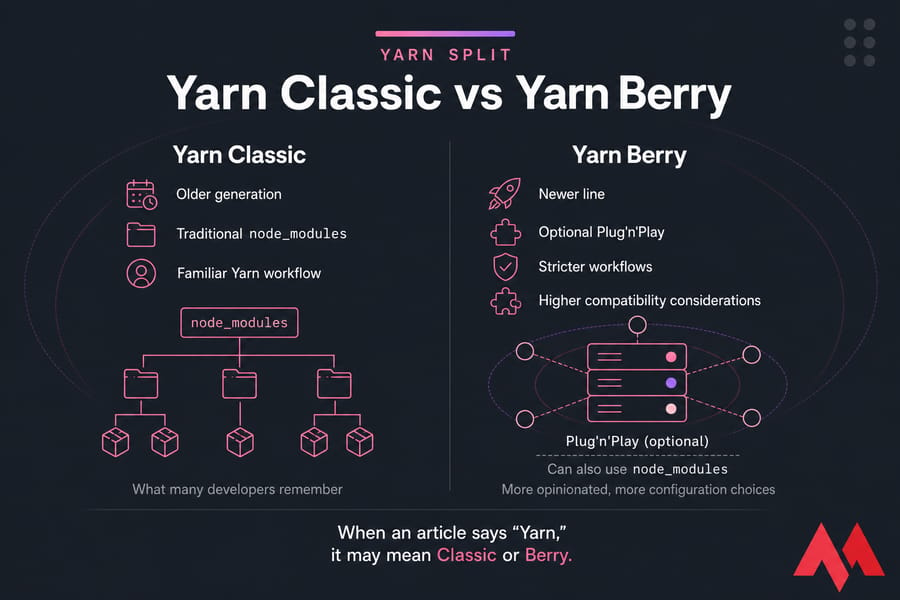
This is the part most articles either skip or rush through. And it matters a lot. When someone says "Yarn," they might mean Yarn Classic or Yarn Berry, and those are not interchangeable in practice.
Why Yarn can be confusing in comparisons
Yarn Classic is the older generation most developers remember from the npm vs Yarn debates of years ago. Yarn Berry is the newer line with a different philosophy, stronger workflow controls, and optional Plug'n'Play. If an article compares Yarn to npm without naming which Yarn it means, take it with a grain of salt.
That's why you still see contradictory opinions online. One person is talking about Classic. Another is talking about Berry. A third is remembering a benchmark from 2019. No wonder the conversation gets messy.
Plug'n'Play vs node_modules
Plug'n'Play, or PnP, is one of Yarn Berry's headline features. Instead of building a traditional node_modules directory, it uses a different package resolution model. That can improve determinism and reduce some filesystem overhead. Teams that adopt it properly often love it.
But there's a trade-off. A lot of tooling in the JavaScript ecosystem has historically assumed node_modules exists. Some tools now support PnP well. Some do not. Some mostly do, until one plugin blows up on a Friday afternoon. That's the real-world version.
If you want Yarn but don't want PnP, Yarn Berry can still be configured to use node_modules. That helps, though it also reduces some of what makes Berry distinct in the first place.
Tooling compatibility issues to know before choosing
npm has the highest compatibility floor because it's the default assumption in so many tutorials, scripts, and deployment guides. Yarn Classic is also broadly compatible. Yarn Berry is more nuanced: excellent for teams that embrace its model, less ideal for teams that want the least surprising path.
pnpm sits in the middle. It generally works very well, but its stricter dependency layout can reveal bad package assumptions in older repos or weaker toolchains. That's often fixable. Still, it's something you should test, not wave away.
If your priority is "I want everything to work the way most docs expect," npm is hard to beat. If your priority is "I want stricter workflows and I'm willing to tune the environment," Yarn Berry becomes more interesting. And if you want efficiency without going full PnP, pnpm is often the sweet spot.
Need the Yarn setup steps? Here’s how to install Yarn. With compatibility clarified, we can give much more useful recommendations for each package manager.
When to use npm for Node.js projects
npm is the safest default package manager for Node.js projects. It's bundled with Node.js, familiar to almost every developer, and supported by basically every tutorial, starter repo, and hosting guide you'll run into.
Best scenarios for npm
- You're a beginner and want the least friction.
- Your team values compatibility first and doesn't want package-manager-specific surprises.
- You're following tutorials or third-party docs that assume npm commands.
- Your app is a standard Node.js API or web app without a huge monorepo setup.
- You want the default path for onboarding new developers quickly.
Modern npm also has much better workspace support than it used to, and recent versions are good enough for many everyday apps. If you're on an older setup, it may be worth learning how to update npm before deciding it's too slow or limited.
Where npm falls short
npm is usually less disk-efficient than pnpm, especially across multiple projects. It also doesn't offer the same kind of opinionated workflow controls some teams want from Yarn Berry. If you're building a large monorepo or heavily optimizing CI, npm may feel fine — but not exceptional.
Recommended npm users
Use npm if you want broad compatibility, easy onboarding, and fewer edge cases. It's also the easiest answer if you just need to get moving today. And if npm isn't even available on your machine yet, MonoVM has guides to install npm on Ubuntu and fix the npm command not found error.
npm is the safest default—but it is not always the most efficient choice.
When to use Yarn for Node.js projects
Yarn still has a place. But you need to be honest about why you're choosing it. For many new projects, Yarn is no longer the automatic alternative people reached for a few years back. For existing Yarn teams, though, it can still be the right call.
Best scenarios for Yarn
- Your repo already uses Yarn and the workflow is stable.
- Your team relies on Yarn Berry features and knows how to work with them.
- You want stricter workflow controls than npm gives by default.
- You have internal tooling built around Yarn and switching would create unnecessary churn.
Where Yarn shines
Yarn Berry can be excellent when a team deliberately adopts its model, especially if it wants Plug'n'Play, strict dependency handling, and advanced workspace workflows. I wouldn't recommend it casually to beginners, but for teams that know why they're using it, it can be very effective.
Yarn Classic is different. It's still serviceable, but if you're starting fresh, you should ask whether you're choosing Yarn because you need it or just because you remember it being the cool alternative to npm. That's not the same thing.
When Yarn is not the best fit
If your team wants the simplest path with the fewest compatibility questions, npm is easier. If your team wants efficiency, fast repeated installs, and strong monorepo support without going all-in on Berry's model, pnpm often makes more sense.
So yes, Yarn is still relevant. No, I wouldn't treat Yarn Classic and Yarn Berry as one bucket. And if you're adopting it, do it on purpose.
For many modern teams, though, pnpm is the package manager that changes the economics of install speed and disk usage.
When to use pnpm for Node.js projects
pnpm is often the best package manager for many modern new projects. Not because it's trendy. Because its storage model, workspace support, and repeated install performance solve real problems once a project grows beyond a toy app.
Best scenarios for pnpm
- You're starting a new project and want a modern default.
- You run a monorepo with workspaces and shared local packages.
- You care about disk space across multiple repos or on smaller machines.
- You want faster repeated installs in local development or CI/CD.
- You build and deploy through Docker and want tighter dependency handling.
pnpm advantages for CI, Docker, and VPS environments
pnpm's store model can be especially attractive in CI/CD pipelines, Docker-based workflows, and server environments where repeated dependency installation happens all the time. On smaller VPS plans, storage efficiency becomes noticeable faster than you'd think.
If you're running Node.js apps on your own infrastructure, pnpm can be a smart fit for leaner deployments and cleaner workspace handling. That's one reason it comes up so often in teams deploying APIs, Next.js apps, or multi-service repos to virtual machines. If you're at that stage, MonoVM has resources on how to connect to your VPS
pnpm drawbacks to consider
pnpm isn't universally best. The main drawback is compatibility edge cases, especially in older repos that rely on sloppy dependency access or tools that make assumptions about package layout. Its stricter behavior can expose problems that npm quietly allowed.
That's usually good for code quality, but it can make migration feel rough at first. So if you're switching an existing production repo, test everything — scripts, builds, Docker images, CI jobs, and local developer setup. This part is a bit tedious, honestly, but it's where smart migrations are won.
If pnpm sounds appealing, the next step is understanding how to switch without breaking your workflow.
How to switch from npm to Yarn or pnpm safely
Switching package managers is not hard. Switching carelessly is hard. There's a difference.
Remove old lockfiles and install cleanly
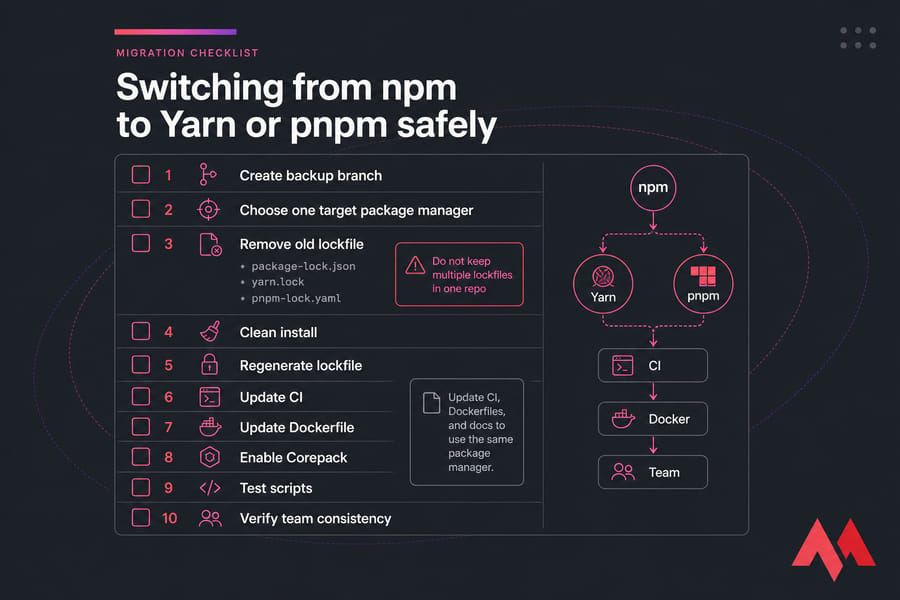
First, create a backup branch or make a clean commit before changing anything. Seriously. I've seen teams skip this because the migration looked "small," then waste an afternoon trying to reconstruct the last known-good dependency tree.
After that:
- Commit your current working state.
- Choose one target package manager.
- Delete the old lockfile:
package-lock.json,yarn.lock, orpnpm-lock.yaml. - Remove existing installed dependencies if needed.
- Run a fresh install with the new tool to regenerate the lockfile.
Do not keep multiple lockfiles in the same repo. That creates confusion fast, especially once CI starts using a different manager than local development.
Check scripts, CI, and Dockerfiles
This is where migrations actually fail. Not at install time. Later.
Update your CI commands, deployment scripts, Dockerfiles, and docs so they all use the same package manager. If your GitHub Actions workflow says npm ci but your repo now expects pnpm, you'll get inconsistent builds or flat-out failures.
For Docker, review layer order and install commands carefully. A lockfile change affects caching behavior. If you use Corepack, enable it so the project can pin package manager versions consistently across environments. That's one of those small details beginners skip and ops people end up cleaning up later.
You'll also want to verify your Node.js version and package manager version as part of the migration. Related guide: update Node.js.
Validate dependencies after migration
Once the new lockfile is generated, run the real checks:
- Start the dev server.
- Run builds.
- Run tests.
- Check lint and formatting scripts.
- Verify workspace linking if you're in a monorepo.
- Test CI and Docker builds explicitly.
If you're moving to pnpm, pay extra attention to undeclared dependencies. If you're moving to Yarn Berry, test any tooling affected by Plug'n'Play or your chosen linker. And make sure editors, IDE settings, and the team docs all reflect the new standard. Inconsistent local tooling causes more friction than the migration itself.
git checkout -b package-manager-migration
rm -f package-lock.json yarn.lock pnpm-lock.yaml
rm -rf node_modules
corepack enable
pnpm install
pnpm test
pnpm build
That's just an example flow, not a universal script. Use the commands that match your target manager. Before making the switch, avoid the common mistakes that cause most package-manager headaches.
Common package manager mistakes in Node.js projects
Most package-manager problems are self-inflicted. Not all, but most.
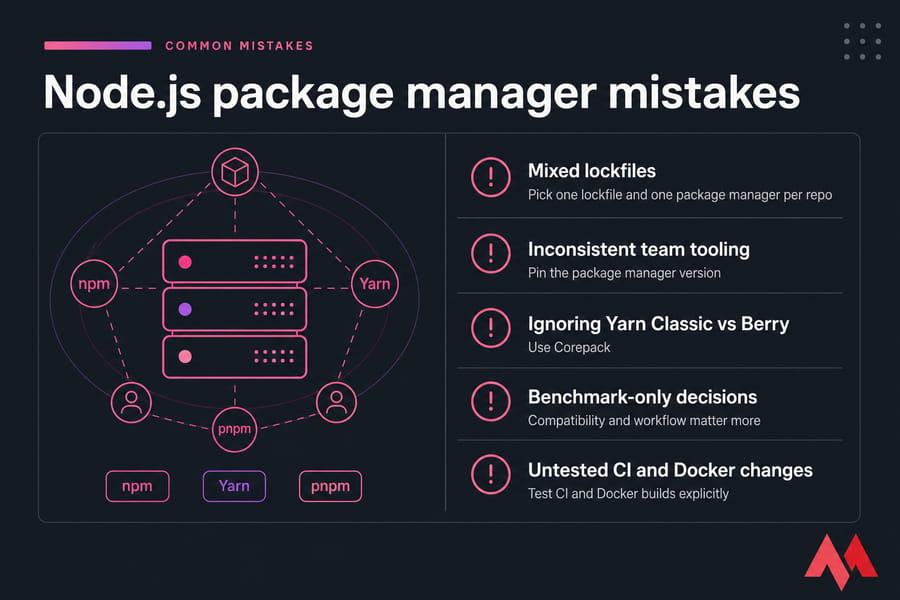
Mixing lockfiles in one repository
This is the fastest way to create inconsistent installs. Pick one lockfile and one package manager per repo. If you need different tools, use them in different projects — not in the same codebase.
Inconsistent team tooling
If one developer uses npm, another uses pnpm, and CI uses Yarn, you're not comparing tools anymore. You're manufacturing chaos. Pin the package manager version, document it, and use Corepack where it helps.
Choosing based only on benchmarks
Raw speed is nice. Compatibility, deterministic installs, and a predictable developer workflow matter more. I've seen teams choose a "faster" tool, then lose the time back in CI/CD fixes and Docker rebuild confusion.
Other common misses: ignoring the Yarn Classic vs Yarn Berry distinction, not validating old repos under pnpm, and forgetting to update automation after migration. If your team needs process cleanup around version control and container workflows, MonoVM has quick references for a basic Git commands cheat sheet and a Docker cheat sheet.
Still deciding? These FAQs cover the edge questions readers usually have before choosing.
Final recommendation: what most teams should choose now
If you want my blunt answer, here it is.
Use npm if you want the safest default, the widest compatibility, and the easiest path for beginners or mixed-skill teams. Use pnpm if you're starting a modern project, especially one with workspaces, CI-heavy pipelines, Docker builds, or monorepo needs. Use Yarn mainly when you already have a solid Yarn workflow or specifically want Yarn Berry features and understand the trade-offs.
For most new projects in 2025, I'd tell people to choose between npm and pnpm first. Yarn isn't dead. It's just more situational now.
Picked Your Package Manager? Deploy Your Node.js Project with Confidence
Whether you stick with npm, migrate to pnpm, or maintain a Yarn-based workflow, MonoVM gives you the server performance and control to run Node.js applications smoothly in development and production. You can explore Node.js VPS hosting, get help from 24/7 support, or choose a broader Linux VPS if you want a more custom stack.

An experienced tech and developer blog writer, specializing in VPS hosting and server technologies. Fueled by a passion for innovation, I break down complex technical concepts into digestible content, simplifying tech for everyone.