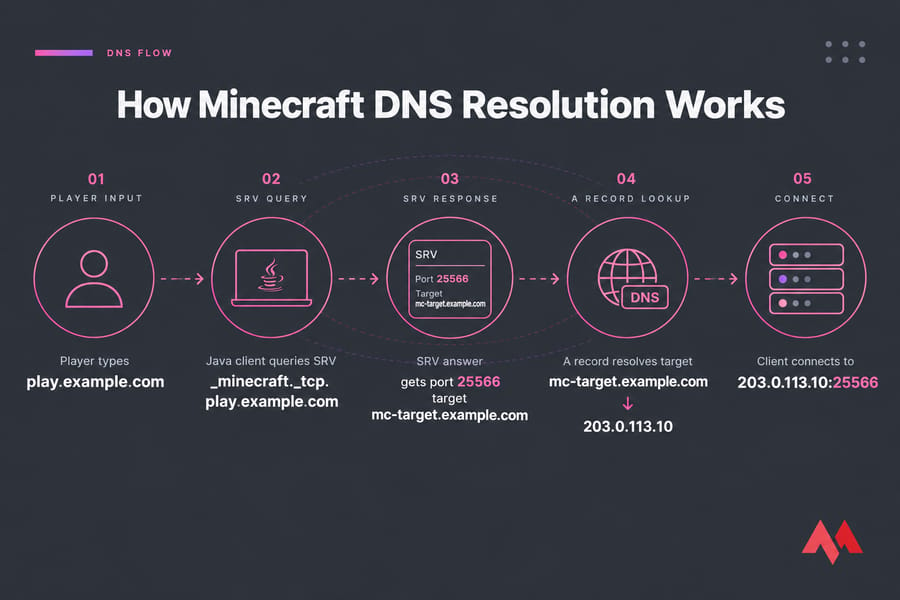
Here's how to set up DNS records for a Minecraft server: create an A record that points a domain or subdomain (say, play.example.com) at your server's public IP. If your Java server runs on a non-default port, add an SRV record named _minecraft._tcp.play as well. That record tells the game client which hostname and port to use, so players never have to type :25566.
That's the short version. In practice, it usually breaks in one of three ways: an SRV target with no A record behind it, Cloudflare's orange cloud left on, or Bedrock players wondering why the domain does nothing for them. Below you'll find exact values, panel field mappings, verification commands, and fixes.
Key takeaway: If your Java server listens on the default port 25565, an A record is usually all you need. Add an SRV record only when you want a clean domain on a custom port.
What DNS Records a Minecraft Server Needs
You'll touch at most three record types. Need a refresher on what DNS is? Start there.
| Record Type | Used For | Required When | Example |
|---|---|---|---|
| A | Maps a hostname to an IPv4 address | Always (directly or as an SRV target) | play.example.com → 203.0.113.10 |
| AAAA | Maps a hostname to an IPv6 address | Your server has a reachable IPv6 address | play.example.com → 2001:db8::10 |
| SRV | Points a service to a target hostname and port | Java Edition on a non-default port | _minecraft._tcp.play → 0 5 25566 mc-target.example.com |
When an A Record Is Enough
Java Edition server on 25565? Then the client already knows the port. Point play.example.com at your IP and players just type the hostname. Done.
When You Need an SRV Record
On 25566 or whatever port your host assigned? Java clients check for an SRV record before connecting, and it supplies the real port. Without one, players type the port by hand.
When to Use an AAAA Record for IPv6
Only add one if your server really listens on IPv6. A broken AAAA is worse than none, since some clients try IPv6 first. More on this in MonoVM's guide to AAAA records for IPv6.
A Record vs SRV Record for Minecraft
People mix these up constantly. They aren't competing options. They do different jobs.
What an A Record Does
It answers one question: "what IP is this name?" No port, ever.
What an SRV Record Does
An SRV record answers "where does the Minecraft service for this name live?" It returns a target hostname plus a port, and the client still resolves that target through A or AAAA. SRV doesn't replace the A record. It sits on top of one.
Which Record Hides the Port Number
| Your Setup | Records to Create | Players Type |
|---|---|---|
| Java, port 25565 | A (plus AAAA, optional) | play.example.com |
| Java, custom port | A + SRV | play.example.com |
| Java, custom port, A record only | A | play.example.com:25566 |
| Bedrock, any port | A (SRV is ignored) | Hostname in the address field, port in the port field |
Only SRV hides a non-default port. Found your row? Gather a few details next.
Custom Domain for a Minecraft Server: Before You Start
Five minutes of prep saves an hour of guessing. Have these ready:
- DNS provider login. Your registrar, Cloudflare, or cPanel, wherever your nameservers point.
- The server's public IP. Not a
192.168.x.xLAN address. - Your edition and port. Check
server-portinserver.properties. Java defaults to 25565 TCP, and Bedrock defaults to 19132 UDP. - Root domain or subdomain. Decide now whether players join on
example.comorplay.example.com. - Working connectivity. Can players connect with the raw IP right now? If not, sort out your firewall and port forward a Minecraft server first.
Warning: DNS can't open a closed port, repair a broken NAT rule, or get past a firewall that blocks traffic. All it does is translate names.
How to Point a Domain to a Minecraft Server with an A Record
Start here regardless of setup. Everything else depends on it.
Example A Record for play.example.com
- Open the DNS zone for
example.comin your provider's panel. - Click Add record and choose type A.
- Set Name to
play. Most panels add the domain for you. - Set Value / IPv4 address to
203.0.113.10, your server's IP. - Leave TTL on Auto, or set it to 300 seconds while you test.
- Save.
Type: A
Name: play
Value: 203.0.113.10
TTL: Auto (or 300)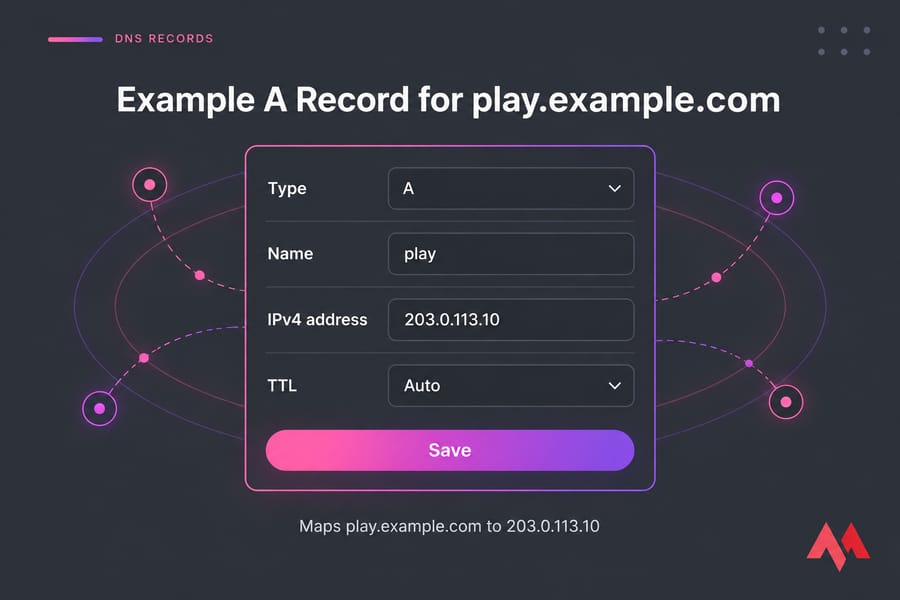
New to this? MonoVM's guide to setting up a domain on a VPS covers the nameserver side.
Root Domain vs Subdomain Setup
You can use @ (the root) as the name, but I wouldn't. Your root usually hosts the website. A subdomain keeps the two separate, and moving the server later is a one-record change.
Pro tip: Use play. for the game server and keep the root domain for your website or landing page.IPv6 Example with AAAA
Type: AAAA
Name: play
Value: 2001:db8::10
TTL: Auto
If your server uses a custom port, the SRV record comes next.
How to Create a Minecraft SRV Record for Java Edition
SRV records are defined in RFC 2782. Java Edition has looked them up when connecting ever since the 1.3 era. When someone types play.example.com, the client first asks DNS for _minecraft._tcp.play.example.com. If a record exists, the client uses the port and target it returns.
The _minecraft._tcp Naming Format
The name has three parts: the service (_minecraft), the protocol (_tcp), and the hostname players type (play). Stick to that order and those underscores. If the hostname isn't play, change the last part to match.
SRV Record Example for a Custom Port
First confirm the target (mc-target.example.com, or just play.example.com) has a working A record. Then add an SRV record using the port your server actually listens on:
Type:     SRV
Service:  _minecraft
Protocol: _tcp
Name:     play
Priority: 0
Weight:   5
Port:     25566
Target:   mc-target.example.com

Full record:
_minecraft._tcp.play.example.com. 300 IN SRV 0 5 25566 mc-target.example.com.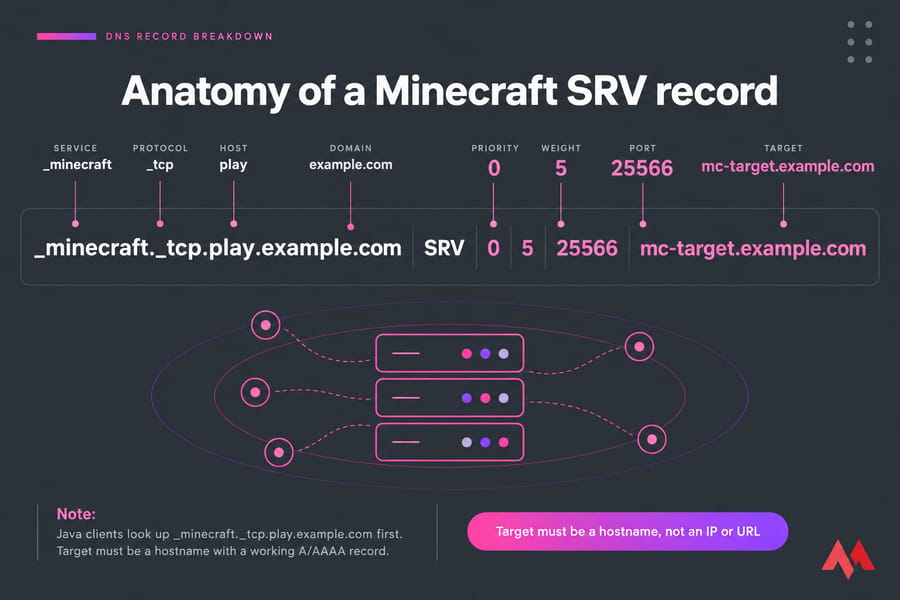
Priority, Weight, Port, and Target Explained
| Field | What It Means | What to Enter |
|---|---|---|
| Priority | Lower number wins when there are several records | 0 |
| Weight | Splits traffic between records that share a priority | 5 (any value works with one record) |
| Port | The TCP port the server listens on | Your real server-port |
| Target | Hostname that resolves through A/AAAA | mc-target.example.com |
Warning: The target has to be a bare hostname. Don't use an IP, a URL like https://..., or a path. RFC 2782 also says the target shouldn't be a CNAME alias, and resolvers handle that case inconsistently.Not sure which IP and port your host assigned? Here's how to find your Minecraft server address.
Minecraft SRV Record: Cloudflare and Registrar Setup Examples
Every panel labels these fields a little differently, but the data underneath is identical. Here's how the labels map:
| Provider | Field Label | What to Enter |
|---|---|---|
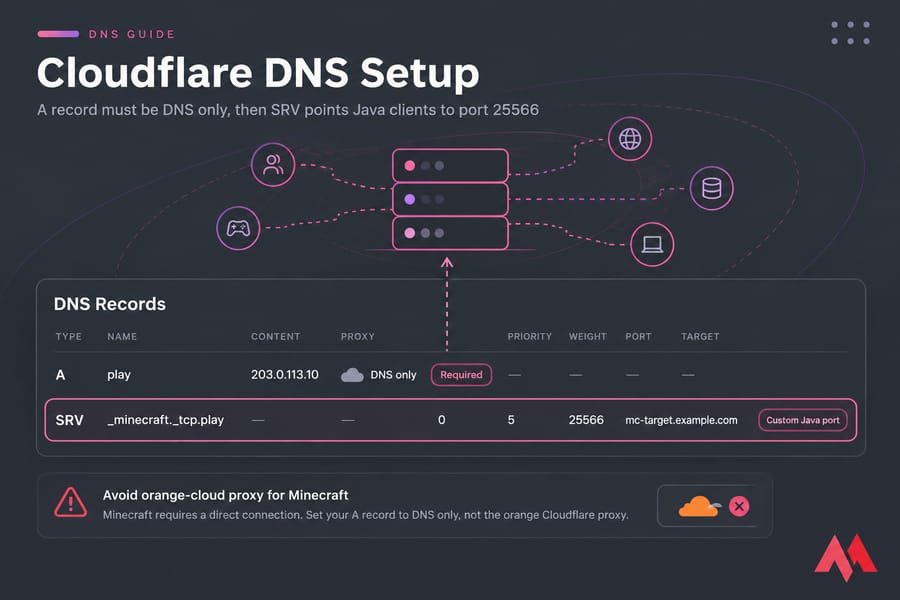
| Cloudflare | Name | _minecraft._tcp.play |
| cPanel Zone Editor | Name | _minecraft._tcp.play.example.com. (full name) |
| Generic registrar | Service / Protocol / Host | _minecraft / _tcp / play |
| All three | Priority / Weight / Port / Target | 0 / 5 / 25566 / mc-target.example.com |
Cloudflare Field Mapping
Cloudflare works fine, with one rule: set the game hostname's A record to DNS only (grey cloud). The orange-cloud proxy is built for web traffic, and Minecraft connections through it fail. It's the most common Cloudflare mistake I see.
cPanel Zone Editor Field Mapping
Go to Zone Editor → Manage → Add Record → SRV and type the full name. A missing domain suffix is the usual culprit when records land in the wrong place.
Generic Registrar DNS Manager Field Mapping
Some registrars split service, protocol, and host into separate boxes; others want _minecraft._tcp.play in one Host field. Lost in the panel? This guide on managing the domain control panel will help. Once you've saved the records, check them.
Need a stable IP for your Minecraft domain? Hosting from home means your DNS breaks whenever your ISP changes your IP or blocks a port. View Minecraft VPS plans to get a fixed public IP, root access, and headroom for modded or growing servers.
How to Verify Minecraft DNS Records with nslookup
nslookup runs on Windows, macOS, and Linux. For more depth, see how to use nslookup to verify records.
Check the A Record
nslookup -type=A play.example.comGood output shows Address: 203.0.113.10. If you see a Cloudflare IP there, the proxy is still on.
Check the SRV Record
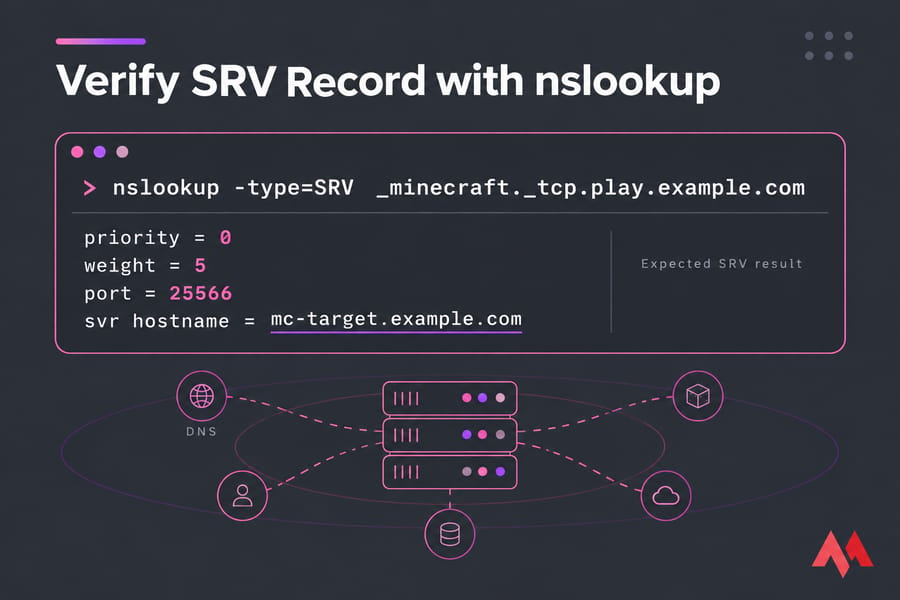
nslookup -type=SRV _minecraft._tcp.play.example.comYou want priority = 0, weight = 5, port = 25566, and svr hostname = mc-target.example.com. Then do an A lookup on that target.
Test After DNS Propagation
Query a public resolver directly (nslookup -type=SRV _minecraft._tcp.play.example.com 1.1.1.1), or use a global DNS checker. After that, try the address in the Java client's Direct Connect.
Quick summary: If nslookup returns the right answers and Minecraft still fails, DNS isn't the problem. Look at the port, the firewall, or the server config.Minecraft DNS Propagation and Troubleshooting
New records usually show up within minutes. Edits to existing records can take as long as the old TTL to clear from caches, and occasionally longer. DNS propagation explained covers why.
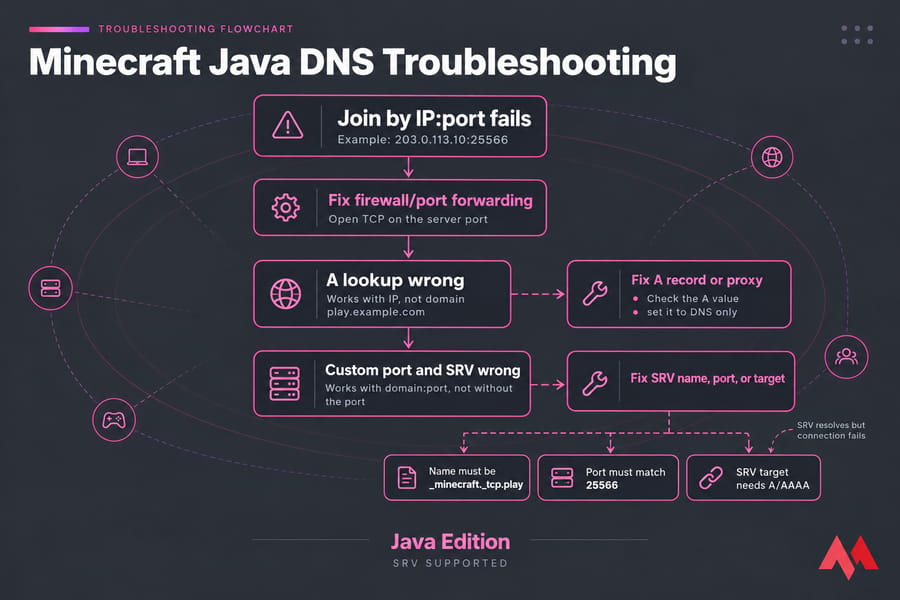
| Symptom | Likely Cause | Fix |
|---|---|---|
| Works with IP, not domain | Missing or wrong A record, or proxy enabled | Check the A value and set it to DNS only |
Works with domain:port, not without the port |
SRV missing, misnamed, or wrong host part | Name must be _minecraft._tcp.play |
| SRV resolves but connection fails | SRV target has no A/AAAA record | Add an A record for the target |
| Times out on the right port | Firewall or port forward closed | Open TCP on the server port |
| Wrong server or refused | SRV port doesn't match server-port, or duplicate records |
Match ports; keep one record per name |
| "Unknown host" | Typo, NXDOMAIN, or wrong nameservers | See fixing NXDOMAIN errors |
| Some players connect, others don't | Stale cache, or a broken AAAA record | Wait out the TTL and remove or fix the AAAA |
| Worked yesterday, dead today | Home IP changed | Update the A record or use a static IP |
Java Edition vs Bedrock Edition DNS Setup Differences
Java Edition Support for SRV Records
Everything above applies to Java. Proxy caveat: since 1.17.1, a client that resolved an SRV record sends the SRV target in its handshake rather than the typed name, which can break forced-host routing on Velocity or BungeeCord.
Bedrock Caveats and Alternate Approaches
Bedrock clients don't read SRV records. Players enter the hostname and port separately (19132 UDP by default). An A record still gives them a friendly name. Test with your actual client and server stack before announcing anything.
What to Do If You Run Both Editions
For crossplay through Geyser, keep one A record such as play.example.com. Use SRV for Java, and publish the Bedrock port clearly. Starting from scratch? See how to make a Minecraft server.
Best Practices for a Branded Minecraft Server Address
- Use short, predictable subdomains.
play,mc, or mode-specific ones likesurvival. - Give players one canonical address. Several join hostnames just create several things to fix.
- Keep other services on separate subdomains. Map, status page, and website should each get their own (
map.,status., root). - Plan for uptime and latency. A clean domain can't save a laggy server. Stable hosting makes DNS set-and-forget.
Once players can join, back up your Minecraft server automatically, install plugins on a Minecraft server, or install mods on a Minecraft server next.
Launch your Minecraft server with a clean custom domain. Get Minecraft server hosting from MonoVM and run Java or modded servers with full control.

An experienced tech and developer blog writer, specializing in VPS hosting and server technologies. Fueled by a passion for innovation, I break down complex technical concepts into digestible content, simplifying tech for everyone.