
Email hosting stores, sends, and receives messages for your custom domain email address. Web hosting stores your website files and makes your site reachable online. They're two separate services that often share the same domain and yes, you can buy them together or keep them apart.
Think of it this way. Web hosting powers what visitors see when they type your domain into a browser. Email hosting powers what lands in your inbox when someone messages hello@yourbrand.com. Same domain, two different jobs, two different servers behind the scenes.
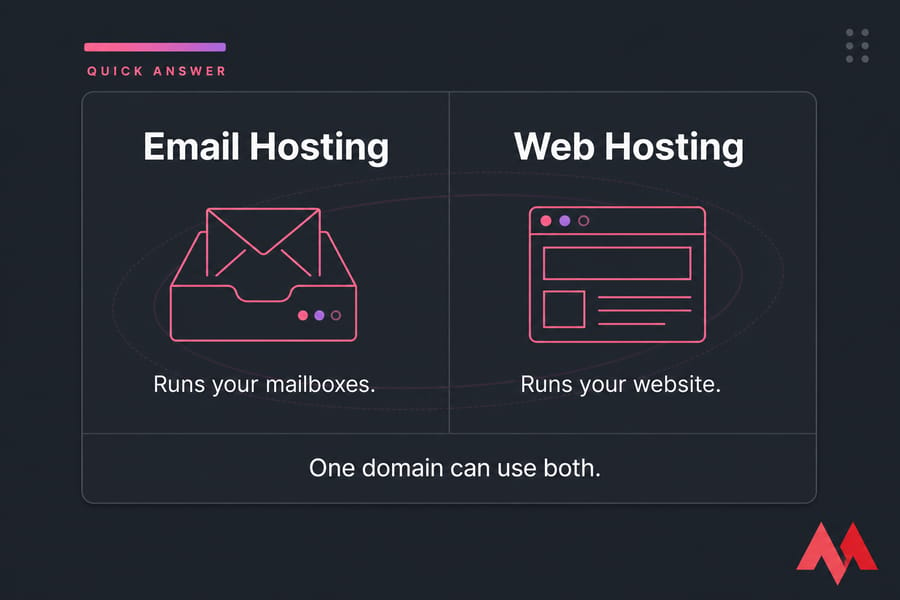
The simplest way to think about each service
If your domain is a piece of real estate, web hosting is the building people walk into. Email hosting is the mailroom out back. Same address on the street. Different doors.
Why people confuse them
Most shared web hosting plans toss in a few free mailboxes. So newcomers assume the two services are the same thing. They're not. The bundled mailbox you get with cPanel and the dedicated email hosting service you buy separately behave very differently especially when it comes to deliverability, storage, and uptime. More on that below.
What is email hosting and what does it do?
Email hosting is a service that runs mail servers on your behalf so messages sent to name@yourdomain.com actually arrive, get stored, and can be read from any device. It handles three jobs: receiving incoming mail, storing it in mailboxes, and sending outgoing mail through the right protocols.
Here's the flow in plain English. Someone sends a message to your branded address. Their mail server checks your domain's MX record (a DNS instruction that says "send mail here"), and routes the message to your email host. Your mailbox stores it. You then read it via webmail, an app like Outlook, or a phone client using IMAP.
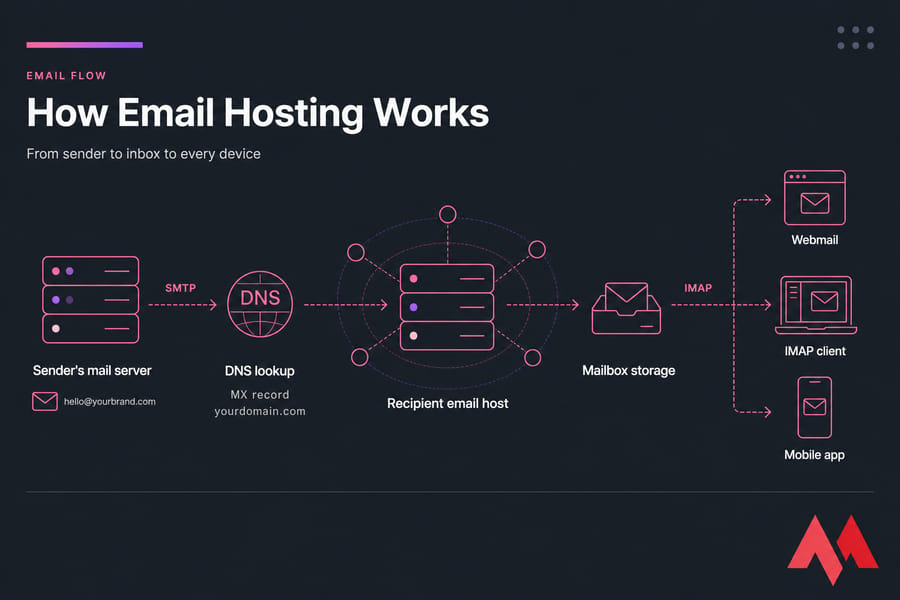
How business email hosting works
Two protocols do most of the heavy lifting. SMTP sends mail out. IMAP (or the older POP3) lets you read it from multiple devices in sync. Want the deeper dive? We've covered what SMTP is and how SMTP works in separate guides. The short version: SMTP is the postman, IMAP is the filing cabinet you can open from anywhere.
What you usually get with professional email hosting
- Custom domain mailboxes (e.g.,
sales@yourbrand.com) - Generous storage per mailbox — usually 10 GB to 50 GB
- Webmail access plus IMAP/SMTP for Outlook, Apple Mail, Gmail app
- Spam filtering and antivirus scanning
- Aliases, forwarding, and catch-all addresses
- SPF, DKIM, and DMARC support for deliverability
- Calendar, contacts, and sometimes shared team tools
Email hosting example with a custom domain
Say you own acmecoffee.com. You sign up for an email hosting plan (say, Titan business email), point your MX records to the provider, and create three mailboxes: orders@, hello@, and ben@. Your website can sit on a totally different host — the inbox doesn't care. The provider handles the mail server work so you don't have to.
What is web hosting and how does it work?
Web hosting is the service that stores your website files (HTML, CSS, images, code, databases) on a web server, then delivers them to anyone who types your domain into a browser. Without it, your domain is just a name with nothing behind it.
When a visitor hits your URL, their browser asks DNS where the site lives, lands on your web server, and the server sends back the files that render the page. That's it. Different beast from email entirely — different server, different protocols (HTTP/HTTPS), different storage.
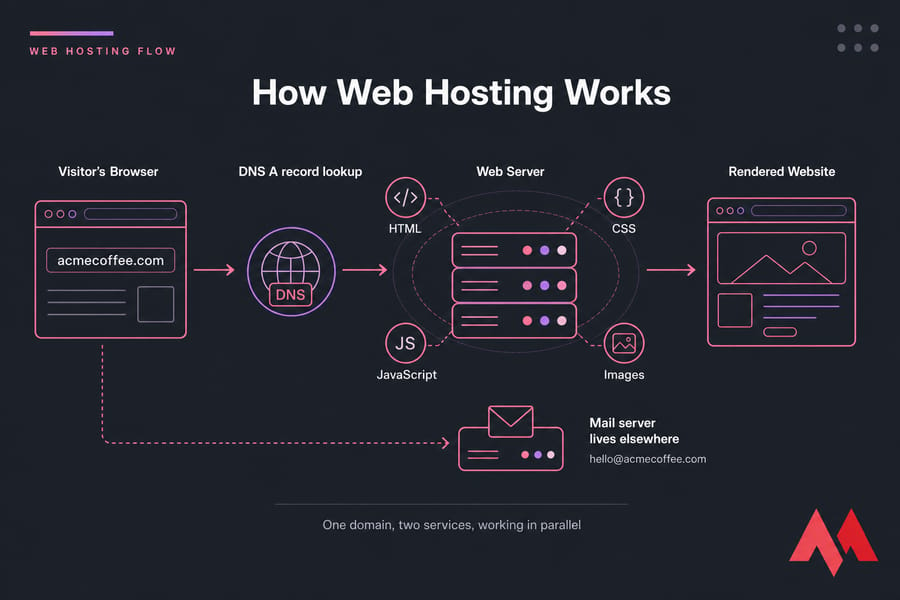
What web hosting stores and serves
- HTML, CSS, JavaScript, and media files
- Databases (MySQL, PostgreSQL) for dynamic content
- CMS installations like WordPress
- SSL certificates that secure the connection
- Server configuration, .htaccess rules, redirects
Common web hosting features
You'll typically see cPanel or DirectAdmin as the control panel, one-click installers for popular apps, FTP access, free SSL, and some level of caching. Plans range from shared hosting (cheap, fine for small sites) to VPS and dedicated servers. If you want the full primer, see our guide to what is web hosting.
Web hosting example for a business website
That same acmecoffee.com brand needs a website too. You buy a shared hosting plan, install WordPress, design the site, and point your domain's A record to the host. Visitors typing acmecoffee.com see your site. Visitors emailing hello@acmecoffee.com still hit your separate email host. One domain, two services, working in parallel.
Web hosting vs email hosting: key differences side by side
Here's the side-by-side most readers actually came here for.
| Feature | Email Hosting | Web Hosting |
|---|---|---|
| Main purpose | Run mailboxes for your domain | Run your website |
| What it stores | Messages, attachments, contacts, calendars | Website files, databases, media |
| Server type | Mail server | Web server |
| Protocols | SMTP, IMAP, POP3 | HTTP, HTTPS, FTP |
| DNS records used | MX, SPF, DKIM, DMARC | A, AAAA, CNAME |
| Ideal user | Anyone who wants branded business email | Anyone publishing a site online |
| Security focus | Spam filtering, authentication, encryption | SSL, firewall, malware scanning |
| Scaling factor | Number of mailboxes, storage per inbox | Traffic, CPU, RAM, disk space |
Email server vs web server explained
A web server's job is to answer browser requests fast. A mail server's job is to receive, queue, store, and forward messages reliably — and to prove to other servers that it's a legitimate sender. Different software, different optimization, different headaches. That's why providers often run them on completely separate infrastructure.
Which one affects your website and which one affects your inbox
If your site goes down, your email might still work. If your mail server breaks, your website keeps serving pages. They're independent — assuming you've split them or your provider runs them as separate services. This is actually a good thing. Isolation means one failure doesn't take down everything.
Does web hosting include email hosting?
Often, yes — but with a catch. Most shared hosting plans include a basic email feature through cPanel or a similar panel. You can create mailboxes, set up forwarders, and access them via webmail. For a hobby site or a side project, that's perfectly fine.
But "included" doesn't mean "business-grade." Bundled hosting email tends to have smaller storage limits, weaker spam filters, and shared sending IPs that can hurt deliverability. If your shared IP gets flagged because some other site on the same server blasts spam, your legitimate emails might end up in junk folders too. I've seen this exact scenario kill a small agency's client communication for a week.
When email is bundled with hosting
Bundled email usually shows up as part of a shared hosting plan with cPanel. You'll see options to create email accounts in cPanel, set passwords, and configure forwarders. It works. It's just not built for serious volume or branding.
Why bundled email is not always the best fit
- Smaller mailbox quotas (often 1–5 GB per account)
- Shared IPs that affect deliverability
- Limited or no DKIM/DMARC tooling
- Basic spam filtering only
- If your hosting goes down, your email goes down with it
What to check before relying on web hosting email
Look at storage per mailbox, sending limits, whether SPF/DKIM/DMARC are configured by default, and whether the host publishes mail server uptime separately from web uptime. If those answers are vague, treat it as a stopgap — not a long-term plan.
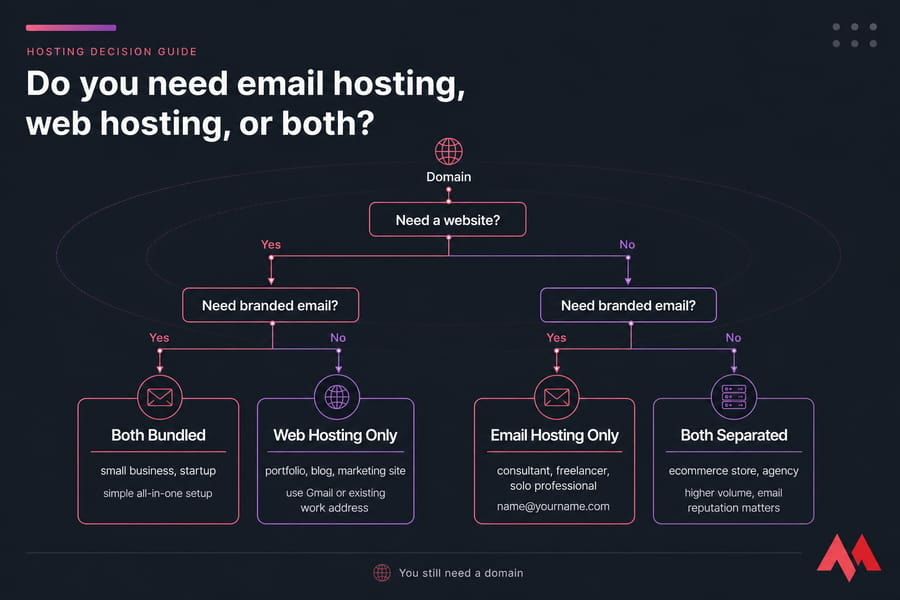
Do you need both email hosting and web hosting?
Depends on what you're building. Let's run through the common scenarios.
If you only need professional email
You're a consultant, freelancer, or solo professional who already uses LinkedIn or a freelance platform as your "site." You just want name@yourname.com for client emails. Buy email hosting only. Skip web hosting. You'll still need a domain — that's non-negotiable.
If you only need a website
You're building a portfolio, blog, or marketing site and you're happy using a personal Gmail or an existing work address. Buy web hosting only. You can always add email later — DNS makes it easy.
If you need both for a business brand
You're a small business, startup, ecommerce store, or agency. You need a site customers visit and a branded inbox they can reply to. Get both. Whether you bundle or separate depends on volume and how much your email reputation matters.
Business email hosting vs bundled cPanel email: which is better?
For most growing businesses, dedicated business email hosting wins. Here's the honest breakdown.
| Factor | Bundled cPanel Email | Dedicated Email Hosting |
|---|---|---|
| Deliverability | Variable — depends on shared IP reputation | Strong — optimized sending infrastructure |
| Storage | 1–5 GB typical | 10–50 GB per mailbox |
| Spam protection | Basic filters | Advanced multi-layer filtering |
| Security records | Manual SPF/DKIM/DMARC setup | Guided or automatic setup |
| Mobile sync | IMAP supported, sometimes flaky | IMAP + ActiveSync, reliable |
| Uptime SLA | Tied to web hosting uptime | Separate, often 99.9%+ |
| Support | General hosting support | Email-specialized support |
Deliverability and spam protection
This is the big one. If your email keeps landing in junk, it doesn't matter how good your copy is. Dedicated email providers maintain clean sending IPs, enforce authentication, and monitor reputation actively. Bundled email rarely does.
Storage, reliability, and scalability
Dedicated email scales better. Adding twenty new mailboxes for your growing team won't blow up your hosting plan. Storage grows with you. Backups are usually built in.
Security features like SPF, DKIM, and DMARC
These three DNS records prove your emails are really from you. SPF says which servers can send for your domain. DKIM cryptographically signs messages. DMARC tells receiving servers what to do with mail that fails. Without them configured properly, you're flying blind on deliverability. We've covered what a DMARC record is and how to create a DMARC record in cPanel separately if you want the step-by-step.
Need a website and professional email on the same domain?
Launch your site and set up branded email like name@yourbusiness.com with MonoVM's web hosting and business email solutions. Bundle for simplicity or keep them separate for more control. Explore email and web hosting options →
Domain email hosting and DNS setup basics
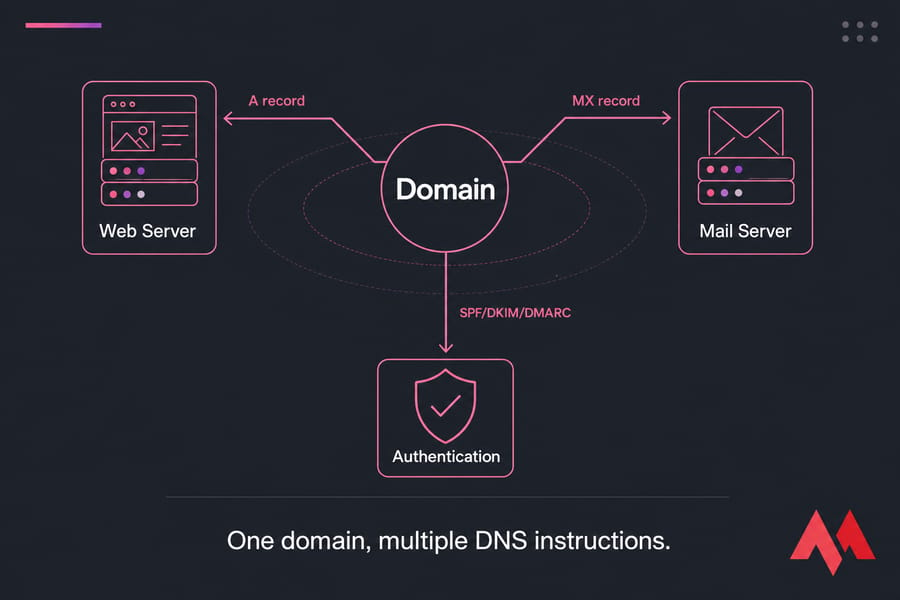
Here's the part that ties everything together. Your domain is the central hub. DNS records tell the internet where to route different types of traffic for that domain. Website traffic follows the A record. Email follows the MX record. They're independent.
This means your website can live on one provider and your email on another. That flexibility is a feature, not a bug.
How MX records route your email
An MX (Mail Exchange) record points to your email host's mail servers. When someone sends a message to your domain, their server looks up your MX record and delivers the message there. Update the MX record, and you've moved your email — without touching your website.
Why SPF, DKIM, and DMARC matter
Without these records, receiving servers (Gmail, Outlook, Yahoo) have no way to verify your messages are legitimate. With them, your deliverability jumps significantly. Set them up once, and they quietly do their job forever.
Can your website and email live on different hosts?
Yes — and many businesses do this on purpose. Site on one provider, email on another. The domain handles the routing through DNS. You don't need to run your own mail server. Your email provider does that for you.
Common mistakes when choosing web hosting with email
I've watched small businesses make the same mistakes over and over. Avoid these.
- Assuming "free email included" means business-grade. It usually doesn't. Free bundled email is fine for low volume. It's not built for client-critical communication.
- Ignoring mailbox storage limits. A 1 GB mailbox fills up faster than you think — especially with attachments.
- Skipping spam filter quality checks. Weak filters mean junk in your inbox and your good emails in someone else's junk.
- Forgetting mobile sync. If IMAP support is flaky, your phone and laptop won't show the same inbox. Massively annoying.
- Not setting SPF, DKIM, and DMARC. The number one reason legitimate business emails get filed as spam.
- Picking based on price alone. The cheapest plan often costs you in lost deliverability and downtime later.
- Using a free Gmail or Yahoo address for business.
acmecoffee@gmail.comscreams "side hustle."hello@acmecoffee.comsays "we're serious."
Best setup for small business websites and professional email
Here's a quick recommendation matrix based on what you're actually building.
| Your Situation | Need Web Hosting? | Need Email Hosting? | Best Setup |
|---|---|---|---|
| Solo freelancer, no site yet | No | Yes | Domain + email hosting only |
| Personal blog, no business email | Yes | No | Domain + shared web hosting |
| Local business with simple site | Yes | Yes (light) | Web hosting with bundled email OR small email hosting plan |
| Small team, 3–10 mailboxes | Yes | Yes | Web hosting + dedicated business email (Titan) |
| Ecommerce or agency | Yes | Yes | Separate web hosting + dedicated email hosting on different providers |
Best low-cost setup
Shared web hosting with included email is the cheapest entry point. Works fine for a single mailbox and a small site. Just don't expect enterprise deliverability.
Best setup for growing teams
Pair web hosting with a dedicated business email service like Titan. You get reliable mailboxes that scale, better spam protection, and your website performance won't impact your team's email.
Best setup for businesses that need reliability
Split them. Web hosting from one provider, email hosting from another. If one provider has an outage, the other keeps running. Don't forget to register your domain name if you haven't already — that's the foundation everything else sits on.
Final verdict: email hosting or web hosting?
Most businesses need both. Here's the simple summary:
- Website only? Buy web hosting. Skip email hosting.
- Professional inbox only? Buy email hosting. Skip web hosting.
- Brand presence? Get both. Bundled if you're small. Separated if email is mission-critical.
The deciding question isn't "which is more important?" it's "how much do my customers rely on each?" If your inbox is your lifeline (sales, support, contracts), invest in dedicated email. If your site is your storefront, invest in solid web hosting. For most growing businesses, you'll want both pillars solid.
Choose the right hosting setup for your business
If your website and email both matter to your brand, don't guess. MonoVM offers web hosting, domain registration, and professional business email so you can build a complete online presence under one roof. Get started with MonoVM → Buy email hosting

An experienced tech and developer blog writer, specializing in VPS hosting and server technologies. Fueled by a passion for innovation, I break down complex technical concepts into digestible content, simplifying tech for everyone.