
Short answer: WireGuard is the best VPN protocol for most people in 2026. It's fast, modern, well-audited, and easy to deploy on almost anything including a cheap Linux VPS. OpenVPN is still the right pick when you need maximum compatibility or fine-grained control. IKEv2/IPsec wins on phones that constantly switch between Wi-Fi and mobile data. And PPTP? Don't use it. We'll get to why.
Best VPN Protocol at a Glance
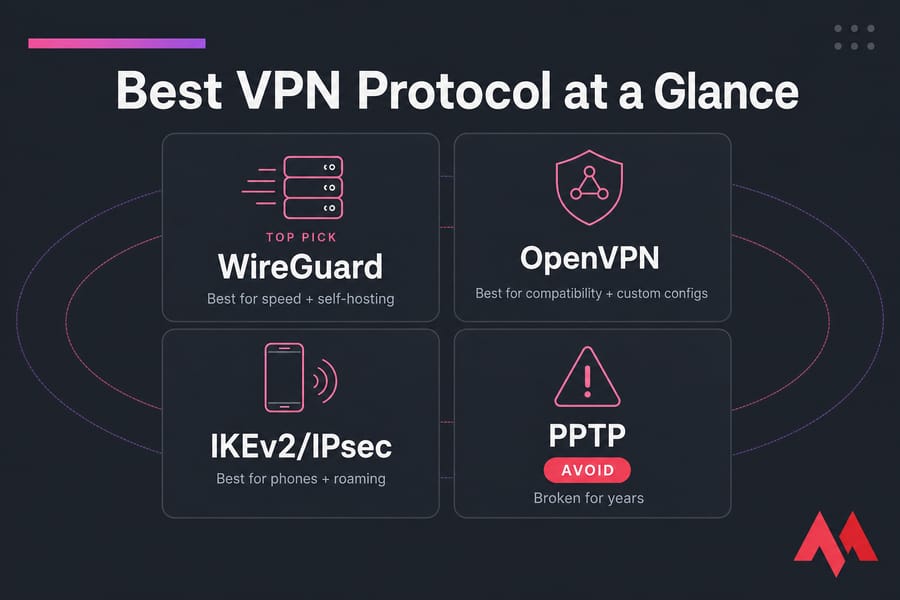
Here's the quick verdict by priority:
- Speed and self-hosting: WireGuard
- Compatibility, business networks, custom configs: OpenVPN
- Mobile devices and roaming: IKEv2/IPsec
- Legacy hardware only: L2TP/IPsec (and only when nothing better is supported)
- Avoid: PPTP — it's been broken for years
No single protocol wins every scenario. But if I had to pick one default and walk away, it'd be WireGuard every time. If you want the full reasoning, the comparison table below is the fastest way in. For background, you can also check our explainer on what a VPN is and how it works.
VPN Protocols Compared: Quick Comparison Table
Here's the cheat sheet. Scan this once and you'll already know more than 90% of people debating protocols on Reddit.
| Protocol | Speed | Security | Stability | Device Support | Best For | Verdict |
|---|---|---|---|---|---|---|
| WireGuard | Excellent | Strong (ChaCha20) | Excellent | Wide (native on Linux, apps elsewhere) | Everyday use, gaming, self-hosting | Use it |
| OpenVPN (UDP/TCP) | Good | Strong (AES-256, TLS) | Excellent | Universal — every OS and most routers | Business, restricted networks, custom setups | Use it |
| IKEv2/IPsec | Very good | Strong (when configured well) | Excellent on mobile | Built into iOS, Android, Windows, macOS | Phones, roaming, travel | Use it |
| L2TP/IPsec | Mediocre | Acceptable but dated | Decent | Built into most OSes | Legacy routers/clients only | Use sparingly |
| PPTP | Fast | Broken | Decent | Old systems | Lab demos, nothing serious | Avoid |
Two quick notes before you start arguing with the table. First, "speed" here assumes a sane server with enough CPU — a protocol can only run as fast as the hardware underneath it. Second, "device support" varies. WireGuard is native in modern Linux kernels but needs an app on Windows and iOS. OpenVPN runs on practically anything with a network card. For a deeper head-to-head, see our WireGuard vs OpenVPN breakdown and the OpenVPN vs L2TP comparison.
What Is a VPN Protocol and How Does It Work?
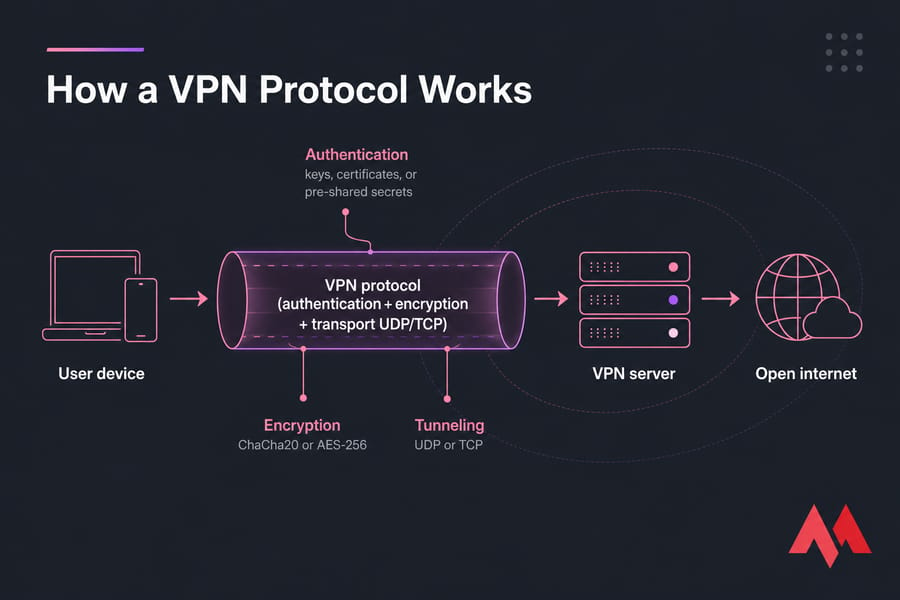
A VPN protocol is the set of rules that decides how your traffic gets wrapped up, encrypted, and sent through the tunnel to your VPN server. Think of it as the language two endpoints agree to speak before they trust each other with your data.
Three things happen under the hood:
- Authentication — your client proves who it is (keys, certificates, or pre-shared secrets).
- Encryption — the protocol scrambles your packets using a cipher like ChaCha20 or AES-256.
- Tunneling — encrypted packets travel over UDP or TCP between you and the server, then get unwrapped on the other side.
Why does this matter? Because every protocol makes different trade-offs. WireGuard keeps its codebase tiny (about 4,000 lines vs hundreds of thousands for OpenVPN) and uses modern ciphers by default. OpenVPN bolts onto TLS, which is battle-tested but heavier. IKEv2 leans on IPsec, which is great at surviving network changes. Those design choices ripple into real-world speed, latency, and how easy the protocol is to block.
One thing people mix up constantly: your VPN provider and your VPN protocol are not the same thing. A sketchy provider running WireGuard is still sketchy. A trusted provider — or your own VPS — running OpenVPN can be excellent. If encryption itself is fuzzy, our guide on data encryption covers the basics.
WireGuard: Best VPN Protocol for Most Users
WireGuard is the protocol I recommend by default. Here's why.
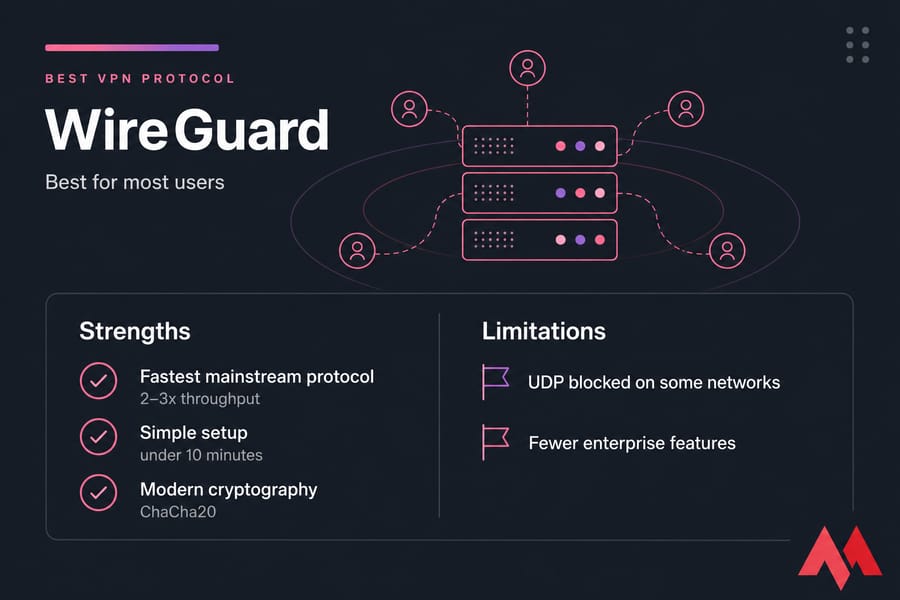
It's lean. The whole codebase is small enough that one person can audit it in a weekend, which is the opposite of OpenVPN's sprawling stack. Less code means fewer bugs and a smaller attack surface. It uses ChaCha20 for encryption and modern primitives across the board — no legacy cipher baggage.
On performance, WireGuard typically beats OpenVPN by 2–3x in throughput tests and shaves real milliseconds off latency. That matters when you're gaming, streaming 4K, or routing a video call through a server in another country. It also runs inside the Linux kernel, which is a big reason it's so fast on a VPS.
WireGuard strengths
- Fastest mainstream protocol in most real-world tests
- Modern cryptography by default — no knobs to misconfigure
- Great battery behavior on phones and laptops
- Trivial to set up on a Linux VPS (often under 10 minutes)
- Reconnects quickly when networks change
WireGuard limitations (yes, there are some)
- Fewer enterprise knobs than OpenVPN — no per-user certificate revocation list out of the box
- By default, it logs client IPs on the server until reconfigured — commercial providers patch around this
- Some restrictive networks block UDP, which is WireGuard's transport
If you're spinning up your own server, WireGuard is almost always the right starting point. Our guide on setting up WireGuard VPN walks through it step by step.
OpenVPN: Best VPN Protocol for Compatibility
OpenVPN has been around since 2001. That's not a flaw — it's the reason it runs on basically everything: every major OS, most routers, MikroTik gear, embedded devices, you name it. If a vendor supports VPNs at all, they support OpenVPN.
It's also one of the most thoroughly audited open-source security projects in existence. Configured properly with AES-256 and TLS 1.2+, it's still excellent. The trade-off is speed — OpenVPN runs in user space and carries more protocol overhead, so it's usually slower than WireGuard.
OpenVPN UDP vs TCP
OpenVPN can run over either transport, and the choice matters more than people realize.
| Mode | Use When | Trade-off |
|---|---|---|
| UDP | Default. Streaming, gaming, general browsing | Faster, lower overhead, but may be blocked on some networks |
| TCP (often port 443) | Restrictive networks, hotel Wi-Fi, captive portals | Slower (TCP-over-TCP issues), but harder to block since it looks like HTTPS |
Pro tip: start with UDP. Only switch to TCP if you're hitting a network that's actively interfering. Running OpenVPN on TCP port 443 is the classic trick for hotel and corporate Wi-Fi that blocks everything else.
When OpenVPN beats WireGuard
- You need certificate-based authentication with revocation
- You're connecting old routers or embedded devices
- You need to slip past aggressive firewalls (TCP 443 trick)
- Your compliance team wants something with a long audit trail
For your own deployment, see how to install OpenVPN on a VPS or check out OpenVPN server hosting.
IKEv2/IPsec: Best VPN Protocol for Mobile Devices
IKEv2 is the protocol you didn't know you were already using. It's built into iOS, macOS, Windows, and supported natively on Android — no third-party client required.
Its killer feature is MOBIKE, which lets a VPN session survive network changes. Switch from coffee shop Wi-Fi to LTE while crossing the street? IKEv2 reconnects so fast you usually don't notice. WireGuard does this too, but IKEv2 was doing it first and does it cleanly on stock mobile OSes.
The downsides are real but narrow. IKEv2 uses specific UDP ports (500 and 4500) that some networks block. It's harder to self-host than WireGuard. And IPsec configuration is famously fiddly — one mismatched setting and nothing connects.
If your main use case is phone-first VPN with constant roaming, IKEv2 is hard to beat. For everything else, WireGuard usually wins.
L2TP/IPsec and PPTP: Legacy Protocols Explained
Let's talk about the old guard. Some old guides still recommend these. They shouldn't.
L2TP/IPsec
L2TP itself does no encryption — it just creates the tunnel. The actual security comes from IPsec wrapped around it. That dual-layer design adds overhead, which is why L2TP/IPsec is noticeably slower than modern options. It's also easy to block because it uses a fixed set of UDP ports.
Use it only when your hardware or client genuinely doesn't support anything better. Some old corporate VPN concentrators still require it. If you're stuck in that bucket, our L2TP VPN server setup guide covers the install.
PPTP — just don't
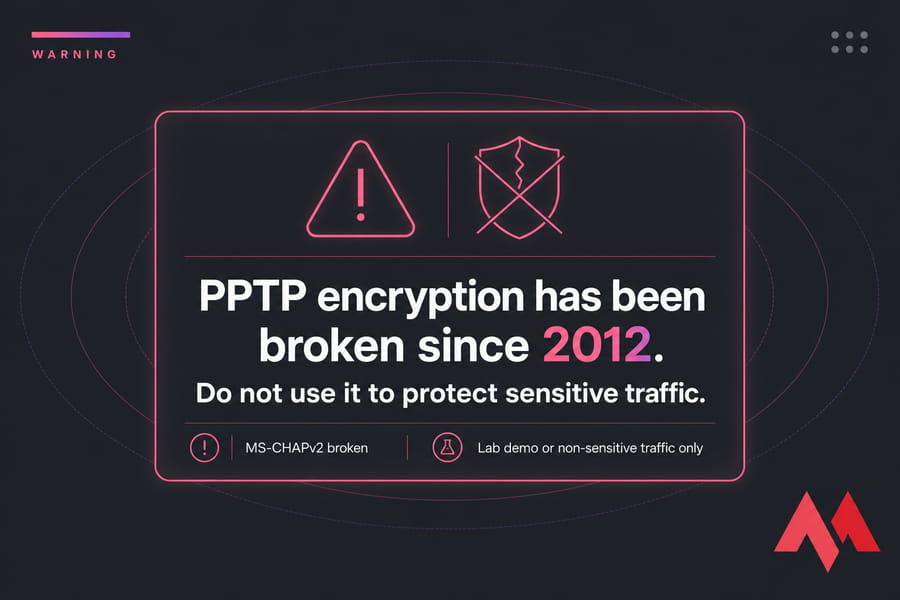
⚠️ Warning: PPTP's encryption (MS-CHAPv2) has been cryptographically broken since 2012. Anyone with modest resources can recover the session key. Do not use PPTP for anything that needs to stay private.
PPTP is fast and trivial to set up, which is exactly why beginners still find tutorials promoting it. Ignore them. It's fine for a lab demo or routing around a geographic block on non-sensitive traffic, but that's it. We have legacy install guides (PPTP on VPS, PPTP on CentOS 8) purely for historical reference — please don't use them for production.
Fastest VPN Protocol vs Most Secure VPN Protocol
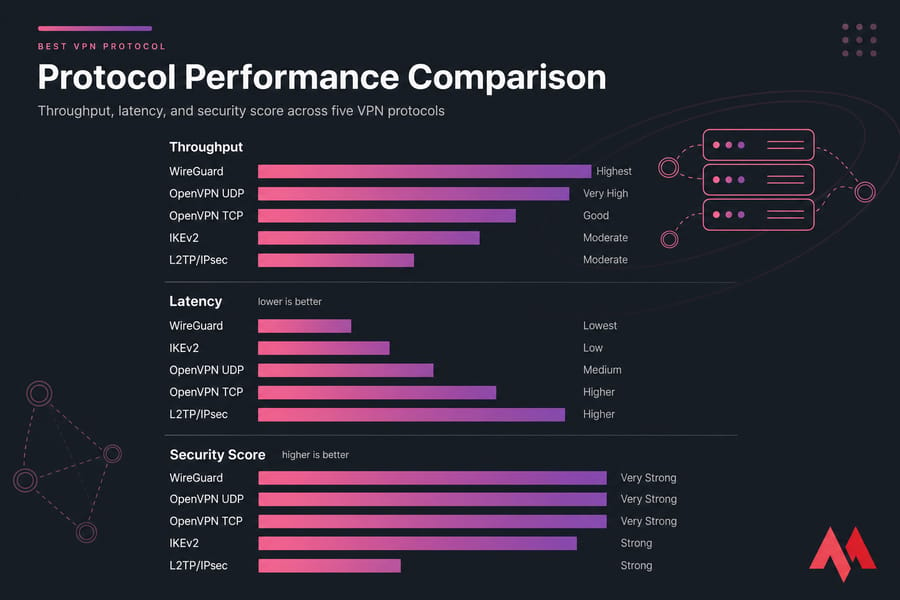
People love framing this as a fight. Honestly, the top three protocols are all both fast and secure — they just optimize differently.
Fastest
- WireGuard — usually the winner, especially on Linux
- IKEv2/IPsec — very close on mobile and short-distance routes
- OpenVPN UDP — solid but lags behind on heavy throughput
Most secure (when properly configured)
- WireGuard — small attack surface, modern crypto, no legacy options to misconfigure
- OpenVPN — equally strong with AES-256 + TLS 1.3, but easier to misconfigure
- IKEv2/IPsec — strong, but configuration complexity has historically led to mistakes
Best balance for everyday use
WireGuard. Next question.
One thing worth saying loudly: protocol choice is not the whole story. A WireGuard tunnel over a congested 1-vCPU VPS in a far-away datacenter will lose to OpenVPN on a beefy server next door. CPU, RAM, network routing, and how the provider implements the protocol all matter. If you're chasing speed, also check whether a VPN can increase your internet speed and how to lower ping.
Best VPN Protocol for Streaming, Gaming, Business, and Travel
Different jobs, different best tools. Here's the practical breakdown.
| Use Case | Best Protocol | Why | Backup |
|---|---|---|---|
| Streaming (4K, smooth playback) | WireGuard | Highest throughput, lowest overhead | OpenVPN UDP |
| Gaming | WireGuard | Lowest latency, fast handshake | IKEv2 |
| Remote work / business | OpenVPN | Cert-based auth, mature client ecosystem | WireGuard |
| Phones and travel | IKEv2/IPsec | Survives network switches gracefully | WireGuard |
| Restricted networks | OpenVPN TCP on port 443 | Blends in with HTTPS traffic | WireGuard (if UDP allowed) |
| Self-hosted on a VPS | WireGuard | Easiest install, fastest result | OpenVPN |
Two real-world notes from experience. Gamers care about jitter more than raw throughput — WireGuard's tight design keeps jitter low, which is why it feels snappier even when bandwidth numbers look similar. And for business, don't underestimate the value of OpenVPN's certificate management. When an employee leaves, revoking one cert is cleaner than rotating shared keys.
For remote work, secure RDP access often pairs well with a self-hosted VPN. And if you're weighing options, our self-hosted VPN vs commercial VPN guide is worth a read.
How to Choose the Best VPN Protocol for Your Needs
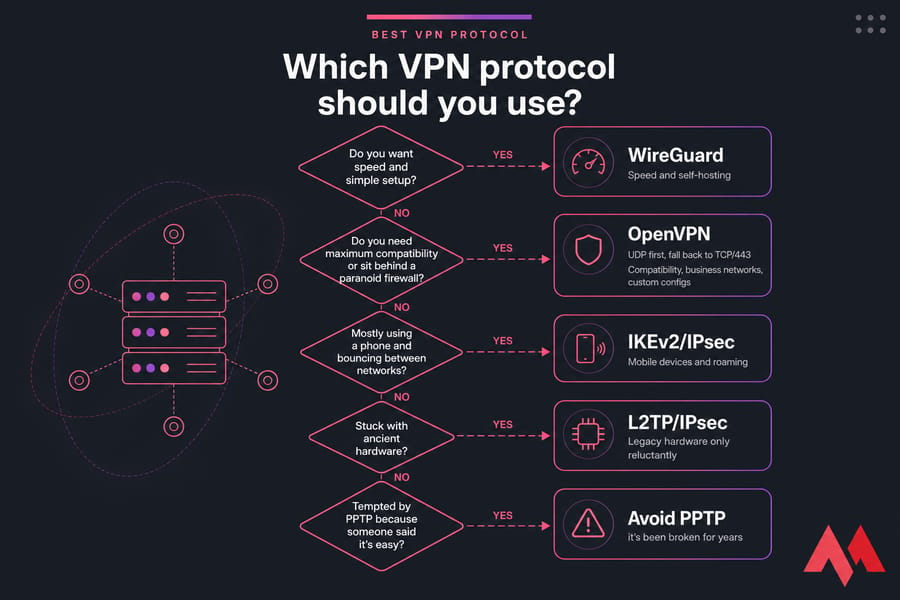
Here's the decision tree I'd use:
- Do you want speed and simple setup? → WireGuard.
- Do you need maximum compatibility or sit behind a paranoid firewall? → OpenVPN (UDP first, fall back to TCP/443).
- Mostly using a phone and bouncing between networks? → IKEv2/IPsec.
- Stuck with ancient hardware? → L2TP/IPsec, reluctantly.
- Tempted by PPTP because someone said it's easy? → Don't.
If you're choosing between using a commercial VPN app and running your own, also factor in control. Apps are easy. A VPS-based VPN gives you the exact IP, location, and protocol you want — and nobody logging your traffic except you. See how to set up a VPN or deploy a VPN on a VPS server for the practical path.
Build Your Own VPN Server With the Right Protocol
Want full control over location, ciphers, and who has access? Run WireGuard or OpenVPN on your own VPS. MonoVM offers VPN server hosting and KVM VPS plans across 25+ locations, with root access and the headroom you need for a fast tunnel. Explore VPN server hosting →
Common VPN Protocol Mistakes to Avoid
I've watched people walk into the same traps over and over. Don't be that person.
- Picking PPTP because the tutorial was short. Short tutorial, broken encryption. Bad trade.
- Assuming the protocol does all the security work. A misconfigured OpenVPN server with a self-signed cert nobody verifies is no better than nothing.
- Ignoring server location. The world's fastest protocol still has to travel the speed of light. A server 8,000 km away will feel slow no matter what.
- Forgetting firewall and NAT realities. WireGuard needs UDP open. IKEv2 needs ports 500 and 4500. If your network blocks those, OpenVPN TCP/443 is your friend.
- Blaming the protocol for weak VPS hardware. WireGuard on a 512 MB struggling node will lose to OpenVPN on a proper server. Benchmark on real hardware before drawing conclusions.
Most of these come down to one thing: people optimize for the wrong variable. Get the basics right first — decent server, sensible location, modern protocol — then tune. See our guide on what latency is and how to reduce it for the network side.
Best VPN Protocol for a Self-Hosted VPN Server
If you're rolling your own VPN on a VPS — which I genuinely recommend for anyone with mildly technical chops — here's the honest breakdown.
| Protocol | Setup Complexity | Resource Use | Best OS | Good on a VPS? | Notes |
|---|---|---|---|---|---|
| WireGuard | Low (10–20 min) | Very low | Linux (any modern kernel) | Yes — ideal | Default choice for self-hosting |
| OpenVPN | Medium | Moderate | Linux, BSD | Yes | Pick if you need cert management or TCP/443 |
| IKEv2/IPsec | High | Low to moderate | Linux with strongSwan | Possible | Configuration is painful — only worth it for mobile-only deployments |
When to choose WireGuard on a VPS
Pretty much always. It installs in minutes, sips CPU, and screams on a 1-vCPU node. If you're running a Linux VPS, WireGuard is what I'd reach for first.
When to choose OpenVPN on a VPS
When you need certificate-based user management, when clients sit behind hostile firewalls, or when you're integrating with existing infrastructure that already speaks OpenVPN. See OpenVPN server hosting for managed options.
Server considerations that actually matter
- CPU: encryption is CPU-bound. Even 1 vCPU handles WireGuard for 10–20 users; OpenVPN wants a bit more.
- RAM: 1 GB is plenty for a personal VPN.
- Location: pick a datacenter near where you'll actually be — not just where it's cheap.
- Port access: confirm UDP isn't blocked upstream.
- Bandwidth: check the monthly cap; streaming over a VPN eats through it fast.
Ready to Deploy WireGuard or OpenVPN?
Pick a KVM VPS or VPN server from MonoVM and launch a private, fast VPN with the protocol that fits your use case — full root access, multiple locations, no shared tunnels.

An experienced tech and developer blog writer, specializing in VPS hosting and server technologies. Fueled by a passion for innovation, I break down complex technical concepts into digestible content, simplifying tech for everyone.