
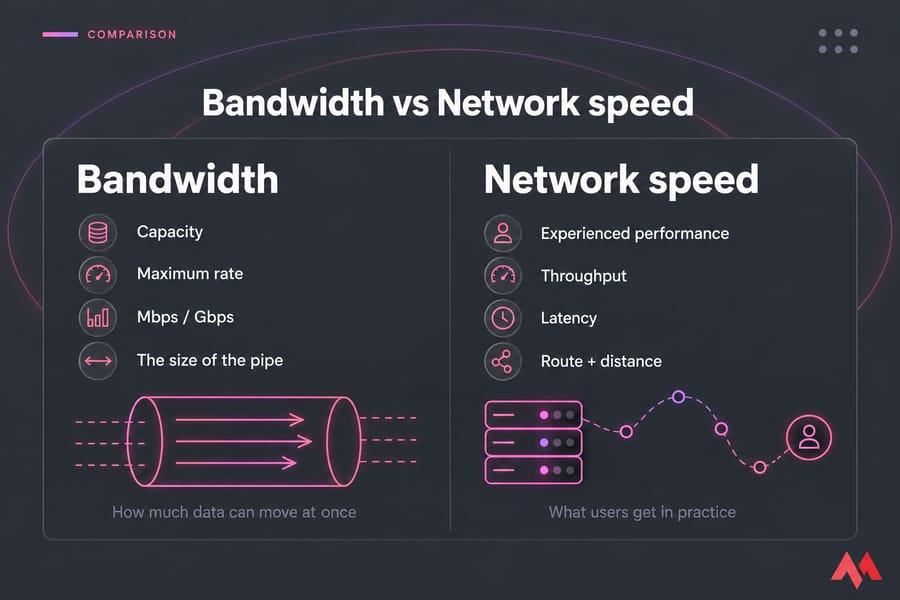
Bandwidth is the maximum rate a VPS connection can carry. Network speed is the performance you and your users get in practice. When you weigh bandwidth vs network speed on a VPS plan, bandwidth tells you how much data can move at once. Real speed also depends on latency, routing, congestion, and whether you've used up your monthly transfer.
Bandwidth vs network speed: the short answer
Throughput is the transfer rate you actually reach, and latency is the delay before data arrives. A plan with a fast port can still feel slow if the server sits on a different continent from your visitors.
What bandwidth means in VPS hosting
Hosting plans use "bandwidth" for two different things. Port speed is the rate limit on your server's network interface, such as 1 Gbps. The bandwidth allowance (often called monthly data transfer) is the total data you can send per billing cycle, such as 10 TB.
The two numbers don't move together. A 1 Gbps port running flat out for 30 days would move roughly 324 TB, so a plan with a 1 Gbps port and 10 TB of transfer can hit its cap in under a day of sustained full-rate traffic.
Traffic direction counts too, since many providers bill only outgoing traffic. Vultr, for example, calculates usage from outbound transfer and doesn't meter inbound. Our guide to inbound vs outbound VPS bandwidth explains how that affects billing.
| Term | What it means | Unit | Why buyers care |
|---|---|---|---|
| Bandwidth / port speed | Maximum transfer rate | Mbps, Gbps | Caps how fast one large transfer can go |
| Data transfer | Total volume per month | GB, TB | Decides when overage fees or throttling start |
| Throughput | Rate you achieve | Mbps, MB/s | Closest to "real speed" |
| Latency | Delay per round trip | ms | Drives responsiveness for sites, games, trading |
Watch the units: 1 Gbps equals 125 MB/s, so tools that show MB/s will read eight times lower than the port figure.
What network speed means for VPS performance
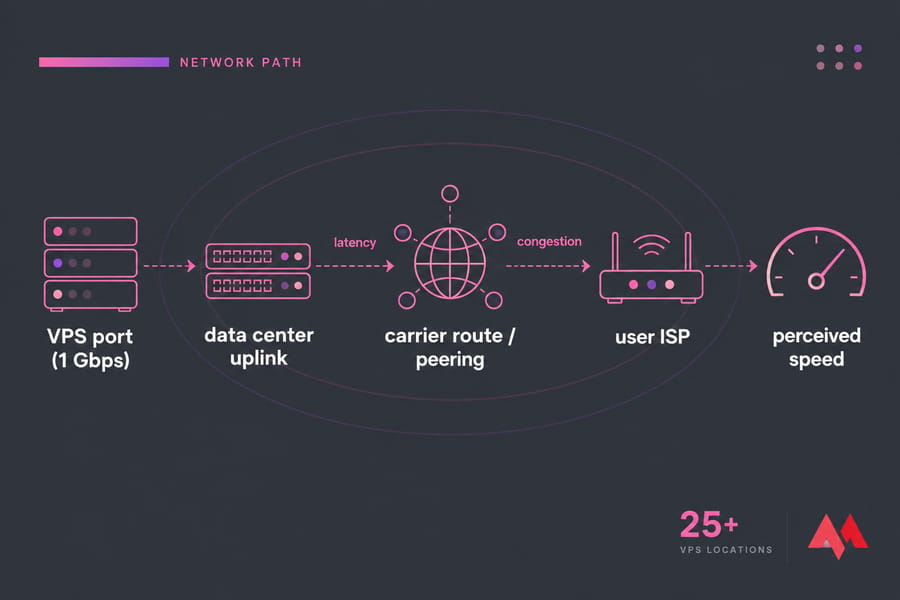
Real speed depends on everything between your VPS and the endpoint: the data center uplink, carrier routes, congestion where networks hand traffic to each other, and the user's own connection. A 1 Gbps port can't push 1 Gbps to a visitor on a 50 Mbps home line.
Distance is the part you control. More distance means more latency, and higher latency also lowers single-connection TCP throughput, so a data center near your audience usually does more for speed than a bigger port. MonoVM has 25+ VPS locations, so you can put the server close to your users.
Bandwidth vs throughput vs latency: how they differ
Throughput is what you measure, and bandwidth is the theoretical ceiling. Latency, which you check with ping, controls how quickly each request gets a response; it has no effect on how much data you can move. Packet loss forces data to be resent, which cuts throughput. Jitter (variation in latency) hurts games and streaming even when the average ping looks fine.
A WordPress page is made of dozens of small requests, so latency often matters more there than raw bandwidth. See what latency is and how to reduce it and these tips to lower your ping.
VPS bandwidth plans explained: metered, unmetered, and unlimited
| Model | How billing works | Best for | Risk |
|---|---|---|---|
| Metered | Pay per GB used | Low or unpredictable traffic | Surprise bills after a spike |
| Included quota | Fixed TB per month, then fees or throttling | Most websites and apps | Slowdown late in the month |
| Unmetered | No per-GB counting; port speed is the limit | Steady heavy transfer | Port may be small or shared |
| "Unlimited" | No stated cap, subject to fair-use terms | Downloads, streaming, backups | Policy conditions on abuse or sustained use |
Hostinger, for example, says that once a VPS reaches its monthly bandwidth limit, the connection is throttled. Third-party reviews put the reduced rate at 10 Mbps. "Unlimited" plans remove the volume cap, but port speed and acceptable use terms still apply. If your workload moves a lot of data, an unlimited bandwidth VPS saves you from planning around a quota.
Which matters more for your workload: bandwidth or speed?
| Workload | Prioritize | Why |
|---|---|---|
| Blog or brochure site | Location | Small pages, low volume; latency drives load time |
| WordPress / WooCommerce | Location, then quota | Many small requests; images add up |
| File hosting and backups | Quota or unmetered, port speed | Large, sustained transfers |
| Streaming and downloads | Quota and port speed | Constant outbound traffic |
| VPN / proxy | Quota, location | All user traffic passes through twice |
| Game server | Latency, jitter | Low volume, timing-sensitive |
| Forex/trading VPS | Latency to broker | Tiny data, milliseconds matter |
| API / SaaS | Balance all | Mixed request sizes, global users |
To estimate your quota, multiply page weight by monthly views: 2 MB pages at 100,000 views come to about 200 GB, and serving 1 GB installers to 5,000 people needs 5 TB. For more project ideas, see how to use a VPS.
How to compare VPS hosting plans without getting fooled by marketing
- Port speed, and whether it's dedicated or shared.
- Monthly transfer and what happens at the cap (fees, throttling, suspension).
- Whether inbound, outbound, or both are counted.
- Data center location relative to your users.
- A test IP or looking glass you can ping and trace before paying.
Ask support about each of these directly. For CPU, storage, and OS criteria, see what to consider when choosing VPS hosting. Then compare VPS hosting plans by location and transfer policy before you look at the headline Gbps figure.
Common VPS buying mistakes around bandwidth and speed
- Reading 1 Gbps as unlimited traffic. It's a rate, not a monthly allowance.
- Choosing a distant region, then paying for a faster port to make up for it.
- Ignoring outbound billing rules until the first overage charge.
- Assuming "unlimited" means no throttling under any conditions.
- Blaming the network when the bottleneck is a slow database query or the CPU. Read why a VPS is slow and how to improve VPS performance before you upgrade.
How to test VPS network performance after purchase
Run iperf3 between your VPS and another server you control to measure throughput. Run mtr or traceroute toward the regions your users are in to find packet loss and bad routes. Browser tools like Speedtest work as a quick check, but DigitalOcean notes that public speed test servers often under-report real server network performance. Repeat your tests at different times of day and watch CPU load, because a maxed-out CPU also limits throughput.
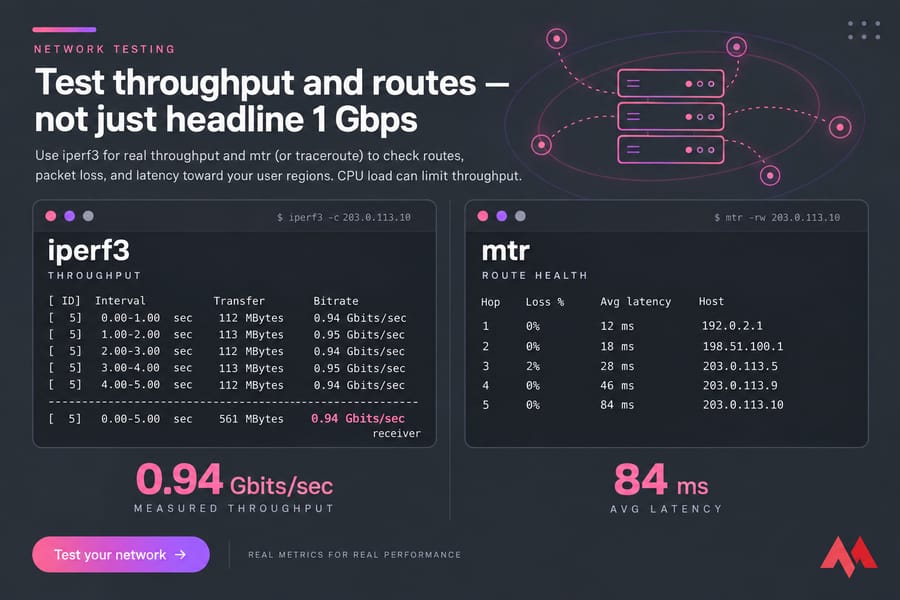
The commands are in our guide to test VPS network speed and bandwidth. To rule out CPU and RAM problems, check managed VPS resource usage, or set up Prometheus and Grafana monitoring for ongoing graphs.
Final verdict: what VPS buyers should prioritize
With bandwidth vs network speed, your traffic pattern decides which one comes first:
- Latency-sensitive apps (games, trading, interactive sites): pick the location first.
- Large transfers (downloads, backups, streaming): prioritize the quota or an unlimited plan, then port speed.
- General sites and APIs: balance location, routes, and room in your monthly transfer.
Choose Linux VPS for most web stacks or Windows VPS for RDP and .NET, then view VPS plans in the region nearest your users.

An experienced tech and developer blog writer, specializing in VPS hosting and server technologies. Fueled by a passion for innovation, I break down complex technical concepts into digestible content, simplifying tech for everyone.