![Inbound vs Outbound VPS Bandwidth: Key Differences [2026] 🌐](/wp-content/uploads/2026/10/inbound-vs-outbound-vps-bandwidth984-main.webp)
Shopping for a VPS, you'll see specs like "1 Gbps port" or "10 TB transfer," and almost nobody tells you which direction of traffic those numbers refer to. That's what inbound vs outbound VPS bandwidth comes down to. Here's the short version: inbound is data coming into your server, and outbound is data your server sends out to visitors, apps, or other machines. On most plans, outbound is the one that counts toward your limit.
If you're still getting a feel for what a VPS is, that's fine. You won't need any networking theory to follow this.
Inbound vs Outbound VPS Bandwidth: Quick Comparison
Networking people call inbound traffic ingress and outbound traffic egress. Same idea, different words.
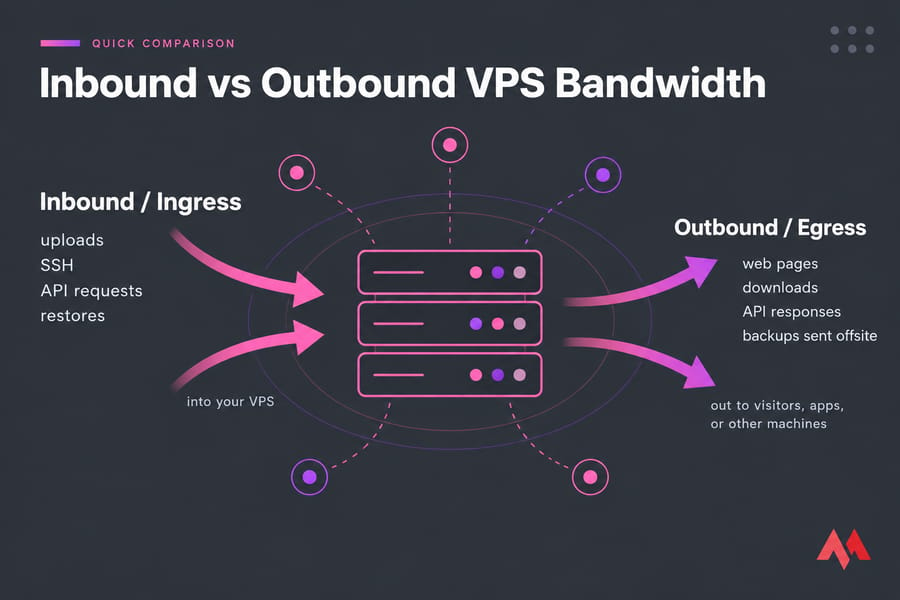
| Traffic Type | Direction | Typical Examples | Usually Metered? | Why It Matters |
|---|---|---|---|---|
| Inbound (ingress) | Internet → your VPS | User uploads, SSH/RDP sessions, incoming API requests, package updates | Often free, but it depends on the provider | Affects restore speed and how responsive the server feels |
| Outbound (egress) | Your VPS → internet | Web pages, images, video, file downloads, API responses | Usually, either against a quota or billed per GB | Drives your data transfer total, overage fees, and throttling |
The takeaway: check the outbound allowance first. Every host words this a bit differently, though, so read the fine print on the plan you're actually looking at.
What Is Inbound Bandwidth on a VPS?
Inbound bandwidth covers everything that arrives at your server. Common examples:
- Visitors uploading files or submitting forms
- Your own SSH or RDP admin sessions (see how to connect to a VPS)
- Incoming API requests
- Restoring a backup onto the server
git pull,apt upgrade, and Docker image pulls
Inbound traffic is often free, but it still affects performance. If you're restoring 200 GB after a crash, inbound throughput decides whether you're back online in 30 minutes or three hours. Some cloud platforms also set per-instance network limits. For example, Google Cloud's documentation explains that it measures VM bandwidth by traffic direction (ingress and egress) and by destination type, so you can't assume inbound is unlimited just because it costs nothing.
What Is Outbound Bandwidth on a VPS?
Outbound is everything your server sends out: HTML pages, images, video segments, downloadable files, API responses, outgoing email, and backups you push to offsite storage. One page view might be 2–3 MB outbound against just a few KB of inbound request.
That imbalance is why hosts keep a closer eye on outbound traffic. Serving content is what uses up their upstream capacity. If you host media, an outbound-heavy workload like video streaming with a VPS can go through a transfer quota surprisingly quickly.
Why Outbound VPS Bandwidth Matters More When Choosing a Plan
Big providers make the industry pattern easy to see. On DigitalOcean, outbound transfer up to your bandwidth pool costs nothing extra, and anything over that is about $0.01 per GB, while inbound is free. AWS gives everyone 100 GB of free data transfer out to the internet each month, aggregated across services, and charges per GB for outbound beyond that. Treat these as examples of common billing models, not as rules every host follows.
Metered vs Unmetered VPS Bandwidth
| Model | What It Actually Means | Watch Out For |
|---|---|---|
| Metered | You pay for each GB transferred | Your bill goes up with traffic |
| Included quota | A set amount per month (e.g. 5 TB outbound) | Overage fees or throttling once you pass it |
| Unmetered | No one counts GB; your port speed is the limit | Fair-use policies, or a shared or capped port |
| "Unlimited" | A marketing term; usually means unmetered with conditions | Acceptable use clauses buried in the terms |
Throttling usually means the host drops your port to something like 10–100 Mbps after you hit the cap. Your site stays up but slows down noticeably, and in my experience that's worse than a surprise bill because it's harder to spot.
If your project serves lots of downloads or media, an unlimited bandwidth VPS takes the guesswork out of monthly transfer. Just confirm the port speed it comes with.
VPS Bandwidth vs Data Transfer vs Network Speed
This is where most people get mixed up. These three terms mean different things:
| Term | Meaning | Unit | Why Buyers Care |
|---|---|---|---|
| Bandwidth / port speed | The maximum rate the connection can carry | Mbps / Gbps | Sets your ceiling during traffic spikes |
| Throughput | The rate you actually get | Mbps / Gbps | The real-world speed your users experience |
| Data transfer | The total amount moved over a period | GB / TB per month | What gets billed or capped |
Think of a highway. Bandwidth is the number of lanes, throughput is how fast traffic is actually moving, and data transfer is how many cars went through this month. A 1 Gbps port doesn't mean unlimited traffic. A "1 Gbps, 10 TB" plan lets you transfer fast, but only 10 TB in total. Running flat out, a 1 Gbps link could move roughly 320 TB in a month. Latency is a separate thing again; here's what latency is and why it isn't the same as bandwidth.
Real-World VPS Bandwidth Examples by Workload
| Workload | Inbound Pattern | Outbound Pattern | Plan Consideration |
|---|---|---|---|
| Website/blog | Light | Heavy (pages, images) | Outbound quota plus a CDN |
| Backup target | Heavy during backups | Heavy during restores | Check both directions and the port speed |
| Streaming/file hosting | Light to moderate | Very heavy | Unmetered or a large quota |
| API/SaaS app | Moderate | Moderate to heavy | Size based on response payloads |
| Game server | Constant, small packets | Constant, small packets | Latency matters more than volume |
For backups, it depends which end you're on. Your production server sends data out, and the backup node takes it in. Our guide to back up a server or VPS covers the planning side.
Pro tip: putting a CDN in front of your origin server can cut its outbound traffic a lot, since cached images, CSS, and JS get served from edge locations instead. If you haven't used one before, start with what a CDN is.
How Much VPS Bandwidth Do You Need?
Here's a simple formula:
Monthly outbound ≈ average page or file size × monthly requests + backups + API responses + admin overhead
An illustrative example: 2.5 MB pages × 100,000 views = 250 GB. Add 50 GB of offsite backups and you're at about 300 GB. Then add 30–50% headroom for traffic spikes. If your estimate gets close to a plan's transfer cap, move up a tier now rather than after an overage notice. Small projects fit comfortably on cheap VPS hosting. Media-heavy or unpredictable traffic is a better fit for unmetered plans.
How to Check VPS Bandwidth Usage and Performance
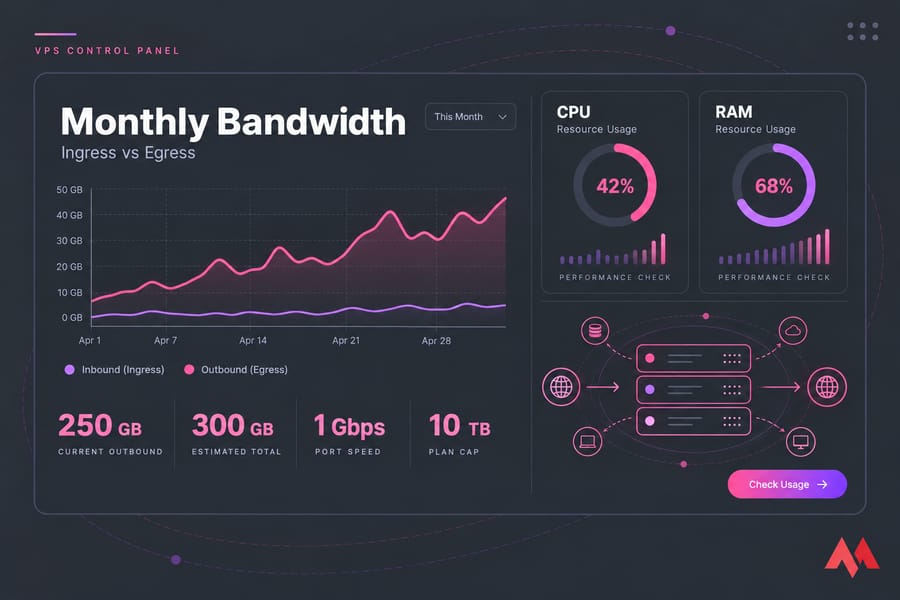
- Start with your dashboard. Most panels chart bandwidth alongside CPU and RAM. Here's how to check VPS resource usage.
- Measure throughput with iperf3. Use the
-Rflag so you test both directions and not just one. - Check the route with MTR or ping to catch packet loss and latency.
- Use Speedtest CLI as a quick sanity check, not as your main measurement.
One catch: if your CPU is maxed out, network tests will come back lower than the network can actually do. For the full walkthrough, see how to test VPS network speed and bandwidth.
Common Mistakes People Make with VPS Bandwidth
- Treating bandwidth and monthly transfer as the same thing. One is a speed, the other is a total amount.
- Assuming inbound never matters. Slow restores will prove otherwise.
- Assuming outbound is always unlimited. It usually isn't.
- Skipping the throttling policy. Read it before you buy, not after your site slows down.
- Picking a plan by port speed alone. Without the transfer cap, "1 Gbps" doesn't tell you much.
- Not using a CDN. Your origin ends up serving files an edge cache could handle.
Once your traffic is under control, these tips to improve VPS performance help with the remaining bottlenecks.
Now that you know the difference between inbound and outbound bandwidth, you can read a spec sheet and spot hidden limits before they cost you. Compare MonoVM VPS hosting plans and pick one that fits your real traffic pattern.

An experienced tech and developer blog writer, specializing in VPS hosting and server technologies. Fueled by a passion for innovation, I break down complex technical concepts into digestible content, simplifying tech for everyone.