VPS vendor lock-in is what happens when leaving your hosting provider stops being a weekend project and turns into a quarter-long migration with real revenue risk. Your data is technically yours. Your server is technically standard Linux. But the backups, the panel, the automation, and the one admin who knows how it all fits together are all tangled up with one vendor.
VPS vendor lock-in, in plain English
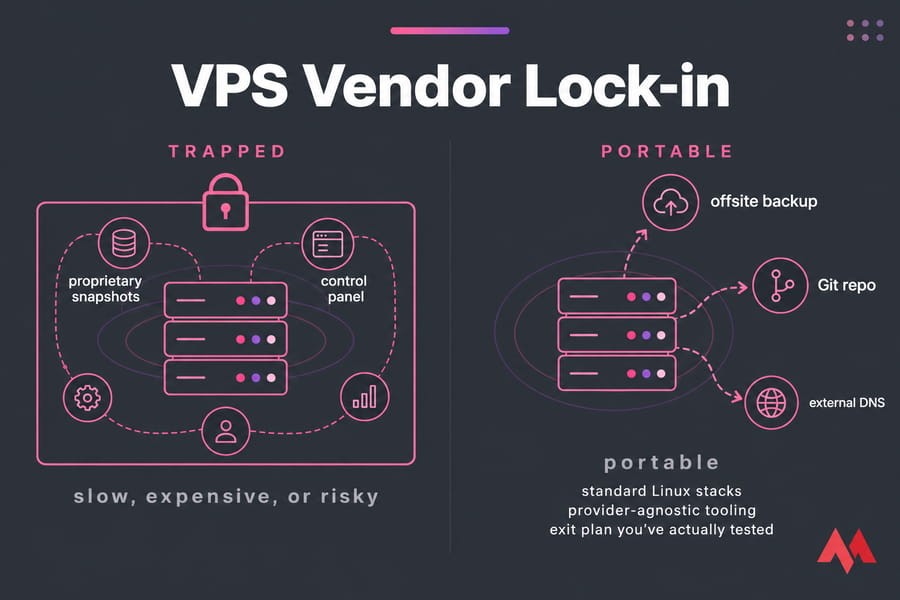
Quick answer: VPS vendor lock-in happens when moving your server, data, or workflows to another host becomes slow, expensive, or risky. You avoid it with portable offsite backups, standard Linux stacks, provider-agnostic tooling, and an exit plan you've actually tested. The goal isn't zero switching cost — it's making a move inconvenient, not business-threatening.
What's on this page: what lock-in really costs, the six ways VPS users get trapped, warning signs, a portable architecture, an exit plan, the tools worth using, managed vs unmanaged trade-offs, how this differs from hyperscaler lock-in, and a three-part checklist.
Preference vs dependency vs catastrophe
Not all stickiness is bad. Liking your provider's network and staying for years is preference. Having deployment scripts that assume their API is dependency — annoying, fixable. Catastrophic lock-in is when you literally cannot reproduce production somewhere else without weeks of archaeology.
Here's the concrete version. A site running stock Ubuntu LTS with Docker, nightly database dumps pushed to a Storage VPS in another network, and Ansible playbooks in Git? You can rebuild that on any provider in an afternoon. A site running a proprietary panel image, protected only by in-platform snapshots, with three years of manual tweaks nobody documented? That's a hostage situation with an invoice attached.
Big cloud vendors frame lock-in around portability, licensing, service availability, and cost — AWS's own vendor lock-in whitepaper makes exactly that point, and adds that switching cost should be part of your evaluation up front, not a problem you discover later. That advice translates cleanly to VPS buying. Read the exit terms before you sign, not after your renewal price jumps 40%.
Common causes of hosting vendor lock-in on a VPS
Six things do most of the damage. I've watched every one of these bite a real team.
- Snapshots treated as backups. A snapshot is a point-in-time image living inside the provider's storage platform. It's great for "I broke nginx ten minutes ago." It's useless if you want to restore on a different host — most formats aren't importable elsewhere, and if your account is suspended, the snapshots go with it.
- Control panel gravity. cPanel, Plesk, DirectAdmin all make daily admin easier. But when your mail routing, DNS zones, SSL, and cron jobs live only inside a panel database, migrating means recreating all of it by hand — or paying for a licence transfer that may not be transferable.
- API-coupled automation. Deploy scripts that call one provider's API for firewall rules, block storage, and load balancers are fine until you need a second target. Then they're a rewrite.
- Egress and transfer costs. Less of a threat than it was: Google Cloud dropped exit egress fees in January 2024, AWS followed, and under the EU Data Act — applicable since 12 September 2025 — switching charges must be cost-based now and are banned outright from 12 January 2027. Smaller hosts aren't all covered. Check your bandwidth overage pricing before you move 2 TB.
- Contracts and billing. Annual prepay, non-refundable terms, support gated behind a plan tier, or a billing contact who left the company. None of this is technical, and all of it slows an exit.
- Knowledge concentration. The quietest trap. One person knows the setup, nothing is written down, and the "documentation" is their shell history.
| Risk area | Why it traps you | Safer alternative |
|---|---|---|
| Provider snapshots only | Not portable, dies with the account | Encrypted offsite backups via Restic or Borg |
| Panel-managed config | Settings exist nowhere else | Config in Git, panel as a convenience layer |
| Provider-specific images | Can't boot the same image elsewhere | Stock Linux distro + cloud-init |
| API-bound deploy scripts | Rewrite needed per provider | IaC modules with a thin provider layer |
| DNS inside the hosting account | Cutover depends on the host you're leaving | Independent DNS with low TTL control |
| Undocumented manual setup | Nobody can rebuild it | Ansible playbooks + a runbook |
Worth saying plainly: provider snapshots are useful, but they are not independent offsite backups. If you only take one thing from this article, take that one. Our guide on how to back up a server or VPS covers the mechanics.
Warning signs your VPS setup isn't portable
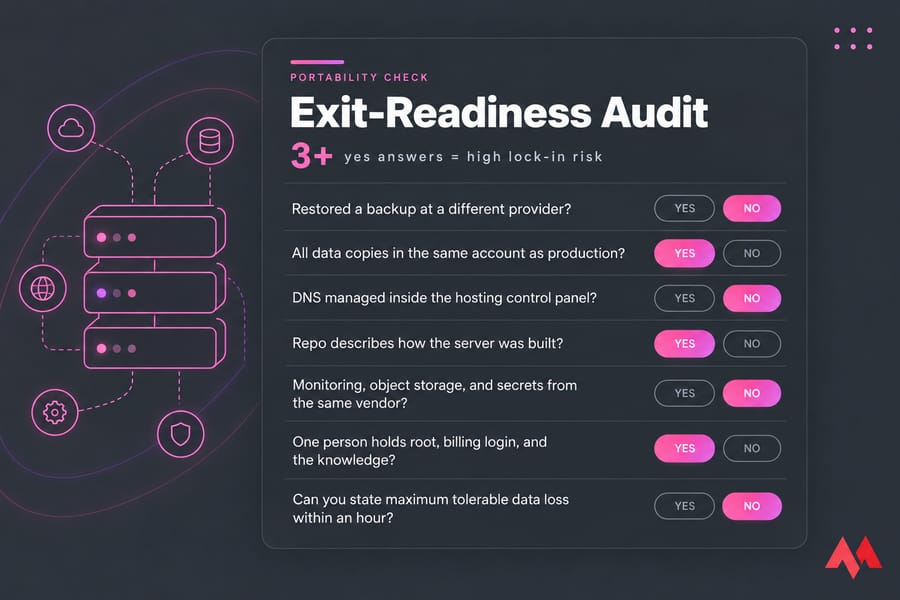
Score yourself. Answer yes to three or more and you've got a portability problem, not a hypothetical one.
- You've never restored a backup onto a server at a different provider.
- Every copy of your data sits in the same account as production.
- Your DNS is managed inside the hosting control panel.
- There's no repo that describes how the server was built.
- Monitoring, object storage, and secrets all come from the same vendor.
- One person holds root, the billing login, and the knowledge.
- You can't say, within an hour, what your maximum tolerable data loss is.
That last one catches people out. If you don't know your recovery targets, you can't tell whether your current setup is acceptable or reckless.
How to avoid VPS vendor lock-in: five principles
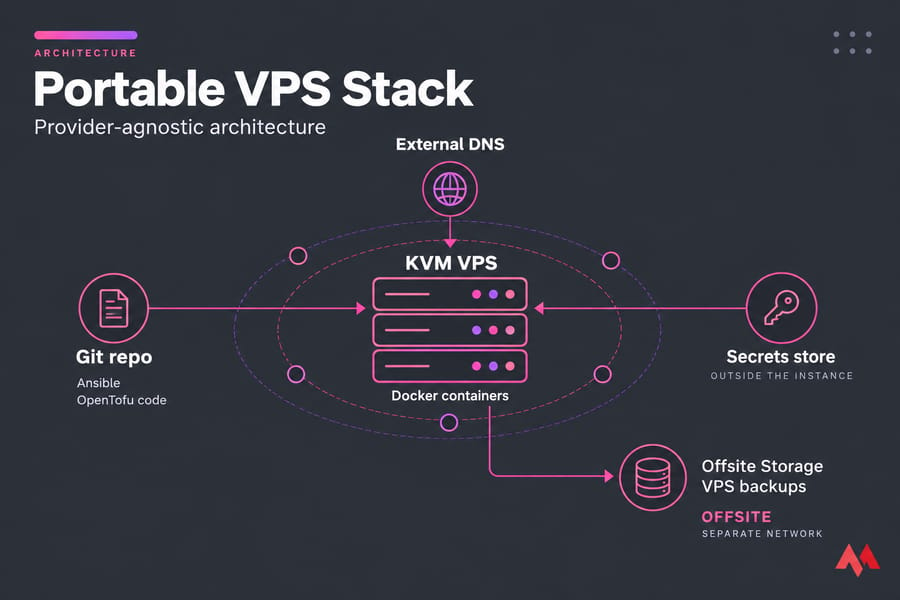
1. Run boring, standard software. Debian or Ubuntu LTS, nginx or Caddy, PostgreSQL or MySQL, SSH for access. Stock distributions with vanilla packages move anywhere. Exotic vendor-tuned images don't. If you're building fresh, our walkthrough on how to set up a VPS properly is a decent baseline.
2. Separate compute from data. Treat the server as replaceable and the data as precious. Database dumps, user uploads, and config go offsite on a schedule — ideally to a different network, not just a different folder. A cheap Storage VPS or any S3-compatible bucket outside your main provider does the job.
3. Package apps in containers where it helps. OCI image and runtime specs hit v1.0 back in 2017 specifically to make container portability real across implementations. In practice that means a properly built image runs on any host with a container runtime. Containers don't solve data gravity, networking, or state — but they remove the "it only works on that box" problem. Here's how to install Docker on Linux if you're starting out.
4. Split provisioning from configuration. IaC creates the server. Config management decides what runs on it. Keep the provider-specific part small and swappable, and the bulk of your setup stays reusable.
5. Keep DNS, secrets, and credentials outside the box. Registrar and DNS with an independent provider. Secrets in a vault or encrypted repo, never baked into an image. Billing owned by the company, not by whoever set it up.
Perfect portability isn't the goal, by the way. Chasing it usually means abstraction layers you don't need and convenience you'll miss. Aim for "reasonable exit readiness" — you can rebuild elsewhere within your recovery target, using documentation that exists.
A note on virtualization
Full-virtualization platforms like KVM give you a real kernel, real root, and images that behave like normal machines — which generally makes moving workloads less fiddly than container-based virtualization where you inherit the host kernel. That's why a KVM VPS is the safer default when portability matters to you.
Build a VPS exit strategy before migration is urgent
Microsoft's own guidance on concentration risk frames exit planning as something you prepare for both orderly and stressed scenarios. Same logic applies at your scale. Plan for the calm migration and the 3 a.m. one.
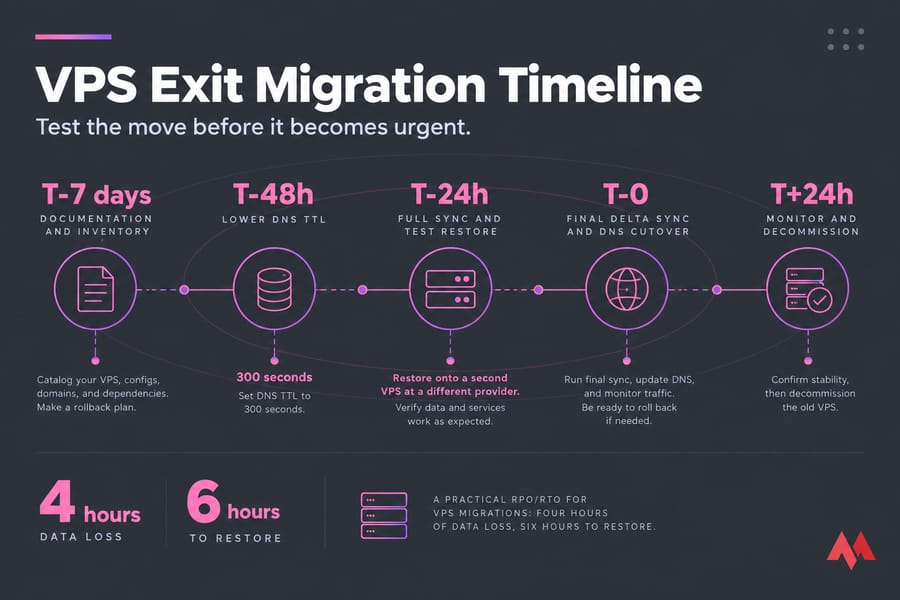
- Document the stack and the recovery order. Services, ports, cron jobs, SSL certs, database versions, external integrations, and what has to come up first.
- Set RPO and RTO in numbers. "Four hours of data loss, six hours to restore" is a decision you can design around. "As fast as possible" isn't.
- Restore onto a second VPS at a different provider. Quarterly for most SMBs, monthly if you're handling payments or customer data. An untested backup is a rumour.
- Rehearse the cutover. Drop DNS TTL to 300 seconds at least 48 hours before the switch, sync, verify, flip, then raise TTL again.
- Name the owners. Who holds registrar access, root keys, the billing account, and the recovery codes. Write it down.
Related reading that pairs with this: migrate a website to VPS for the hands-on sequence, and the rsync command guide for the data-moving part.
Tools for provider-agnostic infrastructure
| Tool | Role | Portability benefit | Caveat |
|---|---|---|---|
| OpenTofu / Terraform | Provision servers, networks, DNS | Infrastructure defined as code; OpenTofu keeps compatibility with existing Terraform configs | Provider blocks still need rewriting per host |
| Ansible | Configure servers repeatably | Agentless over SSH, works on any Linux box | Playbooks rot fast if never run |
| Restic / BorgBackup | Encrypted, deduplicated backups | Open formats, restorable anywhere | You must test restores yourself |
| rsync over SSH | File sync and migration | Universal, scriptable, resumable | Not a versioned backup on its own |
| Docker / OCI images | Package applications | Standardised image format runs on any host | State and data still need separate handling |
| Git | Version everything above | Your stack's source of truth, hosted independently | Worthless if secrets get committed |
One honest caveat: tools reduce provider dependence and quietly create tooling dependence. Undocumented Ansible roles written by someone who left are their own kind of trap. Keep a plain-text runbook alongside the code.
Managed vs unmanaged: where lock-in risk climbs
Managed hosting isn't a trap by default. I'd argue most small teams should buy it — you're paying for patching, monitoring, and someone to call at 2 a.m. instead of hiring a sysadmin. Risk rises when the provider controls your backups, your automation, and a pile of undocumented customisations you've never seen.
The difference is visibility. Good managed service means you still have root, still get exportable backups, and can ask for a copy of the config. Bad managed service means you're a tenant in a black box.
Ask these five questions before you buy — the answers tell you more than any feature page:
- Can I export backups in a standard format, to a destination I choose?
- Do I get full root or administrator access?
- Are control panel licences transferable if I leave?
- Do you provide migration help out, not just in?
- What's the notice period, and are there switching or egress charges?
If you're still weighing the model itself, our breakdown of managed or unmanaged server goes deeper, and managed hosting is worth a look if you want help without giving up operational visibility.
VPS vendor lock-in vs cloud vendor lock-in
| Factor | VPS | Hyperscaler cloud |
|---|---|---|
| Typical stack | Standard Linux, self-managed services | Dozens of proprietary managed services |
| Access level | Full root | Console and API, abstracted infrastructure |
| Main lock-in source | Backups, panels, contracts, knowledge | Managed service APIs, data gravity, IAM design |
| Typical exit effort | Days | Months, sometimes an app rewrite |
| Cost predictability | Flat monthly | Usage-based, harder to forecast |
VPS lock-in is the easier problem. You're running normal Linux on normal hardware, so portability is mostly a discipline question, not an architecture rewrite. See VPS hosting vs AWS and VPS vs cloud hosting for the fuller comparison.
And multi-cloud? It reduces concentration risk, sure. It also doubles your operational surface — two billing models, two networking models, two sets of on-call knowledge. Cloud providers' own architecture docs admit the complexity trade-off. Most SMBs don't need it. They need portable architecture, offsite backups, and a restore they've actually run. If you want elasticity without hyperscaler complexity, a Cloud VPS covers the middle ground.
Your VPS migration checklist
Before you buy: confirm root access, standard distro images, backup export formats, DNS independence, egress/overage pricing, notice period, and whether migration assistance works in both directions.
Audit your current provider: where do backups live, can you restore them elsewhere, is DNS separate, is config in version control, who owns billing and the registrar, and what breaks if the account is suspended tomorrow?
Exit readiness — answer yes to all five:
- Can I rebuild production elsewhere from documentation and code alone?
- Do I hold backups completely independent of this provider?
- Have I restored those backups on another VPS in the last 90 days?
- Are my apps containerised or otherwise reproducible?
- Do I control DNS, credentials, and billing outside the hosting account?
Good hosting should make staying easy — not make leaving impossible. Build the portable version now, while nothing is on fire, and you get the best of both: performance today, options later. If you're ready to set that up, compare VPS hosting plans and pair one with offsite backups from day one.

An experienced tech and developer blog writer, specializing in VPS hosting and server technologies. Fueled by a passion for innovation, I break down complex technical concepts into digestible content, simplifying tech for everyone.