To get any website onto the internet and available to web page visitors, you need hosting - that is, a web server to send your website’s details, files, and scripts to anyone who wants to see it.
There are millions of server computers distributed worldwide in various sizes, shapes, and configurations. There are many different kinds and setups of web servers that allow them to host anywhere from one to several thousand websites simultaneously. In the past few years, hosting providers have invested in new technologies allowing faster connections, higher bandwidth, and better website hosting reliability. Two such methods are VPS and AWS, specifically Virtual Private Servers and Virtual Private Clouds.
Quick Answer: VPS vs AWS at a Glance
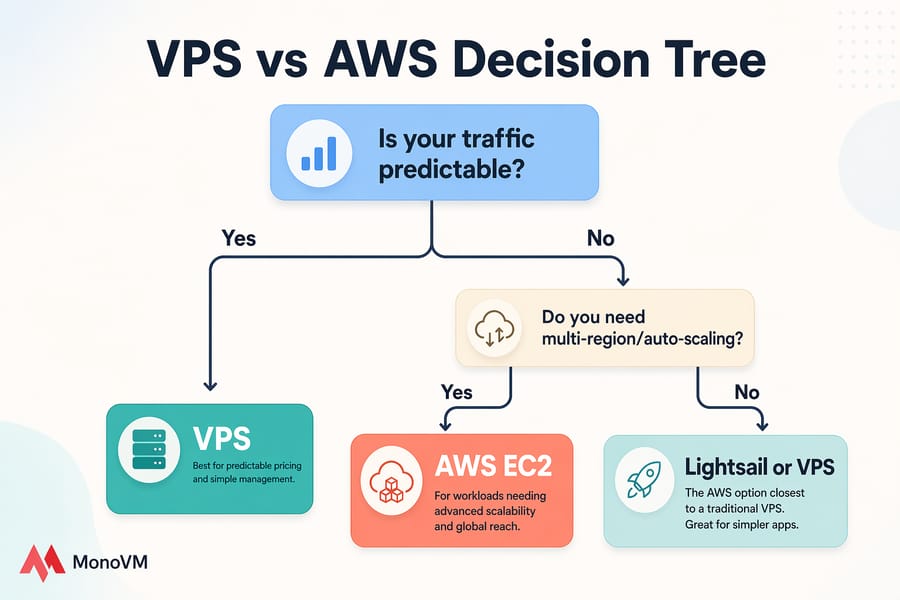
Short version? A traditional VPS gives you a slice of a server at a fixed monthly price — simple, predictable, and easy to manage. AWS, on the other hand, isn't a VPS at all. It's a sprawling cloud platform where services like Lightsail and EC2 can mimic VPS hosting, but with usage-based billing and a much steeper learning curve.
So when people search "AWS VPS," they're usually thinking of Lightsail or EC2. That's the comparison that actually matters.
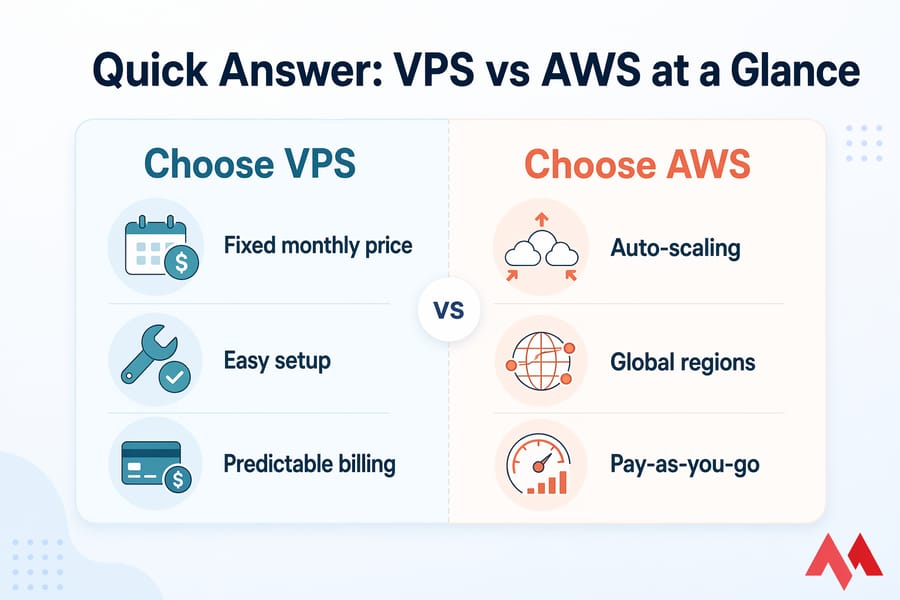
Choose VPS if you want predictable pricing and easier management
If you run a small business site, a WordPress blog, a handful of client projects, or a development environment — a VPS wins on cost clarity and simplicity. You pay a flat rate. You know what's coming out of your card every month. That's it.
Choose AWS if you need advanced scalability and cloud services
AWS makes sense when you actually need the elasticity: SaaS apps with unpredictable traffic, multi-region architectures, managed databases, queues, serverless workers, and 200+ other services tied together. But if all you need is a website, AWS is probably overkill — and more expensive than it looks.
What Is VPS Hosting?
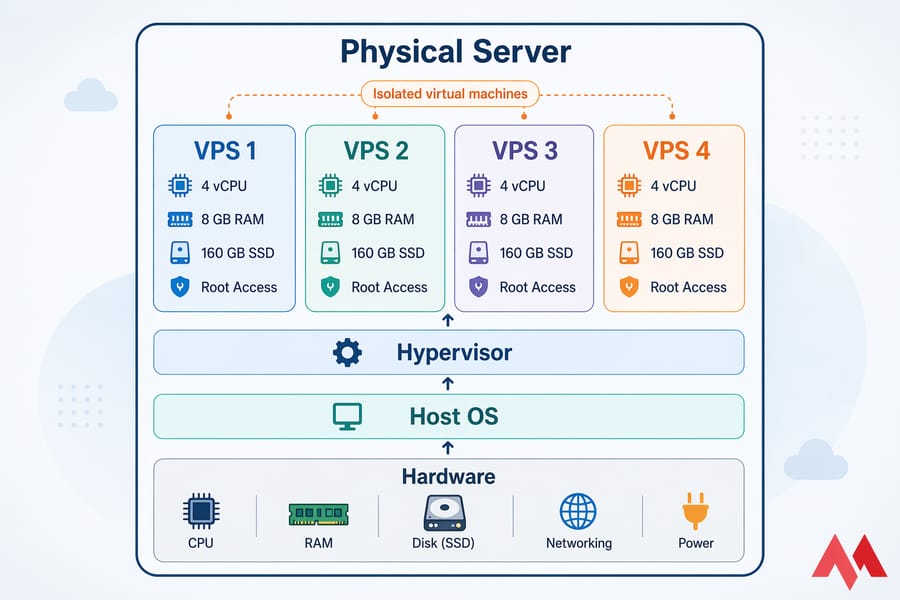
A Virtual Private Server is exactly what it sounds like. A physical machine is sliced into multiple isolated virtual machines using a hypervisor (KVM, VMware, Hyper-V — the usual suspects). Each VPS gets its own dedicated CPU allocation, RAM, storage, and root access. You're sharing hardware, but not resources in any meaningful way.
How a traditional VPS works
You rent a plan — say, 4 vCPU, 8 GB RAM, 160 GB SSD, 4 TB bandwidth — and that's yours for the month. No bidding, no per-hour billing, no surprise line items for "outbound data transfer." The provider handles the physical host, networking, and power. You handle the OS and whatever you run on it.
Managed vs unmanaged VPS
This trips up a lot of first-time buyers. An unmanaged VPS gives you a bare OS — you patch it, secure it, and install everything yourself. A managed VPS comes with the provider handling updates, security hardening, monitoring, and often a control panel like cPanel or Plesk. Managed costs more, but if you don't live in a terminal all day, it's worth every penny.
If you're just starting out, I'd point you toward a VPS plan before you touch anything involving "sudo."
Common VPS use cases
- Small to mid-size business websites
- WordPress, Magento, or Joomla hosting with decent traffic
- Development and staging environments
- Game servers, VPN endpoints, or private Git hosts
- Email servers and small SaaS prototypes
- Reseller hosting for agencies
What Is AWS for Hosting?
Here's where the article you probably read before this one got things wrong. AWS isn't a VPS product. It's a catalog of over 200 cloud services — compute, storage, databases, AI, IoT, content delivery, you name it. Calling AWS "a VPS" is like calling a hardware store "a hammer."
AWS is a cloud platform, not just a VPS
Amazon Web Services is the infrastructure backbone for a huge chunk of the internet — Netflix, Airbnb, NASA, and a few million smaller companies. For hosting a website or an app, only a handful of AWS services are directly relevant. The rest is noise unless you're building something complex.
What is Amazon EC2?
EC2 (Elastic Compute Cloud) is AWS's flagship compute service. You spin up a virtual machine — they call it an "instance" — pick the CPU, RAM, storage, region, and OS, and pay by the hour or second. EC2 is massively configurable. It's also where people get burned on bills, because storage, snapshots, data transfer, and elastic IPs all bill separately.
EC2 is the closest AWS equivalent to an unmanaged VPS in spirit, but the billing model and operational complexity are a different animal.
What is AWS Lightsail?
Lightsail is Amazon's answer to "why is AWS so complicated for a simple website?" It bundles a virtual server, storage, and a fixed amount of data transfer into a flat monthly price — starting around /month at the time of writing. It's the AWS product that most closely resembles a traditional VPS.
Honestly, if someone tells you they want an "AWS VPS," they probably want Lightsail. It's simpler, predictable, and has a friendly dashboard.
What is Amazon VPC and why it is not the same as VPS
Here's a terminology trap: VPC stands for Virtual Private Cloud. It's a networking service — a logically isolated network inside AWS where you place your EC2 instances, databases, and load balancers. VPC is about networking. VPS is about virtual servers. One letter off, totally different concepts. Don't mix them up.
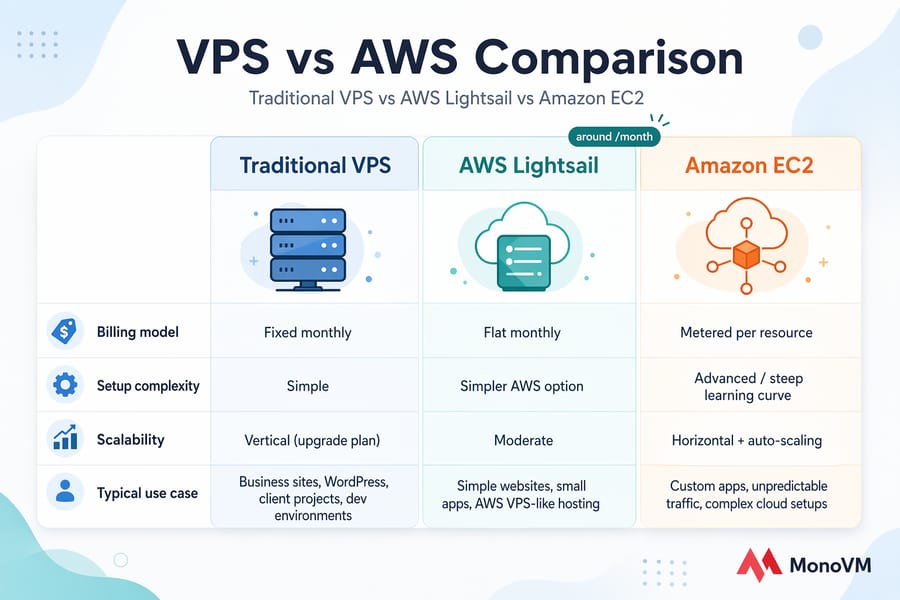
Is AWS the Same as VPS Hosting?
Not really. They overlap in what they can do — both can host a website, run an app, serve APIs — but they differ sharply in philosophy.
Key technical differences
- Billing: VPS = fixed monthly. AWS = metered per resource (compute, storage, bandwidth, requests, IPs).
- Scaling: VPS = vertical (upgrade plan). AWS = horizontal and automated (auto-scaling groups, load balancers).
- Complexity: VPS = one server, one bill, one dashboard. AWS = dozens of services, IAM roles, security groups, regions, billing alarms.
- Bandwidth: VPS usually includes a generous transfer allocation. AWS charges for outbound data transfer, which can balloon.
- Support: VPS providers often include basic support. AWS charges for support plans (Developer, Business, Enterprise).
Which AWS service is closest to a VPS
Lightsail. Full stop. If you want the AWS experience but with VPS-like simplicity, that's where you land. EC2 is more powerful, but if you're comparing AWS to a traditional VPS on equal footing, Lightsail is the honest comparison.
VPS vs AWS Pricing Comparison
This is where most buyers get confused — and where AWS bills blow up. Let's break it down.
Fixed monthly VPS pricing
A traditional VPS plan is one number. /month, /month, /month — whatever your tier is. That price includes your CPU, RAM, disk, and a bandwidth cap (usually a few TB, sometimes unmetered on fair-use terms). Backups might cost a little extra. Control panel licenses too. But the variance is small.
You can check current Linux VPS pricing or Windows VPS plans to see what I mean. One sticker, one monthly charge.
AWS pay-as-you-go pricing
AWS charges you for what you consume, by the hour or second, across every service you touch. For a single EC2 instance, that could look like:
- Instance compute (e.g., t3.medium) per hour
- EBS storage per GB-month
- EBS snapshots per GB-month
- Outbound data transfer per GB (after the free tier)
- Elastic IP if not attached to a running instance
- CloudWatch logs and metrics
- Support plan (if you need more than basic)
Lightsail simplifies this considerably — you pay a flat monthly price with a bundled data transfer allowance. Go over the allowance, and overages apply.
Hidden AWS costs to watch for
I've seen small teams open their first AWS invoice and nearly fall out of their chair. The usual suspects:
- Data transfer out: every GB leaving AWS costs money. CDN traffic, API responses, video — all bills.
- NAT Gateway: easily /month plus per-GB charges.
- Unused Elastic IPs: free while attached, billed when idle.
- Snapshots: they accumulate. Forgotten snapshots are a silent budget leak.
- RDS backups and storage: often bigger than the database itself.
- Cross-AZ traffic: yes, even within AWS, data between availability zones costs money.
Example cost scenarios for small websites and apps
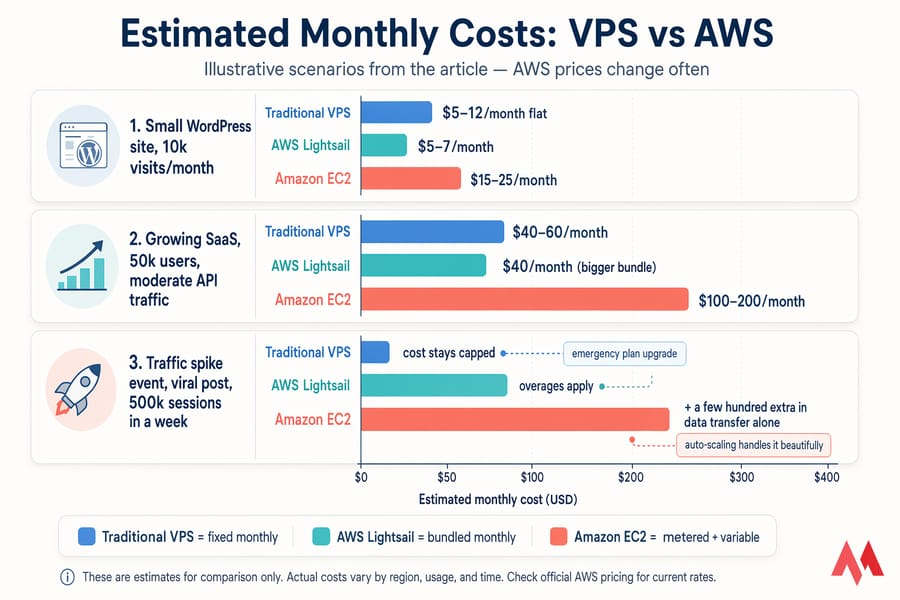
Scenario 1: Small WordPress site, 10k visits/month
VPS: –12/month flat. Lightsail: –7/month. EC2: potentially –25/month once you add storage, snapshots, and data transfer.
Scenario 2: Growing SaaS, 50k users, moderate API traffic
VPS: –60/month. Lightsail: –40 (bigger bundle). EC2: –200/month depending on database, load balancer, and data transfer.
Scenario 3: Traffic spike event (viral post, 500k sessions in a week)
VPS: might need an emergency plan upgrade, but cost stays capped. EC2 with auto-scaling: handles it beautifully — and bills you a few hundred extra in data transfer alone. This is where AWS earns its keep, and also where it bites you.
Note: AWS prices change often. Always check the official AWS pricing page before making decisions.
VPS vs AWS Performance and Scalability
Compute resources and burst capacity
A VPS gives you dedicated vCPU and RAM. Whatever your plan allocates, it's yours 24/7. AWS instances come in two flavors: fixed-performance (like m5, c5 families) and burstable (t-series). Burstable instances run at a baseline CPU level and "burst" above it using CPU credits. Run out of credits and performance tanks — I've debugged this more times than I'd like to admit.
Storage and bandwidth
VPS plans usually ship with SSD or NVMe storage and a generous monthly transfer cap. AWS offers tiered storage (gp3, io2, st1, sc1) with different IOPS guarantees — and bandwidth, as mentioned, bills separately on outbound traffic.
Traffic spikes and scaling options
Scaling a VPS usually means upgrading to a bigger plan or adding a second server behind a load balancer. It works, but it's manual. AWS lets you configure auto-scaling groups that spin up new instances when traffic climbs and kill them when it drops. That's genuinely powerful — if your workload actually needs it. Most small sites don't.
For a deeper dive on getting more out of your VPS, take a look at how to improve VPS performance.
VPS vs AWS Ease of Use and Management
Which is easier for beginners
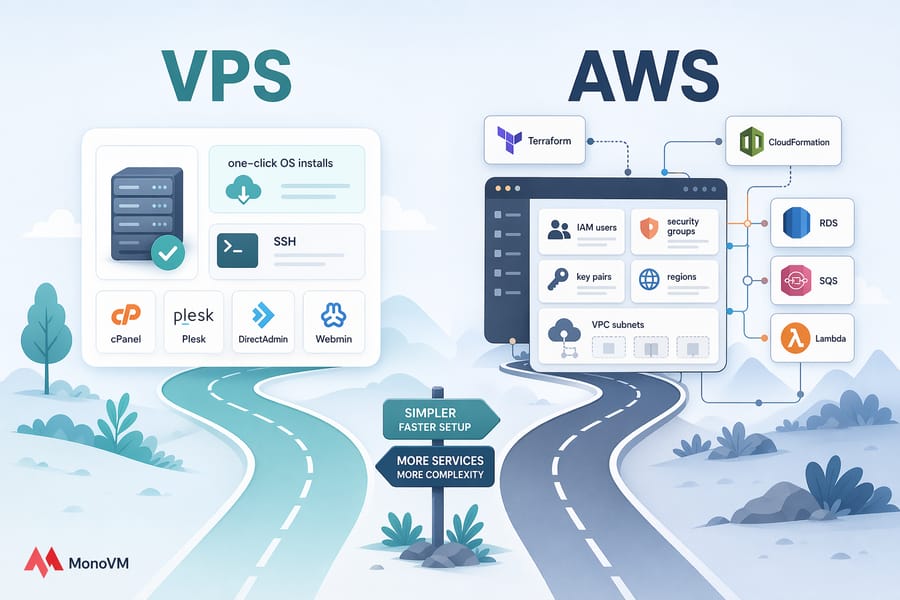
VPS, no contest. A decent provider gives you a clean dashboard, one-click OS installs, optional control panels, and straightforward SSH access. You can go from purchase to a running WordPress site in under 30 minutes.
AWS? You'll spend the first hour just figuring out IAM users, security groups, key pairs, regions, and VPC subnets. It's learnable, but the onramp is steep.
Control panels, setup time, and maintenance
Traditional VPS providers integrate cPanel, Plesk, DirectAdmin, or Webmin. AWS doesn't include a control panel by default — Lightsail has a basic dashboard, but it's not cPanel-level. You'd install a panel yourself or use a third-party service.
Developer flexibility and learning curve
Developers who already know AWS love it. You get IaC (Terraform, CloudFormation), managed services (RDS, SQS, Lambda), and a consistent API for everything. But if you're not already in that world, expect a few weeks of ramp-up before you're productive.
VPS vs AWS Security and Reliability
Shared responsibility on AWS
AWS operates on a shared responsibility model. Amazon secures the underlying infrastructure — physical datacenters, hypervisor, network hardware. You secure everything else: OS patches, IAM policies, security groups, application code, data encryption. This is true for a VPS too, but AWS formalizes it with documentation you're expected to actually read.
Backups, snapshots, and disaster recovery
Both platforms offer snapshots. AWS has EBS snapshots and Lightsail has automated snapshots. A good VPS provider offers weekly or daily backups, often included or as a small add-on. For serious disaster recovery, AWS has more tooling (cross-region replication, S3 lifecycle policies), but it's also more to configure.
Uptime expectations and architecture differences
AWS publishes SLAs — typically 99.99% for EC2 within a region when you use multiple availability zones. Lightsail's SLA is 99.99% as well. Good VPS providers target 99.9% to 99.99%, though actual uptime depends on the provider's infrastructure. Don't take "100% uptime" claims at face value from anyone. Nothing hits 100%.
Pros and Cons of VPS Hosting
Pros:
- Predictable, flat monthly pricing
- Simple to set up and manage
- Managed options available for non-technical users
- Control panels like cPanel/Plesk bundled or cheap
- Full root access and OS choice
- Good support from most providers
Cons:
- Vertical scaling requires a plan upgrade and often downtime
- Fewer managed services compared to AWS
- Single-region hosting in most cases
- Less suited for complex, multi-service architectures
Pros and Cons of AWS Hosting
Pros:
- Massive scalability (auto-scaling, load balancing, global regions)
- 200+ integrated services for any workload
- Strong SLAs and multi-AZ high availability
- Pay only for what you use (in theory)
- Industry-standard for enterprise cloud workloads
Cons:
- Unpredictable billing — surprise invoices are a known meme
- Steep learning curve
- Paid support tiers for anything beyond basic
- Data transfer costs add up fast
- Overkill for simple websites
When to Choose VPS Hosting
Best for SMBs, agencies, and predictable workloads
If your site or app has a reasonably stable traffic pattern — a business website, an e-commerce store doing 100–5,000 orders a month, a WordPress agency managing client sites — a VPS is almost always the better call. You know your monthly cost. You know your resources. You can budget.
Best for budget-conscious website owners
For bloggers, freelancers, and small teams watching every dollar, VPS wins. A cloud VPS or a basic Linux VPS gives you everything you need without the AWS billing anxiety.
When to Choose AWS
Best for cloud-native applications
Building a modern SaaS with microservices, managed databases, message queues, and serverless functions? AWS is designed for exactly that. The service ecosystem is unmatched.
Best for multi-service architectures and elastic scaling
If traffic is unpredictable — viral content sites, event-based apps, seasonal e-commerce spikes — AWS auto-scaling is genuinely valuable. You pay more on average, but you avoid outages during peak load. For a team with cloud engineers on staff, the complexity is a worthwhile trade.
VPS vs AWS Comparison Table
| Feature | Traditional VPS | AWS Lightsail | AWS EC2 |
|---|---|---|---|
| Pricing model | Fixed monthly | Fixed monthly bundle | Pay-as-you-go (hourly/per-second) |
| Setup difficulty | Easy | Easy | Moderate to Complex |
| Root access | Yes | Yes | Yes |
| Scalability | Vertical (plan upgrade) | Limited | Horizontal, auto-scaling |
| Billing predictability | High | High | Low |
| Support | Usually included | Basic included, paid tiers | Paid tiers |
| Customization | High | Moderate | Very High |
| Security responsibility | Shared (provider + you) | Shared responsibility model | Shared responsibility model |
| Best use case | SMB sites, apps, dev | Simple cloud hosting | Complex, scalable apps |
| Beginner friendliness | High | Moderate | Low |
Migration Considerations
Thinking of switching between the two? A few practical notes from the trenches:
- VPS → AWS: Plan for re-architecting. Lifting and shifting a monolithic VPS app to EC2 works, but you're leaving most of AWS's value on the table. Consider using RDS for the database, S3 for static assets, and CloudFront for caching.
- AWS → VPS: Usually triggered by cost. Export your data, rebuild your app on a simpler stack, and test thoroughly before cutting DNS. Watch for AWS-specific services (SQS, Lambda, IAM) that don't have direct VPS equivalents.
- DNS cutover: Lower your TTL a few days before migration. Trust me on this one.
Alternatives to AWS for VPS Hosting
AWS isn't the only cloud in town, and it's rarely the cheapest. If you want cloud-like flexibility with VPS-like predictability, look at:
- Traditional VPS providers like MonoVM — fixed pricing, solid support, managed options
- DigitalOcean, Vultr, Linode — cloud VPS with simple billing
- Google Cloud and Azure — similar to AWS in complexity, different pricing quirks
If you're weighing hosting types more broadly, these comparisons might help:
Final Verdict: VPS or AWS?
Here's the honest take after years of deploying on both: most websites and small apps don't need AWS. They need a reliable VPS at a predictable price, with decent support and a control panel that doesn't make you Google every click. If that's you, pick a VPS and move on with your life.
AWS earns its reputation when you're building something that genuinely needs cloud-native features — horizontal scaling, managed databases, global distribution, serverless components. If you have a team that understands the platform, the power is real. If you don't, you'll overpay for features you never use.
If you want predictable monthly billing, straightforward management, and a team that answers tickets without upselling you on a "Business Support Plan," browse the Linux VPS plans or Windows VPS options and pick the size that fits. You can always scale up later — but you probably won't need to for a while.