You've split your app into services. Locally, everything runs fine — docker compose up and you're in business. Then comes the part nobody enjoys: getting it into production without breaking things at 2 a.m.
Deploying microservices, minus the overengineering
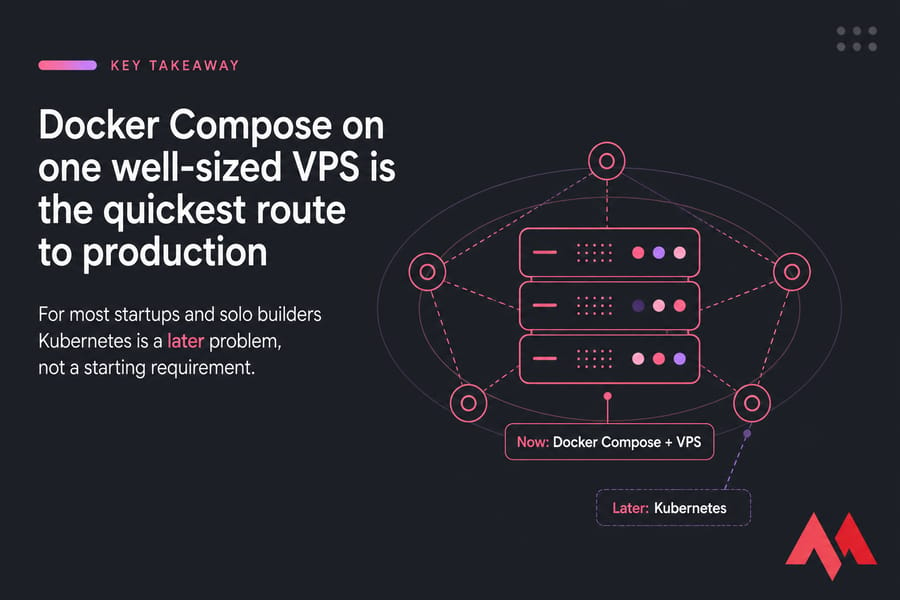
Here's the short answer. To deploy microservices you package each service into a container, wire them together on a private network, route external traffic through a reverse proxy or API gateway, then run the whole thing on a VPS, Docker host, or Kubernetes cluster. For small and mid-sized apps, Docker Compose on a single VPS is usually the fastest production-ready path — and it stays viable far longer than most people admit.
I'll use one running example throughout: an API gateway, an auth service, a user service, an order service, PostgreSQL, and Redis. Six moving pieces. Realistic, not a toy.
Before you deploy: the prerequisites checklist
- Code split into independent services, each with its own Dockerfile
- A plan for environment variables and secrets (not committed to Git)
- A database strategy — shared instance, per-service schema, or separate instances
- A domain or subdomains mapped for public endpoints
- SSH access to a VPS or cluster (here's how to connect to your VPS if that's new territory)
- Basic Linux comfort — file permissions, systemd, log locations
- CI/CD is optional at first. Recommended by month two.
What microservices deployment actually involves
Building microservices is a coding problem. Deploying them is an operations problem, and the two require different instincts.
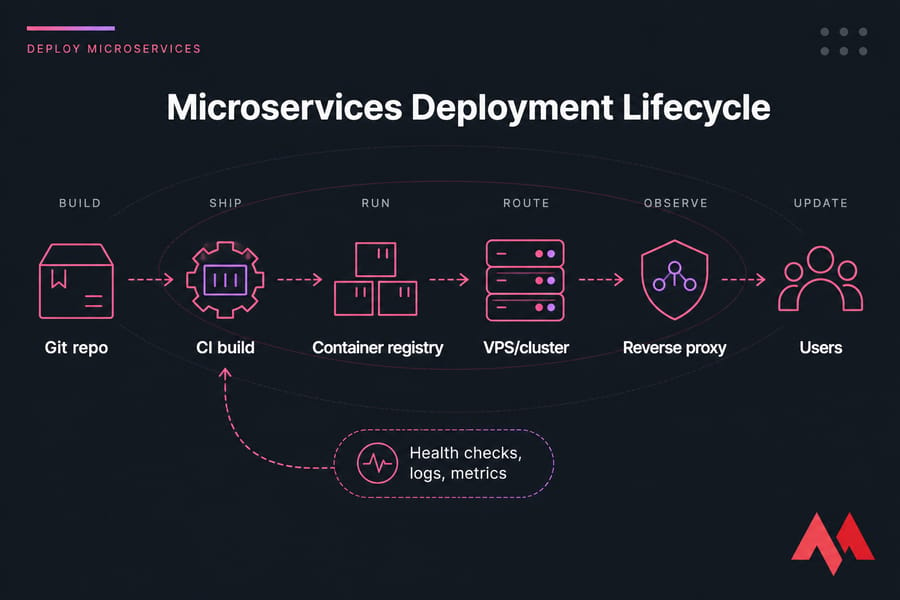
The lifecycle looks roughly like this:
- Build — compile and containerize each service
- Ship — push images to a container registry
- Run — start containers on your host or cluster
- Route — expose public endpoints via reverse proxy or gateway
- Observe — health checks, logs, metrics
- Update — roll new versions out and roll bad ones back
What changes between local dev and production
Locally, everything shares one network, ports are wide open, and a crash means you hit restart. Production is different in ways that bite. Services need stable internal names. Only the gateway should face the internet. Secrets can't sit in a committed .env file. And when the order service dies at 3 a.m., something has to notice and restart it.
Why this is harder than a monolith
With a monolith you deploy one artifact. With six services you have six deploy targets, six sets of logs, five internal network paths, and failure modes that only appear under load. That's the honest trade-off. Fault isolation is real, but you pay for it in operational surface area — which is exactly why starting simple matters so much.
Deployment models: Docker Compose vs Kubernetes vs managed platforms
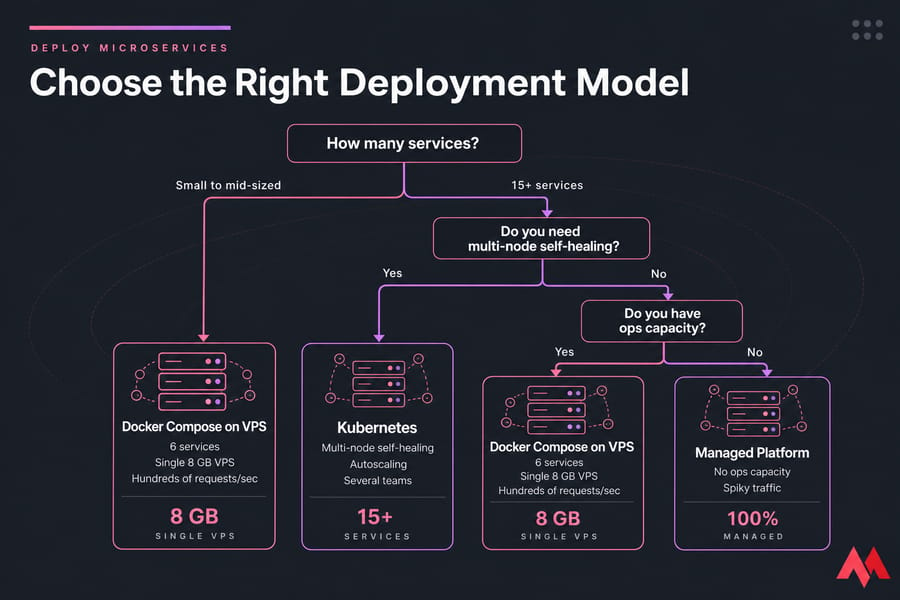
Three realistic routes. Pick based on your team and traffic, not on what's trending.
| Model | Best for | Complexity | Typical cost | Scaling | Ops overhead |
|---|---|---|---|---|---|
| Docker Compose on a VPS | MVPs, startups, internal tools, up to moderate traffic | Low | $10–80/mo | Vertical + manual replicas | Low — one server to patch |
| Kubernetes cluster | Multi-team products, dynamic workloads, 15+ services | High | $150+/mo plus engineer time | Horizontal, automated | High — cluster is its own product |
| Managed container platform | Teams with no ops capacity, spiky traffic | Medium | Usage-based, escalates fast | Automatic | Low, but you inherit platform limits |
When Compose is enough
If your six services fit comfortably on one machine and traffic is measured in hundreds of requests per second rather than tens of thousands, Compose is genuinely enough. I've seen production apps with real revenue run on a single 8 GB VPS for years. It's boring. Boring is good.
When Kubernetes earns its keep
Kubernetes makes sense once you need automated self-healing across multiple nodes, autoscaling in response to traffic, and independent deploy pipelines for several teams. If you can't name a specific problem it solves for you right now, you're buying complexity on credit. Our breakdown of Kubernetes vs Docker covers where the line sits.
When managed platforms win
No ops person, unpredictable traffic, and you'd rather pay a premium than learn Linux internals? Managed it is. Just budget carefully — costs get uncomfortable at scale, and you lose the flexibility a cloud VPS gives you.
Core infrastructure every model needs underneath
Regardless of orchestrator, the same layers exist.
- Compute — CPU and RAM. Budget roughly 256–512 MB per lightweight Node.js service, more for the database.
- Container runtime — Docker or containerd. This runs your images.
- Networking — a private network so services reach each other by name, plus one public entry point.
- Persistent storage — volumes for PostgreSQL data and uploads. Containers are disposable; your data isn't.
- Reverse proxy / gateway — Nginx or Traefik handling TLS termination and path-based routing.
- Service discovery — internal DNS so the order service can call the auth service without hardcoded IPs.
A single VPS server covers all six layers for early-stage apps. Multi-node becomes necessary when one machine can't hold your peak load, or when downtime during reboots stops being acceptable.
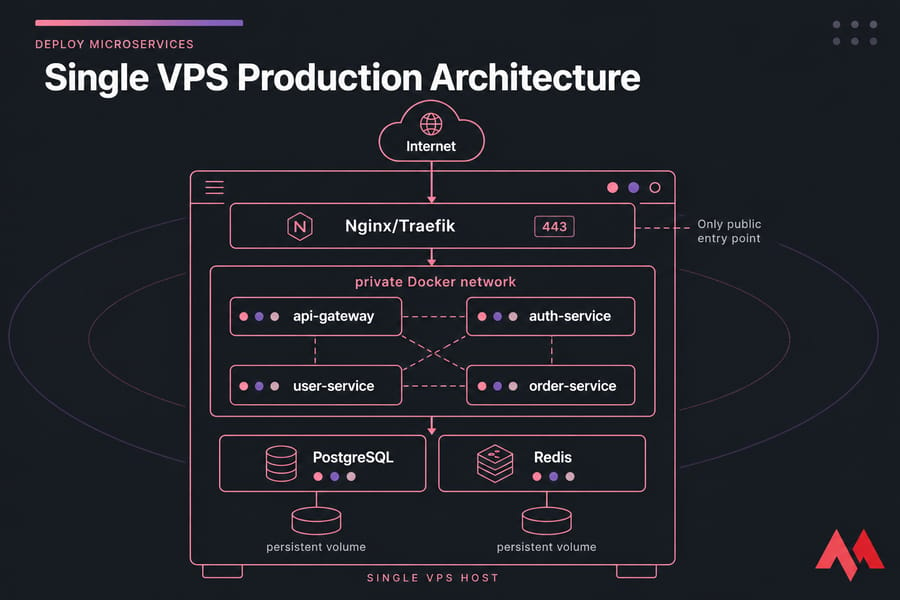
How to deploy microservices with Docker Compose on a VPS
This is the path I recommend to most teams. Roughly an afternoon of work.
- Provision the VPS. Start with 4 vCPU / 8 GB RAM / NVMe storage for six services with a database. Pick a region near your users.
- Install Docker and the Compose plugin. Follow our guide to install Docker on Linux, then verify with a version check.
- Pull your images. Build in CI, push to a registry, pull on the server. Building on the production box works but competes with your running services for CPU.
- Write the Compose file. Define each service, attach them to a shared internal network, and mount volumes for PostgreSQL and Redis.
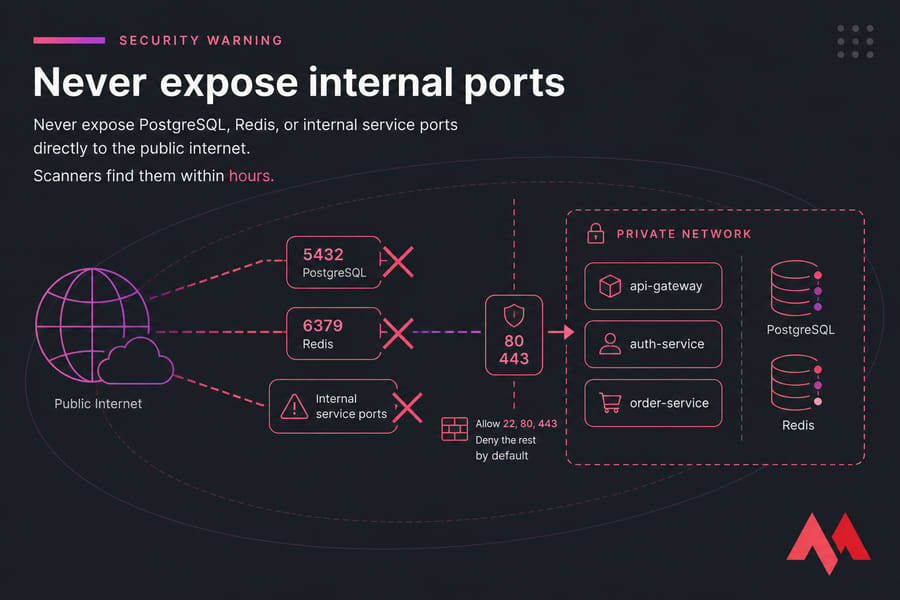
- Publish only the proxy. Ports 80 and 443 on the reverse proxy. Nothing else.
- Handle environment variables. Use a root-owned .env file with 600 permissions, or Docker secrets. Never bake credentials into images.
- Add Nginx or Traefik. Route /auth, /users, and /orders to the right containers. Our Nginx reverse proxy walkthrough has working config.
- Enable TLS. Traefik can pull Let's Encrypt certificates automatically; with Nginx, use certbot.
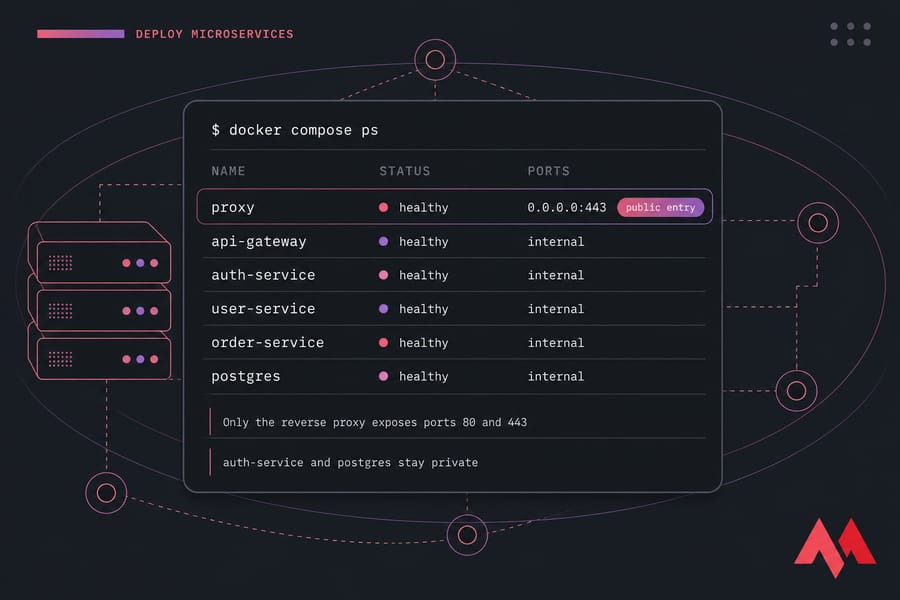
- Start and validate. Bring the stack up, check container health status, hit every public endpoint, then confirm internal calls succeed.
services:
  api-gateway:
    image: registry.example.com/gateway:1.4.2
    networks: [internal]
    depends_on: [auth-service, order-service]
    healthcheck:
      test: ["CMD", "curl", "-f", "http://localhost:3000/health"]
      interval: 30s
  auth-service:
    image: registry.example.com/auth:2.1.0
    env_file: .env
    networks: [internal]
  postgres:
    image: postgres:16
    volumes: [pgdata:/var/lib/postgresql/data]
    networks: [internal]
networks:
  internal:
    driver: bridge
volumes:
  pgdata:
Notice what's missing: no ports mapping on auth-service or postgres. That's deliberate.
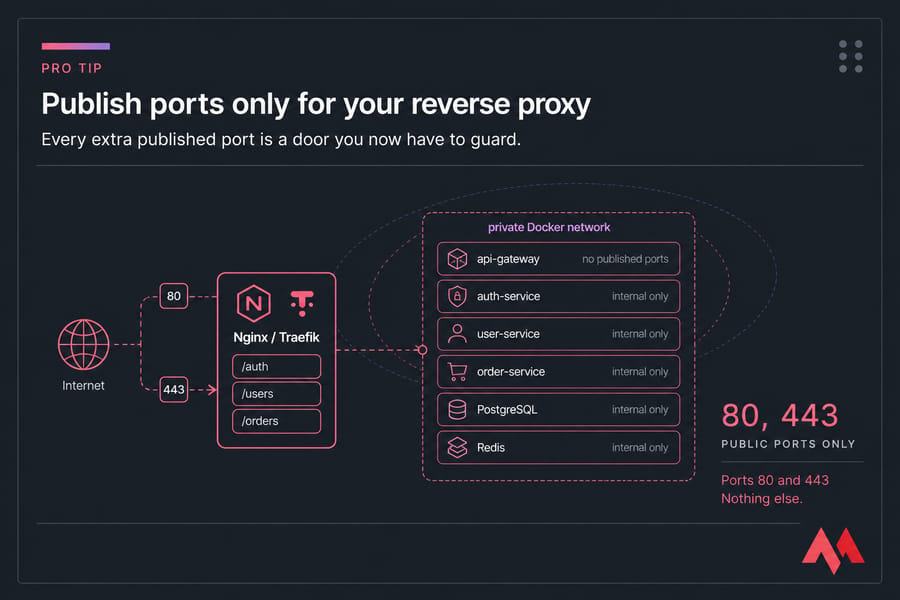
Rolling updates without downtime
Pull the new image tag, then recreate one service at a time. Compose keeps the rest running, so a bad auth deploy doesn't take orders offline. Keep the previous image tag on disk — rollback then means changing one line and restarting. Tag by version, never rely on latest.
How to deploy microservices on Kubernetes
When Compose stops fitting, Kubernetes is the next rung. It adds scheduling across nodes, automatic restarts, declarative rollouts, and autoscaling.
The objects you'll actually use:
- Deployment — declares how many replicas of a service to run and which image to use
- Service — gives pods a stable internal DNS name and load-balances between them
- Ingress — the cluster's front door, handling hostnames, paths, and TLS
- ConfigMap — non-sensitive configuration
- Secret — credentials and keys, ideally with encryption at rest enabled
Rolling updates are built in: change the image tag, and Kubernetes replaces pods gradually while readiness probes gate traffic. The Horizontal Pod Autoscaler adds replicas when CPU or custom metrics cross a threshold.
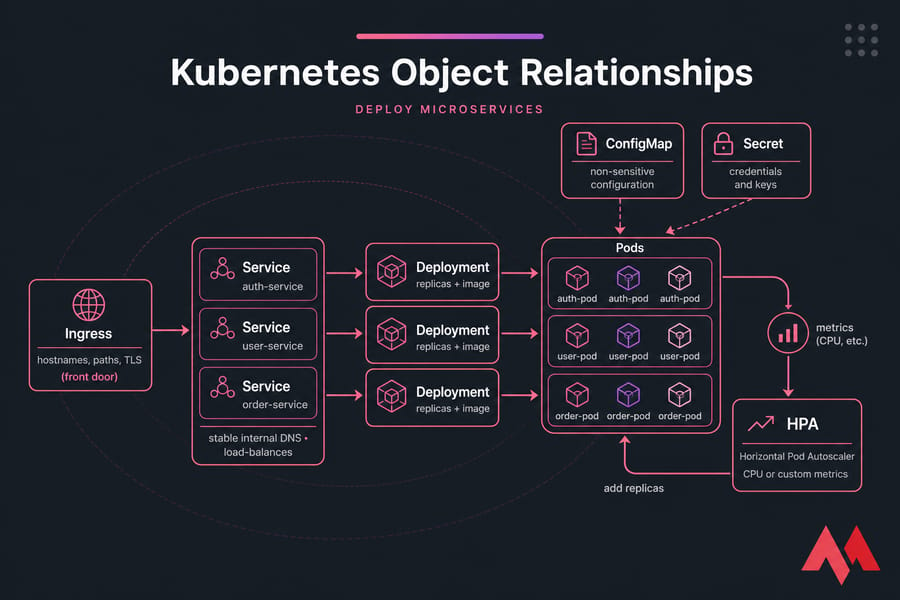
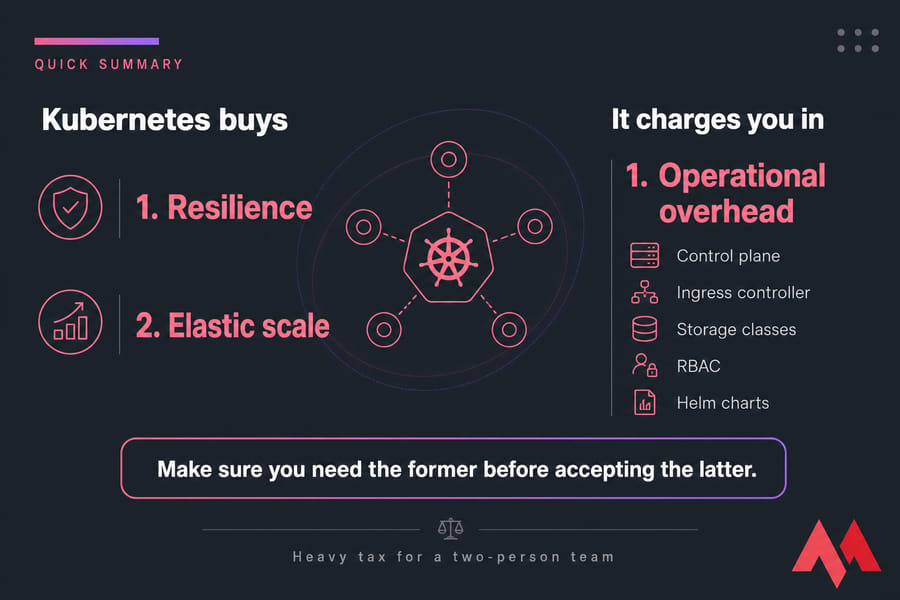
The trade-off is real. You now maintain a control plane, ingress controller, storage classes, RBAC, and probably Helm charts. Managed Kubernetes offloads some of that, but the day-to-day complexity stays yours. For a two-person team shipping features, that's a heavy tax.
Networking, service discovery, and gateway patterns
Split your traffic mentally into two categories: external requests from browsers and mobile apps, and internal calls between services.
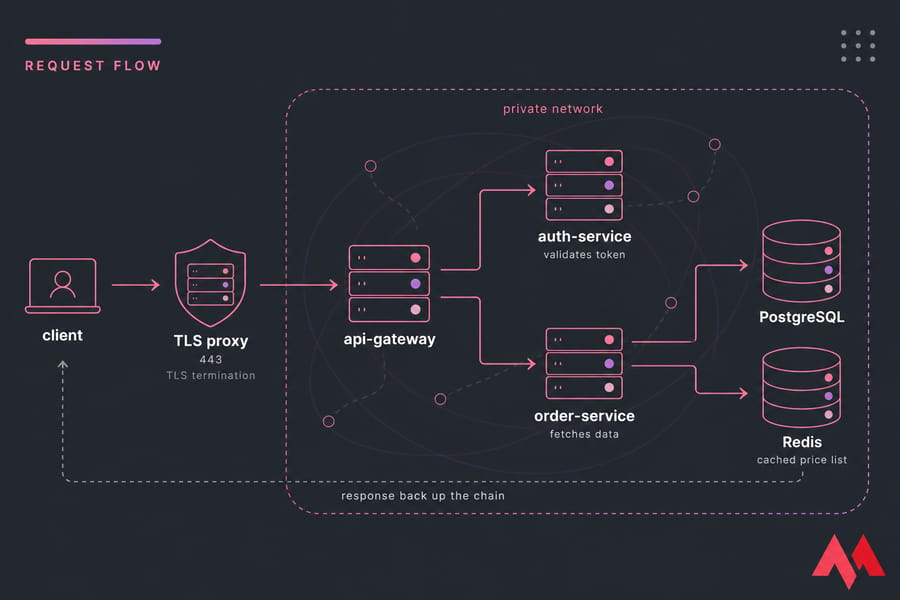
External traffic hits the reverse proxy on 443, gets TLS-terminated, and is routed by path or subdomain to the gateway. Internal traffic never leaves the private network. In Compose, containers resolve each other by service name — the order service calls http://auth-service:3000 and Docker's embedded DNS handles it. Kubernetes does the same via Service names. Either way, hardcoded IPs are a bug waiting to happen.
An example flow: browser → Traefik (TLS) → api-gateway → auth-service validates the token → order-service fetches data → Redis returns a cached price list → response back up the chain.
Add sane timeouts and limited retries between services. Without them, one slow service becomes a cascading outage. Retry twice with backoff, then fail fast and return a useful error. If you're setting this up from scratch, our guide on how to set up a reverse proxy on a VPS covers the config details.
Security: secrets, TLS, and access control
The production security floor, in order of priority:
- Secrets outside the repo. Environment files with restrictive permissions at minimum; Docker secrets or a vault as you grow. Environment variables aren't perfect — they leak into logs and process listings — but they beat hardcoded strings by a mile.
- HTTPS on every public endpoint. Terminate TLS at the proxy with a valid certificate. Internal traffic on a private network can stay plain HTTP early on; add mutual TLS when compliance demands it.
- Least privilege between services. The order service shouldn't hold admin database credentials. Separate users, scoped permissions.
- Firewall the host. Allow 22, 80, 443. Deny the rest by default. Walk through secure your Linux VPS for the full pass.
- SSH hardening. Key-only authentication, no root login, non-standard port if you like. Details in configure secure SSH access.
Monitoring, logging, and health checks
Secure doesn't mean observable. You need to know when something breaks before your users tell you.
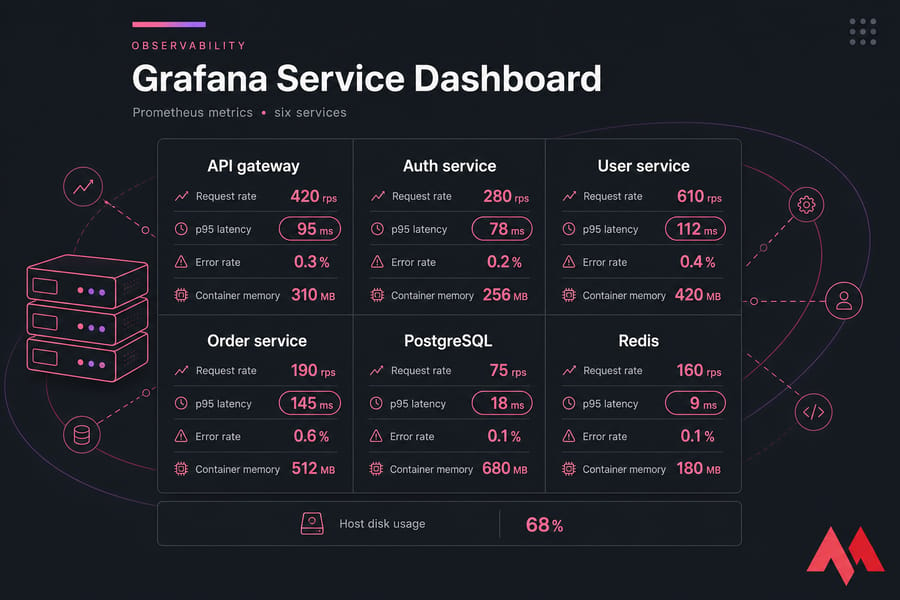
Start with four signals per service: CPU, memory, request latency (p95, not average), and error rate. Add disk usage on the host. That's enough to catch most incidents.
Every service should expose two endpoints. A liveness check answers "am I alive?" — fail it and the container restarts. A readiness check answers "can I serve traffic?" — fail it and the proxy stops routing to you while you finish warming up or reconnecting to the database.
For logs, ship container output to one place and stamp every request with a correlation ID that travels through the gateway, auth, and order services. Debugging a distributed request without one is genuinely miserable. That ID is your entry point into distributed tracing later.
Prometheus scraping metrics with Grafana dashboards on top is the standard self-hosted stack, and it runs fine alongside your services on a modest VPS. Our tutorial on Prometheus and Grafana on a VPS gets you there.
Scaling and zero-downtime releases
Vertical scaling — more CPU and RAM on the same box — is the cheapest first move and often the right one. Horizontal scaling means more replicas behind a load balancer, which only works if your services are stateless. Push sessions into Redis, files into object storage, and keep containers disposable.
| Strategy | How it works | Risk | Good fit |
|---|---|---|---|
| Rolling update | Replace instances gradually | Two versions live at once | Default choice, backward-compatible changes |
| Blue-green | Full parallel stack, switch traffic | Doubles resource cost | Risky releases, instant rollback needs |
| Canary | Send 5% of traffic to the new version | Needs solid metrics to judge | High-traffic services, gradual confidence |
One caveat: "zero downtime" assumes your database migrations are backward-compatible. They usually aren't unless you plan for it. Add columns before you use them, never rename in a single release.
Your database is the usual bottleneck, not your app containers. Connection pooling, read replicas, and Redis caching buy far more headroom than another service replica. Check how to improve VPS performance and consider a dedicated MySQL VPS or MongoDB VPS once the database competes with your services for resources.
Common deployment mistakes
| Mistake | What goes wrong | Better approach |
|---|---|---|
| Adopting Kubernetes on day one | Weeks lost to cluster maintenance instead of shipping | Start with Compose; migrate when scale demands it |
| No rollback plan | Bad deploy means frantic hotfixing under pressure | Version every image, keep the last known-good tag ready |
| Publishing internal ports | Database exposed to the internet within hours | Private network only; proxy is the sole entry point |
| Secrets in the repo or image | Credentials leak permanently into Git history | External env files, Docker secrets, or a vault |
| No observability | Users report outages before you notice | Health checks, metrics, alerts on error rate |
| Splitting into 20 services early | Network complexity with no organisational benefit | Three to six services until team size justifies more |
| No backups | One volume corruption ends the business | Automated off-server backups — back up your server or VPS regularly |
When something does go sideways, our Linux VPS troubleshooting guide is a decent starting point.
Best VPS setup for deploying microservices
What actually matters when picking hosting for containers: root access, your choice of Linux distribution, NVMe disks (container builds and database writes are I/O heavy), predictable bandwidth, and a location close to your users.
| Stage | Example workload | CPU | RAM | Storage | Recommended hosting |
|---|---|---|---|---|---|
| MVP | 3–4 services + Postgres | 2 vCPU | 4 GB | 50 GB NVMe | Linux VPS |
| Startup | 6 services + Postgres + Redis | 4 vCPU | 8 GB | 100 GB NVMe | Docker VPS hosting |
| Growing product | 8–12 services, monitoring stack | 8 vCPU | 16 GB | 200 GB | NVMe VPS |
| High traffic | Multi-node, separate DB tier | 16+ vCPU | 32 GB+ | 500 GB+ | Cloud VPS or dedicated |
Running JavaScript services? A Node.js VPS hosting environment comes pre-tuned, and our walkthrough on how to deploy a Node.js application on a VPS pairs directly with this guide.
Split to multiple nodes when a single box can't absorb your peak, when reboots cause unacceptable downtime, or when your database needs isolated I/O. Not before.

An experienced tech and developer blog writer, specializing in VPS hosting and server technologies. Fueled by a passion for innovation, I break down complex technical concepts into digestible content, simplifying tech for everyone.