SSD VPS hosting gets sold as "fast," and the word "SSD" does most of the selling. But the architecture behind it decides how fast your server actually feels: where the drive sits, how the hypervisor hands out I/O, and how many other tenants share it. This guide covers that architecture and its effect on performance. It looks at IOPS, latency and throughput, and then helps you decide when a standard SSD plan is enough and when you should pay for NVMe.
Quick answer: SSD VPS hosting is a virtual private server that keeps its data on solid-state drives, not spinning hard disks. SSDs have much lower latency and higher IOPS. Because of that, an SSD VPS usually boots faster, runs databases better and feels more responsive than an HDD-backed VPS.
If you're still unsure what a VPS is, start there. Everything below assumes you know the basics.
What Is SSD VPS Hosting and Why Does It Matter?
In simple terms, an SSD VPS is a slice of a physical server. You get your own operating system, RAM and CPU allocation, and its virtual disk sits on flash storage. There are no moving parts, so there's no read head moving across a platter.
Storage type matters because most of what users notice comes from disk waits. A WordPress page that runs 40 small database queries, an apt upgrade that unpacks thousands of files, a log rotation: all of these are lots of small reads and writes. SSDs handle that kind of work far better than HDDs.
One caveat. "SSD VPS" is a label, not a full specification. Two plans with the same label can behave very differently, and the architecture explains why.
How SSD VPS Architecture Works
Physical server, hypervisor, and VM layer
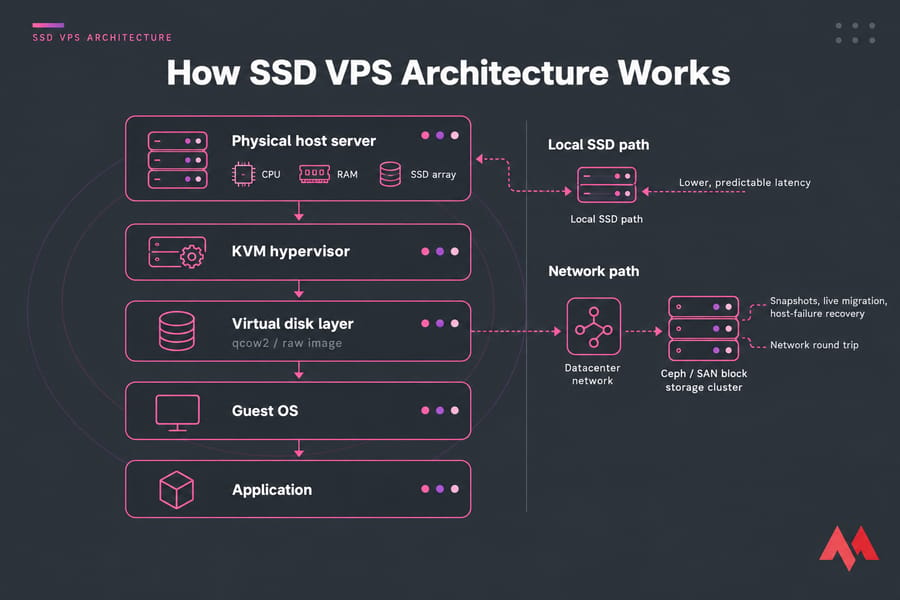
At the bottom is a physical node. A hypervisor runs on top of it, usually KVM on Linux hosts, though Hyper-V and VMware are also common. The hypervisor splits the node into isolated virtual machines. Each VM sees a virtual disk, which is really a file or volume the hypervisor maps onto physical storage. Every read your app makes passes through that translation layer before it reaches flash.
Local SSD vs network-attached block storage
This is the detail most sales pages leave out. With local storage, the SSDs sit inside the same machine that runs your VM, often in a RAID mirror. With network storage, your disk is a volume on a separate cluster (Ceph, a SAN, or another block storage system) and every I/O travels across the datacenter network.
Each option has trade-offs. One provider puts it this way: local vs network storage is "one decision hiding behind two product names." Local disks give lower and more predictable latency. Network storage makes snapshots, live migration and recovery from a host failure easier, but every operation pays a network round trip.
How KVM affects consistency
Full KVM virtualization gives each VM its own kernel and lets the host set per-VM I/O limits. That doesn't stop noisy neighbors entirely, but it limits how much one busy tenant can starve the others. That's one reason I usually point people to KVM VPS hosting rather than container-based plans.
SSD VPS Performance: IOPS, Latency, and Throughput
| Metric | What it measures | Why it matters | Example workload |
|---|---|---|---|
| IOPS | Read/write operations per second | Handling lots of small requests | CMS page loads, mail servers |
| Latency | Time for one I/O to complete | How "snappy" the server feels | Database commits |
| Throughput | MB/s moved | Large sequential transfers | Backups, video files |
| Queue depth | Outstanding I/O requests | Behavior under concurrency | Busy APIs, Docker pulls |
For most VPS workloads, latency matters more than the headline MB/s figure. A MySQL or PostgreSQL commit has to wait for an fsync to finish. If each one takes a few milliseconds instead of a fraction of one, your app slows down no matter how high the sequential throughput number is.
Hosts also apply storage QoS, which means IOPS caps per VM. A fast drive behind a strict cap is still a slow disk for you. Run fio for random 4K tests and watch iostat during real traffic. Our guides to VM monitoring metrics and VPS benchmark tools show you how to read the results.
SSD VPS vs HDD VPS
An HDD has to physically move a head and wait for the platter to spin into position. That seek and rotational delay typically costs several milliseconds per random read. Flash has no moving parts, so it skips that delay entirely.
| Factor | SSD VPS | HDD VPS |
|---|---|---|
| Random latency | Sub-millisecond | Several milliseconds |
| IOPS | Thousands to tens of thousands | Low hundreds |
| Boot time | Seconds | Noticeably slower |
| Cost per GB | Higher | Lowest |
| Best for | Websites, apps, databases | Archives, cheap backup storage |
HDD still makes sense for bulk storage that you rarely read. For a more detailed breakdown, see SSD vs HDD VPS hosting.
SSD VPS vs NVMe VPS
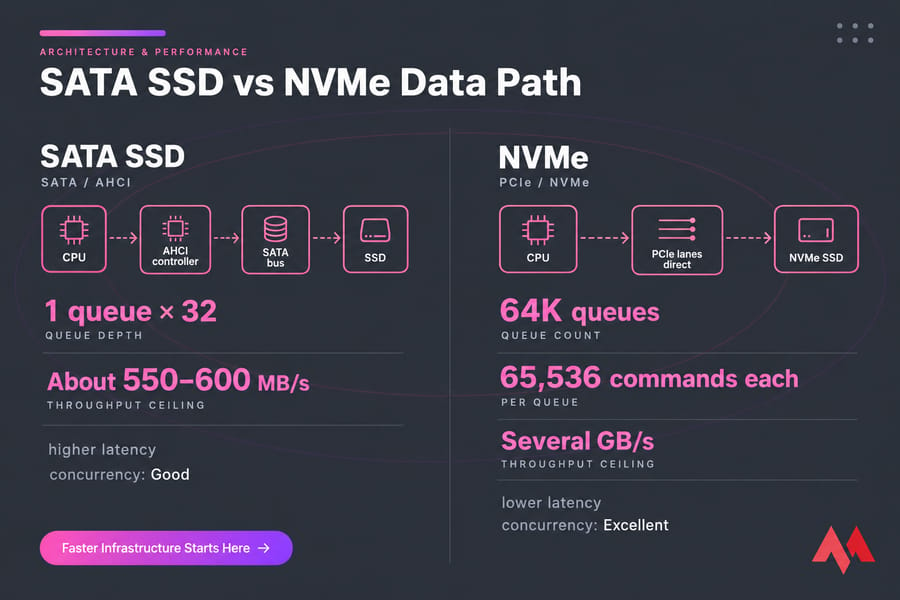
Buyers often mix this up: NVMe is also SSD. The difference is the interface. "SSD VPS" usually means SATA SSDs that use the AHCI protocol, which was designed for spinning disks. SATA makes do with a queue depth of 32 and a single command queue. NVMe connects over PCIe and supports up to 65,535 command queues, each holding 65,536 commands.
| Factor | SATA SSD VPS | NVMe VPS |
|---|---|---|
| Interface | SATA / AHCI | PCIe / NVMe |
| Throughput ceiling | About 550–600 MB/s | Several GB/s |
| Concurrency handling | Good | Excellent |
| Best for | Blogs, small stores, staging | Busy databases, high-concurrency apps |
| Cost | Lower | Higher |
NVMe pays off when many I/O requests run at once, such as busy WooCommerce checkouts, write-heavy databases or CI pipelines. For a low-traffic blog you won't notice the difference. More detail is in our guide to NVMe VPS hosting.
Best Use Cases for SSD VPS Hosting
- Dynamic sites: WordPress and small WooCommerce stores, where random reads dominate.
- Small to mid databases: MySQL or PostgreSQL that sit beside the app.
- Dev and staging: Docker builds, image pulls and package installs.
- Light real-time work: small game servers, trading bots and automation scripts.
What Affects Performance Besides the SSD?
I've seen plenty of people blame the disk when the real cause was RAM. When memory runs short, the server starts swapping, and swap traffic goes to disk too. The usual suspects:
- CPU steal and RAM pressure: check
htopfor steal time and swap use. - Noisy neighbors: latency spikes that come and go at random hours.
- Hypervisor overhead: virtio drivers and caching mode matter.
- Network latency: a distant datacenter adds round-trip time to every request. Test VPS network speed before you blame storage.
For tuning steps, see how to improve VPS performance.
How to Evaluate SSD VPS Hosting Before You Buy
| Question | Good sign | Warning sign |
|---|---|---|
| Local or network storage? | Clearly stated | "SSD" with no detail |
| Virtualization type? | KVM | Not disclosed |
| SATA or NVMe? | Named explicitly | Vague "fast storage" |
| Backups and snapshots? | Available, documented | Your problem only |
| IOPS limits or SLA? | Published | Hidden caps |
Choose the right storage tier for your VPS. For websites, apps and moderate databases, compare SSD VPS hosting plans. If your workload is I/O-heavy, look at NVMe VPS plans before you decide.
Common Mistakes and Misconceptions
- "All SSD plans are equal." Storage topology and contention make a big difference.
- "Sequential MB/s tells the whole story." For most apps, latency matters more.
- "SSD means I don't need backups." Flash fails too, and often without warning.
- "NVMe is always worth it." Not for light workloads.
Is SSD VPS Hosting Right for Your Project?
| Workload | Recommended tier |
|---|---|
| Blogs, business sites, staging, bots | SSD VPS |
| Busy stores, write-heavy databases | NVMe VPS |
| Spiky traffic, need for fast scaling | Cloud VPS |
Choose based on your workload, not the label. When you're ready, look at MonoVM's SSD VPS, NVMe VPS or Cloud VPS hosting options.

An experienced tech and developer blog writer, specializing in VPS hosting and server technologies. Fueled by a passion for innovation, I break down complex technical concepts into digestible content, simplifying tech for everyone.