Most crypto hosting payment errors come down to four things: sending on the wrong USDT network, paying the wrong amount, using an expired invoice, and assuming a "sent" transaction is a confirmed one. Verify the network, the exact invoice amount, the destination wallet address, and the transaction status before and after you hit confirm — and your USDT hosting payment goes through the first time.
I've watched people lose funds over a dropdown menu. Not a hack, not a scam. A dropdown. So if you're staring at a "USDT payment failed" message or a hosting order stuck on pending, this is for you.
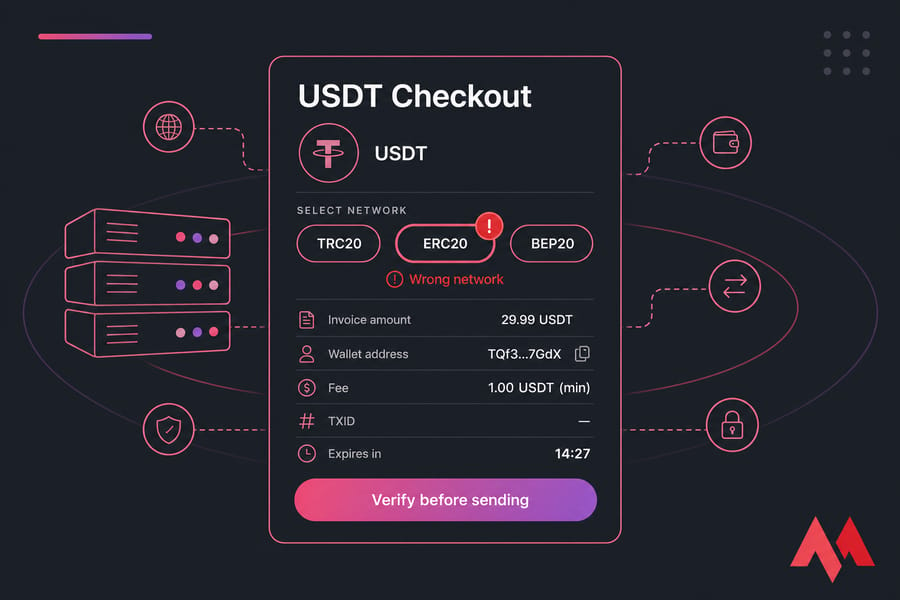
Before you send: have these five things ready
- The exact invoice amount (down to the decimals)
- The network shown at checkout — and a wallet or exchange that supports it
- Enough balance to cover the payment plus the withdrawal fee
- Access to your transaction history so you can grab the TXID
- The invoice expiry time (usually a visible countdown)
Why USDT payment failed issues happen at hosting checkouts
A wallet-to-wallet transfer is forgiving. A merchant invoice isn't.
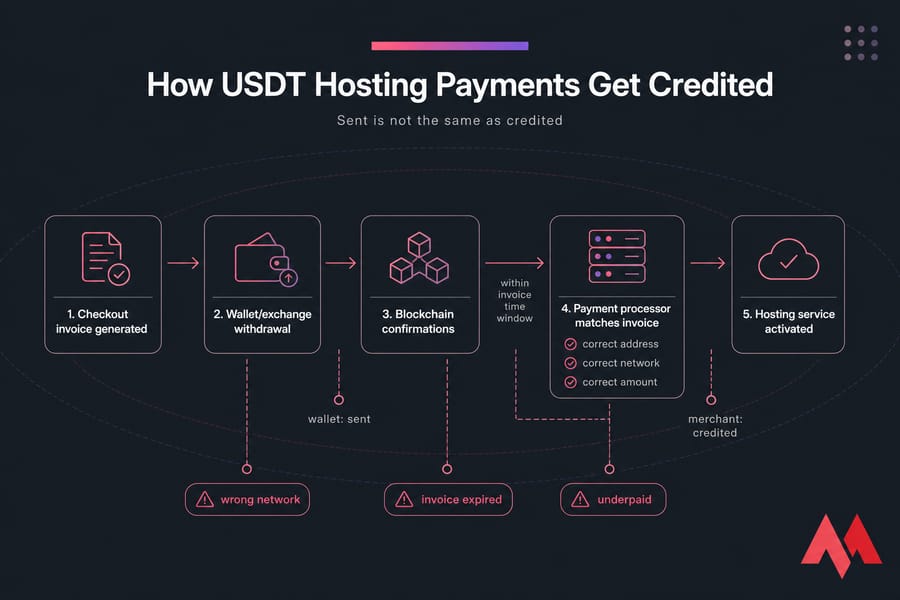
When you pay a friend, any amount lands and everybody's happy. A hosting invoice is matched by a payment processor against three variables: the correct address, the correct network, and the correct amount — inside a time window. Miss one and the system won't credit you, even though the blockchain says the transfer succeeded.
That's the gap that confuses everyone. "Sent" in your wallet is not the same as "credited" in the merchant's system. Between those two states sit blockchain confirmations, the processor's matching logic, and the invoice timer. The payment guide walks through the accepted routes if you want the official version.
How to pay hosting with USDT, step by step
- Place your order and pick USDT at checkout. Note the network the invoice specifies.
- Copy the destination address. Never retype it by hand.
- In your wallet or exchange withdrawal screen, select the same network. Not the cheapest one — the same one.
- Enter the exact invoice amount, then check whether the fee is deducted from that amount or added on top.
- Glance at the invoice timer. If it's about to expire, refresh for a new invoice instead of sending late.
- Send, then immediately save the TXID (the transaction hash — your receipt on the blockchain).
- Wait for the required confirmations. Activation follows once the processor credits the invoice.
Prefer a guided flow? Processor checkouts like pay VPS with CoinPayments or pay VPS with Cryptomus handle a lot of this matching for you.
Common USDT payment mistakes that delay activation
| Mistake | Why it happens | What happens | How to avoid it |
|---|---|---|---|
| Wrong network | Invoice says ERC20, you send TRC20 out of habit (example scenario) | Funds don't reach the merchant wallet; recovery is uncertain | Match the network dropdown to the invoice, every single time |
| Wrong amount | Rounding down, or typing 25 instead of 25.40 | Underpaid invoice sits unmatched pending manual review | Copy-paste the amount; don't "clean up" decimals |
| Fee deducted from the payment | Exchange takes its withdrawal fee out of the amount sent | Merchant receives less than invoiced | Confirm the received figure, not the entered one |
| Expired invoice | Sent 40 minutes after the timer ran out | Payment arrives with nothing to match against | Generate a fresh invoice before sending |
| Exchange batching delays | Withdrawal queued or held for review | Confirmations land after expiry | Pay early, or send from a self-custody wallet |
| No TXID saved | Closed the tab right after sending | Support can't trace anything quickly | Screenshot the withdrawal confirmation immediately |
Warning: never send USDT on a network other than the one shown on your invoice. Blockchain transfers are generally irreversible, and nobody can promise recovery.
USDT TRC20 vs ERC20 vs BEP20 for hosting payments
Same token, different rails. USDT lives on Tron (TRC20), Ethereum (ERC20), BNB Smart Chain (BEP20) and others — and the sending and receiving side must agree.
| Network | Standard | Fee profile | Speed profile | Main risk |
|---|---|---|---|---|
| Tron | TRC20 | Typically the lowest | Usually fast | Assumed as the default when checkout wants something else |
| Ethereum | ERC20 | Highest, varies with congestion | Slower under load | Fees eating into the invoice amount |
| BNB Smart Chain | BEP20 | Low | Fast | Address format looks identical to ERC20 — easy to mix up |
Key takeaway: the cheapest network is worthless if the checkout doesn't support it. Compatibility beats fees. And ERC20 and BEP20 share the same address format, which is exactly why people send to a valid-looking address on the wrong chain.
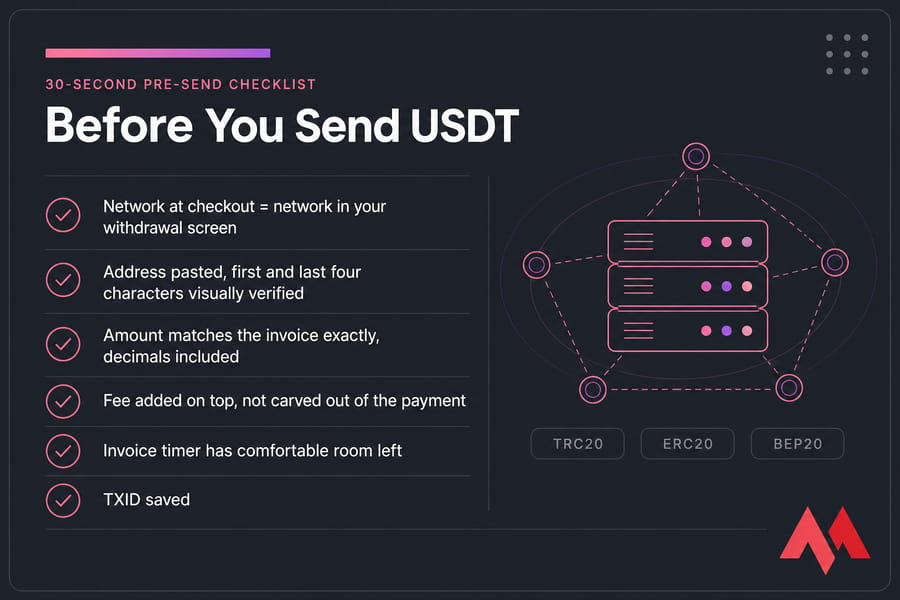
The 30-second pre-send checklist
- Network at checkout = network in your withdrawal screen ✔
- Address pasted, first and last four characters visually verified ✔
- Amount matches the invoice exactly, decimals included ✔
- Fee added on top, not carved out of the payment ✔
- Invoice timer has comfortable room left ✔
- No reused address or amount from an older order ✔
USDT transaction pending or not received? Do this
Stay calm and work in order.
- Find the TXID in your wallet or exchange withdrawal history.
- Look it up on a blockchain explorer for the network you used.
- Check the confirmation count. Still zero? It's network-side, and waiting is the answer.
- Confirm the destination address matches the invoice, character for character.
- Compare the received amount against the invoiced amount.
If the explorer shows the correct amount, on the correct network, to the correct address with confirmations complete — and your order still says unpaid after the normal processing window — that's the moment to open a ticket with MonoVM support.
What support can usually help with: unmatched-but-received payments, underpayments awaiting review, expired invoices where funds arrived. What nobody can guarantee: recovering a transfer sent on an unsupported network or to a completely wrong address.
Crypto payment proof: what to put in the ticket
- Invoice or order ID
- TXID / transaction hash
- Exact amount sent
- Network used (TRC20, ERC20, BEP20…)
- Sending wallet or exchange name
- Timestamp with timezone
- Screenshot of the withdrawal confirmation
Send all seven in the first message. Tickets with complete evidence get traced in one reply instead of five.
USDT, or another crypto route?
USDT wins on predictability — the invoice amount doesn't move under you mid-transfer, which is why most buyers buy VPS with USDT or pay for web hosting with USDT.
If network selection makes you nervous, a single-chain coin removes that decision entirely — see buy VPS with Bitcoin. Want other options? There's VPS with stablecoins, plus guided processor checkouts if you'd rather pay for a VPS with NOWPayments or pay VPS with BitPay.
Seven habits that prevent crypto hosting payment errors
- Don't rush. Ninety seconds of checking beats a week of tickets.
- Match the network exactly — no substitutions.
- Verify the amount the merchant will receive.
- Save the TXID before you close anything.
- Send well before the invoice expires.
- Use provider-approved payment routes only.
- If the delay outlasts the normal window, ticket support with full proof.
MonoVM runs VPS in 25+ locations with 24/7 technical support, and activation is quick when the payment details are right. Ready to go? Buy my VPS with USDT then run the checklist above before you send a thing.

An experienced tech and developer blog writer, specializing in VPS hosting and server technologies. Fueled by a passion for innovation, I break down complex technical concepts into digestible content, simplifying tech for everyone.