So you've decided to buy a VPS and pay with crypto. Good call it's fast, flexible, and keeps your billing options open. This guide walks you through exactly how to pay for a VPS with NOWPayments on MonoVM, from picking your plan to seeing the server light up in your dashboard.
To pay for a VPS with NOWPayments, pick your MonoVM VPS plan, head to checkout, choose the cryptocurrency option powered by NOWPayments, select your coin and network, send the exact invoice amount to the wallet address (or scan the QR code), and wait for blockchain confirmations. Once the payment clears, your order is processed and your VPS gets activated.
What It Means to Pay for a VPS with NOWPayments
Here's the simple version: MonoVM is the hosting provider selling you the VPS. NOWPayments is the crypto payment processor sitting between you and MonoVM's checkout. You're still buying from MonoVM — NOWPayments just handles the coin side of the transaction.
Why does this matter? Because it widens your coin options. Instead of being stuck with one or two cryptocurrencies, you get the flexibility of a gateway that accepts many. And the checkout experience feels familiar: an invoice, a wallet address, a QR code, a timer.
Quick takeaways before we go deeper:
- NOWPayments isn't the seller it's the rails for the payment
- You'll receive a time-limited invoice with a fixed amount
- Multiple coins are typically supported (availability can vary)
- Once the blockchain confirms, MonoVM activates your VPS
If you're new to crypto-funded hosting, the payment guide on MonoVM gives a broader view of accepted methods.
How NOWPayments Works in the MonoVM Crypto Checkout
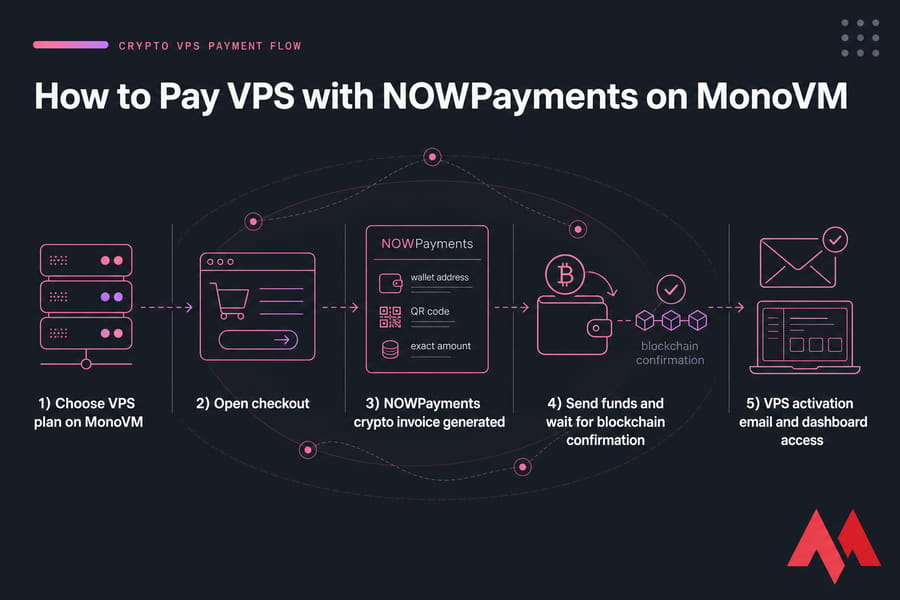
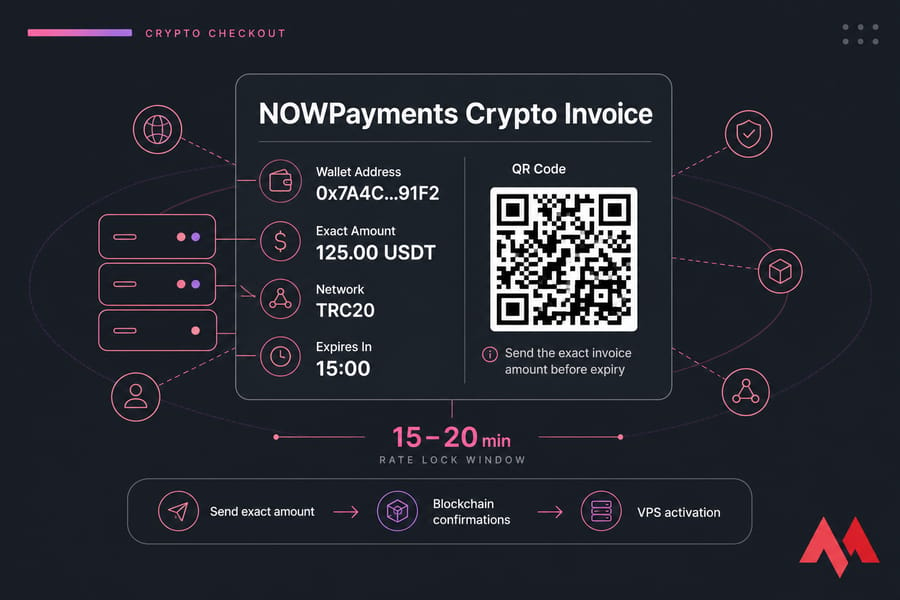
The workflow is straightforward. You select a VPS plan, fill in your billing details, then choose crypto as your payment method. The system generates an invoice with a unique wallet address, the exact amount in your chosen coin, a QR code, and a countdown timer.
That timer matters. Exchange rates are typically locked for a short window — usually 15 to 20 minutes — so the amount you see is the amount you must send. If the invoice expires before your funds arrive, you may need to start over or open a ticket with support.
Once you broadcast the payment, the gateway waits for the required number of blockchain confirmations. After that, MonoVM gets the green light, your order moves into provisioning, and you'll see activation confirmation in your inbox and dashboard.
What You Need Before You Buy a VPS with Cryptocurrency
Don't skip this part. Most failed crypto payments come from rushing the prep work.
- A VPS plan picked already — browse Linux VPS plans or Windows VPS hosting first
- A crypto wallet or exchange that lets you send on the exact network shown at checkout
- Enough balance to cover the invoice plus network fees (gas, miner fees, withdrawal fees)
- Access to your email for the order confirmation and activation message
- A stable connection — invoices expire, so don't start checkout from a dodgy connection
One thing I see beginners miss: exchange withdrawals sometimes sit in a queue for ten or fifteen minutes. If your invoice expires in the meantime, you've got a problem. Use a wallet with fast outbound transactions when you can.
Step-by-Step Guide to Pay VPS with NOWPayments
Here's the actual flow. Follow it in order.
Step 1: Select your VPS plan on MonoVM
Pick the plan, location, and operating system. If you're price-sensitive, affordable VPS hosting options are worth a look. Confirm the OS choice before continuing — switching post-purchase is doable, but messier.
Step 2: Open the checkout and enter billing details
Fill in the standard order info. Double-check the email address. That's where your invoice, activation, and login details land.
Step 3: Choose the crypto payment option powered by NOWPayments
On the payment method screen, pick the cryptocurrency option. The checkout will route you to a NOWPayments-powered invoice screen.
Step 4: Select your coin and blockchain network
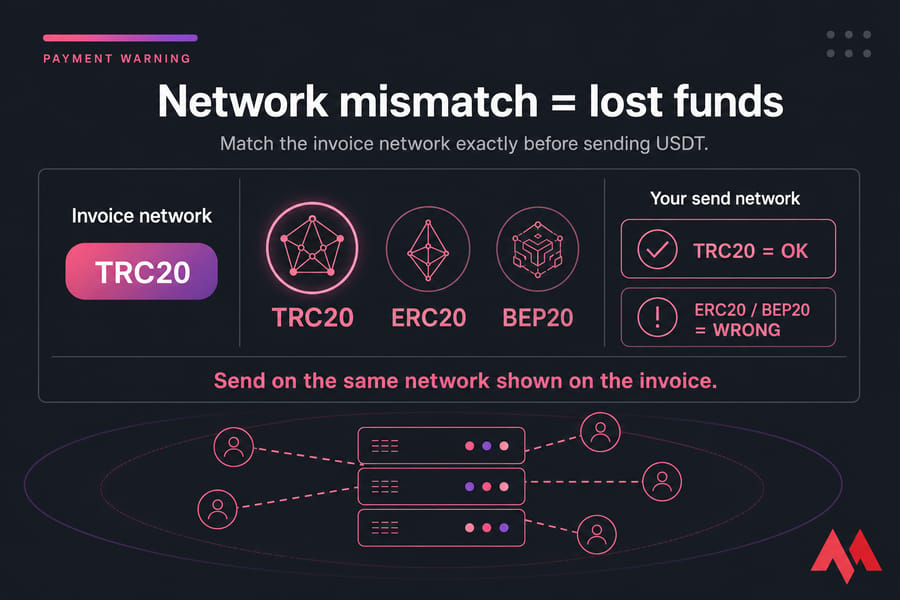
This is the most error-prone step. If you're paying with USDT, you'll typically see network options like TRC20, ERC20, or BEP20. Choose the one that matches what your wallet or exchange supports. Never send USDT on a different network than the one shown — funds can be lost permanently.
Step 5: Copy the wallet address or scan the QR code
Copy the address directly — don't type it manually. Or scan the QR code from your mobile wallet. Verify the first and last few characters match on both ends before hitting send.
Step 6: Send the exact amount before the invoice expires
Send the exact invoice amount. Not a rounded number. Not "close enough." Underpayments often trigger a manual review; overpayments may need support intervention to reconcile. Account for network fees on your side, so the received amount matches the invoice.
Step 7: Wait for payment confirmation and VPS activation
Save the transaction hash (TXID) the moment your wallet broadcasts the payment. Then wait. Confirmations roll in based on the coin's blockchain speed. Once enough confirmations land, you'll get an activation email and your VPS shows up in the dashboard.
Key takeaway: The two details that matter most are the exact amount and the correct network. Get both right, and the rest is just waiting.
Supported Coins for VPS Crypto Payment
Coin availability can shift depending on what's enabled at checkout, but here's a practical look at the most common options.
| Coin | Typical Benefit | Common Networks | Best For | Watch Out For |
|---|---|---|---|---|
| Bitcoin (BTC) | Widely held, well understood | BTC mainnet | Long-term holders paying for hosting | Higher network fees, slower confirmations |
| Ethereum (ETH) | Fast settlement, broad wallet support | ERC20 | Users active in DeFi or with ETH on hand | Gas fees can spike during congestion |
| USDT | Stable value, predictable invoice | TRC20, ERC20, BEP20 | Avoiding price volatility mid-payment | Network mismatch is the #1 risk |
| USDC | Stable value, regulated issuer | ERC20, others | Users preferring USD-pegged coins | Confirm network support at checkout |
Stablecoins like USDT and USDC are usually preferred for predictable checkout value — your invoice amount doesn't drift while you're scrambling to fund a wallet. If you want a dedicated landing page by coin: buy VPS with Bitcoin, buy VPS with USDT, or buy VPS with Ethereum.
VPS Payment Confirmation Time and Activation Expectations
How long does it take? Honestly, it depends. Bitcoin tends to take longer because confirmations are slower. USDT on TRC20 is usually quick. Ethereum sits somewhere in the middle, depending on gas conditions.
A rough timeline:
- Within minutes: the transaction is broadcast and visible on a blockchain explorer
- 10–60 minutes: required confirmations complete (varies by coin and network load)
- Right after: MonoVM begins order processing and VPS activation
If you're past the typical window and still see "pending" on your order, check the TXID on a blockchain explorer first. If it's confirmed on-chain but your VPS isn't active yet, that's the moment to ping MonoVM support with your details ready.
Common NOWPayments VPS Checkout Mistakes to Avoid
Most payment headaches trace back to a small handful of preventable mistakes. Here's what to watch for:
- Sending on the wrong network — especially with USDT and USDC. Always match the network shown on the invoice.
- Paying less than the invoice amount — network fees come out of your wallet, but the received amount must match. Add a small buffer if your exchange deducts fees from the send amount.
- Letting the invoice expire — start checkout only when you're ready to send. Don't open it, wander off, and come back twenty minutes later.
- Forgetting to save the TXID — copy that hash the instant your wallet broadcasts the payment. Without it, troubleshooting is a nightmare.
- Sending from a slow-withdrawal exchange — some exchanges queue withdrawals for 10+ minutes. Your invoice may expire first.
How to Fix a Pending or Failed VPS Crypto Payment
Something off? Don't panic. Work through this checklist.
| Issue | Likely Cause | What to Do |
|---|---|---|
| Payment still pending | Awaiting confirmations or network congestion | Check TXID on a blockchain explorer; wait if not yet confirmed |
| Underpayment | Exchange deducted fees from sent amount | Contact support with TXID and order ID for manual review |
| Overpayment | Manual amount entry error | Contact support; reconciliation may be possible |
| Invoice expired | Funds sent after timer ended | Open a support ticket with TXID before doing anything else |
| Wrong network | Coin sent on unsupported chain | Contact support immediately; recovery isn't always possible |
When you reach out to support, have this ready: order ID, coin used, network, exact amount sent, timestamp, and the TXID. The faster you provide it, the faster the team can investigate. You can also browse the VPS payment FAQ for quick answers.
Quick summary: if your payment is delayed, gather TXID + order ID + coin + network before opening a ticket. It saves everyone time.
NOWPayments vs Direct Bitcoin VPS Payments
Which approach is better? Depends on you.
| Method | Coin Flexibility | Volatility Risk | Ease of Checkout | Best For |
|---|---|---|---|---|
| NOWPayments gateway | High — many coins | Lower with stablecoins | Guided invoice with QR + timer | Buyers wanting coin choice |
| Direct BTC payment | BTC only | BTC-dependent | Simple if you already hold BTC | Bitcoin-first users |
If you mostly hold BTC and don't care about coin flexibility, direct payment is straightforward. If you want USDT, ETH, or another option — or you'd rather pay in a stablecoin to avoid price drift during the transaction the gateway route makes more sense.
Buy Your MonoVM VPS with Crypto Today
The process boils down to three things: pick your plan, send the right coin on the right network, wait for confirmations. That's it.
Pick the payment path that fits your coin:
- Buy VPS with Bitcoin
- Buy VPS with USDT
- Buy VPS with Ethereum
- Linux VPS plans or Windows VPS hosting if you're still choosing the server
Unsure which coin or network to use? Ping MonoVM support before you send anything. It's a lot cheaper than fixing a misdirected payment after the fact.

An experienced tech and developer blog writer, specializing in VPS hosting and server technologies. Fueled by a passion for innovation, I break down complex technical concepts into digestible content, simplifying tech for everyone.