Cloud computing tools are the platforms and software you use to build, deploy, run, secure, and monitor workloads on remote infrastructure. Some are full-blown providers (think AWS or Azure). Others are operational tools that sit on top — Docker, Terraform, Prometheus, Cloudflare. Together they form what most teams loosely call a "cloud stack."
Here's the thing most listicles get wrong: they treat every tool as equally important. They're not. A solo developer launching a Node app does not need the same kit as a fintech with 200 engineers. So before you copy a stack from someone else's blog, you need to know what each category actually does.
Cloud platforms vs cloud management tools
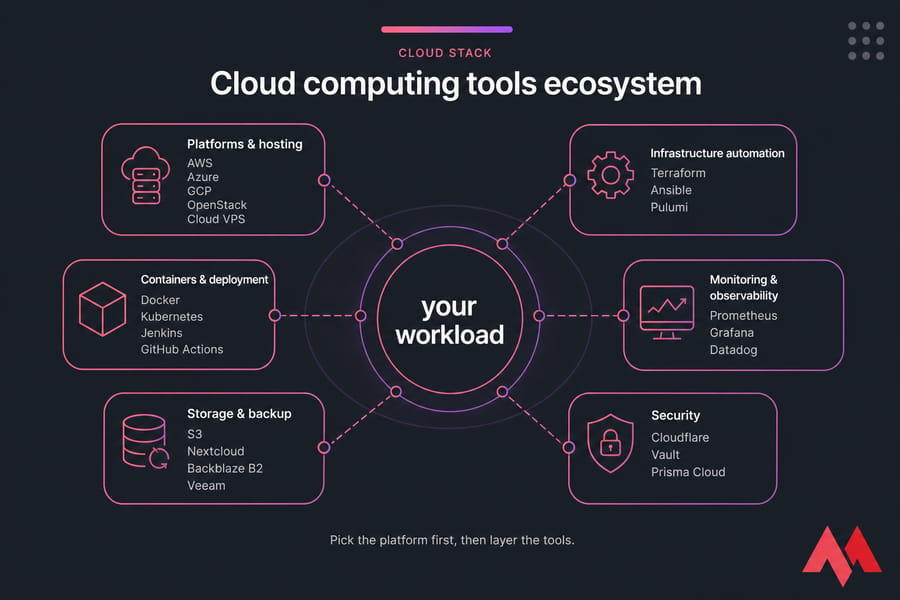
A cloud platform gives you the raw infrastructure — compute, storage, networking. AWS EC2, Azure VMs, Google Compute Engine, and a Cloud VPS all fall in this bucket. A cloud tool, on the other hand, helps you do something with that infrastructure: provision it, ship code to it, watch it, lock it down, or back it up.
Both matter. But you pick the platform first, then layer the tools.
The main categories of tools used in cloud computing
- Platforms & hosting — AWS, Azure, GCP, OpenStack, Cloud VPS providers
- Infrastructure automation — Terraform, Ansible, Pulumi
- Containers & deployment — Docker, Kubernetes, Jenkins, GitHub Actions
- Monitoring & observability — Prometheus, Grafana, Datadog
- Storage & backup — S3, Nextcloud, Backblaze B2, Veeam
- Security — Cloudflare, Vault, Prisma Cloud
Who should use cloud tools?
Pretty much anyone running something online. Solo developers, SMBs, DevOps teams, agencies, internal IT. The skill ceiling varies wildly though. If you just want a fast website and email, you don't need to learn Terraform. If you're running microservices across regions, you do.
For background on the underlying concept, see what is cloud computing and the related primer on What is a Virtual Private Cloud.
Key takeaway: Cloud tools fall into six categories. Most teams only need three to five to get started.
Cloud computing tools list at a glance
Before we get into the breakdowns, here's the full set in one place. Sort it mentally by what you actually need — there's no prize for using all 25.
| Tool | Category | Best For | Pricing | Difficulty | Open Source |
|---|---|---|---|---|---|
| AWS | Platform | Enterprise & scale | Pay-as-you-go | High | No |
| Microsoft Azure | Platform | Microsoft shops | Pay-as-you-go | High | No |
| Google Cloud | Platform | Data & ML | Pay-as-you-go | High | No |
| OpenStack | Platform | Private cloud | Free (self-host) | Very high | Yes |
| MonoVM Cloud VPS | Platform | SMBs, devs | Flat monthly | Low–Medium | No |
| Terraform | IaC | Multi-cloud provisioning | Free / paid tier | Medium | Source-available |
| Ansible | Config mgmt | Server configuration | Free / Red Hat paid | Medium | Yes |
| Pulumi | IaC | Devs who hate HCL | Free / paid | Medium | Yes |
| VMware vSphere | Virtualization | Enterprise VMs | Licensed | High | No |
| HashiCorp Nomad | Orchestration | Lightweight workloads | Free / paid | Medium | Source-available |
| Docker | Containers | Any app | Free / paid | Low–Medium | Yes |
| Kubernetes | Orchestration | Scaled microservices | Free | High | Yes |
| Red Hat OpenShift | Managed K8s | Enterprise K8s | Subscription | High | Partly |
| Jenkins | CI/CD | Self-hosted pipelines | Free | Medium | Yes |
| GitHub Actions | CI/CD | GitHub-based teams | Freemium | Low | No |
| Prometheus | Monitoring | Metrics & alerts | Free | Medium | Yes |
| Grafana | Dashboards | Visualizing metrics | Free / paid | Low–Medium | Yes |
| Datadog | Observability | All-in-one SaaS | Per-host paid | Low | No |
| New Relic | APM | App performance | Usage-based | Low | No |
| Uptime Kuma | Uptime | Self-hosted checks | Free | Very low | Yes |
| Amazon S3 | Object storage | App assets, backups | Per GB | Low | No |
| Backblaze B2 | Object storage | Cheap backups | Per GB (cheap) | Low | No |
| Nextcloud | File sync | Self-hosted Drive | Free / paid | Low–Medium | Yes |
| Veeam | Backup | VM & server backup | Licensed | Medium | No |
| Cloudflare | Security/CDN | Edge protection | Freemium | Low | No |
That's the bird's-eye view. Now let's break each category down.
Best cloud platform tools for infrastructure and hosting
This is where your stack starts. Get the platform wrong and everything else gets harder — and more expensive. The big three hyperscalers dominate, but they're not always the right answer.
Amazon Web Services (AWS)
The market leader. EC2 for VMs, S3 for storage, RDS for managed databases, Lambda for serverless. The catalog has well over 200 services, which is both the appeal and the curse. Best for: teams that need scale, global reach, and have engineers who actually understand IAM and billing. Trade-off: the bill surprises are real, and onboarding takes weeks, not hours.
Microsoft Azure
Strongest fit if your shop already runs Windows Server, Active Directory, or Microsoft 365. Azure Virtual Machines and Azure Kubernetes Service are solid. Best for: enterprises with existing Microsoft licensing. Trade-off: the portal can feel sluggish, and pricing isn't always cheaper than AWS despite the marketing.
Google Cloud Platform (GCP)
Google's edge is data, ML, and Kubernetes (they invented it, after all). BigQuery is genuinely excellent for analytics. Best for: data-heavy and ML-first projects. Trade-off: smaller service catalog than AWS and a thinner partner ecosystem.
OpenStack
Open-source private cloud platform. You run it yourself on your own hardware. Best for: telcos, government, or anyone with strict data-residency needs. Trade-off: operational complexity is brutal. You need real platform engineers.
MonoVM Cloud VPS
Here's where most SMB readers actually land. A Cloud VPS gives you a dedicated slice of compute with root access, predictable monthly pricing, and global datacenter locations — without the AWS console maze. Best for: websites, web apps, Docker workloads, self-hosted tools, dev/staging environments. Trade-off: not the right fit for petabyte-scale data lakes or 50-service microservice deployments.
For a deeper take on this trade-off, the comparisons on cloud servers vs VPS and VPS hosting vs AWS are worth a read.
| Platform | Strength | Drawback | Best For |
|---|---|---|---|
| AWS | Massive service catalog | Billing complexity | Scaled enterprises |
| Azure | Microsoft integration | UI sluggishness | Windows/MS365 shops |
| GCP | Data & ML tooling | Smaller ecosystem | Analytics, AI |
| OpenStack | Full control, open source | Ops overhead | Private cloud |
| MonoVM Cloud VPS | Simple, predictable | Not hyperscale | SMBs, developers |
Pro tip: Start with the simplest infrastructure that meets your scale needs. You can always migrate up. Migrating down from an over-engineered cloud is much more painful.
Best cloud infrastructure tools for automation and provisioning
Manual server setup doesn't scale past a handful of machines. That's where infrastructure as code (IaC) and configuration management come in.
Terraform
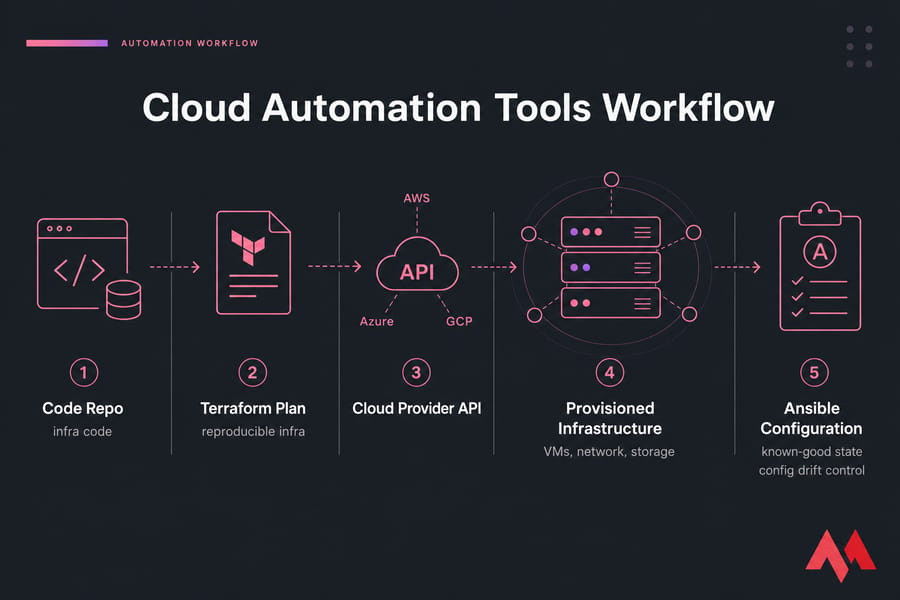
The de-facto standard for IaC. You declare your infrastructure in HCL, run terraform apply, and the tool reconciles state with reality. Works across AWS, Azure, GCP, and dozens of smaller providers. Best for: multi-cloud or anyone who wants reproducible infra. Trade-off: the state file is a foot-gun if you don't manage it properly.
Ansible
Agentless configuration management. SSH into servers, run playbooks, get a known-good state. Pairs well with Terraform — provision with one, configure with the other. Best for: server hardening, software install, ongoing config drift control.
Pulumi
IaC, but in real programming languages (TypeScript, Python, Go, C#). If your team already writes code and resents YAML, this clicks fast. Best for: dev-heavy teams that want loops, conditionals, and proper testing in their infra code.
VMware vSphere
The dominant enterprise virtualization stack. vCenter, ESXi hosts, the whole deal. Best for: on-prem and hybrid enterprises. Trade-off: licensing costs went sideways after the Broadcom acquisition. Worth comparing against KVM virtualization if you're cost-conscious.
HashiCorp Nomad
A lightweight orchestrator. Schedules containers, VMs, and even raw binaries. Best for: teams that find Kubernetes too heavy but still want scheduling. Trade-off: smaller ecosystem than K8s.
Warning: Terraform and Kubernetes are powerful, but unnecessary for many small projects. If you're running one website and a database, a shell script and a backup cron job will do.
Best cloud deployment tools for containers and DevOps
This is where your code becomes a running service. Containers and CI/CD are the foundation.
Docker
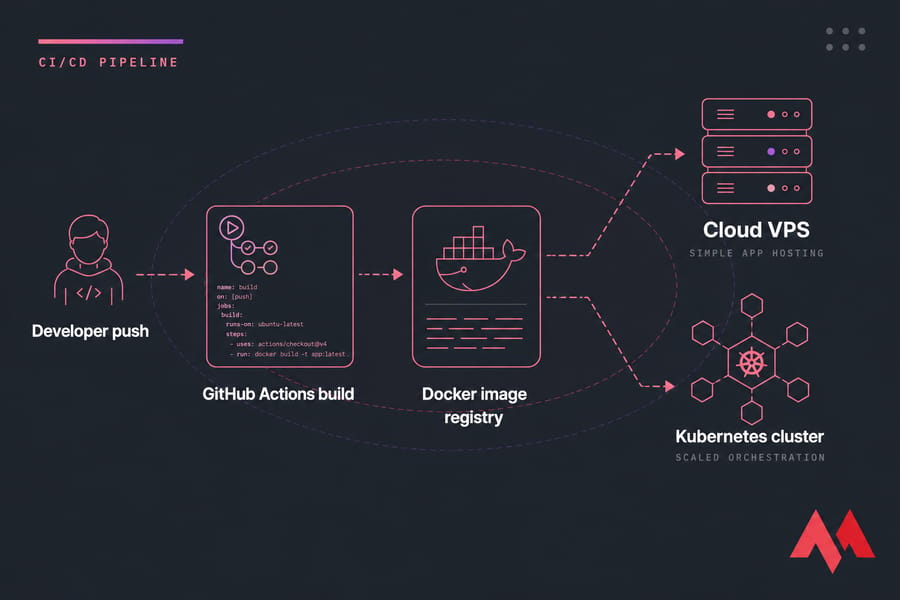
Packages your app and its dependencies into a portable image. Honestly, for 70% of small-to-medium teams, Docker alone is enough. You don't need Kubernetes to ship a containerized app. A single host running docker compose handles a lot. If that's your path, a Docker VPS setup gets you there with minimal fuss.
Kubernetes
Container orchestration at scale. Handles scheduling, self-healing, rolling deploys, service discovery. Best for: teams running dozens of services or needing zero-downtime deployments across regions. Trade-off: the learning curve is steep, and the operational overhead is real. Don't adopt it because it's trendy read Kubernetes vs Docker first to see which you actually need.
Red Hat OpenShift
Enterprise Kubernetes with security defaults, built-in CI/CD, and Red Hat support. Best for: regulated industries that need a vendor throat to choke. Trade-off: licensing isn't cheap.
Jenkins
The grandfather of CI/CD. Self-hosted, plugin-rich, infinitely configurable. Best for: teams that need complex pipelines and want full control. Trade-off: the UI feels like 2012, and maintaining Jenkins itself becomes a job.
GitHub Actions
CI/CD baked into your GitHub repo. YAML workflows, generous free tier, huge action marketplace. Best for: anyone already on GitHub. Honestly, for most new projects, this is the default starting point.
Best cloud monitoring tools for visibility and observability
If you can't see it, you can't fix it. Monitoring is non-negotiable past day one in production.
Prometheus
Pulls metrics from your apps and infrastructure on a schedule, stores them in a time-series database, and lets you alert on anything. Open source, free, and the backbone of cloud-native monitoring.
Grafana
The dashboard layer. Connects to Prometheus, Loki, InfluxDB, CloudWatch — basically any data source. Best for: visualizing whatever you're collecting. Free OSS edition or paid Grafana Cloud.
Datadog
SaaS observability with metrics, logs, traces, and synthetics in one product. Best for: teams that want one bill and one UI. Trade-off: can get expensive fast as your host count grows.
New Relic
Strong APM (application performance monitoring) with usage-based pricing. Best for: teams who care most about app-level latency and traces.
Uptime Kuma
A self-hosted, free uptime monitor. Pings your URLs, sends alerts to Slack/Discord/email. Takes about ten minutes to set up on any VPS. I personally run this on every project — it's that easy. For more options, the VPS monitoring tools guide expands on this.
Stat callout: Downtime and poor visibility cost more than monitoring tools, almost every single time. A free Prometheus + Grafana + Uptime Kuma stack covers most small teams' needs.
Best cloud storage tools for files, object storage, and backup
Storage isn't one thing. There's object storage (for assets and backups), file sync (Drive-style), and backup software (point-in-time restore). Don't confuse them.
Amazon S3
The original object store. Cheap, durable, integrated with everything. The de-facto API standard — most other object stores mimic the S3 API.
Google Cloud Storage
GCP's S3 equivalent. Tight integration with BigQuery and other Google services.
Nextcloud
Self-hosted Google Drive / Dropbox alternative. Files, calendars, contacts, video calls. Runs great on a Nextcloud VPS. Best for: teams that want full control over their files without paying per-seat SaaS fees.
Backblaze B2
S3-compatible object storage at roughly a quarter of S3 pricing. Best for: backups, archives, anything where egress and cost matter more than ecosystem.
Veeam
Enterprise-grade backup for VMs, physical servers, and cloud workloads. Best for: IT teams responsible for disaster recovery SLAs. For DIY approaches, the guide on how to back up a server or VPS covers the basics. You can also browse the wider category of best cloud storage options.
Quick summary: Object storage, sync-and-share, and backup software solve different problems. Pick one of each — don't try to make S3 your file-sharing tool or Nextcloud your backup target.
Best cloud security tools for protection and access control
Security shouldn't be an afterthought, but it also doesn't mean buying every CNAPP suite on G2. Start with the basics.
Cloudflare
CDN, DDoS protection, WAF, DNS, edge functions all on a generous free tier. If you put nothing else in front of your site, put Cloudflare there. The how to secure a website guide walks through hardening basics.
Lacework
Cloud security posture management. Continuously audits your AWS/Azure/GCP config for misconfigurations and threats. Best for: mid-to-large cloud estates.
Prisma Cloud
Palo Alto's full CNAPP — workload protection, posture, IAM analysis, the works. Best for: enterprises with compliance pressure.
CrowdStrike Falcon Cloud Security
Endpoint and cloud workload protection from one of the most respected names in EDR. Best for: teams that already use Falcon for endpoints.
HashiCorp Vault
Secrets management. Store API keys, database passwords, certificates — and rotate them automatically. Best for: any team where "secrets in .env files committed to git" is a recurring problem (so, most of them).
| Layer | Must-have | Nice-to-have |
|---|---|---|
| Edge | Cloudflare (free) | Premium WAF rules |
| Identity | MFA, IAM least-privilege | SSO, IdP federation |
| Secrets | Vault or cloud secrets manager | Auto-rotation |
| Posture | Basic CSPM scans | Full CNAPP suite |
How to choose the best cloud computing tools for your needs
Run through this checklist before you commit:
- What's the workload? Static site, web app, API, database cluster, ML training? Each pulls toward different tools.
- What's your team's skill level? If nobody knows Kubernetes, don't pick Kubernetes.
- What scale do you actually need? Not what you imagine in 18 months. What you need in the next three.
- What's the budget? Including the hidden ops cost of managing the tool, not just the license fee.
- Do you need vendor lock-in protection? Multi-cloud is harder than it sounds. Most teams don't need it.
When a cloud VPS is a smarter choice than hyperscale cloud
Honestly, most small and mid-sized projects don't need AWS. If you can describe your infrastructure as "a web server, a database, and some background workers," a Cloud VPS or a Linux VPS will be cheaper, faster to deploy, and dramatically easier to reason about. If you don't want to manage the OS yourself, managed hosting takes that off your plate too.
The threshold to genuinely need hyperscale cloud is higher than the AWS marketing suggests. Reach for it when you've got real reasons — global multi-region, complex managed services, deep ecosystem integration. Otherwise, simpler usually wins.
Common mistakes when building a cloud tool stack
I've seen these play out enough times to call them patterns, not exceptions.
- Tool sprawl. Five monitoring tools, three CI systems, two IaC frameworks. Pick one in each category and stick with it for at least a year.
- Cost blindness. AWS bills don't come in monthly chunks — they come in surprises. Set budget alerts on day one. Same for Datadog and other per-host SaaS.
- Adopting Kubernetes too early. If you have one app and three engineers, K8s adds operational tax without solving any real problem.
- Skipping monitoring until something breaks. By then, the postmortem is already painful.
- Picking tools because they're popular. Twitter doesn't run your servers. Pick what fits your workload.
For teams running across multiple providers, the multi-cloud management platforms overview is worth a look before things sprawl further.
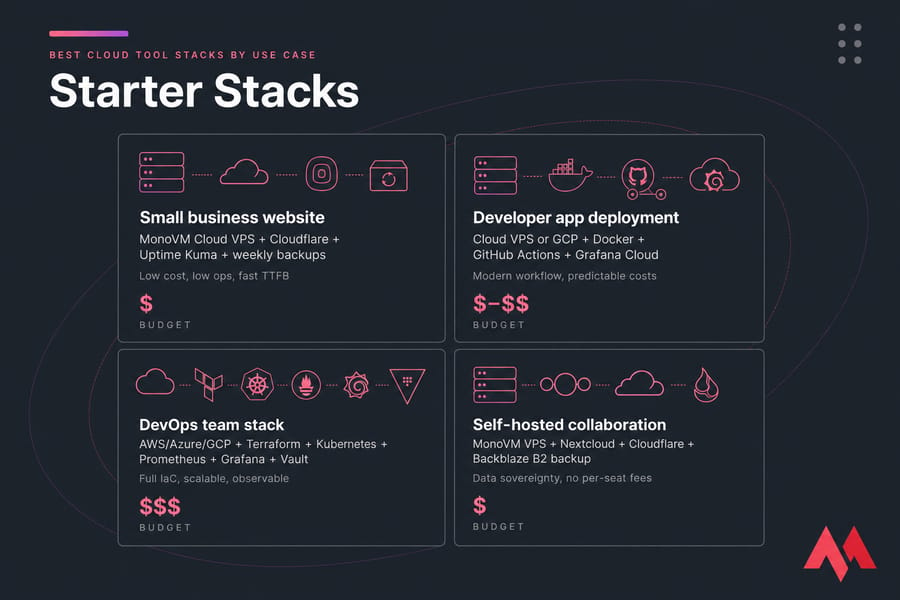
Best cloud tool stacks by use case
Concrete examples beat abstract advice. Here are four stacks I'd actually deploy.
| Use Case | Recommended Stack | Why It Works | Budget |
|---|---|---|---|
| Small business website | MonoVM Cloud VPS + Cloudflare + Uptime Kuma + weekly backups | Low cost, low ops, fast TTFB | $ |
| Developer app deployment | Cloud VPS or GCP + Docker + GitHub Actions + Grafana Cloud | Modern workflow, predictable costs | $–$$ |
| DevOps team stack | AWS/Azure/GCP + Terraform + Kubernetes + Prometheus + Grafana + Vault | Full IaC, scalable, observable | $$$ |
| Self-hosted collaboration | MonoVM VPS + Nextcloud + Cloudflare + Backblaze B2 backup | Data sovereignty, no per-seat fees | $ |
Pro tip: Pair one hosting layer with one monitoring layer and one backup layer first. Add tools only when you hit a real limitation, not because a blog post said you should.
Need cloud power without hyperscaler complexity?
If AWS, Azure, and GCP feel like overkill for your project, a Cloud VPS gives you scalable compute, root access, global datacenter locations, and predictable pricing — without the console maze or the surprise bills. Spin up a server, deploy your app, and move on with your day.
Build your cloud stack on infrastructure you can actually manage
Whether you're shipping a web app, running Docker workloads, or self-hosting Nextcloud, MonoVM offers Cloud VPS, VPS hosting, and managed hosting plans with global locations, root access, and pricing that doesn't surprise you at the end of the month. Pick a plan, deploy in minutes, and get back to building.

An experienced tech and developer blog writer, specializing in VPS hosting and server technologies. Fueled by a passion for innovation, I break down complex technical concepts into digestible content, simplifying tech for everyone.