538-main.webp)
A Virtual Private Cloud (VPC) is a secure and isolated public cloud segment that allows users to run resources like servers, databases, and applications with much greater control over their network environment. It merges the freedom of cloud computing with the best kind of security, enabling businesses to outline their private couple settings, including address ranges, subnets, and firewalls. VPC is a critical service in cloud computing because it provides a trade-off between scalability and security; organizations can easily scale resources up and down while protecting sensitive data in transit through encryption, access controls, and private connections.
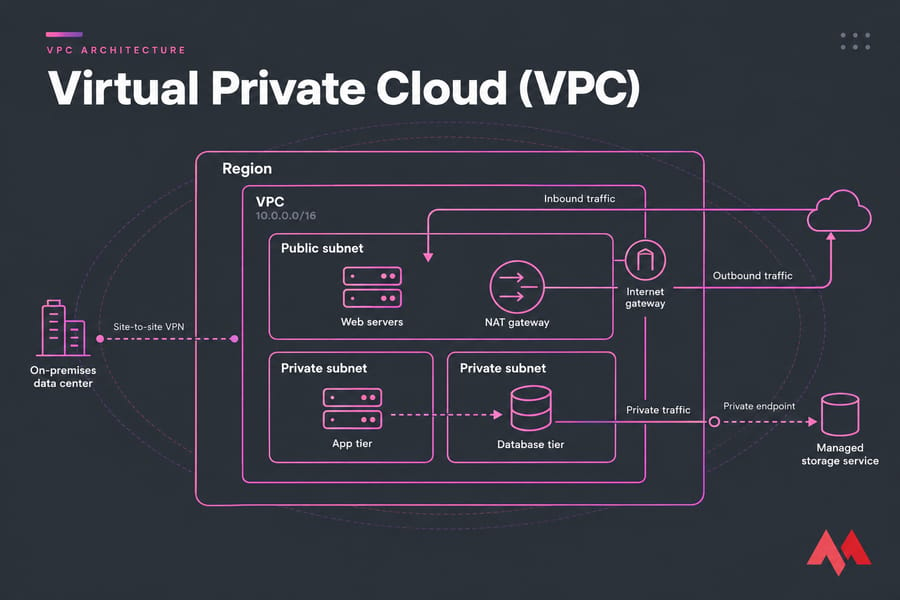
Put simply, a VPC is a private network that's logically walled off inside a public cloud provider's infrastructure. You pick its IP address range and split it into subnets. You also decide how traffic is routed and who's allowed in. Your workloads run on shared hardware, but the network behaves as if only you are on it.
Here's a simple way to picture it. The public cloud is an apartment building and your VPC is your own unit, with walls, a lock, and the floor plan you chose. The plumbing is still shared, but nobody walks into your kitchen unless you let them.
🧩 What is a Virtual Private Cloud?
The definition of VPC is that it is an isolated logical network secured within the public cloud, thus allowing businesses to run workloads in this controlled environment. The VPC is much unlike a private cloud that runs on a dedicated physical infrastructure; a virtual private cloud runs on shared cloud provider infrastructure with tight access control, private networking, and resource isolation. Hence, it is a win-win situation—the public cloud scalability and cost structure mixed with the security and control of a private setup.
A VPC allows the user to set up his configurations regarding the network, IP address ranges, routing tables, and security policies, thus ensuring that classified data and applications remain secure. Enterprises with hybrid cloud strategies typically adopt VPC since it connects to their on-premises data centers through VPN or dedicated connections. The segmenting of networks, combined with firewalls and encryption measures of the VPC, helps organizations comply with security standards while enjoying the agility of the cloud.
⚙️ How Does a Virtual Private Cloud Work?
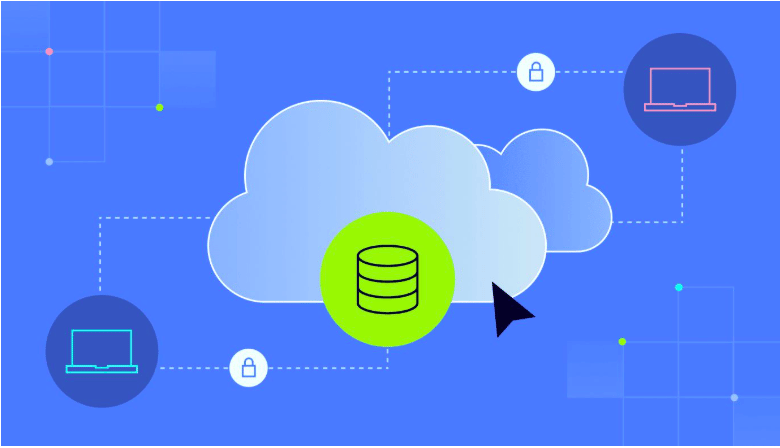
A Virtual Private Cloud (VPC) operates by creating a secure, isolated network within the public cloud, allowing businesses to manage resources with customized security and networking controls. Network segmentation is achieved using subnets, which further divide the VPC into smaller sections where security groups and network access control lists (NACLs) can regulate the traffic flow.
Everything starts with a CIDR block, which is the private IP range your VPC owns (for example 10.0.0.0/16, about 65,000 addresses). You cut that range into subnets, and each subnet usually sits in a single availability zone. Next, route tables tell each subnet where its packets should go. Security controls sit on top of all that.
Companies can connect their VPCs to the on-premises infrastructure via a VPN or Direct Connect, ensuring secure and private communication. Such a setup allows organizations to maintain resource isolation to some extent and improve security while reaping the advantages of cloud elasticity.
In VPC configuration, businesses set IP address ranges, subnets, and security policies to govern the access and flow of traffic. They attach internet gateways for outbound traffic and apply private gateways for inbound traffic. VPCs find applications mainly in hosting application services, database management, and security for mission-sensitive workloads.
⚠️ Plan your IP ranges early. I've watched teams choose 10.0.0.0/16 for every environment and then find out, months later, that they can't peer those VPCs or connect them to the office network because the ranges overlap. Changing the ranges at that point means rebuilding. It's not fun.
Security groups vs network ACLs
People confuse these two constantly. A security group is a stateful firewall attached to an instance or network interface: if a request is allowed in, the reply is automatically allowed back out. A network ACL is stateless and works at the subnet level, so you have to write rules for both directions. My advice is to do most of your filtering with security groups and keep NACLs as a coarse backstop.
🏗️ Key Components of VPC Architecture
| Component | Purpose | Example |
| Subnet | Splits the CIDR block into zones or tiers | 10.0.1.0/24 for web servers |
| Route table | Decides where each subnet's traffic goes | 0.0.0.0/0 → internet gateway |
| Internet gateway | Carries two-way traffic between public subnets and the internet | Load balancer receiving HTTPS |
| NAT gateway | Allows outbound-only internet access from private subnets | DB server downloading patches |
| Security group / NACL | Filters traffic at the instance (SG) or subnet (NACL) level | Allow port 5432 only from the app tier |
| VPN / dedicated link | Connects the VPC to on-prem networks privately | Site-to-site IPsec VPN, AWS Direct Connect |
| Private endpoint | Reaches cloud services without touching the public internet | Private access to object storage |
One thing older articles often get wrong: the NAT gateway isn't for inbound traffic. It does the opposite, letting private machines start connections out while blocking anything unsolicited from coming in. Microsoft's NAT gateway design docs explain this distinction clearly.
A few more components worth knowing:
- Virtual Private Gateway: Enables secure connections via VPN between the VPC and an on-premises data center.
- Elastic IPs: Static, public IP addresses that can be assigned to cloud resources for consistent access.
🌐 Public vs Private Subnets Explained
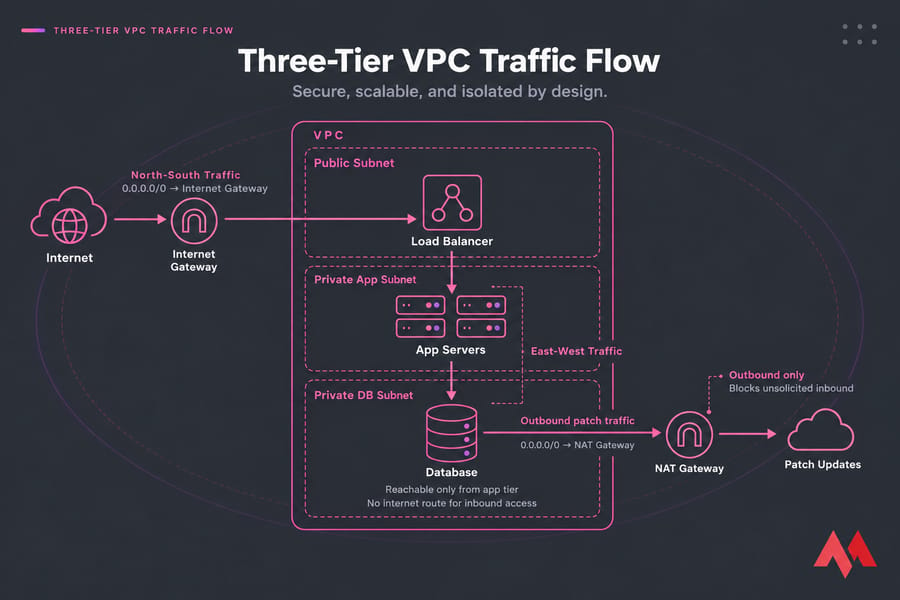
A subnet isn't public because you named it "public." It's public when its route table sends 0.0.0.0/0 (the default route) to an internet gateway. A private subnet has no such route. If its machines need outbound access, it sends that traffic through a NAT gateway instead. You can find the full routing logic in the AWS route table documentation.
A typical three-tier layout looks like this:
- Public subnet: load balancer and bastion host (or no bastion at all if you use a managed session tool)
- Private app subnet: application servers, reachable only from the load balancer
- Private DB subnet: databases, reachable only from the app tier, with no internet route
Traffic moving between these tiers is called east-west traffic. Traffic entering or leaving the VPC is called north-south. Keeping those two ideas apart makes firewall rules much easier to reason about.
🔗 Connecting VPCs: Peering, Transit, and Hybrid Links
VPC peering connects two VPCs so they can talk over private IPs. Google Cloud's VPC Network Peering even works across projects and organizations. Peering doesn't pass traffic through, though: if A peers with B and B peers with C, A still can't reach C. After about five VPCs, a mesh of peering links gets messy, so teams usually move to a transit gateway (a hub-and-spoke model) instead.
For hybrid cloud connectivity, you've got two real options. A site-to-site VPN is cheap and quick to set up but runs over the internet. A dedicated private connection (AWS Direct Connect, Azure ExpressRoute, Google Cloud Interconnect) costs more and gives you steady latency. Private access options such as private endpoints keep traffic to managed services off the public internet completely.
✨ Benefits of a Virtual Private Cloud
- Isolation and segmentation: a breach in the web tier doesn't give the attacker a direct path to the database.
- Elastic scale: you can add instances or subnets in minutes without buying hardware.
- Network control: you get your own IP plan, routing, and firewall rules, similar to on-prem but without the racks.
- Compliance support: private connectivity, flow logs, and least-privilege rules help with HIPAA, PCI DSS, and GDPR audits. A VPC doesn't make you compliant by itself, but it gives you the building blocks.
- Performance: VPCs allow users to optimize traffic flow within their virtual network by configuring subnets, routing tables, and gateways. This setup reduces network congestion, improves latency, and ensures better performance for applications and services running in the cloud.
Read the link below to learn more about the difference between cloud servers and VPS.
⚠️ Challenges and Considerations
While virtual private clouds are generally more secure and flexible, they can pose challenges in setup and management. Setting up a VPC requires networking, security policy, and resource allocation know-how, which makes it complex for organizations that may not have an IT team.
Companies need to stipulate IP address ranges, routing tables, subnets, and firewalls to ensure operations run uninterrupted while eliminating the possibility of misconfiguration, which can lead to security and connectivity problems.
This continuous integration of security layers such as security groups, network-access control lists (NACLs), and virtual private networks (VPNs) can lead to more operational overhead, and organizations are then required to keep constant monitoring and maintenance in place.
Cost and compliance are two significant considerations regarding VPCs. While the VPC can be cost-efficient, data transfer charges, dedicated gateways, and advanced security configurations can quickly drive up expenses. Organizations must also ensure that their VPC set-up complies with industry regulations such as HIPAA, GDPR, or PCI DSS, which would require further security protocols, audits, and encryption standards.
Additionally, a VPC integrated with other cloud environments in a multi-cloud or hybrid-cloud strategy may face compatibility problems, requiring planning that will safeguard security, performance, and data consistency across platforms.
Common VPC Mistakes to Avoid
- Overlapping CIDRs between VPCs or with on-prem, which blocks peering and VPNs later.
- Private subnets without a NAT route, so package updates silently time out. AWS's VPC resource map helps you spot this.
- Security groups open to
0.0.0.0/0on SSH (22) or database ports. - Broken DNS resolution after adding private endpoints.
- No flow logs, which leaves you guessing when something breaks or an auditor asks questions.
Cost traps
The VPC itself is usually free. Azure Virtual Network costs nothing to create, for instance. Your money goes to what surrounds it. On AWS, a NAT gateway costs about $0.045 per hour per availability zone plus per-GB processing, and since February 2024 every public IPv4 address costs $0.005 per hour. Check Amazon VPC pricing before you put a NAT gateway in every zone "just in case."
The same cost discipline applies to where your data actually lives. A VPC gives you the network, but physical storage vs cloud storage is a separate decision — and one that affects both your monthly bill and your disaster recovery plan. Most production teams end up with a hybrid: cloud object storage for backups, local or dedicated storage for hot data.
⚖️ VPC vs Other Cloud Models
| Model | What it is | Best for |
| VPC | Isolated network inside a public cloud | Multi-tier apps needing control and scale |
| Private cloud | Dedicated hardware for a single organization | Strict data residency, predictable heavy load |
| Public cloud (default network) | Shared resources with minimal network design | Quick experiments |
| VPN | Encrypted tunnel between networks or users | Secure access into a network, including a VPC |
| VPS | A single virtual server on a hypervisor | Websites, small apps, simple hosting |
A VPN is a connection method. A VPC is a network. You'll often use a VPN to get into a VPC. And a VPS is just one server, while a VPC is the network that many servers live in. If you're still deciding whether a single VPS is enough, our comparison of VPS vs cloud hosting and the deeper guide on what a VPS is both help frame that decision. For a bigger step up, dedicated server vs cloud server explains when single-tenant hardware beats a virtual network. If you're also weighing cloud providers against each other, VPS hosting vs AWS breaks down how pricing and management complexity compare.
A hybrid cloud combines on-premises infrastructure with public and private cloud services, while a VPC serves as a secure bridge between these environments. Businesses use VPCs in hybrid cloud setups to extend their private networks securely into the cloud while maintaining connectivity with their on-premises data centers. If you want the basics of how traditional hosting fits into this picture, the guides on what web hosting is and web hosting vs cloud hosting cover the fundamentals.
If you want to know what a VPN is used for, read the link below:
☁️ VPC Services from Major Providers
| Provider | Service name | Scope | Hybrid options |
| AWS | Amazon VPC | Regional | Site-to-Site VPN, Direct Connect, Transit Gateway |
| Google Cloud | Google Cloud VPC | Global (regional subnets) | Cloud VPN, Cloud Interconnect |
| Microsoft | Azure Virtual Network | Regional | VPN Gateway, ExpressRoute |
| IBM | IBM Cloud VPC | Regional | VPN, Direct Link, Transit Gateway |
Azure calls its product a "Virtual Network" (VNet) rather than a VPC, but it does the same job. Google's global VPC stands out: a single network can cover every region, which makes multi-region designs simpler.
🎯 Real-World Use Cases of Virtual Private Cloud
Various industries nowadays deal with a growing number of private cloud users (VUG) for security, compliance, and scaling needs, and they enjoy the perks of cloud computing services. For example, VUGs serve as a fortress for safeguarding financial entities and protecting sensitive transactions. Maintaining compliance with regulations on the protection of customer data, such as PCI-DSS, is made much easier with VUGs.
In other words, healthcare providers use VUGs to store and process patient information according to pertinent regulations such as HIPAA while ensuring that telemedicine applications are available around the clock. E-commerce providers use VUGs to host their platforms while isolating their payment processing system to secure transactions. Other government agencies utilize VUGs to store classified information with stringent access controls, and enterprises with hybrid-cloud solutions use VUGs to bridge the on-premises infrastructure and cloud environments.
While multiple VUG providers exist for all business needs, some major ones include Amazon Web Services. The Amazon VPC service enables users to create a secure and customizable network for launching resources. Google Cloud VPC gives much flexibility in configuring subnets and networking globally, while Microsoft Azure Virtual Network (VNet) allows users to create isolated network environments with private connections and security-enhancing features.
Good case studies of VPC utilities in the real world include a financial service company migrating to AWS for data security and compliance, while a healthcare provider enhanced performance and stayed compliant with regulations by using Google Cloud VPC. Similarly, one of the major e-commerce companies utilized Azure.
Who Actually Needs a VPC?
Running a blog or a single web app? A well-secured VPS is probably enough, and it's cheaper and simpler. A VPC starts paying for itself once you have several tiers, a staging environment that has to stay separate from production, compliance requirements, or a data center to connect. If you're not sure which hosting model matches your workload, our breakdown of the different types of web hosting maps each one to a use case. Startups should begin with one VPC and a sensible, non-overlapping IP plan. Regulated enterprises and multi-cloud teams should design transit and private connectivity from the start, not bolt them on later.
🎯 Conclusion
Virtual Private Clouds allow companies to enjoy both worlds—with the scalability of public cloud systems and the security of private networks. With network isolation and customizable security controls coupled with seamless integration with on-premise infrastructure, VPCs are suited to industries that handle sensitive data, are under compliance, or require high-performance cloud environments. Whether organizations want cloud solutions to provide scalability and security to applications, databases, or hybrid-cloud strategies, they can look at the VPC.
With the presence of firm VPC services and solutions across major cloud vendors such as AWS, Google Cloud, and Microsoft Azure, any company can start adopting and deploying VPCs specific to the organization's needs. The increasing adoption of cloud technology means that VPC solutions could offer even better security and performance while minimizing costs for companies. Organizations could further review the VPC offerings from their respective cloud vendors and read about cloud networking best practices.
If you'd rather start with something simpler before you design a full VPC, a Cloud VPS gives you the same isolation and root control on a single virtual machine — a good first step that maps directly onto the private-subnet model you've just read about, without needing to wire up peering, transit gateways, or hybrid links.