If you've ever watched a shared VPN IP get you a wall of CAPTCHAs, or lock you out of a corporate dashboard that only trusts a specific address, you already understand the appeal of a dedicated IP VPN. The idea is simple: one public exit address, yours alone, riding on top of an encrypted tunnel. But the details matter more than most feature pages admit.
This guide walks through what a dedicated IP VPN actually does, where it helps, where it quietly hurts your privacy, and whether you should rent one from a provider or run your own VPN server on a VPS.
What Is a Dedicated IP VPN Server?
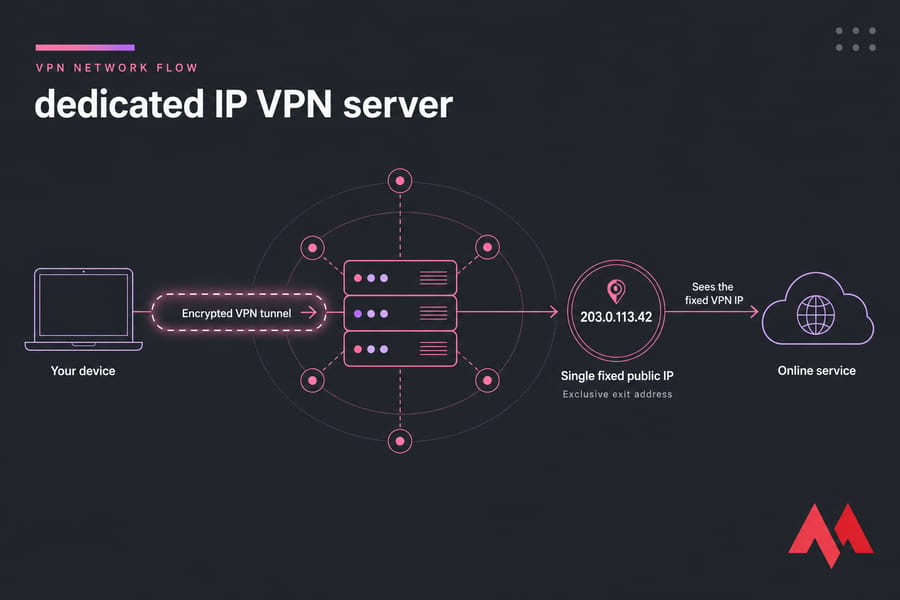
A dedicated IP VPN assigns one public IP address exclusively to you or your organization while routing traffic through an encrypted VPN tunnel. It provides consistent egress for allowlisting, remote work, and account access. Unlike shared VPN IPs, it reduces "bad neighbor" issues but can be easier to associate with one user.
Key takeaway: "Dedicated" describes exclusive IP use. It does not necessarily mean dedicated hardware.
Dedicated IP VPN definition
Here's the plain version. Your traffic leaves your device encrypted, travels to a VPN gateway, and then exits to the wider internet under a single public IP that no other customer touches. The website or server you're reaching sees that fixed address — never your real ISP address. Want the fundamentals first? Start with how a VPN works.
Is a dedicated IP the same as a dedicated VPN server?
No, and this trips people up constantly. You can have an exclusive exit IP that lives on shared VPN infrastructure. A dedicated VPN server means the actual server resources — the VPS or physical machine — are controlled by you. One is about the address. The other is about the box.
| Attribute | Dedicated IP | Dedicated server |
|---|---|---|
| What's exclusive | The public exit address | The whole server/VM |
| Infrastructure | Can be shared | Yours to administer |
| Firewall/routing control | Usually provider-set | Fully configurable |
| Inbound access | Provider-dependent | Configurable |
| Maintenance | Provider handles it | You handle it |
Dedicated IP VPN example
Say a company allowlists 203.0.113.30 on its internal database. Remote employees connect to the VPN gateway first, then reach the database through that trusted address. Anyone connecting from a random home IP gets rejected. That's the whole trick — the address becomes a gatekeeper.
The address is only one piece though. Routing, authentication, and the underlying server determine how the connection actually behaves.
How Does a Dedicated IP VPN Work?
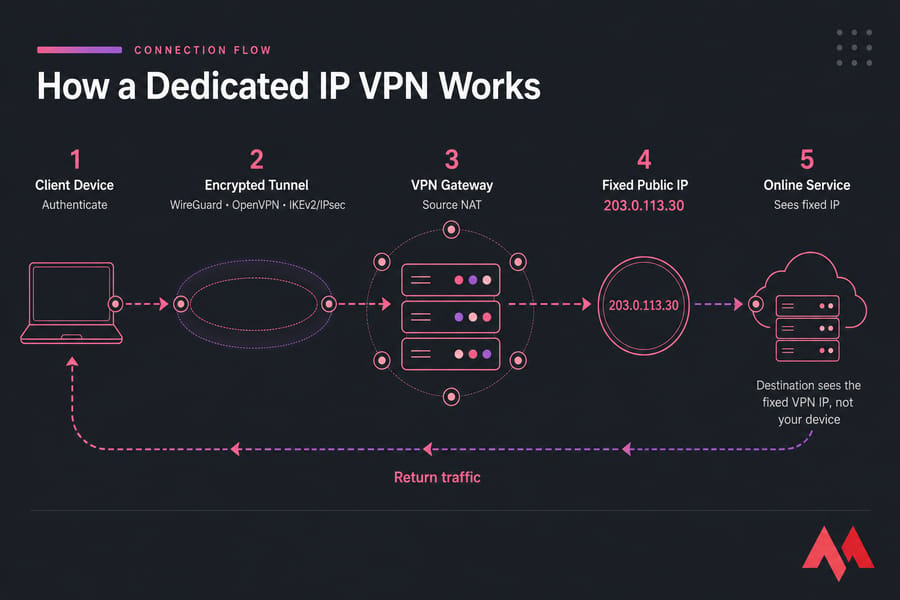
A dedicated IP VPN works by authenticating your device to a gateway, wrapping your traffic in an encrypted tunnel, and forwarding it out under a fixed public IP. Nothing magical — just consistent plumbing.
From VPN tunnel to fixed public exit IP
- Your client authenticates to the VPN gateway.
- A secure tunnel is established (WireGuard, OpenVPN, or IKEv2/IPsec).
- Routes decide whether all your traffic or just some of it enters the tunnel — that's full tunnel versus split tunnel.
- The gateway forwards packets and usually performs source NAT.
- The destination sees your fixed VPN IP, not your device.
- Return traffic comes back through the gateway and down the encrypted tunnel.
Authentication, NAT, routing, and DNS
NAT alone isn't security — it just rewrites addresses. Real protection comes from strong authentication and a properly hardened gateway. And DNS matters more than beginners expect. If your DNS queries leak to a different resolver, you can expose an inconsistent location or reveal your real network. Point DNS at your intended resolver and test it. Picking the right transport helps too; here's how to choose the right VPN protocol.
Can several devices use the same dedicated IP?
Yes. Multiple authorized devices can egress through one organization's dedicated IP, as long as the provider's terms and the gateway config allow it. One thing to note, though — a dedicated exit IP does not automatically give you inbound connections or port forwarding. Outbound identity and inbound reachability are two separate questions.
Types of Dedicated IP VPN Solutions
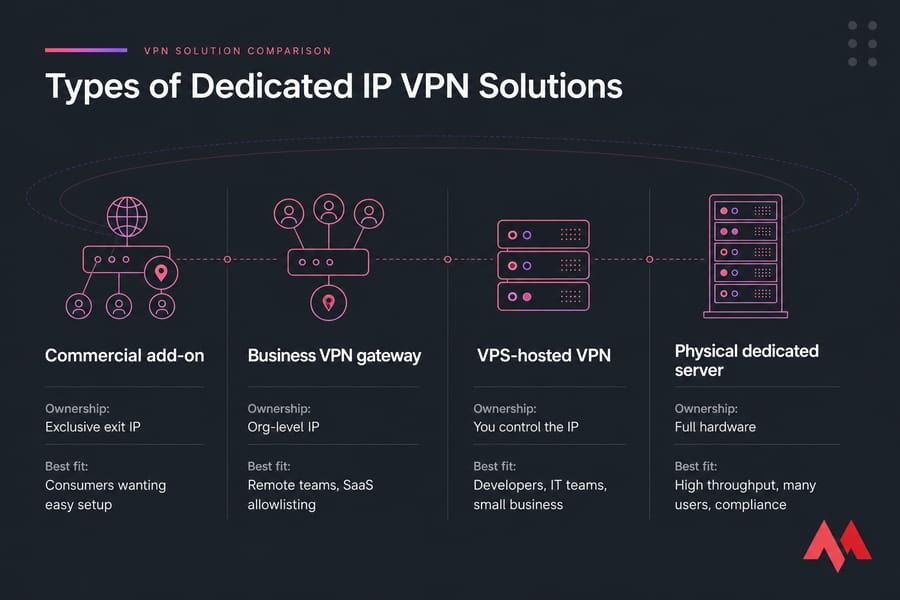
There isn't one flavor of "VPN with dedicated IP." There are four, and picking the wrong one wastes money.
| Solution | Exclusivity | Control | Maintenance | Best fit |
|---|---|---|---|---|
| Commercial add-on | Exclusive exit IP | Provider runs gateway | None for you | Consumers wanting easy setup |
| Business VPN gateway | Org-level IP | Policy control | Low–medium | Remote teams, SaaS allowlisting |
| VPS-hosted VPN | You control the IP | Full server control | Medium/high | Developers, IT teams, small business |
| Physical dedicated server | Full hardware | Total control | High | High throughput, many users, compliance |
A few honest points. Shared infrastructure can still hand you a dedicated exit IP — that's normal. A VPS is logically isolated but sits on shared physical hardware, and for a small team's VPN gateway, dedicated hardware is almost always overkill. Provider terms decide whether your IP can accept inbound traffic or move to another server later.
If you need control over the gateway — not just an exclusive address — a MonoVM VPS can host WireGuard or OpenVPN with your own firewall, routing, and client config. For the wider decision, read self-hosted VPN vs commercial VPN and VPS vs dedicated server.
Dedicated IP VPN Benefits
The real value shows up when a service needs to recognize a predictable source network. Here's what you actually gain — with the caveats that most feature pages leave out.
| Benefit | Practical value | Caveat |
|---|---|---|
| Stable IP for allowlists/ACLs | Trusted systems recognize you every time | Source IP is not authentication on its own |
| Reputation isolation | No penalty for another customer's abuse | You alone own the IP's reputation now |
| Consistent location signal | Fewer identity challenges on logins | Banks and payment platforms set their own rules |
| Cleaner audit logs | Org gateway is easy to identify | One IP can represent many people |
| Predictable API/DB egress | Cloud allowlists just work | Provider must permit data-center IPs |
| Fewer CAPTCHAs (often) | Less friction than a busy shared pool | Not guaranteed, ever |
| Routing & firewall control | Only if you self-host | You take on the ops burden |
Warning: A dedicated IP does not strengthen the VPN cipher and does not replace MFA. Encryption quality comes from the protocol and implementation, not the address.
Does a dedicated IP improve VPN speed?
Not by itself, no. Speed comes from server location, network congestion, protocol efficiency, and CPU capacity for encryption. A dedicated IP might sidestep a congested shared exit, but the address itself isn't a performance feature. If speed is your worry, look at what latency is and how to reduce it instead.
Dedicated IP VPN Use Cases
Enough theory. Here's where a dedicated IP earns its keep.
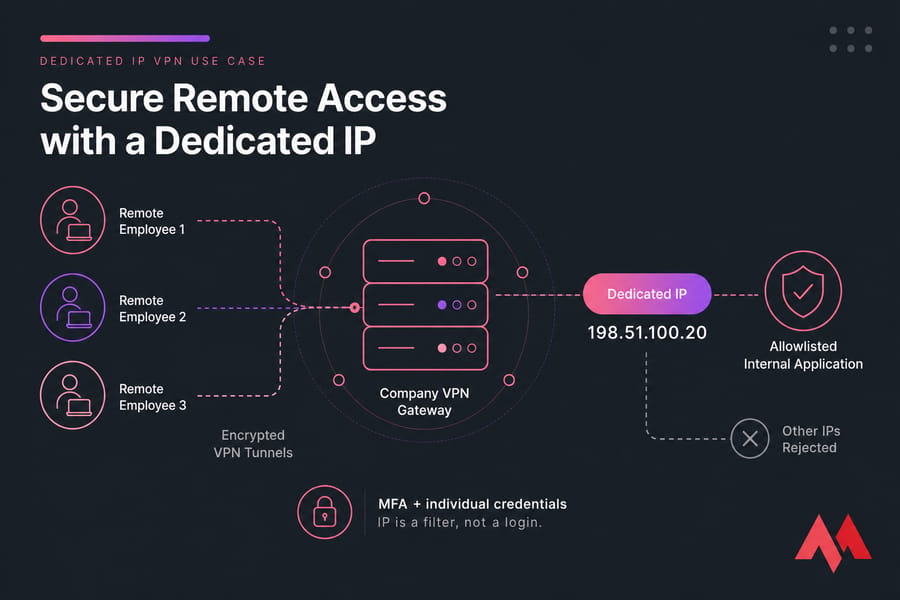
Secure remote access for employees
Route authorized team members through one company gateway so your internal systems only ever see a single trusted address. Pair those IP restrictions with MFA, identity controls, and device security. Remember — one IP might represent five people, so the address tells you "someone from the company," not "who."
Cloud database, API, and SaaS allowlisting
Allowlist the gateway IP for cloud consoles, control panels, databases, APIs, and internal dashboards. Say your managed database only accepts 198.51.100.20. Everything routes through the gateway, and the database rejects anything else. Still use least-privilege access — don't lean on source IP alone.
Pro tip: Allowlist the VPN gateway, but also require individual credentials and least-privilege permissions. The IP is a filter, not a login.
SSH, RDP, and server administration
Restrict SSH or RDP to the VPN address and keep those management ports closed to the open internet wherever you can. This kills a huge amount of automated brute-force noise. See secure SSH access and secure RDP access for the specifics.
Consistent access to payment and business accounts
A steady login location can reduce the "we don't recognize this device" challenges. But be clear-eyed: financial and payment services run their own access rules, and a VPN never overrides a provider's terms. Don't treat it as a workaround.
Site-to-site and branch-office connectivity
Connecting an office, branch, home lab, or cloud network usually needs a stable gateway endpoint plus real routing — not just a consumer exit IP. A dedicated IP on a server you control is a natural fit here.
When a dedicated IP is unsuitable for streaming
A dedicated IP might dodge shared-IP congestion, sure. But it can still be flagged as a hosting or VPN address and blocked.
Warning: A unique IP can still be detected as a hosting or VPN address. Don't buy one primarily to bypass geo-restrictions — that's not a guaranteed outcome.
Dedicated IP vs Shared IP and Static IP VPN
Now for the part that clears up most confusion. A static IP VPN just means the address doesn't change — but "static" does not always mean "exclusive." A static IP can still be shared among customers. Dedicated means it's yours alone.
| Attribute | Shared dynamic IP | Static shared IP | Dedicated IP | Self-hosted VPN IP |
|---|---|---|---|---|
| Consistent address | Not always | Yes | Yes | Yes |
| Exclusive to one customer | No | No | Yes | Owner-controlled |
| Crowd anonymity | Stronger | Moderate | Lower | Lower |
| Allowlisting | Poor | Risky | Good | Good |
| Inbound config | Usually no | Usually no | Provider-dependent | Configurable |
| Reputation control | Low | Low | Higher | Higher |
| Administration | Provider | Provider | Provider | Customer |
| Maintenance burden | Low | Low | Low | Medium/high |
Dedicated IP vs residential IP
Residential IPs come from consumer ISPs and can look less like a VPN — but don't assume they're automatically legal, safer, or better. They carry their own sourcing and policy questions.
Dedicated IP VPN vs proxy server
A proxy typically handles one app's traffic without full-device encryption. A VPN wraps everything in an encrypted tunnel. Different tools, different jobs — the VPN vs proxy comparison breaks it down. And for the underlying address concepts, types of IP addresses is worth a read.
Quick summary: Shared for anonymity. Dedicated for consistency. Self-hosted for control.
One more caution — "dedicated" doesn't mean the address can never be reassigned. Providers can move IPs during migration, cancellation, or abuse investigations. Always confirm the persistence terms.
When Do You Need a Dedicated IP VPN?
Short answer: when a trusted system needs to recognize a fixed, predictable source address.
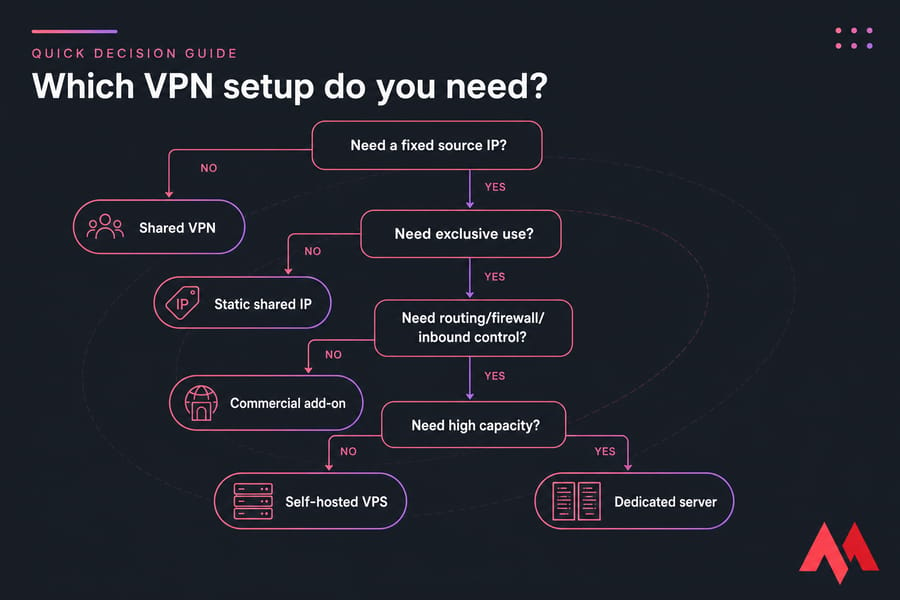
Go with a dedicated IP if:
- A trusted system requires a fixed source IP
- Shared exit addresses keep triggering reputation-based blocks
- Your team needs one predictable outbound gateway
- Access logs must identify the organization's gateway
- A site-to-site endpoint has to stay stable
- You want control over routes, firewall rules, or DNS and can self-host
Stick with a shared VPN if:
- Maximum crowd anonymity is the priority
- You change locations often
- Nothing you use needs allowlisting
- You want the lowest cost and near-zero maintenance
Quick decision checklist: Do you need one fixed outbound IP? Must it be exclusive? Do you need inbound access? Will more than one user connect? Can you administer a server? Is the target service okay with data-center IPs? And — this one gets skipped — what's your plan if the IP gets blocked? For broader context, see what a VPN is used for.
Need More Than a VPN Add-On?
Run your own VPN gateway when you need a predictable public IP, configurable firewall rules, individual client credentials, and control over routing. Pick a server location close to your users or protected systems. Explore VPN server hosting or check global VPS locations.
Dedicated IP VPN Security and Privacy Limitations
Is a dedicated IP VPN safe? It's as safe as your protocol, your hardening, and your operational discipline — the IP itself doesn't move that needle. And on privacy, there's a genuine trade-off worth stating plainly.
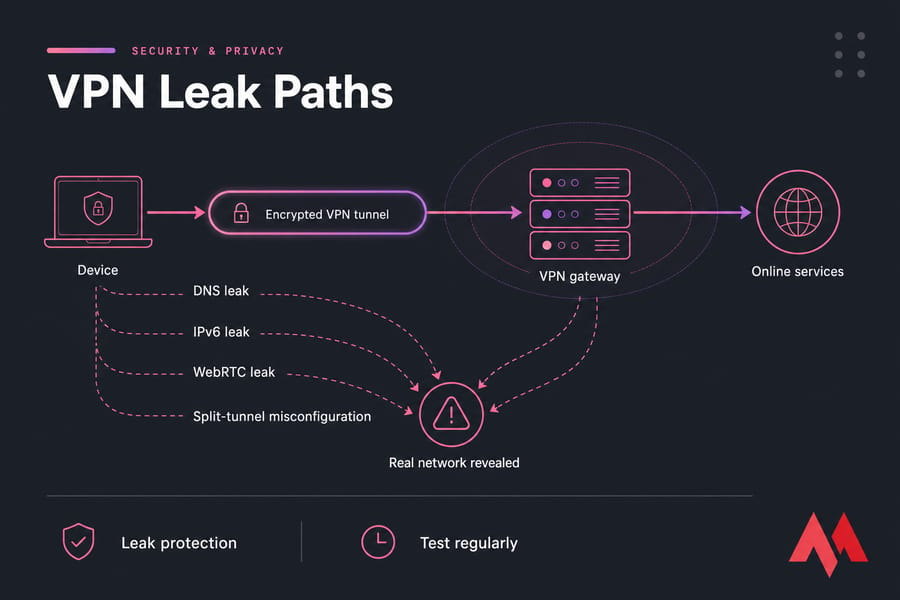
| Risk | Impact | Mitigation |
|---|---|---|
| Session linkability | A consistent IP is easier to correlate across services | Use shared IPs when anonymity matters more |
| Weak protocol/config | Encryption only as strong as the implementation | Use WireGuard or well-configured OpenVPN |
| ASN classification | Data-center ranges still get blocked | Have a replacement plan |
| Single gateway | One outage point | Monitoring, backups, failover plan |
| Stolen credentials | Exposes a trusted route straight in | MFA, key rotation, least privilege |
| DNS/IPv6/WebRTC leaks | Reveals unintended paths | Leak protection, test regularly |
| Self-host ops gaps | Unpatched server = liability | Patching, firewall, log management, monitoring |
Does a dedicated IP reduce anonymity? Honestly, yes — a bit. A large shared pool hides you in a crowd. A unique address does the opposite. That's the fundamental tension: exclusive use kills the bad-neighbor problem but concentrates all reputation responsibility on you, and makes your activity more attributable.
If you self-host, budget for the whole operational picture: OS patching, SSH hardening, firewall rules, log management, key rotation, backups, monitoring. Restrict access by identity and device, never by source address alone. Dig deeper with how to secure a VPN server and VPS security tips.
How to Choose a Dedicated VPN Server
When you're evaluating providers or planning a self-hosted gateway, run through this. It's the procurement checklist I wish more people used before ordering.
- Location: pick near your users or protected services, based on latency needs.
- IP type: confirm a dedicated public IPv4; ask if IPv6 is included and exclusive.
- Address persistence: what happens on renewal, migration, cancellation, or abuse investigation?
- Protocol: WireGuard for efficient modern setups, OpenVPN for broad compatibility, IKEv2/IPsec for mobility.
- Capacity: user count, throughput, encryption CPU overhead, concurrent tunnels.
- Traffic policy: transfer allowance and what "unmetered" actually means.
- Inbound support: firewall control, public ports, NAT, port forwarding.
- Security: console access, backups, DDoS protection, patch ownership, MFA.
- Routing: split tunnel, full tunnel, site-to-site support.
- Support: managed versus unmanaged — know which you're getting.
Pro tip: Test latency to both your users and your protected systems before committing to a location. The "farthest server for privacy" idea usually just adds lag.
| Deployment | Starting point | Note |
|---|---|---|
| 1–5 light users | 1 vCPU, 1 GB RAM | Planning guidance only |
| 5–20 mixed users | 2 vCPU, 2 GB RAM | Watch encryption overhead |
| 20+ users / high throughput | Benchmark first | More CPU and bandwidth |
Treat those as starting points, not guarantees. MonoVM offers VPS locations across multiple regions, so you can place the gateway near users or infrastructure to trim avoidable latency. Check the global VPS locations and, if you want numbers, VPS benchmark tools.
How to Self-Host a Dedicated IP VPN on a VPS
Self-hosting is the right call when you need firewall, routing, DNS, and user control — not just an exclusive IP. Here's the high-level workflow, not a full copy-paste tutorial.
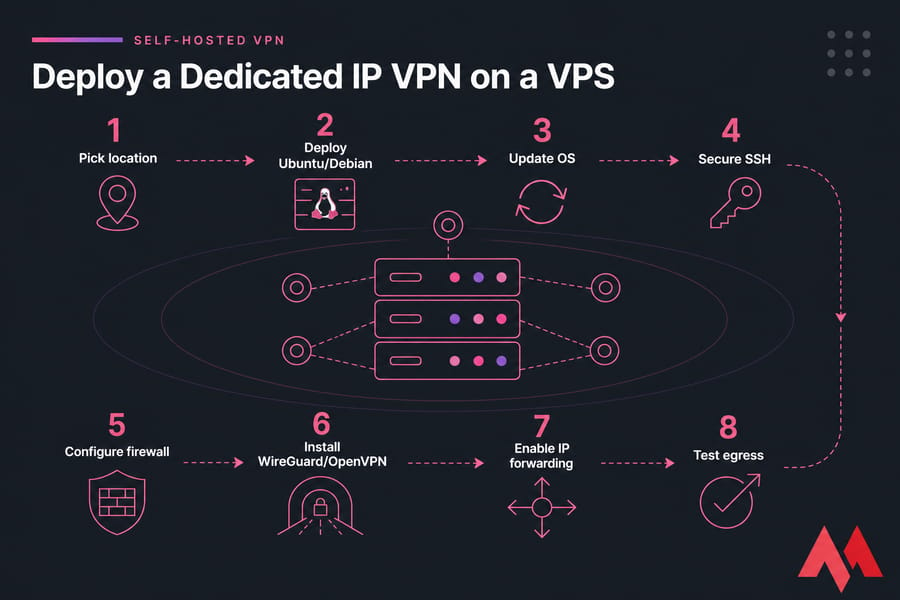
- Choose a VPS location and confirm public IPv4/IPv6 assignment.
- Deploy a supported Linux distro like Ubuntu or Debian.
- Update the operating system.
- Create a non-root admin and lock down SSH with keys.
- Configure the firewall (UFW or equivalent).
- Install WireGuard or OpenVPN — skip obsolete PPTP entirely.
- Enable IP forwarding and set up NAT/routing.
- Configure DNS and leak protection.
- Create unique credentials per client.
- Test egress IP, DNS, IPv6, routes, throughput, and reconnect behavior.
- Set up patching, monitoring, backups, and credential revocation.
Security warning: If you operate the server, you own the patching, firewall rules, credentials, and monitoring. Never expose a management port to 0.0.0.0/0 without a very good reason.
Self-hosting buys control but transfers responsibility to you. A VPS public IP is generally stable while the service stays assigned — verify exact retention with the provider. And remember, a VPS won't give you the huge shared anonymity set of a consumer VPN. Full walkthroughs live here: set up a VPN on a VPS, set up WireGuard on a VPS, install OpenVPN on a VPS, and secure SSH access.
MonoVM's VPN server options suit users who want a persistent endpoint and admin control rather than a consumer VPN app alone. To verify egress IP and DNS during testing, tools like ipinfo.io, browserleaks.com, dnsleaktest.com, and AbuseIPDB for reputation are all worth bookmarking.
Final Recommendation: Shared, Dedicated, or Self-Hosted VPN?
So, which one? It comes down to your priority.
- Shared IP VPN — pick this for anonymity and simplicity, when no system needs to recognize you.
- Provider-assigned dedicated IP — pick this for consistent consumer or small-business access without touching server administration.
- VPS-hosted VPN — pick this when you need control over routing, firewall, DNS, users, or inbound policy. This is where a private VPN server shines.
- Dedicated hardware — only when capacity, isolation, or compliance genuinely demand it.
One last thing, and it's the point I'd tattoo on every network diagram if I could: a dedicated IP VPN identity complements authentication — it never replaces it. Allowlist the address, then require credentials, MFA, and least privilege behind it.
Build a Private VPN Gateway With a Stable Server IP
Choose a MonoVM server, deploy WireGuard or OpenVPN, and manage your own users, routes, DNS, and security policies. Confirm IP assignment, bandwidth, location, and inbound-port requirements before ordering. Start with VPN server hosting or, for a protocol-specific path, OpenVPN server hosting.

An experienced tech and developer blog writer, specializing in VPS hosting and server technologies. Fueled by a passion for innovation, I break down complex technical concepts into digestible content, simplifying tech for everyone.