
The short version of VPN vs proxy: a VPN encrypts and routes most of your device's traffic through a private tunnel, while a proxy usually forwards traffic for a single app or browser and often doesn't encrypt anything. Both can swap the IP address a website sees. Only one of them protects the data itself.
VPN vs Proxy at a Glance: What Is the Main Difference?
So if you're weighing proxy vs VPN for daily privacy, the VPN wins as a default. Pick a proxy when you just need one application routed through a different IP and encryption isn't your concern.
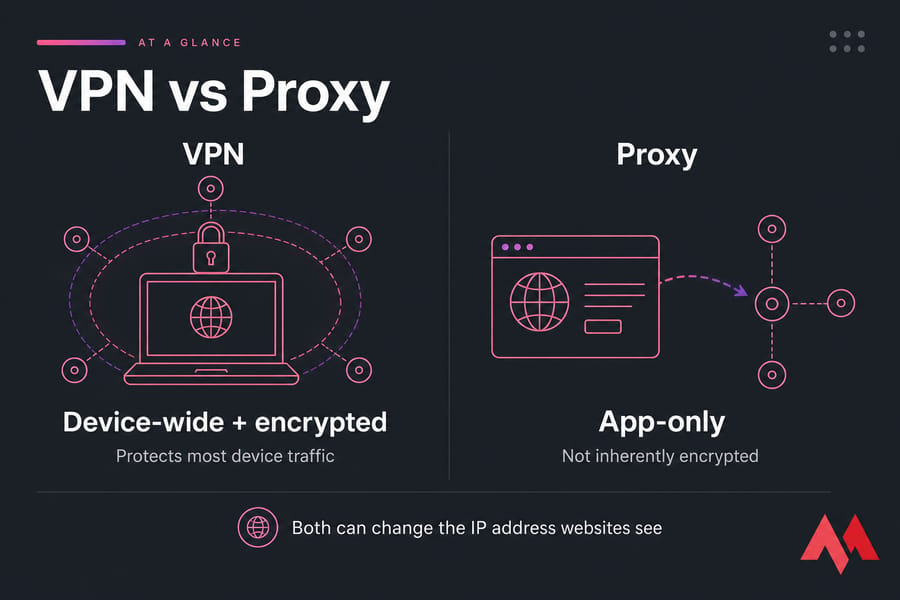
| Feature | VPN | Proxy |
|---|---|---|
| Encryption | Yes (tunnel) | Not inherently |
| Traffic coverage | Whole device (usually) | Single app or browser |
| Hides IP from destination | Yes | Yes |
| Hides content from ISP | Yes | Only if HTTPS |
| Protocols | WireGuard, OpenVPN, IKEv2/IPsec | HTTP, HTTPS, SOCKS5 |
| UDP support | Yes | SOCKS5 only |
| Setup effort | Higher | Lower |
| Best for | Privacy, public Wi-Fi, remote work | Lightweight app routing, testing |
| Anonymity | No | No |
The verdict is simple. A VPN covers more and protects more; a proxy is a lighter tool for narrow jobs. Not sure what each one even is? Start with what a VPN is and how it works and what a proxy server is.
Key takeaway: A VPN is the safer default when encryption and broad device coverage matter. A proxy is better suited to selective application routing.
How Do VPNs and Proxy Servers Work?
The differences make sense once you follow the traffic. A VPN builds an authenticated, encrypted tunnel from your device to a VPN server. A proxy just relays requests for whatever app you point at it.
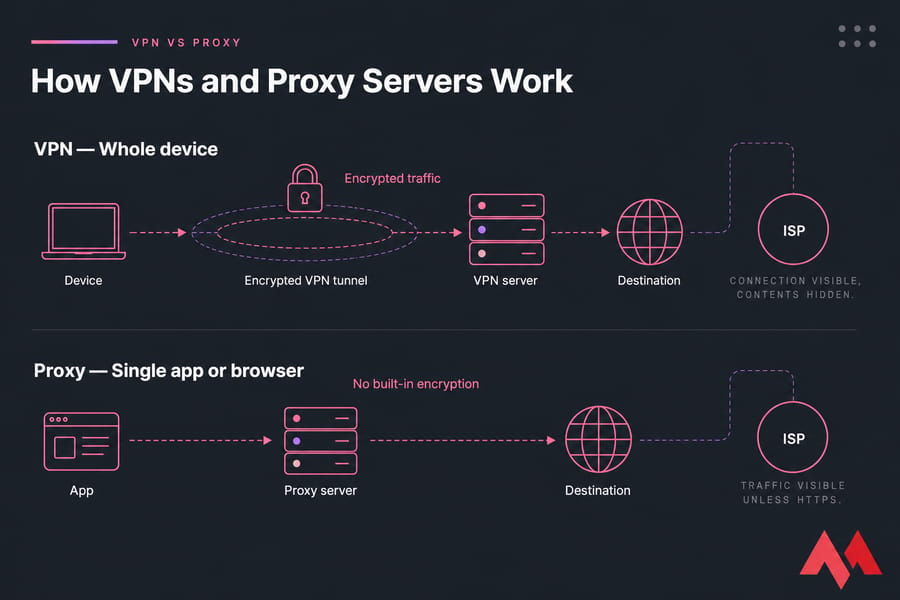
With a VPN, routing happens at the operating-system level. That's why nearly everything — browser, email client, background apps — travels through the tunnel. Your IP address gets replaced by the VPN server's, and the encryption hides packet contents from your local Wi-Fi and ISP.
A proxy works differently. You configure it per browser, per app, or sometimes system-wide. An HTTP proxy understands web requests. A SOCKS5 proxy sits lower in the stack and can forward more connection types, including UDP — but it doesn't encrypt on its own.
Here's a point people miss: HTTPS still protects your browser-to-site content even through a basic proxy, because TLS runs end-to-end. But the proxy operator can see where you're going, and possibly more if the connection isn't secured.
| Who can see what | VPN | Proxy (HTTP) |
|---|---|---|
| Local Wi-Fi sniffer | Encrypted | Visible unless HTTPS |
| Your ISP | Sees connection, not contents | Sees traffic (metadata at least) |
| The operator | Sees your real IP + destination | Sees your real IP + destination |
| Destination site | Sees VPN IP | Sees proxy IP |
Notice where trust lands. You're moving it from your ISP and local network to whoever runs the VPN or proxy. That's the whole game.
VPN and Proxy Types Explained
Neither "VPN" nor "proxy" is one thing. The type changes what it can do.
VPNs come in two broad flavors: remote-access (you to a server) and site-to-site (network to network). For consumer privacy, you want remote-access. Protocol-wise, the modern choices are WireGuard, OpenVPN, and IKEv2/IPsec. Skip PPTP — it's obsolete and insecure. For a deeper breakdown, compare modern VPN protocols.
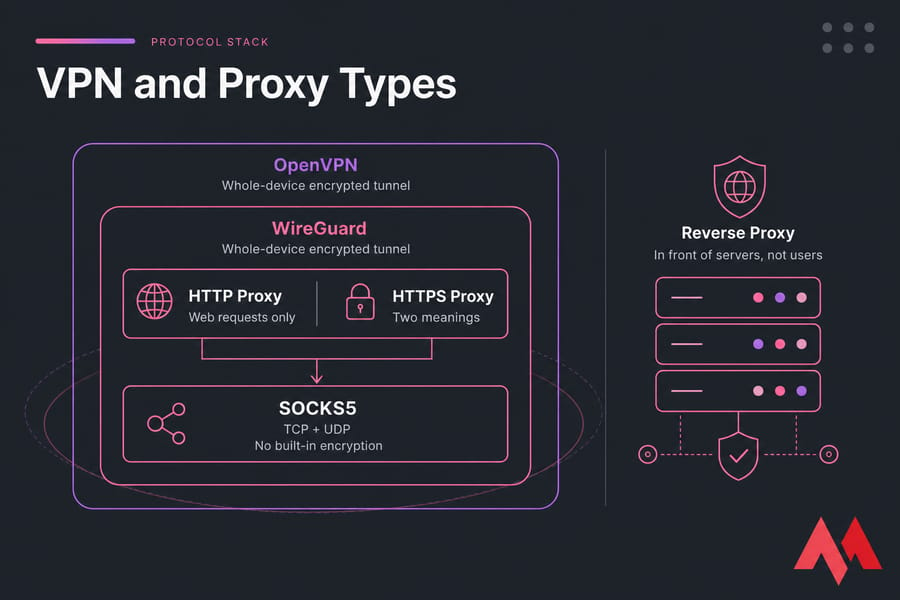
On the proxy side, an HTTP proxy handles web requests only. An "HTTPS proxy" is ambiguous — it can mean the proxy supports HTTPS destinations, or that the connection to the proxy itself is TLS-protected. Two different things.
Pro tip: SOCKS5 supports more traffic types than an HTTP proxy, but SOCKS5 does not inherently encrypt the connection.
SOCKS5 proxy vs VPN
SOCKS5, defined in RFC 1928, operates below the HTTP layer and forwards TCP and UDP. That flexibility makes it handy for apps beyond a browser. But it's still a relay without built-in encryption, and it won't cover your whole device the way a VPN does.
Why a reverse proxy is different
A reverse proxy sits in front of web servers to protect or speed them up. It's an infrastructure tool, not a consumer privacy product. Don't confuse it with the forward proxies discussed here. If you're chaining multiple hops, see how proxy chains work.
VPN vs Proxy Security and Privacy
On security, a properly configured VPN wins — but with real caveats.
VPN tunnel encryption protects everything between your device and the endpoint. A basic proxy usually doesn't protect client-to-proxy traffic at all. That gap matters on untrusted networks.
Warning: Changing your IP is not the same as becoming anonymous. Accounts, cookies, browser fingerprints, and the service operator can still identify your activity.
Even with a VPN running, keep using HTTPS. Tunnel encryption stops at the VPN server; from there to the destination, HTTPS does the protecting. And the VPN operator becomes a trust point — "no-logs" claims deserve scrutiny, not blind faith.
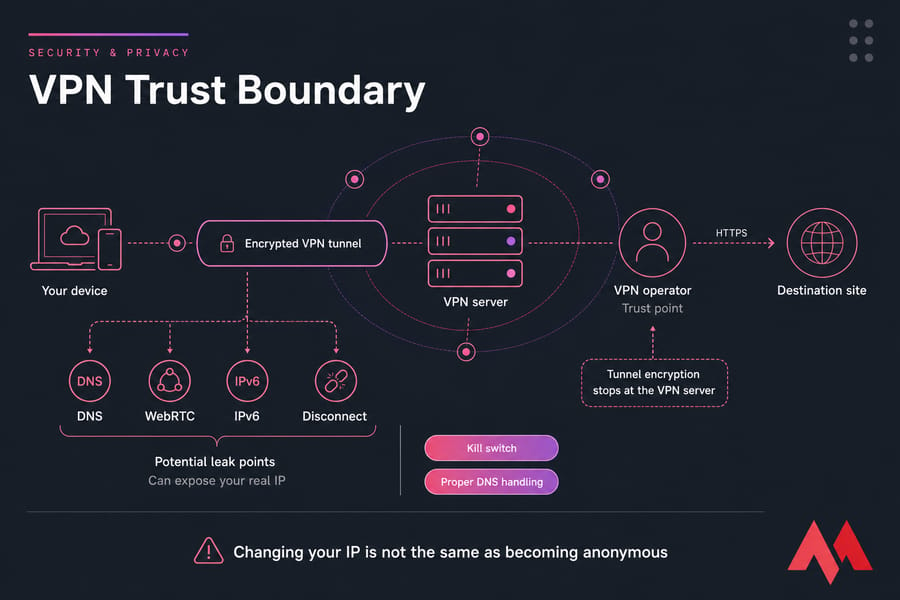
Watch for leaks. DNS requests, WebRTC in browsers, IPv6 traffic, and sudden disconnects can all expose your real IP. A kill switch and proper DNS handling help, but those are VPN-client features — not guarantees baked into every service.
And neither tool blocks cookies, malware, phishing, account-based tracking, or browser fingerprinting. If you want the fuller picture on masking, here are ways to hide your IP address. Running your own server? Read how to secure a VPN server.
VPN vs Proxy Speed and Performance
Speed is where myths pile up. A proxy can carry less overhead, but server quality usually matters more than the protocol.
VPN encryption costs a little CPU and adds encapsulation. In practice, though, distance to the server, peering, congestion, packet loss, and your device all dominate the result. WireGuard is lean and often faster than older protocols.
| Factor | VPN impact | Proxy impact |
|---|---|---|
| Encryption overhead | Small, CPU-dependent | Usually none |
| Server distance | High | High |
| Congestion | High | High |
| Protocol choice | Noticeable (WireGuard leaner) | Minimal |
A VPN sometimes improves routing or dodges ISP throttling — but don't treat it as a universal speed booster. Whether it helps depends on your route; here's more on whether a VPN can increase speed. For gaming, chase the best route and lowest latency, not IP masking. Learn to understand network latency first.
Should You Use a VPN or Proxy for Each Use Case?
Let's get concrete. Same question, different answers depending on what you're doing.
| Use case | Recommended | Why / caveat |
|---|---|---|
| Public Wi-Fi (airport, café) | VPN | Encryption protects you on untrusted networks |
| Streaming | VPN | Broader app support; respect platform terms |
| Gaming | Depends | Proxy if the game supports it; VPN may add latency |
| Torrenting / P2P | VPN | P2P isn't browser-only; use a kill switch, check policy |
| Remote work | Company VPN | Use the approved network, not a random proxy |
| Web testing / automation | Proxy | Authenticated proxy is efficient and app-specific |
| Dedicated-IP allowlisting | Private VPN | Fixed endpoint for business access |
Picture a traveler on airport Wi-Fi — that's a VPN moment. A developer testing a regional page? A proxy in that region does the job cheaply. A gamer assuming a VPN cuts ping is often wrong; test the route instead.
Quick summary: Public Wi-Fi → VPN. Browser-only testing → proxy. Business access → approved VPN. Anonymity-focused browsing → evaluate Tor.
Need a Private VPN Endpoint You Control?
Run WireGuard or OpenVPN on a MonoVM VPS with a dedicated environment and a choice of locations. A private VPN server hosting setup suits secure remote access, dedicated-IP allowlisting, and controlled routing. You can also set up a VPN on a VPS yourself.
VPN and Proxy Limitations and Common Mistakes
Before you commit, know what neither tool fixes.
| Mistake | Reality |
|---|---|
| Trusting a random free proxy | Ownership, logging, and traffic modification may be unclear |
| Assuming free VPNs are neutral | Someone pays the bills — check the business model |
| Browser proxy = full protection | It only covers that browser, not the device |
| Stacking VPN + proxy "for safety" | Usually adds complexity and cost without real benefit |
| Ignoring policies | Workplace, school, and service terms still apply |
Warning: Never expose an unauthenticated proxy to the public internet. It can become an open relay and be abused by third parties.
Cookies, logins, payment details, and fingerprinting still tie activity to you. Changing your IP doesn't erase your identity. And I'll say it plainly — most beginners overestimate what these tools hide.
How to Choose Between a VPN and Proxy
Is a VPN better than a proxy? For most people, yes — but the right answer depends on five questions.
- Do you need encryption?
- One app, or the whole device?
- Do you need UDP?
- Do you trust the provider?
- Is the priority privacy, access, testing, or performance?
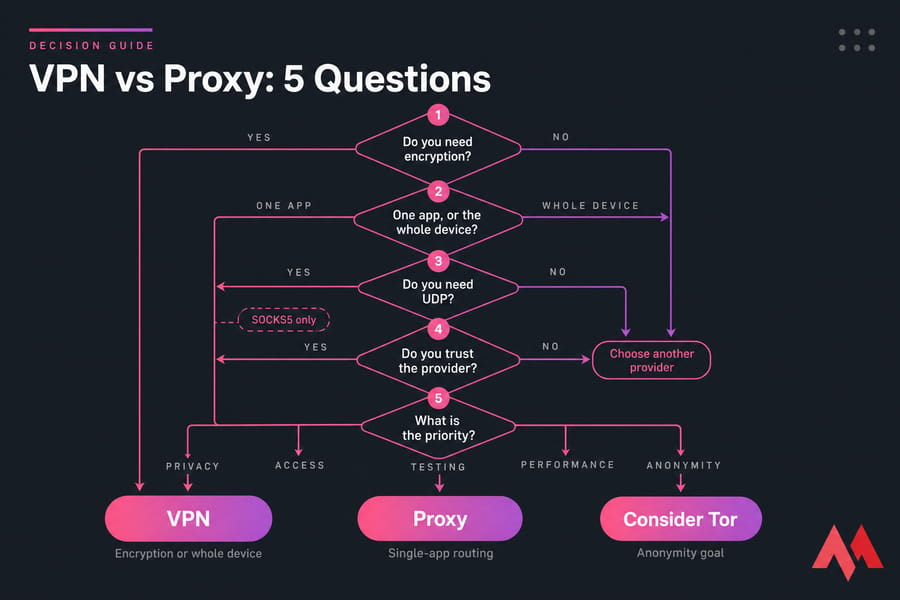
Choose a VPN if you answered "yes" to encryption or "whole device." Look for modern protocols, a kill switch, DNS controls, transparent ownership, and a clear update policy. Choose a proxy for single-app routing where encryption is handled elsewhere — but demand authentication, clear protocol support, and a stated logging policy. If anonymity is the real goal, Tor is a different animal worth evaluating separately.
Self-Hosted VPN vs Proxy on a VPS
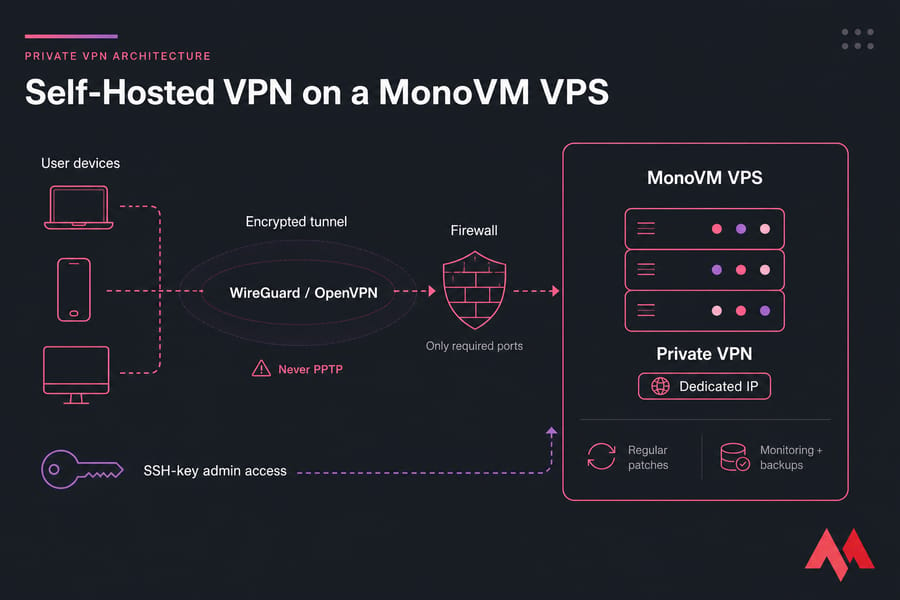
For readers who want control, self-hosting is worth a look. If you need a dedicated endpoint and full configuration control, a private VPN on a VPS may beat a shared commercial service.
| Benefit | Trade-off |
|---|---|
| Full config + user control | You own patching and security |
| Dedicated IP endpoint | Easier to link to one user than a shared IP |
| Your own logging policy | Hosting provider still has visibility |
| Great for secure access | No large rotating-location network |
A private VPN shines for secure access to personal or business resources over untrusted networks. A self-hosted proxy fits controlled app routing, development, or testing. MonoVM offers an OpenVPN server hosting option for a private, configurable endpoint. Weigh the models with self-hosted vs commercial VPN.
Product callout: A private VPN server gives you configuration control and a dedicated endpoint — but you stay responsible for patching and security.
Minimum hardening: SSH keys (not passwords), regular patches, a tight firewall, only the ports you need, strong authentication, no open relays, monitoring, and backups. Use WireGuard or OpenVPN. Never PPTP. Self-hosting shifts trust to you; it doesn't grant anonymity.
How to Test a VPN or Proxy Connection
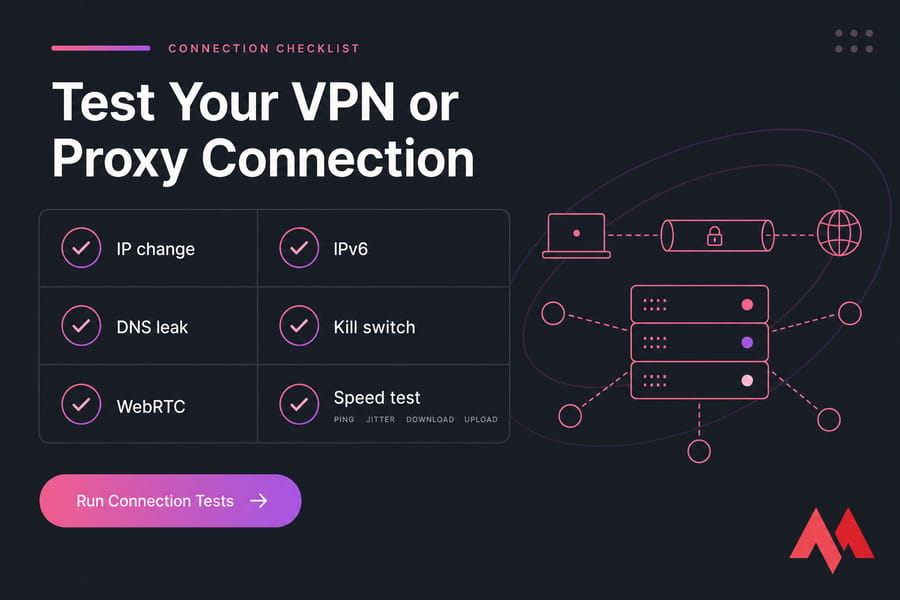
Once it's running, verify it actually works.
- Record your public IP before connecting — check your public IP address.
- Connect, then confirm the visible IP changed.
- Check DNS resolver exposure for leaks.
- Test WebRTC and IPv6 behavior in your browser.
- Kill the tunnel and confirm the kill switch blocks traffic.
- Compare ping, jitter, download, and upload under matching conditions.
- Confirm the right apps are routed and excluded apps aren't.
Ready to Build Your Own Secure VPN Server?
Choose a MonoVM VPS, deploy a modern VPN protocol, and manage your own users, firewall rules, DNS, and access policies. Self-hosting offers control — pair it with regular updates and hardening. Start by viewing private VPN server hosting, or first learn how to secure a VPN server.

An experienced tech and developer blog writer, specializing in VPS hosting and server technologies. Fueled by a passion for innovation, I break down complex technical concepts into digestible content, simplifying tech for everyone.