So a link landed in your inbox that smells like phishing, or a domain is pumping out spam and impersonating your brand. You want it gone. The first thing to understand is how to report domain abuse, spam, or phishing using WHOIS information — and that starts with knowing exactly what a registration lookup can (and can't) prove.
What WHOIS and RDAP Can Tell You About Domain Abuse
WHOIS is the umbrella term most people use for looking up a domain's registration data. RDAP is the newer, structured protocol that's quietly replacing it. When you check a domain today, use both — RDAP tends to give you cleaner, more consistent registrar details.
Do not visit, log in to, download from, or pay through a suspected malicious site. If you already entered a password, change it from a trusted device, turn on two-factor authentication, and contact your bank or provider right away.
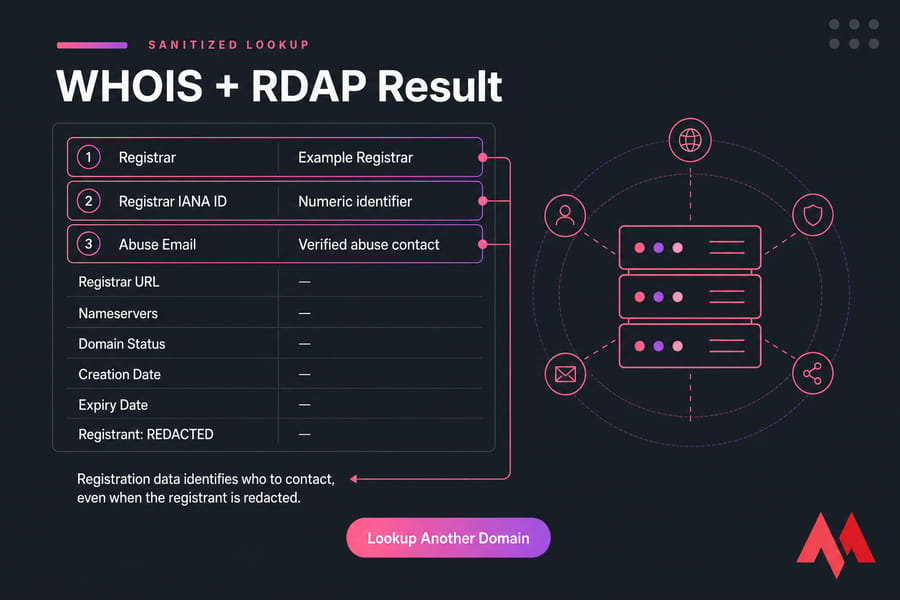
Sanitized WHOIS and RDAP result highlighting registrar, IANA ID, and abuse contact fields.
Which lookup fields actually matter
Here's what to copy down when you run a lookup. The rest is noise for now.
- Registrar — the company that sponsors the registration. This is usually who you report to.
- Registrar IANA ID — a numeric identifier that confirms the registrar's identity.
- Registrar URL and abuse email — often the fastest reporting route.
- Nameservers — a clue about which DNS or hosting operator is involved.
- Domain status codes — tell you if the domain is on hold or locked.
- Creation and expiry dates — context, not proof.
Now here's the part most guides botch. The registrant field — the supposed owner — is frequently redacted or replaced by a privacy service. And even when it shows a name, that person may not be the attacker. Legitimate sites get compromised all the time. A recent registration date isn't evidence of guilt either. It's a mild risk signal at best.
Registration data tells you who to contact. It doesn't prove who runs the server or who sent the email. Want the field-by-field breakdown? See our guide on how to read WHOIS data.
Once you know what the lookup can — and can't — prove, preserve the evidence before contacting anyone.
Preserve Evidence Before Reporting a Malicious Domain
This step is a bit tedious, honestly, but skip it and your report goes straight to the ignore pile. Providers act on reproducible evidence, not outrage.
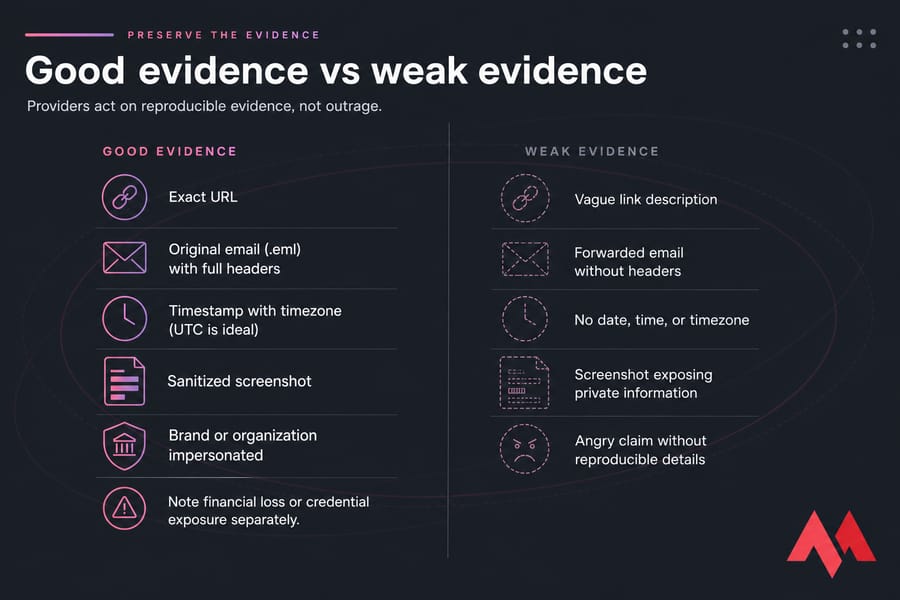
What to collect for a report to report malicious domain activity
- The exact URL — copy it from the address bar or email source without reopening the page.
- The original email, saved as a
.emlfile with full headers intact. - The date, time, and time zone (UTC is ideal) of the incident.
- A screenshot that shows the abuse but hides your own passwords or payment info.
- The brand or organization being impersonated.
- Any financial loss or credential exposure, noted separately.
A quick warning: public scanning tools like VirusTotal may share whatever URLs or files you submit. Don't upload private emails or confidential documents. If you want to hash a suspicious attachment, fine — but don't open it, and leave active redirect-tracing to a qualified analyst. For prevention habits worth building, our notes on business email security practices are a solid follow-up.
With the evidence saved, use the registration data to identify the registrar.
How to Find a Registrar Abuse Contact With WHOIS
This is where you turn a suspicious link into an actual reporting address. Four steps.
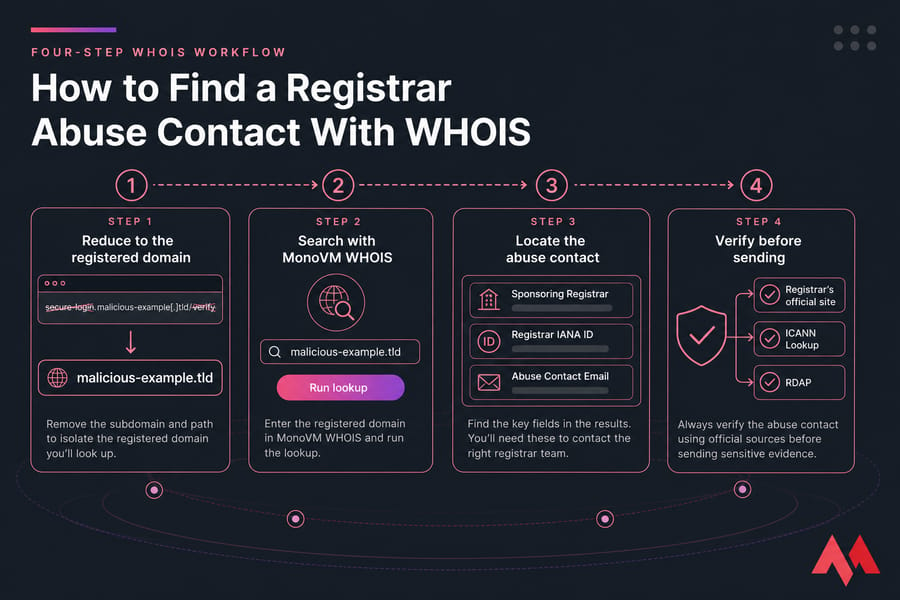
Step 1: Reduce the URL to the registered domain
Strip away the path and subdomains. Something like secure-login.malicious-example[.]tld/verify becomes just malicious-example.tld. Look up the registered domain, not a subdomain.
Step 2: Search it with MonoVM WHOIS
Run the domain through the MonoVM WHOIS lookup. Note the sponsoring registrar and its IANA ID.
Step 3: Locate the registrar abuse email or form
Look for a registrar abuse contact — usually an email, sometimes a phone number. If it's not shown, open the registrar's official abuse-policy page.
Step 4: Verify the contact on the registrar's own site
Confirm the abuse address lives on the registrar's real domain before you send anything sensitive. Cross-check with ICANN Lookup or an RDAP service. A privacy-service email is not a substitute for the registrar's abuse channel, and a generic abuse@domain role address (per RFC 2142) may not even be monitored. If you're fuzzy on the modern protocol, read our WHOIS vs RDAP comparison.
Key takeaway: redacted owner data doesn't stop you from identifying the registrar. The abuse contact is almost always discoverable.
Registrar vs. Hosting Provider: Who Should Receive the Report?
Reporting everything to the registrar is a classic beginner mistake. Registrars manage registrations — they often can't pull content off a server. Match the abuse to the party that can actually act.
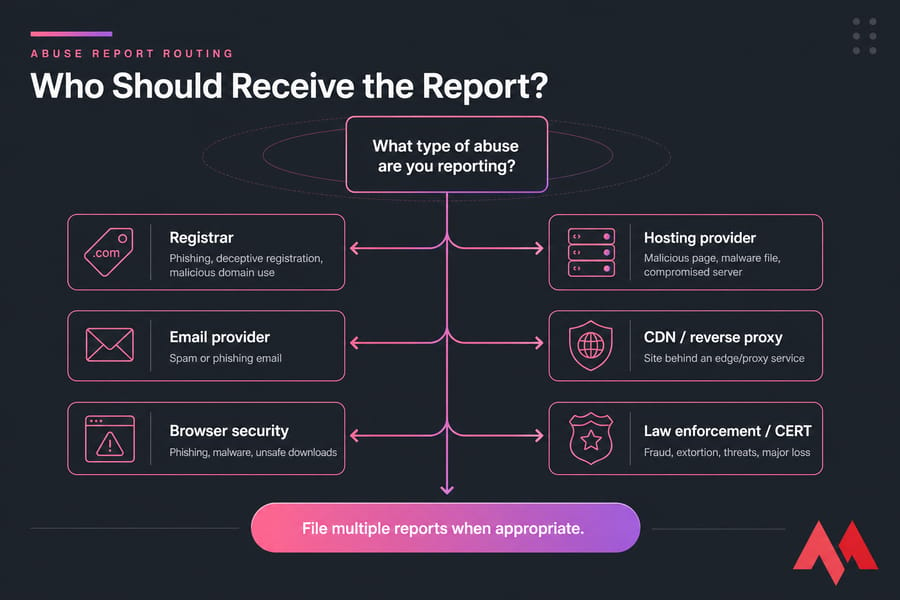
| Party | What it controls | Report when |
|---|---|---|
| Registrar | Domain registration | Phishing, deceptive registration, malicious domain use |
| Registry | TLD-level registration | Registrar unresponsive or systemic abuse |
| Hosting provider | Website and server content | Malicious page, malware file, compromised server |
| Email provider | Sending mailbox/server | Spam or phishing email |
| CDN / reverse proxy | Edge/proxy service | Site sits behind the provider — use its abuse form |
| Browser security | Warnings and blocklists | Phishing, malware, unsafe downloads |
| ICANN | Contractual oversight | Registrar compliance issues — not content takedowns |
| Law enforcement / CERT | Crime, public harm | Fraud, extortion, threats, major loss |
Filing multiple reports at once is often the right move. But don't call a CDN like Cloudflare "the host" without checking — it may just be sitting in front of the real origin server. And remember, legitimate sites get hacked. For the org-role breakdown, see registrar vs registry.
After choosing the provider with the power to act, submit a report it can verify.
How to Report Domain Abuse Step by Step
Here's the core workflow. Calm and factual beats angry and vague every time.
- Confirm and normalize the domain.
- Classify the abuse: phishing, spam, malware, fraud, impersonation, botnet, or a child-safety issue.
- Preserve your evidence (URL, headers, timestamps, screenshots).
- Run a WHOIS/RDAP lookup.
- Identify the registrar and the relevant infrastructure provider.
- Read that provider's abuse policy before submitting.
- Submit through the designated form or email.
- Include exact URLs and timestamps.
- Request acknowledgment — don't demand a specific outcome.
- Save the ticket number.
- Avoid duplicate submissions.
- Recheck status safely using trusted tools and domain status codes.
One honest note: filing a report isn't the same as recovering money or guaranteeing a takedown. No provider promises a fixed 24- or 48-hour window, and you shouldn't either.
How to Report Spam Sent From a Domain
Email spam is trickier than it looks because the visible sender lies. Constantly.
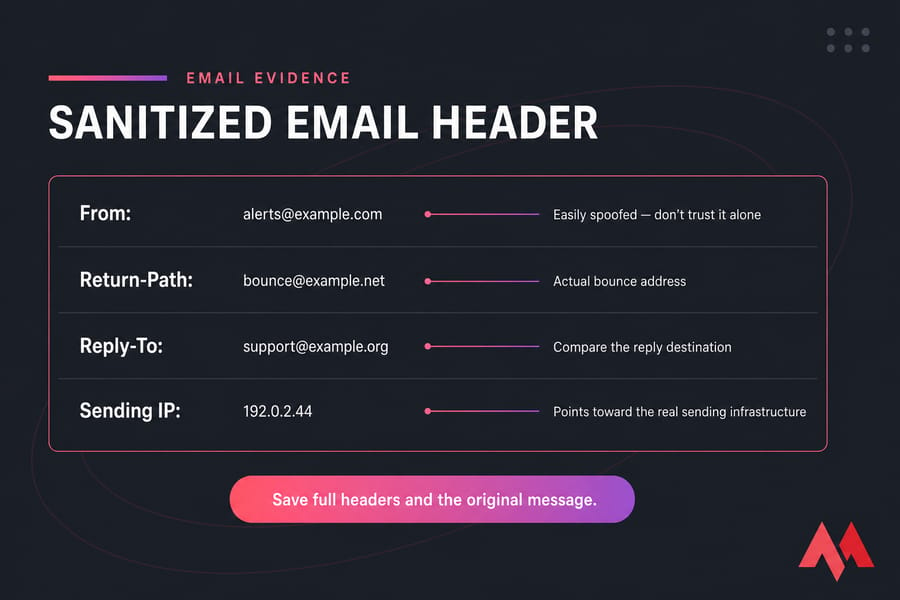
| Header field | What it tells you |
|---|---|
| Visible From: | Easily spoofed — don't trust it alone |
| Return-Path / envelope sender | The actual bounce address |
| Sending IP | Points toward the real sending infrastructure |
| SPF / DKIM / DMARC results | Authentication signals, not standalone proof |
Save the full headers and the original message. Use your mailbox provider's "Report spam" or "Report phishing" button first — that trains the filters and flags the sending provider. Report linked phishing domains separately. Only escalate to the registrar when the domain itself is central to a sustained campaign.
Don't reply. Don't hit unsubscribe on obviously malicious mail. And know the difference between legitimate bulk email and deceptive spam — our pieces on bulk email vs spam and how DMARC works spell that out. A failed SPF check alone doesn't prove malice.
If the message tries to steal credentials or money, switch to the faster phishing workflow below.
How to Report a Phishing or Malware Domain
To report a phishing domain effectively, speed matters — but so does not making things worse.
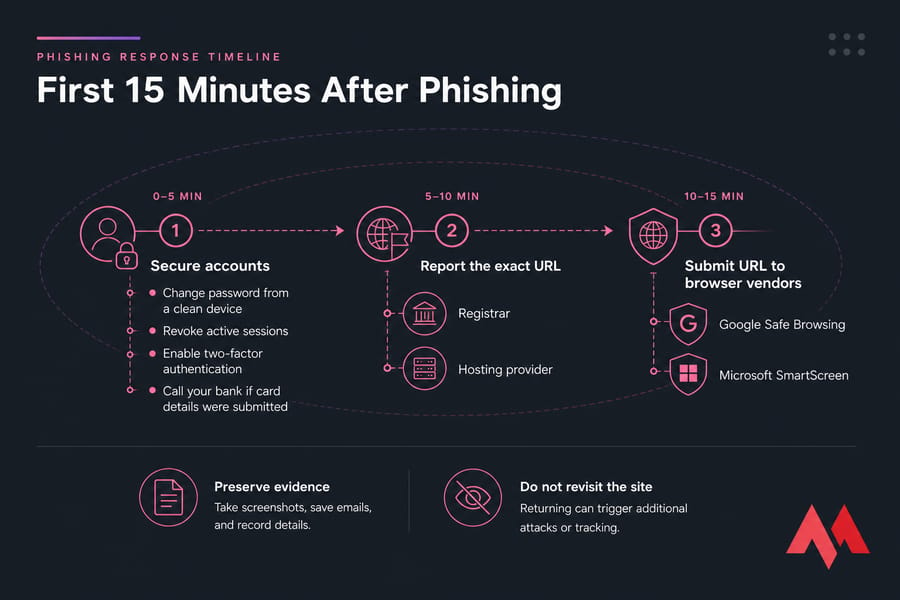
- Report the exact URL, not just the root domain, to the registrar and hosting provider.
- Submit the URL to Google Safe Browsing.
- Submit it to Microsoft's unsafe-site reporting channel (SmartScreen).
- Forward phishing emails to the APWG using its current published instructions.
- Report malware URLs to URLhaus where relevant.
- Consider your national cybercrime, consumer-protection, or CERT channel.
If you already entered credentials or payment data
A domain report won't protect your account — act first. Change your password from a clean device, revoke active sessions, enable two-factor authentication, and notify your employer or provider. Submitted card details? Call your bank immediately. Preserve the evidence before deleting anything, and pick a stronger replacement using our secure password tips. For broader context, see common cyber security threats.
Domain Abuse Report Templates and Evidence Checklist
Copy these, replace every bracketed field, and strip out anything sensitive before sending.
Phishing-domain report template
Subject: Phishing report: malicious-example[.]tld - observed 2025-01-15

Domain: malicious-example.tld
Exact URL: hxxps://secure-login.malicious-example[.]tld/verify
Date/time (UTC): 2025-01-15 14:20 UTC
Impersonation: Fictional Bank login page
Credentials/payment requested: Yes - login + card details
Evidence attached: screenshot, original .eml, full headers
Reporter contact: [your email]
Request: Please acknowledge and investigate.
Note: Findings are based on observed behavior.
Spam-domain complaint template
Subject: Spam report: sending-example[.]tld

Sending domain/IP: sending-example.tld / [IP if verified]
Original message: attached as .eml
Full headers: included
Volume/dates: ~40 messages, 2025-01-10 to 2025-01-15
Links in message: hxxps://malicious-example[.]tld/promo
Redaction note: recipient address removed for privacy
Evidence checklist
- Exact URL and registered domain
- Timestamp with time zone
- Full email headers and original
.eml - Sanitized screenshot
- Redirect info (only if safely obtained)
- Ticket history and impact description
Never attach passwords, card numbers, or identity documents. Keep the language neutral — no threats, no unsupported accusations.
What to Do if an Abuse Report Is Ignored
Silence doesn't always mean nothing happened. Investigations run quietly. Still, if the resource stays live, work the escalation ladder.
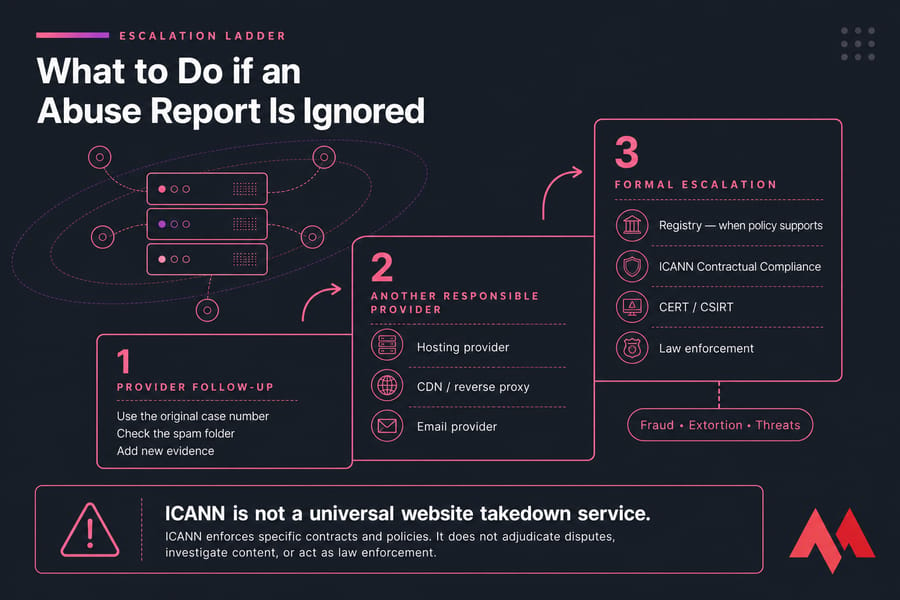
- Check your spam folder for the automated ticket reply.
- Follow up with the original case number and any new evidence — don't open five new tickets.
- Report to another provider that controls the affected layer (host, CDN, email).
- Contact the registry only where its policy supports the complaint.
- Raise ICANN Contractual Compliance issues where a registrar genuinely breaches its obligations.
- Escalate fraud, extortion, or threats to a CERT/CSIRT or law enforcement.
Key takeaway: ICANN is not a universal website takedown service. And remember — suspending a domain can cause collateral damage if the site was a compromised, legitimate one. If a domain got flagged, our guide on why domains get blacklisted covers the reputation fallout.
If the domain, server, or IP involved runs on MonoVM, use MonoVM's designated channel — report abuse involving MonoVM — and attach the evidence checklist rather than emailing sales or support.

An experienced tech and developer blog writer, specializing in VPS hosting and server technologies. Fueled by a passion for innovation, I break down complex technical concepts into digestible content, simplifying tech for everyone.